It Worked on My Laptop. The Phone Said No.
I was building an autonomous memory-book app, the kind of thing where AI quietly assembles a story from photos and notes without you doing the work. In the simulator, it was beautiful. On my dev machine, flawless. The AI did exactly what I designed it to do.
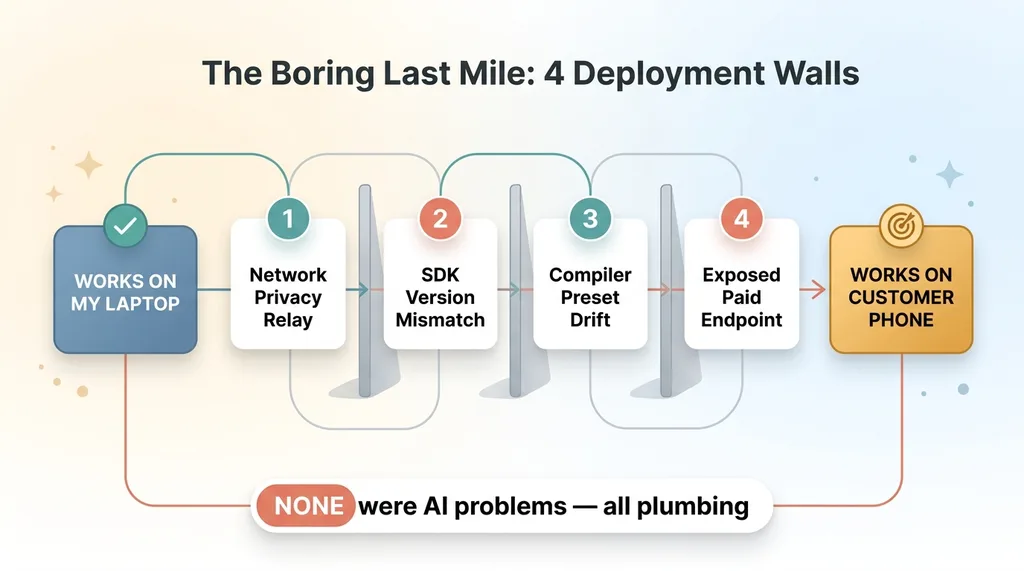 The Four Deployment Gotchas Overview
Then I plugged in a real iPhone.
It would not connect. It would not build. It would not run. Three different ways of saying no, in sequence, like the phone had personally decided my week was going too well.
Here is the part worth your attention: none of these were AI problems. The model worked. The product logic worked. Every blocker was plumbing. A network privacy setting silently re-routing my traffic. An SDK mismatch in the on-device runtime. A compiler preset pinned to the wrong version. And a public tunnel that got correctly blocked because I was about to do something dumb with my API budget.
Four walls. Zero of them had anything to do with the thing the app was actually for.
This is the gap nobody talks about. The distance between "it works on my machine" and "it works on a customer's device" is where most of the real time goes. It is also where most people quietly stop. They get the demo running, show it around, collect the nods, and never push it onto an actual phone in an actual stranger's hand.
These ai app deployment gotchas are not exotic. They are boring, repeatable, and they will eat your timeline if you do not know them in advance.
So let me walk you through all four, exactly as they hit me, so you know what the last mile actually costs.
Gotcha 1: The Phone Couldn't Even Reach My Dev Machine
The first wall was the dumbest and it cost me the most time.
The physical device could not reach my development server over the local network. Connection refused. Over and over. The kind of error that makes you question whether you understand how computers work.
Why private-relay network features break local dev
I spent the first hour chasing the wrong thing. Firewall settings. Port numbers. Whether the dev server was even listening. All of it checked out. The dev machine was serving fine, the phone was on the same WiFi, and the connection still died.
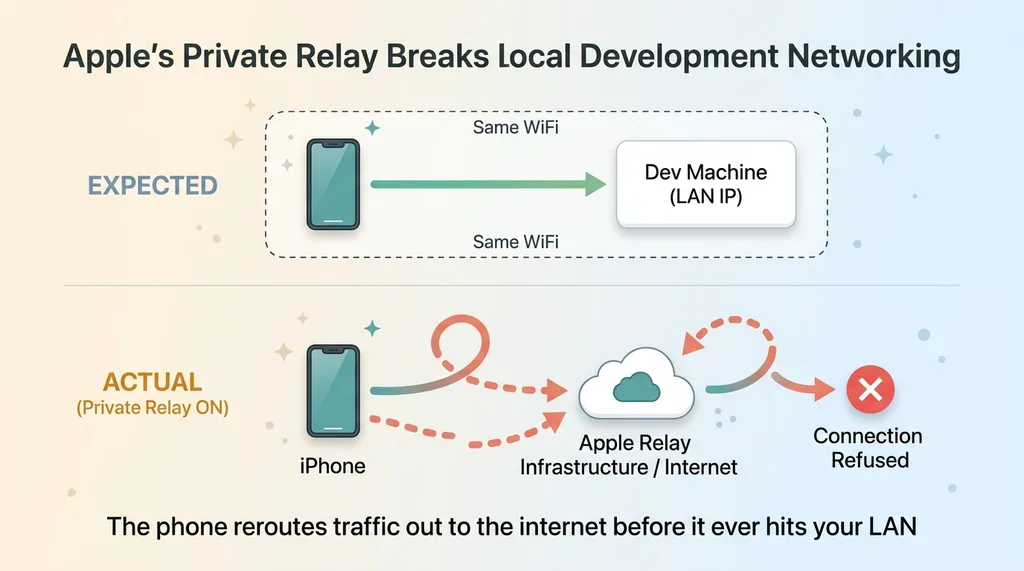 How Private Relay Breaks Local Dev Networking
The culprit was a privacy network feature, the iCloud Private Relay style routing that quietly sends your traffic through Apple's infrastructure before it reaches anything. So when my phone tried to hit my dev machine's local IP, the request never actually went to the local network. It went out to the internet, got relayed, and came back confused.
This is a classic mobile dev network issues trap. The phone is being "helpful" behind your back, and the help is exactly what breaks you.
The fix that took five minutes once I knew
Once I isolated it, the fix was trivial. Disable the relay on the test device, confirm both the phone and the dev machine are on the same subnet, and pin the dev server to the LAN IP so there is no ambiguity about where the traffic should go.
Five minutes. After roughly an hour of looking in the wrong place.
The lesson I wrote down: when "connection refused" makes no sense, stop looking at your code and suspect the network layer doing something clever you did not ask for. I documented it so it never costs me a day again.
Gotcha 2: The Runtime Only Accepts the Latest SDK
Networking fixed. Phone could finally reach the dev machine. I felt good for about ninety seconds.
Then the on-device runtime refused to load the bundle. The Expo Go style preview client I was using to run the app would not touch my project.
Expo Go SDK mismatch in plain English
Here is the plain-English version for anyone who does not write code for a living.
The tool you use to preview a mobile app on a real device is itself an app from the App Store. It updates itself automatically, like everything else on your phone. And when it updates, it drops support for older project versions. It only runs the newest SDK.
My project was one version behind. That was enough. The expo go sdk mismatch meant the preview client looked at my project, decided it was too old, and refused to load it.
Nobody chose this. The phone updated the preview tool overnight and my project fell out of the supported range without me touching anything.
Upgrading without breaking everything else
The fix was an SDK upgrade. Bump the project to the current version, run the dependency migration, and fix the handful of breaking changes that come with any version jump. An hour or two of careful work, not a disaster, but real work.
Here is the buyer takeaway, because this one matters more than it looks. "Shippable" is not a finish line you cross once. It means staying current with platform churn you do not control and did not schedule. The preview tool updates. The OS updates. The frameworks update. Your project has to keep pace whether you planned to or not.
That is an ongoing cost the demo never reveals. The demo runs once, in a frozen moment. Production lives in a world that keeps moving underneath it.
Gotcha 3: A Compiler Preset Pinned to the Wrong Version
This was the hardest one to find, because everything looked correct right up until it didn't.
After the SDK upgrade, the build broke. Not in an obvious, screaming way. The bundle compiled fine. No build errors. Then the runtime tried to load it on the device and the JavaScript engine choked at startup.
When a build tooling pin silently breaks the JS engine
The cause was a compiler preset, a piece of tooling config, pinned to a version that no longer matched the JS engine the runtime expected. The preset and the engine had drifted out of alignment during the upgrade. The build process happily produced a bundle the engine couldn't actually run.
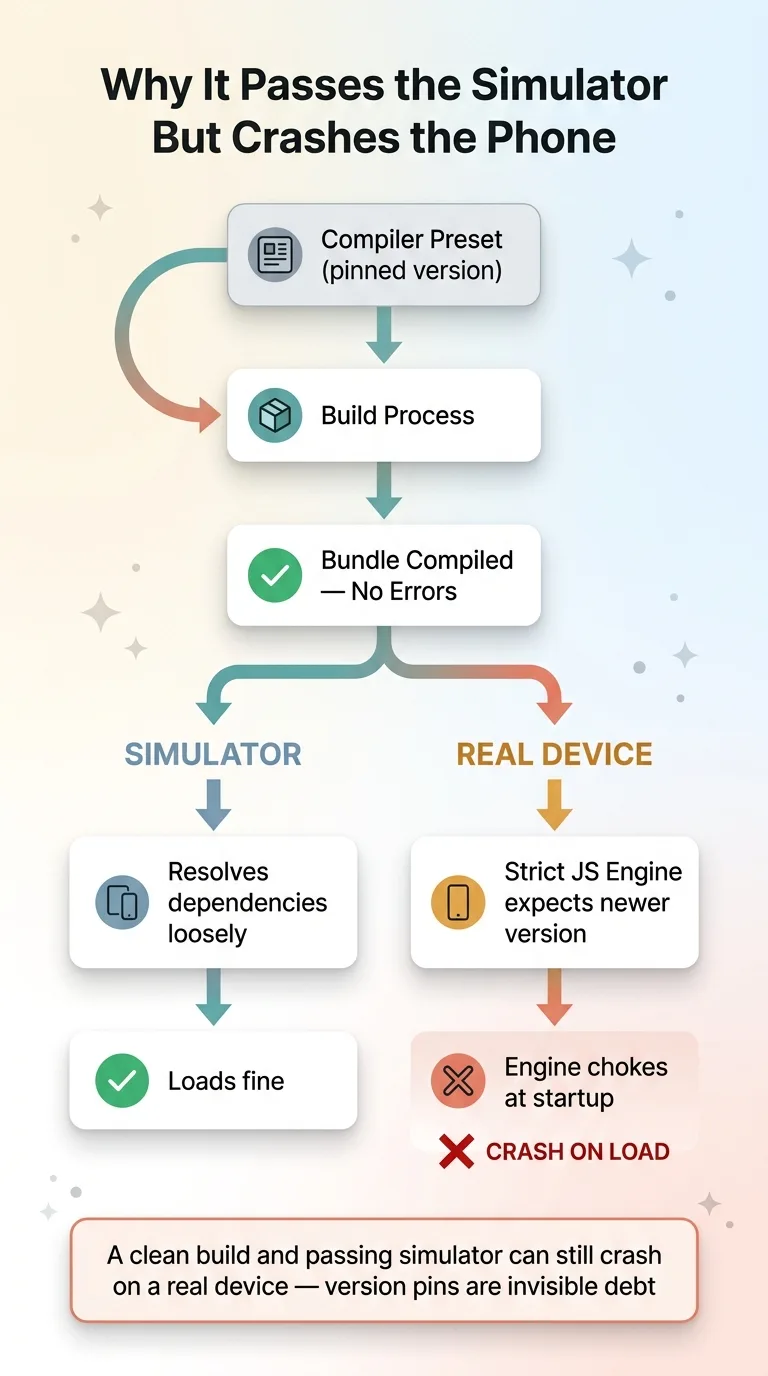 Why Compiler Preset Drift Crashes Only on Real Devices
This is the part of react native device testing that nobody warns you about. The simulator and the physical device resolve dependencies differently. A version pin that is completely invisible on your machine, in your simulator, with everything green, surfaces only when the bundle hits a real device with a real engine.
So you can have a clean build, a passing simulator, and a phone that crashes on load, all from one stale pin in a config file you forgot existed.
The fix was to align the preset to the engine version, clear every cache (caches lie to you constantly in this work), and rebuild clean.
The deeper lesson: version pins are debt. You pin something to feel safe, to lock in a known-good state, and for a while it does feel safe. Then six months later it is the exact thing that breaks, in the exact place you cannot see it.
Speed has a tax, and pins are one way you pay it. The shortcut that saved you time today is sitting in your config, waiting.
Gotcha 4: Safety Correctly Blocked My Public Tunnel
The fourth wall was the one I am actually glad happened.
I wanted the phone to reach a backend AI feature over the open internet, not just my local network. So I reached for a public tunnel, a quick way to expose a local endpoint to the world for testing.
The platform's safety blocked it. And it was right to.
Why exposing an unauthed paid endpoint should fail
The endpoint I was about to expose was an unauthenticated paid AI endpoint. No login required, and every call costs real money against my API budget. If I had tunneled that out to the public internet, anyone who found the URL could hammer it. They would not be stealing data. They would be spending my money, one expensive model call at a time.
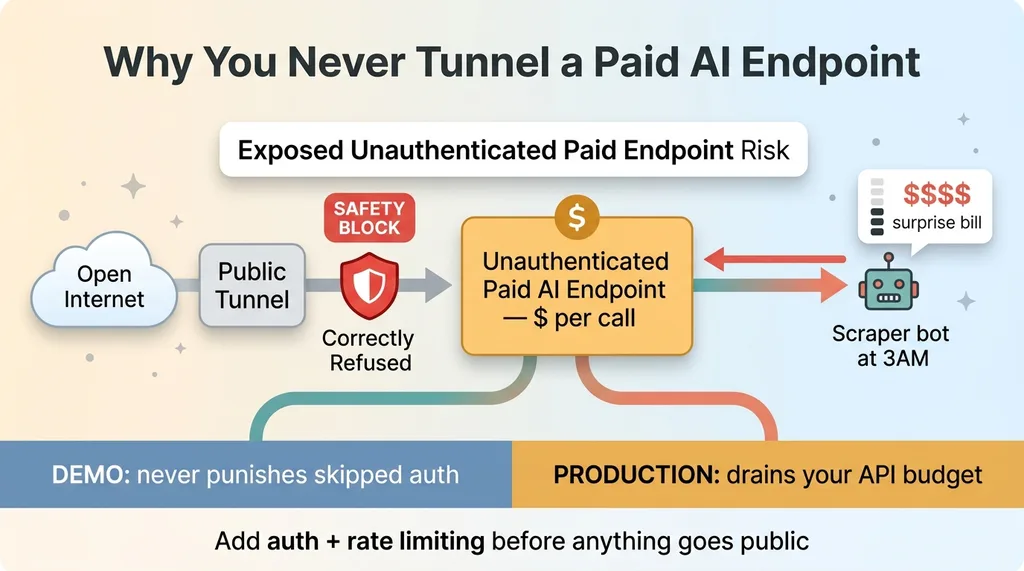 Exposed Unauthenticated Paid Endpoint Risk
The guardrail caught it before I could do something I would have regretted. That is not a bug. That is the system working exactly as designed.
For now, the fix is simple: keep the feature LAN-only during development, and add proper auth plus rate limiting before anything goes public. I have a standing rule about this. You never expose an unauthenticated expensive endpoint to the open internet, full stop, no matter how convenient the tunnel makes it.
The buyer takeaway here is sharp. The shortcuts that work in a demo are exactly the ones that get you a five-figure surprise bill in production. The demo never punishes you for skipping auth. A scraper bot at 3am absolutely will.
None of This Was an AI Problem. That's the Point.
Step back and look at the whole list.
The headline feature, the autonomous AI doing the actual interesting work, ran correctly from day one. It never broke. It was the easy part.
Every single blocker was unglamorous engineering. Networking. Versions. Pins. Security. Not one of them touched the model.
The demo-to-device gap is where projects die
This is the honest answer to the doubt every buyer carries: people massively underestimate the distance between a demo and a shippable app. The demo is the easy 80 percent. The last mile is the expensive 20 percent that decides whether a customer ever actually touches the thing.
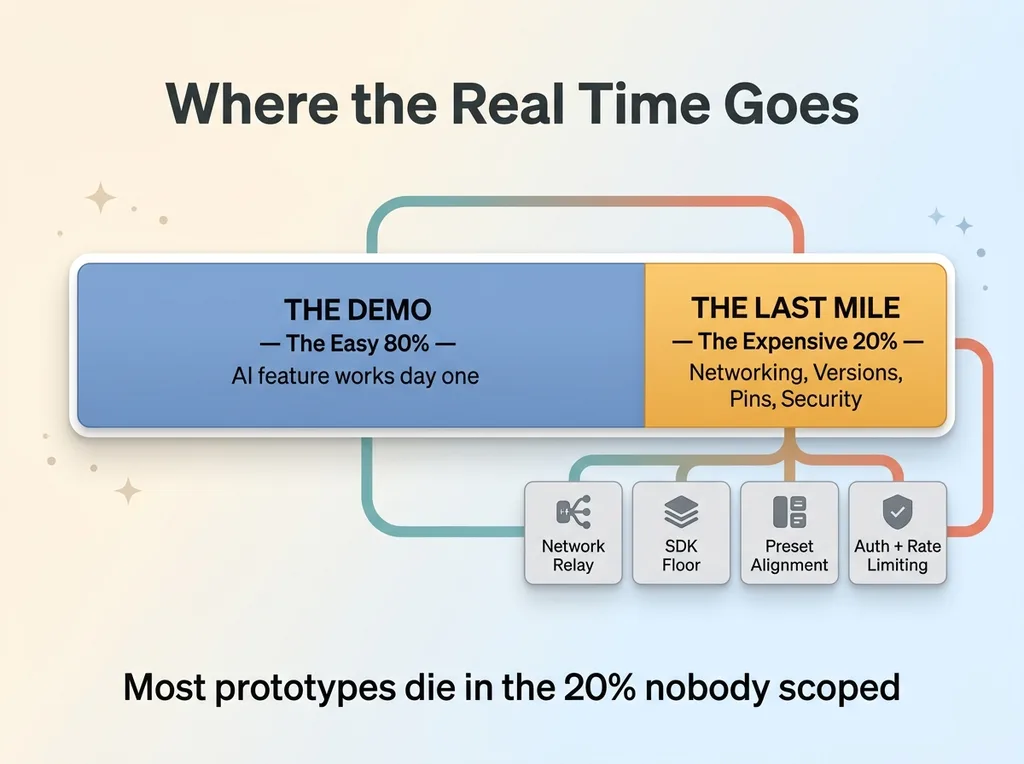 Demo to Device Effort Split
I wrote about the boring reasons my AI app wouldn't run on a real phone because this pattern repeats on basically every project. The intelligence works. The plumbing fights you.
Most prototypes die right here. Someone builds a slick demo, the room is impressed, and then it never survives contact with a real device because nobody budgeted for the boring 20 percent.
Why I document every gotcha
I wrote down all four of these the moment I solved them. The relay routing, the SDK floor, the preset-engine alignment, the tunnel rule. Each one is now in an internal playbook so it never costs me a day twice.
Custom software is faster than it has ever been. The new timeline for custom software is genuinely shorter than most people believe. But faster does not mean the last mile disappears. It just means you reach it sooner.
I push through this part instead of stopping at the demo, because demos do not ship. Devices ship.
If Your Last Build Stalled Between Demo and Device
I see this constantly. A company has an impressive AI demo that lit everyone up in the meeting, and then it just... stalled. Never made it onto a real device. Never got into real hands. And the natural reaction is to blame the AI, to assume the technology wasn't ready.
Usually it was ready. The boring last mile got them. Networking, versions, security, deployment. The unglamorous 20 percent that nobody scoped and nobody enjoys.
That is the part I actually finish.
Get the next build note.
I write up each system I build, including what broke. Subscribe to my newsletter and I'll send you the next one.