The hidden cost of connecting AI to your real systems
The first time a CEO asks me to connect an AI assistant to their live store, I watch the same flicker cross their face. It looks like handing your house keys to a stranger who promised to water the plants.
That fear is reasonable. The default assumption is that every integration means a new access token. Something you have to store, scope correctly, and rotate before it expires. Each one is a secret. And every secret is one more thing that can leak, get over-scoped, or get forgotten in a drawer somewhere in your codebase.
Most teams I meet have a pile of half-working connectors. Six AI integrations, three of which throw errors on startup, two nobody remembers configuring, and one that holds an admin token broad enough to delete the whole catalog. That is not a system. That is a liability with a dashboard.
Here is the part that surprises people. The best integrations I run need zero credentials at all.
That is not a trick. It is a deliberate MCP server setup choice, and it is the foundation of how I wire AI into live systems without lying awake about secret sprawl.
Quick plain-English definition. MCP stands for Model Context Protocol. It is the standard way AI tools talk to external systems, like a universal adapter between your model and your real data. I wrote about how MCP changed the way I build AI systems if you want the full background.
For now, hold onto the thesis: connecting AI to your real systems does not have to mean more secrets. Done right, it can mean fewer.
What a credential-free MCP server actually is
A credential-free MCP server authenticates by nothing. Not because it skips security, but because it only exposes data that is already public or read-only and non-sensitive.
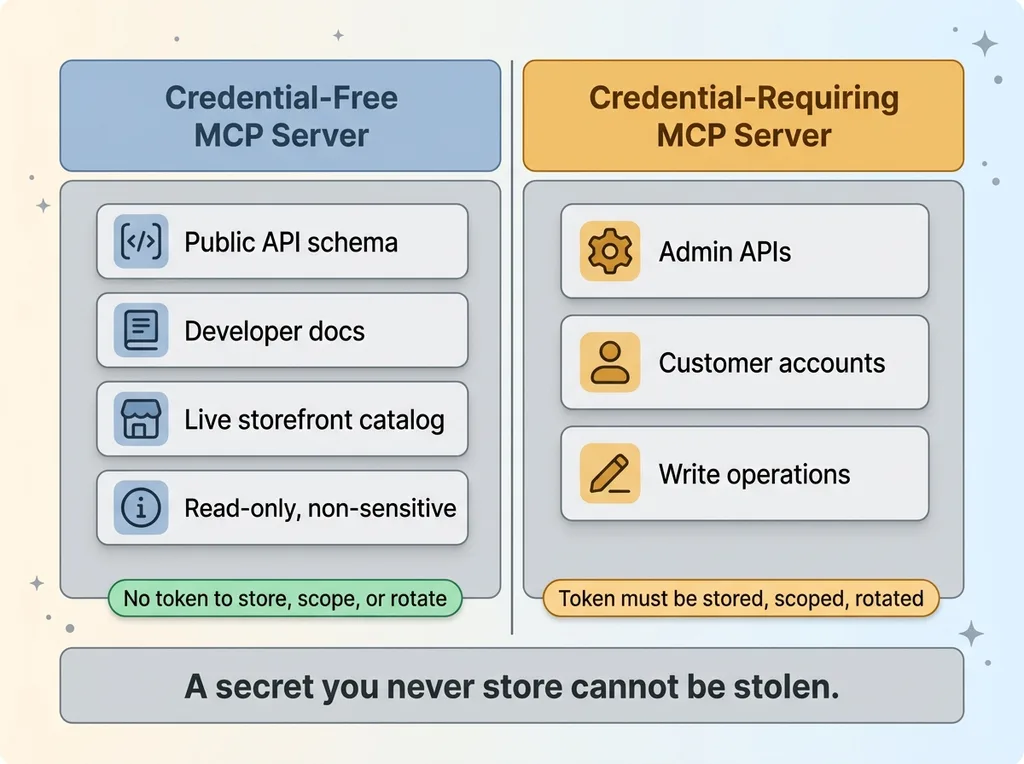 Credential-free vs credential-requiring MCP servers
Think developer documentation. A public API schema. The live storefront catalog any shopper can already browse. None of that needs a key, because none of it is secret in the first place.
The secret you don't have to manage
Contrast that with a credential-requiring server. Anything that touches admin APIs, customer accounts, or write operations against live systems needs a token. That token has to live somewhere, get scoped, and get rotated on a schedule.
For my e-commerce brand's live store running on a major commerce platform, I draw the line hard. Public catalog and schema data go through credential-free servers. Anything that can change the store or read a customer's private data does not get an autonomous agent connection at all.
Why this is safer, not just easier
This is where people miss the real argument. Credential-free is not a convenience hack. It is a security posture.
A secret you never store cannot be stolen. It cannot be scoped wrong. It cannot be forgotten in a rotation cycle and quietly become a backdoor eighteen months later.
I have seen how secret sprawl turns into risk. I wrote about the security holes that show up in every AI-built app, and the pattern is always the same. Tokens accumulate faster than anyone tracks them. Each one is an attack surface.
The credential-free pattern removes the surface entirely. You cannot leak a key that does not exist. That is the whole point, and it is why I default to this category whenever the data allows it.
The two servers I kept (and why)
After cleaning up my own stack, I run exactly two credential-free MCP servers in production. Both authenticate with nothing. Both earn their place.
A docs and schema server that stops hallucination
The first is a developer docs and GraphQL schema validation server. On paper it sounds boring. In practice it is the single most valuable connector I run.
Its real job is stopping the model from inventing API fields that do not exist. That is the number-one cause of broken AI-generated integration code. The model is confident, the field name sounds plausible, and the whole thing fails at runtime because the field was never real.
With a live schema server, the model checks its work against the actual API definition before it writes a line. The result is code that runs on the first try instead of the third. When I am building against a platform's GraphQL API, this is the difference between twenty minutes and an afternoon of debugging hallucinated field names.
A storefront server that reads the live catalog
The second is a storefront server. It reads the public catalog, cart behavior, and store policies the way an AI shopping agent would see them.
This is the Shopify MCP server angle most people get wrong. They assume reading the store needs admin access. It does not. A shopper can browse your catalog without logging in, so an agent can too, with zero credentials.
The payoff is practical. The model answers shopper-style questions against real inventory instead of guessing. It knows what is actually in stock, what the return policy says, and how products are categorized, because it is reading the same live storefront a customer sees.
Two servers. No tokens. Correct code and real answers. That is the entire kept list, and I am not in a hurry to add more.
The servers I deliberately removed
Pruning is the unglamorous half of MCP server setup, and almost nobody talks about it. I had broken, credential-requiring servers throwing reconnect errors on every single session. Two of them got cut.
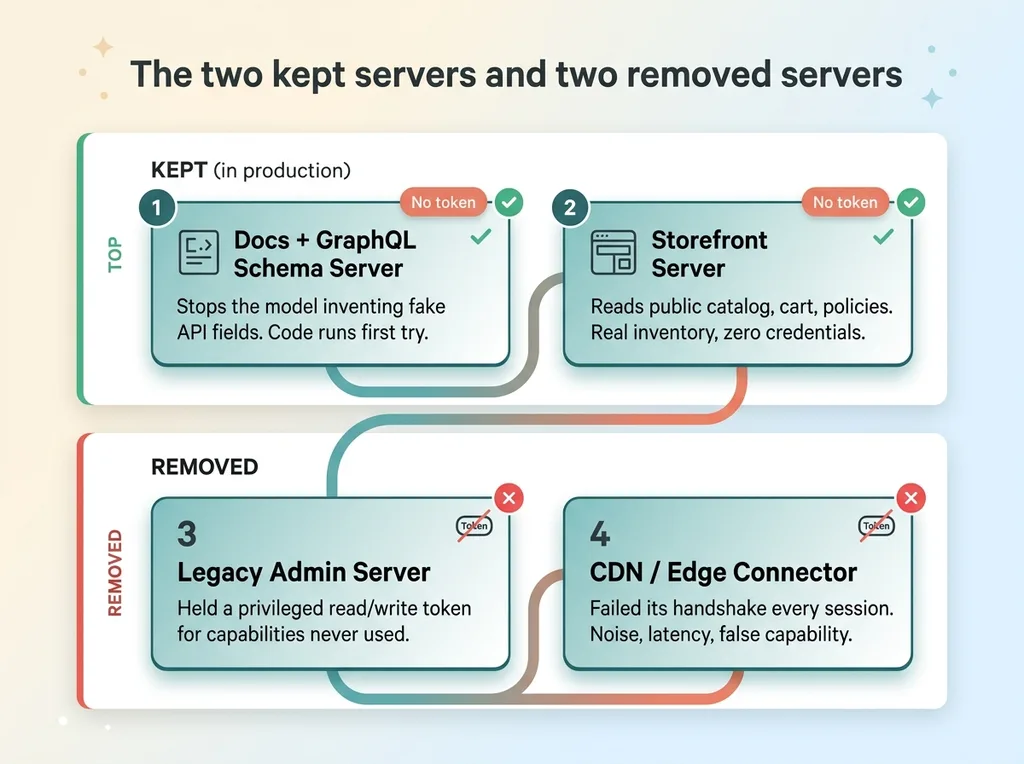 The two kept servers and two removed servers
The legacy admin server
The first was a legacy admin server. It needed a privileged token, the kind that can read and write almost anything in the store.
The problem was not just the credential risk, though that was real. It was overkill. Everything I actually needed an agent to do, I could do with the read-only credential-free servers. The admin server was holding a powerful token to deliver capabilities I was not even using.
So I deleted it. The token went away, the attack surface shrank, and nothing I cared about broke.
The connector that kept failing its handshake
The second was a CDN and edge connector that failed its handshake every session. Every time I started a session, it threw a reconnect error before timing out.
Here is the discipline argument, and it is the part I want CEOs to internalize. A server that fails its handshake is strictly worse than not installing it. It adds noise to every session. It adds latency while the system waits on a connection that will never complete. Worst of all, it creates a false sense of capability. The connector is listed, so you assume it works, right up until you depend on it.
The fix was not to debug it. I tried that. The fix was to delete it.
A connector that does not work cleanly is not a half-feature. It is a full liability dressed up as a feature. Cutting it made every session faster and quieter, and I lost nothing real.
If your AI integration list has connectors throwing errors on startup, that is not a backlog item. That is your Monday morning task.
The server I refused to install on purpose
There is one connector I never installed at all, and the reasoning matters more than the decision.
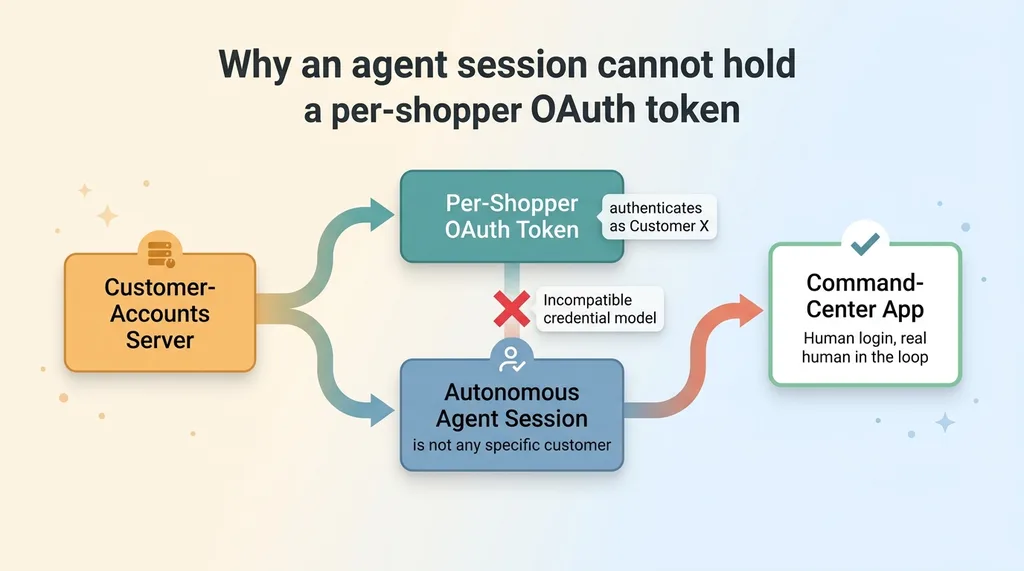 Why an agent session cannot hold a per-shopper OAuth token
The customer-accounts server. It is tempting. The pitch writes itself: let the agent see shopper account data, order history, saved addresses, the works. Imagine the personalization.
I skipped it for two reasons, and the first is structural, not preference.
A customer-accounts server needs a per-shopper OAuth token. That token authenticates as a specific customer. But an autonomous agent session is not a specific customer. It cannot be. You cannot authenticate as a shopper you are not, which means the credential model is fundamentally incompatible with an agent session. The connector exists for a human logging into their own account, not for an agent acting on its own.
The second reason is redundancy. I already have a command-center app that surfaces that data through a properly authenticated, human-facing interface. The data is accessible to me when I need it, behind a real login, with a real human in the loop. Bolting it onto an agent session would not add capability. It would add risk to duplicate something I already do safely.
Here is the lesson for any buyer evaluating their stack. Not every available connector belongs in it. The right question is not "can I connect this." The right question is "should an agent session ever hold this credential." For customer accounts, the answer is no, and no amount of convenience changes that.
How to set up your own credential-free MCP stack
You do not need to be technical to apply this. You need a decision filter you can run on every connector before it touches your systems.
The three-question filter
Run every candidate MCP server through these three questions, in order.
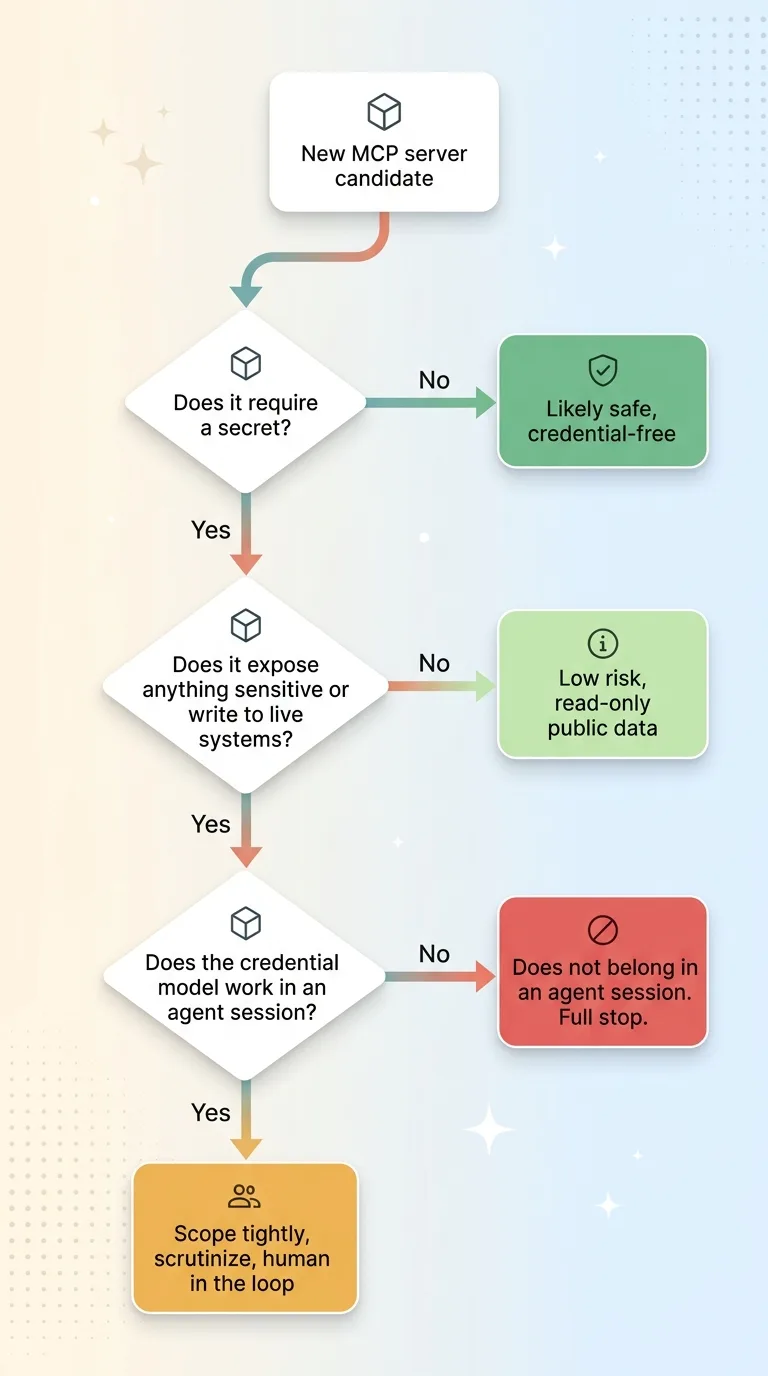 The three-question filter for evaluating any MCP server
- Does it require a secret? If no, you are likely in safe credential-free territory. If yes, keep going, the bar gets higher.
- Does it expose anything sensitive or write to live systems? Read-only access to public data is low risk. Write access or private data is where you slow down and scrutinize.
- Does the credential model even work in an agent session? This is the question that killed my customer-accounts server. If the connector needs a per-user token an agent cannot legitimately hold, it does not belong in an agent session, full stop.
Most connectors fail somewhere in those three questions. That is the point. The filter is supposed to disqualify things.
Where Google Workspace and similar tools fit
Productivity connectors follow the exact same logic. A Google Workspace MCP server, a docs tool, a calendar integration, all of it runs through the same three questions.
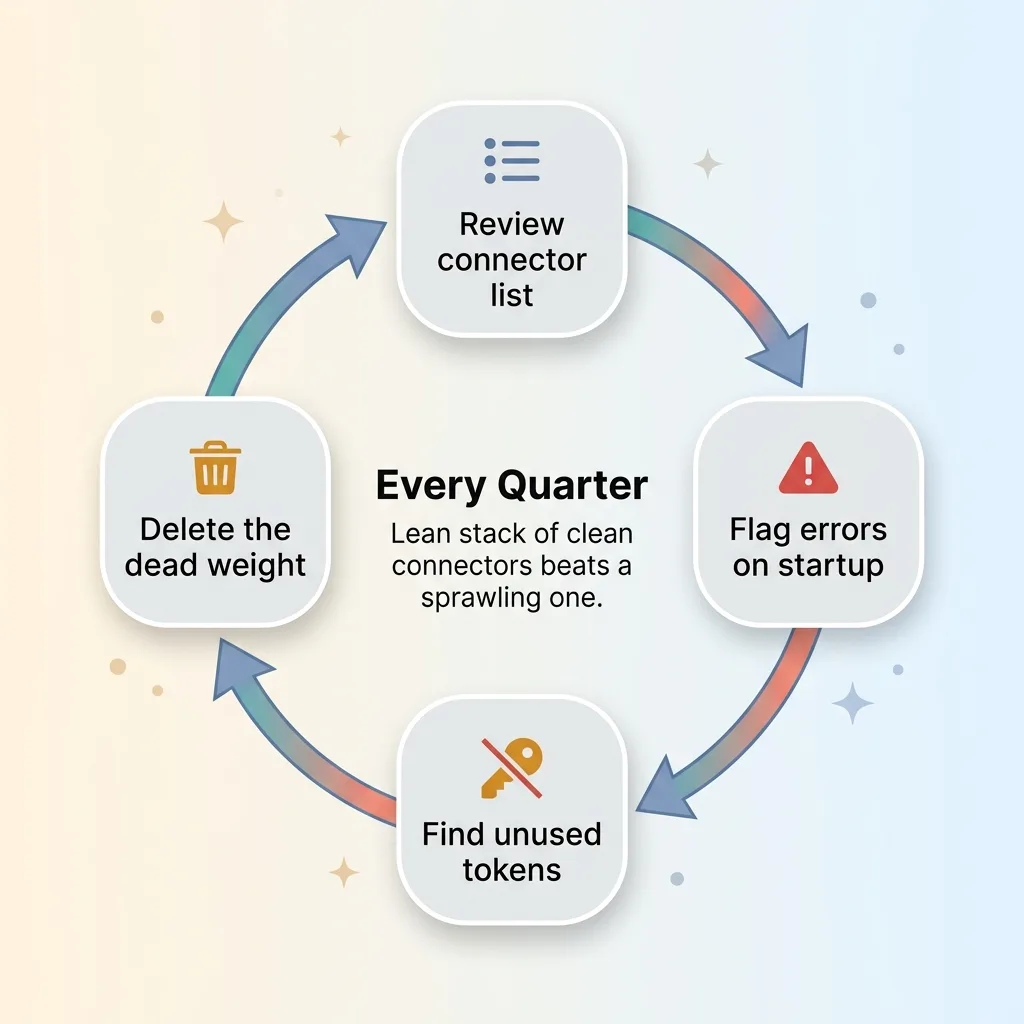 Quarterly MCP connector pruning playbook
Scope read-only wherever you can. If the agent needs to read a shared document but never edit it, give it read access and nothing more. And prune anything that cannot authenticate cleanly, the same way I deleted the connector failing its handshake.
The discipline is repeatable. Every quarter, look at your connector list and ask which ones are throwing errors, holding tokens you do not use, or sitting there unused. Delete those. A lean stack of clean connectors beats a sprawling one full of half-working integrations every time.
This is a Monday-morning playbook, not a six-month project.
Giving AI access to live systems without giving up control
Come back to that flicker of fear I see on a CEO's face. Connecting AI to your real systems feels like surrendering control. It does not have to.
With credential-free patterns plus aggressive pruning, you get the upside without the liability. An AI that reads your real catalog. A model that writes correct integration code on the first try. Answers grounded in live inventory instead of confident guesses. And on the other side of the ledger, almost no secret-management burden, because the secrets mostly do not exist.
This is as much about discipline as architecture. The architecture gives you the option to run credential-free. The discipline is what makes you delete the broken connector, skip the tempting-but-incompatible one, and resist the urge to bolt on every integration a vendor offers.
It fits a broader philosophy I hold about AI in production. Every system I build is bounded and controllable. Every AI system I ship stops for a human at the points that matter, and the credential-free approach is the same instinct applied to integrations. Give the agent exactly what it needs, nothing it does not, and never a key it should not hold.
Get the next build note.
I write up each system I build, including what broke. Subscribe to my newsletter and I'll send you the next one.