I had 14 AI skills running my DTC fashion brand. Product creation, dynamic pricing, SEO optimization, photography direction, customer service, inventory management — the list kept growing. I'd built this 14-skill AI ecommerce platform over months, and it was working. Revenue per employee was up 38%. Manual operations time was down 42%. The results were real.
But under the hood, I had a mess.
The MCP Model Context Protocol wasn't on my radar yet. What was on my radar: a function called get_product_details that existed in four different skills with four slightly different implementations. The pricing skill had one version. The SEO skill had another. Customer service had its own. Product creation had yet another. Same data, same Shopify API call, four codebases to maintain.
When Shopify changed their API response format last year, I had to find and update that function in four places. I missed one. The SEO skill started throwing errors on a Friday afternoon. It took me two hours to track down the problem because the error wasn't in the SEO logic — it was in a product lookup function buried inside that skill's tool library.
This is the monolithic AI problem. Every skill is its own island with its own copy of everything it needs. It works fine when you have two or three skills. At fourteen, it's a maintenance nightmare.
And here's the thing — most companies building AI systems hit this wall. They build their first automation and it works great. They build a second, and they copy-paste some code from the first. By the time they have five or six AI workflows, they're spending more time maintaining duplicate code than building new capabilities. The AI systems that were supposed to save time start consuming it.
That's where I was. And that's what forced me to rethink the entire architecture.
What MCP Actually Is (Without the Hype)
The Protocol in Plain English
Model Context Protocol is a standard created by Anthropic that defines how AI models discover and use tools. That's it. No magic, no sentient AI, no revolution. It's plumbing.
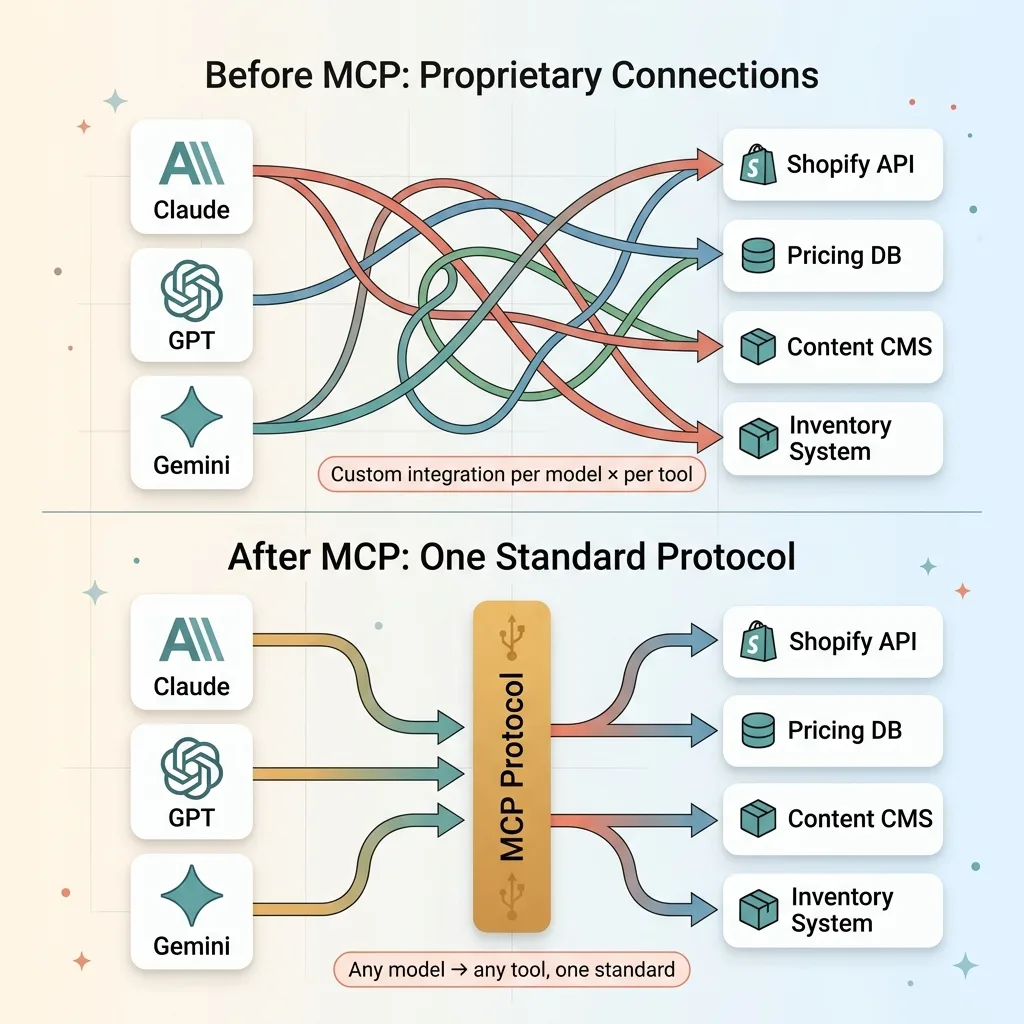 MCP as USB for AI — Protocol Analogy
The best analogy I've found: MCP is USB for AI. Before USB, every device had its own proprietary connector. Your printer had one cable, your mouse had another, your keyboard had a third. USB gave every device the same interface. Plug anything into anything.
MCP does the same thing for AI tools. An MCP server exposes a set of tools — functions that an AI model can call. An MCP client (the AI model or agent) connects to the server and asks, "What can you do?" The server responds with a structured list of available tools, what inputs they need, and what they return. The model picks the right tool, sends the right inputs, and gets results back.
One standard. Any model, any tool.
Why It's Not Just Another API Standard
I've built plenty of REST APIs. MCP is different in three specific ways.
First, tool discovery is automatic. The model doesn't need pre-configured knowledge of what tools exist. It asks the server and gets a structured answer. Add a new tool to the server, and every connected client can find it immediately.
Second, input validation is built into the protocol. Each tool defines its input schema. The model knows what parameters are required, what types they need to be, and what constraints apply — before it makes the call.
Third, it's model-agnostic. The same MCP server works with Claude, GPT, Gemini, or any model that supports the protocol. No custom integration per model. This matters when you're running a multi-model AI architecture like I am — Claude for content, Gemini for images, custom chaining for cost efficiency.
MCP is open source and rapidly becoming the de facto standard. But I want to be clear: it's infrastructure. It won't make a bad AI system good. It makes a good AI system easier to maintain and extend.
19 MCP Tools Across 4 Skills: What I Actually Built
Here's what this looks like in practice. I built 19 MCP tools organized into 4 servers, consumed by 6+ different AI skills. One codebase per tool, not six.
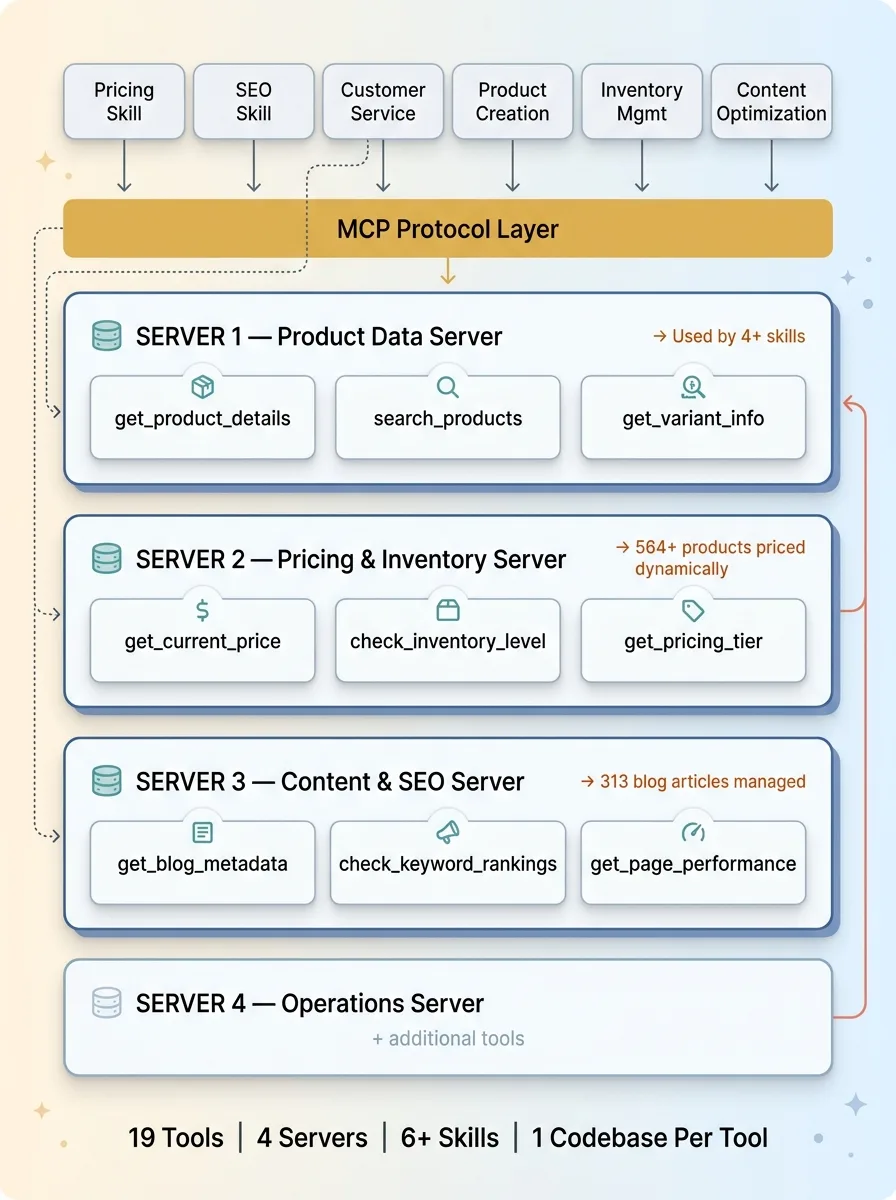 19 MCP Tools Mapped to 4 Servers and 6+ Skills
Product Data Tools
Three tools handle everything product-related:
- get_product_details — Takes a product ID, returns title, description, variants, images, tags, status. One implementation. Used by the pricing skill, SEO skill, customer service skill, and product creation skill.
- search_products — Takes a query string and optional filters, returns matching products. Used when the AI needs to find products by name, tag, or category rather than by ID.
- get_variant_info — Returns size/color/material data for a specific variant. Critical for inventory decisions and customer service responses.
Before MCP, these three functions had a combined twelve implementations across my skills. Now they have three. One each.
Pricing and Inventory Tools
This is where the 564+ dynamically priced products get managed:
- get_current_price — Returns the active price for a product or variant, including any active promotions.
- check_inventory_level — Real-time stock check. Critical for customer service and for the pricing engine's scarcity signals.
- get_pricing_tier — Returns the product's tier in my 4-tier ABC classification system. A-tier products (top 15% of revenue) get different pricing rules than D-tier products. This tool makes that classification available to any skill that needs it.
Content and SEO Tools
Managing 313 blog articles with AI-assisted SEO requires its own toolset:
- get_blog_metadata — Returns title, keywords, publish date, word count, and performance metrics for any article.
- check_keyword_rankings — Pulls current ranking data for a target keyword. Used by the SEO skill to prioritize content updates.
- get_page_performance — Traffic, bounce rate, time on page. Feeds into content optimization decisions.
The Cross-Skill Multiplier
This is the part that changed my development speed fundamentally.
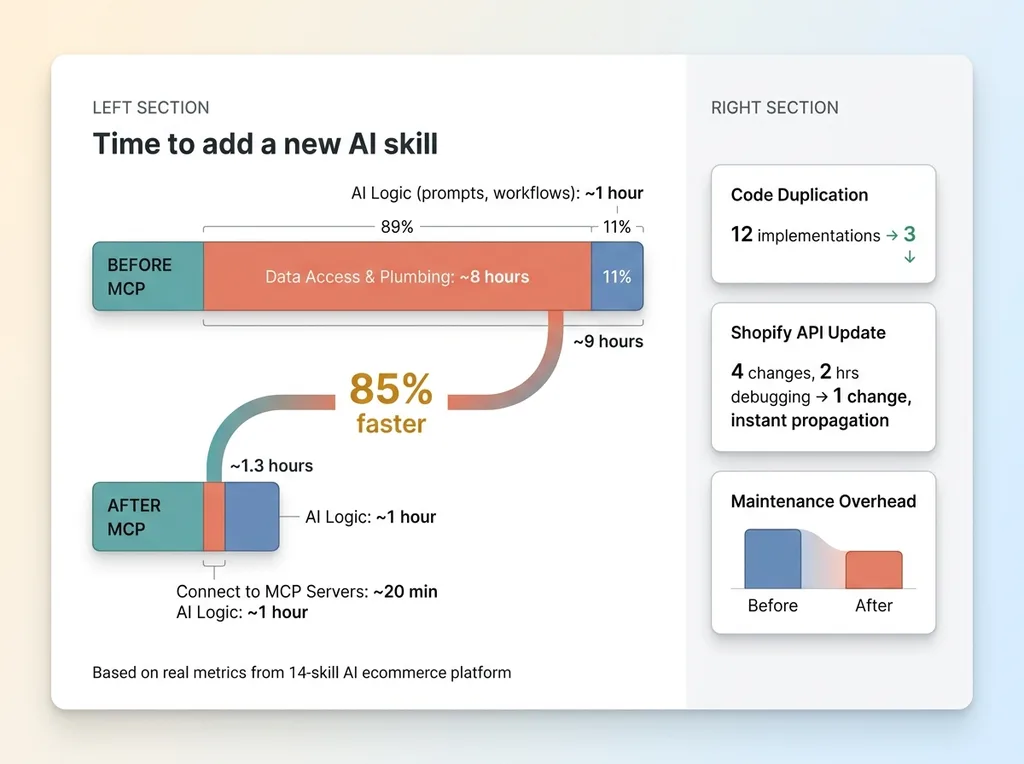 Development Speed: Before vs. After MCP
Before MCP, adding a new AI skill meant writing new tool integrations from scratch. I'd estimate a full day just wiring up data access — connecting the new skill to Shopify, to my pricing database, to the content management system. The actual AI logic (prompts, workflows, decision trees) might take an hour. The plumbing took eight.
Now I point a new skill at existing MCP servers and it immediately has access to product data, pricing, inventory, content metadata — all of it. A new skill that used to take a day to wire up now takes 20 minutes to get data access. I spend my time on the AI logic, not the plumbing.
19 tools. 4 MCP servers. 6+ consuming skills. That math keeps getting better as I add more skills.
The Architecture Shift: Monolithic Skills to Composable Tools
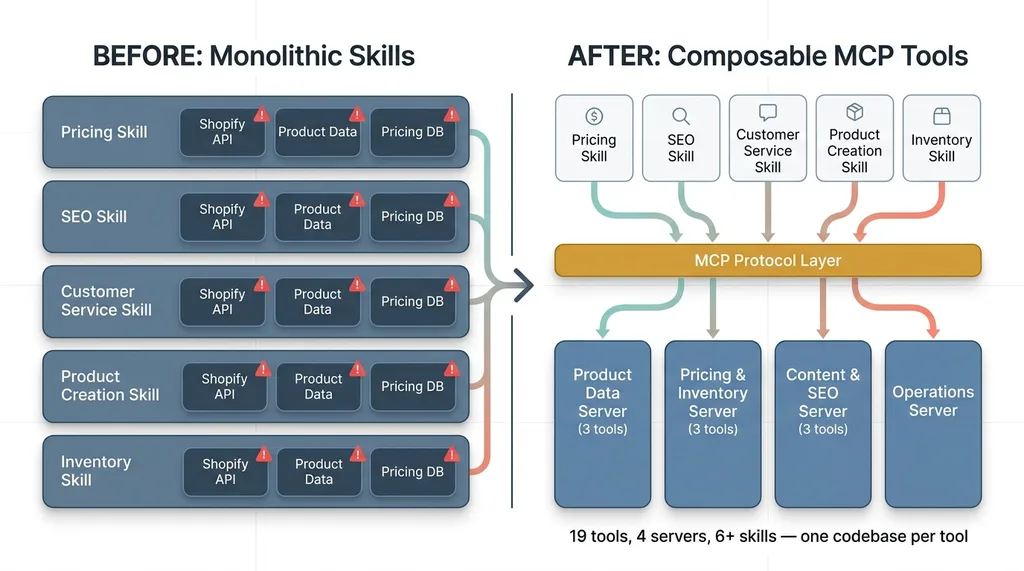 Monolithic Skills vs. Composable MCP Architecture
Before: Fat Skills With Embedded Logic
My original architecture looked like this: each AI skill was a self-contained monolith. It had its own prompt logic, its own tool implementations, its own data access layer. The pricing skill could do everything it needed without touching any other skill.
That sounds like good encapsulation. In practice, it meant massive redundancy. Five skills that needed product data each had their own Shopify API integration. Three skills that needed pricing data each maintained their own database queries. Changing one data source meant updating every skill that touched it, then testing each one individually.
The skills were independent but expensive to maintain.
After: Thin Skills With Shared Tool Registries
The new architecture inverts the relationship. Skills are now thin orchestration layers. They define what the AI should do — prompts, workflows, decision logic, output formats. They don't define how to access data or perform actions. MCP tools handle the how.
If you've been in software for a while, this sounds familiar. It's the same evolution backend engineering went through when monolithic applications decomposed into microservices. Same insight: separate the business logic from the infrastructure.
For AI systems specifically, MCP makes model-switching much easier. Because the tools aren't coupled to a specific model's function-calling format, the tool registry is model-agnostic. When I swap Claude for Gemini on a particular task — which I do regularly for cost optimization — the tools don't care. They serve data to whatever model asks.
The concrete result: when I updated my Shopify integration last month, I changed one MCP server. All six skills that use product data got the update immediately. Zero coordination required. Zero risk of missing one implementation in a forgotten corner of the codebase.
One change, one place, instant propagation. That's the payoff.
What Breaks in Production (And How I Fixed It)
MCP isn't a silver bullet. Here's what went wrong and what I did about it.
Tool Sprawl and Naming Discipline
When tools are easy to create, you create too many. I caught myself building overly specific tools — get_product_price_for_seo, get_product_price_for_email — when get_current_price serves both.
More importantly, I learned that the tool description is the most critical field in the entire system. It's not documentation for humans. It's how the AI model decides which tool to use. A vague description means wrong tool selection. I now spend more time writing tool descriptions than writing the tool logic itself.
Error Handling When Tools Fail Mid-Agent
Shopify API times out. Inventory data goes stale. A database query returns nothing. In a monolithic skill, error handling lived next to the tool code. With MCP, the tool is decoupled from the skill, so where does error handling live?
I built retry logic and fallback responses into the MCP servers themselves. If a Shopify call fails, the MCP tool retries twice with exponential backoff, then returns a structured error response that the consuming skill can interpret gracefully. The skill doesn't need to know about Shopify's reliability issues. It just gets data or a clean error.
When Models Pick the Wrong Tool
With 19 tools available, Claude occasionally picks search_products when it should use get_product_details. The model sees two tools that both return product information and makes a judgment call. Sometimes that judgment is wrong.
Three fixes that worked:
- Better tool descriptions with explicit "use this when..." and "do not use this when..." guidance
- Tighter input schema constraints that make the wrong tool harder to call incorrectly
- Skill-level tool filtering — you don't need to expose all 19 tools to every skill. The customer service skill gets 12 tools. The SEO skill gets 8. Fewer options, better choices.
This is the same principle behind AI systems that check their own work. You design for the model's mistakes, not just its successes.
When MCP Makes Sense (And When It Doesn't)
MCP makes sense when:
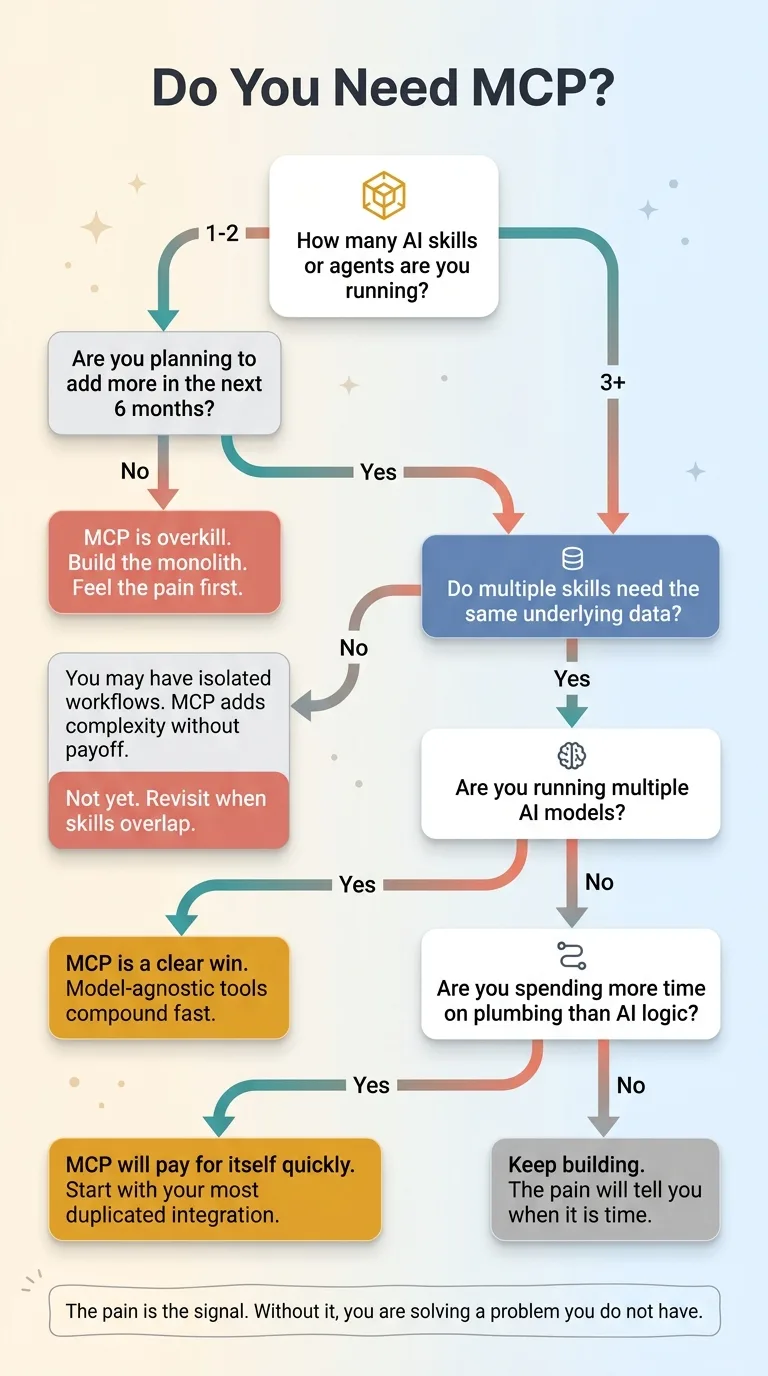 MCP Readiness Decision Framework
- You have 3+ AI skills or agents that need the same underlying data
- You're running a multi-model setup and want tools that work across models
- You want to add new AI capabilities without rewriting integrations every time
- Your team is building production AI systems, not just prototypes
MCP is overkill when:
- You have one AI workflow doing one thing
- You're still experimenting and haven't committed to an architecture
- Your entire AI stack is a single API call
I'll be direct: most companies I talk to aren't ready for MCP yet. They need to build their first two or three AI systems, feel the pain of duplication, and then MCP becomes obvious. Don't architect for composability on day one. You'll over-engineer. Build the monolith, feel the pain, then decompose.
The pain is the signal. Without it, you're solving a problem you don't have.
The Shift That Matters More Than the Protocol
MCP Model Context Protocol is just a protocol. Protocols come and go. What doesn't change is the underlying insight: AI capabilities should be composable tools, not monolithic applications.
This is the same mental model shift that turned software engineering from desktop apps into cloud-native services. The companies that understood that shift early built systems that compounded — every new service made every existing service more capable. The companies that didn't ended up with a graveyard of disconnected applications.
The same pattern is playing out with AI right now. Companies that build composable AI tools create a flywheel — every new tool makes every existing skill smarter, faster, more capable. Companies that build isolated AI experiments end up with five chatbots that can't share a customer record.
This is exactly the kind of architectural thinking a Chief AI Officer brings to an organization. Not "should we use AI?" but "how do we build AI systems that scale without collapsing under their own weight?"
If you're building multiple AI systems and feeling the duplication pain, that's exactly where I start with clients. Not with MCP specifically, but with the architectural audit that reveals where composable tools will save you months of rework.
Get the next build note.
I write up each system I build, including what broke. Subscribe to my newsletter and I'll send you the next one.