The PDF Walk Sheet Was a Dead End
For years, my DTC fashion brand in San Diego ran inventory cycle counts the way most small operations do. Somebody printed a list. An operator walked the bins with a pen, marked counts by hand, then handed the paper back. We called it a process. It was really just a ritual that produced nothing.
That paper walk sheet was the opposite of a mobile task dispatch system for a warehouse. It had three fatal flaws, and they compounded.
No data in. Nothing structured came back. The counts lived as ink on a page, maybe transcribed later, maybe not. There was no row in any system that said "bin 14 had 6 units, not 9."
No corrections out. Even when we did read the paper, nothing happened automatically. No storefront update. No bin adjustment. The knowledge just sat there waiting on a human to act, and humans are busy.
No audit trail. We had no record of who walked what, when, or what they found. If a count was wrong, there was no way to trace it back.
The cost was drift that never died
The expensive part was the drift. The gap between what was physically in the bins and what the storefront said was available kept reappearing. We would count, find the discrepancy, and then... the count never closed the loop. It produced a snapshot nobody could act on fast enough to matter.
A week later, the same drift was back. We were paying an operator to walk the floor and generate a document that changed nothing.
That is the thesis of everything I built afterward: floor work is only worth doing if it becomes structured data that triggers action. A count that doesn't change anything is just exercise.
What 'Closed Loop' Actually Means on a Warehouse Floor
Let me define the term plainly, because "closed loop" gets thrown around a lot.
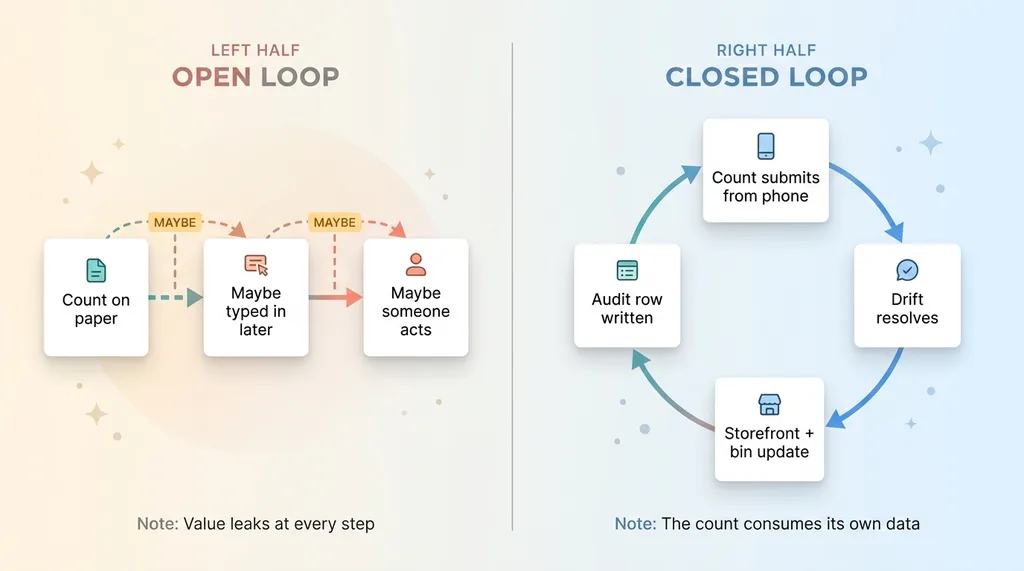 Open Loop vs Closed Loop Comparison
A closed loop means four things happen in sequence, automatically. A task gets created with known items. An operator walks it on a phone. The system reconciles the result against the source of truth. And corrections apply, either automatically or queued for approval, with a full record of what changed.
Compare the two worlds.
Open loop: count on paper, someone maybe types it in later, someone maybe acts on it. Three maybes. Each one is a place where the value leaks out.
Closed loop: the count submits from the phone, drift resolves, the storefront updates, the bin record adjusts, and an audit row gets written. No maybes. The count consumes its own data.
The whole point is resolving the disagreement between physical and digital stock. If you have ever stared at two numbers and not known which one to trust, I wrote about exactly that problem in who's right about your stock, the shelf or the storefront. The walk sheet was supposed to answer that question. It never did, because it never fed an answer back into anything.
Here is what surprises people: this is not about fancy AI. There is no model deciding anything clever in the base version of this. It is about turning a manual ritual into a system that produces and consumes its own data. The intelligence is in the plumbing, not the prompt.
The Generic Schema That Makes One System Do Many Jobs
When I rebuilt this, I made one architectural decision that mattered more than all the others. I did not build a cycle count app. I built a generic task schema.
Tasks, items, comments, photos
Everything reduces to four primitives.
A task is the assignment, the thing handed to an operator. Items are the N things to check inside that task, the bins, the units, the SKUs. Comments hold operator notes and the help thread. Photos are the evidence attached to specific items.
That is it. Four tables. Every floor process I run maps onto those four primitives, because every floor process is fundamentally "go check these things and tell me what you found."
A type registry, not a hardcoded form
Here is the design decision that made one system do many jobs. Each task has a type, and the type keys into a handler that runs the right logic on submit.
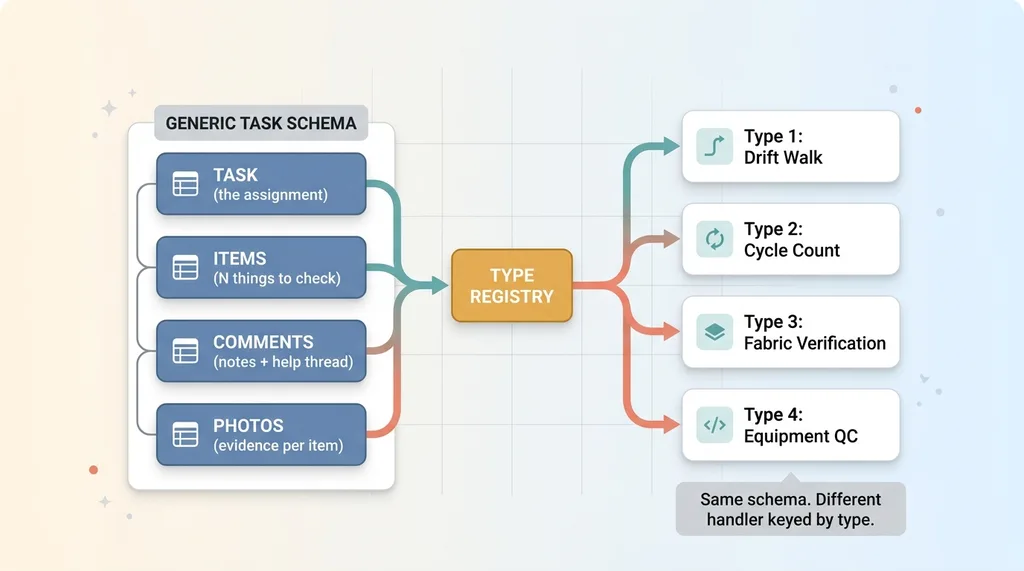 Generic Task Schema with Type Registry
The drift walk is type one. The cycle count app is type two. Fabric verification is type three. Equipment QC is type four. All four reuse the exact same schema. The only difference is the handler that fires when the task submits.
I did not build four apps. I built one schema and a registry of handlers. This is the data-as-config, code-as-engine pattern applied to physical operations. The form structure is config. The submit logic is a handler keyed by type. The engine never changes.
The payoff is concrete. Adding a new kind of floor task is a config entry and a handler function. It is not a rebuild, not a new app, not a new login for my operators. When I decided to add equipment QC walks, the operator-facing part already existed. I wrote a handler and a config row, and it was live the same afternoon.
That is the difference between building a product and building a platform. The platform makes the next task type nearly free.
How an Operator Actually Walks a Task on Their Phone
None of this matters if the person standing in an aisle hates using it. So I designed the operator mobile workflow for someone holding a phone in one hand, not a desk worker with two monitors.
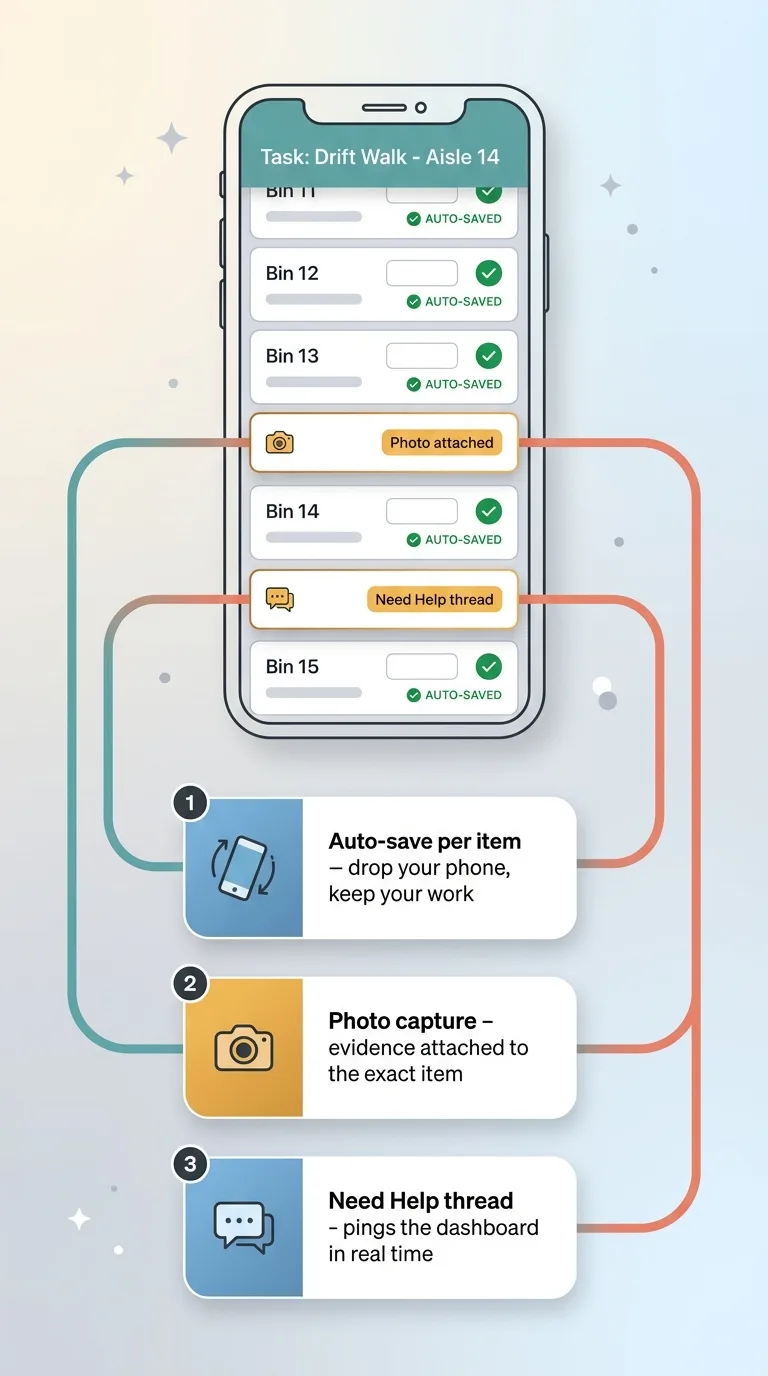 Operator Mobile Workflow on Phone
They open the assigned task on their phone and see the list of items. They count or verify each one as they walk the bins. Simple, scrollable, thumb-friendly.
Auto-save per item
Every item auto-saves the moment they enter a value. This sounds small. It is not.
Floor work is physical. Phones get dropped. Batteries die. Someone gets pulled away mid-walk to deal with a shipment. With the old paper sheet, a smudge or a lost page meant a redo. With a typical web form, closing the tab or losing signal could wipe the whole entry.
Auto-save per item means none of that loses work. Walk five bins, drop the phone, pick it back up, keep going. The five are already saved. The operator never thinks about it, which is the point.
Photo capture and the 'need help' thread
For any item, they can snap a photo as evidence. A damaged unit. The wrong fabric on a bolt. A mislabeled bin. The photo attaches to that specific item, so when I review the submission, I am not guessing what they meant. I am looking at it.
And when something is genuinely confusing, they open a need help thread instead of guessing or stopping the walk. That thread pings my dashboard in real time. I can answer from wherever I am, and they keep moving.
This is part of a bigger principle I follow on every build, which I wrote about in every system I ship stops for a human. The operator is not left alone to make a judgment call that wasn't theirs to make. They flag it, I weigh in, the walk continues. Paper never gave us that. Paper gave us a guess and a smudge.
What Happens on Submit: The Handler Runs the Corrections
This is the payoff. When the operator hits submit on a drift walk, the type-keyed handler does the work paper never could.
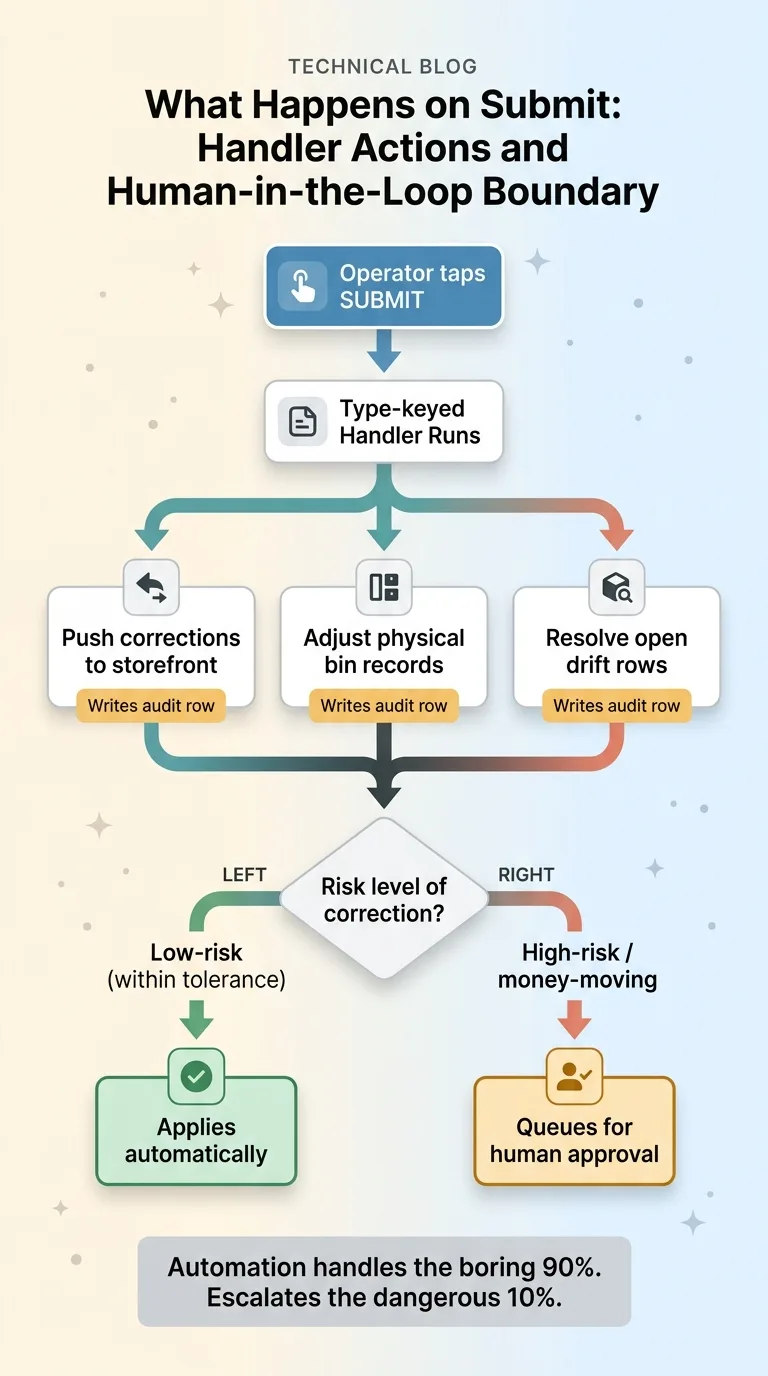 What Happens on Submit: Handler Actions and Human-in-the-Loop Boundary
It auto-pushes corrections to the storefront so listed availability matches reality. It adjusts the physical bin records to the counted numbers. And it resolves the open drift rows that triggered the walk in the first place, the same rows that kept reappearing under the old system because nothing ever closed them.
Every single one of those actions writes an audit row. Who walked it. What changed. When. If I ever need to ask "why is this bin showing 6 units," I have a full record instead of a shrug.
Now, I do not let everything fire blind. This is where the human-in-the-loop boundary lives.
Low-risk corrections apply automatically. A bin count that matches expectations within tolerance, a routine adjustment, those go through. But money-moving or high-risk corrections queue for my approval. A count that would zero out a high-value SKU, or a discrepancy large enough that it might be an operator error rather than real drift, those wait for me. I built that boundary on purpose, for the same reasons I lay out in every system I ship stops for a human. Automation should handle the boring 90 percent and escalate the dangerous 10.
Compare that to the old way. Under PDF walk sheets, this entire reconciliation either never happened or happened manually days later with transcription errors baked in. Someone read ink, typed numbers into a spreadsheet, and maybe propagated the changes if they had time.
Now it is seconds, with a record. The walk closes the loop the moment the operator taps submit. That is the closed loop made real. The inventory walk closed loop is not a diagram on a whiteboard, it is a handler running while the operator is still standing in the aisle.
Why One Schema Beat Four Apps
Let me make the build-versus-buy argument directly, because if you run an operation you are weighing this right now.
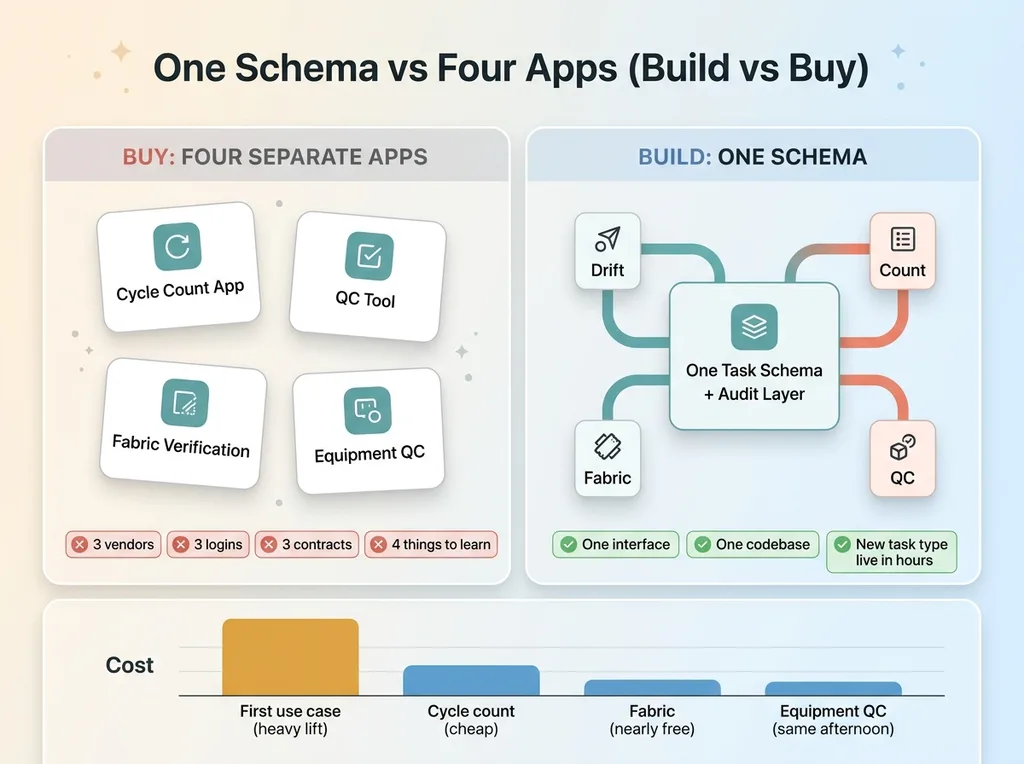 One Schema vs Four Apps (Build vs Buy)
I could have bought a separate cycle count app. A separate QC tool. A separate fabric verification process. Three vendors, three logins, three contracts, three things my operators would have to learn and three things I would have to maintain.
Instead, the same task schema runs all of them. Each new use case is a handler plus a config entry. Not a new vendor. Not a procurement cycle. Not another app icon on a phone that confuses the person trying to count bins.
The reuse is where the return lives. The expensive part of this build was the schema, the mobile UX, and the audit layer. That was the heavy lift, and I paid it once. The second use case (cycle count) was cheap. The third (fabric verification) was nearly free. The fourth (equipment QC) went live the same afternoon I decided to add it.
My operators learn one interface. I maintain one codebase. A new floor process goes from idea to live in hours, not the weeks a procurement and onboarding cycle would take.
This answers the doubt I hear most often from skeptical CEOs: "Isn't this a big project?" The honest answer is that the first closed loop is a real platform investment. But it is a one-time investment that pays off on every new task type forever. The field task automation you build for counting bins becomes the engine for inspecting equipment, verifying intake, and anything else your floor does on a recurring basis.
You are not buying four tools. You are building one and reusing it.
Where Your Floor Work Disappears Right Now
Most operations I walk into still run on the equivalent of PDF walk sheets. Group texts. Spreadsheets emailed around. One overloaded person who "just knows" the numbers. Paper counts and verbal handoffs that produce no data and trigger no action.
So here is the question I would ask you over coffee. Name the recurring floor task in your business that generates a snapshot nobody acts on. Cycle counts. Equipment checks. Site walks. Intake inspections. Quality verification. There is almost always one, and it is almost always costing you in drift, errors, or a person whose whole job is chasing numbers around.
The fix is rarely AI first. It is the boring plumbing: a schema that captures what was found, a mobile workflow your operators will actually use, and a handler that closes the loop by making something change when the task submits. Get that right and you can layer intelligence on top later. Skip it and the smartest model in the world has nothing structured to act on.
Because a count that doesn't change anything is just exercise. The whole game is making the floor produce data, and making that data do something.
Get the next build note.
I write up each system I build, including what broke. Subscribe to my newsletter and I'll send you the next one.