Encrypting PHI in Supabase: AES-256-GCM for Health Data
How I encrypt health data in Supabase using AES-256-GCM at the application layer. Why encryption at rest isn't enough to protect PHI.
By Mike Hodgen
Most "HIPAA-compliant" health apps have a fundamental security gap that their developers either don't understand or choose to ignore. I know because I almost built one myself.
When I started building a health monitoring system that stores real vitals, symptoms, medications, and AI-generated health insights, I did what most developers do first: signed a BAA with Supabase, confirmed encryption at rest was enabled, and moved on to building features. It took me about two days to realize that approach to encrypting health data in Supabase was dangerously incomplete.
Here's what I learned building the real thing — and why application-layer AES-256-GCM encryption is the only approach I'd trust with PHI.
Most "HIPAA-Compliant" Apps Aren't Actually Protecting Your Data
The gap between what developers think HIPAA compliance means and what it actually requires is where breaches happen. Not in theory. In production.
What HIPAA Actually Requires vs. What Most Apps Do
HIPAA's Security Rule mandates three categories of safeguards: administrative, physical, and technical. The technical safeguards include access controls, audit controls, integrity controls, and transmission security. Most health app developers check two boxes — encryption at rest (Supabase provides this) and HTTPS for transmission — and call it done.
A BAA with Supabase covers Supabase's infrastructure obligations. It means Supabase agrees to handle your data according to HIPAA requirements on their end. It does not cover your application logic. It does not cover how your code handles PHI. It does not cover what happens when someone with database access runs a SELECT query.
Most health apps I've reviewed treat the BAA as a checkbox and stop there. This is the security debt that vibe-coding creates — speed-first development that skips the hard parts because the compliance paperwork feels like enough.
The Dangerous Gap Between Encryption at Rest and Real Protection
Encryption at rest means data is encrypted on the physical disk. If someone steals the hard drive from Supabase's data center, they can't read your data. Great.
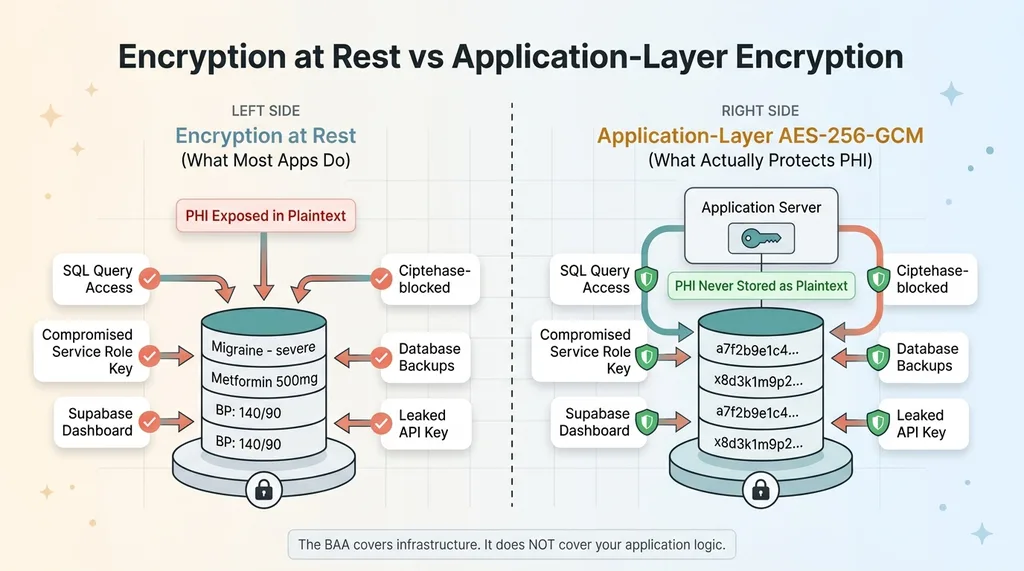 Encryption at Rest vs Application-Layer Encryption
But here's what encryption at rest does not protect against:
- Any SQL query against the database returns plaintext data
- A compromised Supabase service role key exposes every row in every table, bypassing RLS entirely
- The Supabase dashboard shows all data in plaintext to anyone with project access
- Database backups contain fully readable PHI
- A leaked API key from a misconfigured environment variable gives an attacker everything
Let me make this concrete. If your Supabase service role key gets compromised — through a leaked .env file, a misconfigured CI/CD pipeline, a developer's laptop getting stolen — the attacker can query your entire database. Every symptom log. Every medication record. Every health assessment. All in plaintext. Encryption at rest does absolutely nothing to stop this.
The BAA doesn't save you here. Supabase held up their end. The failure is in your application architecture.
Why I Chose AES-256-GCM for Application-Layer Encryption
Once I understood the threat model, the question wasn't whether to add application-layer encryption. It was which algorithm.
AES-256-GCM vs. Other Encryption Options
AES-256-GCM is authenticated encryption. That means it provides both confidentiality (nobody can read your data) and integrity (you can verify the data hasn't been tampered with). The GCM mode generates an authentication tag alongside the ciphertext. If a single bit of the encrypted data changes — whether from corruption or deliberate tampering — decryption fails. Hard. That's exactly what you want for health data.
The alternatives I evaluated:
- AES-256-CBC: No built-in authentication. Vulnerable to padding oracle attacks. You'd need to add HMAC separately, which means more code, more places to make mistakes.
- ChaCha20-Poly1305: Excellent algorithm, arguably better than AES-GCM on devices without hardware AES acceleration. But library support is less universal, and I didn't want to fight dependency issues across environments.
- Hashing (SHA-256, bcrypt): Not encryption. Hashing is one-way — you can't get the original data back. Useful for passwords. Useless for health records you need to display to users.
AES-256-GCM won because it's battle-tested, widely supported, provides authentication out of the box, and every major language has solid library implementations.
What "Application Layer" Actually Means in Practice
Application-layer encryption means PHI is encrypted before it touches Supabase. The database never sees plaintext health data. Not during writes. Not during reads. Not in logs. Not in backups.
In my health app, these fields get encrypted before storage: symptom descriptions, medication names and dosages, health metric values, AI-generated health assessments, and any free-text input from the user. By the time the INSERT statement hits Supabase, those fields contain ciphertext that's meaningless without the encryption key.
Even if someone dumps the entire database, they get gibberish. Even Supabase employees with infrastructure access can't read it. Even a compromised RLS policy — which would normally be catastrophic — doesn't expose actual health data.
The tradeoff: metadata like timestamps, user IDs, and record type identifiers stays unencrypted because RLS needs to query on it. I'll get into why that tradeoff is deliberate and acceptable in a later section.
The Implementation: Encrypting PHI Before It Touches the Database
This is the part that separates a blog post about encryption from an actual encrypted system in production. The algorithm choice is the easy decision. Key management is where people get burned.
Key Management: The Part Everyone Gets Wrong
The encryption key is the single point of failure. If it's compromised, all your encryption is worthless. If it's lost, all your data is permanently unreadable. Both scenarios are catastrophic.
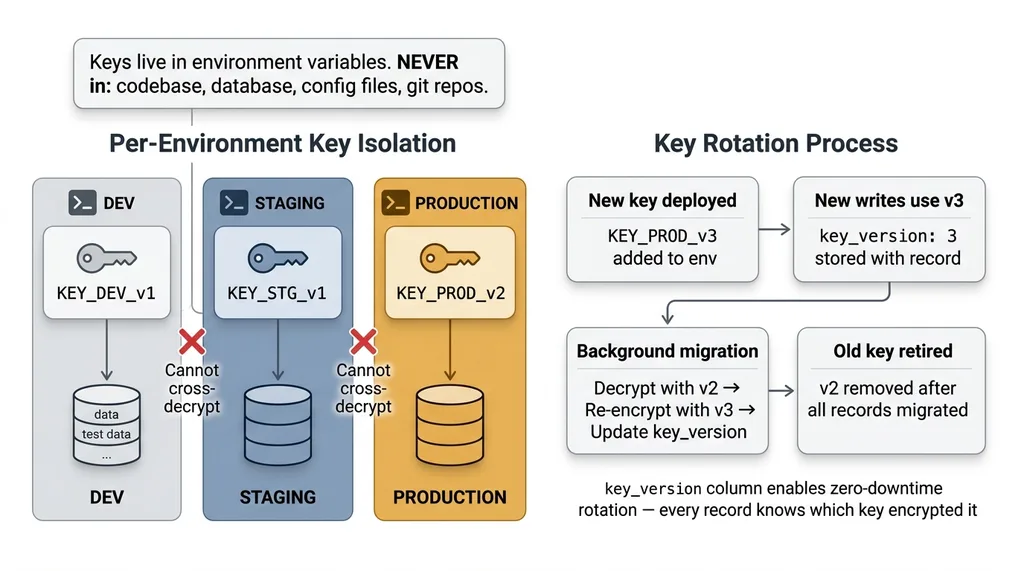 Key Management Architecture and Rotation
My rules:
- Keys live in environment variables. Never in the database. Never in the codebase. Never in a config file that gets committed to git.
- Per-environment keys. Dev, staging, and production each have their own encryption key. Test data encrypted in dev cannot be decrypted in production, and vice versa.
- Key rotation is planned from day one. I store a
key_versionidentifier alongside each encrypted record. When I rotate keys, I know exactly which records were encrypted with which key. Re-encryption happens as a background migration — decrypt with the old key, re-encrypt with the new key, update the version identifier.
Key rotation is the part most tutorials skip entirely. If you can't rotate your encryption key without downtime or data loss, you don't have a production-ready encryption system. You have a demo.
Encrypt on Write, Decrypt on Read
The flow is straightforward conceptually:
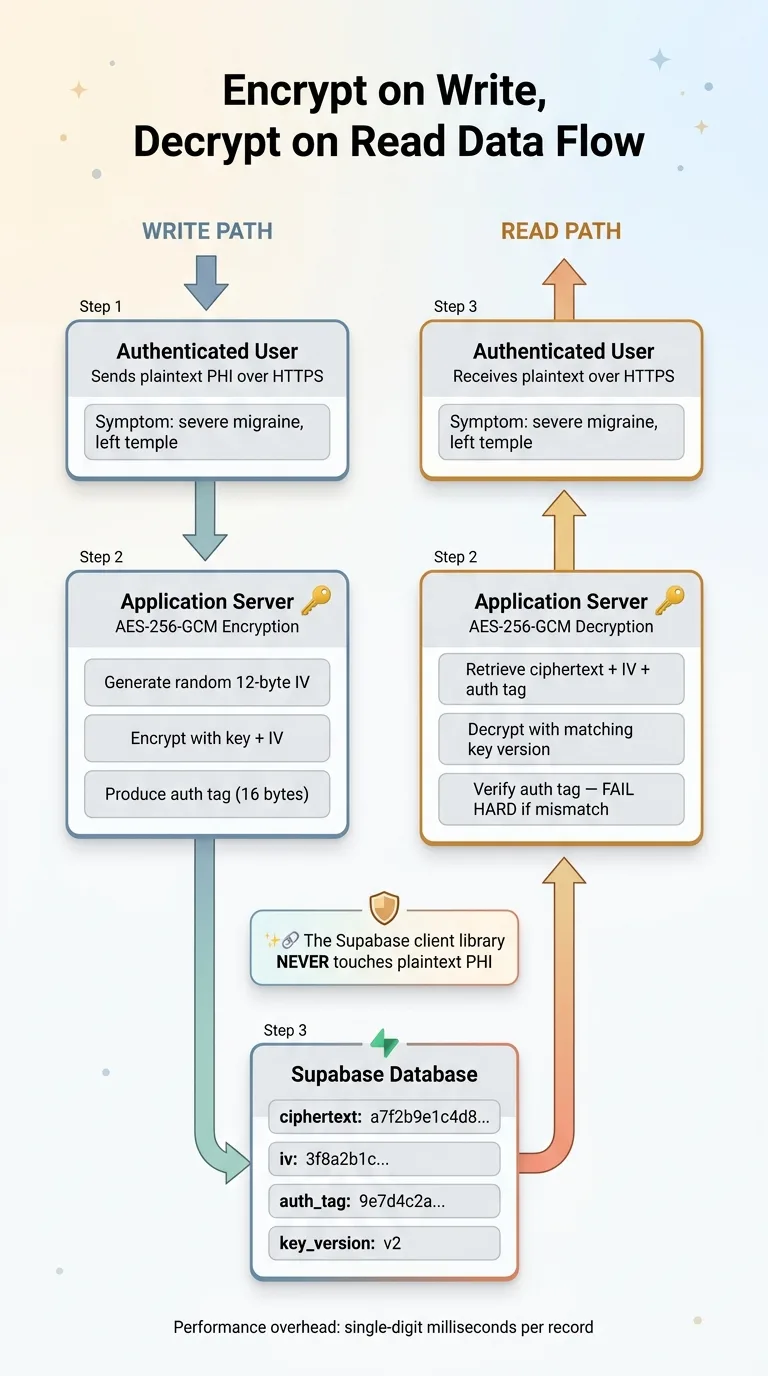 Encrypt on Write, Decrypt on Read Data Flow
On write: Serialize the PHI fields into a string. Generate a random initialization vector (IV). Encrypt using AES-256-GCM with the key and IV. Store the ciphertext, IV, and authentication tag in the database.
On read: Retrieve the ciphertext, IV, and auth tag. Decrypt using the same key and stored IV. Verify the authentication tag. If verification fails, reject the data — it's been tampered with.
The important piece: this encryption and decryption happens in your application server. The Supabase client library never touches plaintext PHI. Your API endpoint receives plaintext from the authenticated user, encrypts it, and sends ciphertext to Supabase. On the way back, it retrieves ciphertext from Supabase, decrypts it, and sends plaintext to the authenticated user over HTTPS.
Handling IVs and Authentication Tags
This is where GCM security gets non-negotiable: never reuse an IV with the same key. If you encrypt two different records with the same key and same IV, an attacker can XOR the ciphertexts together and recover both plaintexts. This is not theoretical — it's a well-documented attack.
I generate a cryptographically random 12-byte IV for every single encryption operation. Every record gets its own IV. The IV is stored alongside the ciphertext — it's not secret, it just needs to be unique.
The authentication tag (typically 16 bytes) gets stored alongside the ciphertext and IV as well. On decryption, GCM verifies this tag before returning the plaintext. If the tag doesn't match — meaning someone modified the ciphertext in the database — decryption throws an error. No silent corruption. No partial data. A hard failure that tells you something is wrong.
Performance overhead? Negligible. Encryption and decryption add single-digit milliseconds per record. For a health app processing dozens or even hundreds of records per session, the total overhead is imperceptible. The real cost is developer complexity, not compute.
RLS Is Necessary But Not Sufficient
I use Row-Level Security extensively in Supabase. I've written about it in detail in my row-level security playbook for Supabase. RLS is excellent at what it does. It just doesn't do what most people think it does for PHI protection.
What Row-Level Security Actually Protects Against
RLS ensures that when User A queries the database through the Supabase API, they only get their own rows. It's an access control mechanism at the database level, and it's effective for that purpose. Every table in my health app has RLS policies, and they're critical.
The Threat Model RLS Doesn't Cover
RLS does not protect against:
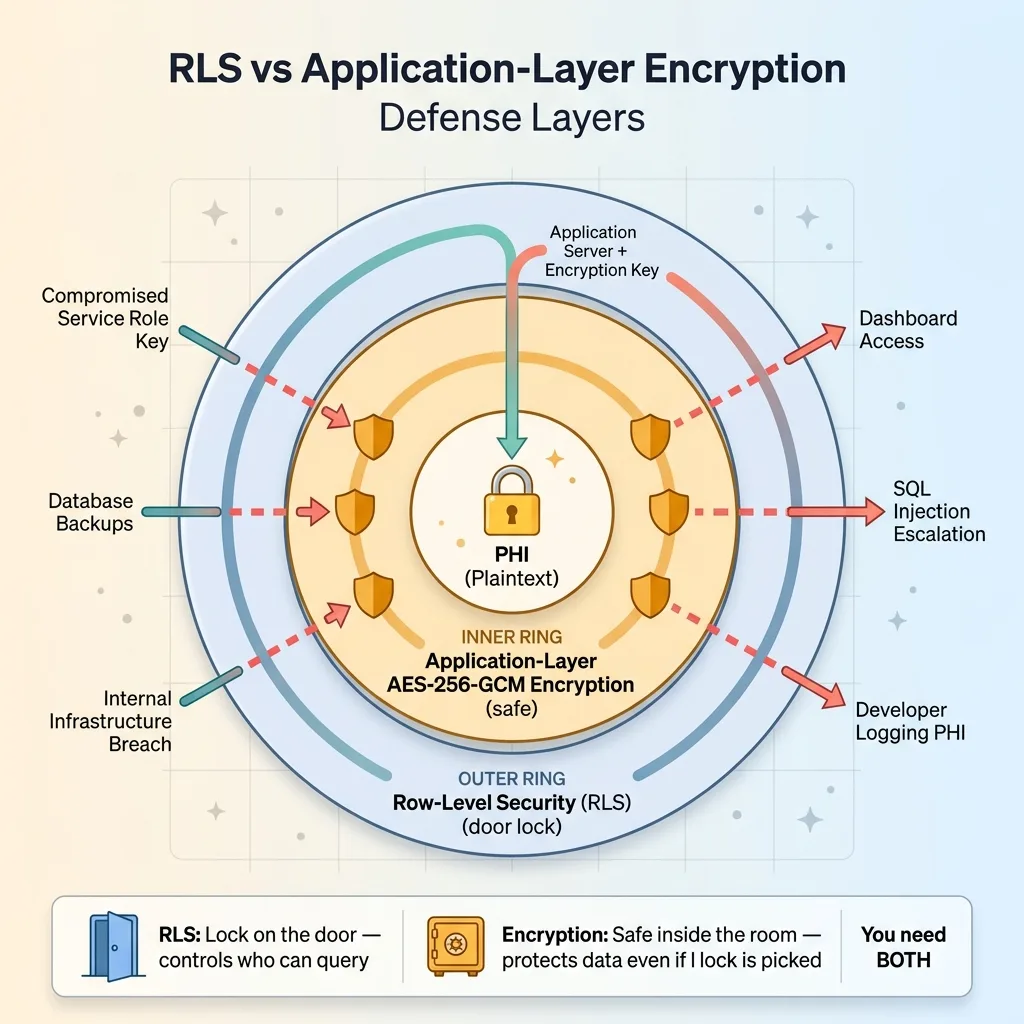 RLS vs Application-Layer Encryption Defense Layers
- A compromised service role key — service role bypasses RLS entirely by design
- Database backups being accessed by unauthorized personnel
- An internal breach at the infrastructure level
- SQL injection that escalates to a privileged role
- A developer accidentally logging PHI in plaintext from a query result
- Supabase dashboard access from a team member who shouldn't see patient data
Here's the analogy I use: RLS is the lock on the door. Application-layer encryption is the safe inside the room. If someone picks the lock — or has a master key — RLS is defeated. But the safe still holds. You want both.
With application-layer encryption, even a total RLS failure only exposes ciphertext. An attacker who bypasses every access control still needs the encryption key, which lives in your application server's environment, not in the database.
What I Encrypt (And What I Deliberately Don't)
This is the practical section that most encryption tutorials skip, and it's the one that matters most for building something that actually works.
The Searchability Tradeoff
You cannot run SQL queries against encrypted fields. No WHERE clauses. No full-text search. No aggregations. No ORDER BY. Ciphertext is opaque to the database engine. This means you have to make deliberate decisions about what gets encrypted and what stays queryable.
Encrypted Fields vs. Queryable Metadata
In my health app:
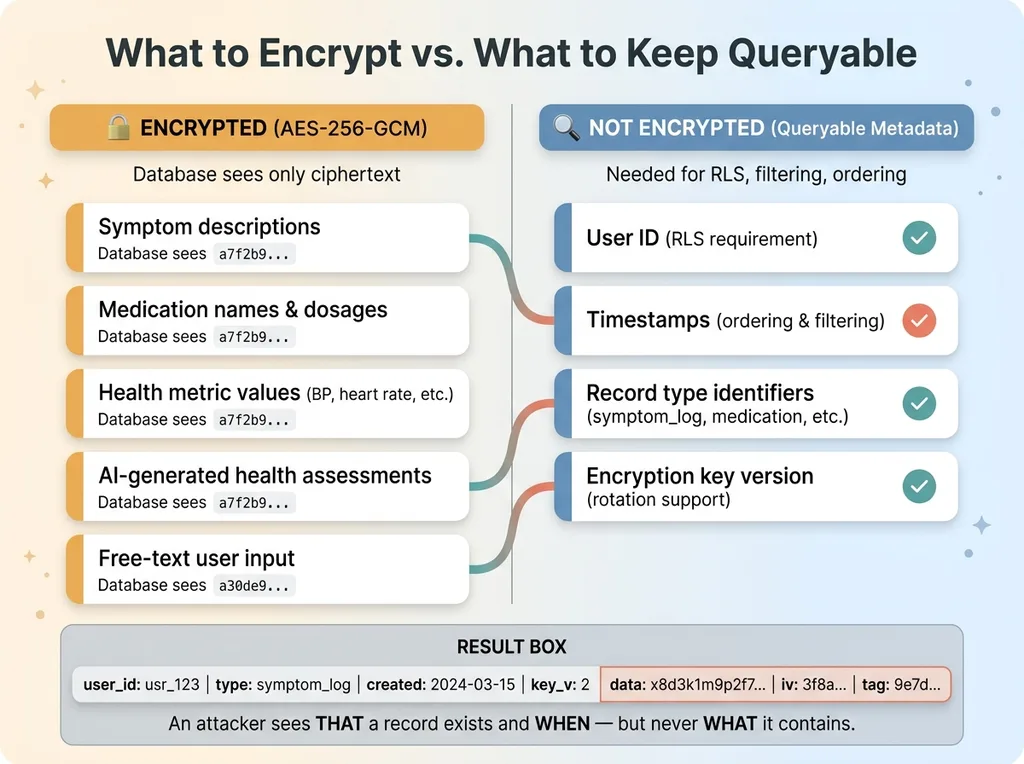 Encrypted vs Queryable Fields Decision Matrix
Encrypted: Symptom descriptions, medication names and dosages, health metric values (blood pressure, heart rate, etc.), AI-generated health assessments, any free-text input from the user.
Not encrypted: User ID (needed for RLS), timestamps (needed for ordering and filtering), record type identifiers (needed for filtering by category like "symptom" vs. "medication"), encryption key version (needed for key rotation).
This means someone with raw database access could see: "User X created a health record of type symptom_log at 2024-03-15T09:30:00Z." They could not see what the symptom was, how severe it was, or what the AI assessment said about it.
That's an acceptable tradeoff. The metadata reveals that a record exists and when it was created, but the substance of the health information — the actual PHI — remains encrypted.
For apps that need to search on encrypted fields, there are options: deterministic encryption (same plaintext always produces same ciphertext, enabling equality checks), blind indexes, or encrypted search indexes. Each adds significant complexity. For my use case, filtering by timestamp and record type was sufficient, so I didn't need to go there. If your app requires searching medication names across users, you'll need to evaluate those approaches carefully.
Testing Encryption: How to Verify You Haven't Left Gaps
Building encryption is half the job. Proving it works — and proving you haven't accidentally left plaintext PHI somewhere — is the other half.
The Database Dump Test
Export your entire Supabase database. Every table. Then search the dump for any known test PHI string in plaintext. A symptom description you entered. A medication name. An AI assessment phrase. If you find it anywhere — in any table, any column, any log — you have a gap.
I run this test after every schema change. It takes five minutes and catches mistakes that code review misses.
Common Mistakes That Leak PHI Despite Encryption
These are leaks I've either caught in my own code or seen in systems I've reviewed:
- Logging middleware that serializes request and response bodies. Your API receives plaintext from the user and returns plaintext to the user. If your logging intercepts these, PHI sits in plaintext in your log files.
- Error messages that include decrypted data. An exception handler that dumps the context will include whatever variables were in scope — including the plaintext you just decrypted.
- Client-side state persistence. If your frontend caches decrypted health records to localStorage or sessionStorage, you've moved PHI to a completely unencrypted location.
- Supabase Realtime subscriptions. If you're subscribing to changes on a table with encrypted fields, the Realtime payload contains whatever is in the database — which is ciphertext if you've done this right, but verify it.
Also: test that decryption fails hard when given a wrong key or tampered ciphertext. GCM's authentication tag should cause an explicit error, not silent corruption or partial output. If you can decrypt with the wrong key and get garbled output instead of an error, something is broken in your implementation.
Building Health Apps That Deserve the Data They Collect
Health data is the most sensitive category of personal information. The people using your app are trusting you with information they might not share with family members. The bar should be higher than "we signed a BAA."
The health app I built uses a multi-specialist AI medical team that processes this encrypted data. The AI agents decrypt what they need, process it, generate assessments, and the results get encrypted before storage. Every layer respects the encryption boundary. No PHI exists in plaintext outside of the brief moment it's being actively processed.
If you're building with health data — or any sensitive data — and your current approach is "Supabase has encryption at rest," that's a starting point, not a finish line. The finish line is application-layer encryption where the database never sees plaintext PHI, combined with proper key management, RLS, audit logging, and the discipline to test every layer.
This is the kind of security architecture I build into every system that handles sensitive data. If you're working on something similar and want to get the encryption right from the start, it's worth talking through the architecture before you've shipped plaintext PHI to production and have to retrofit everything.
Thinking About AI for Your Business?
If this resonated, I'd like to hear what you're building. I do free 30-minute discovery calls where we look at your current operations and figure out where AI — and proper security architecture — could actually make a difference.
Get AI insights for business leaders
Practical AI strategy from someone who built the systems — not just studied them. No spam, no fluff.
Hodgen.AI
Ready to automate your growth?
Book a free 30-minute strategy call with Hodgen.AI.
Book a Strategy Call