I shipped two AI-powered mobile apps in the same month. Both built with Expo SDK 55, both running real AI inference on every request, both needing to make money. The challenge of figuring out how to monetize an AI mobile app hit me twice, simultaneously, with two products that had completely different usage patterns.
The first is an AI nutrition scanner — I built it to solve my own problem of quickly analyzing food labels and barcodes. It's utility-based: scan, get results, move on. The second is a multi-specialist AI platform that gives consumers access to a team of AI specialists — finance, fitness, career, legal basics. That one is relationship-based: ongoing conversations where context compounds over time.
Here's the core tension that shaped every pricing decision. Apple takes 30% of in-app purchases. Stripe takes 2.9% + $0.30. And every single AI request costs me real money in inference. When your margins get squeezed from both sides — platform fees on revenue, model costs on delivery — pricing mistakes don't just hurt. They can make the entire business unviable.
The early numbers are modest and I'm going to share them honestly. We're talking hundreds of downloads, not thousands. Single-digit percentage conversion rates. Enough data to see patterns, not enough to call anything proven. But the architecture decisions I made in month one will determine whether these apps scale or collapse, and that's what's worth sharing.
The Pricing Model Decision: Subscriptions vs. Credits vs. One-Time
Why Subscriptions Work for AI Apps (And When They Don't)
AI apps have a cost structure that most traditional apps don't: every user interaction costs money. Not just server time — actual per-token inference costs that scale linearly with usage. This economic reality eliminates most pricing models before you even start.
Subscriptions align recurring costs with recurring revenue, which is why 90% of AI apps land here. You know roughly what a user costs you per month, and you price the subscription above that. Simple math.
But subscriptions have a brutal weakness: the "did I use it this week?" test. If someone doesn't open your AI app for five days, they start questioning the charge. For the multi-specialist platform, subscriptions made sense because the value compounds. Your AI specialists remember your financial goals, your fitness routine, your career context. Leaving means losing that accumulated intelligence. That creates natural retention.
For the nutrition scanner, subscriptions felt wrong. Nobody scans food labels every day. Usage is bursty — heavy during a diet push, dormant for weeks, then heavy again.
The Credit-Based Model I Almost Used
Credit-based pricing (buy 50 scans, use them whenever) matches the nutrition scanner's usage pattern perfectly. No monthly pressure, no guilt about not using it, and I'd only pay inference costs when credits are actually consumed.
I explored this seriously. The problem was implementation complexity for v1. RevenueCat handles consumable in-app purchases, but tracking credit balances, handling partial refunds, managing expiration — it added weeks of development for an unproven product. I shelved it for a future version and went with a low-cost subscription that includes generous daily limits.
I made a similar pricing decision when building a document signing SaaS — matching the monetization model to actual usage patterns rather than copying what competitors do. That principle held here too.
One-Time Purchases: Dead for AI, Alive for Features
One-time purchases don't work for AI-powered features because your costs never stop. But they work great for non-AI additions: premium themes, export formats, widget customizations. I kept a slot open in both apps for one-time cosmetic purchases that cost me nothing to deliver. They're not the revenue engine, but they're pure margin.
The specific tiers I landed on: the nutrition scanner runs $7.99/month or $59.99/year for unlimited scans. The multi-specialist platform is $12.99/month or $99.99/year. Annual pricing was a week-two addition that I should have included from day one.
RevenueCat + Expo SDK 55: The Integration That Actually Works
Why RevenueCat Instead of Raw StoreKit/Billing
I'll save you the pain I've watched other developers endure. Raw StoreKit 2 on iOS and Google Play Billing Library on Android are two completely different systems with different receipt formats, different validation flows, and different edge cases that will consume weeks of your life.
Receipt validation alone — confirming that a purchase is legitimate and not a replayed or forged receipt — is a security-critical system that you need to get perfect. RevenueCat handles both platforms behind a single SDK, gives you one webhook endpoint for all subscription lifecycle events, manages restore purchases across devices, and tracks subscription status server-side. The SDK cost ($0 up to $2,500 monthly tracked revenue, then percentage-based) is trivial compared to the engineering time it saves.
With Expo SDK 55 specifically, the integration is clean. Install react-native-purchases, configure it with your API keys in app.json, and you're calling RevenueCat's APIs within an hour.
Setting Up Offerings and Entitlements
The mental model matters here. RevenueCat uses three layers: Products (the actual SKUs in App Store Connect and Google Play Console), Offerings (groups of products presented together — your "pricing page"), and Entitlements (what the user gets access to — "pro" or "premium").
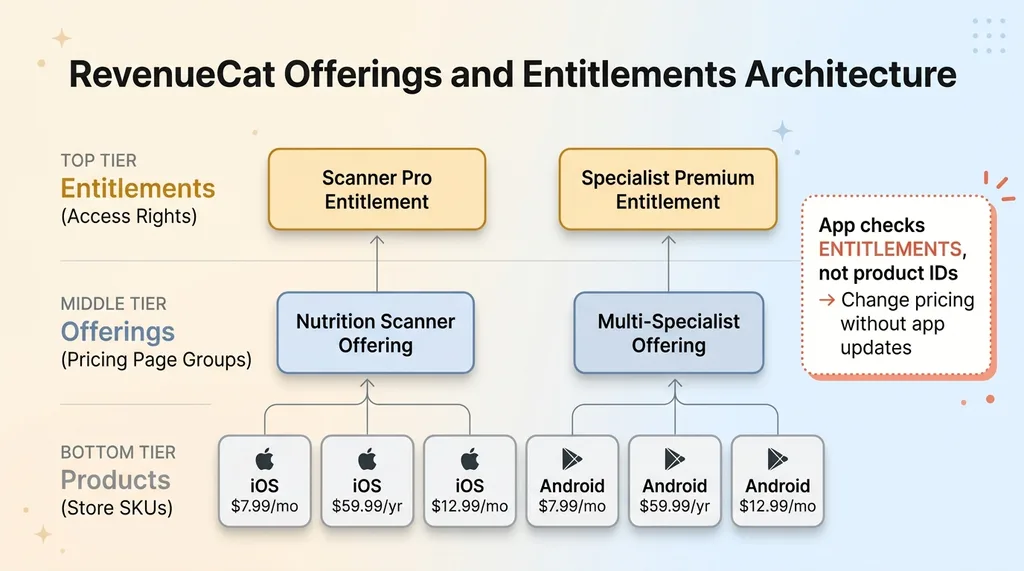 RevenueCat Offerings and Entitlements Architecture
I created products in both stores first. This is the most tedious part — Apple's App Store Connect interface for in-app purchases is slow and requires you to submit for review separately from the app itself. Google Play Console is marginally better. Map those products to a RevenueCat Offering, attach the offering to an Entitlement, and your app checks entitlements rather than specific product IDs. This abstraction means you can change pricing, add tiers, or run A/B tests without shipping app updates.
Gotchas I hit: iOS sandbox testing is unreliable — purchases sometimes take 30+ seconds to register, and sandbox subscriptions auto-renew on compressed timelines (monthly subs renew every 5 minutes) which creates confusion if you're not expecting it. Also, there's a real delay between a purchase completing on-device and the webhook firing to your server. Design for eventual consistency, not instant confirmation.
The Paywall UI That Converts
I built a custom paywall instead of using RevenueCat's templates. AI apps need to communicate value differently than a photo editor or weather app. The paywall screen for the multi-specialist platform shows the specific specialists you're getting access to, sample conversations, and — critically — a reminder of the context your free-tier conversations have already built. "Your AI team already knows your goals. Keep the relationship going."
The conversion logic: the free tier gives you enough to experience real value (more on that below), the paywall triggers when you hit the limit, and the upgrade screen shows exactly what changes. No vague "unlock premium" — specific numbers. "Unlimited messages. All 8 specialists. Priority response speed."
Paywall-to-purchase conversion is sitting around 6-8% right now across both apps. Not exceptional, not terrible. Early days.
Stripe for Web: Bypassing the 30% Apple Tax
When Web Payments Make Sense
Here's the math that keeps AI app developers up at night. A $12.99/month subscription on iOS nets you $9.09 after Apple's 30% cut. If your inference costs for an active user run $3-5/month, you're left with $4-6 before server costs, storage, and everything else. That's thin.
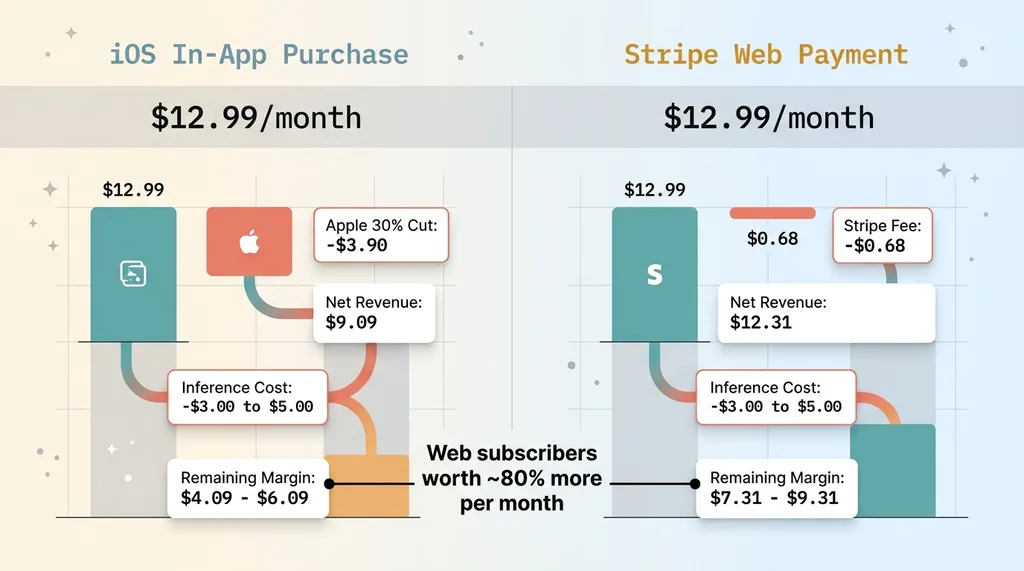 Apple Tax vs Stripe Margin Comparison
The same subscription through Stripe on web costs you $0.68 in processing fees. You keep $12.31. That's not a small difference — it's the difference between a viable business and a charity project.
The multi-specialist platform has a web version where users can subscribe via Stripe at the same price. I chose not to offer a discount on web (some developers do) because I didn't want to train users to avoid the App Store. The margin difference alone is enough motivation on my side.
The Legal Line You Can't Cross (And the One You Can)
This is where developers get nervous, so let me be precise. You cannot tell users inside your iOS app to go to your website to subscribe. Apple will reject your app. You cannot include a link, a button, a QR code, or even text suggesting a cheaper alternative exists on the web. Since the Epic v. Apple ruling and the changes Apple made in response, there's been some loosening here — but the rules shift and enforcement is inconsistent. Don't bet your app approval on regulatory changes.
What you can do: have a website that independently offers subscriptions. If a user finds your site through Google, social media, or any non-app channel, they can subscribe there. That's just normal business.
The technical sync works like this: the user authenticates with the same account on web and mobile. My server checks both RevenueCat (for App Store/Play Store subscriptions) and Stripe (for web subscriptions) when determining access. If either source shows an active entitlement, the user gets full access everywhere. RevenueCat's REST API lets you grant entitlements manually, so a Stripe webhook can update a user's RevenueCat profile, keeping everything in sync.
Gating AI Features Behind Entitlements Without Killing the Experience
The Free Tier That Hooks Without Hemorrhaging Money
This is the decision that determines everything downstream. Give away too much and inference costs eat you alive. Gate too aggressively and nobody experiences enough value to convert.
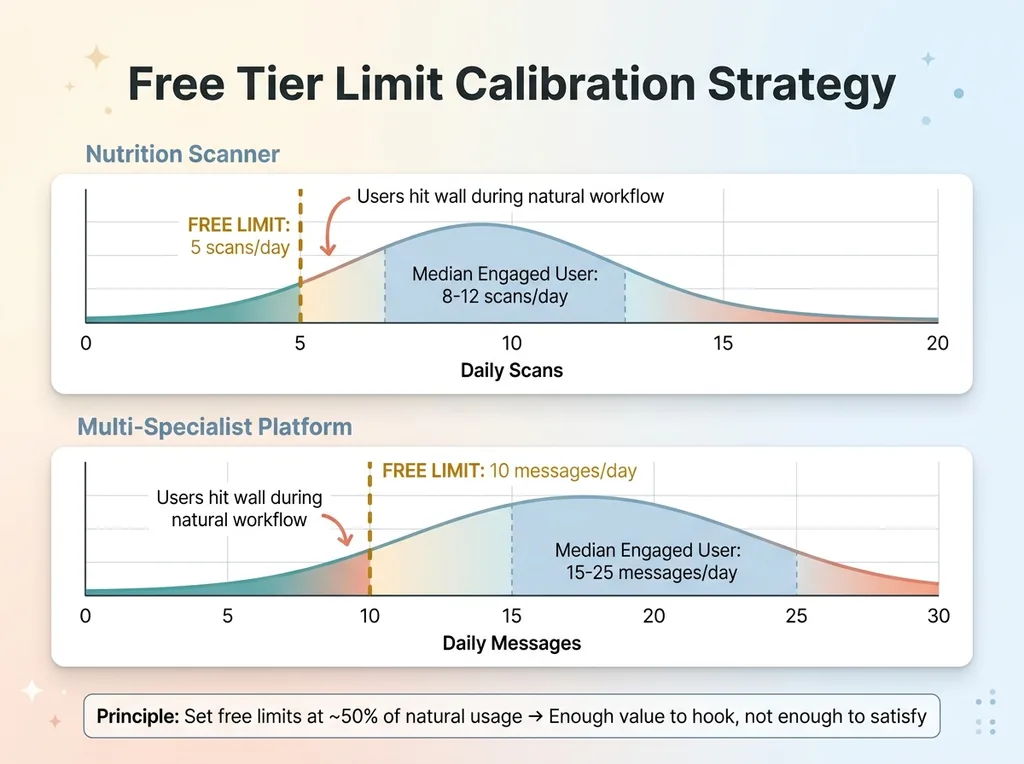 Free Tier Limit Calibration Strategy
The nutrition scanner gets 5 free scans per day. That's enough to try it during one meal — scan a couple products, see the AI analysis, understand what you're getting. It's not enough to use as your daily nutrition tool. The multi-specialist platform gets 10 free messages per day spread across all specialists. Enough to have one meaningful conversation, not enough to get deep help across multiple domains.
These numbers weren't arbitrary. I watched the first 200 users for a week before setting them. Median daily usage for engaged users was 8-12 scans and 15-25 messages. Setting the free limits at roughly half the natural usage point means free users consistently hit the wall during their natural workflow — not before they've gotten value, and not so far after that they feel no urgency.
Server-Side Entitlement Checks for AI Endpoints
Never trust the client to enforce usage limits. A modified app binary can bypass any client-side check, and someone running your inference endpoints without paying will cost you real money on every request.
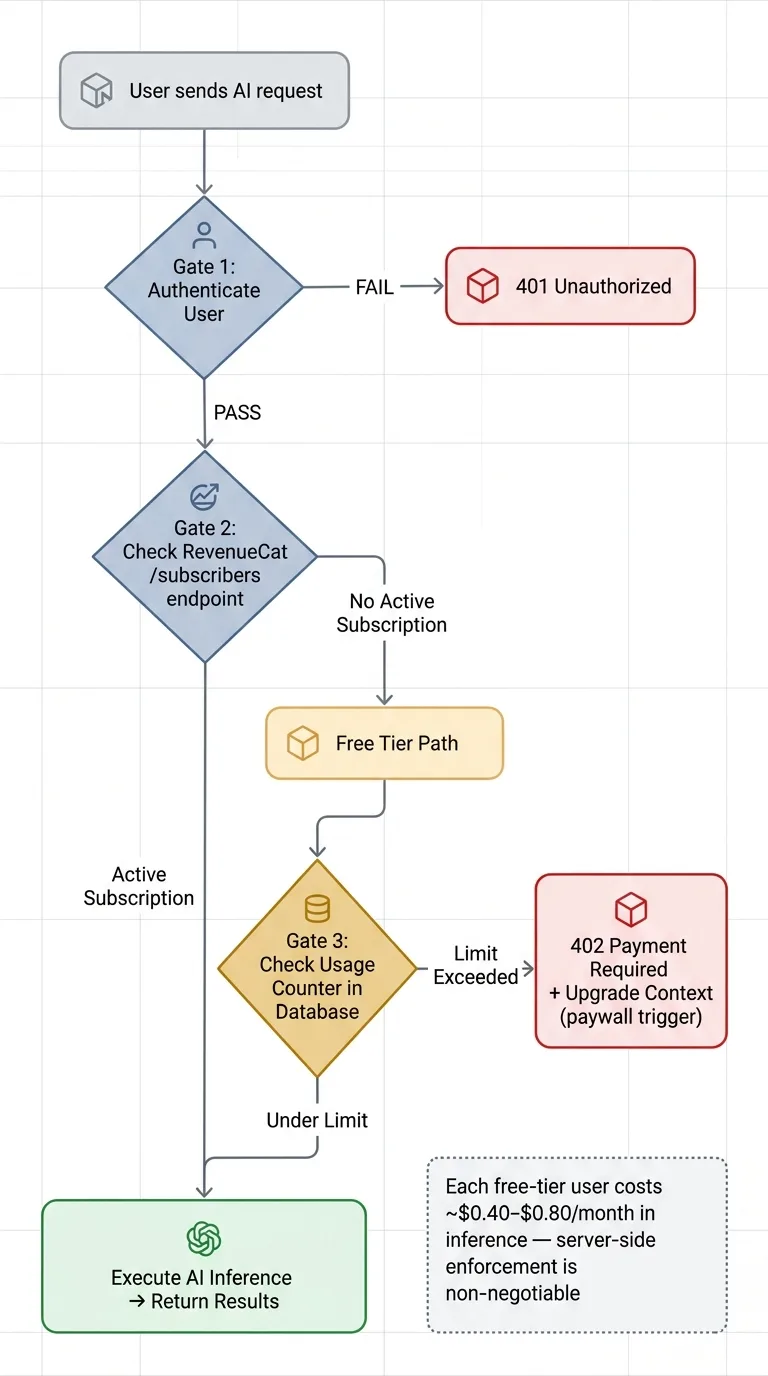 Server-Side Entitlement Gating Flow
Every AI endpoint in both apps follows this middleware pattern: authenticate the user, call RevenueCat's /subscribers endpoint to verify subscription status, check the usage counter in the database for free-tier users, and return a 402 Payment Required with upgrade context if limits are exceeded. The AI inference call only happens after all three gates pass.
At my current inference costs, each free-tier user costs roughly $0.40-0.80 per month depending on engagement. That's my effective customer acquisition cost. With a 6-8% conversion rate and $8-13/month subscription revenue, the math works — but only if free-tier limits hold server-side.
Early Revenue Data and What I'd Change
The Numbers So Far
Both apps have been live for about five weeks. Combined: roughly 800 downloads, 7.2% free-to-paid conversion rate, $8.40 average revenue per paying user per month, 22% seven-day churn rate on monthly subscribers, 8% thirty-day churn on annual subscribers. iOS subscribers outnumber web subscribers about 4:1, which tells me my web acquisition channels need work — the margin difference makes every web subscriber significantly more valuable.
These are honest early-stage numbers. They're not impressive at scale. But the per-unit economics work, and that's what matters at this stage.
Three Mistakes I Made
I launched the paywall too late in the user journey. Initially, users hit the limit and saw the paywall only after extensive free usage. They'd built a habit of "this is free" and resisted paying. Moving the paywall trigger earlier — letting users hit it on day one rather than day three — actually improved conversion by about 40%. Counterintuitive, but early friction sets the expectation that this costs money.
I underpriced the initial tier. The nutrition scanner launched at $4.99/month. At that price, heavy users (15+ scans daily) cost me more in inference than they paid. I raised it to $7.99 with zero measurable impact on conversion rate. If raising your price doesn't reduce conversions, you were leaving money on the table.
I didn't include annual pricing from day one. Annual plans dramatically reduce churn because users self-select for commitment. RevenueCat makes offering them trivial. I added annual options in week two, and they now represent about 35% of new subscriptions. That's 35% of new users I'm not fighting to retain monthly.
The Revenue Architecture AI Apps Actually Need
Monetizing an AI mobile app is a fundamentally different problem than monetizing a traditional app. You have per-request costs that scale with usage, platform fees that compress margins from the top, and users who expect the magic of AI to be free because ChatGPT trained them that way.
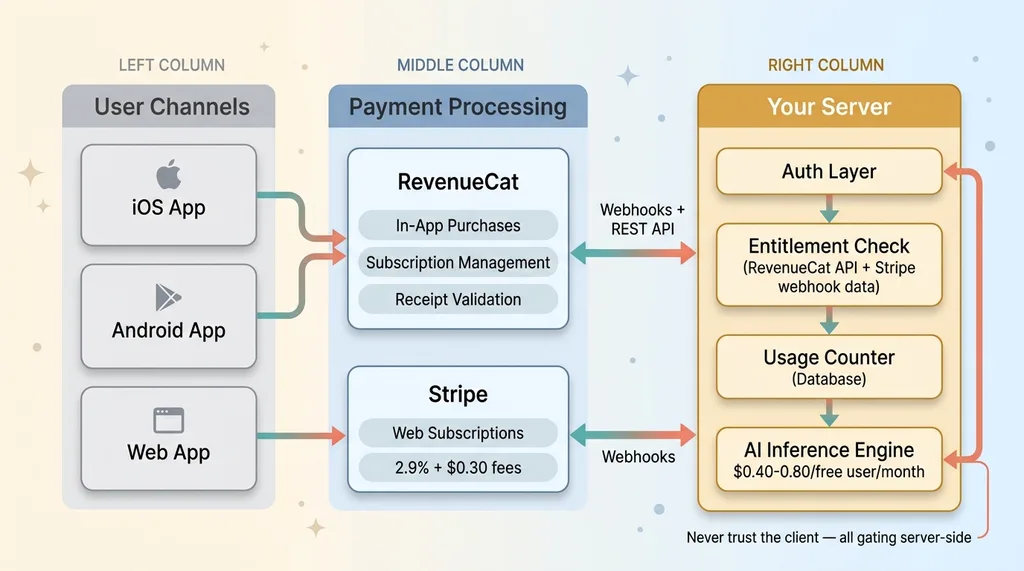 Full Revenue Architecture for AI Mobile Apps
The architecture that works: RevenueCat for mobile in-app purchases across iOS and Android, Stripe for web subscriptions at dramatically better margins, server-side entitlement gating that never trusts the client, usage-based free tiers calibrated against actual inference costs, and pricing that leaves room for margin after both Apple's cut and model costs. Skip any one of these pieces and the business math breaks.
This same thinking — matching revenue architecture to real economic constraints — applies to any AI-powered product, not just consumer apps. SaaS platforms with AI features, internal tools with usage-based costs, B2B products where inference scales with customer size. The pattern is the same.
If you're building an AI product and the monetization math doesn't add up yet, that's not a sign to give up. It's a sign your revenue architecture needs work. These are solvable engineering and pricing problems, and I solve them — both in my own products and for clients.
Get the next build note.
I write up each system I build, including what broke. Subscribe to my newsletter and I'll send you the next one.