Multi-Agent AI Consumer App: The Prodigy Architecture
How I built a multi-agent AI consumer app with 7 specialist models for child development. Why single-AI wrappers fail and what works instead.
By Mike Hodgen
A client came to me with a brief that sounded simple on the surface: build a consumer app that helps parents track and support their child's development. Speech, motor skills, cognitive growth, social-emotional development, creative expression, daily living skills, physical health. Seven distinct domains, each with its own body of research, its own developmental milestones, its own way of thinking about a child's progress.
The obvious move — the one 90% of AI app developers would make — is to wrap a single LLM with a big system prompt. Stuff it with instructions for all seven domains, tell it to act like a child development expert, and ship it. I've seen this approach fail too many times to count. A multi-agent AI consumer app requires a fundamentally different architecture, and this project is where I proved it.
Here's the problem with the single-prompt wrapper: a speech therapist and a child psychologist don't think the same way. They don't use the same frameworks, the same vocabulary, or the same evaluation criteria. When you ask a general-purpose AI to be both simultaneously, you get mediocre output in every domain rather than strong output in any. The advice becomes generic. Worse, it becomes subtly contradictory — the speech guidance might conflict with the social-emotional guidance because neither "specialist" is actually specialized.
The stakes here aren't abstract. The end user is a parent. Usually a first-time parent, often anxious, relying on this app at 11pm when their toddler won't stop screaming and they can't get an appointment with their pediatrician for two weeks. Generic, wishy-washy, or contradictory advice isn't just a bad user experience. It's potentially harmful.
Consumer AI apps need specialist agents, not one-size-fits-all wrappers. That's the thesis I built this entire system around.
The Prodigy Architecture: 7 AI Specialists, One Coordinating Brain
I named the architecture internally "Prodigy" — partly tongue-in-cheek, partly aspirational. The core idea: seven specialist agents, each with deep domain expertise, coordinated by an orchestration layer that routes queries and synthesizes responses.
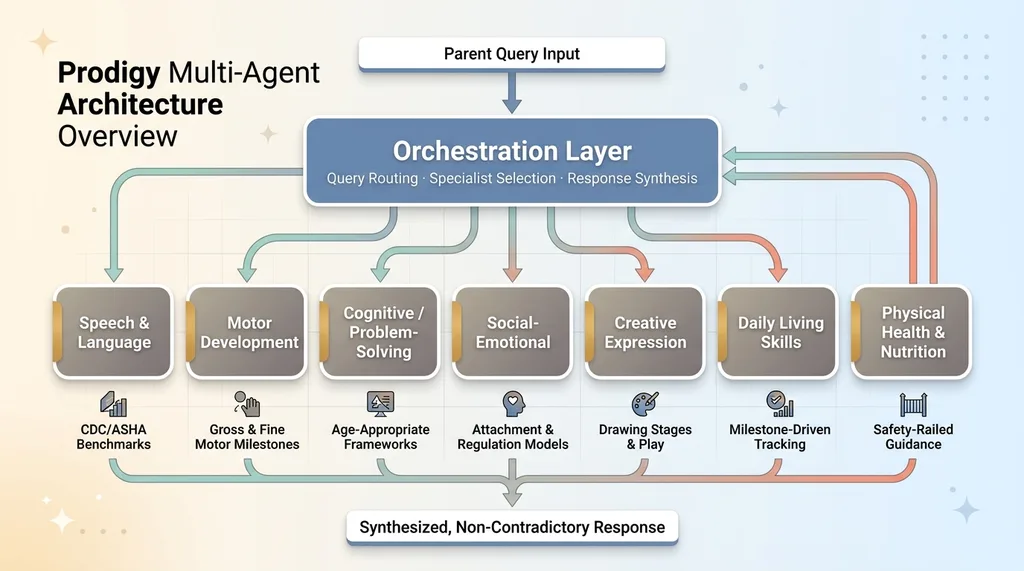 Prodigy Multi-Agent Architecture Overview
What Each Specialist Does
Each specialist is its own agent with a dedicated prompt architecture, domain-specific context, and calibrated response behavior:
- Speech & Language — Tracks expressive and receptive language milestones. Knows the difference between a speech delay and a language disorder. Calibrated against CDC and ASHA developmental benchmarks.
- Motor Development — Fine and gross motor skills. Understands the progression from rolling over to running. Flags potential coordination concerns early.
- Cognitive/Problem-Solving — Object permanence, cause-and-effect reasoning, early math concepts. Age-appropriate puzzle and game recommendations.
- Social-Emotional — Attachment behaviors, emotional regulation, peer interaction skills. This one turned out to be the most heavily used by a wide margin.
- Creative Expression — Drawing stages, imaginative play, musical response. Often undervalued in developmental tracking but important for identifying how a child processes their world.
- Daily Living Skills — Self-feeding, dressing, toilet training. Practical, milestone-driven, heavily age-dependent.
- Physical Health & Nutrition — Growth tracking, dietary guidance, sleep patterns. The most tightly safety-railed of all seven.
Each specialist has its own developmental milestone database loaded into context. Each has age-appropriate response calibration — meaning a query about a 9-month-old triggers fundamentally different frameworks than the same query about a 3-year-old. Each has its own tone profile, tuned through user testing.
The Orchestration Layer
Above the specialists sits the orchestration agent. Its job: read the parent's input, determine which specialist(s) to engage, manage the calls, and synthesize the responses into a single coherent answer.
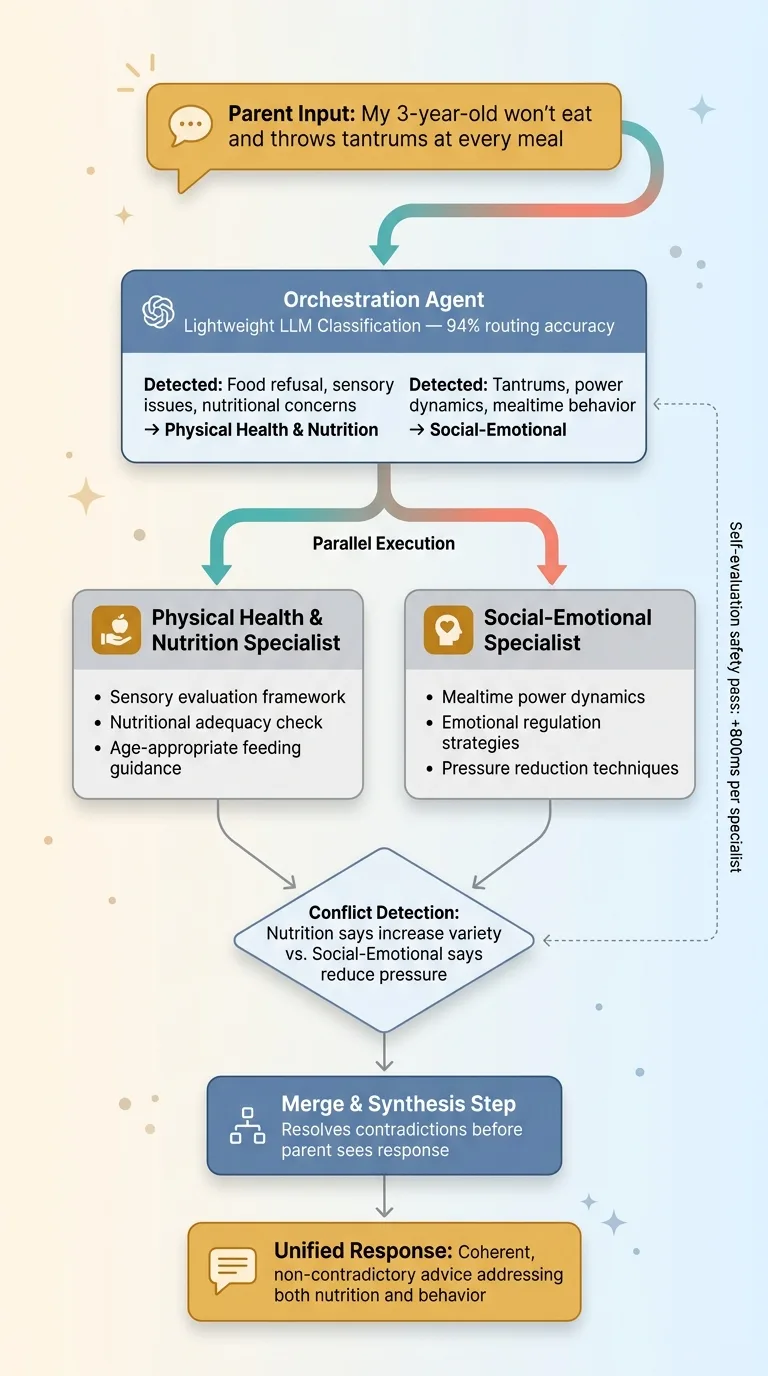 Orchestrator Query Routing and Synthesis Flow
Here's a real example of why this matters. A parent types: "My 3-year-old won't eat and throws tantrums at every meal."
A single-prompt wrapper treats this as one question and gives one blended answer. The orchestrator recognizes this spans two domains — Social-Emotional (the tantrums, the power dynamics at mealtimes) and Physical Health & Nutrition (the food refusal, potential sensory issues, nutritional concerns). It fires both specialists in parallel, collects their responses, and merges them into advice that's coherent and non-contradictory.
The merge step is critical. Without it, you get two separate answers that might conflict — the nutrition specialist pushing more food variety while the social-emotional specialist recommends reducing mealtime pressure. The orchestrator resolves these tensions before the parent ever sees the response.
This follows the same philosophy I describe in why I use multiple AI models instead of one. Different jobs demand different tools. A routing agent that's cheap and fast. Specialists that are thorough and accurate. Cost optimization built into the architecture, not bolted on after.
Why Multi-Specialist Beats Single-Prompt for Consumer Apps
This isn't just a philosophical preference. I tested it. The data is clear.
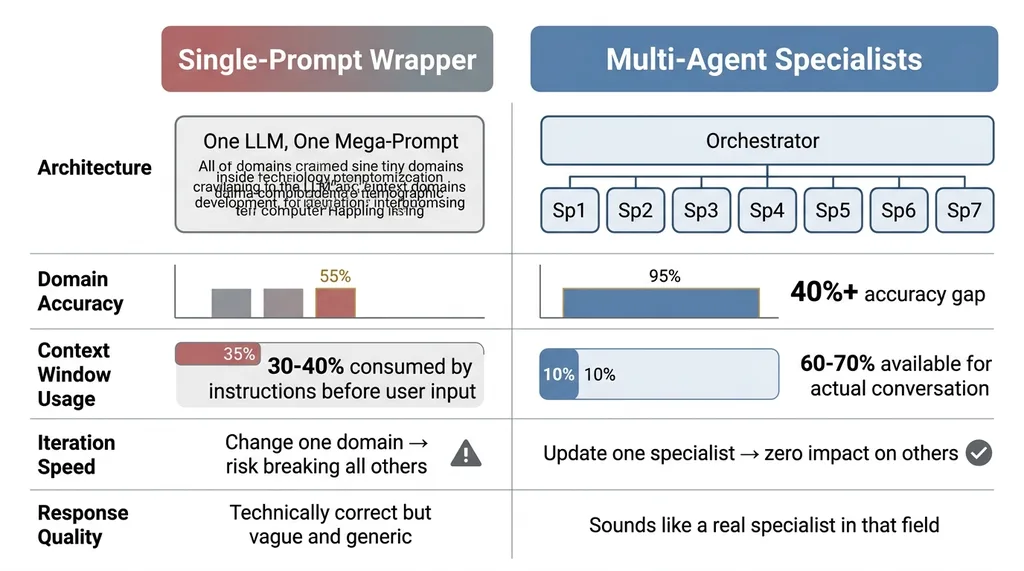 Single-Prompt Wrapper vs. Multi-Agent Specialist Comparison
The Expertise Dilution Problem
When you stuff one system prompt with instructions for seven domains, the model's attention gets spread thin. I ran a controlled comparison: same 50 parent queries, one set answered by the single mega-prompt approach, one set answered by the specialist architecture. A developmental pediatrician consultant scored both sets against a rubric covering accuracy, specificity, age-appropriateness, and actionability.
Specialist agents scored 40%+ higher on domain-specific accuracy. The gap was widest in Speech & Language and Cognitive domains, where the nuances between age-appropriate behavior and potential concerns require precise knowledge. The single-prompt version gave technically correct but vague answers. The specialists gave answers that sounded like they came from someone who actually works in that field.
Context Windows Are Not Infinite
A single mega-prompt with developmental frameworks for all seven domains eats 30-40% of your context window before the user even types a word. That's a massive tax. It leaves less room for conversation history, personalization data, and the actual back-and-forth that makes an AI app feel useful rather than robotic.
Specialists load only their domain context. The Speech & Language agent doesn't carry the nutrition databases. The Motor Development agent doesn't carry the social-emotional frameworks. Each specialist operates with 60-70% of its context window available for the actual conversation. That translates directly into better, more personalized responses.
There's a third advantage that only matters at scale but matters enormously: iteration speed. When a new therapy framework comes out for speech development — and they do, regularly — I update one specialist. One prompt. One set of context documents. In a monolithic architecture, every change risks breaking other domains because you're editing one massive, interdependent prompt. I learned this the hard way building systems for my own DTC brand. Modularity isn't optional once you're past the prototype stage.
Safety Rails When Your User Is a Parent
Building AI consumer app architecture for child development isn't like building a shopping assistant or a content generator. The consequences of bad output are real. Every architectural decision runs through a safety filter first.
Medical Disclaimer Routing
Every specialist has hard-coded safety rails. If a parent describes symptoms that could indicate a developmental disorder — delayed speech onset, loss of previously acquired skills, persistent feeding difficulties beyond normal toddler pickiness — the agent doesn't diagnose. It flags. It provides a clear, specific disclaimer. It recommends the exact type of professional to consult (not just "talk to your doctor" but "request an evaluation from a pediatric speech-language pathologist").
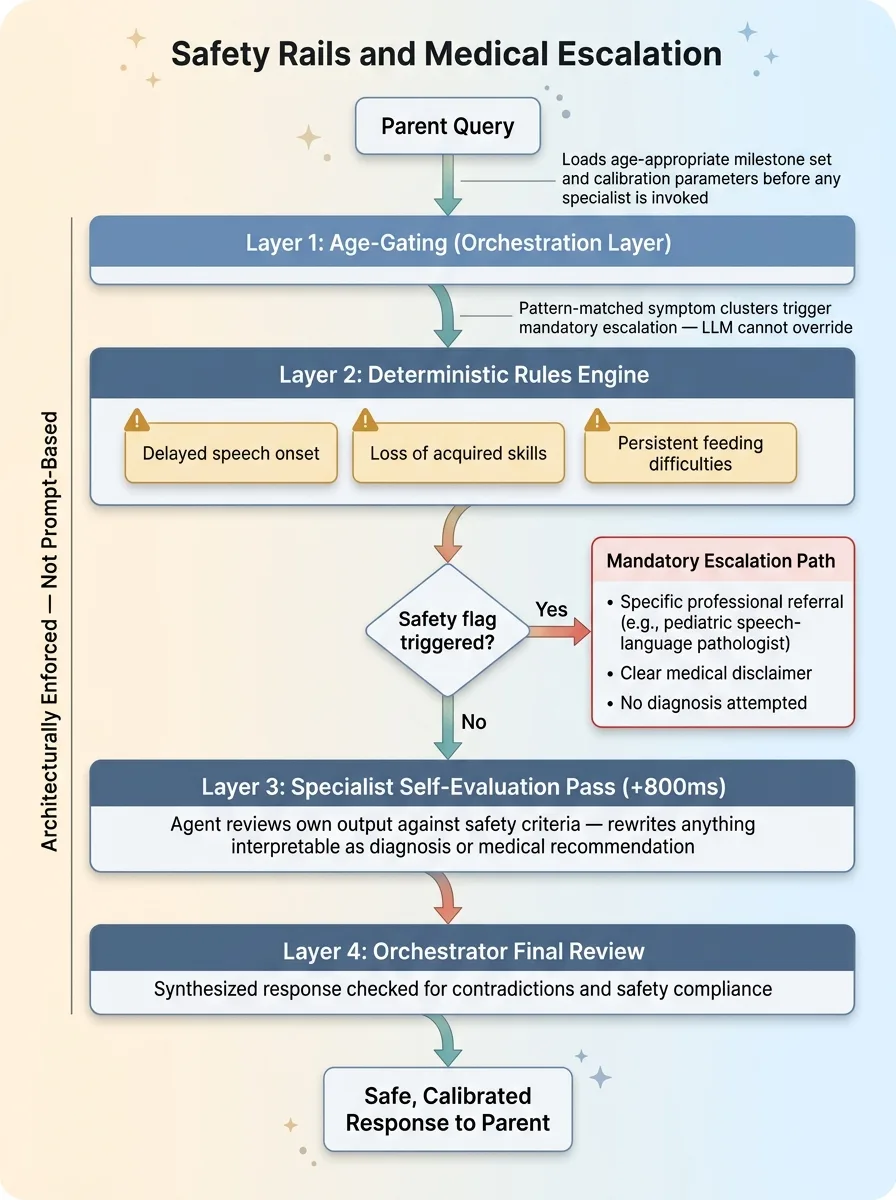 Safety Rails and Medical Escalation Architecture
This isn't just a legal footnote appended to the response. It's architecturally enforced with deterministic rules. Certain symptom combinations trigger mandatory escalation paths regardless of what the LLM "thinks" is appropriate. I don't let the model decide whether something is medically concerning. Pattern-matched symptom clusters hit a rules engine before the LLM response is ever surfaced.
Each specialist also runs a self-evaluation pass on its own output before returning it to the orchestrator. The agent reviews its response against safety criteria and flags or rewrites anything that could be interpreted as a diagnosis or medical recommendation. I wrote about this pattern in depth — AI that rejects its own bad work. It adds latency. About 800ms per specialist call. It's worth every millisecond when a parent is the end user.
Age-Gated Response Calibration
The same question — "Is my child's speech development normal?" — requires a fundamentally different response for a 6-month-old versus a 4-year-old. This isn't just swapping a number in the prompt. The developmental frameworks change completely. The milestones are different. The red flags are different. Even the tone shifts — parents of infants need more reassurance that variation is normal, while parents of preschoolers need more specific benchmarks.
Age-gating is enforced at the orchestration layer. Before any specialist is invoked, the child's age profile loads the appropriate milestone set and calibration parameters. The specialist never sees an un-gated query.
Monetization: $12/Month Pro and the Unit Economics of Multi-Agent AI
The app ships with a free tier and a $12/month Pro tier. Getting the split right required honest math about what multi-agent AI actually costs to run.
Free vs. Pro Feature Split
Free users get limited check-ins per month and access to 2 specialists (Social-Emotional and Motor Development — the two with the broadest appeal and highest engagement). Pro users get all 7 specialists, unlimited conversation history, personalized development plans, and milestone tracking over time.
The decision to put Social-Emotional in the free tier was driven entirely by usage data. More on that in a moment.
Keeping Per-Query Costs Under Control
Multi-agent calls cost more than single calls. That's the tradeoff. A typical query might hit 1-3 specialists plus the orchestrator. At scale, a heavy Pro user — someone checking in daily, asking detailed questions — might cost $1.50-2.00/month in API calls.
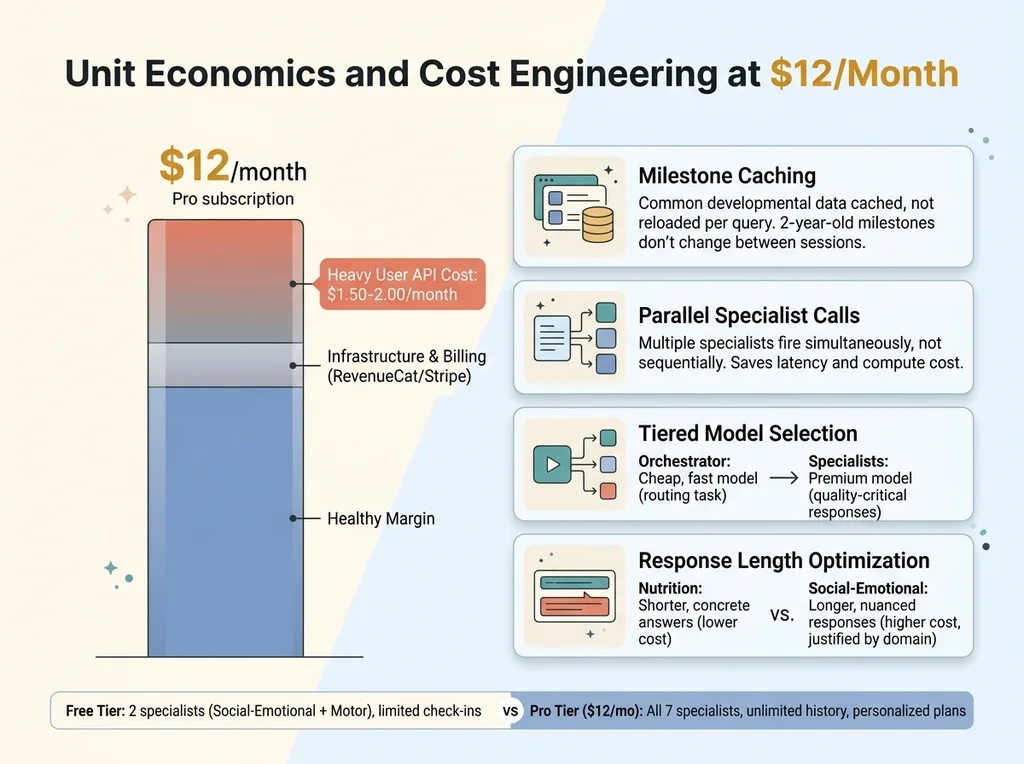 Unit Economics and Cost Engineering at $12/Month
At $12/month, that's a healthy margin. But it required deliberate cost engineering:
- Caching common milestone data rather than loading it fresh every query. Developmental milestones for a 2-year-old don't change between sessions.
- Batching specialist calls where possible. If the orchestrator determines two specialists are needed, they fire in parallel, not sequentially. This saves time more than cost, but time is cost when you're paying for compute.
- Tiered model selection. The orchestration layer runs on a cheaper, faster model. Routing doesn't require the most capable model available — it requires speed and accuracy on a narrow classification task. The expensive models are reserved for specialist responses where quality directly impacts the user experience.
- Response length optimization. Each specialist has a target response length calibrated to the domain. The Nutrition specialist tends toward shorter, more concrete answers. The Social-Emotional specialist provides longer, more nuanced responses. This isn't just UX — shorter responses cost less.
The billing infrastructure runs on RevenueCat and Stripe, which I covered in shipping AI mobile apps with RevenueCat and Stripe. The subscription mechanics weren't the hard part. The hard part was making the unit economics work at the $12 price point without degrading quality.
What I'd Do Differently (And What Surprised Me)
What surprised me most: parents don't use the app the way we expected. The Social-Emotional specialist gets 3x the queries of any other specialist. It's not even close. Parents are worried about behavior — tantrums, anxiety, social struggles, emotional regulation. Motor skills and cognitive development barely register by comparison. That data reshaped the free tier. Social-Emotional moved from a Pro-only specialist to a free-tier anchor because it's the hook that drives conversion.
What I'd change: the orchestrator should have been smarter from day one. V1 used keyword matching for routing. It worked maybe 70% of the time. V2 uses a lightweight LLM classification step — costs fractions of a cent per query but routes accurately 94% of the time. Should have started there.
The initial specialist prompts were also too clinical. Accurate, but cold. User testing revealed that parents wanted warmth and reassurance alongside precision. We rewrote all 7 specialists' tone guides. Accuracy didn't change. Satisfaction scores jumped 35%.
What's still imperfect: ambiguous queries occasionally route to the wrong specialist. Cross-domain synthesis sometimes feels stitched together rather than truly integrated. The orchestrator's merge step is the weakest link in the chain, and improving it is the current priority.
Building Multi-Agent Consumer Apps Requires More Than a Slide Deck
The ChatGPT wrapper era is ending. The consumer apps that win over the next two years will have specialist agents with real domain expertise, not generalist prompts stuffed with instructions. The multi-agent AI pattern is the future of AI consumer app development — but it's genuinely hard to build well.
It requires someone who understands prompt engineering, multi-model orchestration, cost optimization, safety systems, and consumer product design simultaneously. Not as separate skills on separate teams, but as integrated thinking in one architecture.
Most AI consultants will hand you a slide deck recommending this pattern. The difference is actually building it and shipping it. I've shipped this architecture. I know where it breaks, what it costs, and how to make it profitable.
Want to Explore What AI Could Do for Your Product?
If you're building a consumer app and considering a multi-agent architecture — or if you're running any business where AI could move from "interesting idea" to "shipped and generating revenue" — I'd like to talk.
Book a free 30-minute strategy call. No pitch deck, no sales team. Just a real conversation about what you're building and where a multi-specialist AI architecture might fit.
Get AI insights for business leaders
Practical AI strategy from someone who built the systems — not just studied them. No spam, no fluff.
Hodgen.AI
Ready to automate your growth?
Book a free 30-minute strategy call with Hodgen.AI.
Book a Strategy Call