My production team works standing up. They're cutting fabric, running sewing machines, pressing seams, doing quality checks on handmade fashion products in our San Diego workshop. Nobody — and I mean nobody — is going to stop mid-seam, wash their hands, open a laptop, log into a SaaS dashboard, click through three navigation menus, and update a purchase order status. It just doesn't happen.
So information goes stale. Updates get tossed into text threads that scroll past and get buried. I'd ask about fabric delivery status and get three different answers depending on who I caught and when. I was flying blind on production, and the tools I was paying for were designed for people sitting at desks.
Here's the thing most software companies don't acknowledge: the majority of the world's actual work happens standing up. Warehouses, factory floors, kitchens, construction sites, medical offices, retail floors. The people doing the work are the last ones to benefit from the systems built to track it.
That disconnect is why I built an AI manufacturing chatbot on Telegram. It lets me — and eventually my whole team — manage production operations through conversation. No login, no navigation, no laptop required. Just type a message, get an answer, take an action. From anywhere, including the factory floor.
What the AI Manufacturing Chatbot Actually Does
This isn't a notification bot that pings me when something happens. It's a two-way operational interface. I talk to it, it talks back, and things actually change in our production systems. It's part of the 14-skill AI platform that runs my ecommerce brand — a layer I call Cortex that sits on top of all our backend systems.
Three core capabilities are live right now.
Purchase Order Management
I can create, update, and query purchase orders in natural language. No forms, no dropdowns, no save buttons.
If I type "Show me open POs for linen", I get a formatted summary: PO numbers, supplier names, quantities, expected delivery dates, current status. If I type "Mark PO-2847 as received", the system updates the PO status, logs the timestamp, and confirms back in the same thread.
Need to create a new order? "Create PO for 50 yards natural linen from Pacific Textiles, expected June 15" does it. The bot parses out the supplier, material, quantity, and date, creates the record, and asks me to confirm before committing. One message in, one confirmation out, done.
This replaced what used to be a 4-step process: open the production dashboard, navigate to PO management, find or create the record, fill in the fields, save. That's 2-3 minutes per update when you're at a desk. From a phone on the factory floor, it was closer to 5 minutes and annoying enough that people just... didn't do it.
Fabric and Materials Tracking
Inventory questions are the most frequent thing I ask. "What's our denim stock?" gives me real numbers — yards on hand, yards committed to open POs, and the effective available balance. "Log delivery: 30 yards black cotton twill received today" updates inventory and links it to the relevant PO if there is one.
The bot also flags shortages proactively. If I have POs in production that require more fabric than I currently have on hand, it tells me before I ask. That alone has saved us from at least three production stalls in the last few months.
Product Visibility Controls
This one sounds minor until you need it at 2 PM on a Saturday when you're not near a computer. "Hide SKU-4421" pulls that product from the live storefront instantly. "Show SKU-4421" puts it back.
Why does this matter? Because when we run out of a specific colorway mid-day — and with handmade products, that happens — I need to pull it from the store immediately so customers don't order something we can't ship. Before the bot, that meant finding a laptop or remoting into Shopify on my phone (which is a miserable experience). Now it's one message.
Why Telegram (and Not Slack, SMS, or a Custom App)
People ask this constantly, so let me be direct about the reasoning.
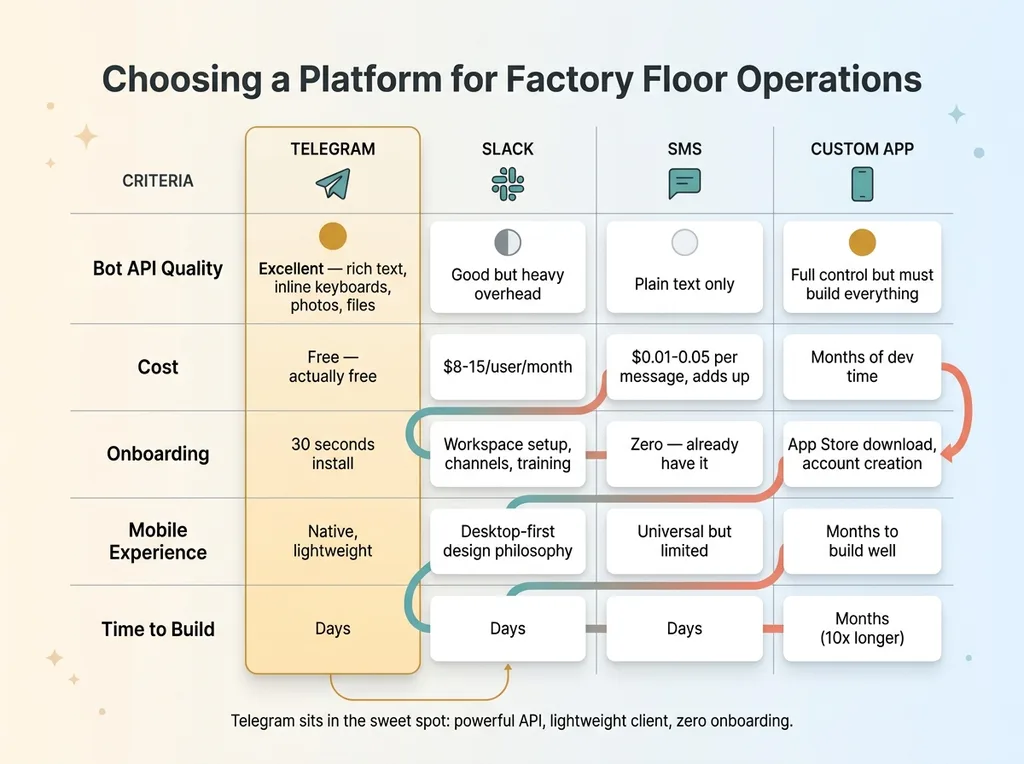 Messaging Platform Comparison for Factory Floor Use
Telegram's bot API is genuinely excellent. Rich text formatting, inline keyboards for structured responses, file sharing, photo support, no meaningful message limits. And it's free. Not freemium, not "free for up to 10 users" — actually free.
Slack is too heavy. It's built for knowledge workers who live in channels and threads. My production team doesn't need that. They need to send a message and get an answer. Slack's overhead — workspaces, channel management, notification settings, the desktop-first design philosophy — is wrong for this use case.
SMS is too limited. Plain text only, no rich formatting, no inline buttons, and it costs real money at scale. I can't send a formatted PO summary over SMS without it looking like garbage.
A custom mobile app would have been the worst option. App Store approval, ongoing maintenance, convincing every team member to download and install yet another app, building a UI from scratch. That's months of work for something that needs to just work now.
Telegram sits in the sweet spot: powerful API, lightweight client, already on people's phones (or installed in 30 seconds), zero onboarding. The technical implementation is straightforward — Telegram bot API, Python webhook handler, connected to my existing backend. I built the first working version in days, not months. A custom app would have taken 10x longer and delivered a worse experience.
The Architecture: Conversational Interface Over Existing Systems
For those who want to understand how this works without it becoming a code tutorial — the key insight is simple. The Telegram bot is a conversational interface layer on top of existing backend systems, not a replacement for them. It doesn't have its own database. It talks to the same APIs and data stores that my dashboard uses. Think of it as another door into the same building.
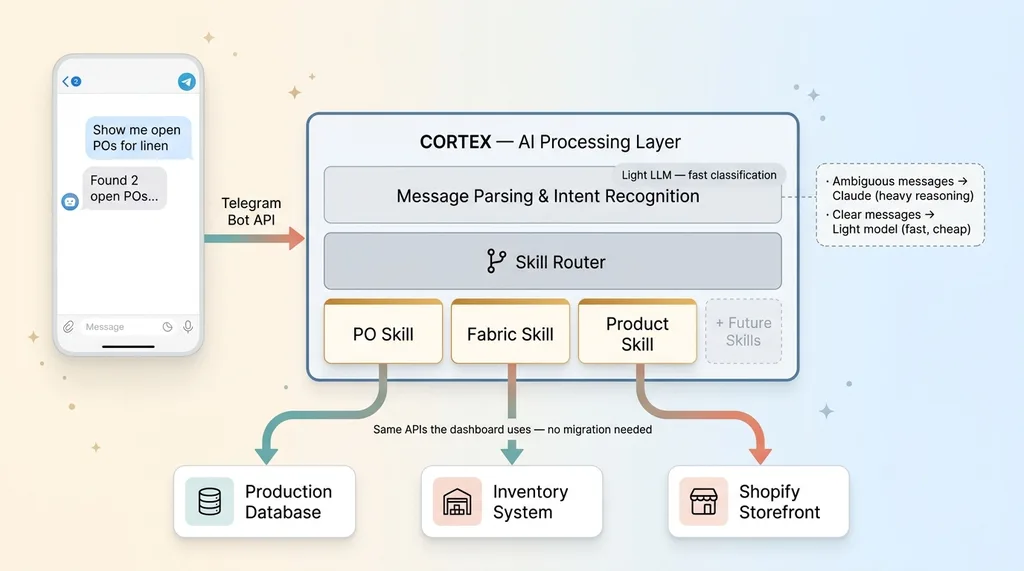 Bot Architecture - Conversational Layer Over Existing Systems
This matters because it means I didn't have to migrate anything or rebuild my data model. Everything that works through the dashboard still works. The bot is just a faster, more accessible way to interact with the same information. This is the same philosophy behind the AI production OS I built to replace four SaaS tools — layers of intelligence on top of operational data, not yet another isolated system.
Message Parsing and Intent Recognition
When a message arrives from Telegram, the first job is figuring out what the user wants. Is this a PO query? A fabric update? A product visibility change? A question about something the bot doesn't handle yet?
An LLM classifies the incoming message into one of the registered intents. This isn't keyword matching — it's actual language understanding. "What linen orders are still pending" and "show me open POs for linen" and "any linen POs outstanding?" all route to the same intent. The classification layer uses a lighter, faster model for this — I don't need Claude-level reasoning just to determine that someone is asking about purchase orders.
The Skill Layer
Each intent maps to a specific skill — a self-contained function that knows how to interact with the relevant backend system. The PO skill knows how to query, create, and update purchase orders. The fabric skill knows how to check and update inventory. The product skill knows how to toggle visibility on the storefront.
This modular design is important for one reason: adding new capabilities is straightforward. Write a new skill, register its intent patterns, connect it to the relevant API. I don't have to refactor the whole bot. When I wanted to add product visibility controls, it took an afternoon. The PO and fabric skills didn't know or care.
Error Handling When Humans Are Vague
Here's where the AI layer earns its keep. Humans don't type clean commands. They type things like "whats the status on that linen order from last week" — and the system needs to figure out which specific PO they mean.
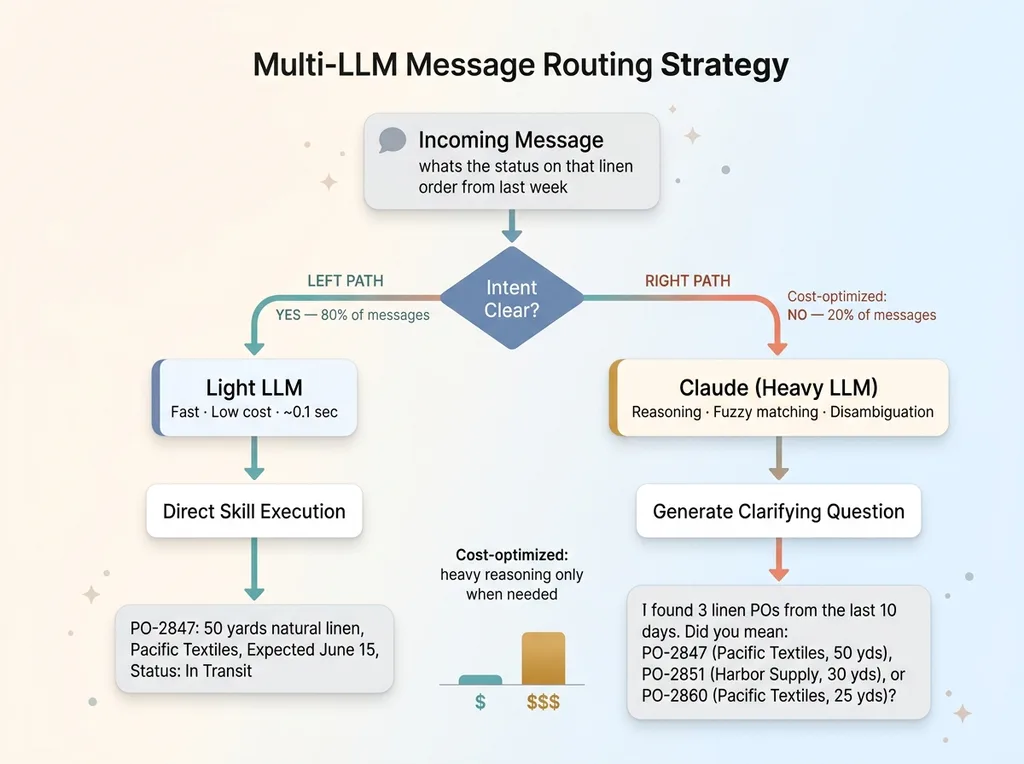 Multi-LLM Message Routing Strategy
My approach: ask rather than guess. If there's ambiguity — multiple POs match, or the timeframe is unclear, or the material name is close but not exact — the bot responds with a clarifying question instead of making an assumption that might be wrong. "I found 3 linen POs from the last 10 days. Did you mean PO-2847 (Pacific Textiles, 50 yards), PO-2851 (Harbor Supply, 30 yards), or PO-2860 (Pacific Textiles, 25 yards)?"
This is where Claude comes in. The heavier reasoning model handles the ambiguous cases — interpreting partial information, matching fuzzy references, generating natural clarification questions. The lighter model handles the clear-cut cases where intent is obvious. This multi-LLM approach keeps costs low for the 80% of messages that are straightforward, while still handling the messy 20% well.
The whole thing should make you think "that's clever and achievable," not "I need a PhD to build this." Because it is achievable. The architecture is not exotic.
Dashboards Are Reports. Conversations Are Operations.
Here's the conceptual shift that matters beyond my specific implementation.
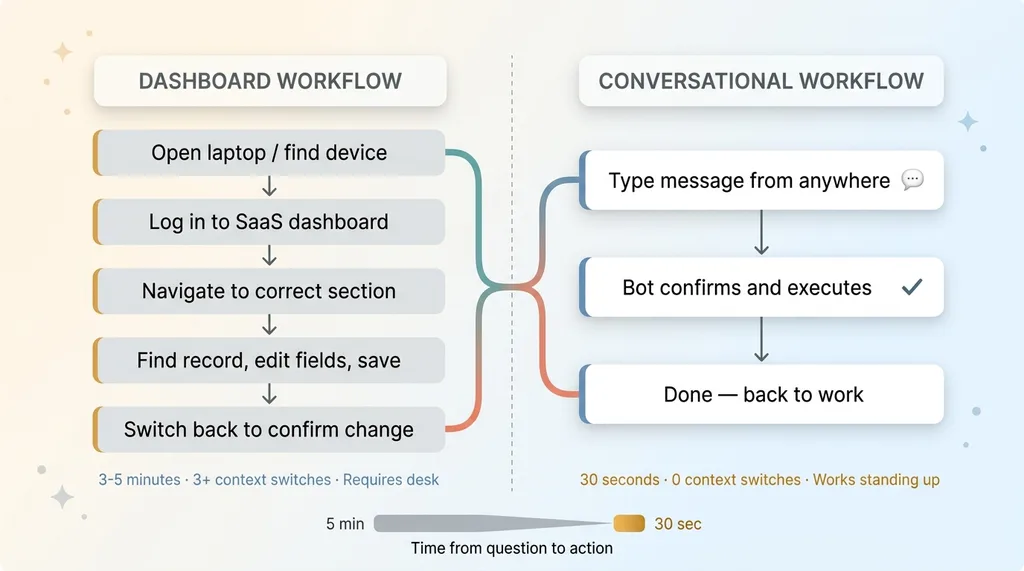 Dashboard vs Conversational Interface Workflow
Dashboards are fundamentally read-only. Yes, most have edit capabilities buried somewhere, but the default interaction is passive: look at data, interpret it, then go somewhere else to act on it. You check the dashboard, see a problem, open a different tool, make a change, go back to the dashboard to confirm it worked. That's three context switches minimum.
A conversational interface collapses that entire loop. Ask a question, get the answer, take action, receive confirmation — all in one thread, all in 30 seconds. The gap between knowing and doing shrinks to nearly zero.
But the bigger shift isn't speed. It's who can interact with your systems.
A production manager who would never figure out how to build a filtered query in Shopify's admin panel can type "show me all products with less than 5 units in stock." A warehouse worker who avoids the inventory management software because the interface is confusing can type "how many yards of black twill do we have?" The conversational interface meets people at their existing skill level — which is typing a message.
This isn't a niche idea. Every major tech company is moving in this direction. Apple Intelligence, Google's AI assistant features, ChatGPT itself — the industry consensus is that natural language is becoming the primary interface layer. Enterprise software is catching up fast.
For small and mid-size manufacturers, this is actually an advantage. You don't have a decade of dashboard workflows and training materials to unwind. You can skip the dashboard era for operational tasks and go straight to conversational ops for the stuff your standing-up workers need to do daily.
Here's my personal proof point: after switching production management to conversational, I check the actual dashboard maybe once a week for big-picture reporting. Every daily operational interaction goes through Telegram. That's not a small behavior change — that's a fundamentally different relationship with my own systems.
What I'd Build Next (and What's Not Ready Yet)
I want to be honest about where the edges are.
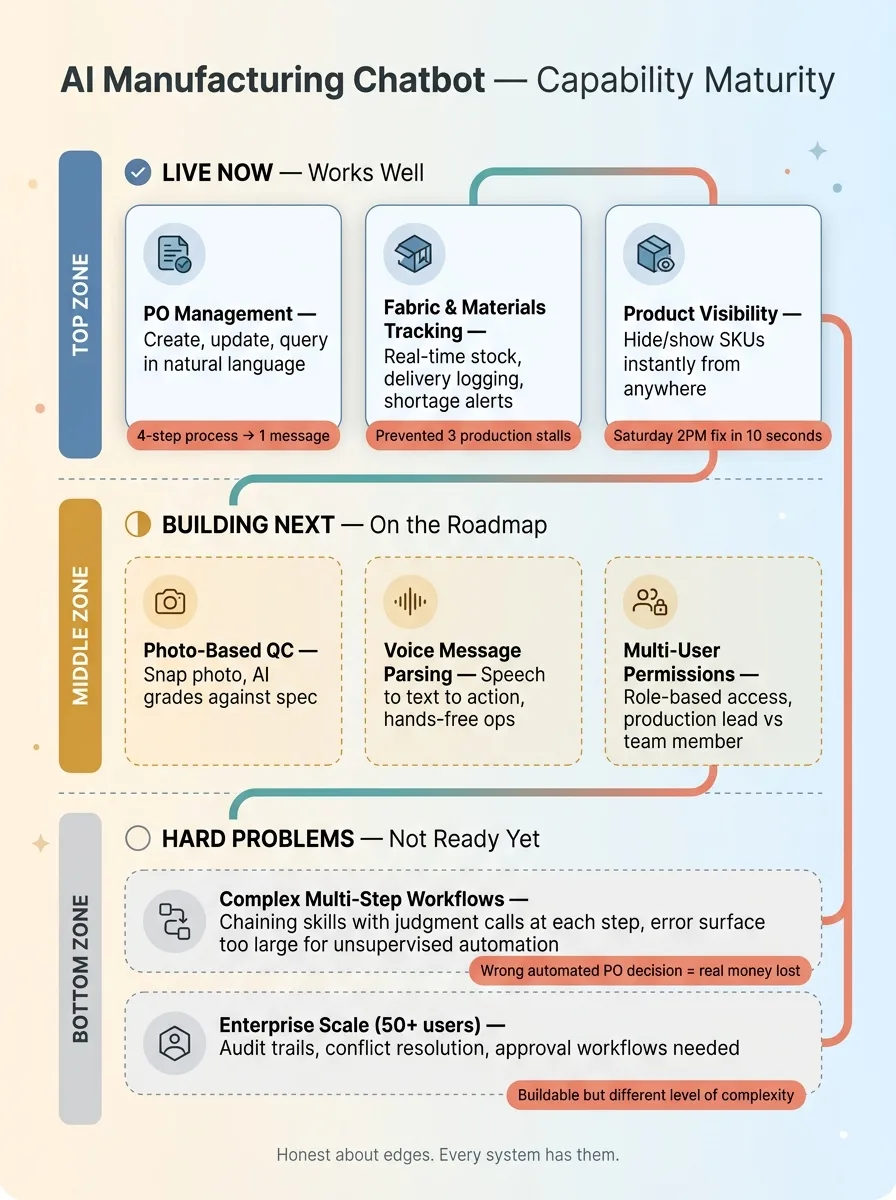 What Works Now vs What's Next — Capability Maturity
What works well: Structured queries, simple create/update operations, status checks, single-entity actions. Anything that maps to "ask about X" or "change Y to Z" is solid.
What's harder: Complex multi-step workflows. Something like "reorder fabric for all POs that are running low based on current production velocity" requires chaining multiple skills with judgment calls at each step. How low is "running low"? What's the reorder quantity? Which supplier? The error surface gets large, and a wrong automated decision on a purchase order costs real money. I'm not comfortable letting that run unsupervised yet.
What I want to build next:
- Photo-based quality checks — snap a photo of a finished product, AI grades it against spec. The vision models are getting good enough to make this real.
- Voice message parsing — Telegram supports voice messages. Convert speech to text, parse intent, execute. Truly hands-free operation for someone mid-production.
- Multi-user with permissions — production lead can update POs, a newer team member can only query. Right now it's essentially single-user.
The honest limitation: This works at my scale — small team, hundreds of SKUs, one production facility. At 50+ production workers, you'd need proper permissions, audit trails, conflict resolution when two people update the same PO simultaneously, and probably approval workflows for certain actions. That's buildable, but it's a different level of complexity than what I'm running today.
Building Your Own Conversational Operations Layer
The takeaway here isn't "you should build a Telegram bot." It's this: think about where your team interacts with systems while standing up.
Could be a warehouse. A restaurant kitchen. A construction site. A medical office. A retail floor. Anywhere people are on their feet and away from a desk, a conversational interface beats a dashboard for daily operational tasks.
The starting point isn't the technology. It's identifying the three operations your team does most often that currently require sitting down at a computer. Those are your first three bot skills. If you need a broader framework for where to begin with AI before building something like this, start with AI systems every small business should build first.
This kind of system — conversational interfaces wired into existing tools so your people can operate faster from anywhere — is exactly what I build as a Chief AI Officer. Not theoretical AI strategy on slides. Working systems that connect to what you already have and make your team measurably faster.
Get the next build note.
I write up each system I build, including what broke. Subscribe to my newsletter and I'll send you the next one.