Video Analysis With Gemini Vision: A Real Consumer App
How I built video analysis with Gemini Vision into a consumer app, and the consent gating and signed-URL storage that made child video data safe to handle.
By Mike Hodgen
The Problem With Static Milestone Checklists
Every parent I know films their kid constantly. There are hundreds of clips sitting in camera rolls right now: first steps, stacking blocks, babbling at the dog, attempting a forward roll. Most of that footage never gets watched twice.
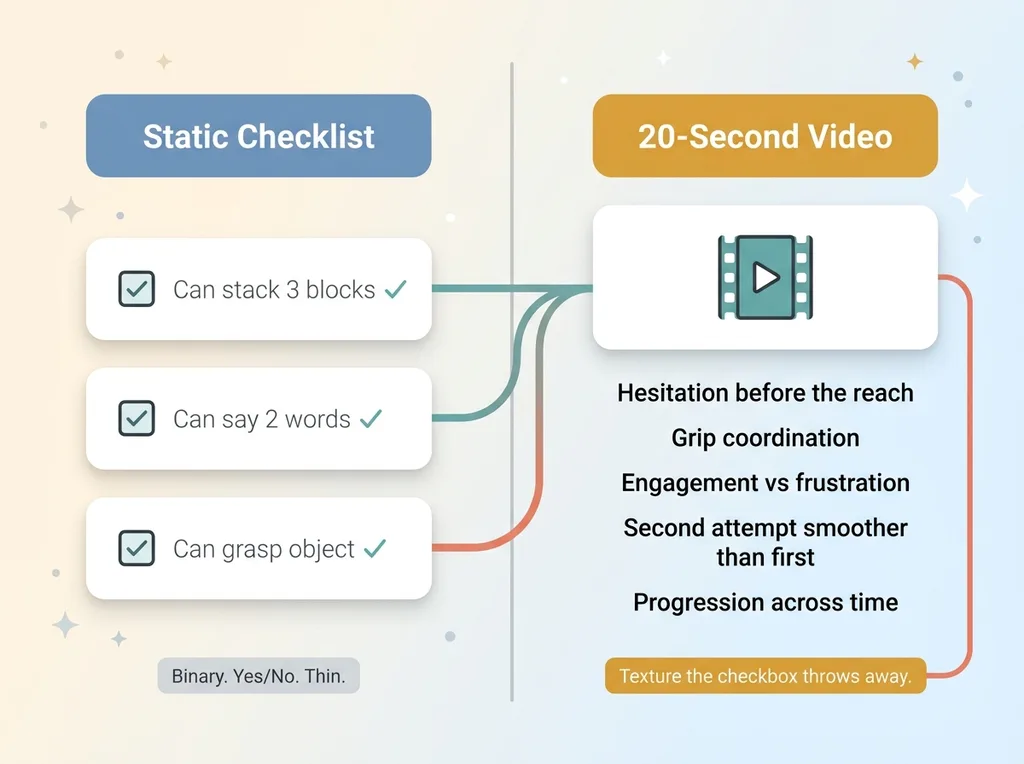 Checklist vs Video Analysis comparison
Meanwhile, the standard tool for tracking a child's development is a checklist. Boxes you tick. Can they grasp an object, yes or no. Can they say two words, yes or no. It's binary, and binary is thin.
A checkbox tells you a kid can stack three blocks. A 20-second video shows you the quality of it. The hesitation before they reach. The coordination in the grip. Whether they're engaged or frustrated. Whether the second attempt was smoother than the first. All the texture a yes/no box throws away.
So I built a consumer app that does video analysis with Gemini Vision, assessing short clips of a child for developmental observations. The parent uploads a 20-second video, and the app returns a structured read on what it sees.
When I describe this to a skeptical buyer, they're really asking two questions. First: can AI actually understand video at all, or is this hype dressed up as a feature. Second: if it can, can I trust whoever built this to handle footage of my child responsibly.
Both fair. I'll answer both.
Here's the thing I want to set up front, because it's the whole point of this article. The interesting engineering was not the model call. The model call is the easy 10 percent. The hard part, the part that actually makes this a product instead of a liability, is everything around it.
Can AI Actually Understand a Video? Yes, and Here's What That Means
Let's kill the doubt directly. Yes, AI can understand video now. Not stitched-together screenshots. Actual motion.
Frames, not magic
Gemini 2.5 Pro ingests a 15 to 30 second clip natively. It doesn't see a pile of disconnected stills. It sees a sequence with motion across time, which means it can pick up on things that only exist in the change between frames: a wobble that smooths out, a reach that gets more confident, a movement that starts hesitant and ends coordinated.
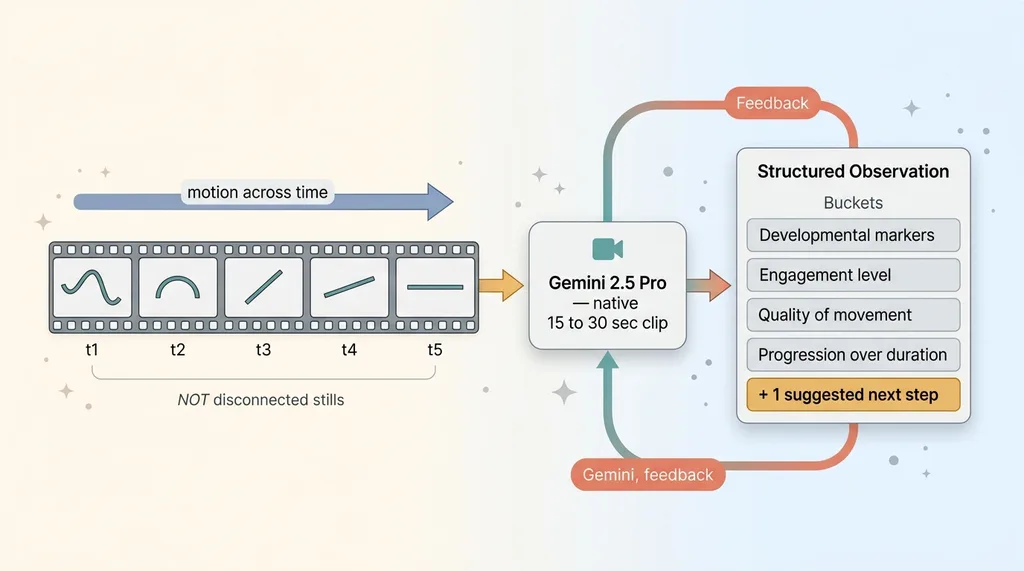 How Gemini reads video as motion across time, not stills
That temporal read is the whole reason video beats a checklist. The interesting signal lives in the progression, not in any single frame.
I went deep on the mechanics of this in a separate piece on an AI video review system using Gemini if you want the technical version.
What the model actually reads
For this app, I ask the model to observe across specific dimensions: developmental markers visible in the clip, the child's engagement level, the quality of movement or form, and how things progress over the duration.
The prompt does the heavy lifting. I don't say "analyze this video." That gets you a vague paragraph. I ask for structured observation across named categories, and the model returns roughly four observation buckets plus one suggested next step.
Be honest about the limits, because this matters. The model sees patterns, not a clinical truth. It can be wrong. Short clips beat long ones, both for cost and for signal density. A 20-second clip of one activity gives a cleaner read than two minutes of a kid wandering the living room.
So the mental model is this: structured assessment in, structured assessment out. Four-ish observation categories, one suggested next step, all framed as something to notice. Not a verdict. The framing is deliberate, and I'll come back to why.
The Real Engineering Is the Data, Not the Model Call
This is the thesis, so I'll say it plainly. Anyone can wire up a vision API in an afternoon. I could teach a junior dev to make the Gemini call before lunch.
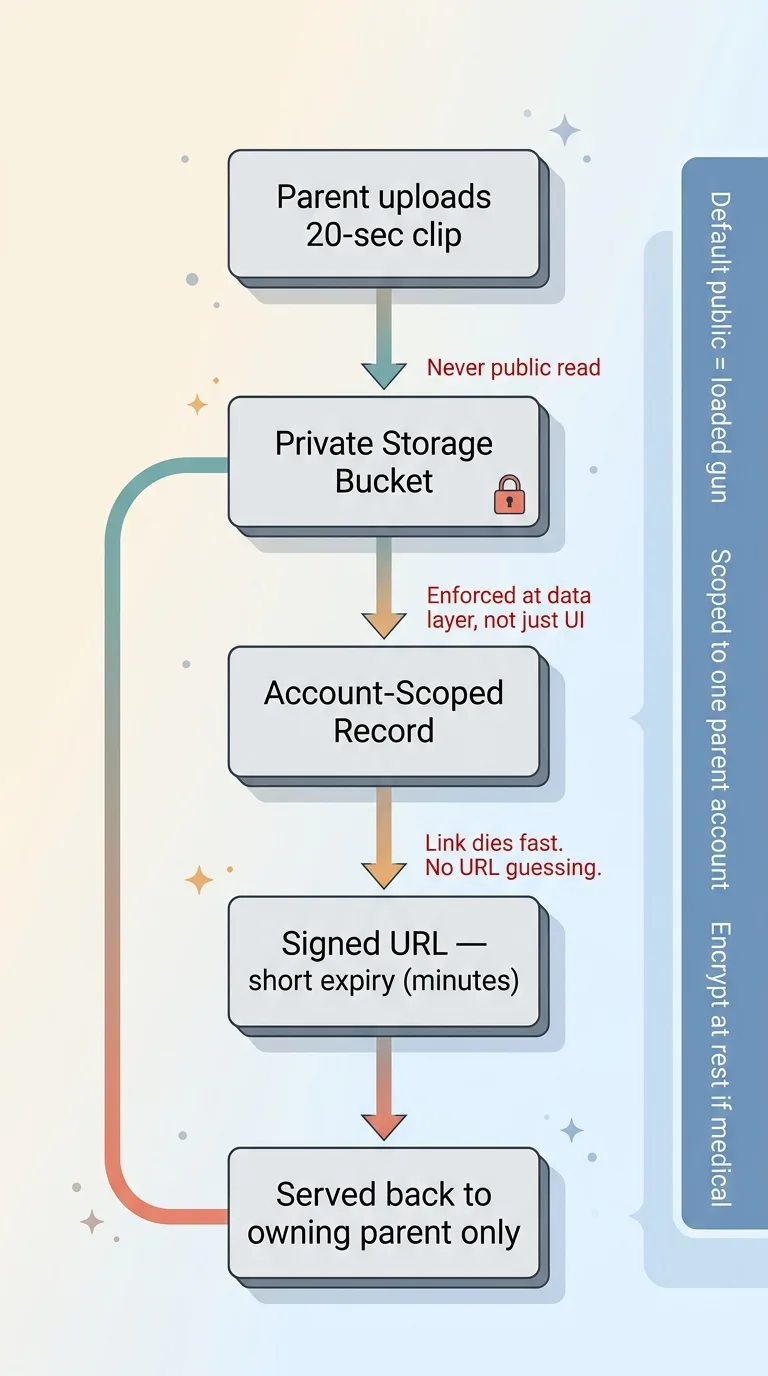 Secure video data handling architecture
The hard part is that this is video of a child. That single fact reshapes every architectural decision.
Private bucket, never public
The clip uploads to a private storage bucket. Never world-readable. Default-public storage is exactly how people get burned, and I've seen it happen more than once: a bucket set to public for convenience, and now anyone with the URL pattern can browse customer files.
I've written before about teams discovering their databases were wide open behind an anon key. Same failure, different layer. Default public is a loaded gun.
So the footage lives in a bucket scoped to the owning parent account only. No public read. Ever.
Signed URLs with short lifetimes
When the app needs to serve the video back, it generates a signed URL with a short expiry. The link works for a few minutes, then it's dead.
Why this matters: if a link leaks, into a log, a screenshot, a copied message, it expires before it can be abused. And because the URL is signed, you can't guess your way to someone else's file by incrementing an ID. URL guessing returns nothing.
The assessment record and the raw video are both stored with access scoped to that one parent account. Nobody else's account can read it, and the app enforces that at the data layer, not just in the UI.
If this footage were medical data, I'd go further and encrypt it at rest, which is the exact pattern I describe in encrypting sensitive data in Supabase. The principle is the same either way: treat the footage as the most sensitive thing in the system, because it is.
That's the design choice that separates a responsible app from a lawsuit. Not the model. The handling.
Gating the Feature Behind Explicit Consent
Here's something most apps skip, and it's a mistake.
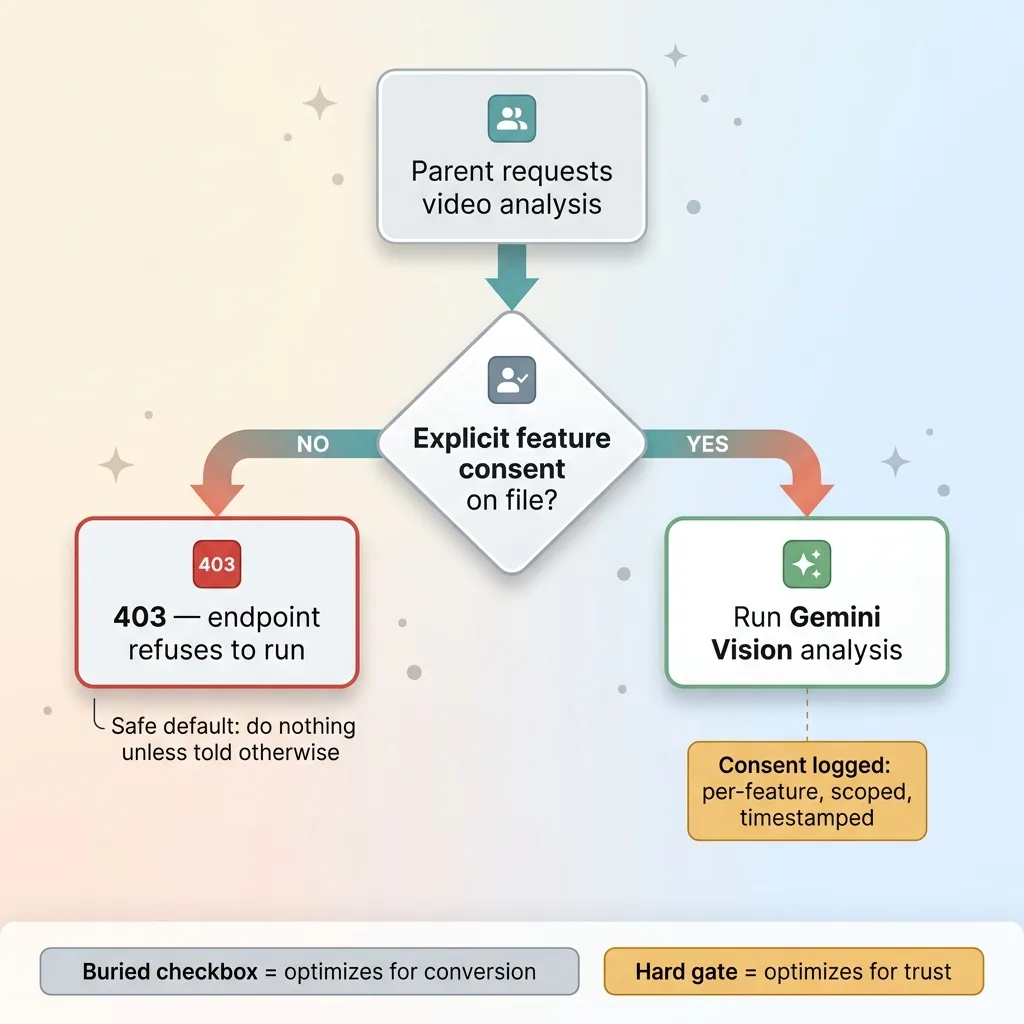 Consent gate with 403 default failure mode
The analysis endpoint returns a 403 until the parent completes a safety acknowledgment. Not a single checkbox buried in a signup flow. An explicit, readable acknowledgment of what the feature does and, just as important, what it does not do.
This is a hard gate in code. It is not a UI suggestion the user can scroll past. If the acknowledgment isn't on file, the endpoint refuses to run. Full stop.
Why be this strict? Because consent for analyzing video of a minor cannot be assumed. You can't infer it from "they uploaded a video," and you definitely can't bundle it with the terms of service nobody reads. Analyzing a child's footage is a specific action that needs specific permission.
The acknowledgment is logged. Per-feature, scoped, and timestamped. So if anyone ever asks "did this parent agree to this specific thing on this specific date," there's a clear answer.
This ties to something I push with every client handling consent: marketing consent and feature consent are different things. Agreeing to get emails is not agreeing to have your child's video read by an AI. Bundling them is lazy and, in some jurisdictions, illegal.
The detail I care most about is the failure mode. A 403 by default is the safe default. The system does nothing until permission explicitly exists. When you're touching something this sensitive, "do nothing unless told otherwise" is the only failure mode you want.
A buried checkbox optimizes for conversion. A hard gate optimizes for not betraying the person using your app. I'll take the second one.
Educational Observation, Not a Medical Evaluation
The single most important guardrail in this whole app is the scope of what it claims.
The output is framed as an educational observation. Never a diagnosis. Never medical advice. And that framing isn't a footnote, it's enforced in two places.
First, the prompt itself forbids the model from diagnosing or recommending treatment. I instruct it to observe and describe, not to conclude. This is the same discipline I build into every health-adjacent system, which I covered in detail in guardrails that keep a health AI from practicing medicine.
Second, the response carries a plain-language disclaimer. Not legalese the user tunes out. A clear note that this is an observation to consider, not a clinical assessment.
The suggested next step is always phrased gently. "Here's an activity you might try." Or "you may want to mention this to your pediatrician." Never "your child has a delay." That distinction is everything.
This is both an ethical line and a liability one, and they happen to point the same direction. A consumer app that tells a parent their child has a developmental problem would be reckless on the ethics, and exposed on the law. You do not want to be the app that triggered a parent's worst fear based on a 20-second clip and a probabilistic guess.
And here's the honest part: the model can be wrong. It will be wrong sometimes. The framing is what protects the parent from acting on a bad read. If the output is always "here's something to notice, talk to a professional," then a wrong observation costs a conversation, not a panic.
The human still decides. The app drafts an observation, the parent and their pediatrician make any real call. That separation, the AI suggests and a person judges, is the same pattern I argue for in the AI drafts and a human still decides. It's not a limitation I'm apologizing for. It's the correct design.
Rate Limiting and the Boring Plumbing That Keeps It Honest
The unglamorous stuff is what keeps this thing running without bankrupting me or getting abused.
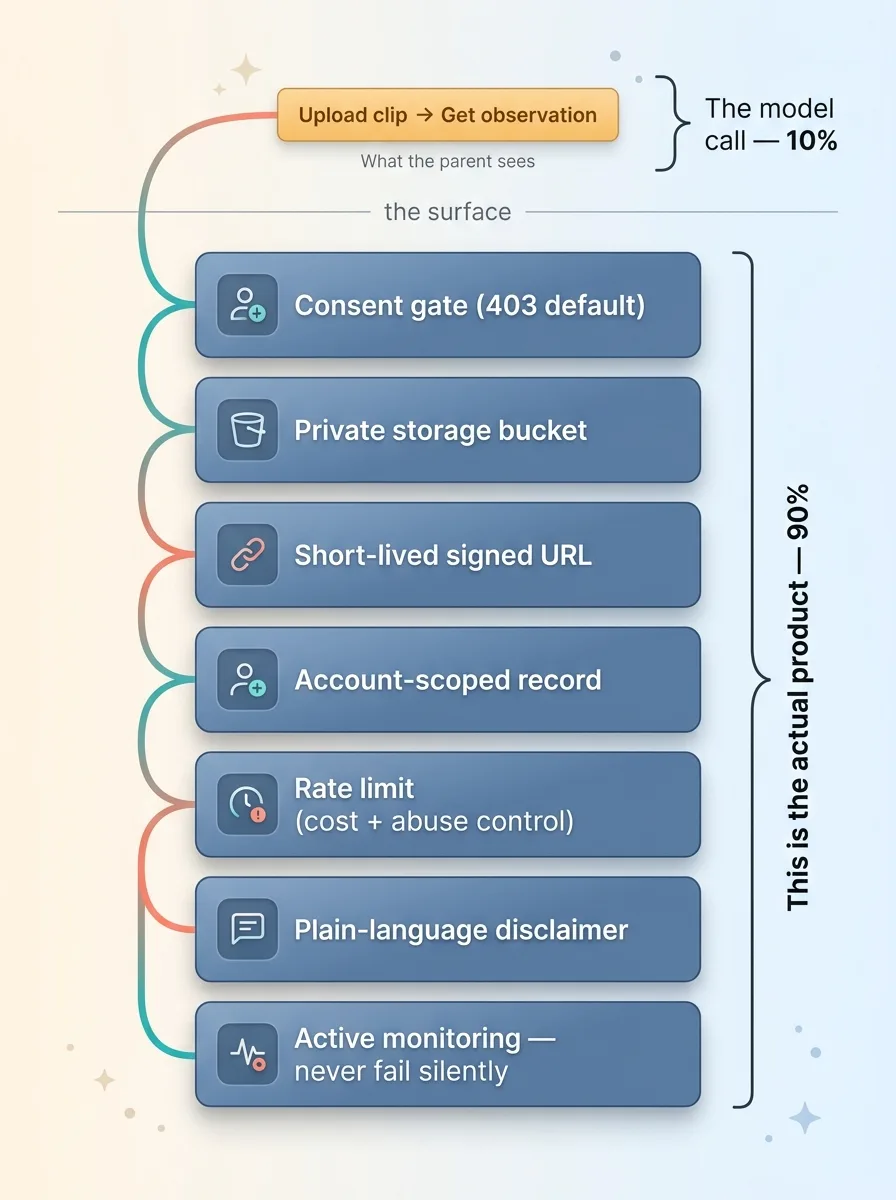 The button vs the real product underneath
The analysis endpoint is rate-limited. A single account can't hammer it. That's two protections in one. It's cost control, because vision calls on video are not cheap, and uncapped usage is a real budget risk. And it's abuse control, because an open expensive endpoint is an invitation.
Without a cap, one motivated user, or one bug in a loop, can run up a bill that ruins your month. I've seen unrate-limited AI endpoints turn into four-figure surprises overnight. The rate limit is cheap insurance.
Then there's logging and monitoring. Silence is not success. The system records every assessment and flags failures instead of failing quietly. If a call errors out, I want to know, not discover it three weeks later when a user complains.
A failure that nobody sees is worse than a loud one, because it erodes trust invisibly. So the boring rule is: log everything, alert on failure, never fail silently.
Here's what I want the reader to sit with. To the parent, this feature is one button. Upload a clip, get an observation. Simple.
Underneath that one button: a consent gate, a private bucket, a short-lived signed URL, an account-scoped record, a rate limit, a disclaimer, and active monitoring. All of that is the actual product. The button is just the part you can see.
What This Pattern Means for Anyone Building With Vision AI
So, back to the two questions a skeptical buyer asks. Can AI understand video? Yes. Genuinely. Video analysis with Gemini Vision is real, native, and useful today.
But the model is maybe 10 percent of the work. For any consumer app touching sensitive footage, the other 90 percent is consent, storage, access scope, scope of claim, and operational guardrails. That's not the boring part you do after the fun part. That is the product.
This applies far beyond a child development app. If your business is sitting on customer video, intake photos, signed documents, recorded calls, anything personal, you've probably wondered whether AI can read it usefully. It can. A vision AI consumer app is well within reach.
The catch is that you cannot bolt the data handling on at the end. Private video storage with signed URLs, scoped records, explicit per-feature consent, a hard 403 by default, these are decisions you make before you write the model call, not after. Get them backwards and you've built a liability with a nice demo.
That's the real lesson from this Gemini Vision use case, and from every AI video assessment system I've shipped. The intelligence is the easy part now. The responsibility is the engineering.
If you're sitting on customer footage, photos, or documents and wondering whether AI can read them responsibly, tell me what you're trying to build. I'd rather hear the actual problem than pitch you a generic solution.
Want to explore what AI could do for your business?
Book a free 30-minute strategy call. No pitch deck, no sales team, just a real conversation about your operations and where AI actually fits.
Get AI insights for business leaders
Practical AI strategy from someone who built the systems — not just studied them. No spam, no fluff.
Hodgen.AI
Ready to automate your growth?
Book a free 30-minute strategy call with Hodgen.AI.
Book a Strategy Call