The Problem: You Can't Type With Both Hands on a Ladder
Picture a window-covering installer ten feet up a ladder. Tape measure in one hand. The other hand steadying his weight against the frame. He's just measured the inside width of a window, and he needs to record it. Thirty-six and a quarter inches.
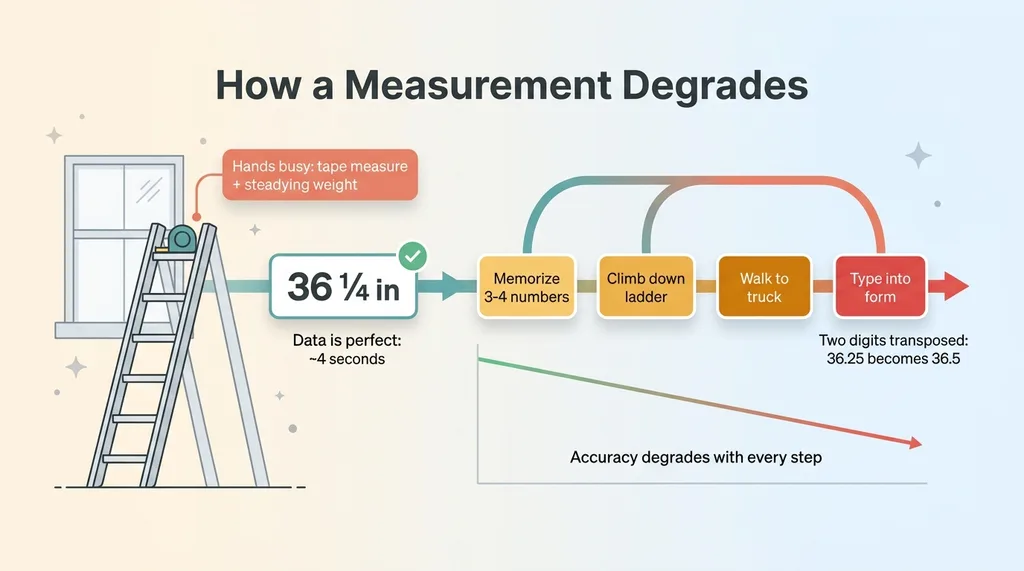 The data degradation problem on the ladder
Now look at every intake tool ever built. Every one of them assumes he can stop, free a hand, pull out his phone, unlock it, find the right field, and type. He can't. Not without climbing down or doing something stupid on a ladder.
So what actually happens? He memorizes three numbers. Maybe four if there's a depth. Then he climbs down, walks to his truck, and types them into a form. Except he transposed two of them in his head. Or he scribbles on a scrap of paper and transcribes it later, when the context is gone and his own handwriting is a mystery.
This is the most fragile point in the entire job. A measurement that drives a cut, that drives a quote, that drives whether the blind fits, gets recorded at the exact moment his hands are least free. The data is perfect for about four seconds. Then it degrades with every step down the ladder.
I want to be honest about what kind of problem this is. It is not a software problem. You can build the cleanest intake form in the world and it changes nothing, because the form still demands a free hand and full attention. This is an environment problem. Typing-based intake fails on a job site because the environment forbids typing.
That's the whole frame. If you accept that the hands are busy and stay busy, then the fix has to be hands-free, or it's nothing. Voice AI for field workers is the only intake method that doesn't fight the environment. The question is whether it actually works, because most voice AI doesn't.
Why Voice AI Usually Sounds Gimmicky (And When It Isn't)
Let me address the skepticism directly, because you've earned it.
The demo trap
Most voice AI demos work because they're filmed in a silent room. One person, speaking slowly and clearly, holding a microphone six inches from their mouth, in a space with carpet and no wind. Of course it transcribes perfectly. Anything would.
Then you take that same system to a job site and it falls apart. There's wind. There's traffic. There's a second installer talking on the other side of the room and a drill running somewhere behind him. The clean recording booth that made the demo look magic does not exist in the field.
Voice AI earns its gimmicky reputation honestly. Most of it cannot survive contact with real noise and real busy hands. I'm not going to pretend otherwise.
The job site is not a quiet room
Here's the line I draw. Voice works when two things are true at once: the task is genuinely hands-busy, and the input is short, structured, and confirmable.
Capturing free-form notes by voice is a mess. Asking someone to dictate a paragraph in a noisy environment gives you garbage you have to clean up later, which defeats the point. But capturing three numbers and a category, then reading them back for confirmation, is exactly what voice is good at.
The win was never "talk to your computer." That's the gimmick. The actual win is "record structured data without stopping the physical task." That's a narrow, real, valuable thing.
Everything that follows is the engineering that closes the gap between the demo and the job site. None of it is magic. It's a series of deliberate decisions about activation, capture, confirmation, and organization, each one made because the obvious approach breaks in the field.
Wake Word on Device: Activating Without a Free Hand
The first real engineering decision is the most important, because it's where most voice tools quietly cheat.
If the installer has to tap a button to start listening, you've just reintroduced the typing problem in a different costume. A tap is still a free hand. It's still unlocking a phone. The whole premise collapses if activation requires a finger.
So the agent listens for a wake word and activates hands-free. The installer says a trigger phrase and the agent starts paying attention. No tap, no screen, no free hand.
On-device first, browser fallback second
I use a two-layer approach for this. An on-device wake-word detector runs first. It's low latency, it works without a perfect connection, and it doesn't ship a constant stream of audio to the cloud. That last part matters on a job site where the signal is intermittent and you can't depend on the network being there when the installer speaks.
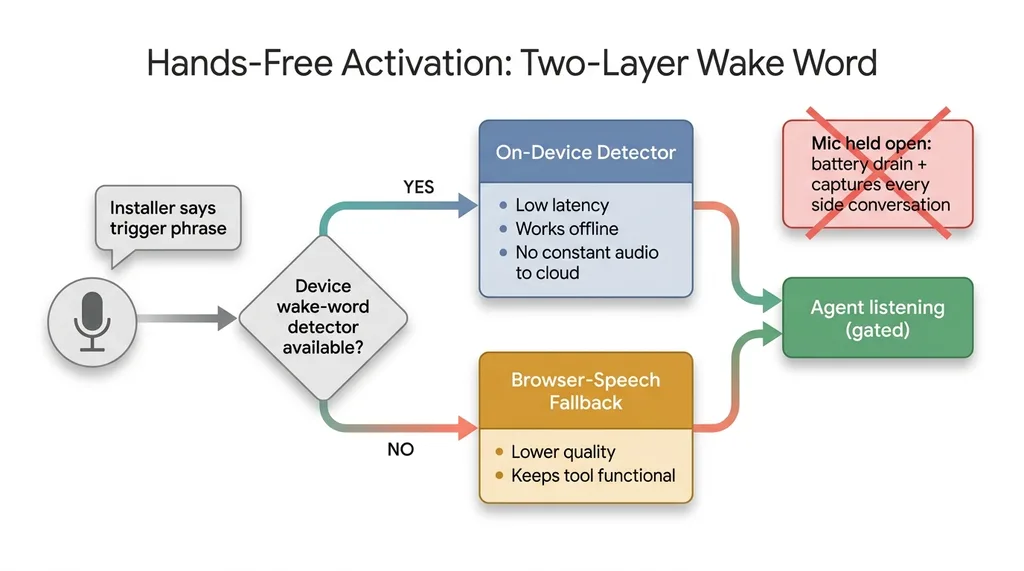 Wake word architecture with on-device first, browser fallback second
When the device path isn't available, there's a browser-speech fallback. It's not as good, but it keeps the tool functional instead of dead. You want graceful degradation, not a single point of failure.
Why holding the mic open fails
The obvious shortcut is to just leave the microphone open the whole time and let the agent figure out when something matters. Don't do this.
Holding the mic open drains the battery fast. It captures every side conversation, every "hey can you grab the other ladder," every bit of ambient chatter. And it turns all of that noise into input the system has to reject. You're feeding it garbage and hoping it sorts itself out.
The wake word on device is a gate. It means the installer controls exactly when the agent is paying attention, using nothing but his voice. That control is the difference between a tool that works on a real site and one that only works in a demo.
Capturing and Segmenting Measurements by Speech
Once the agent is listening, the core capture flow kicks in.
A real-time voice agent captures the spoken measurements as they're said. Not a record-then-upload-then-transcribe round trip that leaves the installer standing on a ladder waiting for a spinner. Real-time means the data is forming as he speaks, so the loop stays tight.
Here's the thing people get wrong: the hard part is not transcription. Transcription is mostly solved. The hard part is segmentation.
One window has multiple measurements: width, height, sometimes depth, sometimes a couple of qualifiers. A job has multiple windows. So the installer needs a way to say "this set is done, start the next one" without touching anything. Otherwise all the numbers run together into one undifferentiated pile and you can't tell where one window ends and the next begins.
Say 'new window' to advance
The solution is a spoken advance command. The installer says "new window" and the session segments into a new unit. Each unit collects its own width, height, and any qualifiers. It's the voice equivalent of hitting save and starting a fresh record, except his hands never leave the tape measure.
So the flow looks like this. He measures, says the width, says the height, calls out anything unusual, then says "new window" and moves on. The structure builds itself as he works.
Real-time voice, not record-then-transcribe
What you're really doing is turning loose speech into voice to structured data. Not a paragraph of notes someone has to decode later. Actual typed fields the quote system can consume directly: width 36.25, height 48, inside mount.
The voice model has to handle the way people actually say numbers out loud. Fractions. "Thirty-six and a quarter." Units, sometimes stated, sometimes implied. The casual phrasing a tired installer uses on his fortieth window of the day. If the model only understands clean dictation, it fails on the first real measurement. It has to understand how a human actually talks.
Read-Back Before Anything Is Accepted
This is the single feature that makes the whole thing usable instead of a liability.
Voice transcription is never perfect. Especially in noise. So nothing gets accepted until the agent reads the captured measurement back and the installer confirms it out loud.
The installer confirms out loud
The agent says, "thirty-six and a quarter by forty-eight, inside mount." The installer says "yes" and it lands. If he says "no," he repeats it.
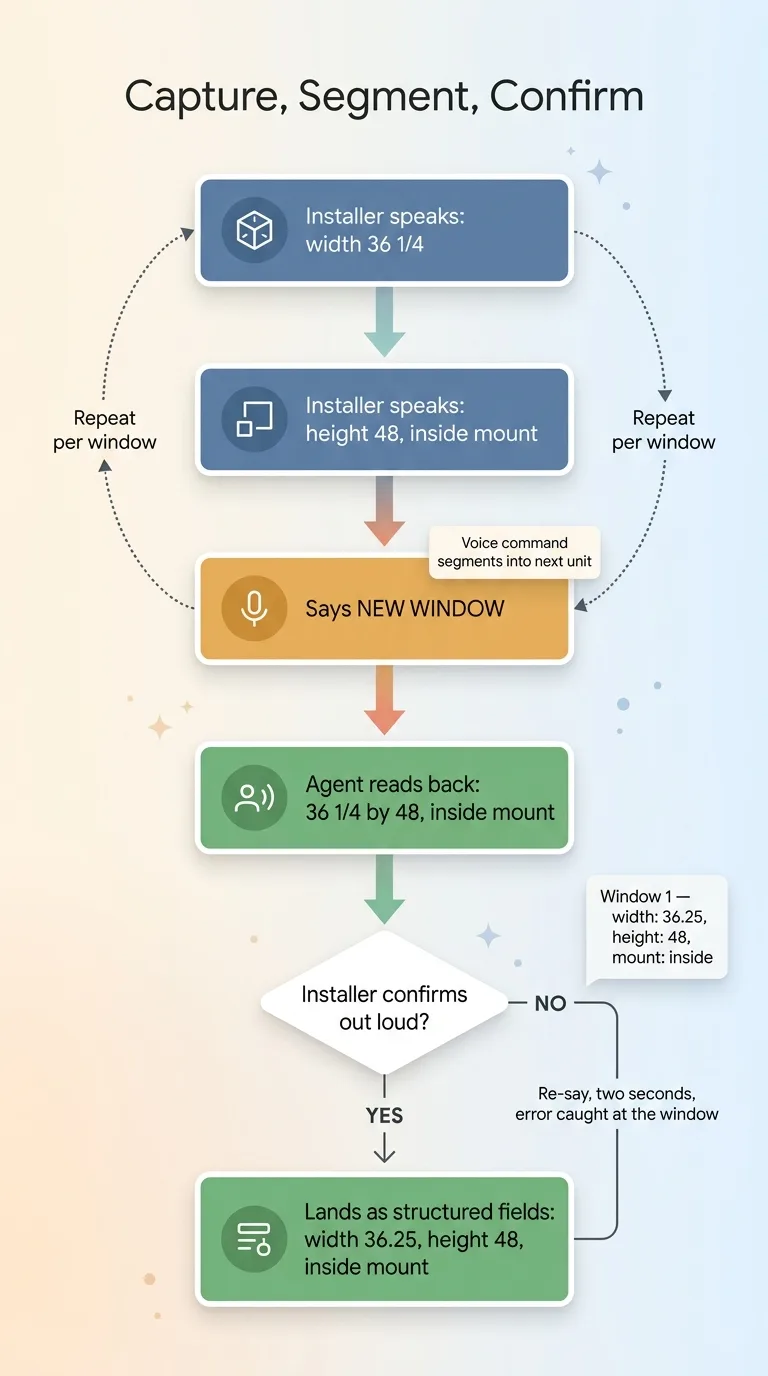 Voice capture, segmentation, and read-back confirmation flow
Here's why this matters with real money attached. If the agent heard "thirty-six and a quarter" as "thirty-six and a half," that's a quarter inch of error that flows straight onto a quote and drives a cut. A blind that doesn't fit. A callback. A remake. The read-back catches that mistake while the installer is still standing in front of the window, when fixing it costs two seconds instead of a wasted product and a return trip.
Why the human stays in the loop
This is a specific case of a principle that runs through everything I build. Every AI system I ship stops for a human before it commits something that matters. The AI captures, the human confirms, then it lands. Never the other way around.
There's a second benefit people miss. The read-back forces the installer to slow down for half a second at exactly the right moment, the moment right after the measurement, while the window is still in front of him. That half-second pause is when errors actually get caught. You're not just verifying the transcription. You're verifying his own memory and his own callout, at the only point in the workflow where verification is cheap.
Confirmation isn't friction. Confirmation is the feature.
Self-Organizing Notes Into Risk Categories
Installers don't only call out numbers. They mutter context.
"No ladder access on this side." "Plaster wall, not drywall." "Tight clearance behind the existing blind." Those asides are gold for whoever builds the quote, because they're the difference between a price that holds and a price that gets blown up by a surprise on install day. And they almost always vanish, because there's nowhere to put them when your hands are full.
The agent files those spoken asides into buckets: install-risk, access, measurement, general. An aside about a plaster wall goes to install-risk. An aside about no ladder access goes to access. The model reads the comment and decides where it belongs.
Spoken asides become editable chips
Back in the office, these show up as editable chips next to the measurements. Tappable. Recategorizable. Because the model gets some of them wrong, and a human should be able to fix the category in one tap instead of fighting the system.
This is the same field-intake pattern I've written about elsewhere, like when a customer snaps a photo and the AI books the job. The job is to capture the messy real-world signal at the source and turn it into something structured, before it evaporates.
The risk badge on the quote
Anything that lands in the risk buckets raises a risk badge on the quote. So when the estimator opens it, he sees the badge before he prices anything. The plaster wall and the access problem are right there, flagged, instead of buried.
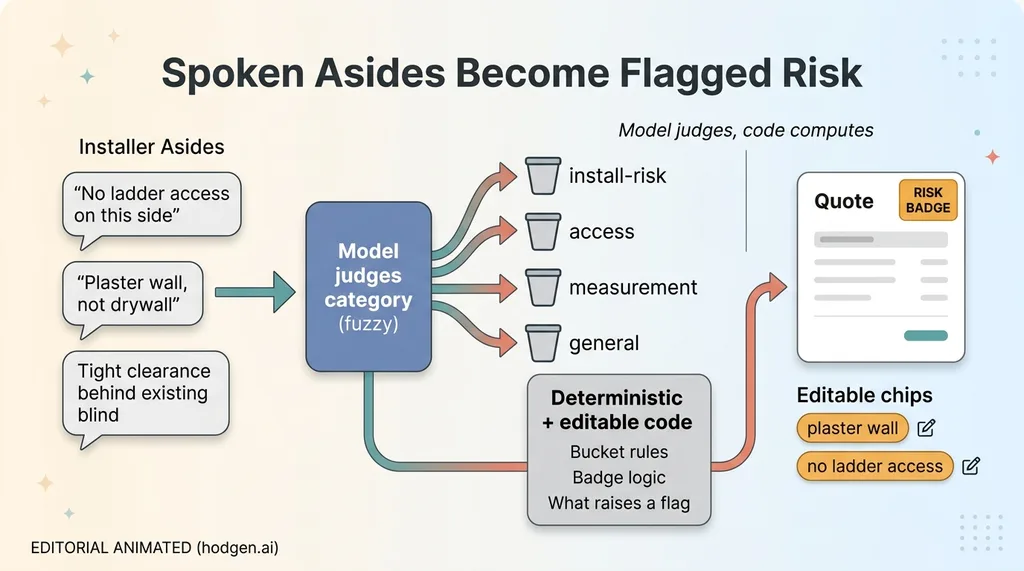 Self-organizing asides into risk categories with let model judge, code computes
A note on the architecture, because it matters. The model judges which bucket an aside belongs to. But the buckets themselves, the badge logic, and the rules for what raises a flag are all deterministic and editable. Not a black box. This is the pattern I lean on constantly: let the model judge, let the code compute. The model handles the fuzzy categorization that code can't, and the code handles the rules that have to be predictable and auditable. You don't want a language model deciding your badge logic on the fly. You want it sorting, and the system doing the math.
Does It Actually Hold Up on a Real Job?
Let me close the doubt I opened with, honestly.
What works, what still doesn't
It is not perfect. Heavy wind and a running drill still degrade accuracy. Very fast or mumbled speech misfires. The wake word occasionally triggers on a word that sounds similar to it. I'm not going to tell you it's flawless, because it isn't.
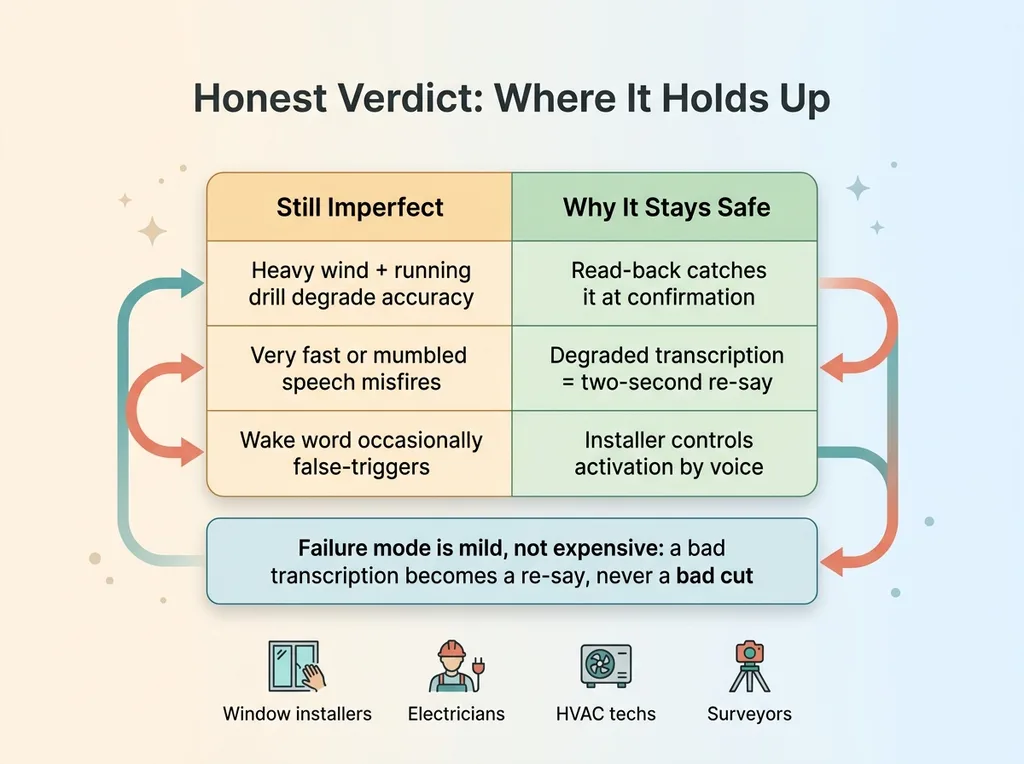 What works vs what still doesn't, and why read-back makes failures safe
But here's the key: the read-back is what makes those failures safe instead of expensive. When accuracy drops, the installer catches it at confirmation and fixes it on the spot. A degraded transcription becomes a two-second re-say, not a bad cut. The system is designed so its failure mode is mild.
What works is the thing that mattered from the start. A guy with both hands full now records structured measurements without climbing down or holding a phone. And the asides that used to evaporate, the access notes and the wall types, now reach the estimator with a badge on the quote.
The honest verdict
The reason it holds up where demos fall apart is that it was built around the environment instead of around a recording booth. Hands busy. Noisy. Intermittent connection. Every decision, the wake word, the spoken advance command, the read-back, the editable chips, exists because the obvious version breaks in the field.
And this pattern isn't specific to window coverings. Any field worker whose hands are occupied during data capture has the exact same problem. Electricians. HVAC techs. Surveyors. Anyone capturing numbers by memory and transcription is losing accuracy at the worst possible moment.
If your team is recording field data by memory and re-typing it later, the fix is almost always a hands-free intake flow built around your actual job, not a generic voice app from an app store. The job site is the design constraint. I'd genuinely like to talk through your own field workflow and figure out where the data is leaking.
Get the next build note.
I write up each system I build, including what broke. Subscribe to my newsletter and I'll send you the next one.