The Symptom: Page Speed Regresses Every Time the Banner Changes
Here is a scenario that played out on my own DTC fashion brand in San Diego. My marketing team swapped the homepage banner for a seasonal promo. Standard stuff. New image, new headline, ten minutes of work in the theme editor.
Two weeks later, I noticed the homepage was loading slower. Not a little slower. Largest Contentful Paint had regressed by roughly 800ms. And here is the part that makes you doubt your own sanity: nobody had touched a single line of code. The marketing team had only changed an image.
So I had to answer the question every CEO eventually asks me. Why does page speed regress when my team just changes a banner image?
The honest answer is uncomfortable. It is not your team being careless. It is a structural trap baked into how CMS sections and browser preloads interact. The two systems do not talk to each other, and when they fall out of sync, your hero image preload silently dies.
The visible symptom was ugly. The hero would paint a flat black background first, sit there for most of a second, and then the real banner would pop in. To a visitor it looks like the site is broken or cheap. On a fashion brand where the hero IS the first impression, that is revenue walking out the door.
This is not a one-off bug I happened to hit. It is a recurring trap that resurfaces every time someone swaps a banner, which on a DTC store is constantly. The hero image lcp preload problem is one of those things that looks like a code issue but is actually a process issue wearing a code costume. Let me show you exactly how it works.
Why the Preload Has to Live in the Head (and the Hero Doesn't)
What a preload actually does
Largest Contentful Paint measures when the biggest visible element finishes rendering. On almost every homepage, that element is the hero image. It is the big banner above the fold. If the hero paints slow, your LCP is slow, full stop.
A preload hint is how you tell the browser "fetch this image immediately, do not wait to discover it." You emit a <link rel="preload" fetchpriority="high"> and the browser starts downloading the hero before it has even parsed the markup that uses it.
The catch: the browser has to find that hint as early as possible. Which means it has to live in the document <head>. The head renders and gets parsed before any page section exists. That early discovery is the entire point.
Where section settings actually live
Here is the mismatch. The hero image URL is a CMS section setting. On Shopify, on most modern theme architectures, marketing configures the hero inside a section block. They pick the image, set the text, hit save.
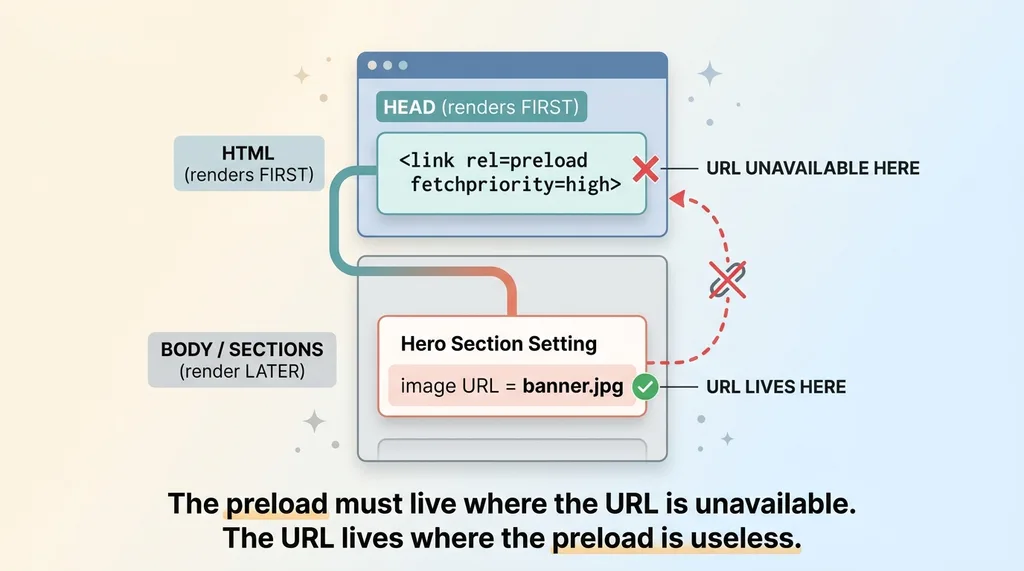 The structural mismatch: preload lives in head, image URL lives in section
But the head template cannot read section settings. Sections render after the head closes. The layout file that builds your <head> has no idea what image marketing chose, because at the moment the head is rendered, the section data has not been loaded into scope yet.
So people try the obvious thing: emit the preload from inside the section, where the image URL IS available. And it does nothing. A preload emitted inside a section lands in the body, well after the closing </head> tag. The browser treats a late preload as a complete no-op. It ignores it entirely.
That is the structural mismatch in one sentence. The preload must live where the URL is unavailable, and the URL lives where the preload is useless. The hero paints late, you get the black background flash, and your LCP suffers. The two systems are architecturally incapable of cooperating.
The Only Real Fix Forces You to Hardcode the Image URL
Once you accept that the head cannot read the section setting, the workaround becomes obvious and ugly. You hardcode the hero's CDN image URL directly in the head.
I wrap it in a conditional so it only fires on the homepage. You do not want a homepage hero preload firing on your product pages, your blog, your cart. That would waste bandwidth on every page that does not use the image. So the section settings head preload gets guarded by a template check that limits it to the index template.
Then there is the responsive angle. My hero is not one image. It is a mobile crop and a desktop crop, served at different breakpoints. So I hardcode multiple URLs in the head, each with a media condition, so the browser preloads the right one for the device.
And it works. When the head preload points at the correct, current hero URL, the browser fetches it immediately. The black flash disappears. The hero paints right away. The largest contentful paint hero improvement is real and measurable. On my brand it pulled LCP back under the good threshold and the above-the-fold experience felt instant again.
But notice what I just did. The same image URL now lives in two places. It lives in the section setting where marketing manages it, and it lives hardcoded in the head where the browser reads it. That is duplication. And duplication that two different people maintain in two different places is a time bomb.
This is the broader theme behind hero performance. I have written before about how I cut 92% off my site's image weight, and lighter images absolutely help. But a perfectly optimized hero that the browser does not preload still paints late. Weight and preload are two separate levers, and this one is about preload.
The Time Bomb: Every Banner Swap Silently Breaks the Preload
Here is where the 800ms regression actually comes from.
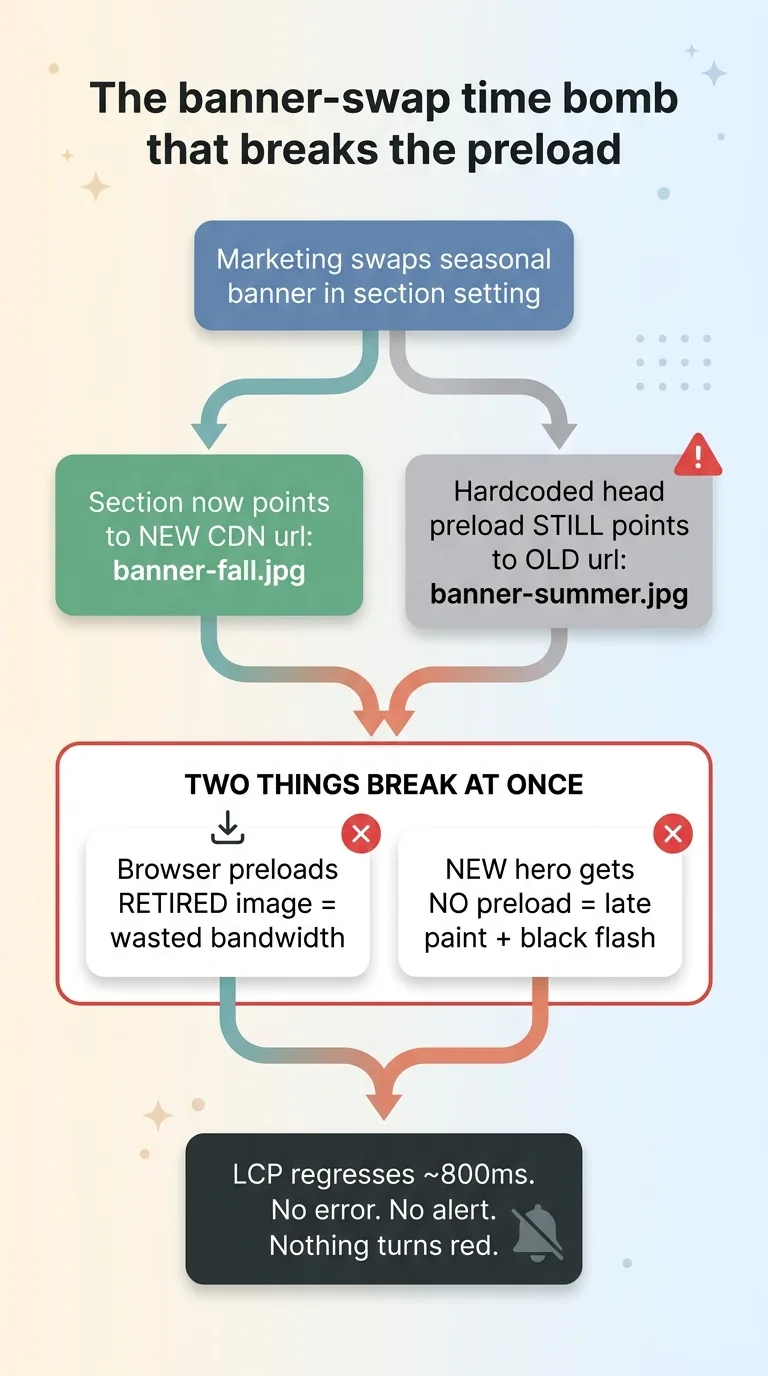 The banner-swap time bomb that breaks the preload
Marketing swaps the seasonal hero in the section setting. New banner, new CDN URL. They never touch the head. Why would they? The head is a theme code file they have never opened and would not know how to find.
So now the hardcoded head preload still points at the OLD image URL. The retired banner. And two bad things happen at once.
First, the browser eagerly preloads an image the page no longer uses. Wasted bandwidth, and on a slow connection that wasted fetch can actively delay the resources that matter. Second, the NEW hero gets no preload at all. So you are right back to the late paint and the black flash. The exact problem the preload was supposed to solve has returned, plus a new wasted download on top.
The two dead preloads I found
When I went digging on my own homepage, I found not one but two dead index hero preloads. Both pointed at banners we had retired seasons ago. They had been quietly fetching dead images and providing zero benefit for who knows how long. Every visitor to my homepage was downloading two images the page never displayed.
Why nothing alerts you
This is what makes it so insidious. There is no error. The page does not break. Nothing turns red in any dashboard. The preload just quietly does nothing, and a separate stale preload quietly wastes bandwidth.
This is exactly the category of problem I have written about with silent failures that nobody notices. The worst bugs are the ones that report success while doing nothing. A no-op preload throws no exception. Your monitoring sees a working homepage. Your team sees a working homepage. Only your LCP knows the truth, and only if someone is watching it.
That is why the regression feels mysterious. The broken thing is invisible, and it lives in a file marketing never opens. They changed a banner and the site got slower, and from their seat those two facts have no possible connection. But they are the same event.
The Maintenance Rule That Keeps It From Rotting
The real fix is not more code. It is a process. Because the head cannot read the section, a human has to keep them in sync, and that means the sync has to be a documented step in the banner-swap workflow.
The maintenance rule is one sentence: any time the hero banner changes, the head preload URLs must change in the same edit. Not later. Not as a follow-up ticket. In the same change.
A one-liner to grab the current hero URLs
To make that actually doable, I gave whoever does the swap a one-line command that pulls the live hero image URLs straight from the rendered homepage. You fetch the homepage HTML, grep for the hero image source, and it prints the current CDN URLs. Copy those, paste them into the head guard, done. No guessing, no digging through the theme editor to reverse-engineer which CDN path the section produced.
Make the swap a two-step checklist
Then I turned the whole thing into a two-step checklist attached to the banner-change task:
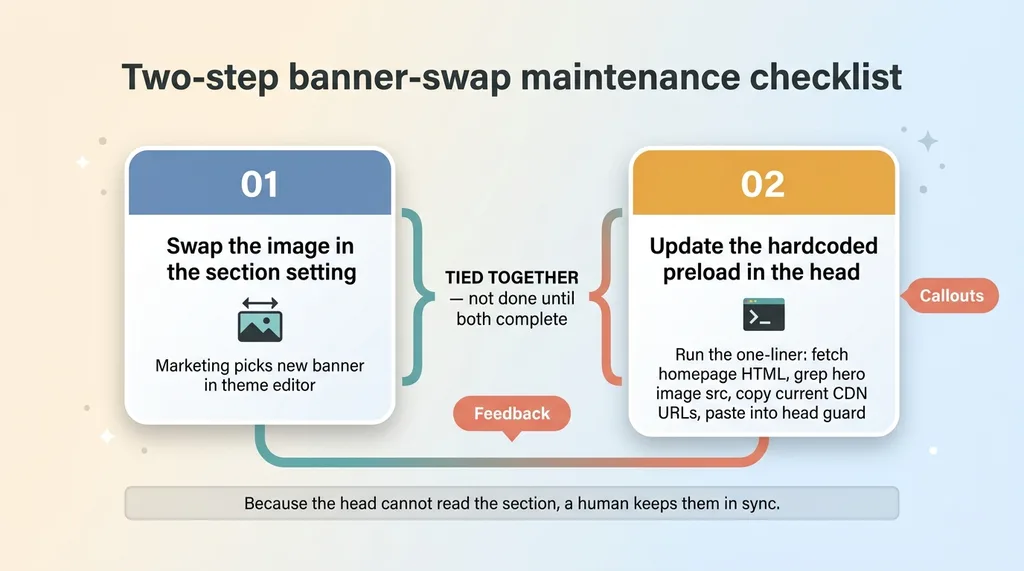 The two-step banner-swap maintenance checklist
- Step 1: Swap the image in the section setting.
- Step 2: Run the one-liner, copy the new URLs, update the hardcoded preload in the head guard.
Two steps. Tied together. You do not consider the banner swapped until both are done.
I will be honest about the ideal. The ideal is auto-syncing the two, so the head reads the section and you never duplicate anything. But on a CMS where the head architecturally cannot read sections, there is no clean automatic path. A documented human-in-the-loop rule is the reliable answer, and reliable beats elegant.
After I shipped the rule, I confirmed the fix held using real-user data, not lab scores. A lab test on the day you fix it always looks great. What you actually care about is whether LCP stayed good across real visitors over the following weeks, especially after the next banner swap. That is the only proof the process is sticking.
The CLS Trap Hiding Next Door: Infinite Scroll Pushing SEO Content
While I was in there, I hit a second perf trap on the same homepage that is worth a quick word, because it teaches the same lesson.
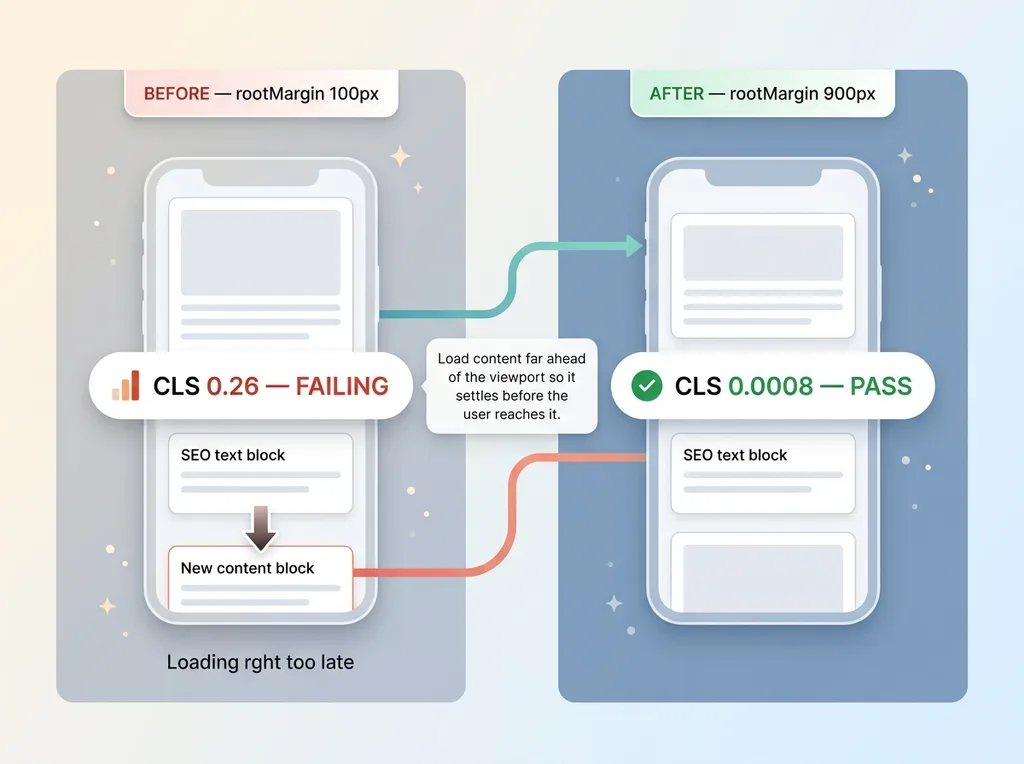 CLS fix via increased rootMargin in infinite scroll
My homepage uses infinite scroll to lazy-load product content. The infinite scroll was configured with a tight rootMargin of 100px, meaning it only loaded the next batch of content when the user was almost on top of it.
The problem: that content kept injecting into the layout right as the user scrolled to it, and every injection shoved the SEO text block below it around. Cumulative Layout Shift was 0.26. That is a failing score, and you could feel it. Content jumping under your thumb as you scroll.
The fix was almost embarrassingly simple. I increased the rootMargin from 100px to 900px, so content loads far ahead of the viewport. By the time the user actually scrolled down to it, it had already loaded and settled. Nothing shifted under them. CLS dropped from 0.26 to 0.0008.
The lesson is the same as the preload trap. The regression did not come from a heavy image or a bloated script. It came from a rendering-order mismatch, content arriving at the wrong moment relative to when the user reached it. Homepage Core Web Vitals problems are usually structural timing issues, not weight issues. Fix the timing and the score fixes itself.
Perf Regressions Are Usually Process Bugs, Not Code Bugs
Here is what I want the CEO reading this to take away.
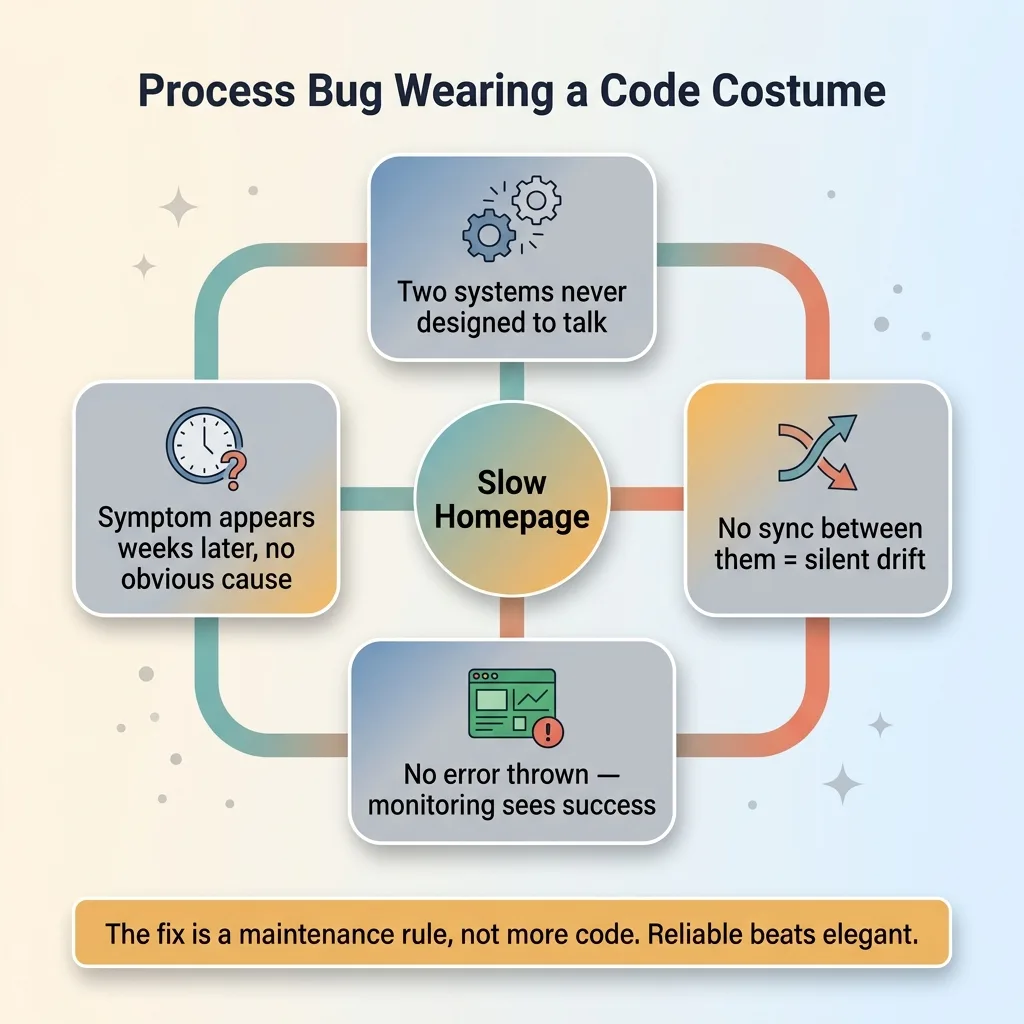 Perf regressions are process bugs, not code bugs
The reason your homepage gets slower every time someone touches it is not that your team is careless. It is a structural mismatch between how your content is managed and how browsers optimize loading. The image URL lives in one system, the preload lives in another, and nothing keeps them in sync. So they drift, silently, until the symptom shows up weeks later with no obvious cause.
Most teams never find these. The failures throw no errors. The symptoms, slow paint and layout shift, get blamed on vague things like "the site feels heavy" or "maybe we need a faster host." Meanwhile the actual cause is a dead preload pointing at last season's banner.
This is the work I do. I find the invisible coupling between systems that were never designed to talk to each other. I build the fix. And just as important, I write the maintenance rule so the fix does not rot the moment I move on to the next thing. A fix that needs me to stay forever is not a fix.
Get the next build note.
I write up each system I build, including what broke. Subscribe to my newsletter and I'll send you the next one.