Instagram API Integration: Lessons From an OAuth Gauntlet
Instagram API integration is a maze of two login systems, hidden scopes, and rate limits. Here's the field guide I wish I'd had, written from the bruises.
By Mike Hodgen
Why I Spent Three Weeks Fighting a Login Button
I run a DTC fashion brand out of San Diego, and we have customers who post genuinely great photos of our products. That kind of user-generated content is gold. So I decided to build a system that pulls our own customer content into a pipeline automatically, no manual screenshotting, no DMing people for permission one at a time.
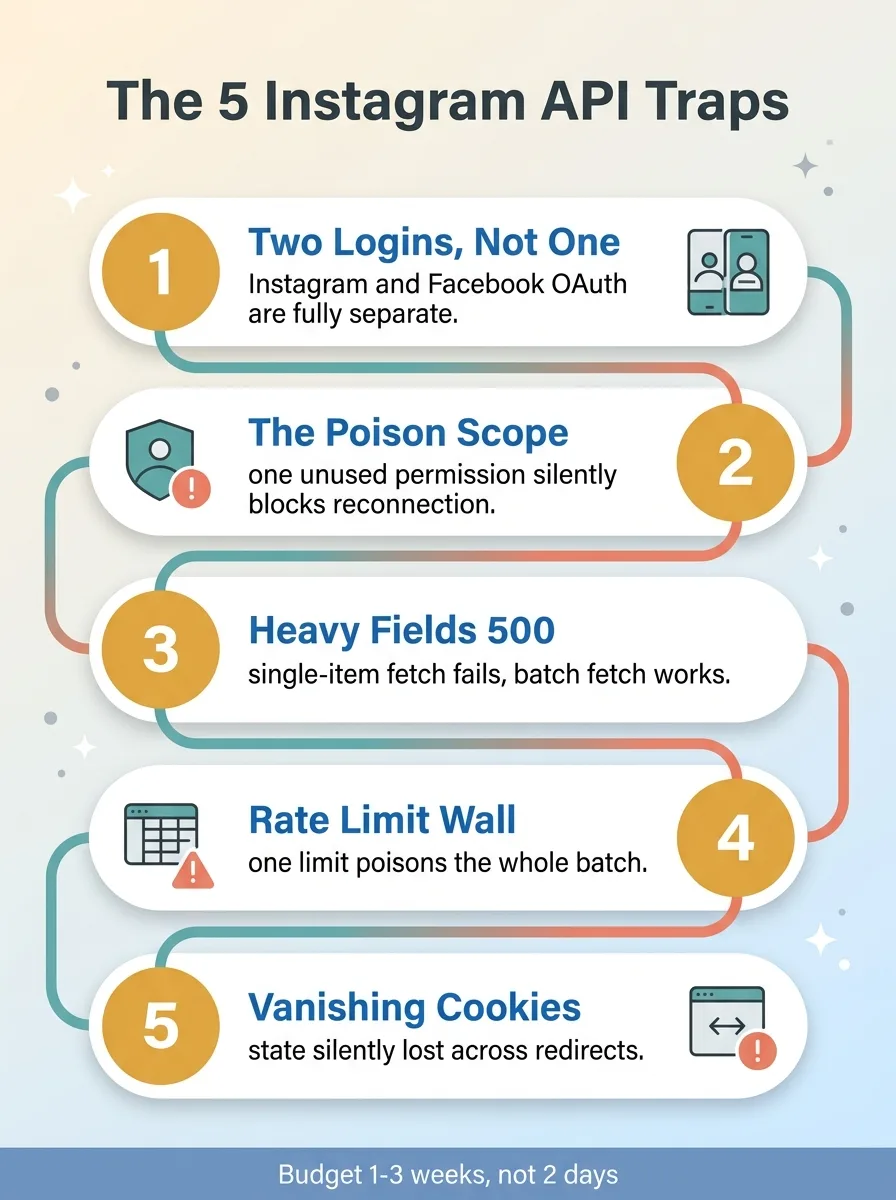 The five Instagram API traps overview
The plan was simple. Connect to the Instagram API, pull the media, store it, move on. I budgeted two days.
It took three weeks.
Here is the thing nobody tells you about Instagram API integration: the API itself isn't hard. The endpoints are documented. The request format is standard REST. If the docs matched reality, this would genuinely be a two-day job. The problem is the gap between what the documentation says and what the platform actually does. That gap is where you lose your time, and it's invisible until you fall into it.
I've built more than 15 AI systems now, across product creation, pricing, content, and customer service. I've integrated with plenty of platforms. Meta's Graph API stack is the one that bruised me the worst, and it bruised me in five specific places that I want to walk you through.
This isn't a tutorial. There are plenty of those. This is the field report I wish I'd had before I started: the undocumented behavior, the silent failures, and what it actually costs to get pulling our own social content into a UGC pipeline working in production.
If you're a CEO staring at a "just connect to Instagram" line item in a project plan, read this before you believe the estimate.
Trap One: Instagram Login and Facebook Login Are Not the Same Thing
Two credentials, two endpoints, zero overlap
This was the single biggest time sink, and it's the one I'm most annoyed about in hindsight.
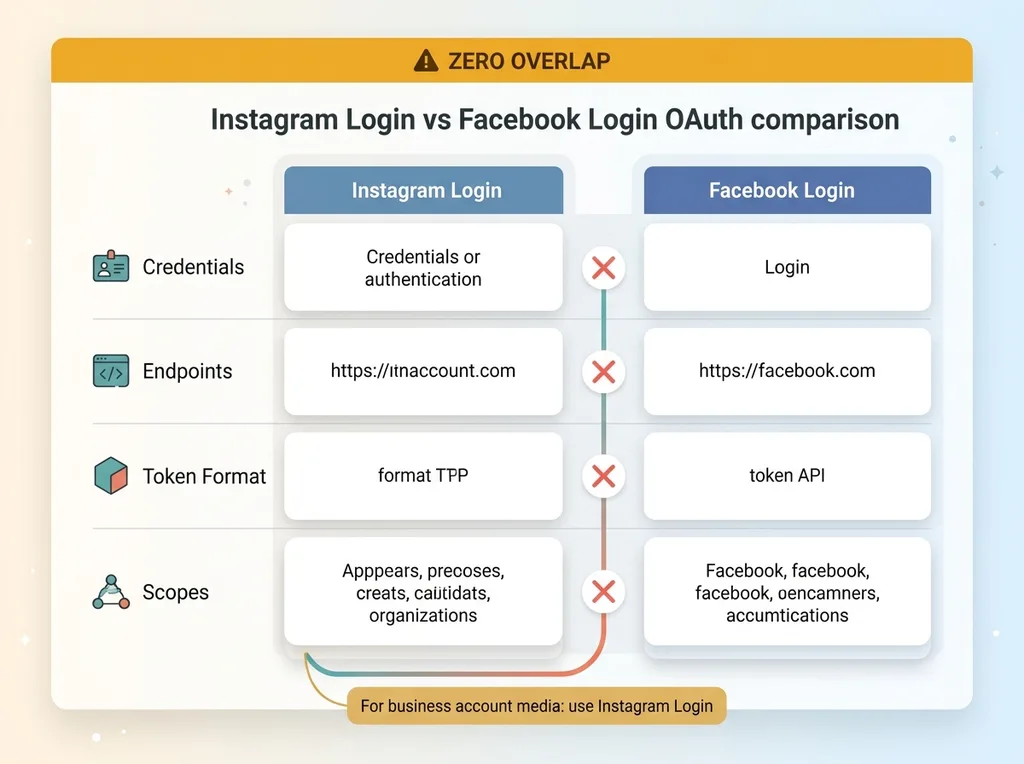 Instagram Login vs Facebook Login OAuth comparison
Meta gives you two completely separate OAuth systems: Instagram Login and Facebook Login. They sound like flavors of the same thing. They are not. Different credentials, different endpoints, different token formats, different scopes. There is essentially zero overlap.
The documentation blurs them together. You read through it assuming that once you've configured authentication, that configuration carries across both. It doesn't. I had a token that authenticated cleanly through one flow and then returned permission errors the moment I tried to use it against the other.
I burned the better part of a week here. The token looked valid. The auth succeeded. And then the data call failed with a permissions error that made no sense, because as far as I could tell, I'd requested the right permissions. I hadn't. I'd requested them on the wrong login system.
The fix was to stop treating the two systems as interchangeable. I split them into two distinct OAuth handlers in the codebase, each with its own credential set, its own redirect path, and its own token handling. Once they were physically separate in the code, the confusion stopped, because there was no longer any way to accidentally cross the wires.
The lesson for anyone starting this: before you write a single line of code, figure out which login system actually maps to the data you need. For my use case, pulling business account media, that meant Instagram Login specifically. Get that decision wrong and you'll build the entire flow against the wrong system and not find out until you try to fetch real data.
Trap Two: The Scope That Quietly Blocks Reconnection
Meta Graph API scopes are where you lose a day to something completely invisible.
When you set up the OAuth flow, you request permission scopes, the specific things your app is allowed to do. I requested a messaging-related scope because I figured I might want it down the line. Seemed harmless. Request it now, use it later.
It was not harmless.
That unused scope didn't just sit there idle. It actively broke the ability to reconnect the account. The first connection worked fine. But every reconnection attempt after that silently failed to complete the reauth flow. No error message telling me why. The flow would start, run, and just not finish.
I spent a day assuming I'd broken something in my token refresh logic. I rewrote the refresh handling twice. I added logging everywhere. The logs showed the request going out and nothing useful coming back.
The fix was embarrassing once I found it. I dropped the scope I wasn't using. Reconnection started working immediately.
I still don't have a clean explanation for why an unused permission would poison the reauth flow. My best guess is that requesting a scope the account isn't fully provisioned for puts the whole authorization into a state Meta won't re-grant cleanly. But the why doesn't really matter for the lesson.
The lesson is this: request the minimum scopes that get the job done, and add more only when a specific API call actually demands them. Over-requesting permissions isn't just a privacy concern or a slower app review. It can lock you out of your own integration in ways that produce no error and no obvious cause. Lean is safer, and it's faster to debug when something does go wrong.
Trap Three: Heavy Fields That Trigger 500s One at a Time
Fetch in bulk, not per-item
Here's one that genuinely defies intuition.
Certain rich fields, the detailed media metadata I needed for the UGC pipeline, returned a 500 server error when I requested them for a single item. Not a 400, not a permissions error. A flat 500, which is the server telling you it broke.
But the exact same fields worked perfectly when I requested them as part of the listing endpoint, the one that returns many items at once.
Read that again, because it's backwards from what you'd expect. A single-item fetch should be the light request. You're asking for one thing. The batch listing should be the heavy one, because it's returning dozens of records. Yet the single-item version was the one falling over while the batch version handled the same fields without complaint.
I lost hours here assuming the 500 meant my request was malformed. I tweaked the field syntax. I tried different field combinations. I checked and rechecked the item IDs. Everything looked correct, and it kept failing.
The fix was to move the heavy fields up to the listing call, where the platform handles them gracefully, and stop doing per-item enrichment requests for those fields entirely. Once I pulled the metadata as part of the bulk listing instead of one record at a time, the 500s vanished.
The broader lesson applies to any platform API, not just Instagram: when a single-record fetch fails but a batch fetch works, the platform is telling you something about how it wants to be queried. It has opinions about access patterns even when the docs don't mention them. Listen to that signal instead of fighting it. The API is steering you toward the path it has actually optimized for, and the path it hasn't will keep breaking in ways you can't predict.
Trap Four: Rate Limits That Lock You Out After One Call
Why a two-phase pipeline beats a tight loop
This is the core architectural lesson, and it's the one most likely to save you if you take only one thing from this article.
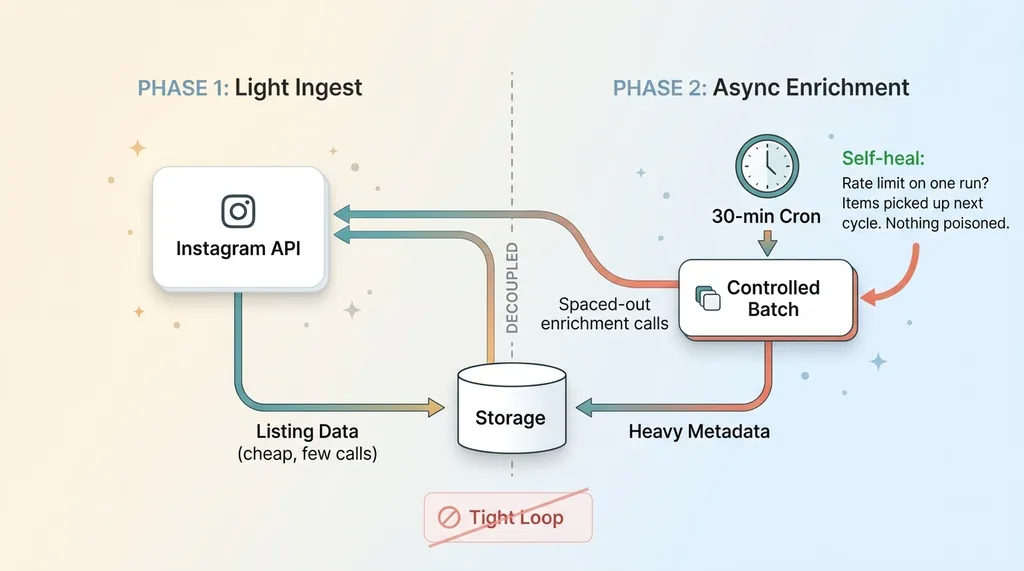 Two-phase ingestion pipeline with async enrichment
My first version was the obvious version. Loop through the media items, and for each one, make an enrichment call to fetch the heavier details. Simple, readable, and exactly the wrong design.
Social media API rate limits are aggressive and opaque. Instagram's in particular don't give you a clean, documented number you can plan around. You find the ceiling by hitting it. And when my tight loop hit it, the pipeline didn't just slow down. It stalled mid-run, and worse, the rate limit failure broke every remaining item in that batch. One run could poison dozens of records, and I'd have to figure out which ones actually made it through.
That's the trap with a tight enrichment loop: a single rate limit doesn't fail one call, it fails everything downstream of where you hit the wall.
The fix had two parts.
First, I split the work into a two-phase ingestion pipeline. Phase one is a light, fast ingest that grabs only the listing data, the cheap stuff, in as few calls as possible. Phase two is an asynchronous enrichment pass that backfills the heavier details separately, on its own schedule, decoupled from the initial pull. If enrichment hits a wall, the listing data is already safely stored. Nothing gets poisoned.
The 30-minute cron that dodges the limit
Second, I stopped hammering the API in real time. Instead of enriching on demand the moment data came in, I moved everything onto a cron that runs every 30 minutes and processes a controlled batch each time. Spreading the calls out across those intervals means I never approach the rate ceiling in the first place.
The result was a pipeline that became genuinely resilient. A rate limit on one run no longer corrupts the whole batch. It just means a few items get picked up on the next cycle. The system self-heals instead of self-destructing.
This pattern compounds badly with the kind of silent failures I'll get to in a second, because silent failures are the worst kind of bug when they're hiding inside a batch that's already half-broken. Decoupling the phases is what lets you actually see and recover from those failures instead of having them cascade. If you're building any ingestion against a rate-limited platform, design for the wall before you hit it.
Trap Five: Cookies That Silently Don't Survive a Redirect
This one wasted hours precisely because nothing errored out.
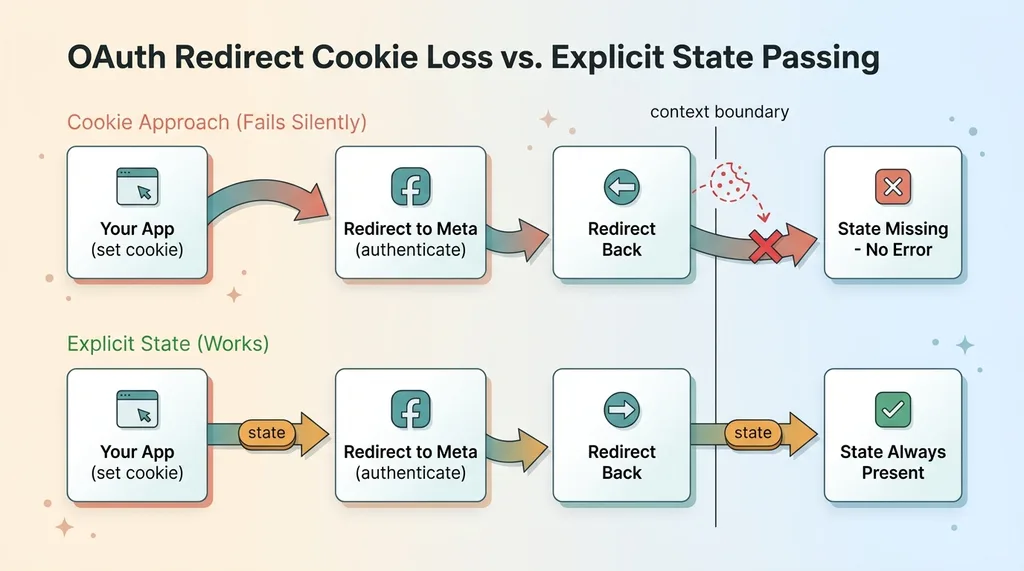 OAuth redirect cookie loss versus explicit state passing
OAuth flows involve redirects. You send the user off to Meta, they authenticate, and they get redirected back to you with the result. In that round trip, I was depending on some state stored in a cookie to carry through.
It didn't carry through. The cookie I set during the redirect leg of the flow silently failed to survive to the next request. So on the other side, the state I needed simply wasn't there.
No exception. No log line. No 400, no 500. Just a flow that half-worked, with missing data exactly where I expected my state to be. I assumed the bug was somewhere in my own logic, because there was no failure pointing me anywhere else.
Without going too deep, the cause is that redirect chains and cross-context cookie handling don't behave the way you assume from normal browser usage. When you're bouncing between domains and contexts during an auth flow, cookies you set in one leg can quietly get dropped by the time you land in the next. The browser isn't broken. It's enforcing rules that don't show up until a redirect crosses the wrong boundary.
The fix was to stop relying on cookies surviving the redirect at all. Instead, I passed the state explicitly through the flow, carried in the request itself rather than depending on a cookie to still be there when I came back. Once the state traveled with the flow, it was always present, because nothing could silently drop it.
This ties back to the theme running through every trap on this list. The painful bugs in API work are almost never the loud ones. A loud failure gives you a stack trace and a starting point. The expensive bugs are the silent ones, where everything reports success and the data just quietly isn't there.
What This Means for Your Timeline and Budget
Budget for discovery, not just coding
Here's the direct answer to the question I opened with: why is connecting to a social platform so painful, and what should you budget?
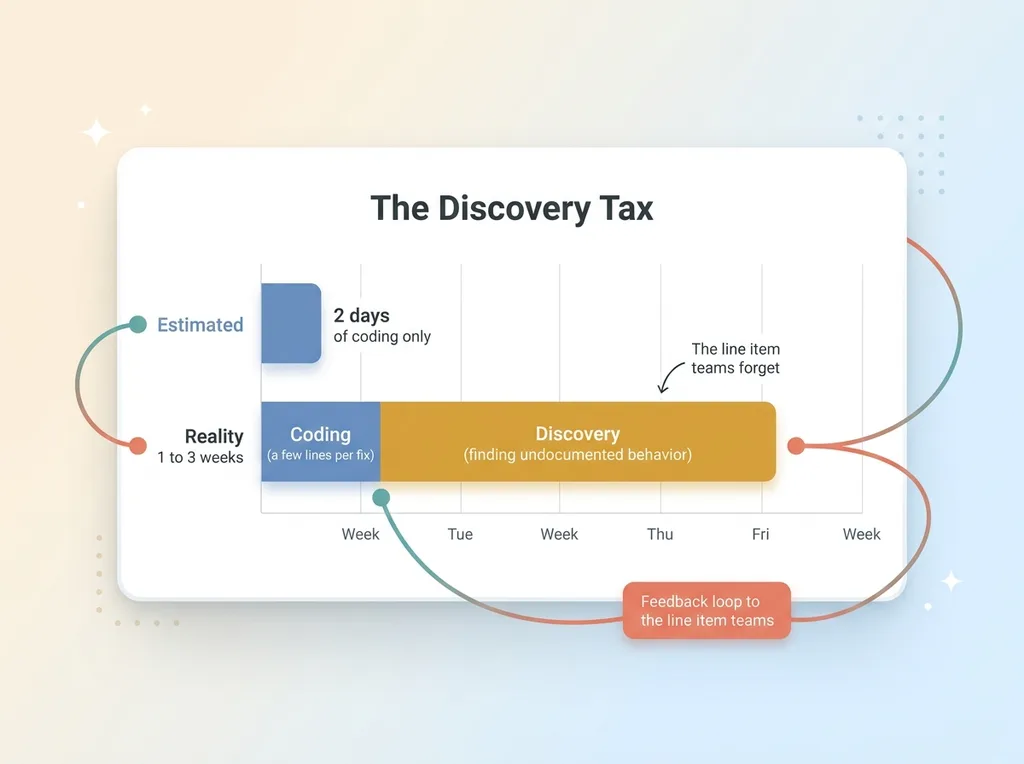 Discovery tax: estimated versus real integration timeline
The painful part is never the code you eventually write. Every fix in this article was a few lines. Split the OAuth handlers. Drop one scope. Move fields to the batch call. Add a cron. Pass state explicitly. None of that is hard to write.
The cost is discovery. It's the days you spend finding the undocumented behavior that no tutorial mentions and no error message explains. That's the real line item, and it's the one teams consistently forget to budget.
So when someone on your team says a platform integration is a two-day job, mentally translate that. For a platform like Meta, the first time through, you're realistically looking at one to three weeks. Not because your team is slow, but because they're paying a discovery tax that you can't estimate in advance, by definition, because you don't know what you don't know yet.
When to build it yourself versus when to call someone who's been burned
If you have time and a non-urgent use case, building it yourself is a fine way to learn a platform deeply. You'll hit these walls, and you'll remember them.
The value of working with someone who's already hit the walls is that they don't pay the discovery tax twice. I've fallen into all five of these traps. The next Instagram API integration I do takes days, not weeks, because the map is already in my head.
This UGC pipeline now feeds downstream systems for my brand, including turning customer content into ad-ready video. None of that downstream value exists if the ingestion layer keeps silently breaking. The unglamorous plumbing is what everything else stands on.
If you're staring down a platform integration and your team is guessing at the timeline, that's exactly the kind of thing I de-risk. Let's talk about what it actually takes before you commit a two-day estimate to a three-week problem.
Thinking about AI for your business?
If this resonated, let's have a conversation. I do free 30-minute discovery calls where we look at your operations and find where AI could actually move the needle, not where it sounds good in a slide deck.
Get AI insights for business leaders
Practical AI strategy from someone who built the systems — not just studied them. No spam, no fluff.
Hodgen.AI
Ready to automate your growth?
Book a free 30-minute strategy call with Hodgen.AI.
Book a Strategy Call