CRM Integration Without Webhooks: When the Docs Lie
What real CRM integration without webhooks looks like: OAuth plus a poll, an idempotent ledger, and a loop guard, built after you disprove the docs.
By Mike Hodgen
The Pitch That Skips the Hard Part
Picture the CEO of a firm that runs on legacy practice-management software. The kind of system their whole business has run on for fifteen years. When someone says "AI," they nod politely and quietly assume it's a science project that will never actually talk to the system that holds every client record they own.
That doubt is correct more often than the AI vendors want to admit.
Most AI pitches show you a clean API diagram. Box on the left, arrow to the middle, your CRM on the right. Everything connects. Everyone smiles. The demo runs.
Real integration is rarely about the clean parts. It's about the parts the diagram hides.
I learned this connecting an AI intake pipeline to two separate legal case-management systems. Same project, two CRMs, both with their own special way of being wrong. The actual work was less coding and more disproving the published documentation, line by line, until I had something I could trust.
Here's the operating assumption I bring to every CRM integration without webhooks: every doc is wrong until a live record proves otherwise. Not "probably outdated." Wrong. I treat the published documentation as a rough sketch drawn by someone who left the company three versions ago.
That sounds cynical. It's actually the cheapest insurance you can buy. Because the difference between a two-week integration and a two-month one is almost always discovered in the first day, when you find out the docs lied about authentication.
Let me show you exactly where they lied.
Every Doc Was Wrong, So I Pulled One Live Record First
Before I wrote a single line of sync logic, I did one thing: I pulled exactly one live record through the real auth flow and read the actual JSON. That one record disproved three separate things the docs claimed.
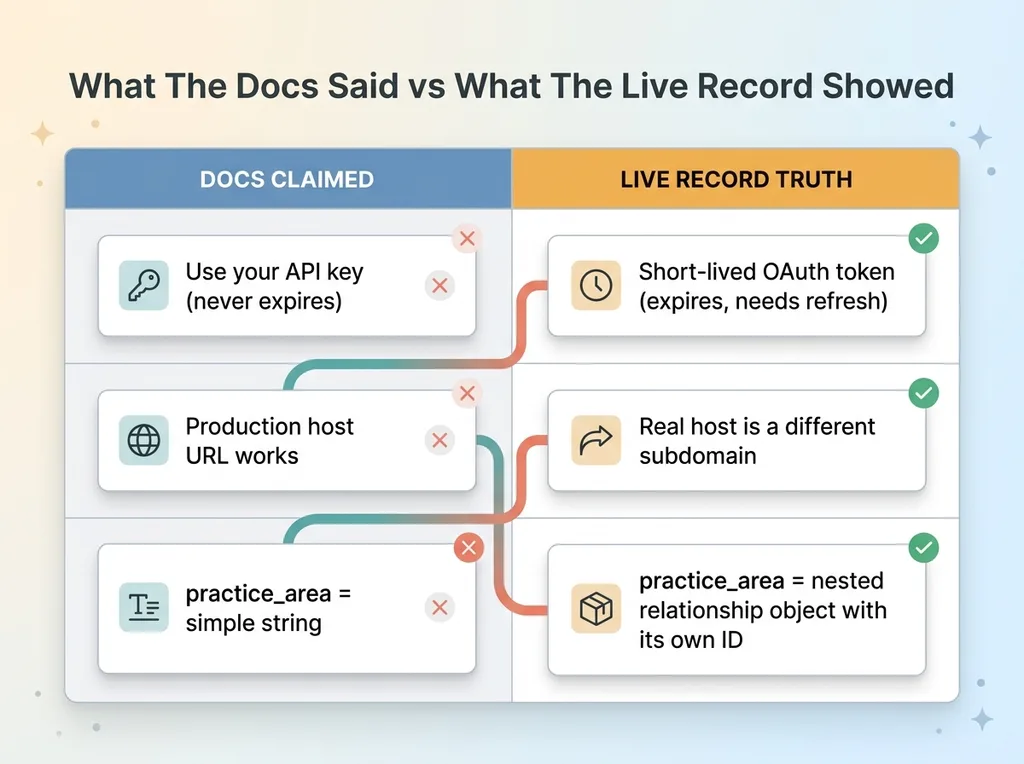 Docs vs Live Record Reality Check
The 'API key' that was actually an OAuth token
The docs said "use your API key." There was a field labeled API key in the dashboard. I copied it, sent it, got a 401.
Turns out the "API key" was a short-lived OAuth token. It expired. The documentation never mentioned a refresh flow because, on paper, it was just a key, and keys don't expire. So anything I built against that assumption would work in testing and then silently die a few hours later in production.
That's the worst failure mode. It works long enough to ship, then breaks after you've stopped watching.
The host URL that pointed nowhere
The production host URL printed in the docs returned errors against the real endpoint. Not a redirect, not a deprecation notice. Just failures. The actual working host was a slightly different subdomain that I only found by inspecting a real request from the CRM's own interface.
A documented field the docs called practice_area (a simple string, supposedly) came back as a relationship object. Not text. A nested thing with its own ID. If I'd mapped it as a string, every downstream lookup would have broken in a way that's annoying to trace.
The lesson here is simple and it has saved me weeks. The field map you build from the docs is a guess. The field map you build from a live response is the truth.
I've written before about integrating a CRM with no real docs, and the punchline is the same: pull one record first. It costs you twenty minutes and it disproves a week of assumptions.
Why CRM Integration Without Webhooks Is the Normal Case
Here's the thing nobody tells you in the sales meeting: most legacy and vertical CRMs have no native outbound webhook. No real-time push. The "events" feature in the brochure either doesn't exist or doesn't work the way you think.
In this project, the published webhook scaffold verified an HMAC signature. Sounds secure. Except the system never actually sends that signature. So the scaffold would have silently rejected every single payload, forever, while reporting no error. A locked door waiting for a key that doesn't exist.
So CRM integration without webhooks isn't the edge case. It's the default. Plan for it.
What you build when there is no native push
When there's no reliable webhook, you have two viable paths.
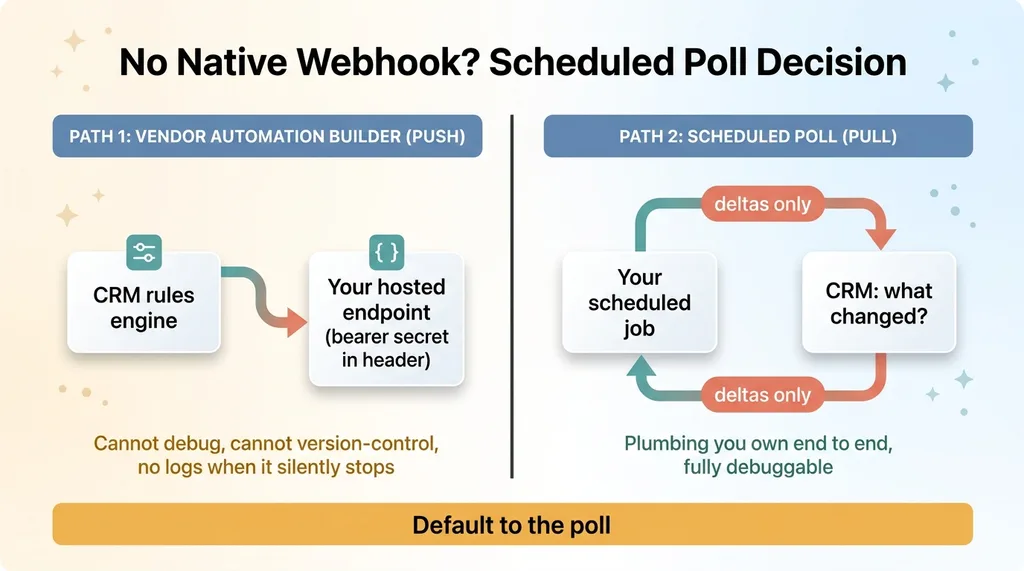 Webhook Push vs Scheduled Poll Decision
Path one: the CRM's own internal automation builder. Most of these systems have a rules engine ("when a record changes, do X"). You can sometimes configure that to POST to an endpoint you host. That's a push, technically, but it's running on the vendor's fragile automation layer.
Path two: a scheduled poll. Your job asks the CRM "what changed?" on an interval. Boring. Reliable. Yours.
The self-owned header-bearer secret channel
If you go with path one, you host an endpoint protected by a bearer secret in the header. The CRM's automation fires at your URL, your endpoint checks the secret, and you process the payload. It works when it works.
But here's my honest take: most teams should default to the poll. The automation-builder path depends on a vendor feature you can't debug, can't version-control, and can't see when it breaks. When it silently stops firing, you have no logs and no recourse.
The poll is plumbing you own end to end. When something goes wrong, you can read your own code.
The OAuth Poll Sync Pattern That Actually Holds Up
Here's the design I actually shipped.
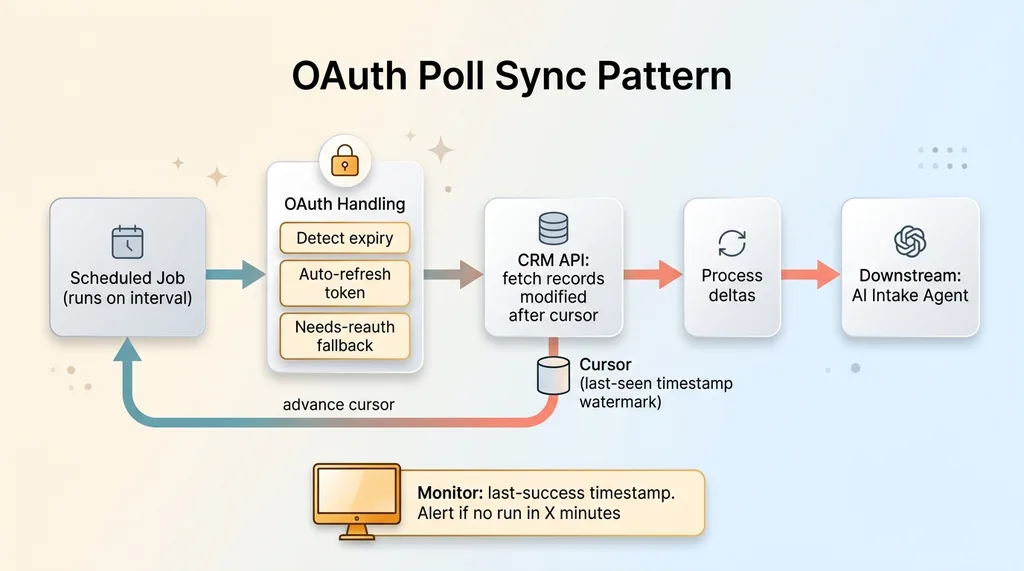 OAuth Poll Sync Architecture
Build the full refresh path even when the token lifetime is unclear
Remember the "API key" that was really an OAuth token? The token lifetime was documented two contradictory ways. One page said one thing, another said something else. So I treated the lifetime as completely unverified and built the full path anyway.
That means three things: detect expiry, refresh the token automatically, and a needs-reauth fallback for when the refresh itself fails. The principle I follow: when the docs disagree with themselves, build for the worse case. It costs an extra hour now and saves you a 2 a.m. outage later.
This is the same discipline I bring whether I'm integrating into legacy software or building the CRM I built from scratch. The difference is that in a greenfield system you control the auth. In a legacy integration, you're building a refresh path around a token you don't fully understand. So you build for the worst documented case and verify against live behavior.
Polling on a schedule, not waiting for a push
The poll itself is a scheduled job. On an interval, it asks the CRM one question: "what changed since the last time I checked?"
The key piece is a cursor (a timestamp watermark) so you only fetch deltas, not the entire dataset every run. You store the last-seen timestamp. Next run, you ask for everything modified after that watermark. Fetch, process, advance the cursor.
This feeds the AI intake agent for a law firm sitting downstream. The AI is the interesting part. The poll is the deterministic plumbing that keeps it fed.
One warning. A poll that quietly stops is worse than no poll, because you assume it's running. I watched a silent OAuth pipeline failure show clean dashboards reading zeros while everyone assumed the data was flowing. Monitor the poll's last-success timestamp. If it hasn't run in X minutes, something is broken and you need to know before the client does.
Idempotency: The Events Ledger That Stops Double-Processing
A poll has one structural problem: it returns the same record twice.
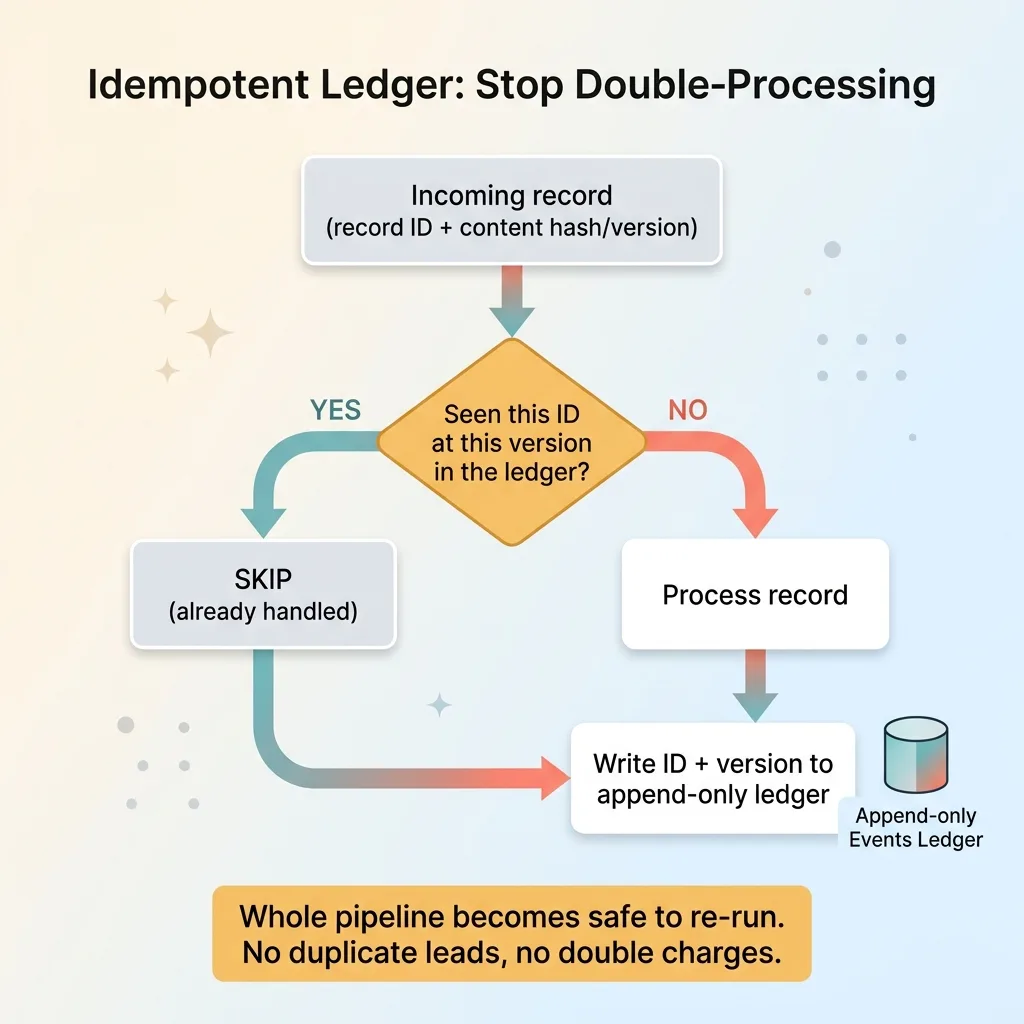 Idempotent Ledger Dedup Flow
Overlapping windows do it. Retries do it. Clock skew between your server and theirs does it. Without protection, you create duplicate leads, fire duplicate emails, and trigger duplicate downstream actions. In a legal intake pipeline, that means two intake records for one human, and someone gets contacted twice.
The fix is an idempotent webhook ledger. Append-only. Keyed by the CRM's record ID plus a content hash or version number.
The flow is simple. Before processing any incoming record, check the ledger. Have I seen this record ID at this version before? If yes, skip it. If no, process it and write it to the ledger. Done.
This turns "did we already handle lead X?" from a guess into a lookup. That's the whole point. You stop relying on your memory of what ran and start relying on a record of what ran.
I call it a webhook ledger even when the trigger is a poll, because the discipline is identical regardless of how the record arrived. Whether a webhook pushed it or a poll pulled it, you check the ledger first. The ledger doesn't care.
The real payoff is that it makes your entire pipeline safe to re-run. Job crashed halfway through? Run it again. The ledger skips everything already processed. No fear, no manual cleanup, no double-charges on anything that touches money or a client.
That last part matters most. The further downstream an action sits (sending a contract, scheduling a consult, charging a card), the more an idempotency check is the thing standing between you and an angry phone call.
Two-Way Sync Loop Prevention: Pre-Stamp the Lead
Now the trap that bites everyone doing bidirectional sync.
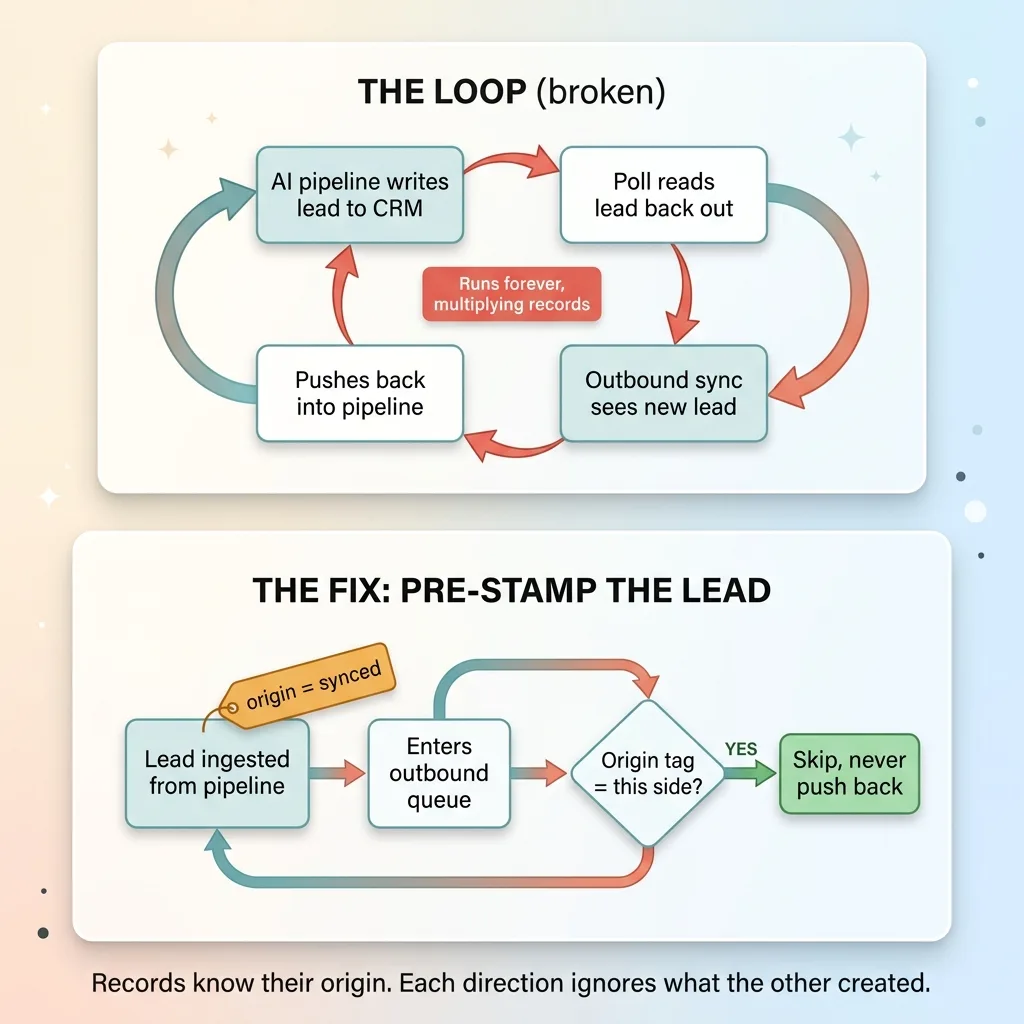 Two-Way Sync Loop and the Origin-Stamp Fix
A lead comes into the AI intake pipeline. We write it into the CRM. The poll runs and reads that same lead back out, because to the poll it's just "a record that changed." The outbound sync sees a new lead and pushes it right back into the pipeline. Which writes it to the CRM again. Which the poll reads again.
That's the loop. It runs forever, multiplying records, until something falls over.
The fix I shipped: when a lead is ingested from our pipeline, it gets pre-stamped before it ever enters the outbound queue. Origin-tagged as "synced" and marked with where it came from. So when the outbound sync later encounters that lead, it recognizes it as already-handled and never pushes it back.
Generalized for anyone building this: every record must carry where it came from. And each sync direction must skip records that originated on the other side.
That's two-way sync loop prevention in one sentence. Records know their origin, and each direction ignores what the other direction created.
It sounds obvious written down. It is not obvious at 11 p.m. when you're watching your lead count climb by a hundred a minute and you can't figure out why. I've seen teams add rate limits and dedup hacks to fight the symptom when the real fix is one origin tag set at the moment of ingestion.
Stamp the lead before it enters the queue. The loop never starts.
What This Means When You Hire Someone to Connect AI to Your Stack
Back to that skeptical CEO. The one who assumed AI would never talk to their legacy system.
Here's the honest resolution. The reason a lot of AI projects stall is not the AI. The models are good enough. The reason is the integration that nobody scoped honestly. Docs that lie. Missing webhooks. Contradictory token rules. Fields that aren't the shape they claim to be.
The clean API diagram in the pitch deck skips all of that. And that's exactly where the project dies.
The person who can actually make AI talk to your legacy software is the one who treats integration as the real work. Who pulls a live record before designing anything. Who builds the boring resilient plumbing (OAuth refresh, the poll with a cursor, the idempotent ledger, the loop guard) instead of the demo that works once on stage.
I build this. I don't just diagram it. Across 15+ AI systems and 22,000+ lines of Python, the systems that survived contact with production are the ones where I assumed the docs were wrong and proved everything against live data.
If you already run software you can't rip out, and you want AI on top of it without a six-month science project, that's a conversation worth having. You can talk through your own integration and I'll tell you straight whether it's a two-week job or a real one.
Want to explore what AI could do for your business?
Book a free 30-minute strategy call. No pitch deck, no sales team, just a real conversation about your operations and where AI actually fits.
Get AI insights for business leaders
Practical AI strategy from someone who built the systems — not just studied them. No spam, no fluff.
Hodgen.AI
Ready to automate your growth?
Book a free 30-minute strategy call with Hodgen.AI.
Book a Strategy Call