Your Internal AI Dashboard Is Probably Public Right Now
I disabled my host's protection to share a link and left an internal dashboard wide open. Here's the fail-closed pattern to secure internal dashboards.
By Mike Hodgen
I Disabled the One Thing Protecting My Dashboard
A few weeks ago I built an internal dashboard to watch my AI agents work. It pulls live telemetry from the live dashboard I built to watch every AI agent working for me, shows me which agents are running, what they're costing, where things are stuck. It's the nerve center for a chunk of how my business actually operates.
I wanted to check it from my phone. I wanted to send a link to a collaborator without making them set up an account. I wanted to glance at it on a Sunday without hitting an SSO wall every single time.
My host has built-in deployment protection. It's a paid SSO gate that sits in front of every deploy. So I did the obvious convenient thing. I turned it off, so a plain public link would just work.
It worked. The link loaded instantly on my phone. No login. Smooth.
Then it hit me about ten seconds later.
I had just made an internal operations tool reachable by anyone. No gate. No password. The exact telemetry of how my business runs, the cost data, the agent status, the error logs, all of it, one URL away from a stranger. Anyone who guessed the URL, or stumbled onto it, or got it forwarded in a screenshot, would see everything.
I had built a secure internal dashboard and then, in the name of convenience, made it public with one toggle.
This is not a victory lap. This is a warning, because I almost shipped it that way, and I build this stuff for a living. If it can catch me, it can catch you.
Why Modern Hosts Are Public by Default
The deployment-protection trap
Here's the structural problem nobody tells you when you sign up.
Modern hosting platforms expose every deployment at a public URL by default. You push code, you get a live link, and that link is reachable by the entire internet the moment the build finishes. That's the feature. That's why these platforms feel so fast.
The access control they offer is usually a paid feature bolted on top. It's a deployment-protection setting or an SSO gate you flip on at the project level. It's not part of your app. It's a wrapper the platform wraps around your deploy.
So your security lives outside your code, in a dashboard setting, controlled by a toggle.
Convenience pulls you toward exposure
And here's the trap. The moment you want anything outside your org's SSO, you reach for that toggle.
You want a shareable link for a contractor. You want a webhook to fire from a third party. You want to check the dashboard from your phone without logging into corporate SSO. Every one of those needs pulls you toward turning protection off.
Now your security depends entirely on a platform default you just disabled. And you can disable it again by accident on the next project, or a teammate can, or it can reset during a migration.
Platform-level protection is fine until it isn't. The problem is when it's your only layer. This is one of the same five security holes that show up in every AI-built app I look at. The tool is convenient, the default is public, and the protection is a setting somebody flips off and forgets.
Never let the platform be your only door.
What 'Fail Closed' Actually Means
Fail open vs fail closed
This whole fix rests on one principle, and it's worth getting precise about.
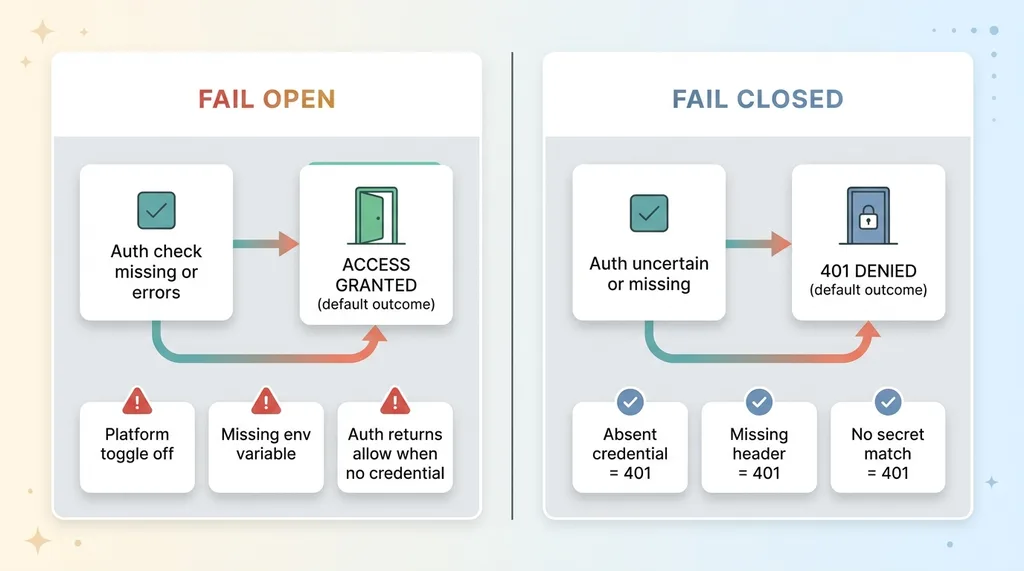 Fail Open vs Fail Closed comparison
Fail open means: if the auth check is missing, misconfigured, or errors out, the request gets through. The default outcome is access.
Fail closed means: if anything about the auth is uncertain, the request is denied. The default outcome is no access.
Most accidental exposures are fail-open by design. A platform toggle being off is fail open. A missing environment variable that silently disables a check is fail open. An auth function that returns "allow" when it can't find a credential is fail open.
The default decision when auth is unclear
The fix is to make the deny path the default path.
If the credential is absent, you return 401. If the header is missing, you return 401. If the secret doesn't match, you return 401. Full stop, no exceptions, no "well, the config wasn't loaded so let's let them through."
Here's the test I use, and it's a good one. You should be able to delete every platform protection setting and still have a locked door. If you turn off the host's SSO gate and your tool is suddenly wide open, you never had real security. You had a borrowed door.
A fail-closed app survives that. Delete the platform protection, and the app itself still says no. That's the standard for a real secure internal dashboard, and everything below is how I got there.
Basic Auth on the Dashboard, Bearer Token on the Ingest
Two distinct surfaces needed two distinct gates, and that distinction is the whole design.
Gate the whole dashboard at the proxy layer
First surface: the dashboard itself. It's meant for a human, me, looking at a screen.
I enforce Basic Auth in the request-proxy layer, the middleware that runs before any page renders. Every route under the dashboard requires a username and password before a single byte of UI loads. Not on the homepage, not on the API the homepage calls, not on a deep link someone forwarded. Everything.
This is app-level authentication. It lives in my code, not in a platform setting. If I delete the host's deployment protection, this gate is still there. The lock is part of the building now, not bolted to the outside.
Separate the human door from the machine door
Second surface: the telemetry ingest endpoints. These are meant for machines, the agents pushing their status to the dashboard every few seconds.
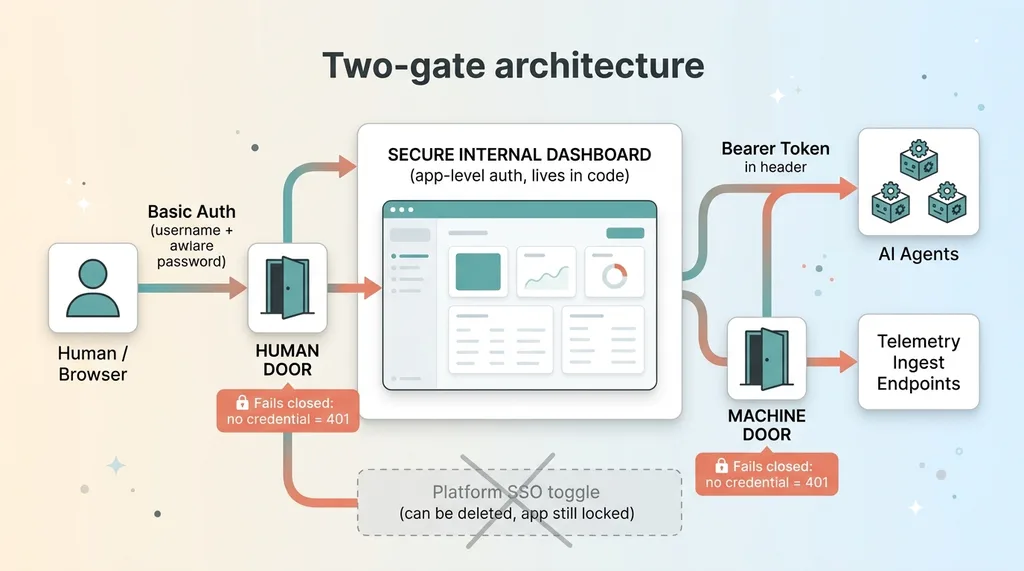 Two-gate architecture: Basic Auth dashboard vs Bearer token ingest
These don't get a login prompt. A username-and-password popup is the wrong thing for a script posting JSON. Instead, each request carries a bearer token in the header, validated server-side, that the dashboard UI never needs to know about.
Why split them? Because a human credential prompt is wrong for a machine posting data every few seconds, and a shared token sitting in a browser is wrong for a human. Different doors for different traffic.
Both checks fail closed. No credential, no token, no match, you get a 401. The deny path is the default path on both surfaces.
A few rules I followed that matter more than they sound:
- Secrets live in environment variables, never in code. The password and the bearer token are config, not source. They never touch the repo.
- An unset env var means deny, not allow. If the secret isn't configured, the check rejects every request. It does not "skip" because the value is missing. Missing config is the deny signal, not a bypass.
- The UI never carries the machine token. The browser does Basic Auth. The agents do bearer tokens. Neither one borrows the other's credential.
That's the entire fix. Two gates, both in the app, both failing closed, both surviving any platform default. It took me about forty minutes to implement and it's the difference between a tool that's actually private and one that's private until somebody flips a switch.
The Mistakes That Make This Worse
There are three ways to get this wrong, and I've seen all three in the wild.
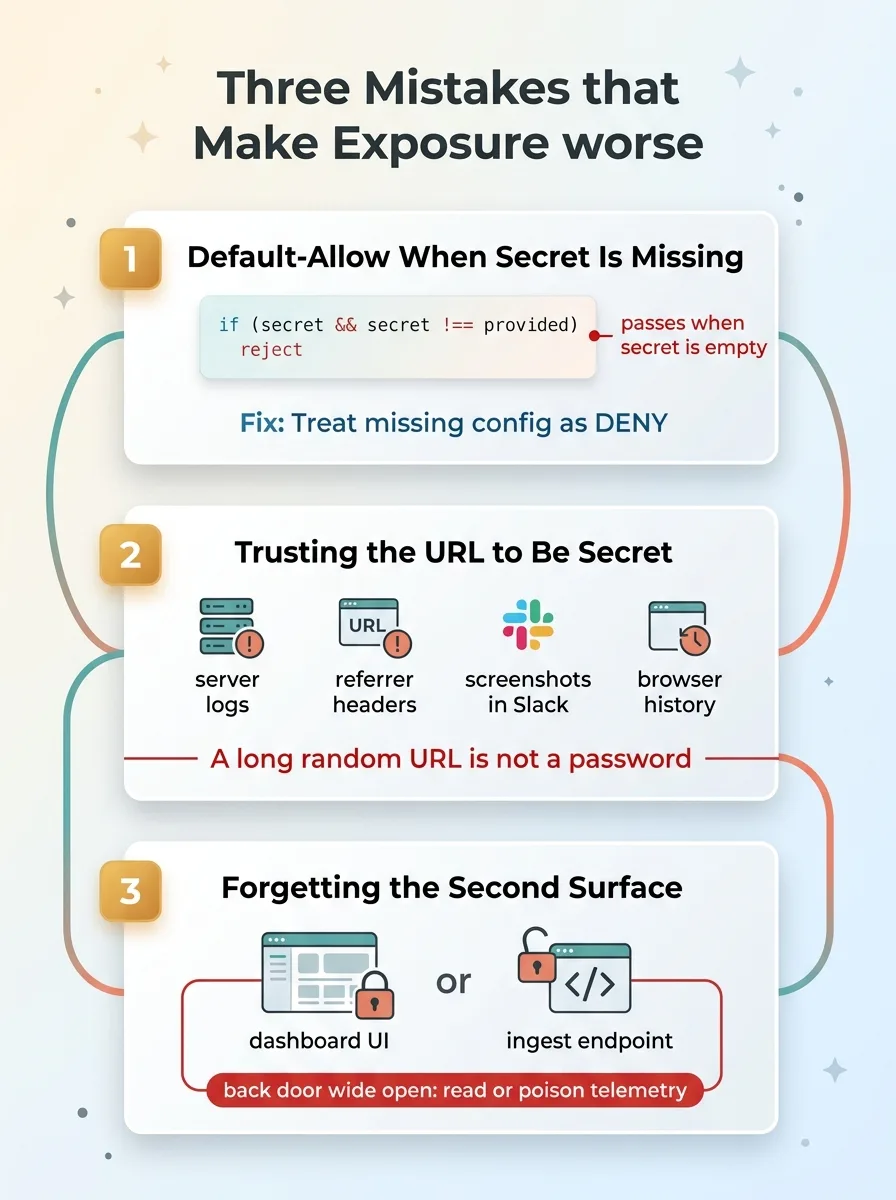 Three mistakes that make exposure worse
Default-allow when the secret is missing
This is the most common fail-open bug, and it's sneaky.
You write the auth check, and somewhere in the logic, if the expected secret is empty or undefined, the code lets the request through. Maybe it's an if (secret && secret !== provided) reject that quietly passes when secret is falsy. Maybe it's a try/catch that swallows the error and continues.
Either way, a missing config now means open door. Always treat missing config as deny. If the secret isn't there, nobody gets in, including you, and you'll notice fast.
Trusting the URL to be secret
The second mistake is assuming an unguessable URL is protection.
It isn't. URLs leak. They show up in server logs, in referrer headers, in browser history, in screenshots people paste into Slack, in shared links that get forwarded three times. A long random URL is not a password. Security through obscurity is not security.
If the only thing standing between a stranger and your telemetry is that they don't know the address, you don't have a secure internal dashboard. You have a secret you're one screenshot away from losing.
Forgetting the second surface
The third one bites people who fixed the obvious door. You lock the dashboard UI behind Basic Auth, feel good about it, and leave the ingest endpoints wide open.
Now anyone can read your telemetry through the back door, or worse, poison it by posting fake agent data. Both doors matter. The human door and the machine door each need their own lock.
I'll own this honestly. This wasn't my only brush with a bad default. I once left nine of my own databases that were readable by anyone with the URL, same root cause, a platform default I trusted too far. I'm not above this pattern. I just build the checks that catch it now.
How to Audit Your Own Internal Tools Today
You can do this in five minutes. Do it before you finish your coffee.
The five-minute test
- Open every internal tool URL in an incognito window with no login. If anything loads, it's public. The UI rendering at all is the failure. Don't talk yourself out of it.
- Check whether your access control is a platform toggle or app-level auth. Ask: if I turned off the host's protection right now, would this still be locked? If the answer is no, your security is borrowed.
- Find every machine endpoint. Webhooks, ingest routes, API endpoints. Confirm each one validates a secret server-side, not just the UI.
- Confirm missing secret means deny. Look at the auth code. If the secret is unset, does the request get rejected or does it slip through? It must reject.
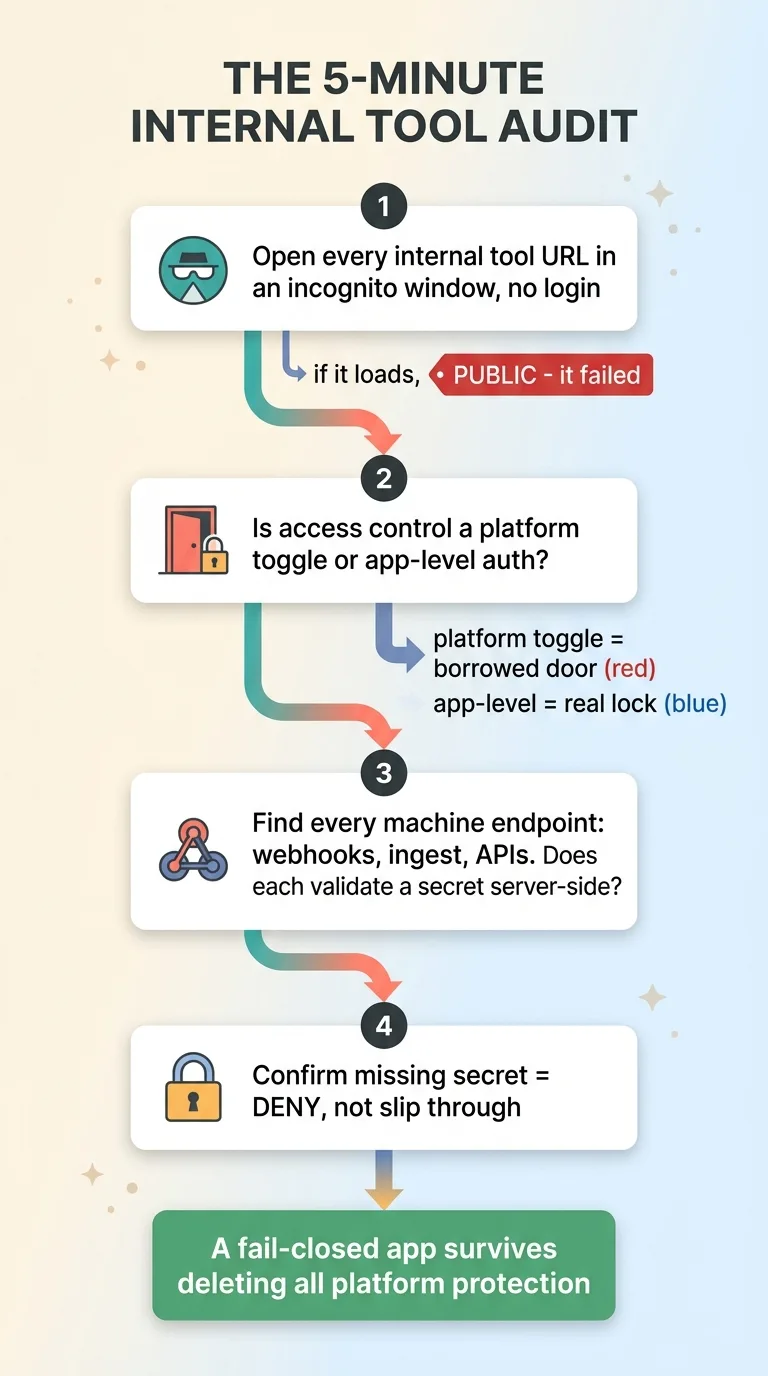 Five-minute self-audit checklist
What counts as internal
Define internal broadly, because the things you skip are exactly the things that get exposed.
Ops dashboards. Admin panels. Monitoring tools. AI agent consoles. Status pages. Anything you stood up fast for your own use and never expected anyone else to find.
Those are the highest-risk surfaces precisely because the team assumed nobody knows the URL. "It's internal" is how every one of these gets shipped without a real lock. Internal is a description of intent, not a security control.
Speed Is Worth Nothing if the Door's Unlocked
The whole appeal of building on modern hosts is that you can stand up a tool in an afternoon. I love that. It's why I ship as much as I do.
But the same speed that lets you build a tool in an afternoon lets you ship something exposed in an afternoon. The convenience cuts both ways.
I build a lot, fast, across many projects. That means I make exactly these mistakes, and then I build the checks that catch them before they ship. The fail-closed pattern, app-level auth that survives any platform default, is the floor. It's not a nice-to-have you get to later. It's the minimum standard for anything labeled internal.
Here's the uncomfortable part. If you've got internal tools, AI dashboards, or admin panels that someone on your team spun up quickly, you almost certainly have at least one public-by-default surface right now. Not maybe. Almost certainly.
This is the kind of thing I find and fix when I look at a company's stack. The fast-built tools, the borrowed platform protections, the ingest endpoints nobody locked. If you want a second set of eyes, have me audit what you've stood up.
Ready to bring AI leadership into your company?
I work with a small number of companies at a time. If you're serious about AI, apply to work together and I'll review your application personally.
Get AI insights for business leaders
Practical AI strategy from someone who built the systems — not just studied them. No spam, no fluff.
Hodgen.AI
Ready to automate your growth?
Book a free 30-minute strategy call with Hodgen.AI.
Book a Strategy Call