The Document Generic Invoicing Tools Pretend Doesn't Exist
If you run an electrical contracting business in California, your right to get paid on a job hinges on a piece of paper most software has never heard of. It's called the preliminary notice. Serve it within 20 days of first furnishing labor or materials, and you preserve your right to file a mechanic's lien. Miss that window, and the single strongest collection tool you have just evaporates.
This is where industry-specific AI tool design either earns its keep or proves it was never about the industry at all. Because the tools most contractors actually use, QuickBooks, FreshBooks, the whole pile of generic invoicing apps, treat the invoice as the center of the universe.
But the invoice is not the lever. The invoice is just a request. It says "please pay me." A customer can ignore it for 90 days with zero consequences.
What the 20-day notice actually does
The preliminary notice is the legal foundation that makes a lien possible. It puts the property owner, the direct contractor, and any lender on formal notice that you furnished labor or materials and that you have rights tied to that work.
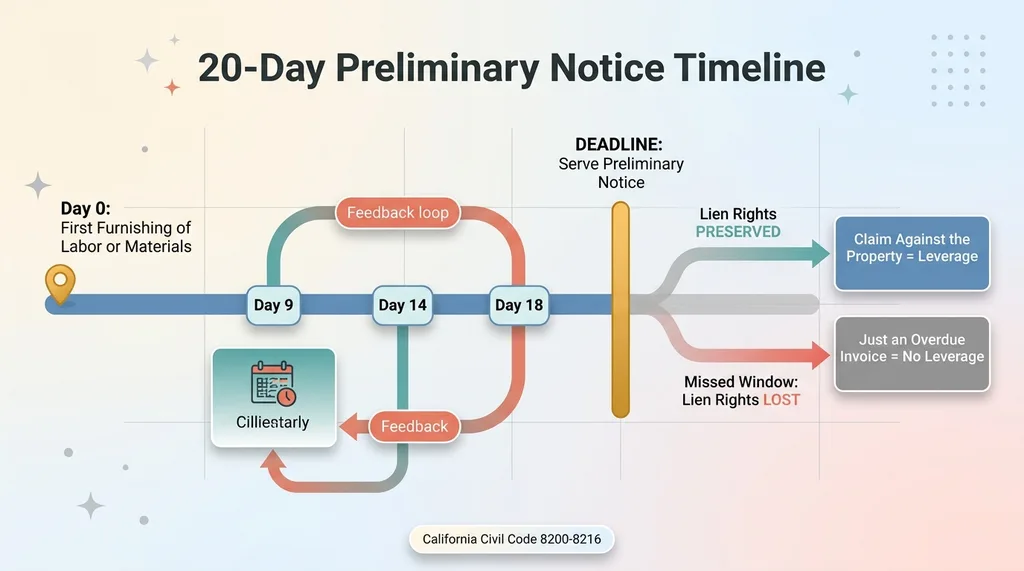 The 20-Day Preliminary Notice Timeline
Serve it on time and you've preserved a claim against the property itself. That's a different conversation than an overdue invoice. That's leverage.
Why QuickBooks never mentions it
QuickBooks never mentions the 20-day notice because QuickBooks is built for every small business on earth. A landscaper in Ohio, a consultant in New York, a bakery in Oregon. None of them have a statutory 20-day clock tied to their cash.
So the one document that determines whether a California contractor actually gets paid simply does not exist in their software. The tool that ignores it is solving the wrong problem with a very polished interface.
Why 'Just Use QuickBooks' Is the Wrong Answer
I can hear the objection already, because every skeptical CEO and contractor asks it. Why pay for a custom tool when QuickBooks is $30 a month and does invoicing fine?
Fair question. Here's the honest answer: QuickBooks does invoicing fine. It does the preliminary notice not at all. And the gap between those two things is where contractors lose real money.
Horizontal tools optimize for the average user
Horizontal software is built for the average user, and the average user does not have a California Civil Code deadline attached to their accounts receivable. QuickBooks cannot afford to encode one state's lien statute, because 99% of its customers would never use it.
That's not a knock on QuickBooks. It's just the economics of building for everyone. When you serve the average, you cannot serve the specific. I wrote about this same pattern in where generic SaaS falls short, the tools I deleted because they were built for nobody in particular.
The cost of a missed lien deadline
Now do the math. Say you've got a $40,000 commercial job. The customer goes quiet. Ninety days pass. You've got an invoice and a pile of polite reminders, and no lien rights, because the preliminary notice never went out.
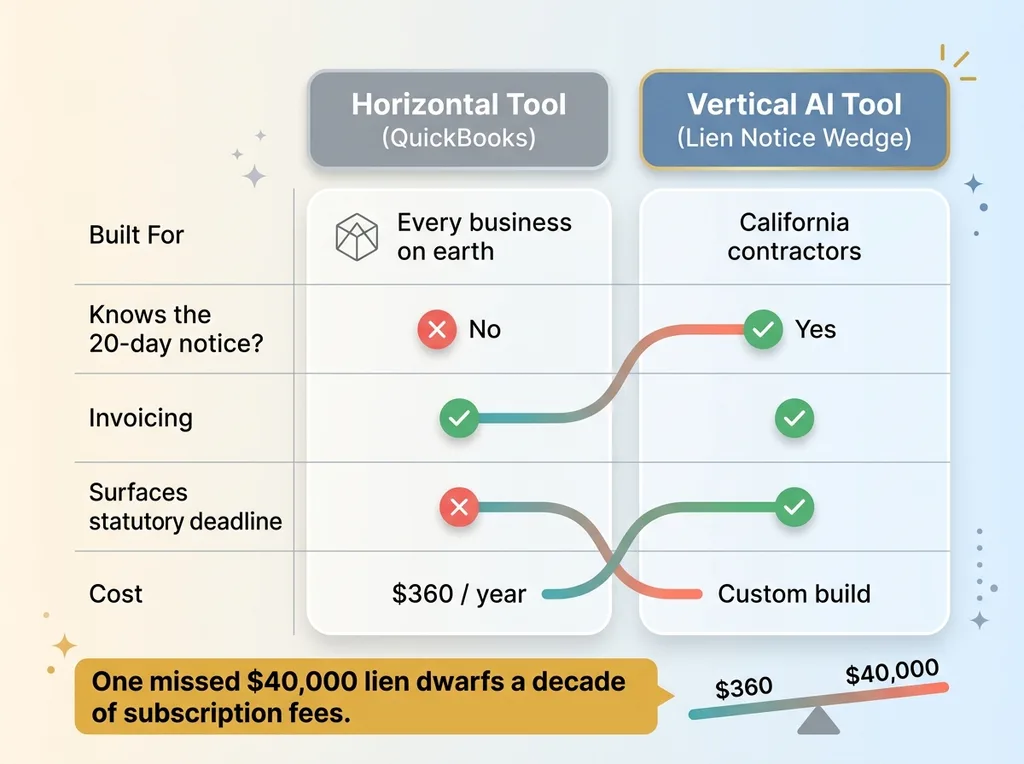 Generic Horizontal Tool vs Industry-Specific Vertical Tool
That single unpaid job dwarfs a decade of any subscription fee. A $360 annual software bill versus a $40,000 receivable you can no longer secure. That's not a close call.
This is the entire case for vertical SaaS with an AI wedge. The deadline that horizontal software ignores is exactly the thing that protects your cash. A tool that surfaces it, drafts it, and refuses to let you forget it pays for itself on the first job it saves.
The math only works because the tool knows something QuickBooks structurally cannot afford to know.
What Industry-Specific AI Tool Design Actually Means
Let me define the term, because most people get it backwards. Industry-specific AI tool design is not about a fancier model. It's not about whether you're running GPT or Claude or some fine-tuned thing. It's about knowing your user's world so well that the tool does what they actually need before they think to ask.
Domain knowledge is the moat, not the model
The AI part is commodity. Drafting a document, writing an escalation email, sending a reminder, none of that is hard anymore. Anyone with an API key can do it.
The defensible part is knowing that California Civil Code 8200 through 8216 governs preliminary notices. That the 20-day clock starts at first furnishing of labor or materials, not at invoice date. That the notice has to reach the owner, the direct contractor, and the lender.
That knowledge is the moat. The model is interchangeable. I dug into exactly how this 20-day notice functions as a legal wedge, and the takeaway is that the legal mechanics, not the AI, are what make the tool worth building.
The same AI primitives, pointed at a real legal lever
Here's the part people miss. The AI was the last thing I built, not the first.
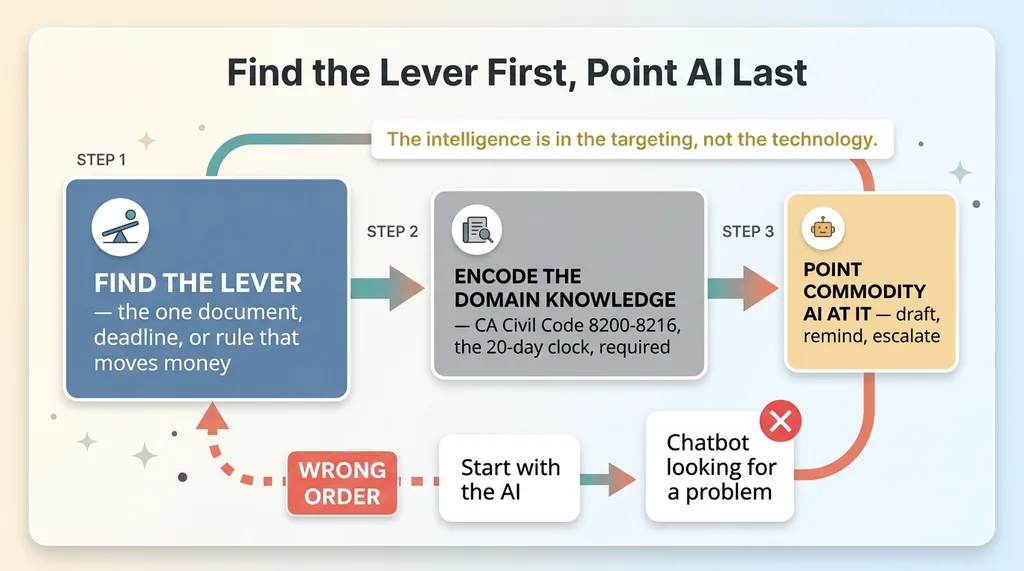 Find the Lever First, Point AI Last
I've shipped 15-plus AI systems across my own DTC brand and client work, and the pattern is always the same. You find the lever first, the one document or deadline or rule that moves money. Then you point commodity AI at it. The intelligence is in the targeting, not the technology.
I've written about this directly: AI is usually the last thing you build, not the first. The wedge is almost always boring plumbing. In this case the plumbing is a statutory deadline and a compliant document, and the AI just makes both impossible to fumble.
Get that order wrong, lead with the AI, and you build a chatbot looking for a problem. Get it right and you build something a contractor would actually pay for.
Building the 20-Day Notice Generator
So what does encoding the lever actually look like in a build? Let me walk through it, anonymized.
The core is a generator that produces a printable preliminary notice compliant with California Civil Code 8200 through 8216. That means the required statutory language, verbatim, not a paraphrase. The property owner. The direct contractor. The construction lender, if there is one. And a description of the labor and materials furnished.
A printable, Civil Code-compliant document
The document has to be right, because a defective notice is barely better than no notice. The statutory language is fixed by code. The parties have to be identified correctly. The description has to be specific enough to hold up.
None of that is glamorous. It's the kind of detail you only get right if you've actually read the statute. The AI assists with drafting the description and filling fields, but the legal structure is hardcoded, because you do not let a model improvise statutory language.
Surfacing it as a first-class step, not a buried feature
Here's the design decision that matters more than the template. The notice generator is not buried in a settings menu where a contractor finds it three weeks too late. It's a first-class step in the job-setup flow.
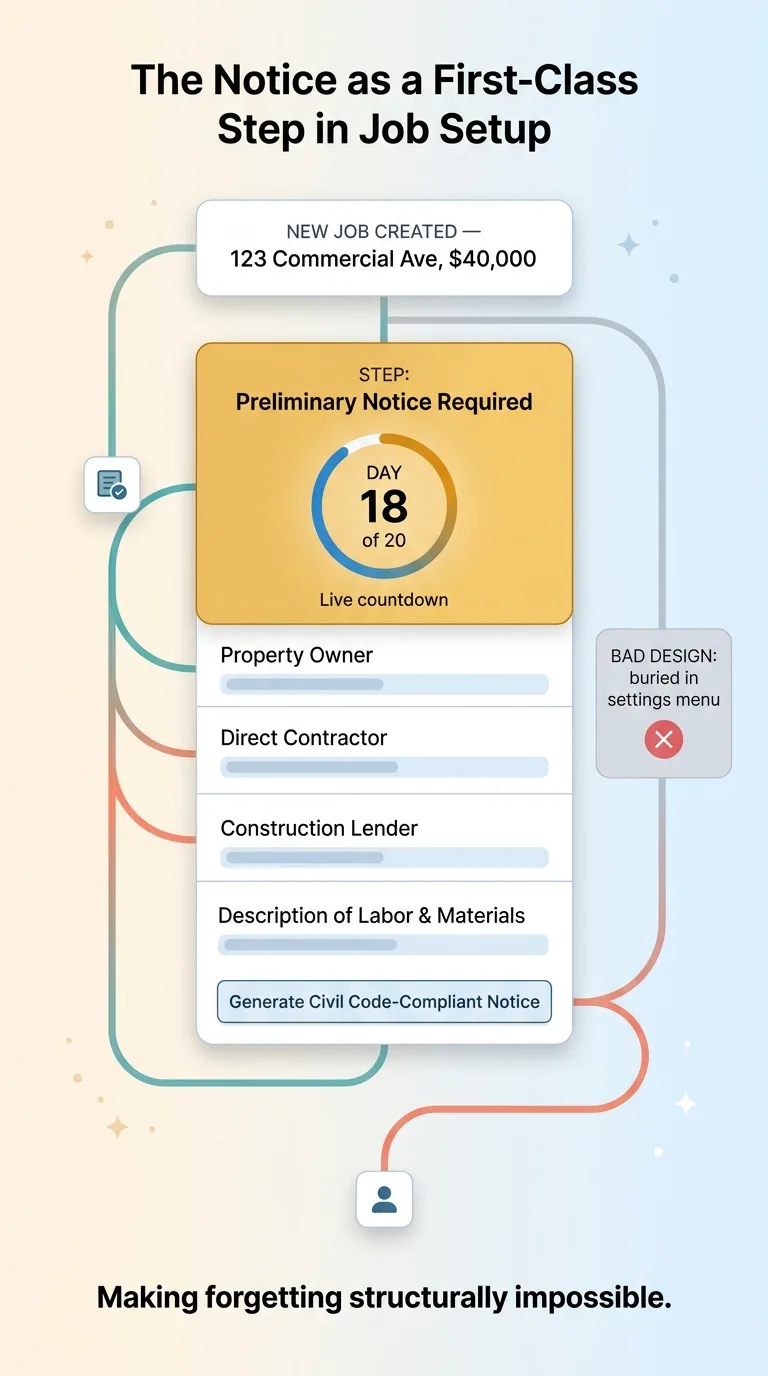 The Notice as a First-Class Step in Job Setup
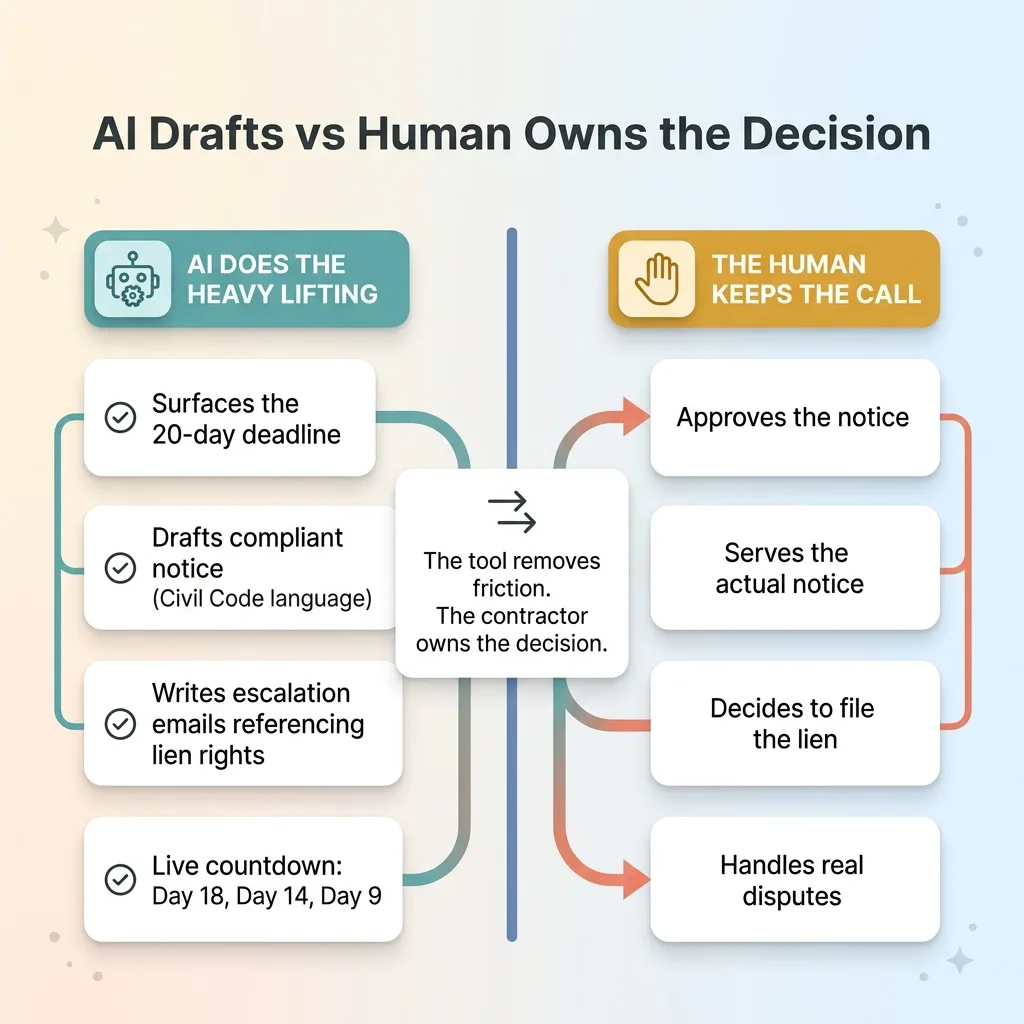
The moment a new job gets created, the tool surfaces the preliminary notice as a step, with the 20-day deadline shown as a live countdown. Day 18. Day 14. Day 9. You cannot create a job and walk away without the system putting that clock in your face.
That's the real value. Not the document template, the workflow placement. Most contractors don't miss the deadline because they don't know the law. They miss it because they're on a job site at 7am and the notice is the last thing on their mind. The tool's job is to make forgetting structurally impossible. The document is easy. Making it unforgettable is the design.
Wiring Collections Around the Legal Lever, Not the Invoice
Once the notice is served, the collections flow changes completely. And this is where the system-level thinking separates a real tool from a nag machine.
Escalation emails that reference the notice
A generic collections email says "your invoice is overdue, please remit payment." That email gets ignored, because it carries no weight.
The escalation emails in this system reference the served preliminary notice and the contractor's preserved lien rights. Not in a threatening tone. Just factual. "A preliminary notice was served on this project on [date], preserving our right to record a mechanic's lien."
That single line changes the temperature of the conversation. A customer who ignores a polite reminder reads very differently when the email references a recorded legal position against their property.
When the deadline becomes leverage
The entire collections flow is built around the lever, not the invoice. The invoice is just the number. The notice is the reason that number gets paid.
 AI Drafts vs Human Owns the Decision
This is the difference between software that nags and software that gets people paid. Nagging escalates volume, more emails, more reminders, more guilt. Leverage escalates stakes, and stakes get attention.
I'll be honest about the boundary here, because it matters. The tool drafts and surfaces. A human still serves the actual notice and approves it before it goes out. I build tools that do the heavy lifting and then hand the decision back to the person accountable for it. That distinction, between what AI drafts and what a human owns, is the whole subject of I build the tools, I don't just advise on them. The tool removes the friction. The contractor keeps the call.
The Honest Limits and Where Domain Depth Stops
Let me be straight about what this thing does not do, because the limits are part of the point.
This is California-specific by design
This tool is tuned to one state's statute. Port it to Texas and the deadlines, the required language, and the recording rules all change. Florida is different again. Every state has its own version of lien law, and they do not transfer.
That's not a weakness. That's the strategy. Depth beats breadth here. A tool that handles California lien notices perfectly is worth more to a California contractor than a tool that handles all 50 states badly. The whole reason it works is that it refused to generalize.
What still requires a human
The AI does not decide to serve the notice. It does not file the lien. It does not replace a construction attorney when a job turns into a real dispute.
What it does is narrow. It removes the failure mode of forgetting the 20-day window, and it removes the friction of drafting a compliant document from scratch. That's it. Those two things happen to be where contractors actually lose money, which is why narrowing the scope this far still produces something valuable.
If a tool claims it does everything, including filing your liens and arguing your disputes, be suspicious. The honest version knows exactly where it stops. These limits are proof the tool was built by someone who understands the domain, not someone shipping a generic clone with the labels swapped.
What This Means If You're Buying a Custom AI Tool
Here's the lesson if you're a CEO or owner thinking about commissioning a custom AI tool. The reason to build one is never the AI.
It's whether the person building it understands the one document, deadline, or rule that actually moves money in your industry. For a California contractor, that's the 20-day preliminary notice. For your business, it's something else, and you probably already know what it is even if you've never seen software respect it.
That's the test. If a vendor pitches you "AI for your business" and cannot name your version of the 20-day notice, they're selling you a QuickBooks skin with a chatbot bolted on. The right tool encodes the lever your industry runs on, and the AI is just how that lever gets pulled faster and more reliably.
I've built this kind of thing across a dozen industries now, from contractor collections to financial advisory to manufacturing. The pattern holds every time. Find the wedge, the legal or operational lever that determines who gets paid, then build the tool around it. The AI is the easy part. Knowing where to point it is the work.
That's the job I do as a Chief AI Officer. If you've got a wedge in your business and nobody's built the tool around it yet, that's exactly the conversation I want to have.
Get the next build note.
I write up each system I build, including what broke. Subscribe to my newsletter and I'll send you the next one.