Why the Demo Worked and the Real App Didn't
I built a label scanner for a consumer mobile app. Point your phone at a nutrition label, the AI reads the macros, done. In the simulator it was beautiful. On my one test device it was beautiful. I showed it off, felt good about myself, and moved on.
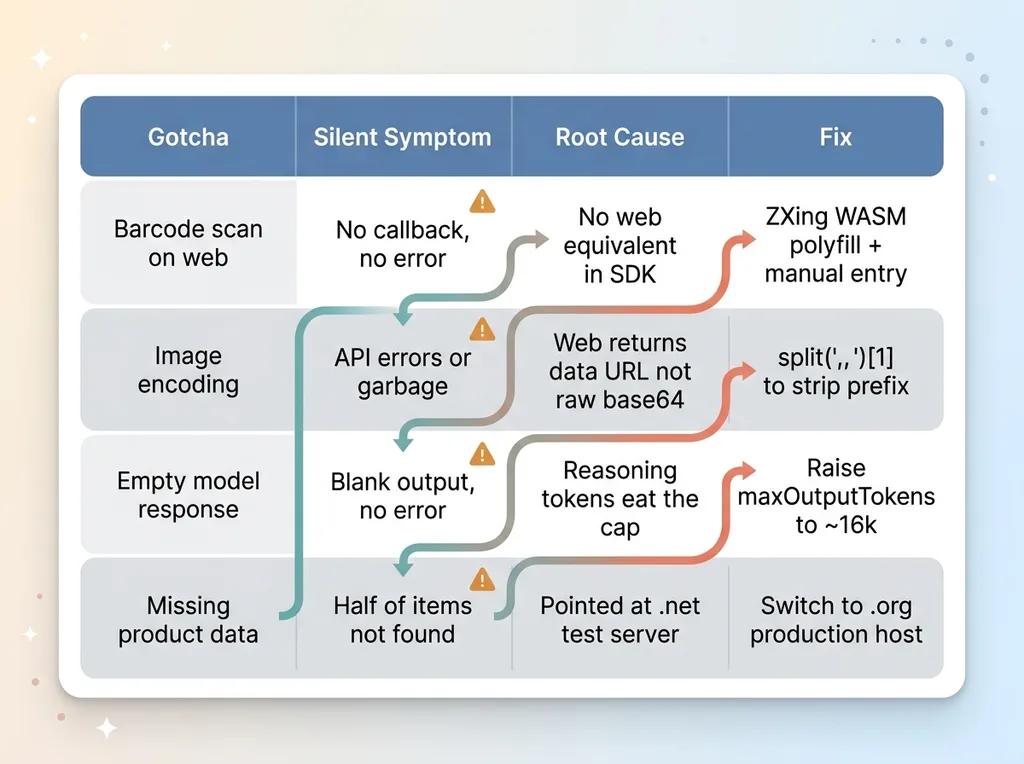 The four gotchas as a field-guide reference matrix
Then it had to run on the web. And on a stranger's actual phone. That's when every clean abstraction I'd trusted quietly fell apart.
Here's the uncomfortable truth about AI and camera features: they demo perfectly and then break on real devices, because the SDKs paper over platform differences that don't actually disappear. The differences are still there. The SDK just stops telling you about them. That's where the expo camera web gotchas live, in the gap between "the docs say this works everywhere" and "this works on the device in front of a customer."
This came out of the full nutrition scanner build, and it's a cousin of the boring reasons my AI app wouldn't run on a real phone. Different project, same lesson: the simulator lies, and it lies confidently.
What follows is a field guide to four real gotchas. Every one of them cost me hours. None of them were in the documentation, at least not anywhere I could find before I hit the wall.
No consultant fluff. Just the specific places where "cross-platform" stopped being cross-platform and what I did to fix it.
If you're building anything that touches a camera and a vision model, read this before you ship. It's cheaper than finding out the way I did.
Gotcha 1: Expo Barcode Scanning Silently Doesn't Fire on the Web
The native path that fooled me
The barcode scanner used expo-camera. On native iOS and Android, the callback fired every single time. Point at a barcode, get the code, look it up. Clean.
So I assumed it'd work on web too. That's the whole pitch of cross-platform camera React Native development, right? Write once.
On web, no callback ever fires. And here's the part that cost me the most time: no error is thrown either. It just silently does nothing.
That's the worst possible failure mode. A crash tells you something's broken. A silent no-op tells you nothing. You sit there pointing your phone at a barcode wondering if the lighting is wrong, the focus is off, or you fat-fingered something.
The ZXing/WASM polyfill fix
The reason is simple once you know it. expo-camera's barcode detection leans on native platform APIs that have no web equivalent in the SDK. The SDK doesn't error because there's nothing to call. It just quietly skips the whole thing.
The fix is a barcode scanner web polyfill. I added a ZXing WASM-based scanner for the web target and branched on platform: native uses expo-camera's built-in detection, web uses ZXing running in WebAssembly against the video stream.
That got callbacks firing on web. But it introduced a second problem.
Always ship a manual-entry fallback
Browser camera permissions are flaky. Different browsers, different permission prompts, different ways users can deny or revoke access without realizing it. Even with the polyfill working, a meaningful slice of web users will never get a clean camera feed.
So I shipped a manual barcode-entry input as a fallback. Can't scan? Type the number. It's not glamorous, but it's the difference between a feature that works for everyone and one that works for the lucky.
The lesson: "works on native" is not "works." Those are two completely different claims, and the SDK encourages you to confuse them.
Gotcha 2: Web Cameras Hand You a Data URL, Not Raw Base64
data:image/jpeg;base64 vs raw base64
Once the camera was capturing on both platforms, I had to send the image to a Gemini vision model. On native, capturing a photo gives you base64 you can drop straight into the request. Done.
On web, expo-camera hands you something that looks almost identical but isn't. Instead of raw base64, you get a full data URL:
data:image/jpeg;base64,/9j/4AAQSkZJRg...
Same data, technically. But wrapped in a prefix that says "I'm a data URL of type image/jpeg encoded in base64." That prefix matters.
Strip the prefix before the API call
If you send that whole string to the vision API, one of two things happens. The request errors outright, or worse, the model receives garbage and returns nothing useful. You're now debugging an empty model response when the actual problem is upstream in your image encoding.
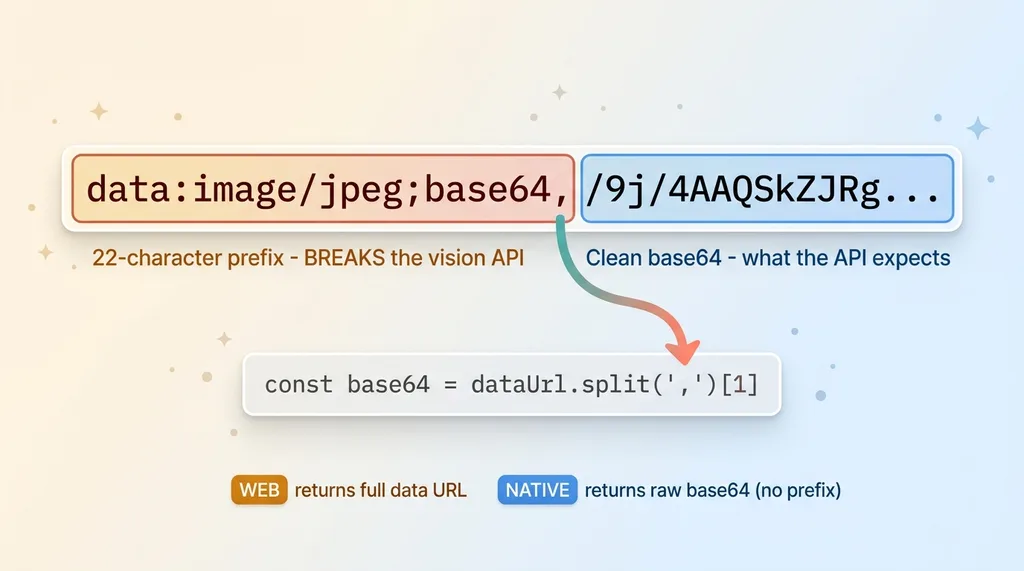 Data URL prefix vs raw base64 string anatomy
The fix is one line, conceptually. Split the string on the comma and take index 1:
const base64 = dataUrl.split(',')[1]
That strips everything up to and including the comma, leaving you the clean base64 the API expects. On native there's no prefix to strip, so you branch on platform or detect the prefix and handle both.
Why this passes code review and still fails
Here's what makes this one dangerous. The same code path returns subtly different data shapes depending on the platform. Your function signature says "returns base64." Both platforms return a string. Both strings start with valid-looking characters.
It looks right. It reads right in a pull request. A reviewer skims it and approves it, because nothing about the code reveals that one platform secretly prepends 22 characters that break your API call.
This is the exact kind of bug that survives review and ships to production. It's not a logic error you can spot. It's a platform divergence hidden inside a string that looks fine until a vision model chokes on it. The only way to catch it is to actually run both platforms against the real API.
Gotcha 3: A Thinking Model Burns Its Whole Budget and Returns Empty
Why maxOutputTokens 2k returned nothing
I was using a thinking-mode vision model, a Gemini 2.5 Pro class model. I set maxOutputTokens to 2,000, which felt generous. A nutrition label has maybe a dozen values on it. Two thousand tokens is way more than enough to write them all out.
The model returned completely empty content. No error. No partial response. Just blank.
I checked my prompt. Checked the image encoding (see gotcha 2). Checked the request structure. Everything looked correct. The model was clearly receiving the image, because it wasn't erroring. It just had nothing to say.
This is the gemini vision empty response problem, and it stumped me for a while because every individual piece looked healthy.
Reasoning tokens count against your cap
Here's what's actually happening. Thinking models spend tokens on internal reasoning before they produce any visible output. They reason through the problem step by step, and that reasoning consumes tokens.
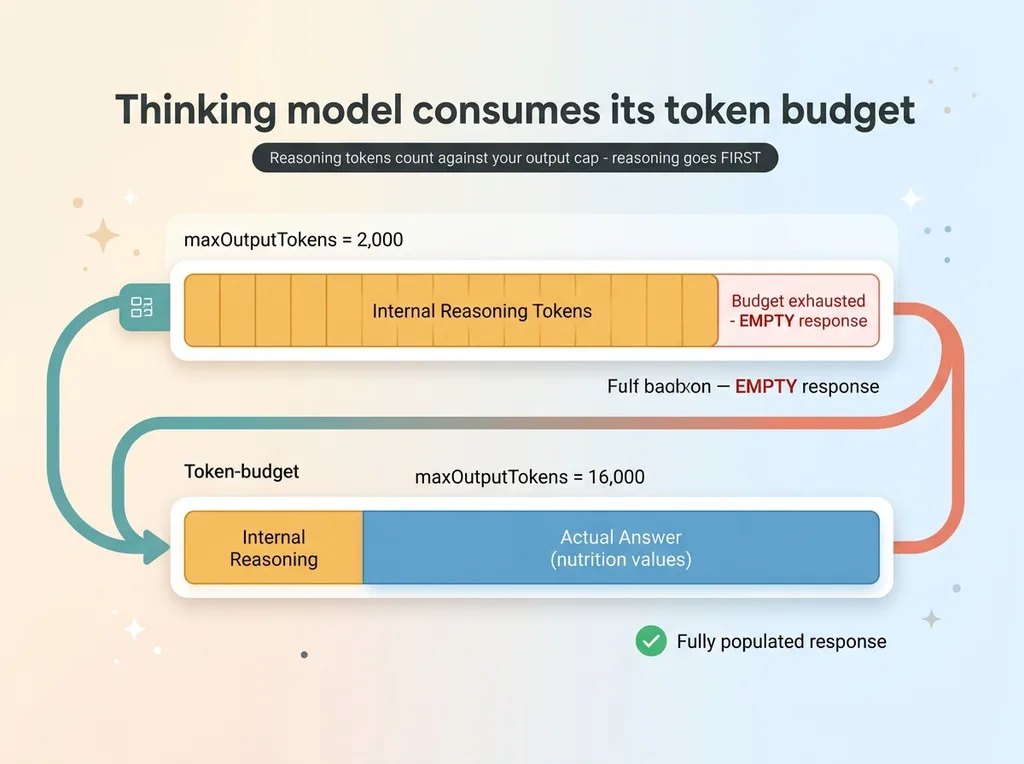 How a thinking model burns its token budget on reasoning before output
Those reasoning tokens count against your output token cap.
So with a tight 2k cap on a vision task, the model starts reasoning about the image, works through what it sees, burns through the entire 2,000 token budget on internal thinking, and then has nothing left to actually emit. It hits the cap mid-thought and returns empty.
This is the thinking model token budget gotcha in one sentence: your output cap is shared between reasoning and the answer, and reasoning goes first.
Raise the budget to ~16k for vision
The fix is to raise maxOutputTokens to roughly 16,000 for vision tasks. That gives the model room for both the internal reasoning and the actual answer. After bumping it up, responses came back immediately, fully populated.
The broader lesson for anyone betting a feature on these models: behavior changed with the thinking-model generation. Defaults that worked perfectly on older models silently break on newer ones. Nobody sends you a migration note. You set a number that was sensible in 2023 and your feature returns blanks in 2025, with no error to tell you why.
Gotcha 4: The Right Data Host (Production vs Sparse Test Server)
Two hosts, wildly different coverage
Once a barcode resolves, you look it up in an open food product database to get the actual nutrition data. I grabbed the API endpoint from a tutorial, wired it up, and started testing.
Half my products weren't in the database. Scan a common item, get nothing back. I started building elaborate fallback logic to handle "missing" products and considered whether I needed a second data source entirely.
I almost shipped a workaround for a problem that didn't exist.
Use the production .org host, not the .net test server
The open database has two hosts. A production host on a .org domain with full coverage, and a test/staging host on a .net domain that's deliberately sparse, missing most products.
The tutorial I'd copied from pointed at the .net test server.
I wasn't hitting gaps in the data. I was hitting a staging environment that was never supposed to have full coverage. Switched to the .org production host and the "missing" products were all there.
The fix took thirty seconds. Finding it took an hour of suspecting the wrong thing.
Broader lesson: when an external data source seems to have gaps, verify you're hitting the right endpoint before you blame the data or build around it. Test servers exist to be sparse. Make sure that's not what you're pointed at.
The Pattern: Every Cross-Platform Abstraction Leaks Somewhere
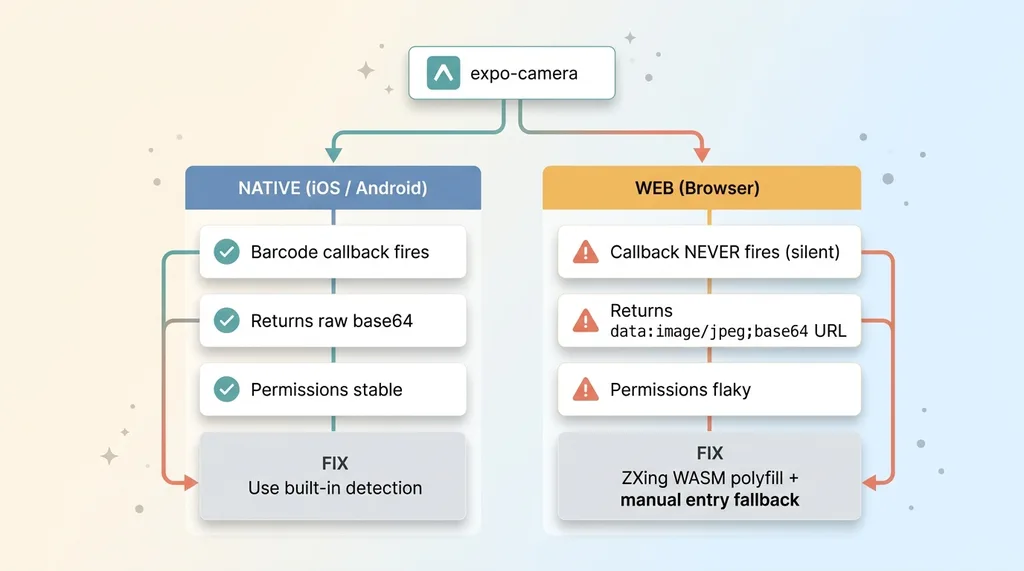 Platform divergence: native vs web code paths for camera capture
Branch on platform deliberately, don't trust the SDK
Four gotchas, one principle. Cross-platform camera and vision SDKs promise "write once," but the moment hardware, browser APIs, or model internals differ, the abstraction leaks. And it almost always leaks silently.
The first defense is to stop trusting "it'll just work." Branch on platform deliberately. When I assumed expo-camera handled barcodes everywhere, I lost hours. When I explicitly wrote a web path and a native path, the problems became visible and fixable.
Treat platform parity as something you build and verify, not something you inherit from the SDK.
Test on real browsers and real phones, not just the simulator
Every single one of these four gotchas was invisible in the simulator. The simulator ran the happy path flawlessly. Barcodes fired, images encoded, models responded.
A simulator is one environment running one code path. Real users bring a hundred browsers, a thousand phones, and permission states you never imagined. You have to test on actual target devices and actual browsers, because that's the only place these bugs exist.
I keep a small pile of real phones for exactly this reason. They've earned their keep.
Silent failures are the expensive ones
Notice the through-line. The barcode scanner silently did nothing. The data URL silently produced garbage. The thinking model silently returned empty. The wrong host silently served sparse data.
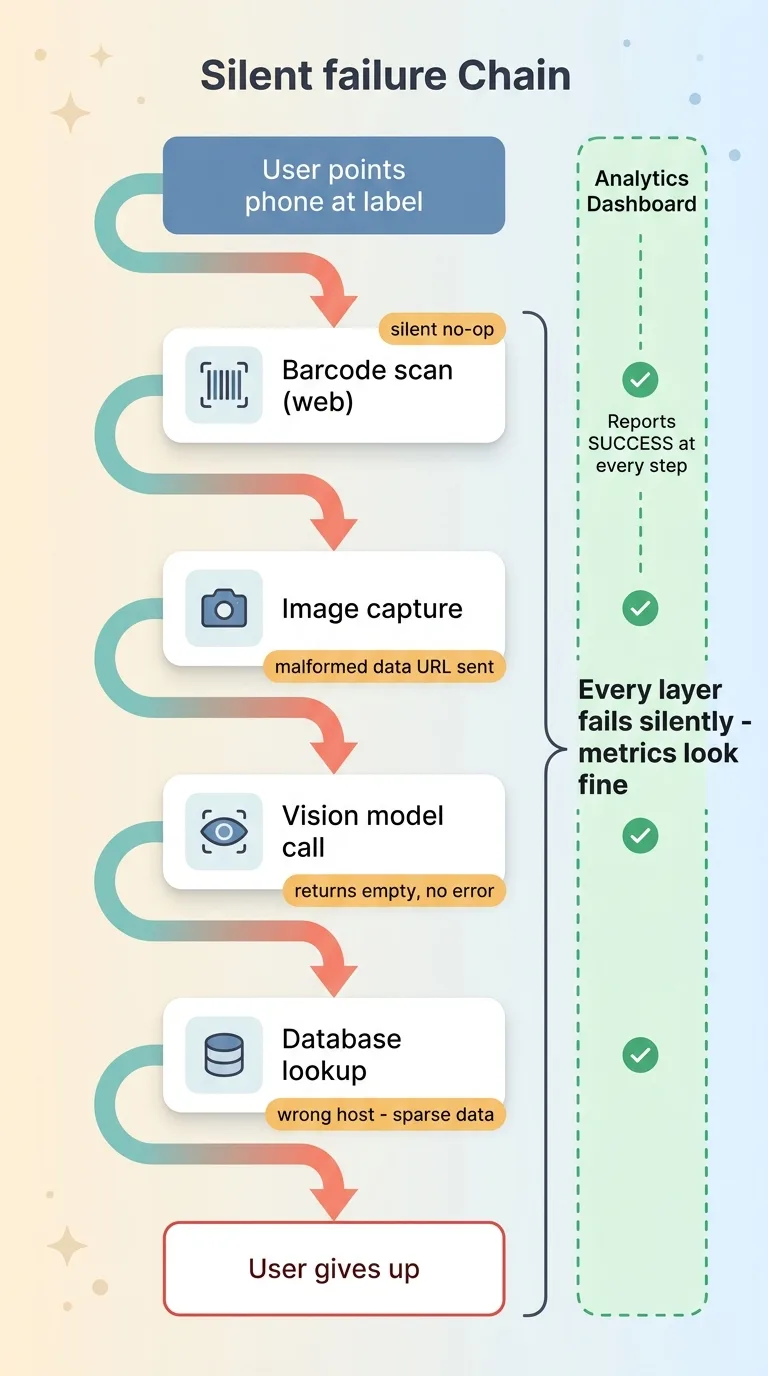 Silent failure chain across the scanner feature
None of them threw an error. None of them showed up as a crash in your logs.
Silent no-op failures are the real enemy, because they pass demos. The demo runs the one happy path where everything aligns. Real users hit all the other paths, and your error tracking shows nothing, because nothing errored. This is precisely why demos lie. They're not dishonest. They're just incomplete in a way that hides the expensive parts.
What This Costs You If You Find Out in Production
Individually, each of these gotchas is a few hours. Annoying, but survivable. Stack them across a single feature, though, and they become the difference between something that ships and something that quietly fails for half your users while your analytics report success.
Picture it. Your dashboard shows the scanner feature getting used. What it doesn't show is that web users never get a callback, the ones who do send malformed images, the model returns blanks, and the lookups hit a database missing half your catalog. Every layer fails silently, so your metrics look fine while real people give up.
I find these because I build the thing on real devices and actually use it, not because I read about them somewhere. There's no substitute for pointing a stranger's phone at a label and watching it fail.
This gap, between a demo that dazzles and a feature that survives real users, is exactly where most AI projects never make it past the demo. The model works. The integration on a real device is what kills it.
If you've got an AI or camera feature that demos great and you're nervous about how it'll hold up on real-world devices, that nervousness is correct. Bringing in someone who's already hit these gotchas costs a lot less than discovering them after launch with users watching. If that's where you are, bring me in to ship it.
Get the next build note.
I write up each system I build, including what broke. Subscribe to my newsletter and I'll send you the next one.