Remove Sensitive Data From Git History (The Real Way)
Deleting a leaked file doesn't remove it from git history. Here's how I purged a real medical record from every commit without breaking the build.
By Mike Hodgen
The Delete That Does Nothing
Here is the mistake I see constantly. Someone realizes a file with sensitive data made it into a git repo. They open the project, delete the file, commit with a message like "remove sensitive file," push, and exhale. Problem solved.
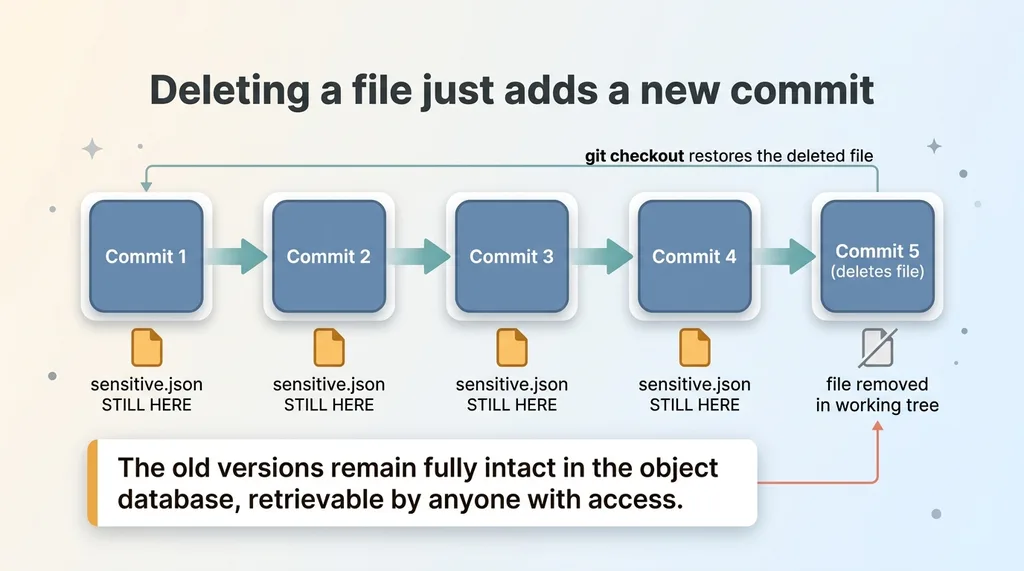 Why deleting a file in a new commit doesn't remove it from history
It is not solved. Not even close.
If you want to remove sensitive data from git history, deleting the file in a new commit does almost nothing. Git is built to remember. Every version of every file you have ever committed is stored in the object database. A new commit that removes a file just adds a new entry that says "this file is no longer here." The old versions still sit in history, fully intact, ready to be checked out by anyone with access.
Think of it like crossing a name off a guest list that has already been photocopied a hundred times. You marked your copy. The other ninety-nine copies still have the name. Anyone who cloned the repo, anyone on the team, anyone with a stale checkout can run a single command and pull the "deleted" file back in full.
Here is the real situation I want to walk you through. I built a health command-center app for a family member. At some point a full patient medical record, plus the vector search index built from it (995 chunks), had been committed to a private repo. Private does not mean safe. The data was sitting in the commit history, retrievable by anyone who ever touched the project.
A medical record is about as sensitive as data gets. So this was not a "clean it up when I have time" problem. This was a fix-it-right-now problem. And fixing it right meant a specific sequence, done in a specific order, or I would have made things worse.
Why a Simple 'git rm' Would Have Broken Everything
Here is the wrinkle that makes real-world cleanup harder than the tutorials admit. Those committed files were not dead weight. They were load-bearing.
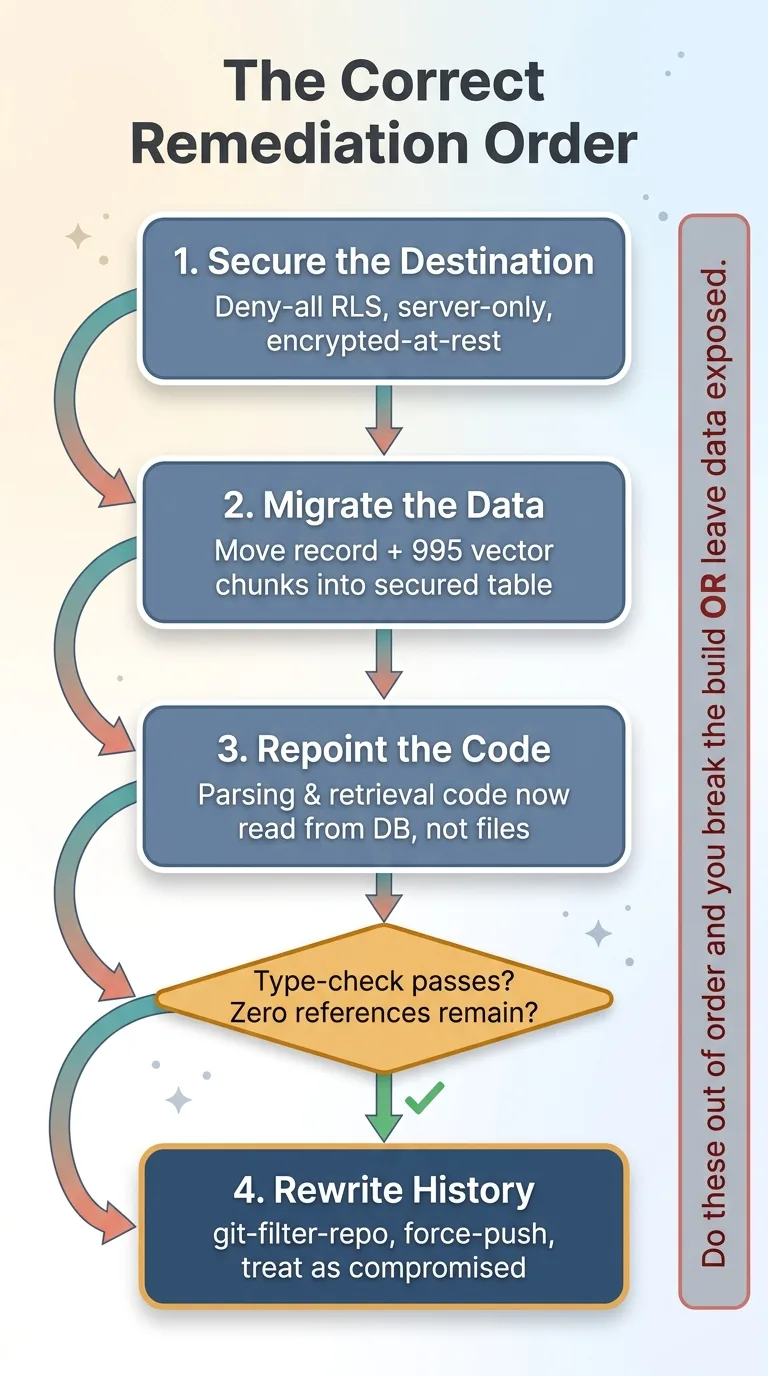 The correct four-step remediation sequence
The medical record file was imported directly by the parsing code. The vector index was imported directly by the retrieval code. The app actually read those files at runtime. They were part of how the thing worked.
So if I had done the obvious quick fix, git rm the files and commit, I would have hit two problems at once. First, the files would still be sitting in history, which is the whole thing I am trying to fix. Second, and just as bad, I would have broken the build. Live code still referenced those files. Remove them and the app stops working.
This is the trap most fast fixes fall into. You cannot just yank the file out. You have to relocate the data somewhere proper first, then repoint every piece of code that depends on it, then verify nothing else is reaching for the old path. Only after all of that can you safely scrub history.
The point I want to drive home: remediation order matters as much as the technique. People reach straight for the history-rewrite tool because that is the dramatic part. But if you rewrite history while your code still imports the file, you end up with a clean history and a broken application. Now you are debugging a build failure at the same time you are dealing with a data exposure. That is the worst possible time to be doing two hard things at once.
The right move is boring and sequential. Secure the destination. Move the data. Repoint the code. Verify. Then, and only then, touch history.
Step One: Build a Locked-Down Home for the Data
The record had to live somewhere. The whole point of this exercise is that sensitive data should never be reachable from a client, never sit in a file the browser could request, and never be exposed through a public key.
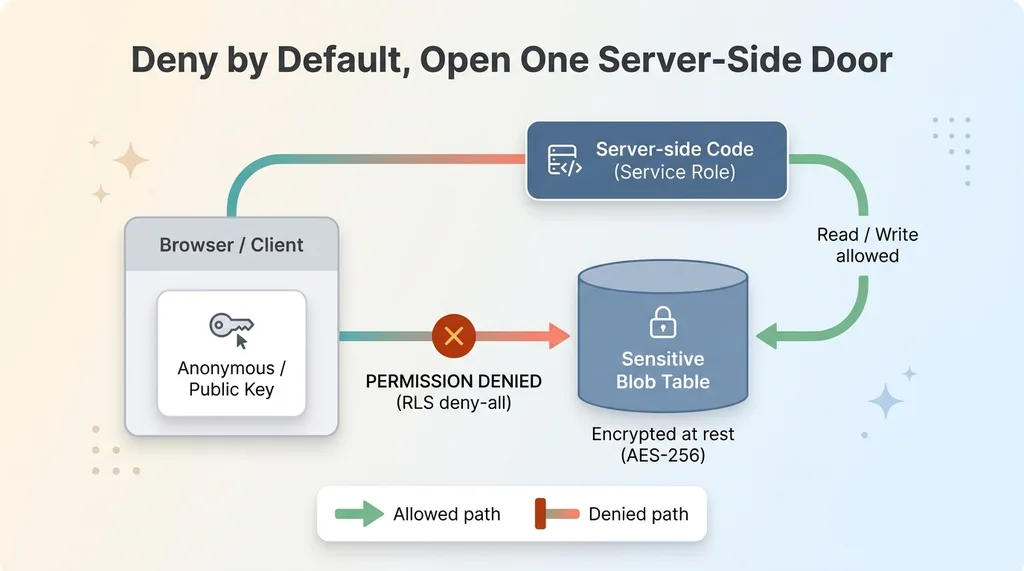 Deny-all server-only architecture for sensitive data
So I created a server-only blob table with row-level security set to deny-all. In plain terms: the public or anonymous key gets permission-denied on every single read. There is no policy that lets a browser-side request touch this table. Only server-side code holding the service role can read or write it.
This is the same pattern I use for any genuinely sensitive blob. Deny by default. Server-only access. No path from the browser, period. If you start from "everything is denied" and then carefully open exactly one server-side door, you have a much smaller surface to reason about than if you start open and try to lock down later.
I have written before about why this matters so much. A misconfigured public key is one of the most common ways sensitive data leaks without anyone noticing, and I covered a real version of that in PHI leaking through the public key. The deny-all RLS posture is exactly what prevents that failure mode.
The storage table is also where encryption-at-rest comes in. For genuinely sensitive records, the data should be encrypted before it ever lands in the column, so even a database-level compromise does not hand over plaintext. I walked through that approach in encrypting health data at rest.
So before I moved a single byte, I built the destination correctly. Locked down, server-only, encrypted, deny-all. The data had a safe home to go to. That is step one, and skipping it means you are just moving exposure from one bad place to another.
Step Two: Migrate the Record, Then Repoint the Code
With the destination built, I wrote a migration script. It uploaded the full medical record and all 995 vector chunks into the new server-only table. Nothing fancy, just a careful one-time move that read the old files and wrote their contents into the secured store.
Then came the part that actually matters: repointing the code. The parsing code that used to import the record file was changed to fetch the record from the database. The retrieval code that used to import the vector index was changed to query the chunks from the database instead. Every place that reached for a file now reached for a row.
Here is the verification gate, and I do not skip it. I ran a full type-check across the codebase. It came back clean. No errors, no missing references, nothing else in the project still pointing at the old files. That clean type-check is the proof that the app no longer depends on those files for anything.
This is the step people get nervous about, so let me be specific about why the type-check matters. If even one obscure module still imported the old file, removing it from history would break that path. The compiler catching zero references means I can delete the files with confidence rather than hope. Verification beats optimism every time.
Then I committed this change normally. Regular commit, regular push. At this point the app works perfectly. It reads everything from the secured database table. It no longer needs the original files at all.
But here is the uncomfortable truth: those files are still in history. The app does not need them, the working tree does not contain them anymore, but every old commit still holds the full medical record and the full vector index. The dangerous part is not done. All I have done so far is make it safe to do the dangerous part.
That distinction trips up a lot of people. Getting the app working without the files feels like the finish line. It is not. It is the point where you have earned the right to rewrite history.
Step Three: Purge the File From Every Commit With git-filter-repo
Now the actual history rewrite. This is where you genuinely purge a file from git across every commit it ever appeared in.
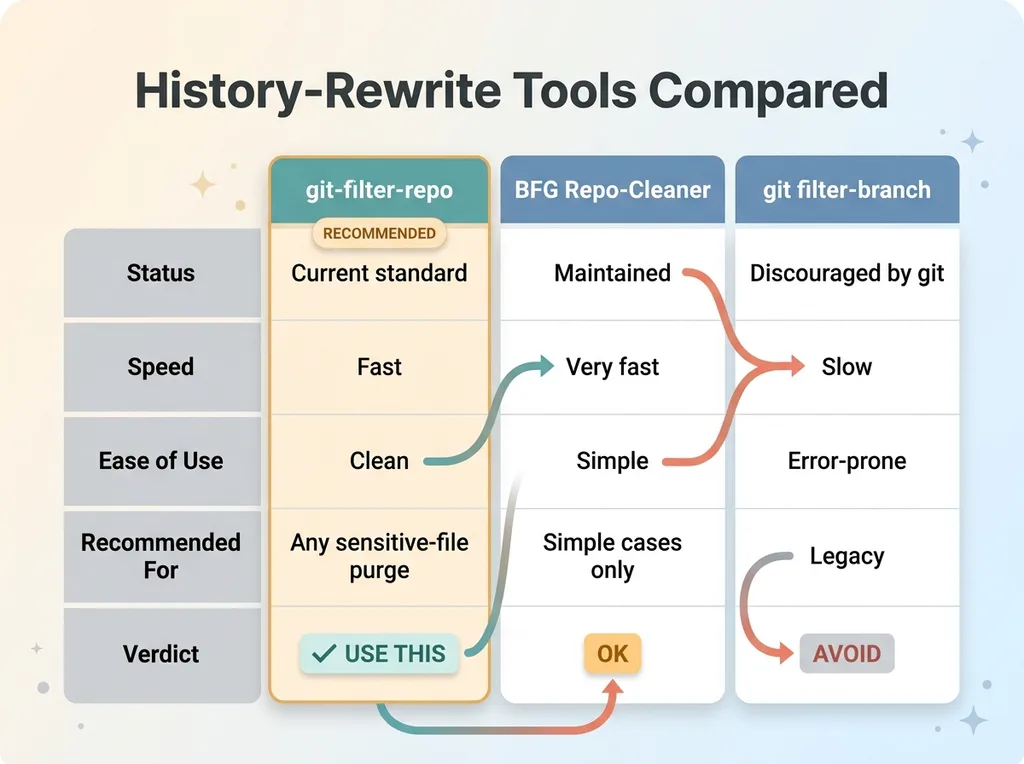 git-filter-repo vs BFG vs filter-branch tool comparison
The tool I use is git-filter-repo. It is the modern, recommended option. You may have heard of BFG Repo-Cleaner or the older git filter-branch. BFG works and is fast for simple cases. filter-branch is the original built-in tool, but it is slow, error-prone, and the git project itself now steers you away from it. git-filter-repo is the current standard, and it is what I reach for to remove secrets in git history or any other committed sensitive file.
Stash the work in progress first
One practical detail that saves you real pain. I had uncommitted audit changes sitting in my working tree at the time, unrelated to this cleanup. A history rewrite can interfere with uncommitted work, so before I touched anything I stashed those changes safely. Ran the rewrite. Then restored the stash afterward. The scrub did not eat my unrelated work because it was never exposed to the operation in the first place.
If you take one habit from this section, take that one. Stash or commit everything unrelated before you rewrite history. A clean working tree before a history operation is cheap insurance.
Verify zero blob references remain
After the rewrite, I verified that zero blob references to either file remained anywhere in history.
Let me explain what a blob reference is in plain terms. A blob is the actual stored content of a particular version of a file. When git remembers a file, it stores the bytes as a blob in its object database. A blob reference is a pointer to that stored content. So checking for blob references is checking whether the actual file content still exists anywhere in the repo's object store, not just whether the filename shows up in some commit message.
Zero blob references means the data is genuinely gone from the object database. Not hidden, not dereferenced, not "no longer linked." Gone. That is the difference between a real purge and the fake "I deleted it in a new commit" version we started with. The bytes that made up that medical record no longer exist in my local repository's history.
That verification is not optional. Rewriting history and assuming it worked is how people end up still exposed while believing they are clean. Check for the blobs. Confirm the count is zero.
Step Four: Force-Push and Rotate What's Already Exposed
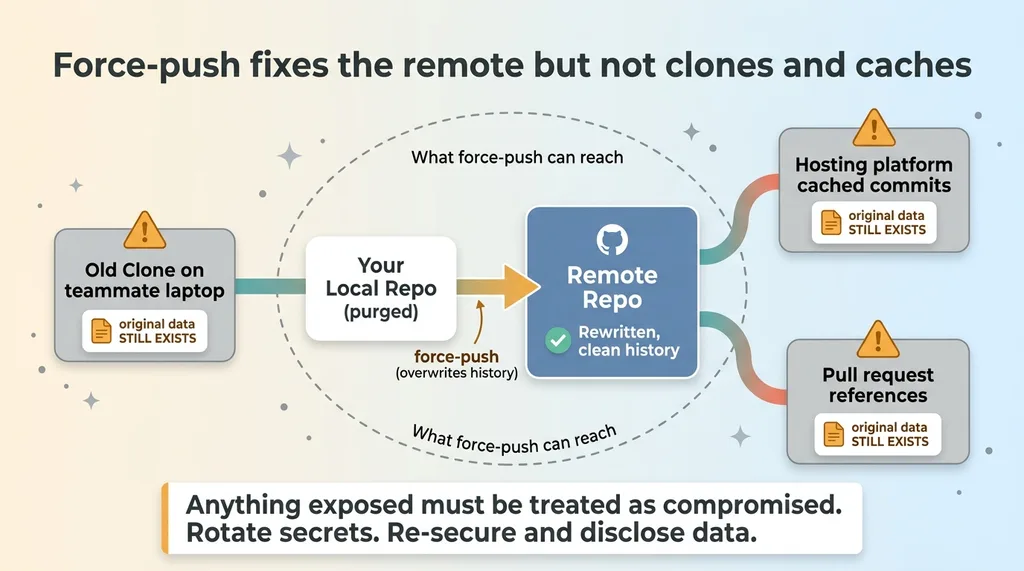
The rewrite I just described only changed my local copy. The remote still had the original history, full medical record and all. To overwrite it, I had to do a force-push history rewrite to the remote.
 Force-push fixes the remote but not clones and caches
This is exactly why a force-push is a deliberate, careful operation and not something you do casually. A normal push adds to history. A force-push overwrites it. You are telling the remote "throw away what you have and accept my rewritten version." Powerful, and unforgiving if you get it wrong, which is another reason the verification step comes first.
Now the honest part, because this matters more than any command.
History rewriting cleans your repo. It cannot un-ring a bell that already rang. If anyone cloned the repo before the rewrite, their copy still has the original data. If your hosting platform cached old commits or kept them reachable through a pull request reference, the data may still exist outside your control. A force-push fixes your remote. It does not reach into every clone and cache on earth.
So the rule I live by: anything genuinely exposed should also be treated as compromised. A real secret gets rotated. Real patient data gets re-secured and, where required, disclosed according to whatever obligations apply. You do the history rewrite and you assume the data leaked, because you cannot prove it did not.
This is exactly why prevention beats remediation. The cleanest history rewrite is the one you never have to do. I wrote about keeping this stuff out of git in the first place in stop committing customer data to git, and that prevention angle is worth more than any cleanup technique.
What This Means If You Think a Deleted File Is Gone
If you or your team "deleted" a sensitive file by committing a new version, it is almost certainly still sitting in your history, fully retrievable by anyone with access.
The real fix is a four-step sequence, in this exact order:
- Relocate the data to a properly secured store (deny-all, server-only, encrypted).
- Repoint every piece of code that depended on the old file.
- Verify with a type-check or build that nothing references the file anymore.
- Rewrite history with
git-filter-repo, force-push, and treat anything already exposed as compromised.
Do them out of order and you either break your build or leave the data in place. Do them in order and you actually fix it.
This is the kind of quiet landmine I find when I audit repos that were built fast. It is especially common in AI-built projects, where a coding assistant happily commits a sample data file or a .env without anyone thinking about what that means for history. The app runs fine. The exposure sits there for months.
If you have shipped fast and you are not sure what is buried in your git history, PHI in github or otherwise, that is exactly what I check when I have me audit your repos. It is a specific, finite thing to look at, and finding it before someone else does is the entire point.
Want to explore what AI could do for your business?
Book a free 30-minute strategy call. No pitch deck, no sales team, just a real conversation about your operations and where AI fits.
Get AI insights for business leaders
Practical AI strategy from someone who built the systems — not just studied them. No spam, no fluff.
Hodgen.AI
Ready to automate your growth?
Book a free 30-minute strategy call with Hodgen.AI.
Book a Strategy Call