Sensitive Data in Git: Getting PHI Out of the Repo
I checked real medical records into git to build a health AI. Here's how I moved sensitive data in git out of version control without losing zero-infra RAG.
By Mike Hodgen
The Pattern That Felt Smart Until I Thought About It
I built a private health AI for a family member. The point was simple: ask plain-English questions about their medical history and get answers grounded in their actual records instead of WebMD guesses.
The build was clean. A RAG pipeline read from a parsed medical record JSON and a 484-chunk vectors JSON. Both were checked straight into git. Raw CCDA exports (the standard clinical document format hospitals export) sat in a data folder right next to them.
It worked great. Fast retrieval, no infrastructure to babysit, clone-and-run on any machine. For a weekend project solving a real problem, this is exactly the kind of thing I love shipping.
Then I actually thought about it.
That setup means real medical records live in git history forever. Not just on my laptop. On every machine that ever cloned the repo. In every backup of that repo. In every CI cache, every fork, every place git quietly copies itself.
I had taken someone's protected health information and scattered it across version control without a second thought, because the convenience of having sensitive data in git made the build faster.
This is the trap. Fast AI builds optimize for clone-and-run simplicity, and the simplest place to put your index is right next to your code. It feels smart. It works in the demo. And it buries regulated data in a place designed to never forget.
So here is the uncomfortable question I had to ask myself, and the one you should ask too: if I did this on a private project I built carefully, where is your customer data sitting right now? In a CSV someone committed last spring? In an env file that got pushed once and never cleaned up?
You probably don't know. Most teams don't. Let me walk through exactly how this happens and how I fixed it.
Why Pre-Computed Embeddings in JSON Is Actually a Great Idea
Before I tear this pattern apart, let me defend it. Because the pattern itself is good.
The zero-infra RAG argument
Pre-computing embeddings into a flat JSON file and running cosine similarity over it in memory is a legitimately smart move for a small corpus. You embed your chunks once, write the vectors to disk as JSON, load them into memory at runtime, and compute similarity against the query. Done.
No vector database to run. No Pinecone bill. No pgvector instance to monitor and patch. For a few hundred chunks, retrieval is sub-millisecond because you're just doing math over an array that's already in RAM.
For 484 chunks, this beats spinning up dedicated vector infrastructure by a mile. You'd be paying a monthly fee and adding an external dependency to solve a problem that a JSON file and 30 lines of Python already solve. I've written before about cheap RAG over a JSON index, and the economics hold up at this scale.
This is rag without a vector database, and for the right use case it's the correct call, not a shortcut.
The one thing that ruins it
The pattern is fine. The storage location is the problem.
JSON-as-index is great when the indexed content is a product catalog, public docs, marketing content, anything you'd happily put on a billboard. Commit it, ship it, never think about it again.
It becomes a liability the instant the content you indexed is PHI, financial records, customer PII, or anything regulated. Because now your fast, elegant, zero-infra index is also a permanent copy of sensitive data living in version control.
The fix is not to abandon pre-computed embeddings in JSON. The retrieval approach is right. The fix is to move where that JSON lives so the data isn't in git at all. Same pattern, different storage. That distinction is the whole article.
What 'In Git Forever' Actually Means
Most owners underestimate this, so let me make it concrete.
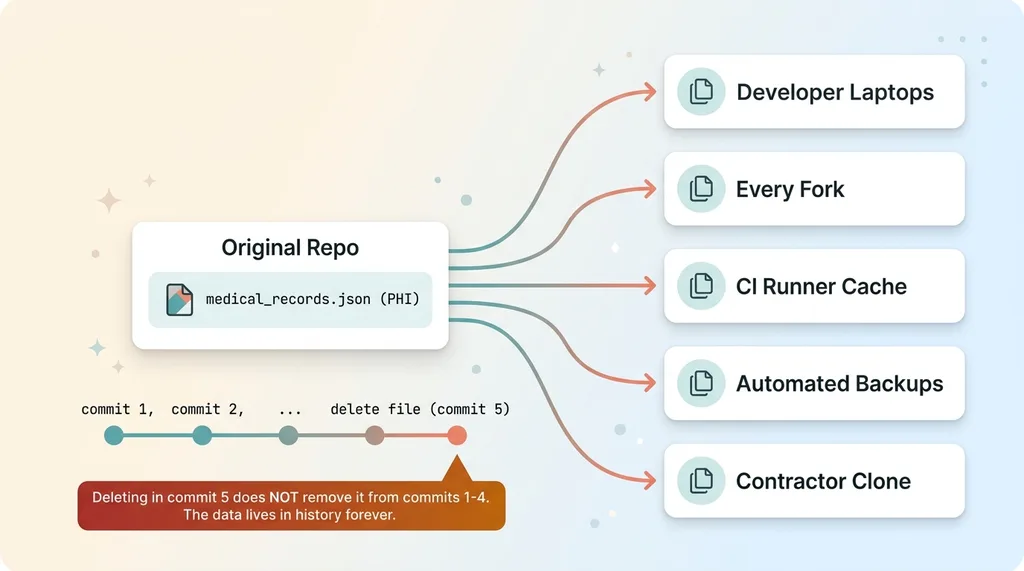 How Git Copies Sensitive Data Everywhere Forever
Git does not forget. This is the part people miss. If you commit a file today and delete it in a commit next week, the file is still in your history. Deleting it later does nothing. The data is preserved in every prior commit, permanently, by design.
Anyone who clones the repo gets the entire history. Not the current state, the whole thing. Every commit, every deleted file, every version of every secret you ever pushed and "removed."
Now count the copies. Every developer laptop that cloned it. Every fork. Every CI runner that cached the repo to run tests. Every automated backup of the repo. Every contractor who pulled it once.
If that repo is ever made public, even by accident, the data is already out. If a contractor is offboarded but keeps their clone, they keep the data. If a backup leaks, the data leaks with it. You don't get to un-distribute it.
For my health project, that's not a theoretical risk. That's a reportable breach. PHI sitting in version history that touched multiple machines is exactly what HIPAA breach notification rules exist for.
And the same logic applies to anything sensitive. API keys committed once and "rotated" are still in history. A customer list, internal financials, a database dump, all of it carries forward forever once it's in a commit.
This is the buyer doubt answered head-on: "we deleted it" is not the same as "it's gone." With git, those are completely different statements.
The Migration: From File-in-Repo to a Service-Role-Only Table
Here's the actual fix I shipped. It took a few hours, not a rearchitecture.
The migrate script
Step one was a one-time migration script. It read the parsed-record blob and the vectors blob off disk and wrote them into a dedicated blob table in the database. One row, two columns, holding the exact same JSON that used to live on disk.
The table is locked down so only the service role can read it. Never the public anon key, never the client. The service role is the server-side credential that never touches a browser. More on why that matters in a second.
The script ran once, moved the data, and then its job was done.
Gitignoring the source
Step two was adding the source files and the raw CCDA folder to gitignore. The parsed JSON, the vectors JSON, the entire data directory of clinical exports. Now nothing new gets committed, and a fresh clone doesn't pull the sensitive files going forward.
This is the cheap, obvious step. It's also the step people think is the whole fix, which it isn't. We'll get to history in a minute.
Rewiring the read path
Step three was changing the read path. The parse route and the RAG module used to read the blobs from disk. Now they read them from the database, pulling the row through the service role on the server side.
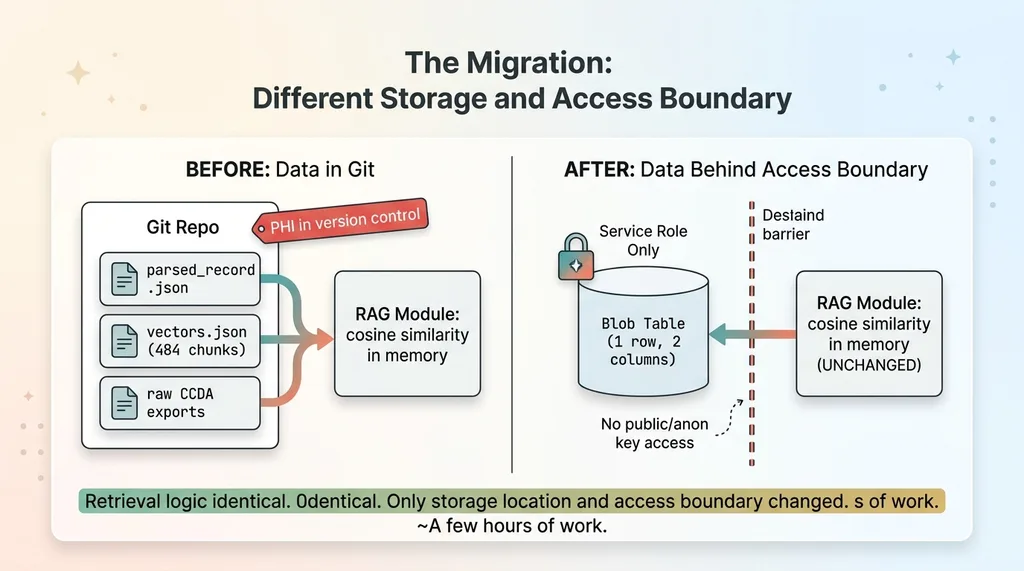 The Migration: Same Retrieval, Different Storage and Access Boundary
Here's the detail that matters most: the cosine-similarity-over-JSON retrieval logic did not change at all. Not one line of the actual search code. I load the exact same JSON shape into memory, just from a database row instead of a file on disk.
Zero-infra retrieval stayed intact. Sub-millisecond similarity over 484 chunks, no vector database, same as before. The only things that changed were the storage location and the access boundary.
That's the part I want owners to hear. Securing this didn't mean throwing out the fast, cheap approach and adopting some heavyweight enterprise vector platform. It meant moving the JSON behind a proper access boundary and changing where I read it from. A few hours of focused work, and the convenient pattern stayed convenient while the data stopped being radioactive.
If your team built something like this fast, the fix is usually this size too. The hard part isn't the engineering. It's noticing the problem exists.
Getting the Data Out of History Is Its Own Job
Now the part everyone wants to skip.
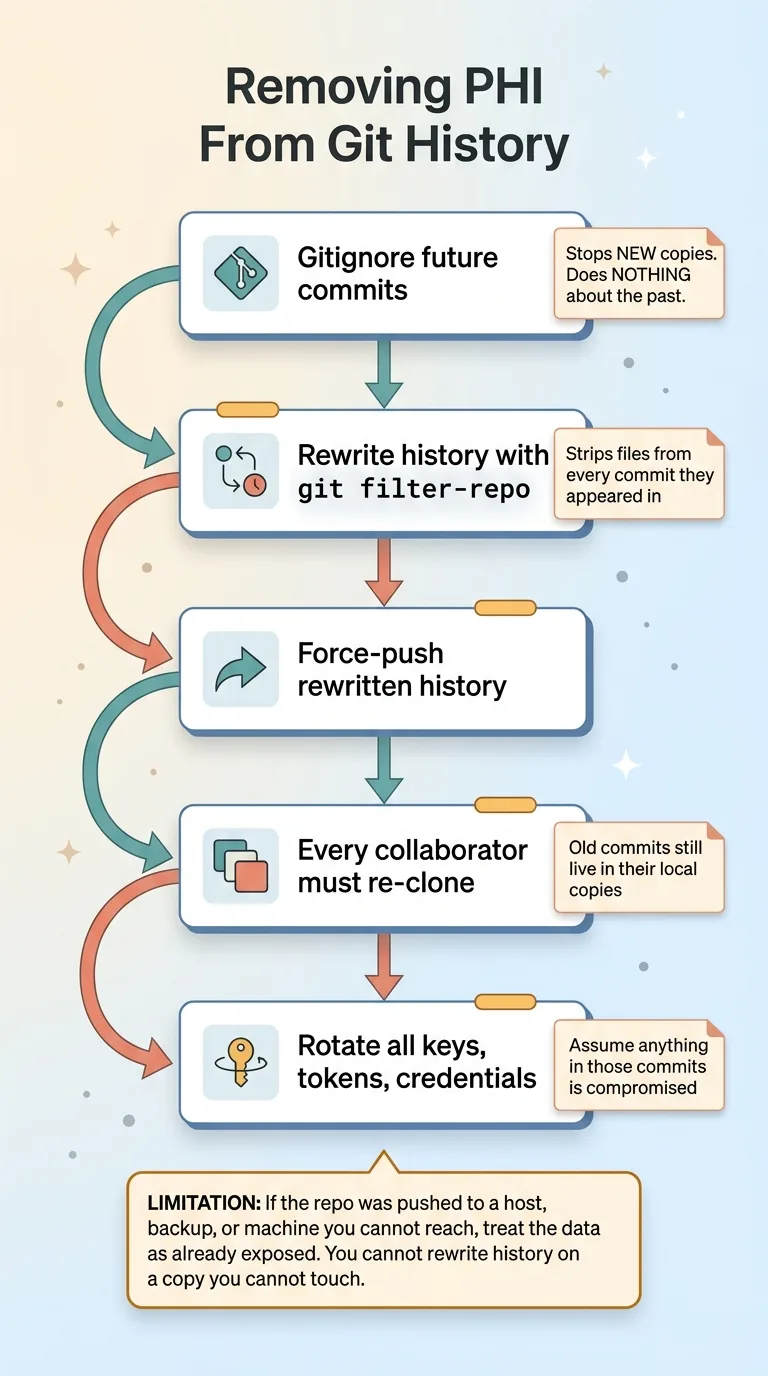 Removing Data From Git History (Process Flow)
Gitignoring future commits does nothing about the past. I said this above and it's worth repeating because it's the most common misunderstanding I see. The files are still in every prior commit. Adding them to gitignore stops new copies, but the old copies are sitting in history right now.
To actually remove data from git history, you have to rewrite history. Tools like git filter-repo strip the offending files from every commit they ever appeared in. Then you force-push the rewritten history, and every collaborator has to re-clone, because their local copies still contain the old commits.
You also rotate anything that should be treated as compromised. Any key, token, or credential that ever lived in those commits gets cycled, because you have to assume it's already been seen.
For my solo private project, this was manageable. One repo, one developer, a clean rewrite and force-push and done.
For a team repo with forks and active CI, this is a real coordination cost. Every fork is its own copy of history. Every CI cache might still hold the old data. Every developer has to re-clone at the same time or you risk re-introducing the deleted commits. It's a project, not a checkbox.
That coordination pain is exactly why you never want regulated data in there in the first place. The cheapest fix is the one you do before the first commit.
And the honest limitation: if the repo was ever pushed somewhere you don't fully control, a managed git host, a backup service, a contractor's machine, you treat the data as exposed regardless of how clean your rewrite is. You can't rewrite history on a copy you can't reach.
Out of Git Is Not the Same as Secure
Getting PHI out of version control is necessary. It is not sufficient. I want to be clear about that so nobody walks away with a false sense of safety.
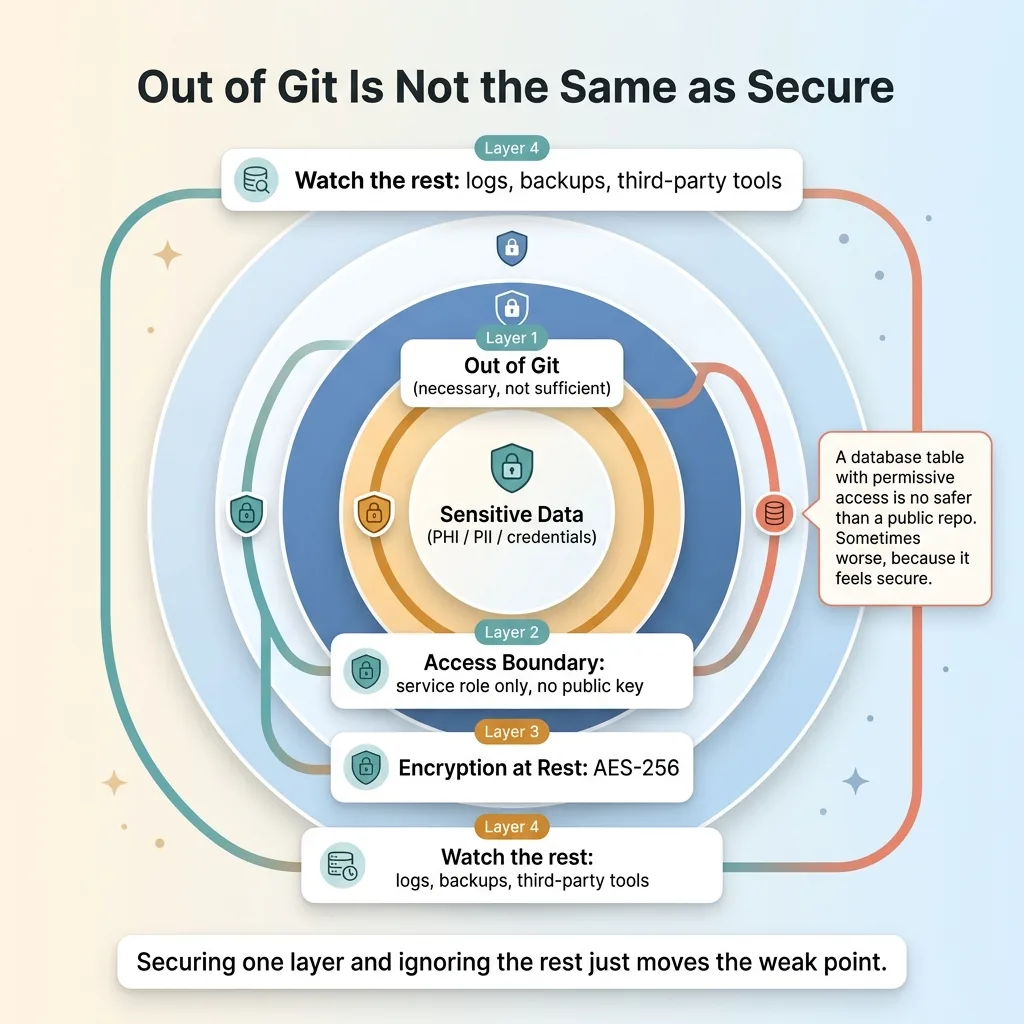 Layered Defense: Out of Git Is Not the Same as Secure
Moving the data into a database table only helps if the table is actually locked down. In my case the blob table is readable only by the service role, the server-side credential. The public client key has zero access to it.
This matters more than people realize. I've written about a real incident where patient data leaked through a public key, where the data was technically "in the database" but the public client could read it because the access rules were wrong. Out of git, still exposed. The location changed but the boundary didn't.
The decision of who can read the blob matters as much as where the blob lives. A database table with permissive access is no safer than a file in a public repo. Sometimes worse, because it feels secure.
Beyond access control, there's encrypting PHI at rest in the database, so that even a leaked backup or a compromised credential doesn't hand over readable records. That's another layer on top of the access boundary.
The right mental model is layered defense. Getting sensitive data out of version control is step one, not the finish line. Every place data lands is a place it can leak from: the repo, the database, the logs, the backups, the third-party tools you pipe it through. Each one needs its own boundary. Securing one and ignoring the rest just moves the weak point.
Where Your Customer Data Is Probably Sitting Right Now
Turn this outward, because I am almost certain it applies to you.
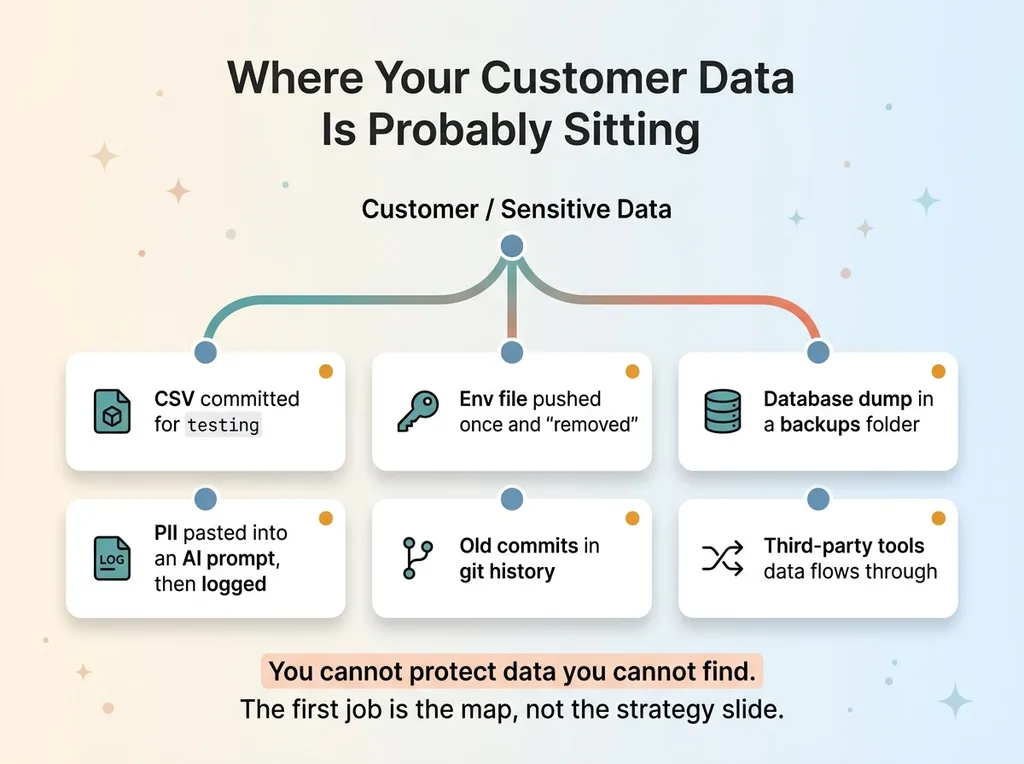 Where Your Sensitive Data Is Probably Hiding (Data Inventory Map)
Most teams shipping fast with AI have done a version of what I did without noticing. Customer records in a CSV that someone committed to the repo for testing. Secrets in an env file that got pushed once and "removed." A database dump in a backups folder under source control. PII pasted into an AI prompt that then gets logged in plaintext somewhere.
The convenience that makes AI builds fast is the exact same convenience that scatters sensitive data into places it should never be. Clone-and-run is great for velocity and terrible for data hygiene, and almost nobody slows down to reconcile the two.
Here's my honest framing. I found this in my own private project, built carefully, by someone who knows better. If it can happen there, it is sitting in production systems built under deadline pressure right now. The question isn't whether you have data in the wrong place. It's where, and how much.
That's the problem. You can't protect data you can't find. Before any of the encryption and access-control work matters, somebody has to actually map where your sensitive data lives, every CSV, every env file, every log, every repo, every third-party tool it flows through.
That map is the first thing I build when I come in as Chief AI Officer. Not a slide about AI strategy. A real inventory of where your customer data actually sits, so we can lock down the leaks before we build anything new on top of them. If you're not sure where your data lives, that uncertainty is the work.
Want to explore what AI could do for your business?
Book a free 30-minute strategy call. No pitch deck, no sales team, just a real conversation about your operations and where AI fits.
Get AI insights for business leaders
Practical AI strategy from someone who built the systems — not just studied them. No spam, no fluff.
Hodgen.AI
Ready to automate your growth?
Book a free 30-minute strategy call with Hodgen.AI.
Book a Strategy Call