Security Guard Scheduling Software That Counts Posts
Why 'fully staffed' is a lie when you count headcount instead of posts. How post-aware security guard scheduling software catches shortfalls in time to fix them.
By Mike Hodgen
The Night They Went Short 14 at the Gate
A security guard staffing company I worked with ran a weekend events contract. Friday, Saturday, Sunday, with a Saturday-night surge that needed 48 to 50 extra guards on top of the base crew. Big venue, paying customer, a relationship that had taken years to build.
One Saturday they showed up short 14.
The gate was naked. Not "thin," not "stretched." Fourteen bodies missing from the posts that controlled who walked into a packed venue. Nobody caught it until the guards who did show up were already clocking in and the math didn't add up. By then it was 7pm and there was no backfilling 14 people on a Saturday night.
Another weekend, short 9 at a different combination of posts. Same story. Caught too late to do anything except apologize and hope the venue didn't start shopping for a new vendor.
Here's the part that made me want to fix it. Their security guard scheduling software said the shift was close to full. The dashboard was green-ish. The ops manager wasn't asleep at the wheel. The system told him things were fine, and the system was wrong.
It counted one headcount number against one total. Need 50, got 42, that reads as "almost there." Except those 42 weren't where they needed to be. The number that the software was confident about was the wrong number entirely.
When you're staffing a venue, "almost there" on a total is not the same as covered. A short gate is a safety problem and a contract problem at the same time. The phone call at 7pm, when the gate is empty and the event is already happening, is the moment everyone wants to never have again.
That call is preventable. The system just has to count the right thing.
Why 'Fully Staffed' Was a Lie
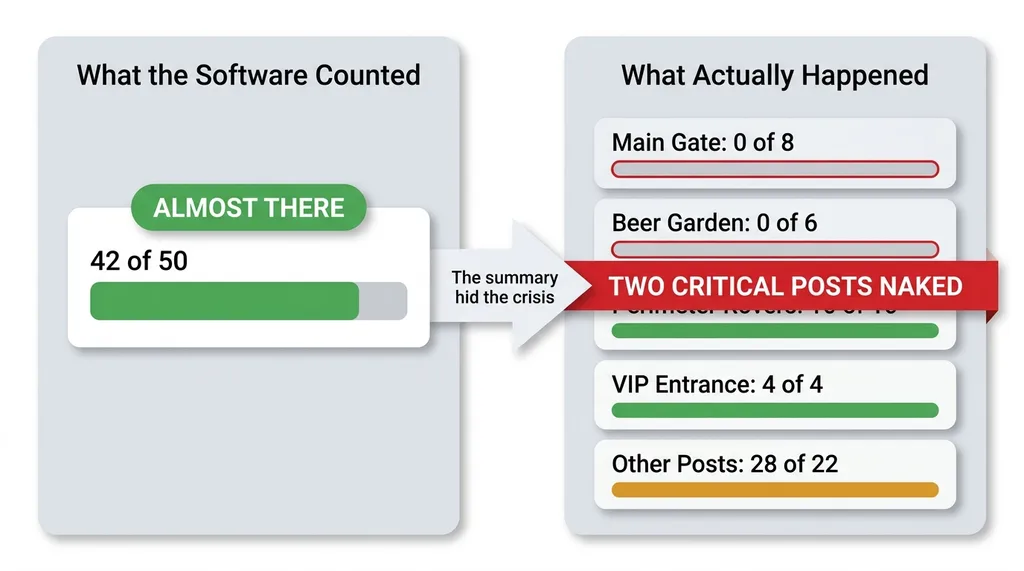 Headcount total vs. post-level fill, why 'almost there' is a lie
A shift is not one number
The core mistake was treating a shift as a single headcount target. Need 50, fill 50, done. That's clean and it's completely disconnected from how the operation actually works.
The real unit isn't the shift. It's the post.
A Saturday surge of 50 guards isn't 50 interchangeable people. It's 8 at the main gate, 6 at the beer garden, 10 roving the perimeter, 4 at the VIP entrance, and so on down the list. Each post has a job. Each post has a minimum below which that specific area is a liability.
Short 8 at the gate and 6 at the beer garden is a crisis. The total might still read 36 of 50, which sounds survivable. It isn't. Two critical posts are functionally uncovered while the summary number looks like a rounding problem.
Filling rovers while the gate is naked
It gets worse. The guards who did sign up clustered toward the easy posts. Roving the perimeter on a nice night beats standing at a gate getting yelled at by people who can't find their tickets. So the rovers filled up first.
That made the totals look even better. Plenty of bodies on the schedule. Meanwhile the gate, the post that actually controls the venue, sat empty.
Filling a rover while the gate has nobody is useless coverage. You can have 45 of 50 slots filled and still be in a full-blown emergency because the 5 missing are the 5 that matter most.
The metric that mattered, post-level fill against the required qualifications for that post, was invisible. The software couldn't see it because the software didn't model it. Most security guard scheduling software counts heads, not posts. That gap is exactly where the 7pm phone calls come from.
The Real Failure Was the Outreach, Not the Calendar
I want to be fair to the ops manager here, because the instinct is to blame the person. The person wasn't the problem.
He was filling shifts by texting guards one at a time. "You free Saturday?" Wait for a reply. Mark it down somewhere, sometimes a spreadsheet, sometimes just in his head. Move to the next name. Repeat 50 times across three nights, every single weekend.
There was no deadline in the system. No rollup that said "you are currently short 12 across these specific posts." No signal at all until someone physically failed to show up at the gate. The feedback loop didn't close until the event had already started.
This is how a huge number of real businesses actually run. Group texts and spreadsheets are how these businesses actually run, and it works right up until the day it catastrophically doesn't. It's not laziness and it's not disorganization. It's that the unit of measurement was wrong and the feedback arrived after the deadline had passed.
Think about what that means. By the time you have proof you're short, the proof is the empty gate at 7pm. The information showed up at the exact moment it became useless. That's not a discipline failure. That's a system that gives you the truth only after the truth can't help you anymore.
You can't text your way out of a structural blind spot. You can hustle harder, work later, send more messages, and still get blindsided, because the thing you're measuring isn't the thing that breaks.
Modeling the Post, Not the Headcount
Each post has its own count and qualifications
The fix started with the data model, because everything downstream inherits from it.
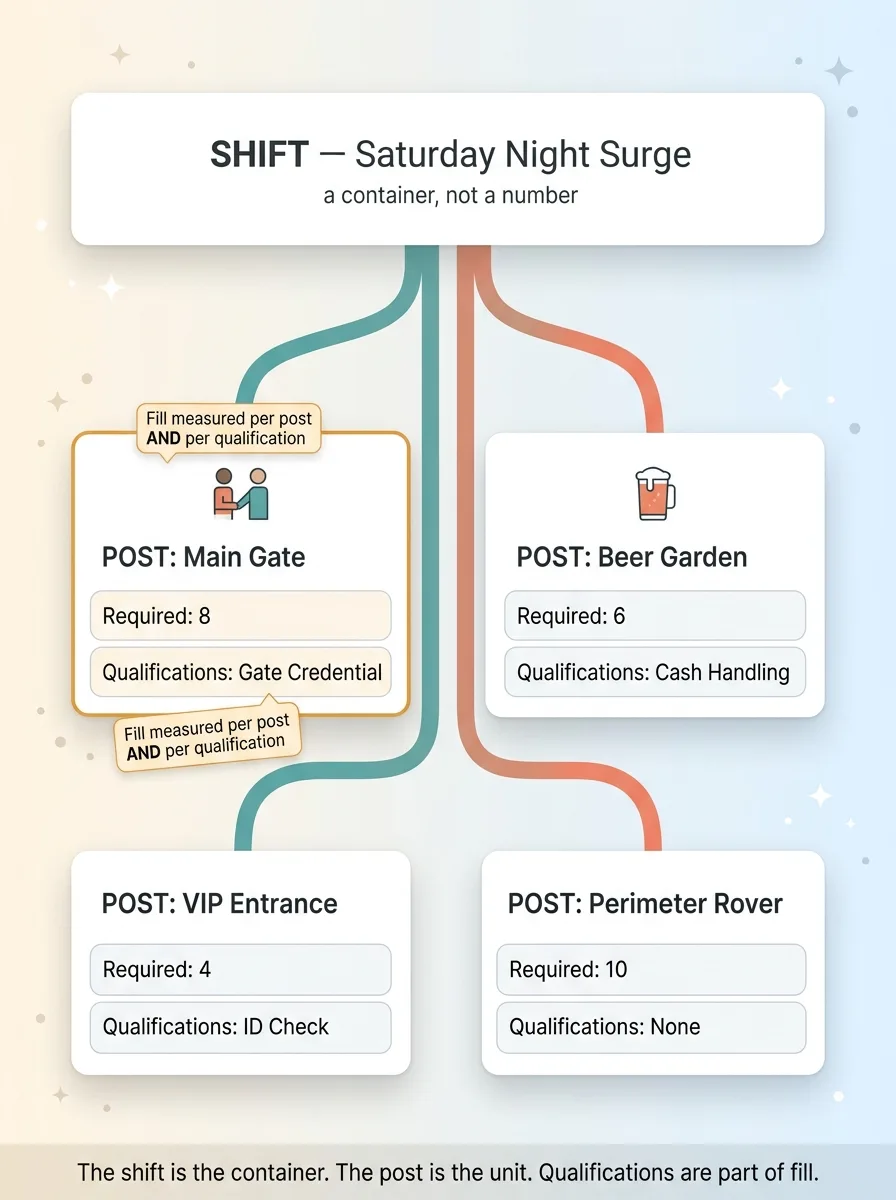 The corrected data model, shift contains posts, posts carry count and qualifications
Shifts now contain posts. A shift isn't a number anymore, it's a collection of named posts, each with its own required headcount. The main gate needs 8. The beer garden needs 6. VIP needs 4. The model carries that structure instead of flattening it into a single sum.
Each post also carries its required qualifications. A gate post needs different credentials than a parking rover. A post that handles cash or checks IDs has requirements a perimeter walk doesn't. Fill is now measured per post, against both the headcount and the qualifications, so a guard who can't legally work the gate doesn't count toward filling it.
This is the whole game. When fill is measured per post, "short 8 at the gate" becomes a number the system can actually see and act on. The crisis becomes visible while it's still a future crisis.
A template that generates the whole season
The contract had a pattern: Friday, Saturday, Sunday, with the Saturday surge. That pattern repeats across an entire season of weekends.
Nobody should hand-build 30 weekends of post structure. So I built a recurring template that generates the full season's calendar from the contract pattern. Define the posts and counts once, and the system stamps them out across every event date automatically.
That saved hours of setup, but more importantly it removed a place for human error to creep in. Every weekend gets the same correct post structure instead of someone forgetting the beer garden on week 17.
This is what post-aware scheduling actually means. The data model matches the operational reality. The shift is a container, the post is the unit, and qualifications are part of fill, not an afterthought. The model is the thing that makes every alert downstream honest. Get the model wrong and no dashboard can save you. Get it right and the alerts almost build themselves.
A Cron That Watches Fill Rate Against the Deadline
The Thursday 6pm cutoff
A correct data model is necessary but not sufficient. You also need something watching it against a real deadline.
So I built a shift fill rate cron. It's a recurring job that wakes up on a schedule, compares post-level fill against a signup cutoff, and decides whether anyone needs to know.
The cutoff is Thursday 6pm. That's the last realistic point where backfilling a short post is still possible for a weekend event. Before Thursday 6pm, a shortfall is a problem you can solve. After it, you're rolling dice.
The cron compares every post's actual qualified fill against its required count as that deadline approaches. If a post is short, it sends a staffing shortfall alert to the manager while there's still time to act. Not at 7pm Saturday. On Thursday, with two days of runway.
Deduped alerts that escalate by tier
The fastest way to make a manager ignore alerts is to bury him in them. If the system emails him every hour about the same short gate, he stops reading by noon.
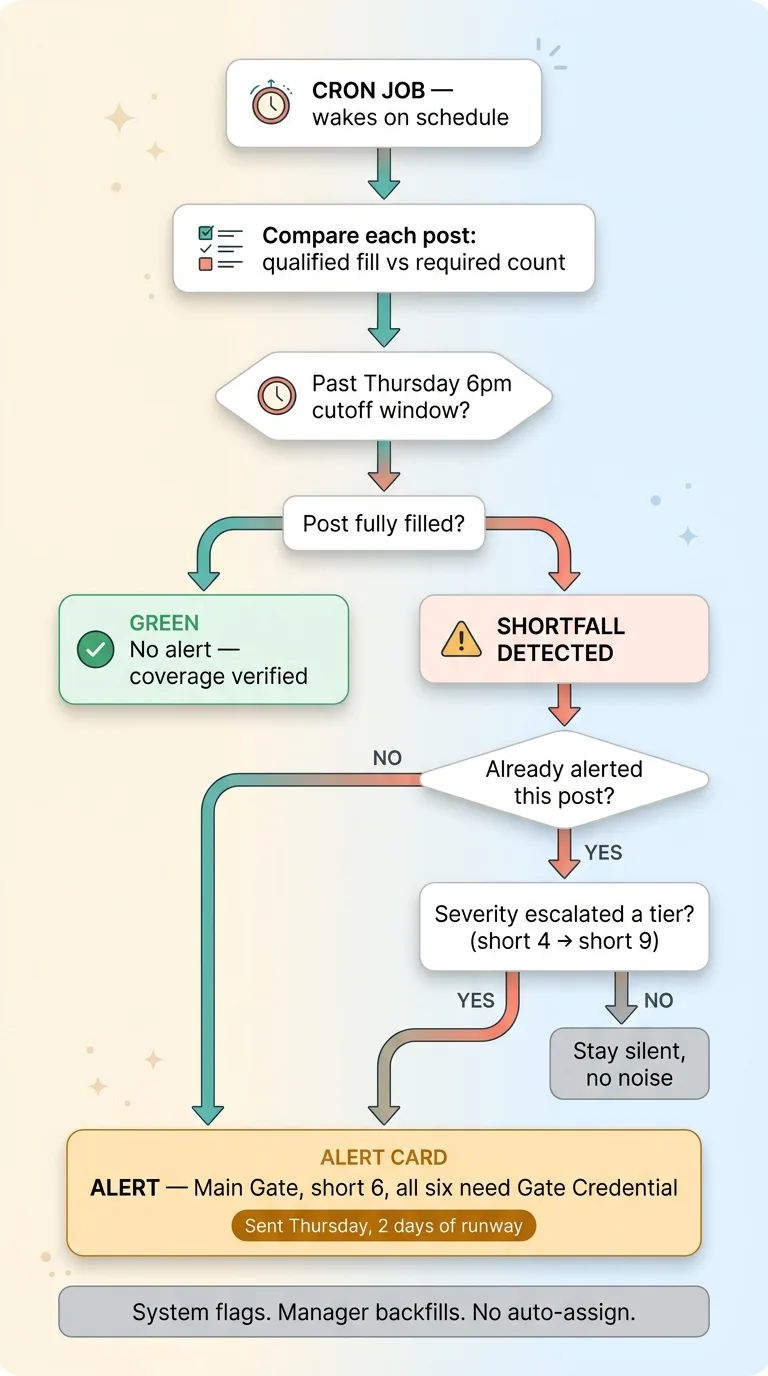 The fill-rate cron watching post fill against the Thursday 6pm deadline
So the alerts are deduped. One alert per short post, not a fresh email on every cron run. The manager gets a clear picture, not a flood.
Re-alerting only happens when severity escalates a tier. Short 4 becomes short 9, that's a new alert because the situation got materially worse. Short 4 stays short 4, no new noise. The system speaks up when the news changes, not on a timer.
Each alert tells him exactly what he needs: which post, how short, and which qualifications are missing. "Main gate, short 6, all six need [credential]." That's an action, not a vague worry.
And it stops there. The system flags. The manager backfills. It does not auto-assign guards, because every system I ship stops for a human. The software knows the math. The manager knows which guard will actually answer his text on a Thursday night and show up sober on Saturday. The decision stays with the person who knows the roster.
Replacing the Dashboard That Lied
There was one more lie hiding in plain sight, and it was the most dangerous kind because it was the default state.
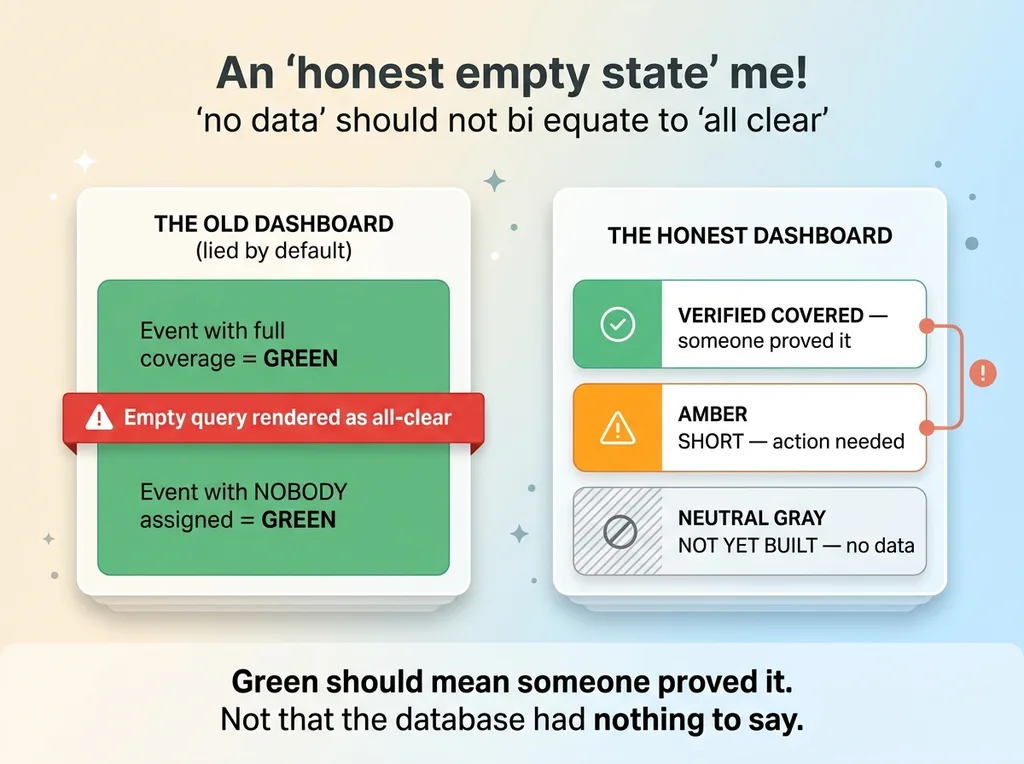 Honest empty state, 'no data' is not 'all clear'
When a new event had nothing scheduled yet, the board showed "fully staffed." Zero shifts created meant zero shortfall, and zero shortfall rendered as green. Empty equaled good.
Read that again. A weekend with literally nobody assigned displayed the same color as a weekend that was actually covered. The dashboard lied by default, and it lied most confidently about the events nobody had touched yet.
This is one of the most common failures I find when I open the hood on a business. A status display that confuses "no data" with "all clear." The query returned nothing, so the screen went green, and everyone relaxed about a gate that didn't have a single guard assigned to it.
I replaced it with an honest empty state. Nothing scheduled now reads as "not yet built," not "all good." It's visually distinct from verified coverage. You can tell at a glance whether a green means someone proved it or whether the system just hasn't been told anything.
The principle is bigger than this one board. Silence is not success. A status display has to distinguish between "verified complete" and "no data," because those are opposite situations that feel identical if you let an empty query render as green.
Green should mean someone proved it. Not that the database had nothing to say. A dashboard that can't tell the difference is worse than no dashboard, because it actively tells you to stop worrying about the thing most likely to hurt you.
If You're Still Running on Group Texts and Gut Feel
This pattern isn't about security guards.
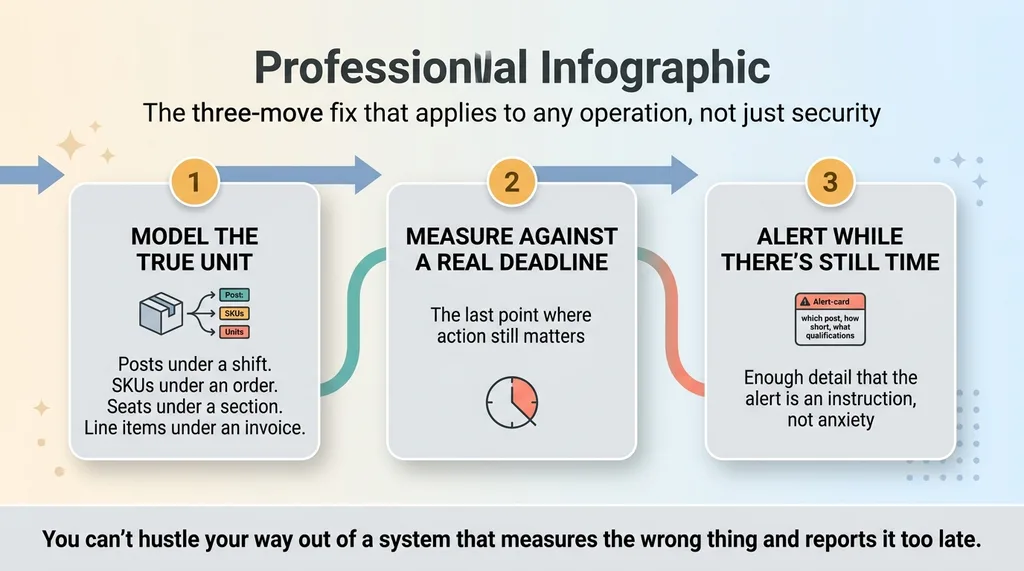 The three-move fix that applies to any operation, not just security
It shows up anywhere the real unit of work is finer-grained than the summary number you watch. Posts under a shift. SKUs under an order. Seats under a section. Line items under an invoice. The total looks fine while a critical piece sits empty, and you don't find out until the moment it's too late to fix.
The fix is always the same three moves. Model the true unit instead of flattening it. Measure fill against a real deadline, the last point where action still matters. Then alert while there's still time to act, with enough detail that the alert is an instruction, not an anxiety.
If you keep getting caught short and you only find out when the event has already started, that's not a willpower problem. You can't hustle your way out of a system that measures the wrong thing and reports it too late. That's a structural problem, and structural problems get fixed by changing the structure, not by trying harder.
If that sounds like your operation, tell me where you keep getting blindsided. I'll tell you whether the unit you're measuring is the unit that's actually breaking.
Thinking about AI for your business?
If this resonated, let's have a conversation. I do free 30-minute discovery calls where we look at your operations and find the places where AI could actually move the needle, not the places that sound good on a slide.
Get AI insights for business leaders
Practical AI strategy from someone who built the systems — not just studied them. No spam, no fluff.
Hodgen.AI
Ready to automate your growth?
Book a free 30-minute strategy call with Hodgen.AI.
Book a Strategy Call