Google Merchant Center Feed in Shopify: 88 to 3,819
My google merchant center feed in Shopify showed 88 products and a 'policy block.' It was a data bug. Here's how a custom Content API feed fixed it overnight.
By Mike Hodgen
The day my Google Shopping went dark
I run a DTC fashion brand out of San Diego. Handmade product, a few thousand SKUs in the catalog, the kind of catalog that should be generating free Google Shopping listings every single day.
Then I opened Merchant Center and saw the number: 88 active products. Out of thousands.
The explanation I'd been handed was clean and confident. My category was getting hit by an adult-content policy wall. Roughly 98% of the catalog disapproved. Fashion, the story went, just trips Google's content filters, and there wasn't much to be done about it.
That's the story you get when someone gives up. It sounds technical enough to be plausible and final enough to end the conversation. "Your category is against policy" is the diagnostic equivalent of a shrug.
Here's what a dead Google Merchant Center feed in Shopify actually costs you. Zero free Shopping listings. Zero product coverage in Performance Max, which means your highest-intent shopping traffic has nothing to bid on. You're paying for a Shopify plan, a product catalog, and an ad account, and the channel that turns all three into revenue is dark.
For a brand that lives and dies on product discovery, that's not a minor bug. That's a hole in the floor.
So I did the thing the agency didn't want to do. I opened the feed.
The real cause had nothing to do with adult content. Nothing to do with my category. It was a structural problem in how Shopify Markets was generating feeds, and it was hiding behind a disapproval label that pointed everyone in exactly the wrong direction.
Let me walk you through it.
Why an agency tells you your category is "against policy"
The convenient explanation
When someone tells you your whole category is against policy, ask yourself one thing: is that a diagnosis, or is it an exit?
Real hard-policy blocks exist. Weapons, certain supplements, actual adult content. But those come with account-level enforcement. Google tells you, in specific terms, that an account or a category is restricted. It's targeted. It's loud. It names the violation.
What it does not look like is a 98% disapproval rate scattered uniformly across a clothing catalog.
A near-total, indiscriminate disapproval that hits everything the same way is almost never a category ban. It's a data-quality artifact. Something upstream is malformed, and the malformation is so consistent that it knocks out the whole catalog at once.
"It's against policy" is just the easiest sentence to say when you don't want to dig into the feed structure. It's not a lie, exactly. The disapproval label really does say "restricted adult content." It's just that nobody checked whether the label was the disease or a symptom.
What policy blocks actually look like
Fashion gets miscategorized as adult content constantly. Swimwear gets flagged. Lingerie-adjacent items get flagged. Anything where Google's classifier sees skin in the product image plus a bad attribute mapping gets flagged.
But here's the tell: a real policy block is surgical. It hits the specific items that violate something. Twenty swimsuits get disapproved, not 1,339 products including your hoodies and your tote bags.
When everything goes down together, including products that couldn't possibly violate any content policy, the policy explanation falls apart. The uniformity is the evidence. A content filter doesn't disapprove a plain cotton t-shirt for being adult content unless something structural is broken in how that t-shirt's offer reaches Google.
That uniformity was my first clue that the agency was wrong.
What was actually broken: Shopify Markets and six currency feeds
Four markets became six broken feeds
Here's the real root cause.
 Shopify Markets fanning four markets into six broken currency feeds
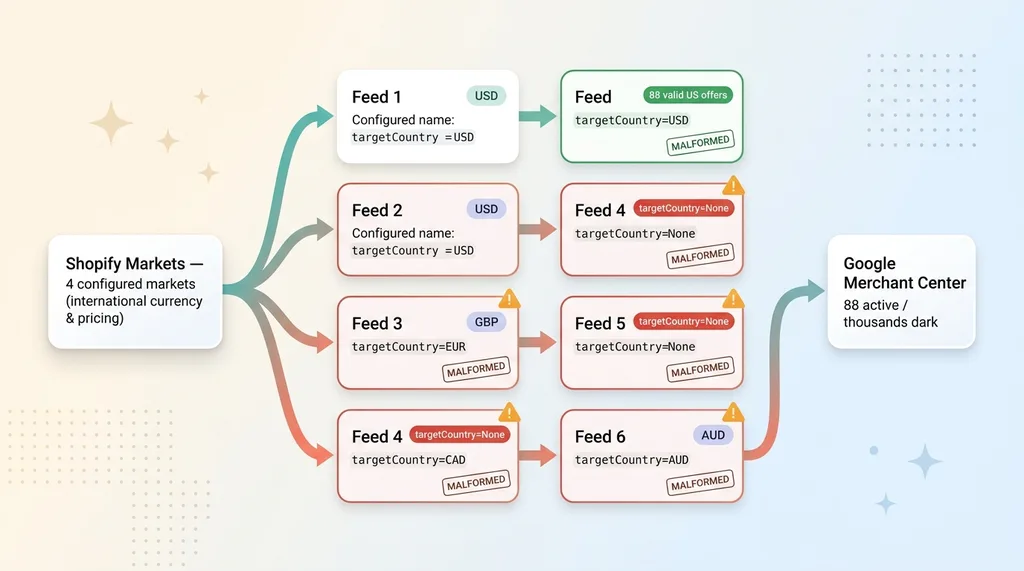
The brand was running Shopify Markets with four configured markets, set up to handle international currency and pricing. Sensible on paper. In practice, those four markets fanned out into six currency-split feeds flowing into Merchant Center.
Six feeds, most of them malformed.
Of everything flowing through, only 88 products were actually being targeted to the United States with a valid offer structure. Those 88 were the ones that survived. They're the "active" count I saw. Everything else was technically present and completely unservable.
targetCountry=None is the silent killer
This is the part nobody checks.
 The misdiagnosis: symptom vs. disease (adult content label hiding targetCountry=None)
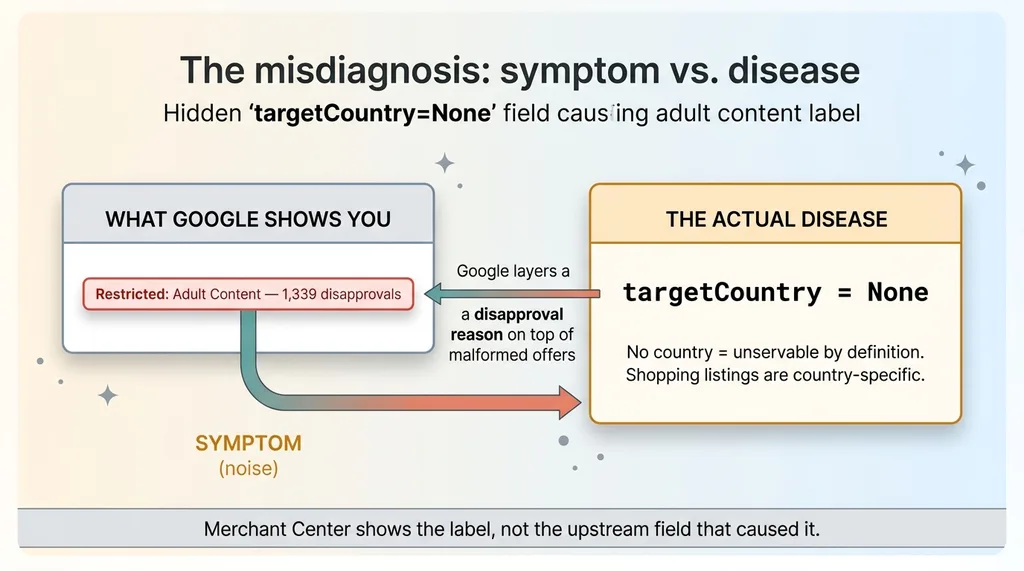
Every product in those broken feeds came through with targetCountry set to None. No country. And a product with no target country is a product Google literally cannot serve, because Shopping listings are country-specific. There's no market to show it in. It's invisible by definition.
Now here's where the misdirection happened. When Google encounters a malformed offer with no valid target country, its disapproval reporting doesn't say "this offer has no country." It picks a disapproval reason from its list and slaps it on top. In this case, it layered a "restricted adult content" flag on a pile of offers that were broken for a completely different reason.
So the 1,339 adult-content disapprovals were a symptom, not the disease. The disease was targetCountry=None across thousands of malformed offers. The adult-content label was noise Google generated while choking on bad data.
This is exactly why it's so easy to miss. Merchant Center shows you the disapproval reason. It does not show you the upstream feed structure that caused it. You see "adult content," you believe "adult content," and you never look at the country field that would have told you the truth in thirty seconds.
The agency read the label. I read the field.
The fix: a custom feed straight through the Content API
Why bypass the Shopify Google channel
The native Shopify Google channel is a black box. You configure it, it emits a feed, and when that feed is wrong you have almost no visibility into why. With Shopify Markets in the mix, it was silently producing six feeds and mangling the country attribute on most of them. I couldn't fix what I couldn't inspect.
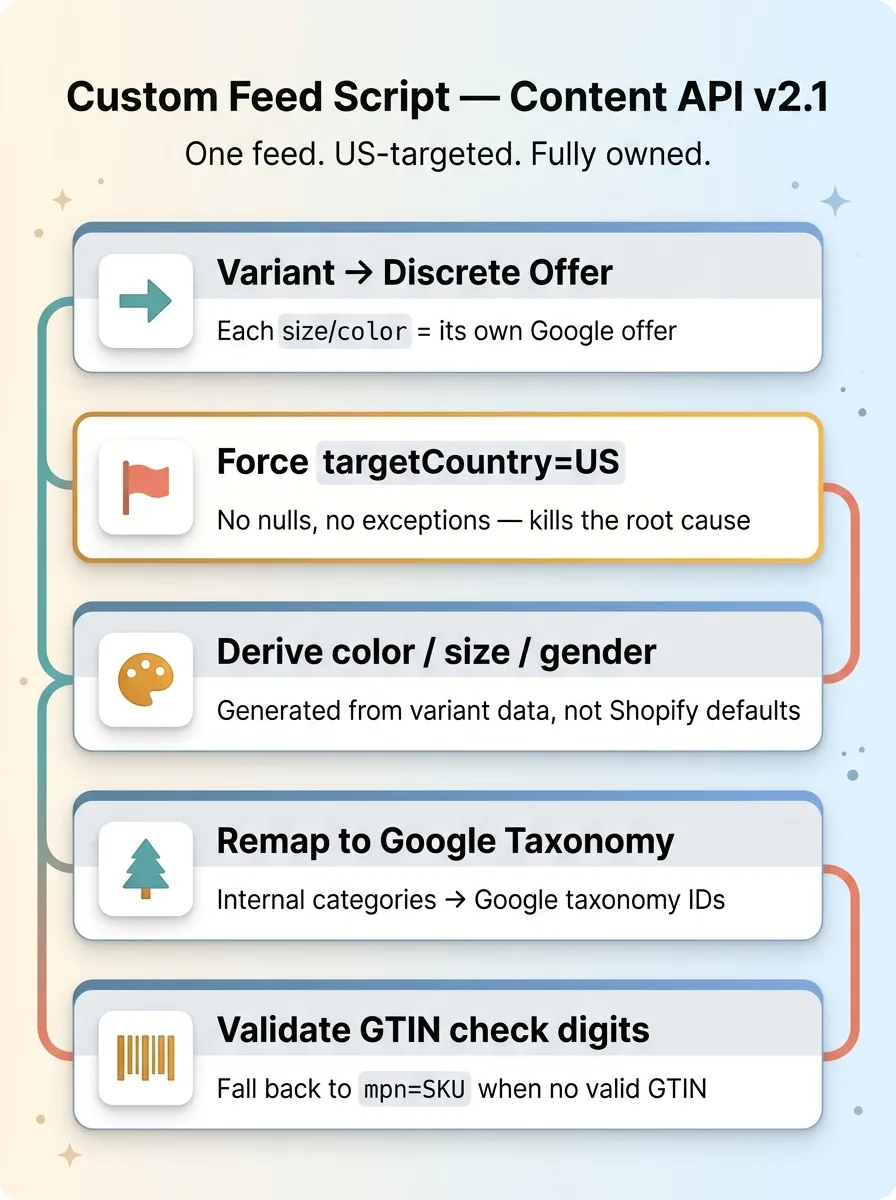
So I stopped trying to fix the channel and built my own feed pusher that talks directly to Google's Content API v2.1. One feed. US-targeted. Fully under my control.
This is the same logic I apply everywhere. When a tool you don't control is failing, you replace it with one you do. It's the same move I made when I replace a flaky tool with something I own, and it's the same principle behind the way I run paid acquisition: own the pipeline that feeds the spend, because everything downstream depends on it being correct.
What the feed script actually does
The custom US feed script does a handful of unglamorous, critical things, and it does them deterministically instead of hoping the channel gets them right.
 What the custom Content API feed script does (5 deterministic operations)
- Maps every variant to a discrete Google offer. Each size and color combination becomes its own offer, the way Google actually wants product data structured.
- Forces targetCountry=US on every single offer. No exceptions, no nulls. This alone killed the root cause.
- Derives color, size, and gender attributes from variant data instead of waiting for Shopify to emit them correctly. These attributes drive how products surface in Shopping, so I generate them myself.
- Remaps internal product categories to Google's product taxonomy. My internal category names mean nothing to Google. The script translates them into Google's actual taxonomy IDs.
- Validates GTIN check digits and falls back to mpn=SKU when no valid GTIN exists, so an invalid barcode never silently disapproves an offer.
The point isn't that any one of these is clever. The point is that I control every attribute on every offer, instead of hoping Shopify's channel emits all of them correctly across six feeds in two currencies. When something is wrong, I can find it and fix it in the script, validate the output, and push again.
That's the difference between owning a pipeline and renting one.
88 to 3,819 approved overnight
The numbers
I pushed the new feed and watched the account.
 Before and after: 88 to 3,819 and the collapse of the adult content wall
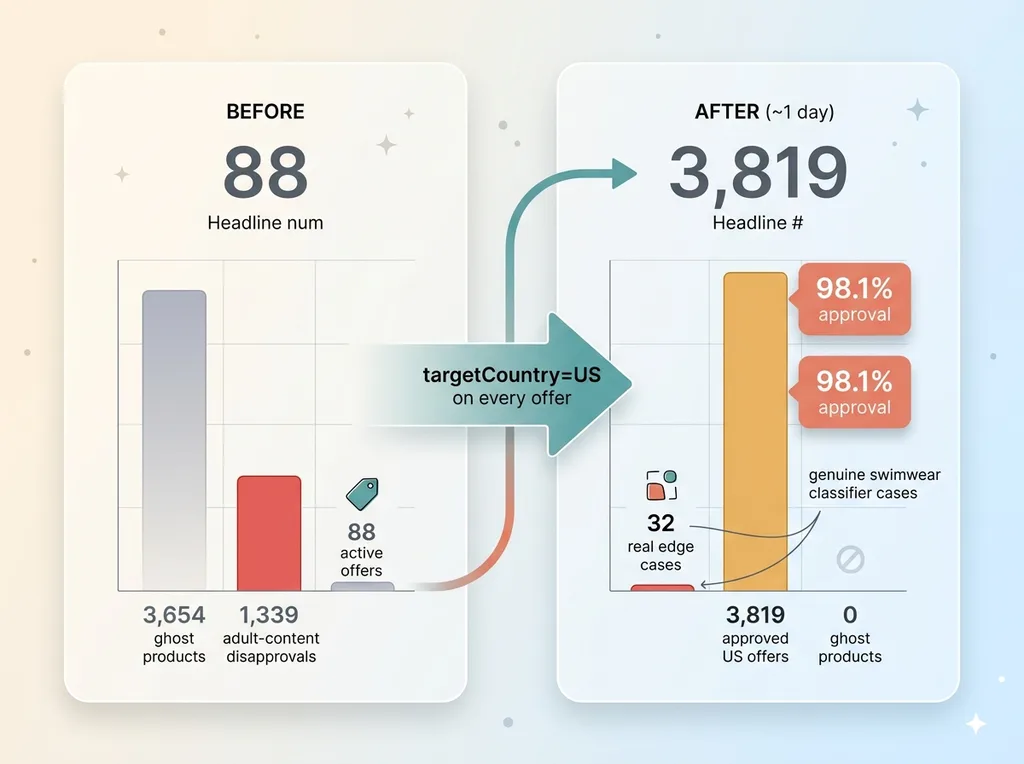
It went from 88 active offers to 3,819 approved US offers at 98.1% approval, in about a day.
That's the entire story in one line. The catalog that had been dark for months wasn't dark because of policy. It was dark because of one broken attribute, and once that attribute was correct on every offer, Google approved almost all of it overnight.
The "adult content wall" collapsed
The supposed adult-content wall, the 1,339 disapprovals everyone had treated as an immovable category ban, fell to 32.
That's the proof. A real policy block doesn't drop from 1,339 to 32 because you fixed a country field. A data-quality artifact does. The wall was never a wall. It was a side effect of malformed offers, and it vanished the moment the offers were valid.
I'll be honest about the 32 that remain. Those are genuine edge cases, the swimwear-adjacent items where Google's content classifier has an actual opinion. Worth fixing individually, image by image and attribute by attribute. It's not magically 100%, and anyone who promises you 100% is selling. But 32 real edge cases is a completely different problem than 1,339 phantom disapprovals.
Then the cleanup. The dead native channel had left behind a stale local feed with 3,654 ghost products rattling around in the account, polluting the data and making everything harder to read. I removed all of them.
Here's the lesson buried in those numbers. The bottleneck was never effort. Nobody was lazy. The bottleneck was the diagnosis. Everyone accepted "it's against policy" and stopped looking. The fix took a day once someone actually opened the feed.
How to tell if your feed is broken or your category is banned
Before you accept a "policy" explanation from anyone, run these three checks. They take an afternoon and they'll tell you whether you've been handed a real diagnosis or an exit.
Three checks before you accept a "policy" explanation
1. Check targetCountry on your disapproved offers. Pull the actual offer data, not the dashboard summary. If targetCountry is None or blank on the disapproved products, you have a feed structure problem, full stop. No policy in the world disapproves a product that was never assigned a country to serve in. The real fix: force a valid target country on every offer at the feed level, not in the channel settings.
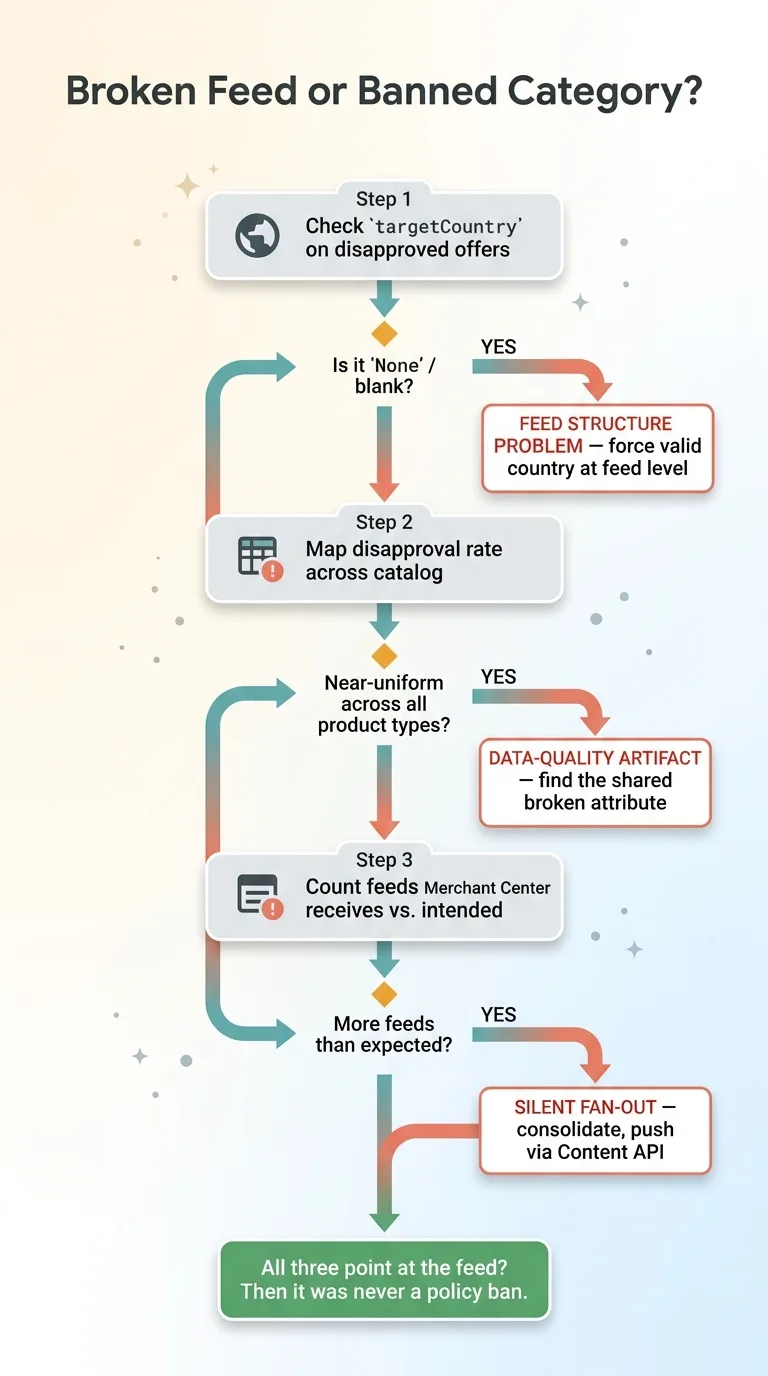 Three checks decision tree: feed broken vs category banned
2. Look at whether the disapproval rate is near-uniform. Map disapprovals across the whole catalog. A real policy block is targeted, it hits specific violating items. A data bug is indiscriminate, it takes down hoodies and swimsuits at the same rate. If everything is going down together, you're looking at a structural artifact, not enforcement. The real fix: find the shared attribute that's broken across all of them.
3. Audit how many feeds Merchant Center is actually receiving. Count them. Then count how many you intended to send. Multi-currency and Shopify Markets setups silently fan out into multiple feeds, and the extras are often the broken ones. The real fix: consolidate to feeds you control and push directly through the content api product feed rather than relying on a channel app to manage the fan-out.
If all three checks point at the feed, then "your category is against policy" was never the answer. It was the thing someone said instead of looking.
When the channel app fails, own the feed
Here's the whole thing in one sentence. A native platform integration is a black box you can't debug. A feed you push yourself is one you can inspect, validate, and fix in a day.
That difference cost this brand months of dark Shopping listings. Months of zero free traffic and zero Performance Max coverage, all because "your category is against policy" sounded final enough that nobody opened the feed. The moment someone did, the real problem, targetCountry=None across six malformed feeds, took an afternoon to find and a day to fix.
This is why I don't stop at advice. Advice would have been "your feed structure looks suspect, you should look into the Content API." That's not worth much when your Shopping is dark and your competitors' products are filling the listings you should own. I don't just advise, I build the fix, then hand over something that keeps running after I'm gone.
If your Merchant Center is dark and you've been told it's a policy problem, I'll tell you whether that's actually true. And if it isn't, I'll rebuild the feed so your products are servable again. Most of the time the diagnosis is the entire bottleneck. Once you know what's really broken, the fix is fast.
Ready to bring AI leadership into your company?
I work with a small number of companies at a time. If you're serious about AI, apply to work together and I'll review your application personally.
Get AI insights for business leaders
Practical AI strategy from someone who built the systems — not just studied them. No spam, no fluff.
Hodgen.AI
Ready to automate your growth?
Book a free 30-minute strategy call with Hodgen.AI.
Book a Strategy Call