Policy Acknowledgment vs E-Signature: Where I Drew the Line
A checkbox-plus-timestamp is a receipt, not a signature. Here's how I built policy acknowledgment vs esignature into an ops app without overselling legal protection.
By Mike Hodgen
The Temptation: Calling a Checkbox a Signature
A security-guard staffing company came to me needing employee onboarding and policy distribution for their W2 workforce. Hundreds of guards, dozens of policies, a constant churn of new hires who all needed to read the same documents before their first shift.
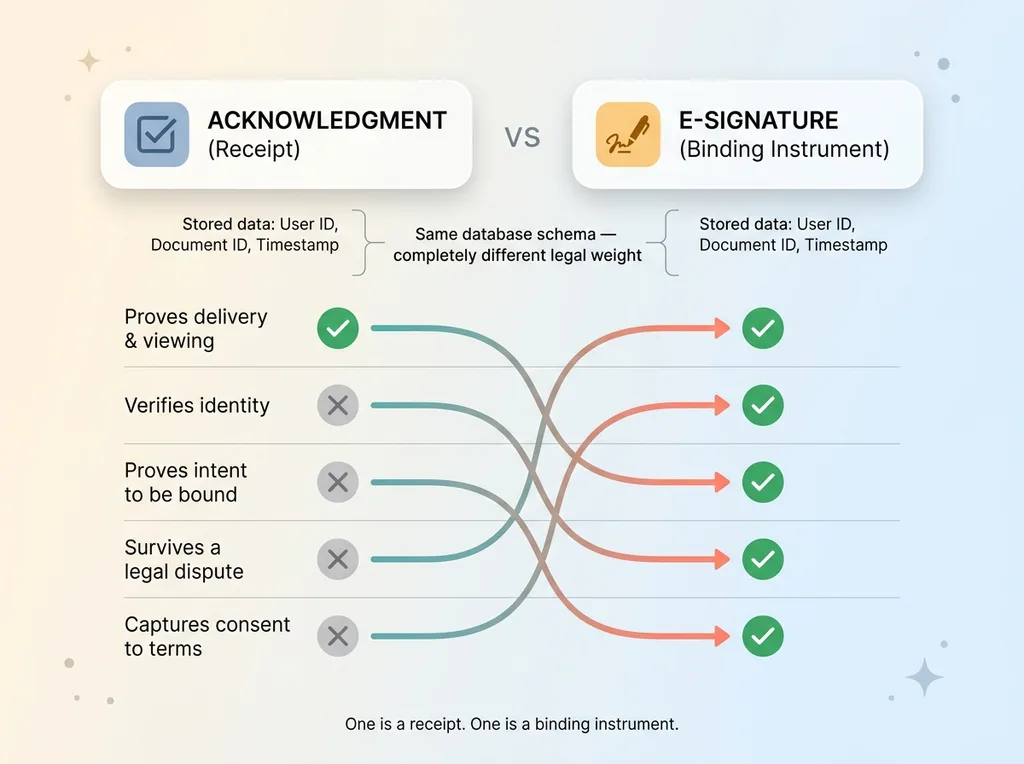 Receipt vs E-Signature comparison
The obvious shortcut was right there. Let a worker open a policy doc, scroll to the bottom, check a box that says "I acknowledge," capture a timestamp, store the user ID. Done. It feels airtight. You've got a record. You've got a name and a time. What more could a court want?
A lot more, as it turns out. And this is the single most common legal-design mistake I see in operations apps. The policy acknowledgment vs esignature question gets glossed over because the data looks identical. User ID, document ID, timestamp. Same three fields in both cases.
But the legal weight is completely different. One is a receipt. The other is a binding instrument. Treating them as the same thing because the database schema looks similar is how companies end up with a pile of records that prove nothing when a dispute actually happens.
Here's the thesis I built the whole system around: an in-app acknowledgment is a receipt. It proves someone saw something. A binding document, like an NDA or a work agreement that waives legal rights, needs a real signature collected through a separate, deliberate flow.
The temptation to collapse those two into one checkbox is strong because it's cheaper and faster to build. One code path. One UI component. One table.
But the moment you route a non-compete through the same checkbox you use for a uniform policy, you've created a liability that looks like a feature. I drew a hard line in this build, and I want to walk you through exactly where, and why.
What a Receipt Actually Proves (and What It Doesn't)
Let me define the receipt precisely, because most people are fuzzy on what they actually have.
A receipt proves delivery and viewing
A checkbox plus a timestamp proves one thing: this specific person, at this specific time, was shown this specific document and clicked "acknowledge." That's it. And that's genuinely useful.
For a guard firm distributing a uniform policy, a shift-conduct code, or a safety briefing, that's exactly the right tool. You need to prove the worker received the material and had it put in front of them. Handbook-style content, code-of-conduct distribution, general HR policy distribution. The receipt does the job.
If a worker later claims "nobody told me about the no-phone-on-post rule," you have a record showing they opened that document on March 3rd and clicked acknowledge. That defeats the claim. The receipt proves delivery and viewing, and for distribution-style compliance, delivery and viewing is the whole game.
It does not prove intent to be bound
Here's where people get burned. A receipt does not prove intent to be legally bound. It does not verify identity in any meaningful way. It does not capture consent to specific terms in a form that survives a real dispute.
Clicking "acknowledge" on a uniform policy is not the same act as signing a non-compete. One says "I saw this." The other says "I agree to be legally bound by this and I understand I'm giving something up."
A court knows the difference. A regulator knows the difference. If you collected a checkbox where you needed a signature, the gap shows up at the worst possible moment.
So the rule is simple. If all you need to prove is that someone received and reviewed a document, a receipt is correct and sufficient. The second you need to prove they agreed to be bound, the checkbox stops being enough.
Where the Line Has to Be Hard: Binding Documents
In this build, a specific set of documents crossed the line and required a real signature, not an acknowledgment checkbox.
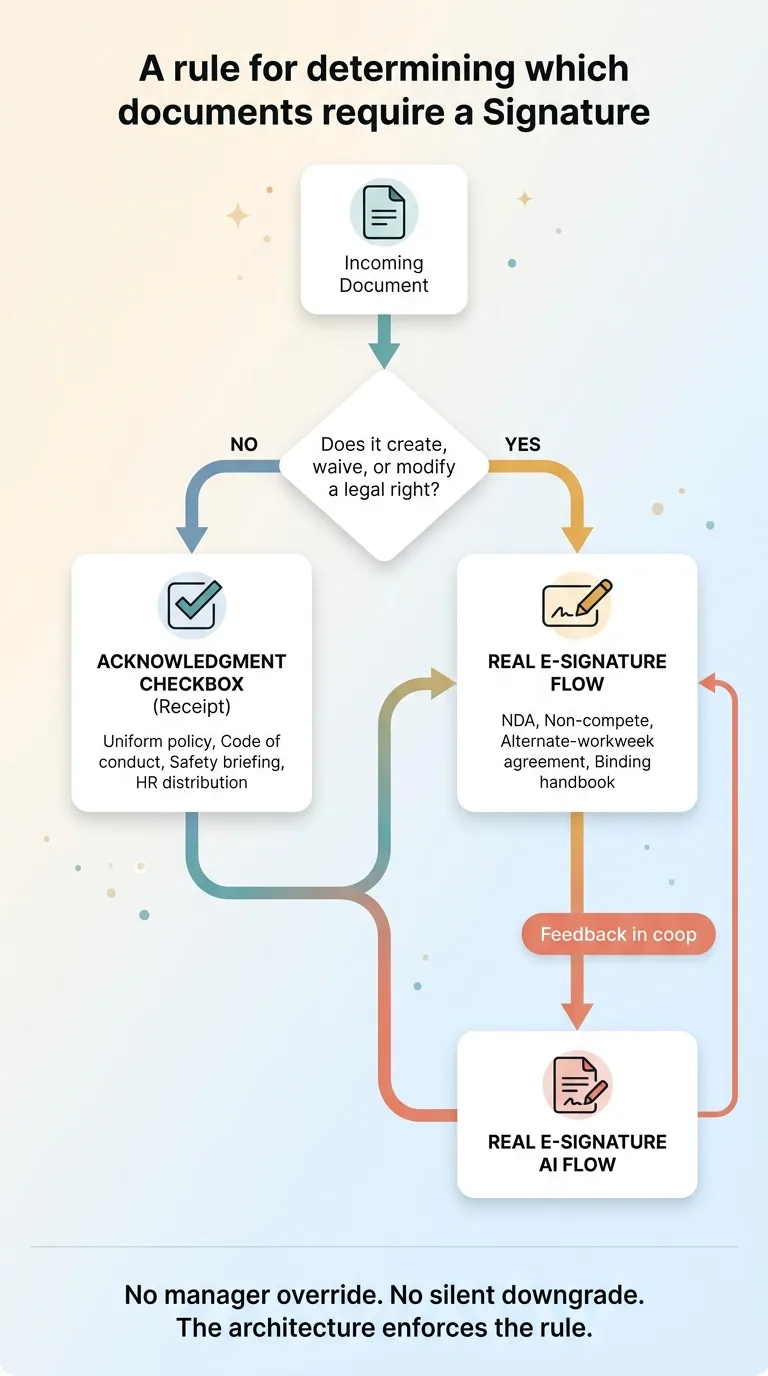 Decision rule: which documents need a signature
NDAs. Non-competes. Alternate-work-week agreements. And the employee handbook acknowledgment in the cases where it functions as a binding agreement rather than a simple distribution.
Each of these is different from a uniform policy for the same reason: they create, waive, or modify a legal right. And when a legal right is on the table, a court or regulator will scrutinize exactly how consent was captured.
The alternate-work-week agreement is the clearest example for a staffing company. Under California-style wage law, an alternate workweek schedule changes how overtime is calculated. That's not a formality. It directly affects what the employer owes and what the worker is entitled to. If that agreement gets challenged, "they checked a box" is not going to hold up. You need a real signature, captured properly, with an audit trail.
Non-competes and NDAs are the same shape. The worker is giving something up. A checkbox that says "acknowledge" does not capture the deliberate, informed consent that a binding waiver requires.
So here's the rule I actually coded into the system: if a document creates, waives, or modifies a legal right, it gets a real signature flow. If it just needs to be received and reviewed, it gets an acknowledgment checkbox. No exceptions, no manager override that quietly downgrades a binding agreement to a receipt.
That rule lives in the architecture, not in a policy doc that someone might ignore.
How I Built the Two Systems Separately
The most important decision in this whole build was making these two completely separate code paths. Not one flexible flow with a flag. Two distinct systems that a developer cannot accidentally cross-wire.
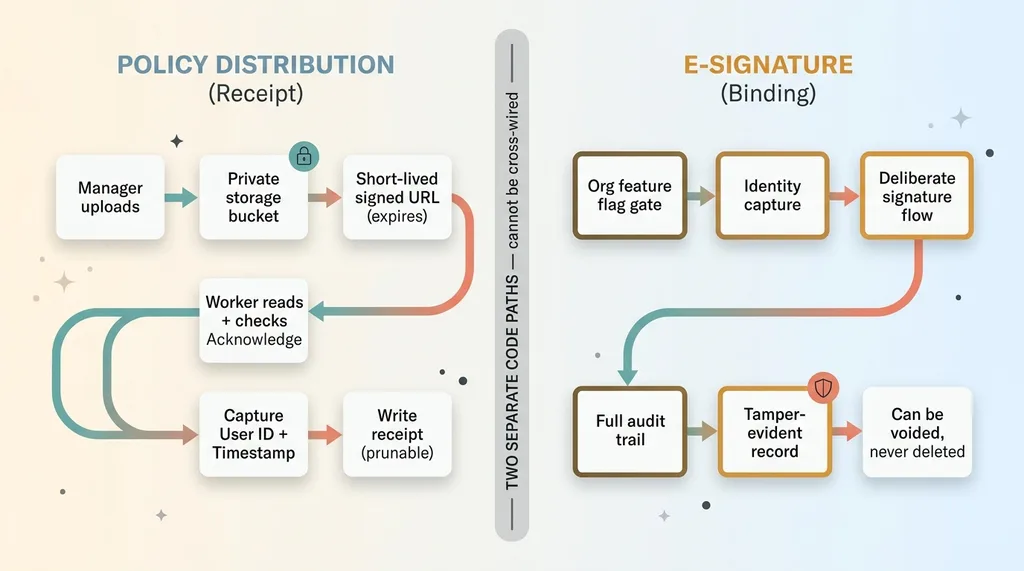 Two separate system architectures
Policy distribution: private bucket, signed URLs, check-acknowledge
The receipt path works like this. Managers upload policy documents to a private storage bucket. Not a public folder, not a shareable link. Private.
Workers access those documents through short-lived signed URLs. The URL expires. You can't forward it, you can't bookmark it for a week, you can't leak it into a group chat and have it work tomorrow. The worker opens the doc, reads it, and then checks the acknowledge box.
At that moment the system captures the user identity and a timestamp and writes the receipt. Clean, fast, and exactly as strong as it needs to be for distribution-style compliance. No more, no less.
E-signature: a separate, deliberate flow
The binding-document path is entirely separate. It's a real e-signature flow with proper identity capture, a full audit trail, and a document record that can be voided but never silently deleted.
I wrote about how I built a real e-signature system without DocuSign, and the architecture there is deliberately heavier than the checkbox path. It has to be. A binding signature needs to survive scrutiny, which means the record of who signed, when, and what they saw has to be tamper-evident.
That's also why a signed document can't be deleted in this system. You can void a signature, and the void itself becomes part of the record, but you cannot make a signed document disappear. A receipt you can prune. A binding signature is a permanent legal artifact.
The reason I kept these as two separate code paths is the same reason I separated the buckets and the URLs. A developer adding a feature six months from now should not be able to route an NDA through the checkbox flow because it was convenient. The separation is the guardrail. The architecture enforces the legal distinction so a human doesn't have to remember it.
Why E-Signature Is a Gated Upsell, Not Self-Serve
The e-signature capability sits behind an org-level feature flag. It is not self-serve. An admin cannot just toggle it on from a settings page.
The feature flag and the reason behind it
I want to be honest about this, because esign feature gating can look like a money grab. Yes, it sits in a higher tier, and yes, that affects revenue. I'm not going to pretend otherwise.
But the gating decision was driven by liability, not pricing. Real signature collection carries legal weight, and I don't want an org flipping it on without understanding what they're asserting on behalf of their workers and themselves.
When a company turns on binding e-signatures, they're saying "we are now collecting legally binding consent through this tool." That's a serious claim. It should involve a conversation, not a toggle someone clicks while exploring the settings menu.
esign feature gating as a guardrail, not just monetization
The gate forces that conversation. Before an org gets the feature, we talk about which documents actually need binding signatures and which are fine as receipts. Most companies are surprised how few documents genuinely need a signature once they think it through.
This is the same philosophy behind why, in my AI systems, every action stops for a human. I don't let software assert more than it can actually prove or back up. A signature is a high-stakes assertion. So the system makes you stop and decide on purpose before it lets you make that assertion at scale.
The gate is a guardrail first. The fact that it also sits in a higher tier is real, but it's not why the gate exists.
The Disclosure Component: Telling Users a Checkbox Is a Checkbox
There's one more piece that I think separates honest software from software that oversells, and it's small. A disclosure component.
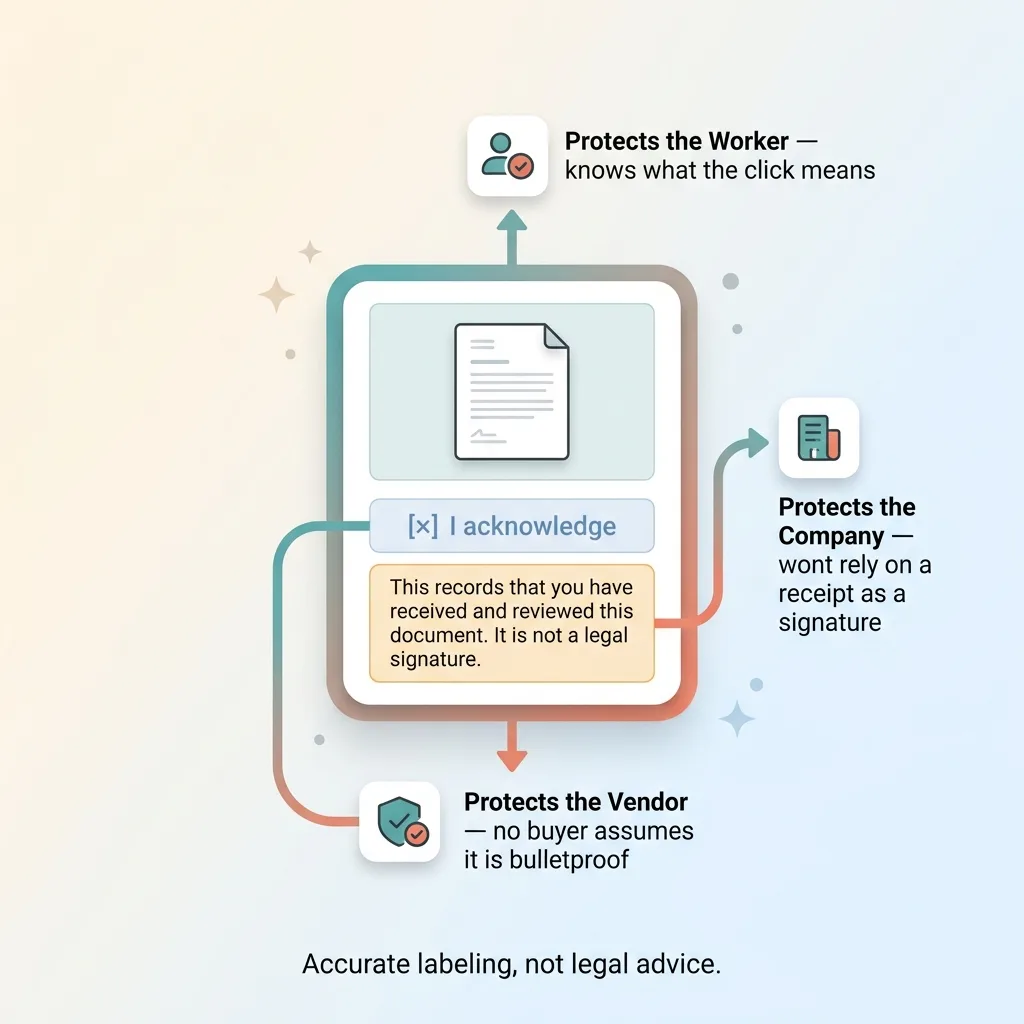 Disclosure component labeling
Anywhere a worker checks an acknowledgment box, a short disclosure appears: this records that you've received and reviewed this document. It is not a legal signature.
That's it. Plain language, shown every single time a checkbox could be mistaken for a signature.
Why bother? Because the whole point of drawing the policy acknowledgment vs esignature line is wasted if the people clicking the box think they're signing something binding. Or worse, if the company thinks the checkbox is airtight when it isn't.
The disclosure protects everyone. It protects the worker, who now knows exactly what their click means. It protects the company, which doesn't end up relying on a receipt as if it were a signature. And it protects the software vendor, the staffing firm running this on their workers, from a customer down the line who assumed the acknowledgment was bulletproof and got burned in a dispute.
This disclosure is not legal advice. I'm careful about that. It's accurate labeling. It tells you what the action you just took actually does, in the same way a receipt at a store tells you what you bought.
Most ops apps skip this because it makes the product feel slightly less powerful. "Just a receipt" sounds weaker than "signed and acknowledged." But pretending a receipt is a signature doesn't make it one. It just sets you up to find out the hard way.
Why This Honesty Protects You More Than a Slick Demo
Here's the uncomfortable truth most buyers don't hear. Software acknowledgments are not automatically legally airtight, and a vendor who tells you they are is selling you risk dressed up as a feature.
I've seen onboarding apps that route everything through one shiny "sign here" interaction because it demos beautifully. One flow, one click, everything "signed." It looks impressive in a sales meeting. It falls apart the moment a real dispute lands on a desk and someone asks how consent was actually captured.
The kind of legal honesty in this build, separating the receipt from the signature, gating the binding flow, labeling every checkbox for what it is, is exactly what protects a company when something goes wrong. It's less impressive in a demo and far more valuable in a courtroom or a wage claim.
I'd rather under-claim and build the right thing than ship a checkbox that pretends to be a signature. That's been my pattern across every system I've built, whether it's an employee onboarding compliance app or my own DTC operations.
So if you're building or buying an ops, onboarding, or HR policy distribution app, ask one question. Does it draw a clear line between a receipt and a signature, or does it blur that line to look good in a demo?
If you're not sure, that's worth a conversation. Talk to me about your build and we'll figure out where your line actually needs to be.
Want to explore what AI could do for your business?
Book a free 30-minute strategy call. No pitch deck, no sales team, just a real conversation about your operations and where AI fits.
Get AI insights for business leaders
Practical AI strategy from someone who built the systems — not just studied them. No spam, no fluff.
Hodgen.AI
Ready to automate your growth?
Book a free 30-minute strategy call with Hodgen.AI.
Book a Strategy Call