The Scan That Found One Key Doing Six Jobs
I ran a security scan across my own projects last month, and it surfaced something I already knew was true but hadn't measured: 10 distinct AI and LLM API keys, with heavy reuse across everything I'd built. One key alone was doing duty in six separate projects. Four more were sitting raw in a local config file, unencrypted, one cat command away from being read. A few had already leaked into tool logs.
None of this happened because I was careless. It happened because I'm efficient, and efficiency is exactly the problem here. When you spin up a new project and you need a Gemini key, you don't go generate a fresh one and lock it down. You grab the key you already have, the one that works, and you paste it in. Done in ten seconds. On to the actual work.
That instinct is the vulnerability. The convenience of reusing a key is the same thing that makes one leak turn into a fleet-wide fire.
Here's the part most people get wrong when they finally clean this up. They count keys. They think the goal is fewer keys, or one key per project, or some target number that feels tidy. The number isn't the control. The restriction is the control.
This article is about API key restrictions: what they actually do, why a shared key can't carry one, and the trust-domain model I used to fix my own sprawl without breaking a single live app. No drama. Just the inventory and the fix.
Why a Shared API Key Can't Actually Be Restricted
Restrictions are platform-level, not per-caller
On a Google AI key, or any major LLM API, you restrict a key in a handful of ways. You lock it to specific API targets, so the key can only call the services that project actually uses. You allowlist HTTP referrers, so a browser-based call only works from your domains. You allowlist IPs, so a server-side call only works from your known addresses. You set quota caps so nobody can run up an unbounded bill.
Every one of those restrictions lives on the key itself. Not on the caller. The platform doesn't know or care which app is making the request. It only checks: does this request satisfy the rules attached to this key.
The union problem
Now share one key across four different kinds of caller. A browser app. A production server. A CLI tool. A local dev box.
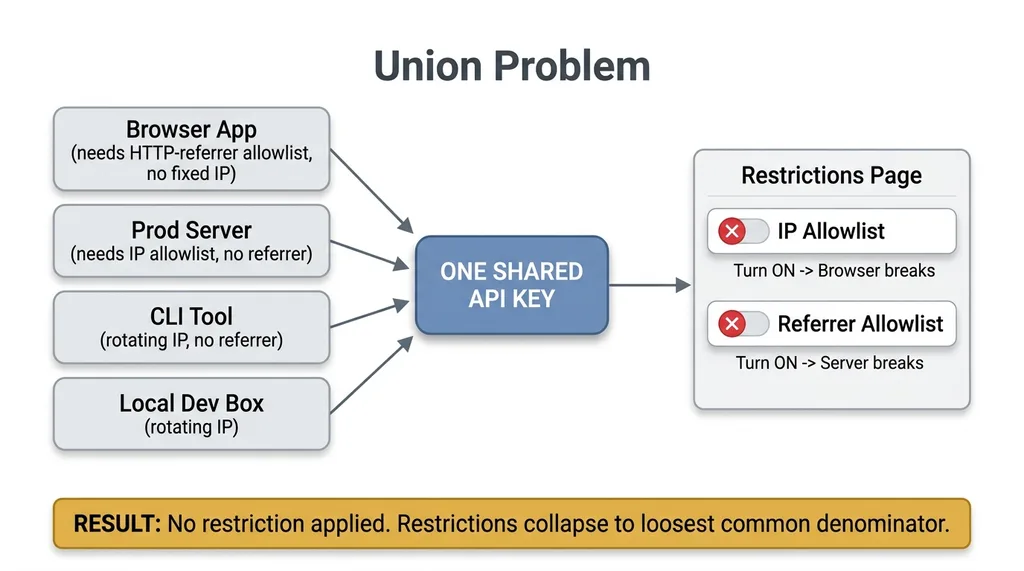 The Union Problem: Why Shared Keys Collapse to No Restriction
The browser needs an HTTP-referrer allowlist, because referrers are how you scope browser calls. The server needs an IP allowlist, because servers have stable IPs and no referrer. The CLI on your laptop has a rotating IP that changes every time you switch networks, so it can't live behind an IP allowlist at all.
These requirements don't stack. They fight. You cannot apply a referrer restriction AND an IP restriction that both must pass, because the server call has no referrer and the browser call has no fixed IP. If you turn on the IP allowlist, the browser breaks. If you turn on the referrer allowlist, the server breaks.
So what actually happens? You give up. You set no referrer restriction and no IP restriction, because that's the only configuration where all four callers work. The restrictions collapse to the loosest common denominator that satisfies everyone.
When you restrict a Gemini API key shared across mixed callers, you end up with effectively no restriction at all. The key technically has a "restrictions" page in the console. The page is empty, because it has to be. That's not a misconfiguration. That's the math.
A shared key is un-restrictable by definition. Not "hard to restrict." Un-restrictable.
The Blast Radius of One Leaked Key
So you've got a key that can't be restricted, sitting in six projects. Now it leaks.
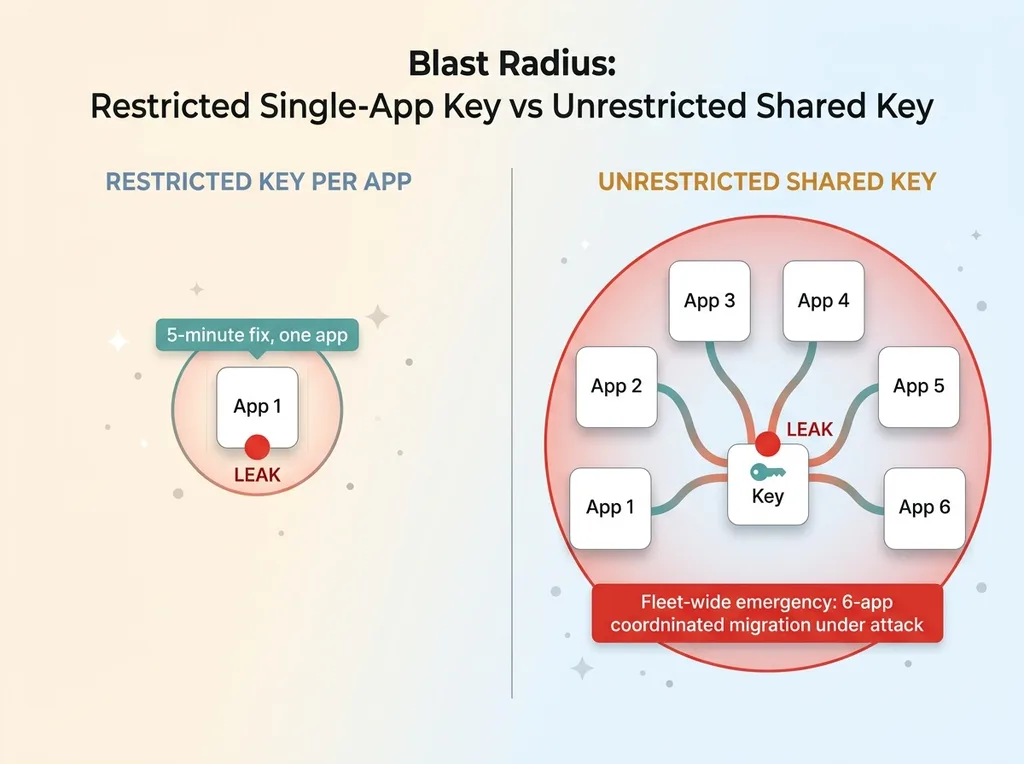 Blast Radius: Restricted Single-App Key vs Unrestricted Shared Key
And it will leak. Not because you're sloppy, but because keys end up in places you didn't plan. A log line that printed a config object. A commit that captured a .env before .gitignore caught it. A screenshot in a support thread. A paste into a chat window when you were debugging with someone. I found mine in tool logs and raw config files when I actually went looking. (I've written before about why most committed-secret alerts are noise, but the live ones matter, and this was a live one.)
Here's where shared API key risk stops being theoretical. The blast radius of one leaked key is the union of everything that key can reach.
Because there's no referrer wall and no IP wall, an attacker who grabs that key can call it from anywhere. They can hit every API the key is authorized for. They can run up your bill against your quota until you notice the alert, if you even set one. There's nothing scoped about the damage. The key works for them exactly as well as it works for you.
Then comes the worse part. The cleanup.
To kill a leaked shared key, you have to rotate it. But that key powers six apps. Rotate it, and all six break at the same instant unless you've already updated every one of them. So now you're not doing a five-minute key swap on one app. You're running a six-app coordinated migration, under time pressure, with an attacker actively using the key you're racing to revoke.
That's the difference. One restricted key per app means a leak is a five-minute fix on one app. One unrestricted key across six apps means a leak is a fleet-wide emergency. The API key blast radius isn't just about money spent. It's about how big the fire is when you have to put it out.
This was the same audit that turned up nine of my live databases were readable by anyone with the URL. When you actually scan, you find patterns, not isolated mistakes.
Why 'One Key Per Project' Is the Wrong Overcorrection
The obvious response, once you feel the pain, is to swing hard the other way. Make a key for every single project. Six projects, six keys. Problem solved.
Except it isn't, and here's why.
You've just traded one un-restrictable key for thirty keys you'll never restrict. Because the same instinct that made you reuse the original key is still running. Nobody generates a key and then spends fifteen minutes locking down its referrers, IPs, API targets, and quota. They generate it, paste it, and move on. So you end up with a pile of thirty loosely-restricted keys instead of one loosely-restricted key.
A pile of thirty unrestricted keys is not safer than a handful of unrestricted ones. It's worse. Now you have thirty things to track, thirty things to rotate, thirty things to audit, and thirty independent chances to leak. You've multiplied your attack surface and called it security.
Count is not control. I'll keep saying it because it's the whole point.
The variable that actually matters is whether each key carries the tightest restriction its surface allows. A key that can only call one API, only from one set of IPs, with a quota cap and a billing alert, is doing real work. A key with an empty restrictions page is doing none, and it doesn't matter whether you have one of those or thirty.
So the answer isn't one mega-key, and it isn't one key per project. It's something in between, and it's organized around restriction, not around count.
The Fix: One Restricted Key Per Trust Domain
The five trust domains
A trust domain is a group of callers that share the same security surface. Same kind of restriction profile. Same blast radius if compromised. When callers share a security surface, they can share a key, and that shared key can actually be restricted, because there's no union problem to solve.
Here's the topology I landed on across my own projects:
- Local-dev, keys used from my development machines, rotating IPs, no production access
- Prod-server, server-side keys with stable IPs running live workloads
- Public/browser, keys that ship to a browser and are called from my domains
- Client-work, keys scoped to client projects, kept separate from my own
- Experiments, throwaway keys for prototypes, tightly quota-capped so a runaway loop can't cost me much
Five domains. Each gets ONE key. That's the structure. Not one per app, not one for everything, one per environment where the security surface is genuinely the same.
Matching the restriction to the surface
Because every caller inside a trust domain has the same needs, the restriction can finally be tight instead of collapsing to the loosest common denominator.
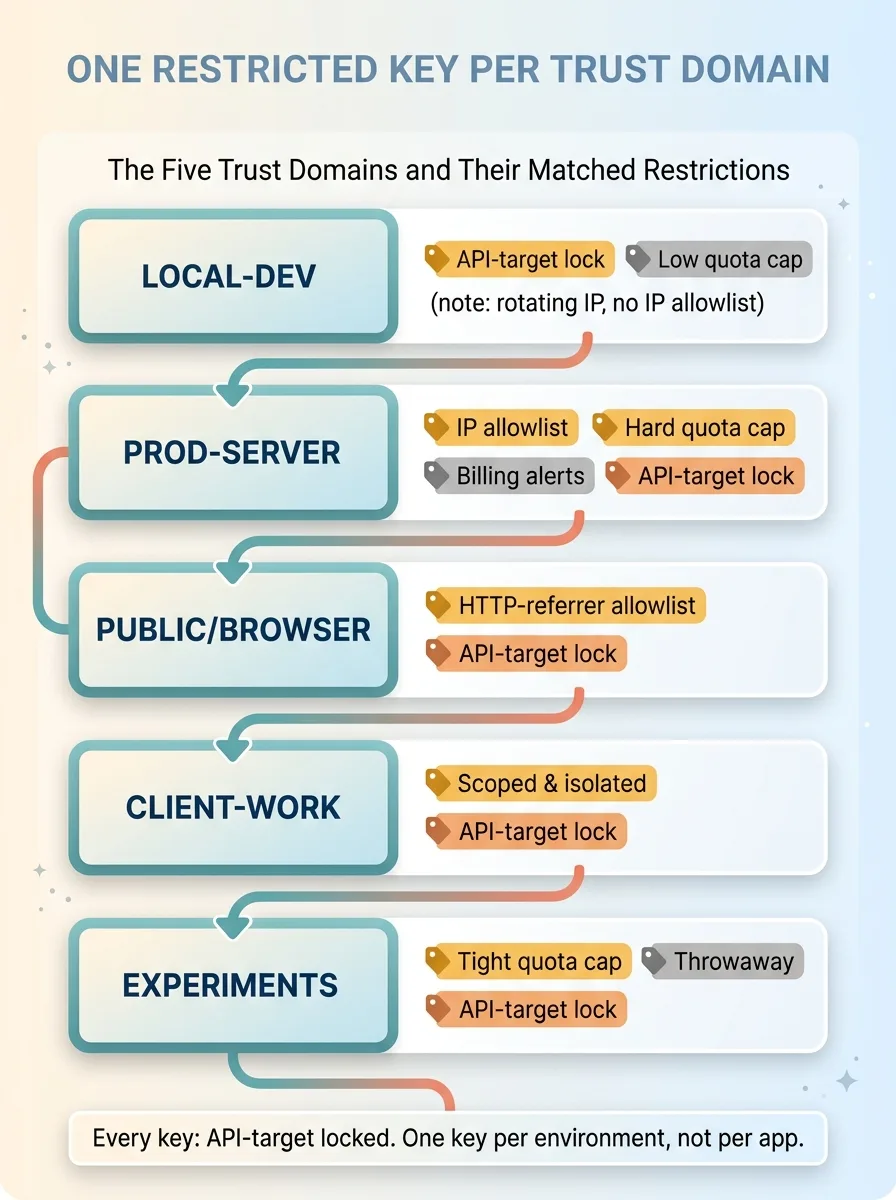 The Five Trust Domains and Their Matched Restrictions
The public/browser key gets an HTTP-referrer allowlist locked to my actual domains. A request from anywhere else fails. If that key leaks, an attacker can't use it from their own machine because they're not on my domain.
The prod-server key gets an IP allowlist scoped to my server addresses, plus a hard quota cap, plus billing alerts that fire the moment usage spikes. No referrers, because servers don't have them. The restriction matches the surface exactly.
The local-dev key can't use an IP allowlist because my laptop's IP rotates, so it leans on tight API-target locks and a low quota cap instead. Less protection than the server key, but appropriate for a key that never touches production.
Every key, regardless of domain, gets API-target locks. A key can only call the specific APIs that domain actually uses. If a domain only needs Gemini, the key can't reach anything else, so a leak doesn't open doors to services that domain never touched.
This is the model that's neither a single mega-key nor key-per-project. It's trust domain keys, one per environment, each carrying the tightest restriction its surface allows. The union problem disappears because you're never asking one key to satisfy contradictory requirements. And the count stays small enough that you'll actually maintain it.
The Migration Rule That Stops You Breaking Production
There's one operational rule here that matters more than any of the architecture, and it's about ordering.
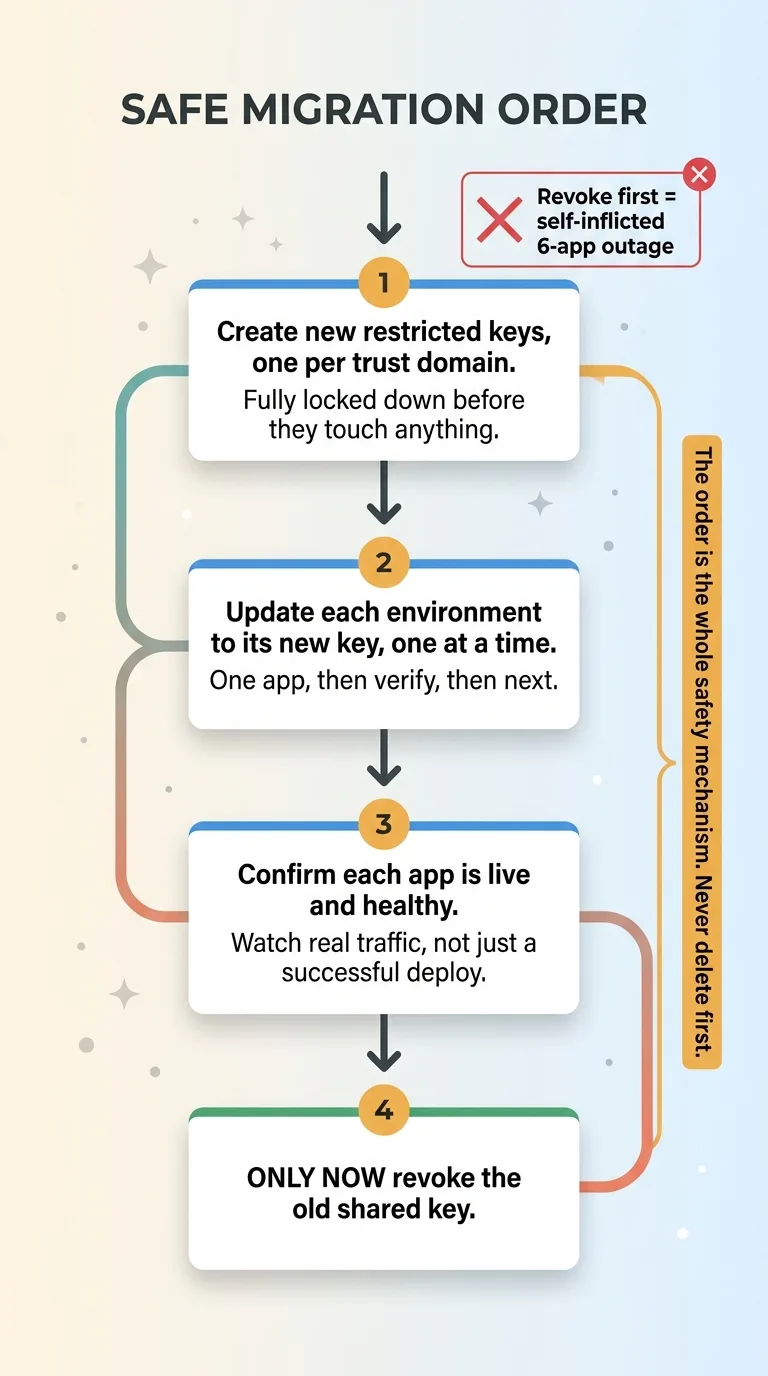 Safe Migration Sequence: Repoint Before You Revoke
Repoint every live consumer to its new trust-domain key BEFORE you delete any old shared key. Never delete first.
This sounds obvious until you're in the middle of it, feeling productive, watching the new keys come online, and you reach for the revoke button on the old shared key while three apps are still pointed at it. Revoke first and you've created the exact six-app outage you were migrating to prevent. The migration becomes the incident.
Here's the safe sequence:
- Create the new restricted keys, one per trust domain, fully locked down before they touch anything.
- Update each environment to the new key, one at a time. One app, then verify, then the next.
- Confirm each app is live and healthy on its new key. Watch real traffic, not just a successful deploy.
- Only when every consumer of the old shared key has been repointed and verified do you revoke the old key.
The order is the whole safety mechanism. You're never in a state where a live app is pointed at a key that no longer exists.
One more thing that makes this auditable instead of chaotic: store the keys in a single secrets source of truth, not scattered across config files on six machines. When I went through moving every project's secrets to one source of truth, the trust-domain topology became something I could actually see and verify, instead of a guess about which key was where. You can't migrate safely what you can't inventory.
What This Looks Like When Someone Else Owns It
Let me restate the takeaway, because it's the thing worth keeping. The control is the restriction, not the count. A shared key is un-restrictable by definition, so the fix isn't fewer keys or more keys. It's keys organized by trust domain, each locked to the tightest restriction its surface allows, migrated in the order that keeps production up.
Most teams don't have key sprawl because they're careless. They have it because pasting an existing key is the path of least resistance, and nobody owns the topology. There's no person whose job is to know which key reaches what, and what happens when one leaks. So it grows quietly until a scan, or a breach, makes it loud.
This is the kind of thing that surfaces in a real audit, not a slide deck. I didn't find my own sprawl by theorizing about it. I found it by actually scanning my projects and counting what came back. Ten keys, one doing six jobs, four sitting raw in a config file.
Get the next build note.
I write up each system I build, including what broke. Subscribe to my newsletter and I'll send you the next one.