The Stale Cache Data Bug That Hides Dead Queries
A persisted cache served operators days-old data because the queries never fired. Here is how a stale cache data bug hides and how to catch it.
By Mike Hodgen
The morning the screens went blank
I run an internal operations app for my DTC fashion brand in San Diego. It lives on shared tablets out on the floor. Operators use it for inventory counts and queue decisions, dozens of times a day, every day. It is not glamorous software. It just has to be right.
One morning, after a routine deploy, the screens went blank. Where there had always been inventory numbers and a populated queue, there were now empty states and loading spinners that never resolved.
The operators assumed the deploy broke the app. That was the natural conclusion. Yesterday it worked, today it doesn't, something in the deploy must have done it.
The truth was worse. The app had been broken for days. The deploy didn't break anything. It removed the thing that had been hiding the break.
That is the whole story in one sentence, and it is the reason I am writing this. The worst bug is not software that crashes. A crash is honest. A crash tells you something is wrong. The worst bug is software that looks like it works while it quietly does nothing.
This was a stale cache data bug, and it had been feeding my operators numbers that hadn't updated in days. No error fired. No alert went off. Nothing in my monitoring flagged it, because from every measurable angle, the app looked healthy. The screens were populated. The team trusted them.
What follows is the forensic walk. How a class of failure I now look for first in any stack I touch managed to run for days inside my own. How a persisted cache turned a loud failure into a silent one. And how, embarrassingly, I found it by accident.
What actually broke: queries that registered but never fired
Let me explain the mechanics in plain terms, because you do not need to be an engineer to understand why this is dangerous.
Zero observers, full screens
The app uses a common client-side caching library to fetch and manage data. Every part of the screen that needs data has a small piece of code, a hook, that says "I want this inventory count" or "I want this queue position."
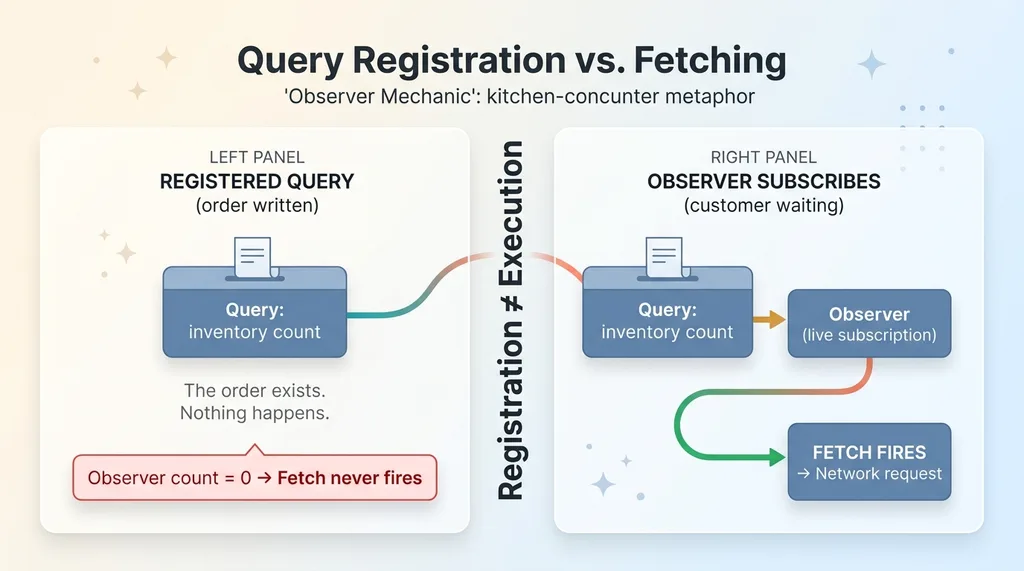 Query registration vs fetching (the observer mechanic)
Here is the part that matters. Registering a query and actually fetching the data are two separate things. Registering is telling the system you want the data. Fetching only happens when something called an observer subscribes to that query.
An observer is the thing that makes a registered query actually go get data. Think of it as a customer at a counter. The query is an order written on a slip. Without a customer standing there waiting, the kitchen never starts cooking. The order exists. Nothing happens.
In my app, every query registered correctly. But the observer count was zero. Nothing was actively subscribed. So the fetches never fired.
Why nothing threw an error
This is the cruel part. When a query never fetches, there is no network request to fail. No timeout. No 500 error. No exception bubbling up to a crash screen.
The system did exactly what it was told. It registered queries and waited for an observer that never showed up. From the code's perspective, nothing was wrong, because nothing illegal happened.
This is a textbook react query observers bug, and it belongs to a whole family of data fetching pitfalls that hide in plain sight. The reason no one noticed for days was simple and devastating. The UI always had something to show. And if the screen has numbers on it, who questions the screen?
How a persisted cache turned a hard failure into an invisible one
This is the core lesson, so I want to slow down here.
The IndexedDB persister kept serving the last good fetch
The caching library was configured to persist its results to the browser, in IndexedDB. That is local storage that survives page reloads and app restarts.
On every load, before any fetch was even attempted, the library rehydrated those stored results and painted them onto the screen. Instantly. The inventory counts, the queue, all of it, drawn from the last successful snapshot saved on the device.
Normally this is a feature, and a good one. It makes the app feel fast. It works offline. The operator opens the tablet and sees data immediately instead of staring at a spinner while a network round trip completes.
But here is the trap. The persister painted the last good snapshot, and the fetches that were supposed to refresh that snapshot never fired. So the screen showed real numbers. Just old ones.
Days-old inventory looked current
Because nothing was refreshing the cache, my operators were looking at the last successful fetch, which could have been days old. There was no visual difference between fresh data and a frozen snapshot. The numbers looked exactly the same as they always had.
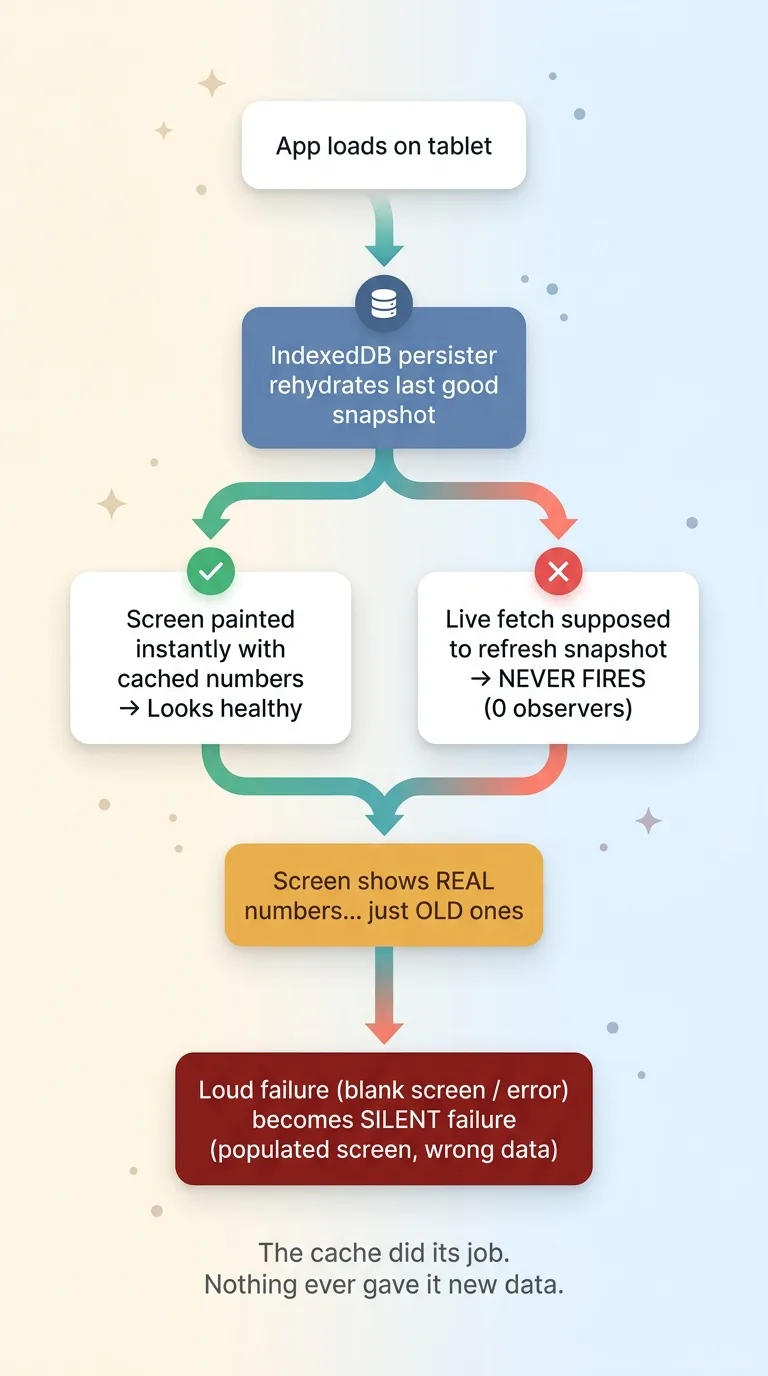 How a persisted cache converts a loud failure into a silent one
A persisted cache is supposed to be a performance win and an offline convenience. Here it became a liability. It converted a loud, obvious failure, a blank screen or an error, into a silent one, a populated screen with wrong numbers.
That is client cache masking failure in its purest form. The cache did its job perfectly. It served the last thing it had. The problem was that nothing ever gave it anything new to serve, and there was no cache invalidation logic forcing a refresh.
I have written before about a dashboard that showed zeros for two weeks while everyone assumed it was working. Same disease, different symptom. The screen looked fine, so nobody looked closer.
The real-world cost: decisions made on dead data
Let me make the stakes concrete, because this is the part that should worry you if you run anything operational.
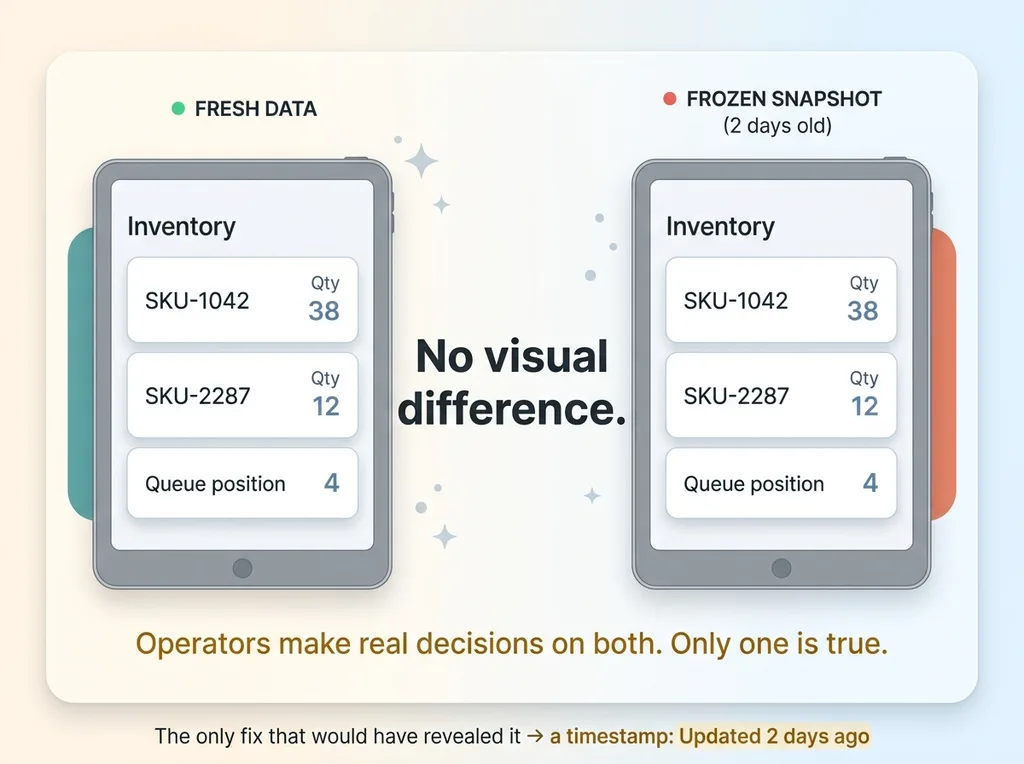 Fresh data vs frozen snapshot looks identical
My operators were standing on the floor, tablet in hand, pulling inventory counts that hadn't updated and queue positions that had long since moved on. And they were making real decisions on those numbers.
That means picking from stock that may already be gone. Prioritizing a queue order that had changed. Telling someone something that was true two days ago and false today. Every one of those decisions felt completely normal, because the screen looked completely normal.
No alarm ever fired. That is the scary part for anyone running a business. Your team can be confidently, repeatedly wrong while every instrument tells them they are right. There is no moment of doubt, no spinner, no red banner. The interface projects total health while feeding bad inputs into real choices.
I will be honest about how this ends, because the honesty is the point. I did not catch this through monitoring. I had no alert watching for it. My dashboards were green.
I caught it entirely by accident. A cache schema version bump, made for an unrelated reason, wiped the persisted store. That removed the snapshot that had been papering over the gap. And only then did the screens go empty and expose that nothing had been fetching the whole time.
If I had not bumped that version, the stale data could have run for weeks more. I want to be clear that I build these systems for a living, and this one fooled me inside my own brand. That is exactly why I take this failure mode so seriously now.
How I found it (and why a schema bump was the accidental fix)
Here is the diagnosis, walked through step by step.
The cache version change that wiped the persister
The caching library keys its persisted data by a schema version number. This is a safety mechanism. When you change the shape of your data, you bump the version, and the library throws out the old persisted store because it no longer matches.
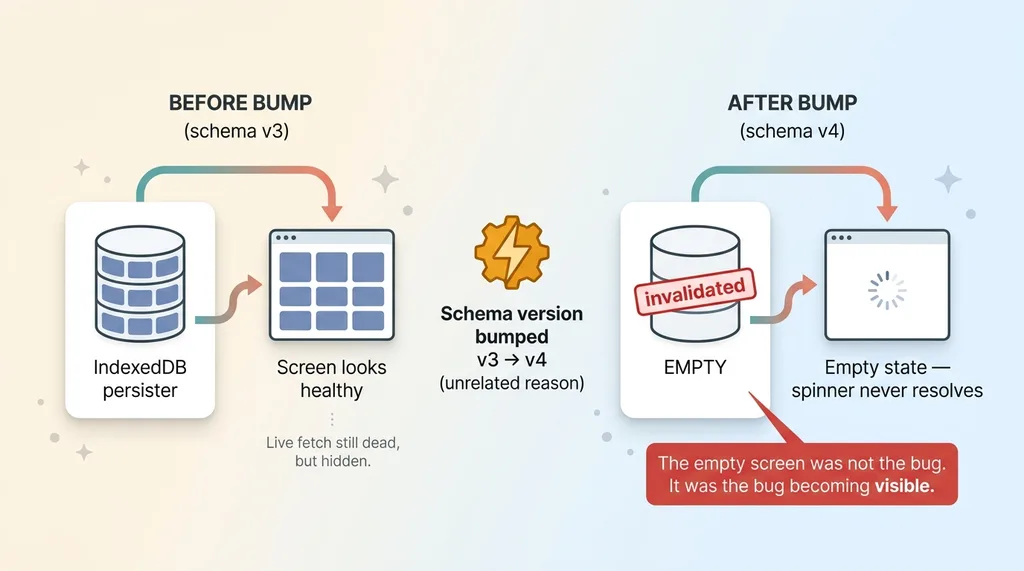 The accidental discovery via cache schema version bump
I bumped that version during the routine deploy. On the next load, there was nothing to rehydrate, because the old store was invalidated and the new one was empty.
With no cached snapshot to paint, the screens had only one possible source of data. The live fetch. And the live fetch was not running. So the screens stayed empty, and the spinners spun forever.
That empty screen was not the bug. It was the bug finally becoming visible.
Tracing it back to zero active observers
Once I could see the failure, finding the cause took minutes instead of days. I checked the observer count on the queries. Zero. Across the board.
The hooks were mounting in a way that registered each query but never attached a live subscription. The orders were on the counter. No customer was ever standing there.
The fix, in terms you care about, is this. Every data path in the app now has a guaranteed live consumer, and I verify that the fetch actually happens rather than trusting that registration implies execution. Those are two different guarantees, and conflating them is what cost me days of dead data.
The deeper takeaway is one I now repeat to every client. Registration is not execution. A query existing in your system does not mean it ran. You have to confirm the work happened, not assume it.
How to make sure your queries actually run
Here is the practical checklist I run now, on my own systems and on every stack I take over.
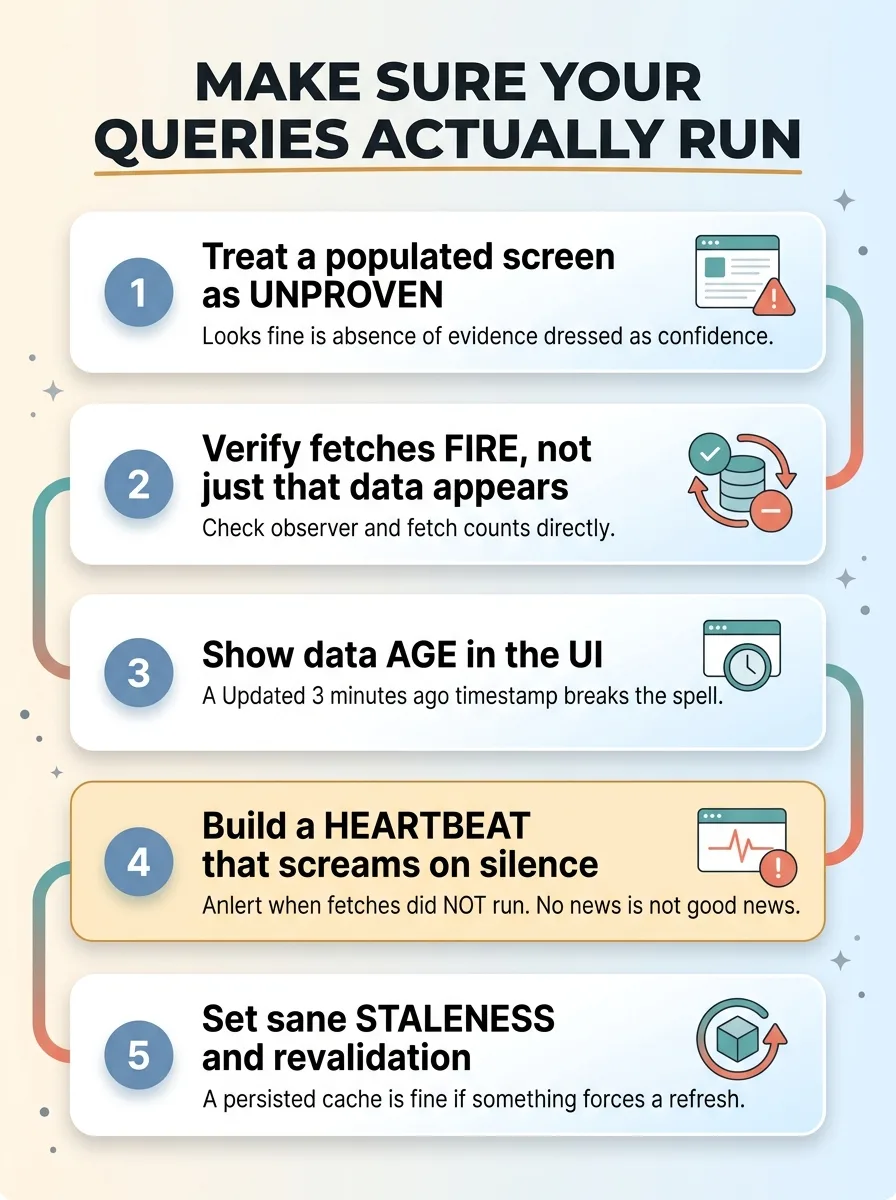 Checklist to make sure your queries actually run
Treat a populated screen as unproven, not proof
A screen with data on it proves nothing about whether your system is live. A persisted cache can fake a healthy interface indefinitely. Stop treating "it looks fine" as evidence. It is the absence of evidence dressed up as confidence.
Verify fetches fire, not just that data appears
Watch the actual fetch activity, not the rendered output. In development, check observer and fetch counts directly. In production, look at network traffic or, better, surface a freshness signal in the app itself. The question is never "is there data on screen." It is "did we go get fresh data, and when."
Show data age in the UI
Put a timestamp on the screen. "Updated 3 minutes ago." This single change would have caught my bug on day one. The moment an operator saw "updated 2 days ago," the spell breaks. Stale data becomes visible to the people relying on it instead of hidden behind numbers that look current.
Build a heartbeat that screams when nothing happens
This is the big one. Most monitoring only alerts when something goes wrong. But this failure was the absence of activity, and absence rarely triggers an alarm.
Build positive monitoring. A heartbeat that confirms fetches ran in the last interval and alerts you when they did not. I am a believer in automations that email me when nothing is wrong, because silence is the most dangerous signal in any system. No news is not good news. No news might mean nothing is running.
Set sane staleness and revalidation
Configure your cache to serve fast and refresh. A persisted cache is fine, even great, as long as something forces revalidation on a schedule. The failure was never the cache. It was a cache with no cache invalidation ever telling it to update.
Why this is the bug I look for first in someone else's stack
This is exactly the failure mode a vendor who only demos software will never show you. In a demo, every screen is populated and every number looks current. Of course it does. The demo runs for ten minutes on cached data. It will never reveal that the fetches stopped firing four days ago.
The systems that scare me are the ones nobody questions, because the screen is green and the numbers are there. Those are the ones I distrust on sight. I have learned the hard way that an interface can be a confident liar, and I have written more on systems that lie about doing the right thing.
When I take over a brand or an internal app, one of the first things I do is verify that the data on every screen is actually fresh and the fetches actually fire. Not that it looks right. That it is right, right now, sourced from a live fetch and not a frozen snapshot.
Because a silent stale-data failure can run for days and quietly cost real money before anyone notices. It cost me decisions on my own floor, inside a system I built, and I only found it by luck.
If you have operators trusting screens you have never audited, that is the kind of risk worth having someone actually check. Not demo. Check. There is a difference, and it is usually measured in days of bad decisions. If that describes your operation, have someone audit the systems you actually trust.
Ready to bring AI leadership into your company?
I work with a small number of companies at a time. If you're serious about AI, apply to work together and I'll review your application personally.
Get AI insights for business leaders
Practical AI strategy from someone who built the systems — not just studied them. No spam, no fluff.
Hodgen.AI
Ready to automate your growth?
Book a free 30-minute strategy call with Hodgen.AI.
Book a Strategy Call