The Problem: A Signed-Off Homepage That Won't Stay Put
I shipped a brand site last year where the marketing homepage was a work of art. Image-led, pixel-perfect, approved line by line by the founder, the creative director, and two other people who all had opinions about hero spacing. It was done. Signed off. Nobody wanted to look at it again.
Then I'd touch a shared component somewhere else in the app, and the homepage would drift.
Spacing shifted by a few pixels. An image got re-optimized by the build pipeline and lost a little crispness. A font weight changed because I'd standardized typography across the rest of the site. None of it was dramatic. All of it was wrong, because this was the one page where "close enough" wasn't acceptable. It had been approved at the pixel level.
This is the core tension of a static homepage dynamic app setup. The homepage needed to be frozen. The rest of the site genuinely needed to be alive.
Because the rest of the site was a real application. Blog posts pulled from a database. Dynamic routes. Real interactivity that had to update without a developer in the loop. That part of the site was supposed to change constantly. Componentizing it was exactly right.
The homepage was the opposite. It was supposed to never change. And every time I forced it into the same component model as the living app, I lost.
Shared components want to be reused and refactored. A signed-off marketing page wants to sit there, untouched, exactly as approved. Those two goals fight each other every single deploy.
I kept losing that fight until I stopped trying to win it inside the component model. The answer wasn't a better component. It was getting the homepage out of the component system entirely while keeping everything else a real app.
Why You Don't Fight a Perfect Page Into Your Component Model
Some pages should not be componentized. I'll say that plainly because it goes against how most developers think.
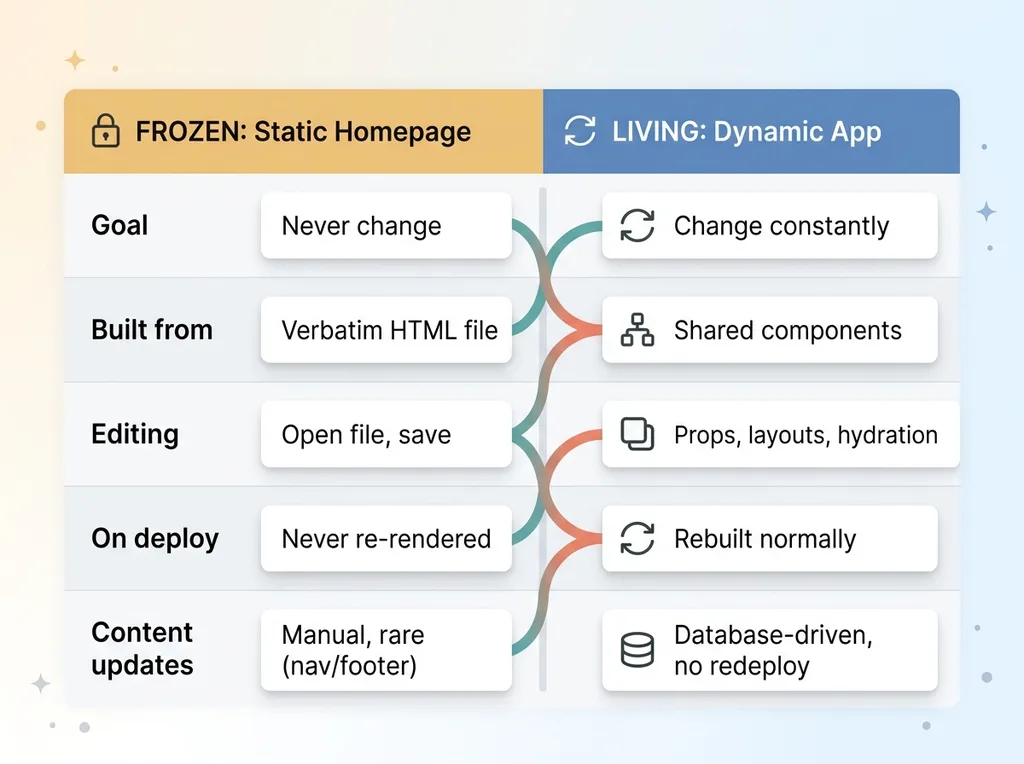 Frozen static homepage vs living dynamic app
Image-led pages are fragile
An image-led marketing page that's been approved becomes a liability the moment you turn it into JSX. Hero images especially. They break in subtle ways that you don't catch until someone with a trained eye notices the LCP image loaded a half-second late or got re-optimized into a slightly different crop.
I wrote a whole piece on how hero images break in subtle ways because I kept hitting it. Preload settings, section configs, image optimization. Each one is a place where a "harmless" refactor introduces a visible regression on the page that matters most.
When a page is built from components, every refactor touches it indirectly. Change a spacing token, the hero moves. Standardize a button, the CTA shifts. The page is hostage to every decision you make elsewhere.
Approval has a cost you don't want to repay
Here's the part people underestimate. Every time the homepage drifts, somebody has to sign off on it again.
That approval cost is real money and real time. On the brand site, getting the hero approved the first time took three rounds of feedback across four people. I did not want to repay that cost every time I refactored a button component two pages away.
A frozen marketing page that's been conversion-tested and executive-approved is finished work. Re-introducing it into the component model means re-introducing the approval cycle every time anything drifts.
Contrast that with the rest of the site. Those pages are supposed to change. Componentization is exactly right for them because consistency and reuse are the whole point. The principle I settled on is simple: freeze what's done and approved, keep building everything that isn't.
The Solution: A beforeFiles Rewrite That Overrides One Route
The mechanism is cleaner than it sounds. In framework-neutral terms: you intercept one specific URL before your normal router gets to it, and you serve a plain static HTML file instead of whatever component would have rendered.
That's it. One route gets special treatment. Everything else falls through to the normal app.
What a beforeFiles rewrite actually does
In Next.js, this is a nextjs beforeFiles rewrite. The beforeFiles rewrite runs ahead of the file-based router. That ordering is the whole trick. Because it executes before the page router resolves, it can override the would-be homepage component for that one route.
 Request routing with beforeFiles rewrite
Conceptually the config looks like this:
async rewrites() {
  return {
    beforeFiles: [
      { source: '/', destination: '/static/home.html' },
      { source: '/index.html', destination: '/static/home.html' },
    ],
  }
}
When a request comes in for /, the rewrite catches it first and points it at the static file. Your homepage page component never runs. You serve static html in nextjs for that one route while the rest of the framework behaves normally.
Mapping only the root path
The clean part is the scope. You match / and maybe a trailing-slash or index.html variant, and nothing else. Every other route, the blog, dynamic pages, app sections, falls through to normal app-router pages with zero changes.
One route is special. The rest is untouched. There's no clever conditional logic scattered across your codebase, no flag you have to remember. The homepage is simply not a component anymore, and the rewrite makes that invisible to the visitor.
Here's the honest tradeoff. You're now maintaining a homepage as a file instead of a component. You give up shared layouts and framework conveniences on that one page. That's a real cost, and I accept it deliberately because for a frozen marketing page, stability beats convenience every time.
How the Static Homepage Is Actually Built and Edited
The practical mechanics matter, because this is what keeps the page pixel-stable.
Absolute asset paths
The homepage lives as verbatim HTML. Real markup, not generated from anything. The one detail that makes it portable is absolute asset paths. Images, CSS, fonts all reference absolute URLs so they resolve correctly no matter how the file gets served, whether it's behind the rewrite or opened directly.
<img src="/static/hero.webp" alt="..." />
<link rel="stylesheet" href="/static/home.css" />
That sounds trivial. It's the difference between a file that works everywhere and one that breaks the moment the serving path changes.
Editing it as a plain file
You edit this page like a web page from 2010. Open the HTML, change the markup, save it. No component graph to reason about. No props, no hydration, no shared layout fighting you.
This is exactly what keeps it stable. Nothing in your component refactors can reach it. Standardize all the typography you want across the app. The homepage doesn't move, because it isn't part of that system.
It's also how you keep it fast. No hydration, no JS framework overhead on your most-visited page. The hero just renders. On a brand site, the homepage takes the most traffic and converts the most visitors, so shaving framework cost off it is a free win.
The honest note: you lose shared components on this one page. If the global nav changes across the site, you update it in two places, once in the component system and once in this file. That's the price. For a marketing page that's been signed off and isn't supposed to change, it's almost always worth it. The nav rarely changes. The hero never should.
Everything Else Stays a Real App on a Shared Design System
The other half of the hybrid static dynamic site is where all the life is. Every route that isn't the root is a genuine app-router page, built normally, with all the framework features intact.
Extracting the shared design system
To keep those dynamic pages consistent without dragging the homepage back into the component model, I extracted a shared design system. Tokens, components, layouts. All the non-root pages pull from it, so they stay visually coherent with each other and with the brand.
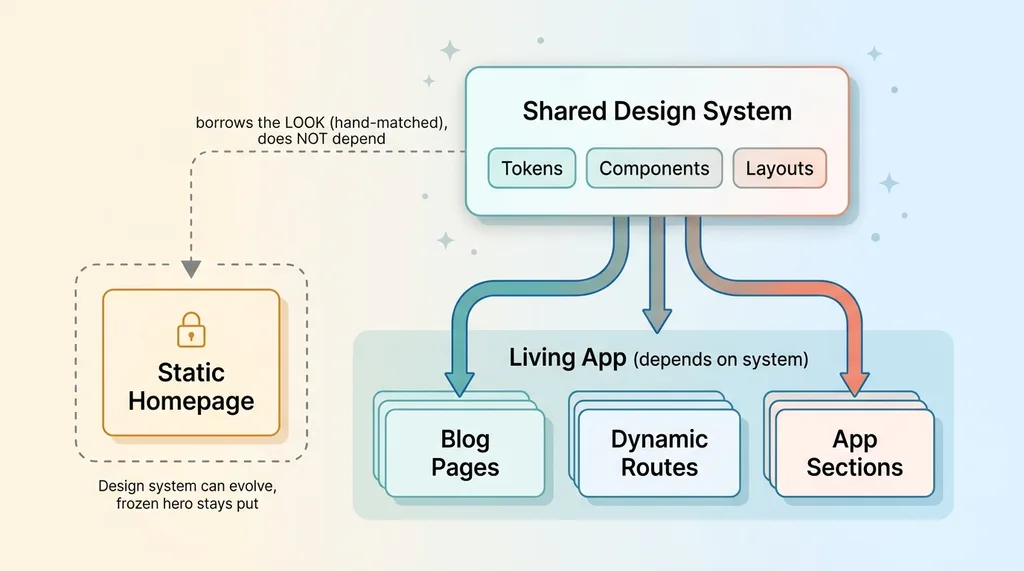 Hybrid architecture: shared design system feeding the app while homepage stays independent
The homepage borrows the look of that system because I hand-matched the static HTML to it. But it doesn't depend on it. That separation is the whole point. The design system can evolve, components can get refactored, and the frozen hero stays exactly where it was approved.
This is the same approach I used when I built my own consultancy site in a day. A clean shared system lets you move fast on the parts that should change without endangering the parts that shouldn't.
Blog posts served from the database, no redeploy
Here's the payoff for the living half. Dynamic content appears with no redeploy. On the brand site, blog posts are served from a database. The moment one is published, it's live. No build, no deploy, no developer.
That's how a content pipeline should work. I manage 313 articles on my own DTC brand site with AI-assisted SEO, and if every new post required a deploy I'd never ship anything. Database-driven content means the site updates itself.
It also means the owner can update content safely without breaking anything. The whole architecture is designed so the team can change content without breaking SEO, while the one page that's locked stays locked. You get both: a frozen hero and a site that updates itself every day.
Deploy Is One Command, and Nothing Drifts
Operationally, this is simpler than the architecture suggests.
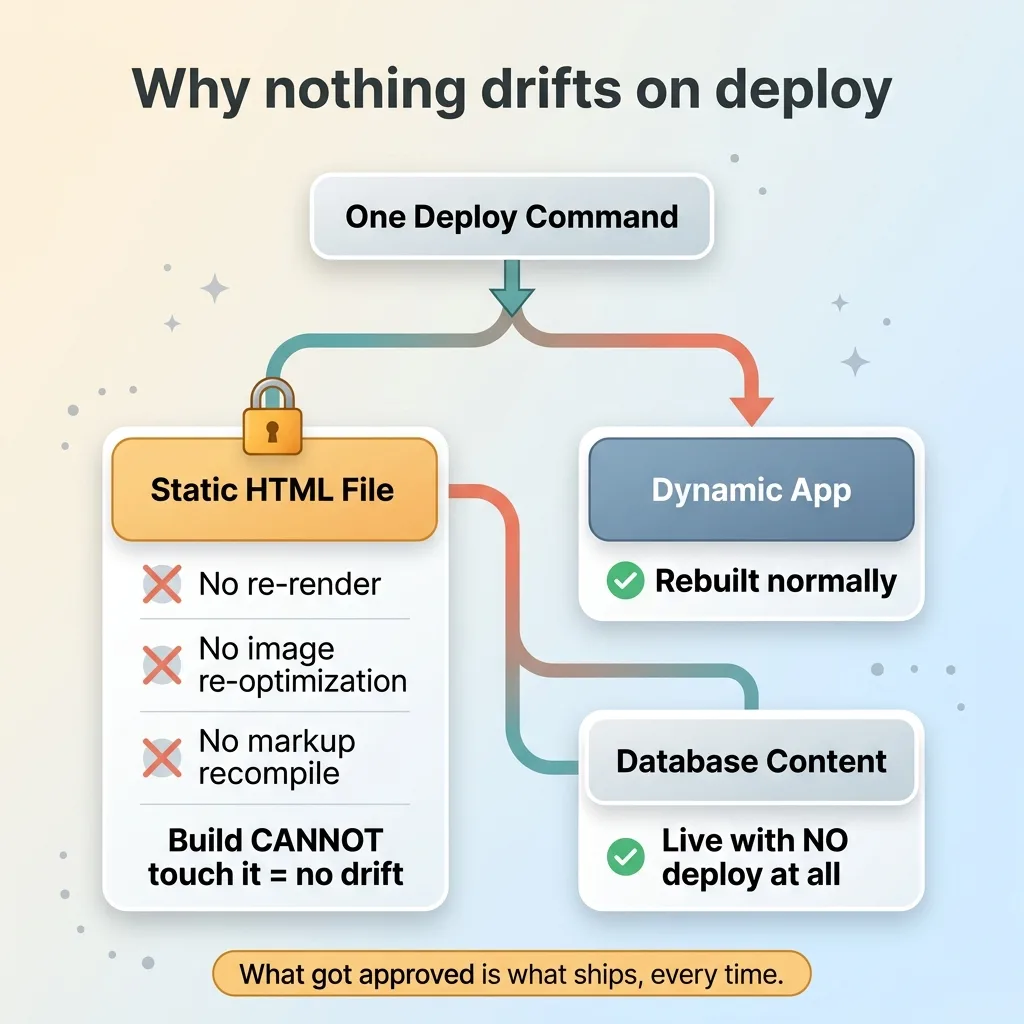 Why nothing drifts on deploy
One deploy command ships both the static file and the dynamic app together. There's no separate pipeline for the homepage. It rides along with everything else as just another file.
The thing that makes drift impossible: because the homepage is a static file behind a rewrite, deploys never re-render it. Nothing re-optimizes the hero image. Nothing recompiles the markup. The build process literally has no opportunity to touch it, so it can't drift. What got approved is what ships, every single time.
Dynamic content doesn't need a deploy at all. It's database-driven, so new blog posts and updated content go live independent of any build.
The honest tradeoffs, in plain terms:
- You maintain global elements (nav, footer) in two places, the component system and the static file.
- The homepage doesn't automatically pick up new framework features, since it's not a component.
- You need discipline about which route is frozen, so nobody accidentally tries to "fix" the static file by componentizing it.
That's the cost. In exchange you get a marketing page that stays exactly as approved, forever, and a site that's a real updatable app everywhere else. That's the best-of-both outcome the title promised, and it holds up in production.
When This Pattern Is Worth It (And When It Isn't)
This isn't a default. It's a deliberate call, and it's wrong for plenty of sites.
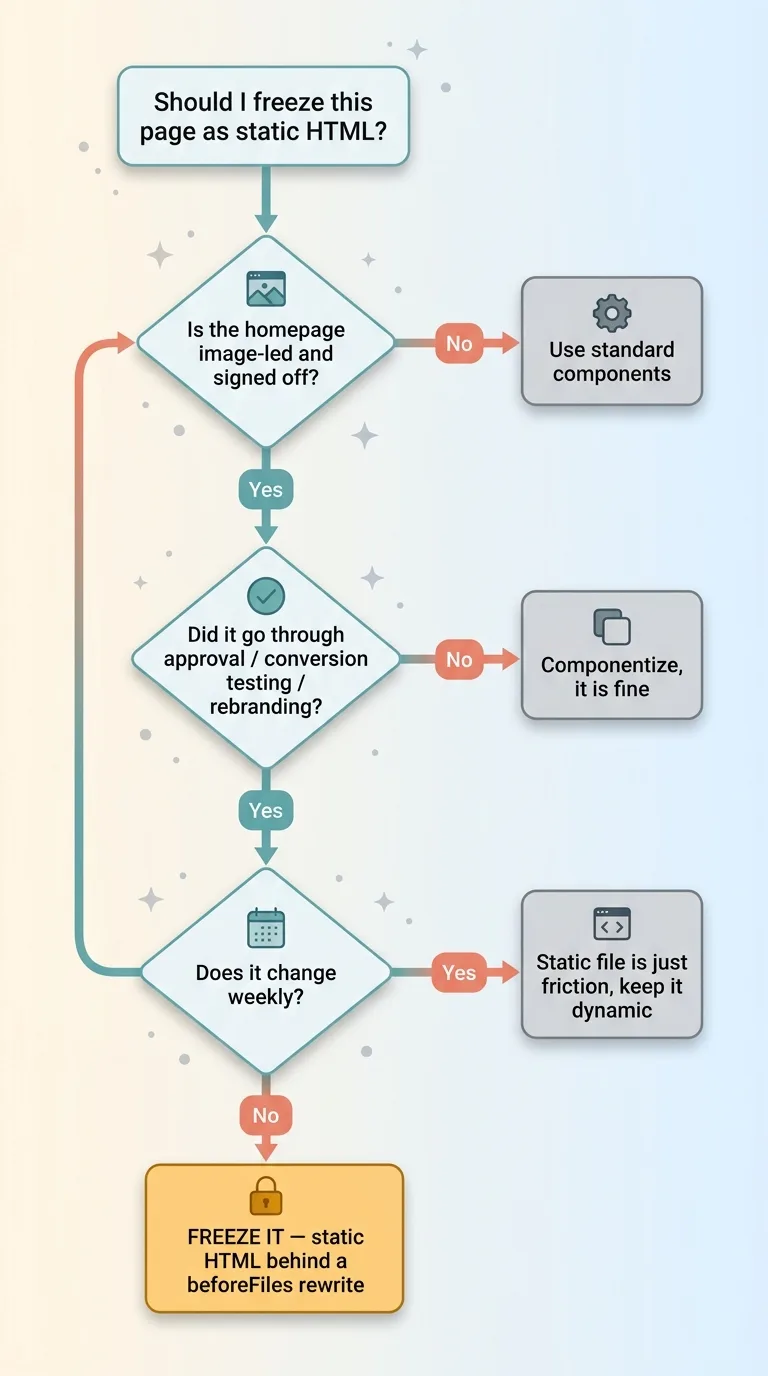 Decision guide: when to freeze a page vs keep it componentized
It's worth it when your homepage is image-led, signed off, and the cost of drift is real. If your hero went through executive approval, a rebranding cycle, or conversion testing, then any drift means repeating that work. Freezing it as a static file pays for itself the first time a refactor would have broken it.
It's not worth it when your homepage changes weekly. If you're constantly updating the hero, maintaining it as a static file is just friction. And if your homepage is already simple enough to componentize safely, with no fragile hero image and no approval gauntlet, then the standard component approach is fine. Don't add this complexity for a page that doesn't need protecting.
The skill here isn't the rewrite config. It's knowing which page to freeze and which to keep living. That's an architectural call I make constantly when I ship brand sites and apps for clients. Get it right and the site stays clean for years. Get it wrong and it quietly degrades, one "harmless" refactor at a time, until someone notices the hero hasn't looked right in months.
If you've got a marketing page that keeps drifting every time your developers touch the app, that's a solvable problem. I solve it for a living.
Get the next build note.
I write up each system I build, including what broke. Subscribe to my newsletter and I'll send you the next one.