Why AI Image Edits Drift in the First Place
Most people get AI image editing consistency wrong before they type a single word. They think the model works like Photoshop, where you select one object and change it while everything else stays put. That's not what happens.
The model isn't editing, it's regenerating
When you ask an image model to swap one thing, it doesn't surgically touch that one thing. It runs a full latent regeneration of the entire scene. Every pixel is back on the table. So the camera nudges a few degrees, objects resize, lighting shifts warmer or cooler, and faces randomize into someone you've never met.
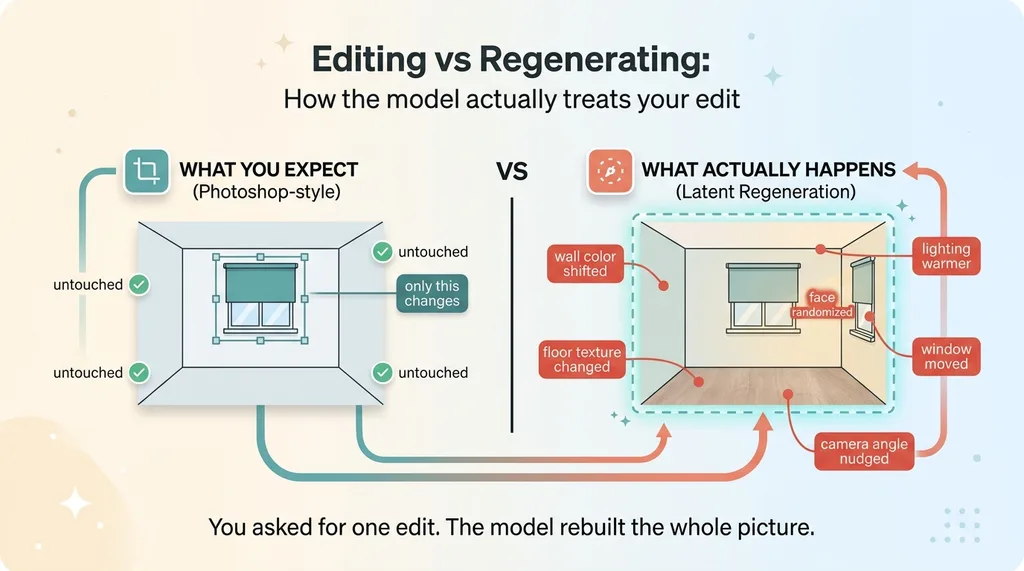 Editing vs Regenerating: How the model actually treats your edit
You asked for one edit. The model rebuilt the whole picture and happened to keep some of it close to the original.
What drift actually looks like
I built a home-products visualizer for a window-treatment company. The job was simple on paper: take a customer's photo of their real window and drop a specific shade onto it. Instead, the model re-rendered the entire room. New wall color. Different floor. The window itself moved. The customer's actual space, the thing they wanted to see the product in, was gone.
Same problem in the DTC fashion brand I run in San Diego. I wanted the same model's face across a sequence of product frames. Every frame gave me a different person. Same prompt, same reference, new face each time. That's character consistency ai failing in the most visible way possible, because a human eye catches a face change instantly.
If you tried this, got garbage, and gave up, you weren't doing it wrong. You were fighting how the model works. The fix isn't a cleverer description of what you want changed. It's a complete rethink of what you're telling the model in the first place.
The Counterintuitive Fix: Lead With a Keep-List, Not a Change-List
Here's the instinct everyone has, and it's backwards: you tell the model what to change. "Swap the shade." "Change the shirt color." "Update the face."
The reliable prompt does the opposite. It leads with an exhaustive list of everything that must NOT change, and the single edit comes dead last.
Enumerate every surface that must stay
Write it out like you're briefing a court reporter. Boring and complete.
Keep the following exactly as they appear in the source: the window frame, the wall color, the floor texture and color, the camera angle and distance, the lighting direction and warmth, the person's face, their hairstyle, and their pose.
Then, and only then, the one change:
Replace only the existing shade with a matte linen roller shade.
Notice the keep-list is five times longer than the actual edit. That's not a mistake. That's the technique.
Why the keep-list goes first
The model reads your prompt and decides what to regenerate based on where its attention lands early. Front-loading the keep-list anchors that attention before the model commits to rebuilding anything. You're telling it "these surfaces are settled" before it ever considers the edit.
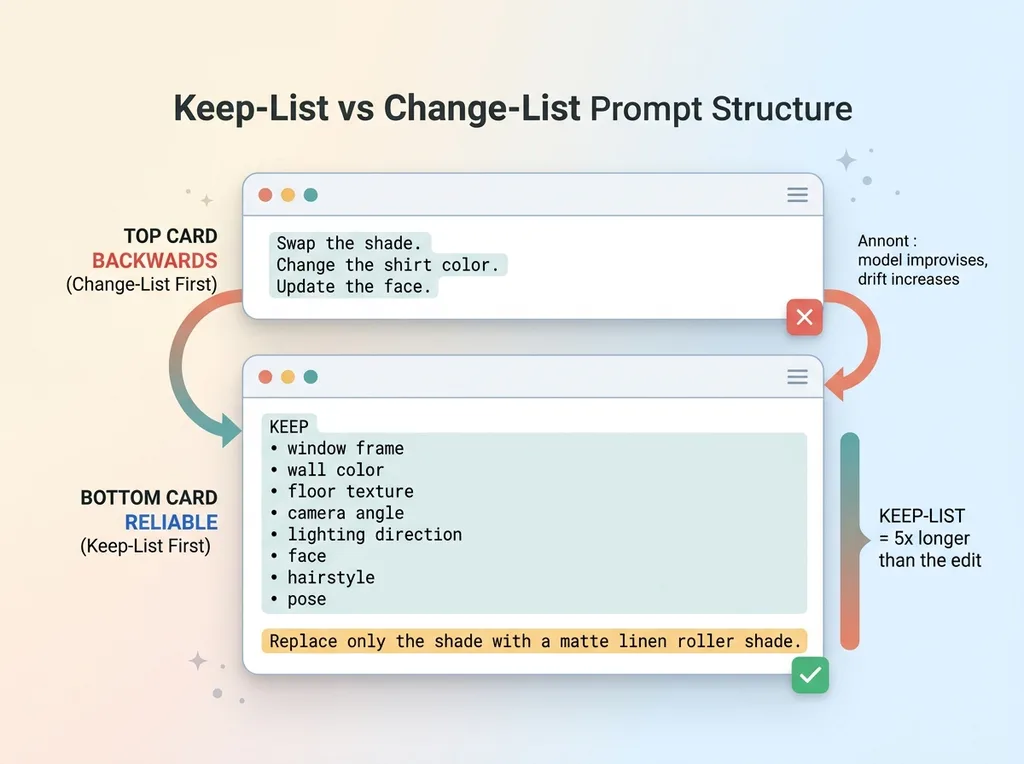 Keep-List vs Change-List prompt structure
When I rewrote my edit prompts this way, my reject rate on the fashion frames dropped dramatically. I went from tossing more than half my outputs to keeping the clear majority on the first pass. The window visualizer got usable enough to put in front of real customers.
Yes, this makes prompts long and ugly. Mine run six or seven sentences for a single edit. That's the point. A short, elegant prompt gives the model room to improvise, and improvisation is exactly what wrecks your consistency. Verbose and constrained beats clean and loose every time.
Anchor Geometry to What Already Exists
Geometry drift is the silent killer. The face is obvious when it breaks. A shade that's two inches too wide or mounted slightly off the frame line looks "fine" until a customer notices their actual window doesn't look like that.
Lock to the existing opening, not an abstract size
The fix is to anchor the new element to features already in the image, never to absolute measurements.
Wrong: "add a 36-inch roller shade."
The model has no idea how big 36 inches is in your photo. It guesses, and it guesses differently every run.
Right: "fit the shade exactly within the existing window opening, matching its width and aligning the top of the shade to the existing top mounting line."
Now you've given the model a reference it can actually see. The width is whatever the opening is. The top edge tracks a line that's already in the frame. Geometry stops drifting because you stopped asking the model to invent scale from nothing.
Describe objects the way a photographer sees light
The second technique sounds strange until you try it: describe objects by how light behaves on them, not by what they're called in your catalog.
A photographer doesn't say "Product #4471 in Linen." A photographer says "matte fabric that diffuses the afternoon light coming from the left, with soft shadow falloff at the bottom fold."
The model understands light physics far better than your internal SKU names. It has seen millions of images of matte fabric in afternoon light. It has seen zero images of Product #4471. Speak its language.
When you genuinely cannot afford any drift on the product itself, the label, the exact pattern, the precise color, prompting alone won't get you there. That's when you composite the real product instead of generating it, which is the complementary approach: let the model handle the scene and lighting, but drop the actual product pixels in rather than asking the model to recreate them.
Bake Avoidance Into Positive Prose
Here's a trap that burns people who think they've cracked the keep-list approach. They write negatives. "Don't change the face." "No extra furniture." "Don't move the camera."
Most models honor negatives weakly, and some ignore them outright. The word "don't" often gets read as a topic, not a prohibition. You write "don't add a lamp" and the model hears "lamp" and helpfully adds one.
Negative prompts get ignored; positive descriptions don't
The trick is to convert every avoidance into a positive description of the desired state.
Instead of "don't move the camera," write: "the camera position and focal length are identical to the source."
Instead of "don't add objects," write: "the scene contains exactly the elements present in the source, plus the single new shade and nothing else."
Instead of "don't change the lighting," write: "lighting direction, intensity, and color temperature match the source exactly."
Reframe 'don't' as 'do'
Here's a clean before and after.
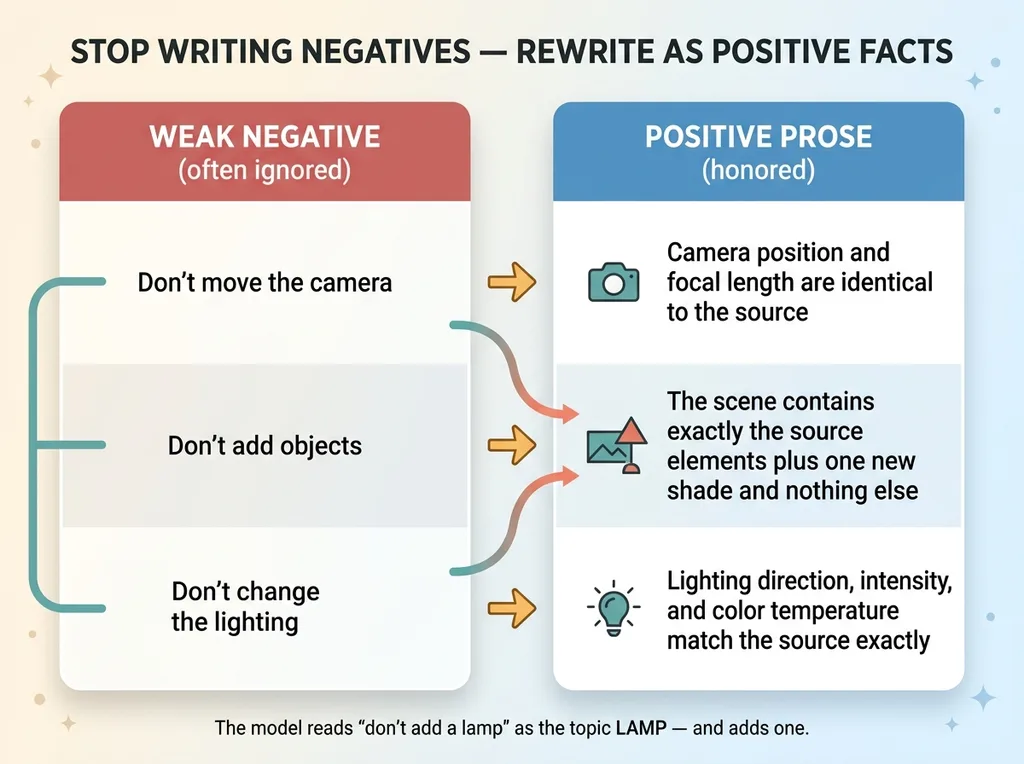 Negative prompts vs positive prose rewriting
Weak negative version:
Swap the shade. Don't change the room. Don't move the camera. Don't add anything. Don't change the lighting.
Positive-prose version:
The wall, floor, window frame, camera angle, and lighting direction are identical to the source. The scene contains exactly the elements in the source plus one matte linen roller shade fitted to the existing window opening.
The second one works because every constraint is stated as a fact about the desired image, not a request to suppress something. This is the heart of clean nano banana prompting, where the model responds best to affirmative descriptions of the final state rather than a list of things to avoid. Tell it what is, not what isn't.
Lock the Aspect Ratio in Two Places
This one is subtle and it will quietly ruin a catalog run. Aspect ratio drift crops your subject's head off or pads the sides with weird invented background. Lock it in two places, not one.
State the ratio in the prompt and in the API call
First, write the target ratio explicitly into the prompt text: "the output is a 4:5 vertical image." Second, set it in the API parameters. Belt and suspenders. The two reinforce each other, and when one gets ignored the other catches it.
I learned this the hard way running batches where roughly one in ten outputs came back at the wrong ratio despite the API parameter being correct. Adding the ratio to the prompt text closed the gap.
Put the source image last so its ratio wins
Then the ordering trick. Place your source image LAST in the input sequence.
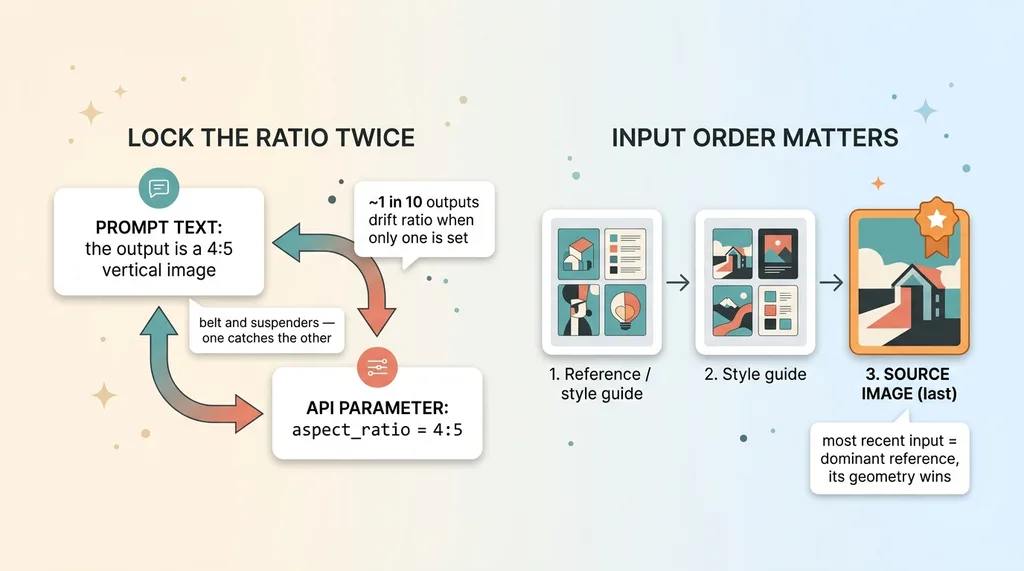 Locking aspect ratio in two places and source-last ordering
With these models, the most recent input in the sequence acts as the dominant reference. When the source image is last, its dimensions become the default the model anchors to. Put reference images or style guides first, the source image last, and the source's geometry wins the tiebreaker.
This is the kind of fiddly detail that separates a one-off lucky output from a system you can run an entire catalog through without babysitting. Anyone can get a good single image. Getting the 500th image as reliable as the first is where ai image drift fix techniques like this actually earn their keep.
Putting It Together: A Production-Ready Prompt Skeleton
Here's the complete structure, in order. This is the reusable template I run in production.
The full structure in order
- Keep-list of every surface. Lead with the exhaustive "keep exactly as in source" inventory. Walls, floor, frame, camera, lighting, face, hair, pose.
- Geometry anchored to existing features. Fit the new element to what's already in the frame, never to absolute measurements.
- The single change described in light terms. One edit, described by how light behaves on it, not by SKU.
- Avoidance as positive prose. Every "don't" rewritten as a fact about the final image.
- Aspect ratio stated. In the prompt text and the API call.
- Source image placed last. So its dimensions dominate the reference order.
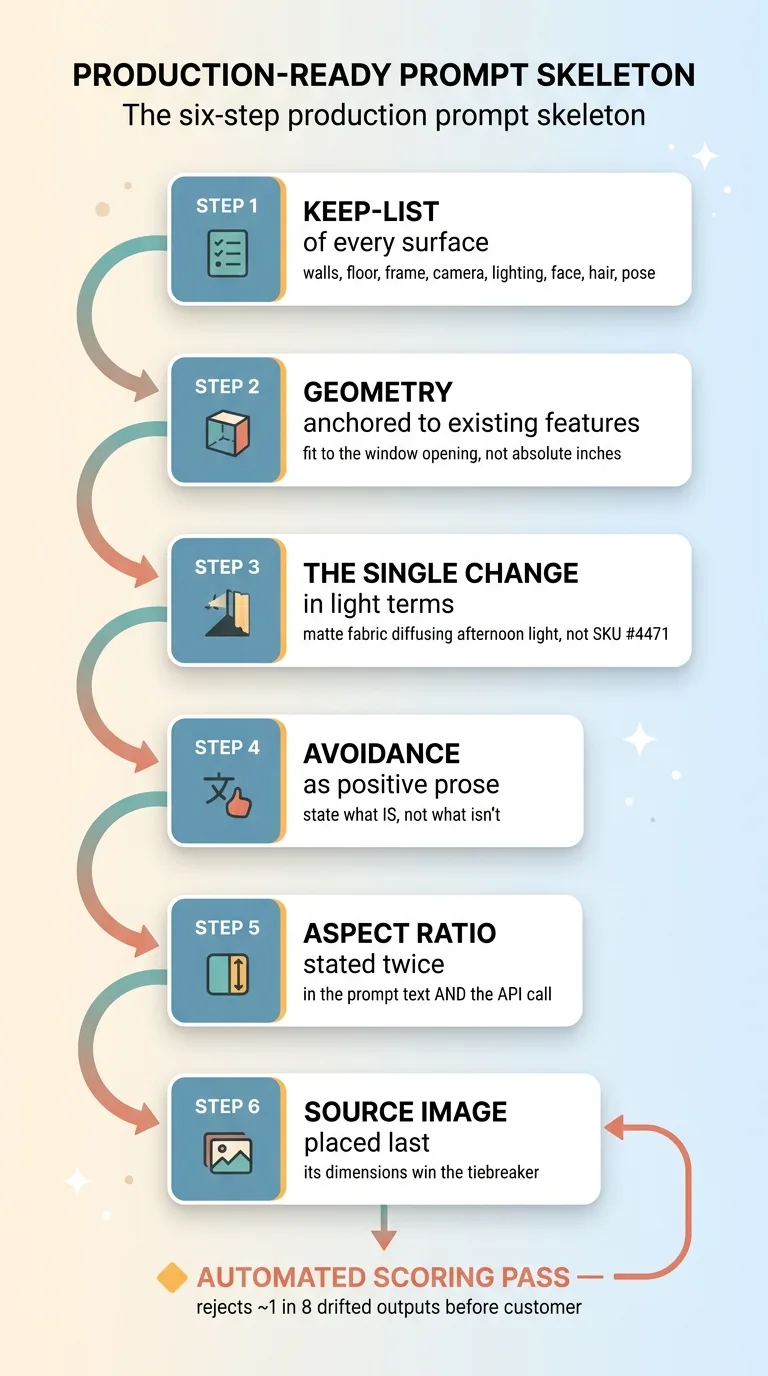 The six-step production prompt skeleton
Run those six in that sequence and your consistency improves more than any model upgrade will give you.
What still requires a human check
Now the honest part. Even with all six locked down, some edits still drift. Maybe one in eight or one in ten in my experience, depending on the source photo's difficulty. A busy background, an awkward pose, an unusual lighting setup, and the model still occasionally hands you a face change or a geometry slip.
That's why a prompt is not a system. You need a human-in-the-loop or, better, an automated scoring pass that rejects bad outputs before they ever reach a customer. I built the product photography pipeline that scores its own work precisely because no prompt is reliable enough to run unsupervised at scale.
This exact skeleton runs in production across the 564 products in my DTC fashion brand and in the window-treatment visualizer. It is not theoretical. It is what survived contact with real catalogs and real customers, and the parts that didn't survive got a scoring gate bolted on top.
When Reliable Edits Become a Real Business Asset
Prompt discipline is cheap to learn and expensive to discover. The six techniques above took me months of rejected outputs to work out. You can read them in ten minutes.
But here's the thing the demo never tells you: the gap between a slick one-off image and a production catalog visualizer is exactly this kind of unglamorous constraint engineering. Nobody puts the keep-list and the aspect-ratio-locked-twice trick in the sizzle reel. They put the one good output that took forty tries.
The whole game is constraints. I wrote up the broader version of this philosophy in three ways I stop AI from embarrassing a client, because the same principle that keeps a face consistent keeps a model from inventing prices, products, or facts.
I build these visualizers and image pipelines as full systems, not loose prompts. Quality gates, scoring passes, and human checks baked in from the start, because that's the difference between a tool you trust and a tool you keep double-checking.
Get the next build note.
I write up each system I build, including what broke. Subscribe to my newsletter and I'll send you the next one.