The Symptom: A Frozen Progress Bar and a 504
I was building an AI brand-generation pipeline I built that produces 56 design options across 14 categories in a single run. Logos, color systems, typography, packaging directions, the works. That generation takes two to four minutes start to finish.
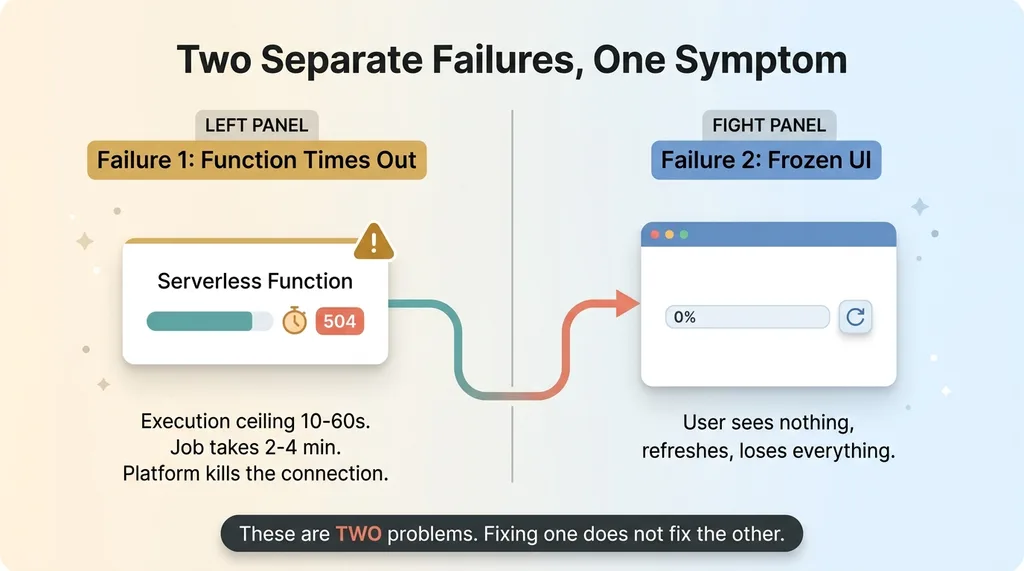 Two separate failures: the duration ceiling and the frozen UI
On serverless, two things broke at once. And the way they broke is the whole reason I'm writing this. If you've ever hit an ai generation timeout on Vercel and tried streaming to fix it, you already know this pain.
First failure: the function hit its execution ceiling and returned a 504. The job was still running, the model was still thinking, and the platform just killed the connection out from under it.
Second failure was worse. Even when I got the model call to survive, the user stared at a progress bar that never moved. It sat at zero. No animation, no count, nothing.
Here's what that looks like to a real person using the tool. They click generate. The bar appears. Ten seconds pass, nothing. Thirty seconds, nothing. To them it looks dead. It looks broken. So they do the only rational thing: they refresh. And they lose everything that was generating in the background.
My first instinct was completely wrong. I assumed this was one slow function I needed to optimize. It wasn't. This is a whole class of problem that hits long AI generations on serverless anytime the work takes more than a minute.
The timeout and the frozen UI are two separate failures. People conflate them and then fix the wrong one.
Why Single Long AI Calls Die on Serverless
The function duration ceiling
Every serverless function has a maximum execution duration. Default ceilings sit somewhere between 10 and 60 seconds depending on your plan and config.
A generation that runs 2 to 4 minutes against a 10 to 60 second ceiling never finishes. It can't. The platform terminates the function before the model returns, and you get your 504.
You can raise the max duration. There's a knob for it. But there's still a hard cap above the default, and more importantly, raising it does nothing for the frozen-UI problem. You've solved one failure and left the other one fully intact.
The non-streaming request is the worst offender
A non-streaming request is where you fire off one call and wait for the entire completion to come back as a single response. This is the riskiest pattern on serverless, and it's the one most people reach for first because it's the simplest to write.
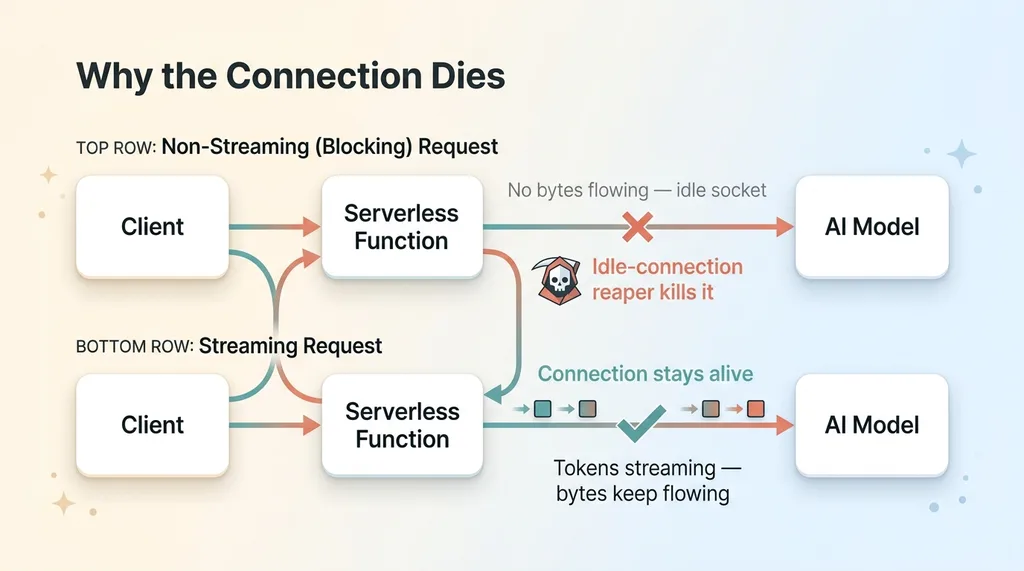 Why non-streaming requests die: the idle-connection reaper
Here's why it dies fastest. While you're waiting for that full completion, the connection sits idle. No bytes are flowing in either direction. The model is working on its side, but from the platform's point of view, the connection looks like a stalled, dead socket.
Platforms aggressively kill idle connections. So the silent, no-bytes-flowing request is the first thing on the chopping block. A blocking call that needs three minutes of model time gets reaped long before it produces a single token.
So you have two distinct problems. The duration ceiling, and the idle-connection reaper. Both have to be solved, and solving one doesn't touch the other. That's the mistake that costs people a day.
Why SSE Streaming Looked Like the Fix and Wasn't
The platform buffers your stream
The obvious answer is server-sent events. Stream tokens and progress events as they happen, keep bytes flowing so the connection never goes idle, and the user sees real movement. On paper this fixes everything.
I built it. Server-side, it worked perfectly. I could watch the events fire in my logs, one per category, exactly on schedule. The connection stayed alive. No timeout.
Then I opened the browser and the progress bar was frozen.
Here's the trap. The hosting platform buffers SSE responses behind its edge and proxy layer. Your function is happily emitting events, but they pile up in a buffer somewhere between your function and the user's browser. They don't reach the client in real time.
Why the progress bar froze
So the connection appears alive and healthy on the server, while the client gets nothing. Events sit in the proxy buffer until something flushes it, or until the whole response completes, or never. The browser is starved.
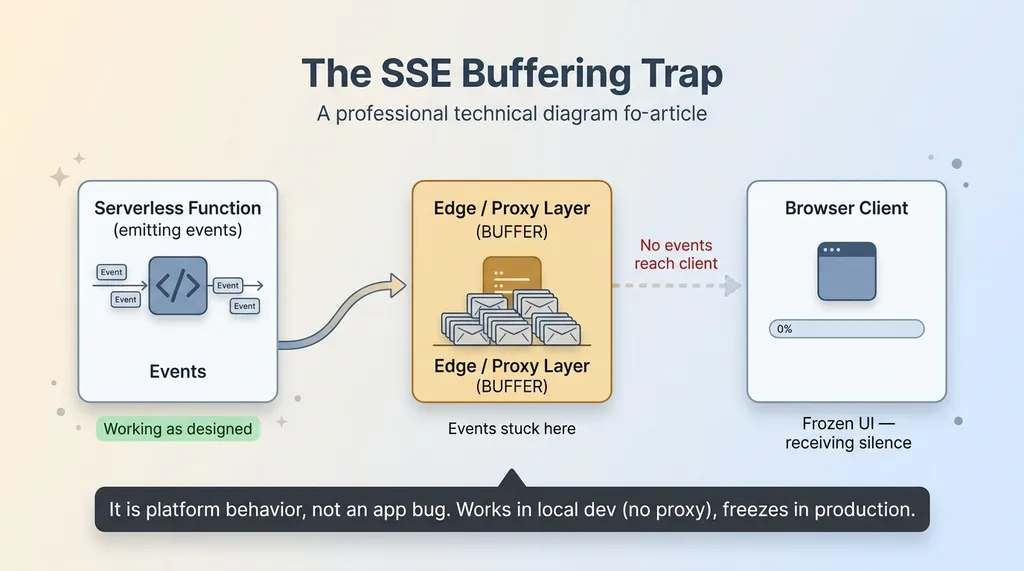 The SSE buffering trap: server streams, client gets silence
That's your frozen progress bar. The server is streaming. The client is receiving silence. Both are technically working as designed, and the combination produces a UI that looks completely dead.
This is critical to understand: it's platform behavior, not an app bug. You can read your code line by line and find nothing wrong, because there's nothing wrong with it. The SSE buffering on Vercel happens at a layer you don't control from your function.
This is the exact trap that wastes a full day. You build the streaming solution, it works in local dev where there's no edge proxy, you deploy, and the bar freezes. Then you spend hours debugging code that's fine. The problem was never your code.
The Pattern That Fixed It: Stream the Model, Poll the Client
The fix has three parts. Once you see it laid out, it reads as a reusable recipe for any multi-minute generation.
Use the Anthropic SDK finalMessage streaming
Stream the model call instead of making one blocking request. With the Anthropic SDK, you use the streaming pattern and then call finalMessage to get the assembled result.
This does two things. Streaming keeps bytes flowing on the model-to-server connection, so the model call itself never trips the idle-connection reaper. And finalMessage hands you the complete, assembled response without you hand-rolling token accumulation. You're not stitching deltas together yourself or managing a buffer; the SDK does that and gives you the finished message.
This is the Anthropic SDK streaming finalMessage pattern, and for a Claude Opus streaming pattern across a long generation, it's the difference between a call that finishes and one that gets killed at 60 seconds. Stream so the call survives, then read finalMessage once it's done.
Write to the database incrementally
This is the part that breaks the dependency on the HTTP connection, and it's the real unlock.
After each category group completes, write that partial result to the database. In my case, that's after each of the 14 categories, or after small batches of them. The moment a category's options are generated, they land in the DB.
The database becomes the source of truth for progress. Not the open connection. Not an event stream. The HTTP request can drop, the proxy can buffer, the user can refresh, and none of it matters, because progress lives in a row in the database that's already been written.
Client polls every few seconds
Now the front end does something almost boringly simple. The client polls a lightweight status endpoint every few seconds. That endpoint reads the completed-category count from the DB and returns it.
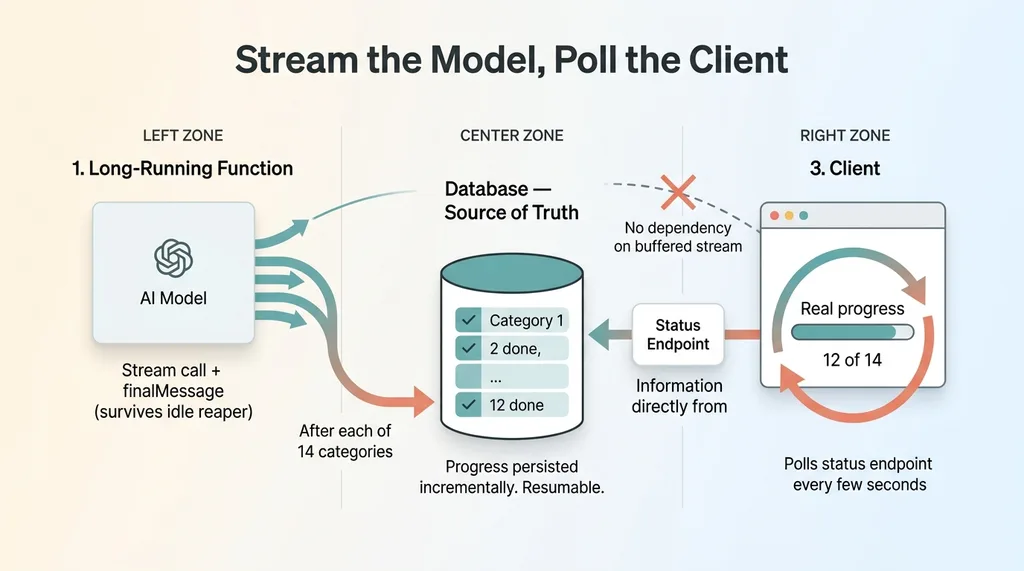 The fix: stream the model, write to DB, poll the client
The UI renders real progress from that count. Twelve of fourteen categories done. The long generation runs in its own function or background job, completely separate from the UI. The browser never depends on the buffered stream at all.
This SSE buffering and Vercel polling tradeoff is the whole game. You stop fighting the edge proxy and route around it. The model streams on one side, the client polls on the other, and the database sits in the middle as the handoff.
Give the long-running function generous max duration and a high token limit so the generation has room to finish. And as a bonus, because every partial result is persisted, the work is now resumable. A dropped job doesn't mean starting over.
The Settings People Forget: Max Duration and Token Limits
Two config knobs quietly cause most of these failures. Both have default values that work fine for short prompts and fall over on real generations.
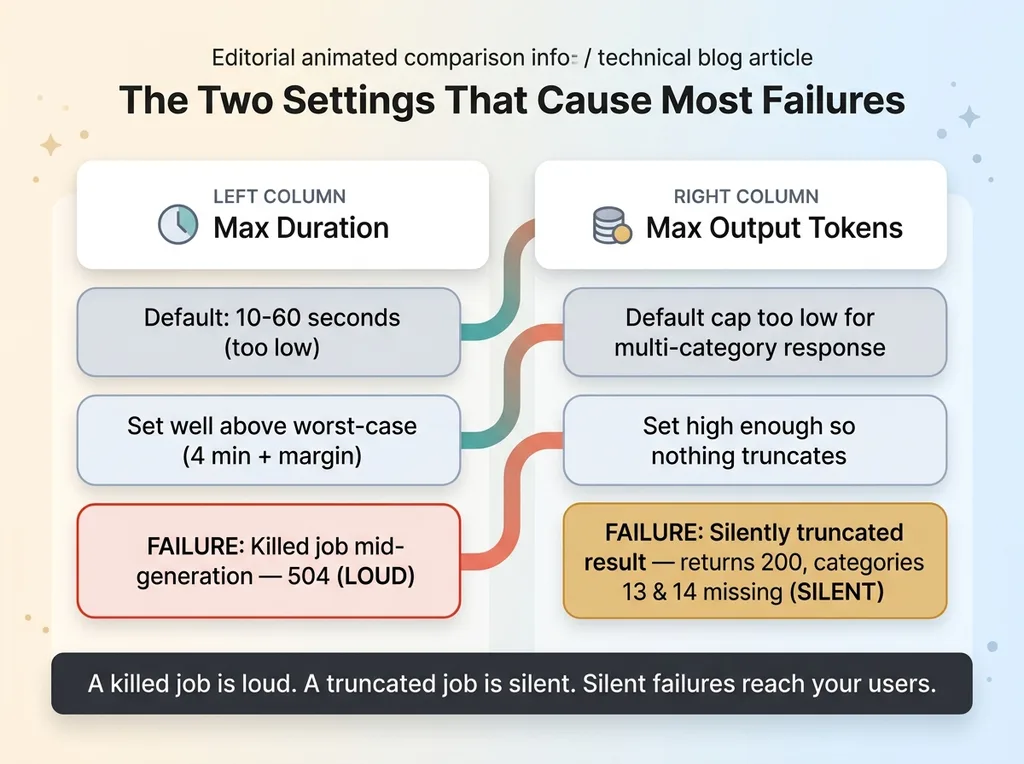 Two config knobs: max duration and max output tokens, loud vs silent failures
Max duration. Raise the serverless function max duration to cover your worst-case generation, with margin. If your generation can take 4 minutes on a bad day, don't set the ceiling to 4 minutes. Set it well above. The failure mode if you leave it default is a killed job mid-generation: the function dies, the partial results may or may not have been written, and the user gets a 504.
Max output tokens. Set the model's max output token limit high enough that a large, multi-category response doesn't get truncated. This one is sneakier. The failure mode of a low token cap isn't a crash. It's a silently truncated result. The brand system looks complete on the surface, the function returns 200, no error anywhere, and you don't notice categories 13 and 14 are simply missing until someone asks where they went.
A killed job is loud. A truncated job is silent, and silent failures are the ones that reach your users.
Both knobs cost money. Longer generations hold the function open longer, and bigger token budgets mean more expensive runs. That's real, and it adds up across hundreds of generations. This is exactly why I'm aggressive about cutting AI iteration costs elsewhere in the pipeline, so I can afford to be generous where it actually matters, which is the production generation that a paying user is watching.
What This Pattern Buys You Beyond Not Crashing
It's tempting to read all of this as purely defensive engineering. It's not. The same architecture that stops the crashes also makes the feature genuinely better.
Real progress, not a fake spinner
Because results land in the database incrementally, the user sees genuine progress. Twelve of fourteen categories done, then thirteen, then done. That's not an animated spinner faking activity to keep them calm. It's the real state of the job, pulled from the DB.
That difference matters more than it sounds. A fake spinner buys you a few seconds of patience before people get suspicious. Real progress that visibly advances buys you the full two to four minutes, because people will wait when they can see it's working.
Resumability and partial results
Partial results survive a dropped connection or a refresh. If the user closes the tab at category 9 and comes back, the first 9 categories are already there.
And when something fails, you can resume or retry just the failed portion instead of regenerating all 56 options from scratch. If category 11 errors out, you regenerate category 11. You don't burn the tokens and the four minutes to redo the entire run.
You also get observability for free. Because every step writes to the DB, you can see exactly where a generation stalls. When a run hangs, I can look at the row and know it died at category 7, not guess.
This is the line between a hello-world prompt demo and something that survives real production load. The demo works because the prompt is short and finishes in eight seconds. The production version works because it assumes the four-minute run, the dropped connection, and the refresh, and it's built to survive all three. This is a solved problem, not a research project.
If Your AI Feature Times Out in Production, This Is Usually Why
The rule is simple. Any AI feature that takes more than a minute needs to decouple the work from the HTTP request. Stream the model call so it survives. Persist progress to the database. Poll a lightweight endpoint from the client. Stop trying to push real-time updates through an edge proxy that buffers them.
The teams that get this wrong ship a demo that works beautifully on short prompts and falls over the first time a real user asks for something big. The code isn't bad. The architecture just assumed the happy path, and production doesn't run on the happy path.
This is the kind of unglamorous production detail I run into constantly building real AI systems. It's not slideware. It's the plumbing that decides whether your feature works at 3pm on a Tuesday when someone runs the biggest job your system has ever seen.
Get the next build note.
I write up each system I build, including what broke. Subscribe to my newsletter and I'll send you the next one.