The CRM is only as good as the updates nobody wants to make
Here's the thing nobody wants to admit about CRM software: most of the data in it is wrong by Friday. Not because the tool is bad. Because the people who are supposed to update it would rather do almost anything else. That's the real problem a voice CRM update by talking approach is built to solve, and it's the reason I built a voice layer on top of the AI CRM I built to replace five tools.
Picture the actual moment. A rep wraps a call that went well. They've got the next meeting starting in twelve minutes, across town. They tell themselves they'll log it later. They don't. The record never gets touched.
By the time the manager pulls up the pipeline on Friday, the stage is wrong, the next-step field is blank, and the close date is a guess from three weeks ago. So the forecast gets built on data that's already rotting.
I've watched genuinely well-built CRMs sit unused for exactly this reason. The features were fine. The reports were beautiful. Nobody used them because every update meant stopping, opening a form, and clicking through fields that felt like a tax on doing the actual job.
The friction was never the CRM's feature set. It was the form.
So when I built my own CRM, I came back to that problem with a simple question: what's the lowest-friction way a human can hand the system new information? Not a cleaner form. Not fewer fields. No form at all. Just talk, the way you'd brief a colleague who caught you in the hallway.
That's what the voice layer does. And it changed which data actually stays current.
What "update by talking" actually means
The debrief, out loud
There's a voice dock on every record. The rep finishes a call, taps it, and just talks.
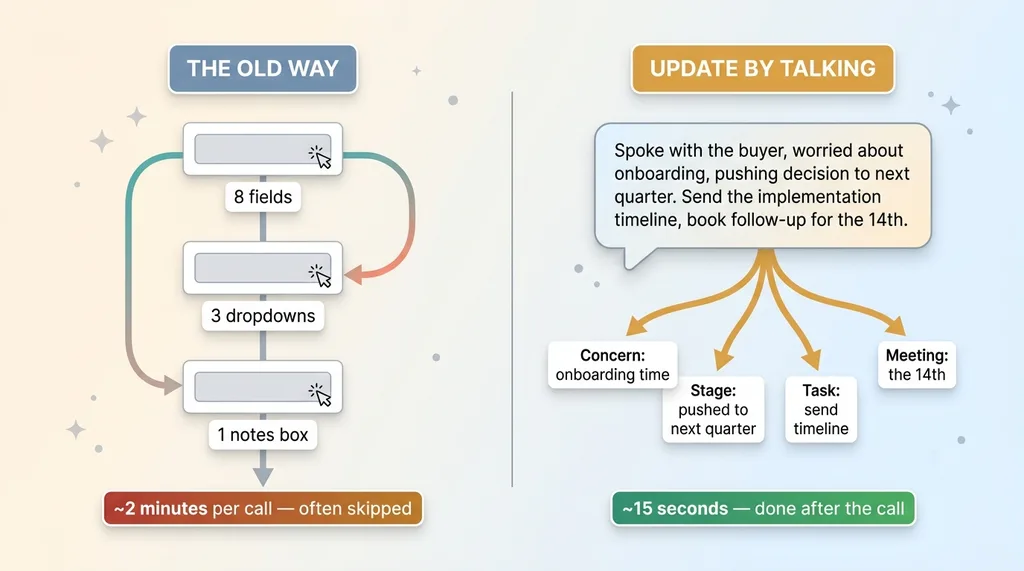
"Spoke with the buyer, they're worried about onboarding time, pushing the decision to next quarter. Send them the implementation timeline and book a follow-up for the 14th."
That's it. No fields. No dropdowns. No notes box they'll leave blank because typing a paragraph after every call is the kind of thing that never happens. The rep debriefs out loud the way they'd brief their sales manager walking back to their desk. I wrote about this idea more fully in talk and it files itself, but the short version is: speech is the lowest-friction input that exists.
What the model does with what you said
A realtime voice model parses that spoken debrief into structured actions. It catches the concern (onboarding time), the stage change (pushed to next quarter), the follow-up task (send the implementation timeline), and the meeting (the 14th). Four discrete things, pulled out of one casual sentence.
 Voice debrief vs form-filling friction comparison
Now contrast that with the old way. To capture the same call, a rep would touch eight fields, three dropdowns, and a notes box. Each one a tiny decision, a tiny click, a tiny reason to put it off. Stack a dozen of those across a day of calls and you've built a system people quietly abandon.
The point isn't that voice is novel. It's that natural speech matches how a human actually thinks right after a call, when the memory is fresh and the details are sharp. You're not asking the rep to translate a conversation into a database schema. You're asking them to say what happened. The model handles the translation. That's the whole shift, and it's a bigger one than it sounds.
The tools the model can call (and the ones it can't)
Scoped tool calls
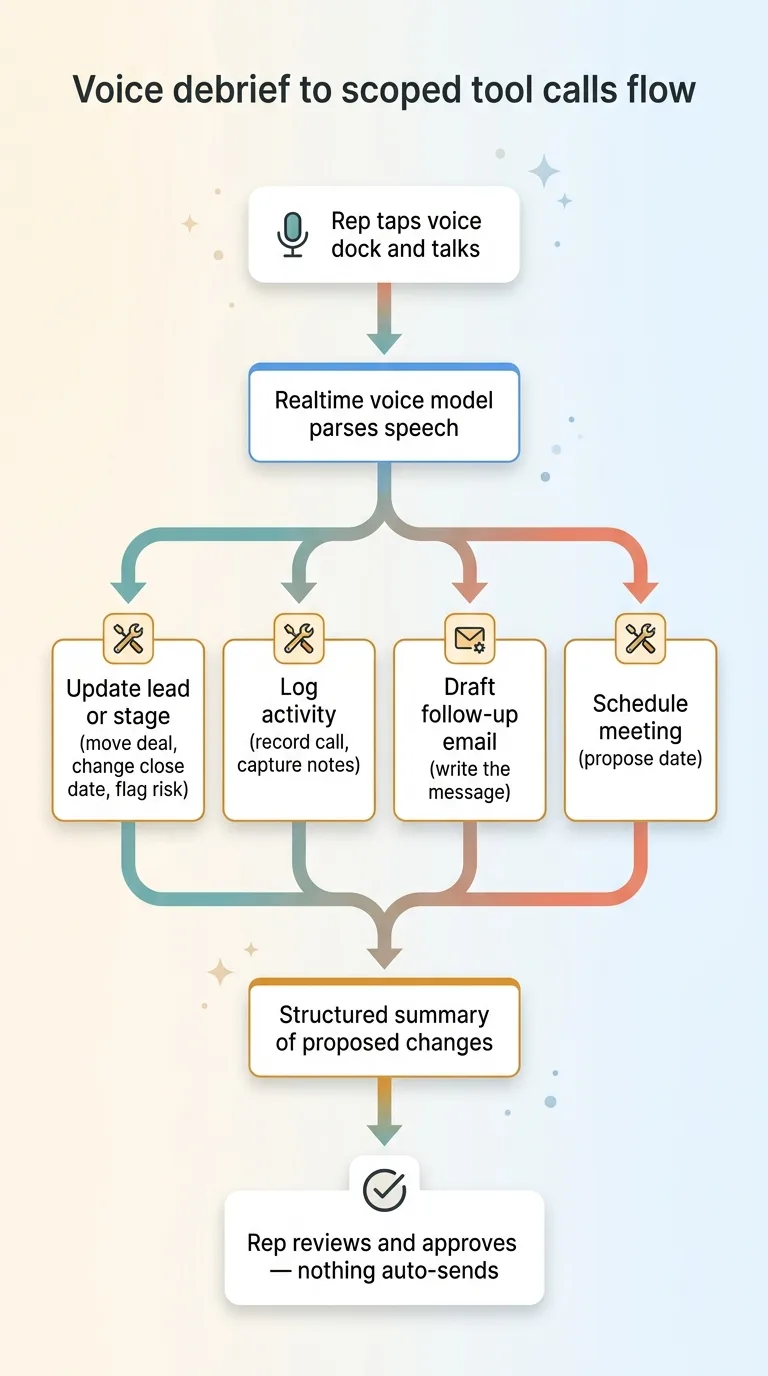
The realtime model isn't doing magic. It's dispatching a small, defined set of tools based on what it heard in the debrief:
 Voice debrief to scoped tool calls flow
- Update the lead or stage, move the deal, change the close date, flag a risk
- Log an activity, record that the call happened, capture the notes
- Draft a follow-up email, write the message the rep said they'd send
- Schedule a meeting, propose the follow-up on the date mentioned
Each one is a discrete tool. The model listens to the debrief, decides which tools apply, and fills in the arguments from what the rep actually said. "Book a follow-up for the 14th" maps to the schedule tool with a date. "Send them the implementation timeline" maps to a drafted email. Clean separation, so the model's job is narrow and predictable.
Why nothing auto-sends
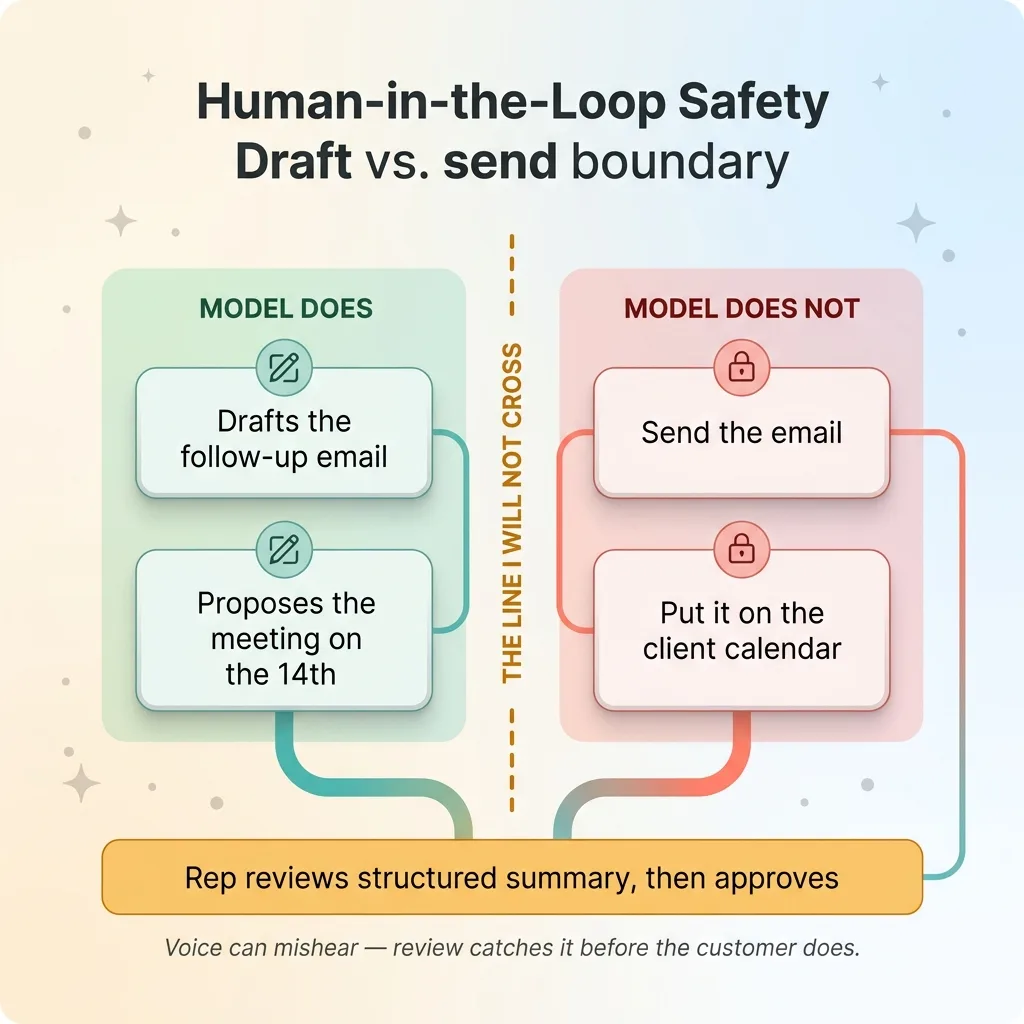
Here's the line I will not cross: the model drafts and proposes, but it does not send or commit anything irreversible without the rep confirming first.
 Human-in-the-loop safety: draft vs send boundary
It writes the follow-up email. It does not send it. It proposes the meeting on the 14th. It does not put it on the client's calendar until the rep says yes. This is the same principle behind every AI action stops for a human, and it matters more with voice than almost anywhere else.
Voice transcription mishears words. Accents, background noise, a rep talking fast between meetings. If the model heard "next quarter" as "next month," that's a wrong field the rep can fix in a review screen. If the model auto-emailed a client based on a misheard sentence, that's a real mistake in front of a real customer.
So the rep sees a structured summary of every proposed change, scans it in a few seconds, and approves. The model's job is to remove the typing, not the judgment. Those are two different things, and confusing them is how AI tools earn distrust.
How the voice endpoint stays scoped to one workspace
RLS on every action
A voice interface is powerful precisely because it's frictionless. That same frictionlessness makes it dangerous if the scope is wrong. So the trust question isn't optional: when a rep talks and the model dispatches a tool call, what data can that call actually touch?
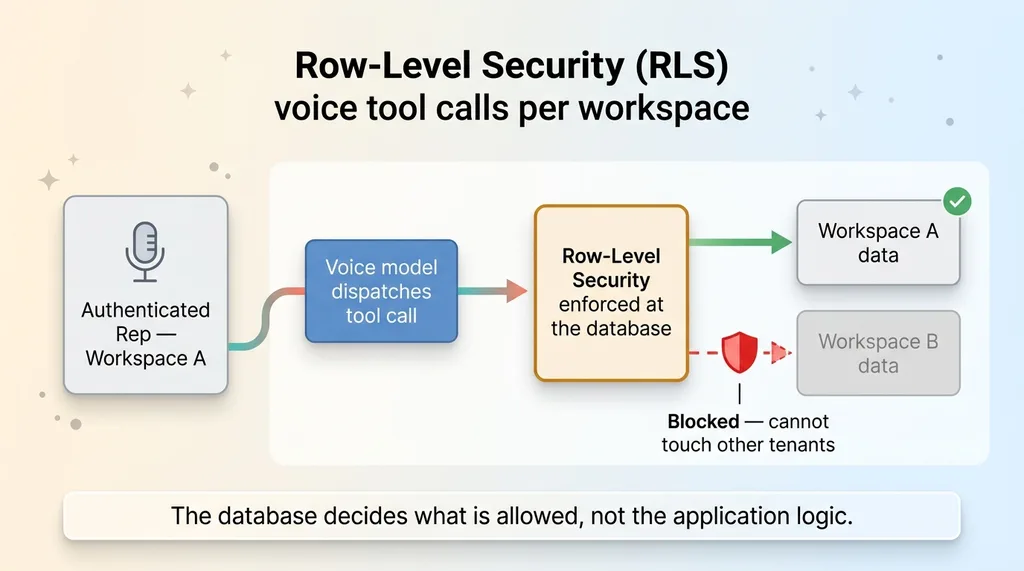
The answer is row-level security, enforced at the database, on every single action. The realtime voice session is wired to an endpoint where every tool call executes as the authenticated rep, against only their workspace's data. The model literally cannot update a record it isn't entitled to see.
No cross-tenant leakage
This matters enormously in a multi-team or multi-client setup. If you've got several sales teams sharing infrastructure, or you're running this across clients, the worst possible outcome is a voice command in one workspace touching data in another. RLS makes that impossible by design, not by hoping the application logic is correct.
 Row-level security scoping voice tool calls per workspace
The model proposes actions. The database decides whether those actions are allowed, scoped to exactly the rows that rep is permitted to see. Even if something upstream went wrong, the boundary holds at the data layer. I go deeper on this pattern in scoped to one workspace's data.
This isn't a bolt-on I added because voice felt risky. It's the same isolation pattern I use across every build. Voice just makes the stakes more visible. When the interface is this easy, the guardrails have to be this strict, or you've built something convenient and unsafe at the same time.
What changed when the friction disappeared
I'm not going to invent client numbers for this. But I can tell you the pattern, because it's consistent and it's the whole point.
When updating a record takes fifteen seconds of talking instead of two minutes of clicking, reps actually do it. More importantly, they do it right after the call, when the details are still fresh, instead of cramming a half-remembered summary in on Friday afternoon.
The data stays current because staying current stopped being work. That's the mechanism. You didn't make reps more disciplined. You removed the thing they were avoiding.
The second-order effect is the one managers feel most. They stop chasing reps for updates. The pipeline review stops being an archaeology dig. And the forecast gets built on data that reflects what actually happened on calls this week, not a manager's best guess papered over stale fields.
Now the honest limits. Voice transcription isn't perfect. Accents, noisy environments, a rep mumbling in a parking garage between meetings, all of that produces errors. That's exactly why the review step exists. The rep glances at the structured summary and corrects anything the model got wrong before approving.
Reps also had to learn to debrief in a slightly structured way. Not a rigid script, but saying "the next step is" or "schedule a follow-up for" gives the model cleaner signal than a rambling stream of consciousness. Took a few days to get the habit.
The review step isn't a flaw in the design. It's the safety net that makes the speed safe. Fast input plus a fast check beats slow input every time.
Where voice belongs in a CRM and where it doesn't
I'm not going to tell you voice should be your whole interface. It shouldn't.
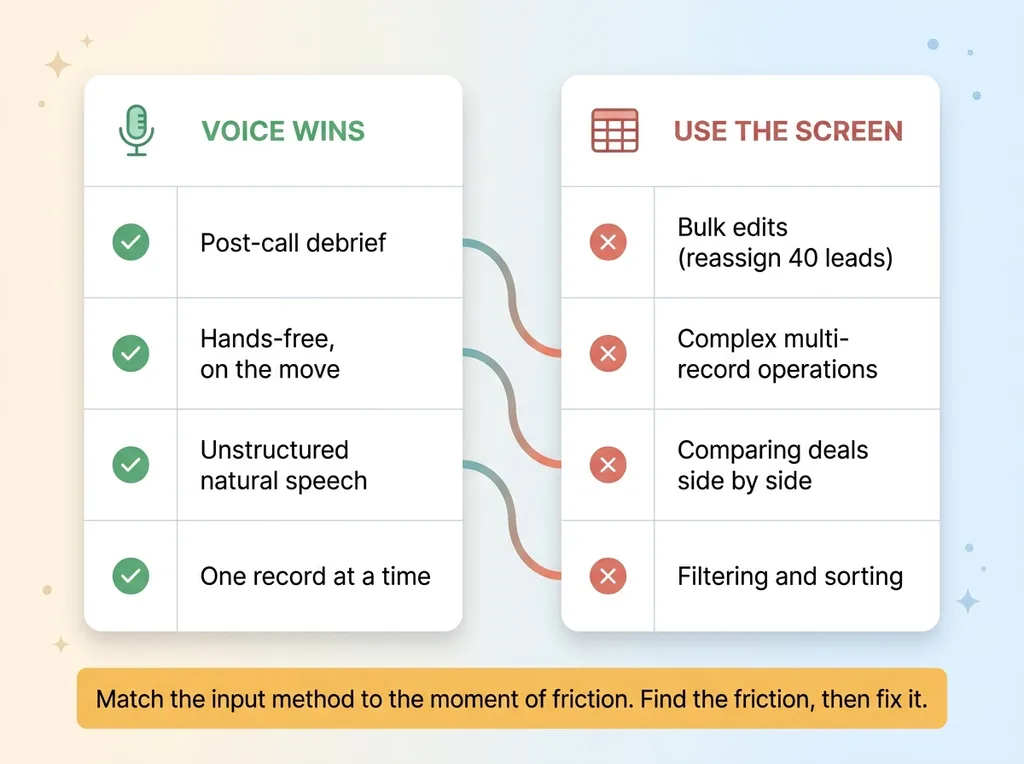 Where voice belongs in a CRM and where it doesn't
Voice is excellent for the post-call debrief. It's unstructured, it's hands-free, it happens in a moment when typing is genuinely inconvenient, and the content is exactly what a human is good at saying out loud. That's the sweet spot.
Voice is terrible for bulk edits. If you need to reassign forty leads, or run a complex multi-record operation, or compare deals side by side, you need a screen and a table. Talking your way through that is slower and more error-prone than just clicking.
So the voice layer sits on top of a CRM that still has a completely normal interface. Screens, tables, filters, all of it. Voice handles the one moment where the screen was the problem. Everything else works the way you'd expect.
This is the broader lesson, and it's bigger than CRMs. The win here was never "voice is cool." The win was matching the input method to the moment of friction. The debrief was the friction point, so I attacked the debrief specifically.
That's the difference between AI that gets used every day and AI that gets a polite trial and quiet abandonment. Tools fail when they force a fancy interface onto a moment that didn't need one. They succeed when they remove a real, specific pain. Find the friction, then fix it. Don't lead with the technology.
If your reps won't update the CRM, fix the input, not the rep
Let me restate the core insight, because it's the whole thing. Stale CRM data is a friction problem, not a discipline problem.
You can keep nagging your reps. You can build dashboards that shame them. You can add it to the performance review. None of it works for long, because you're fighting human nature with willpower, and willpower loses.
Or you can remove the form. Make keeping the data current take fifteen seconds of talking, and watch the data stay current on its own.
I build these voice layers onto CRMs, including ones I build from scratch, so the pipeline stays accurate because keeping it accurate stopped being a chore. The realtime voice agent tools do the structured work. The rep just talks.
Get the next build note.
I write up each system I build, including what broke. Subscribe to my newsletter and I'll send you the next one.