Wearable Data AI Integration: What the Model Sees
Wearable data AI integration isn't about the API. It's deciding what biometric signal earns a place in the context window. Here's how I built it.
By Mike Hodgen
The Real Problem Isn't the API. It's the Context Window.
Connecting a wearable to a health AI sounds like a weekend job. And honestly, the connection part is. You grab an access token, hit the endpoints, parse some JSON. Done by lunch.
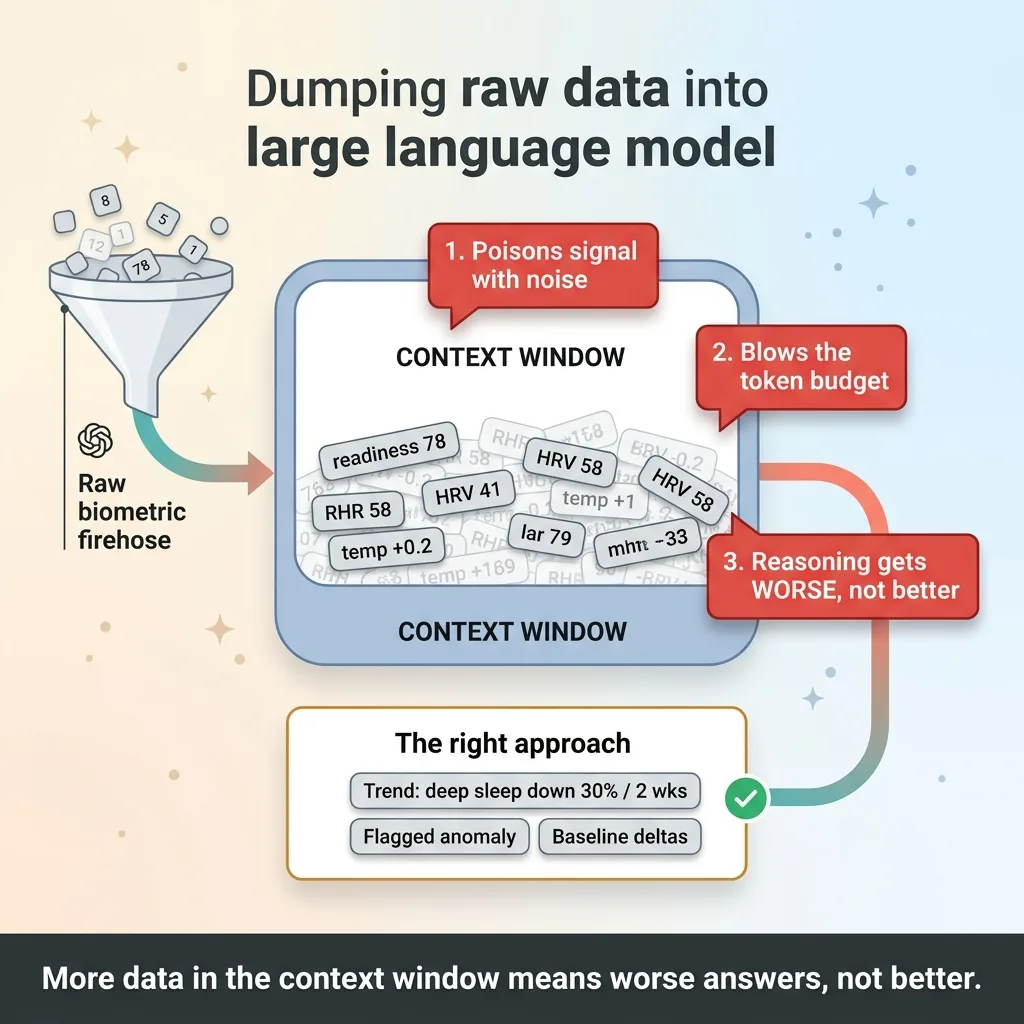 The Context Window Firehose Problem
The hard part shows up the second you ask the real question: what should the model actually see?
I learned this building a private wearable data ai integration for a family member. The setup pulls from a sleep and recovery wearable, and it feeds a health AI that's supposed to spot problems before they become problems. Simple goal. Brutal design problem underneath.
Here's why. A sleep and recovery wearable produces dozens of metrics every single day. Sleep stages, readiness scores, heart rate variability, resting heart rate, activity load, temperature deviation. Multiply that by 365 and you've got a firehose.
The instinct is to dump all of it into the prompt. More context, better answers, right?
Wrong. Dump raw biometric data into a context window and three things happen at once. You poison the model with noise it can't separate from signal. You blow your token budget on numbers that don't matter. And you make the reasoning worse, not better, because the model is now hunting for a needle in a haystack you built for it.
So let me state the thesis bluntly. More data in the context window does not mean better answers. It usually means worse ones.
The design question that actually matters is not "how do I connect the wearable." It's "what data earns a place in front of the model, and what should stay out of the way until it's needed."
That's the whole game. Everything below is how I made those calls.
How I Pulled the Data: A Personal Access Token, Not OAuth
The integration itself is the easy 20%. I pull four streams from the v2 API and route them into the system I'd already built when I connected a sleep wearable to a health dashboard.
What I pull: sleep, readiness, activity, heart rate
Four streams, each with a job.
- Sleep gives me deep sleep, REM, total duration, and efficiency. This is where early signals of overtraining or illness tend to show up first.
- Readiness is the wearable's own composite score. Useful, but only relative to a personal baseline (more on that later).
- Activity tells me load and movement. Context for everything else.
- Heart rate includes resting heart rate and HRV, two of the most reliable trend signals in the whole dataset.
Four streams is enough. I deliberately didn't pull everything the API offers. Half of it is noise for this use case.
Why I skipped OAuth on purpose
I used a personal access token instead of a full OAuth flow. That was a deliberate decision, not a shortcut I'm hiding.
OAuth makes sense when you're onboarding strangers at scale. You need per-user consent, token refresh, the whole handshake. If I were building a SaaS where thousands of people connect their own wearables, OAuth is non-negotiable.
But this is one family member's private system. A single user. Building a consent-and-refresh dance for one person would be engineering theater. The PAT saved me days of work that would have served exactly nobody.
Here's the honest limitation. This does not scale to a multi-tenant product without a rewrite. If a client came to me wanting to ship this to their customers, I'd throw the PAT out and build proper OAuth from day one. I'm telling you that because the framing matters more than the code. Match the integration to the actual problem, not the hypothetical one.
Raw Daily Readings Are Noise. Trends Are Signal.
A single night's readiness score tells the model almost nothing useful in isolation.
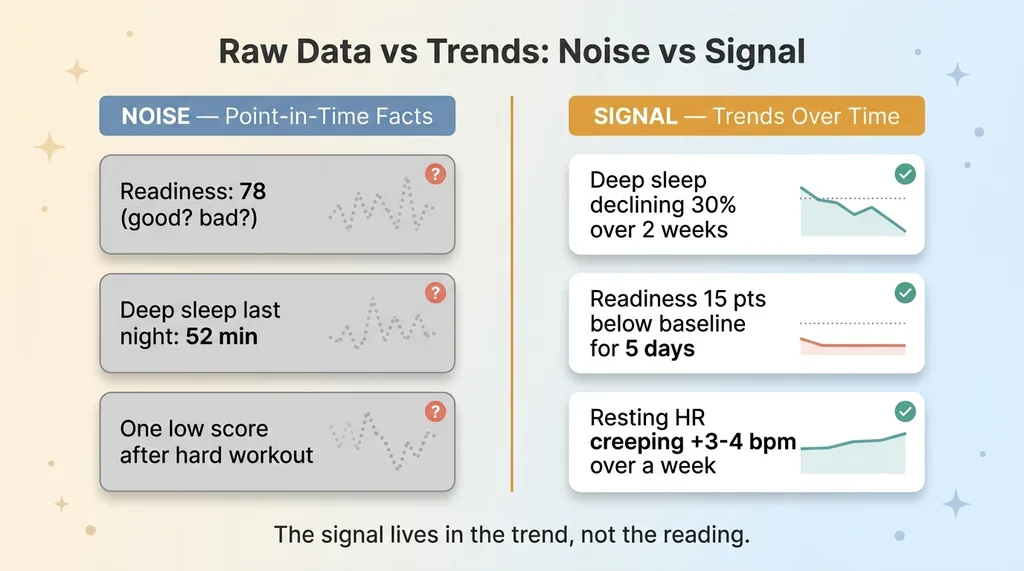 Raw Data vs Trends: Noise vs Signal
Say the score is 78. Good? Bad? You can't know. 78 is great for one person and a red flag for another. It's meaningless without context.
The signal doesn't live in the reading. It lives in the trend.
Here's what actually matters:
- A two-week decline in deep sleep, dropping a little each night
- A readiness score sitting 15 points below the personal baseline for five straight days
- Resting heart rate creeping up 3-4 bpm over a week with no obvious cause
Those are signals. They mean something. They're the kind of thing that precedes getting sick, burning out, or a real health event.
Now compare that to the noise. One bad night's sleep because of a late dinner. A single low readiness score after a hard workout. HRV bouncing around the way HRV always bounces around. None of that deserves the model's attention.
This reframes the entire integration. I'm not building a pipe that dumps data into a prompt. I'm building a system that decides which patterns are worth a sentence in the context window.
The distinction is point-in-time facts versus trends. A point-in-time fact is "last night's deep sleep was 52 minutes." A trend is "deep sleep has declined 30% over two weeks against a baseline of 85 minutes."
The model can reason with the second one. The first one is just a number waiting to mislead it.
So the job isn't feeding the model every reading. It's feeding it the shape of the data over time.
Vectorizing Biometrics Alongside the Medical Record
This is the technical heart of the build, and it's where most people get it wrong.
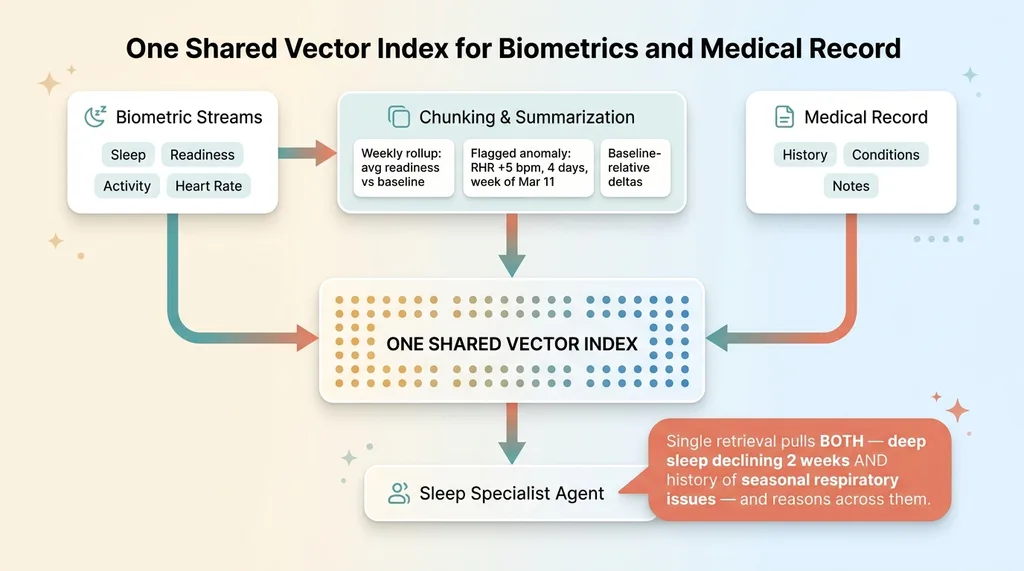 One Shared Vector Index for Biometrics and Medical Record
I chunk and vectorize the biometric data into the same embedding index as the medical record. Same index. That single decision is what makes the whole thing work.
Chunking time-series into retrievable summaries
I do not embed raw rows. Embedding "2024-03-14: readiness 71, RHR 58, deep sleep 64min" is useless. It's a row in a spreadsheet, not something a model can reason over.
Instead I embed summarized chunks. Each chunk contains:
- Weekly rollups, average readiness, sleep trends, and activity load for the week, stated relative to baseline
- Flagged anomalies, "resting heart rate elevated 5 bpm above baseline for 4 consecutive days, week of March 11"
- Baseline-relative deltas, not the raw number, but how far it sits from this person's normal
A chunk reads like a paragraph a doctor might write, not a database export. That's the point. Retrieval should return something the model can actually use, not raw material it has to interpret from scratch.
This is the same logic I broke down in search the index, not the library. You don't pour the whole dataset into the prompt and hope. You store it well, then retrieve the few pieces that matter for the question at hand. Cheaper and more relevant, both at once.
One index, so the specialist can connect the dots
Here's why same-index matters so much.
The system runs a team of specialist AI agents, including a sleep specialist. When that agent gets a question, it retrieves from one index.
So in a single retrieval, it can pull a relevant biometric trend ("deep sleep declining two weeks") AND a relevant note from the medical history ("history of seasonal respiratory issues") and reason across both.
If those lived in separate systems, the agent would never connect them. With one index, the connection happens naturally. The trend and the history surface together because they're semantically related, and the model gets to do the one thing models are actually good at: spotting the pattern across two facts a human might keep in separate folders.
Inject vs. Retrieve: The Decision That Actually Matters
This is the question that separates AI projects that work from ones that quietly don't.
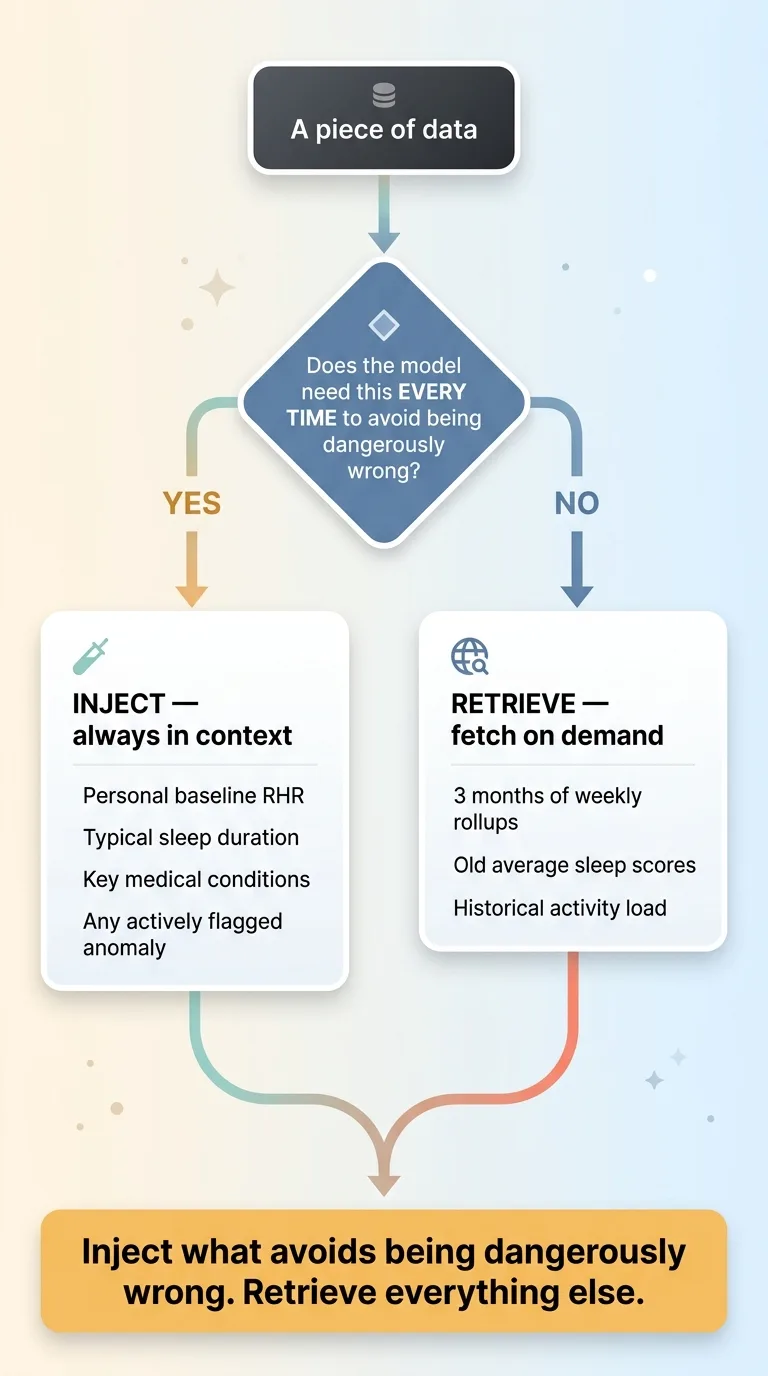 Inject vs Retrieve Decision Rule
Data reaches the model in one of two ways. You inject it directly into every prompt's context, or you leave it in the vector index and retrieve it only when relevant.
Most people pick one and apply it to everything. That's the mistake.
Some signals earn permanent injection. A small set of always-relevant baseline facts goes into every prompt: this person's normal resting heart rate, their typical sleep duration, key medical conditions. And any actively flagged anomaly gets injected too, because the model needs to know about it whether or not the conversation happens to mention it.
Everything else stays in retrieval. Three months of weekly sleep rollups don't belong in every prompt. They get pulled only when the conversation calls for them.
Here's the rule of thumb I use, and it transfers to any system:
Inject what the model needs every time to avoid being dangerously wrong. Retrieve everything else.
If a flagged cardiac anomaly is sitting in the data and the model doesn't see it because nobody asked the right question, that's a failure mode you cannot accept. So that fact gets injected, permanently, no matter what.
But the average sleep score from six weeks ago? It can wait in retrieval until it's relevant. Injecting it every time just burns tokens and dilutes the signal.
I went deeper on this in some facts I always inject rather than retrieve, and the logic holds for any business sitting on data.
Whether it's biometrics, sales numbers, or support tickets, the question is never "how do I connect it." It's "what does the model need in front of it every single time, versus what can it fetch on demand."
Two Modes: Auto-Insights and On-Demand Deep Analysis
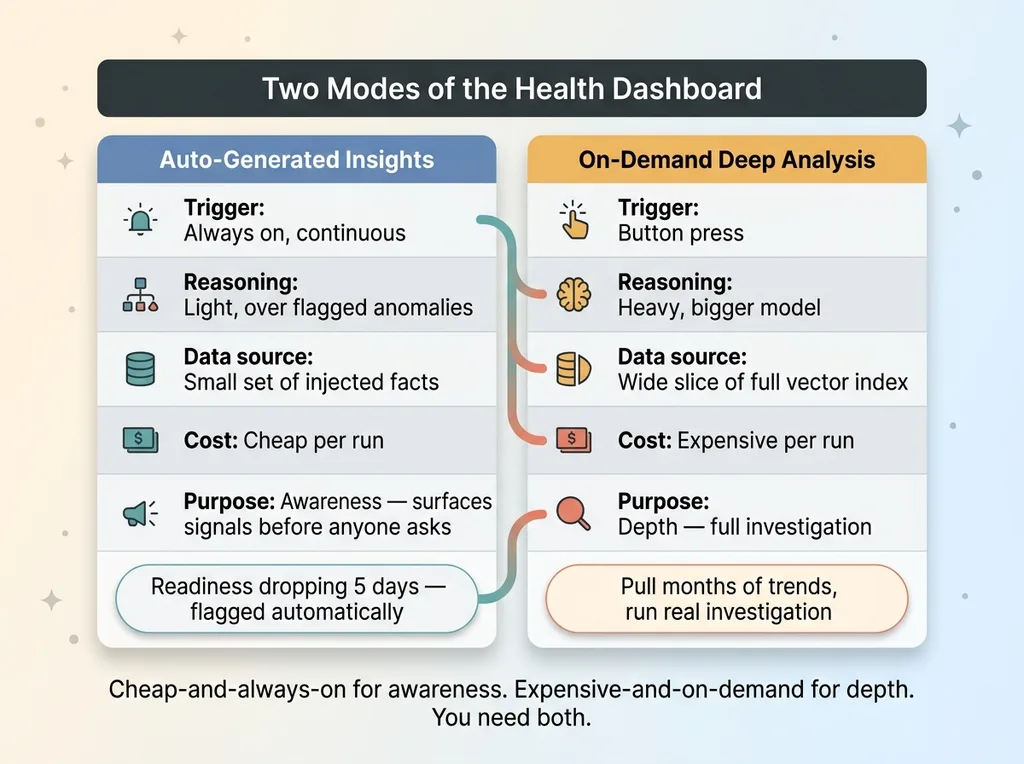
The dashboard does two things, and the split between them is a cost decision as much as a UX one.
 Two Modes: Auto-Insights vs On-Demand Deep Analysis
First, auto-generated insights. The system continuously surfaces notable trends without anyone asking. A flagged decline in deep sleep, a readiness baseline drift, a creeping resting heart rate. These show up on their own.
Why automate this? Because important signals shouldn't wait for someone to think of the right question. If readiness has been dropping for five days, the system says so. Nobody has to remember to check. This runs cheap and always-on, light reasoning over the flagged anomalies that already earned injection.
Second, on-demand AI deep analysis. A button. Press it and the system runs a heavier, more expensive reasoning pass over a much wider slice of the vectorized data. This is for when you want a real investigation, not a glance.
The deep analysis pulls more from retrieval, runs a bigger model, and takes longer. It costs more per run. That's exactly why it's on-demand and not always-on.
The logic ties straight back to inject versus retrieve. Cheap-and-always-on handles awareness, using the small set of injected facts. Expensive-and-on-demand handles depth, reaching into the full index when someone actually wants the deep dive.
Running the expensive pass continuously would burn money for no reason. Running only the cheap pass would miss things a real investigation would catch. You need both, and you need to know which one fires when.
You Already Have the Data. The Question Is What AI Should See.
Here's the lesson for the skeptical operator, and it has nothing to do with wearables.
Every business is sitting on data. Device exports, tool data, spreadsheets, logs, years of CRM history. It's all there.
The instinct, every time, is to feed the AI all of it. Connect everything, dump it in, let the model figure it out.
That's the mistake. That's the project that produces a slow, expensive chatbot that hallucinates because it can't tell what matters from what doesn't.
The value was never in the connection. It's in the judgment about what earns a place in the context window and what stays in retrieval until it's needed. That judgment is the actual work. It's where AI projects either succeed or quietly fail six months in.
I made these exact calls building a private health system for one family member. What to inject, what to vectorize, what to summarize, what to ignore entirely. The same logic applies whether you're working with biometrics, sales data, or support tickets. The data type changes. The discipline doesn't.
If you've got data piling up and AI that isn't using it well, that's worth a conversation. Happy to talk through your own data and where the lines should be drawn.
Want to explore what AI could do for your business?
Book a free 30-minute strategy call. No pitch deck, no sales team. Just a real conversation about your operations and where AI actually fits.
Get AI insights for business leaders
Practical AI strategy from someone who built the systems — not just studied them. No spam, no fluff.
Hodgen.AI
Ready to automate your growth?
Book a free 30-minute strategy call with Hodgen.AI.
Book a Strategy Call