Every new project starts the same way. You open a registrar dashboard, search for a domain, compare TLD pricing, click purchase, wait for the confirmation email, then open your DNS provider in another tab. You copy the nameservers. You add A records or CNAMEs. You open your deployment platform in a third tab, add the custom domain, copy the verification records it gives you, go back to the DNS tab, paste them in, wait for propagation, refresh, check SSL status. Done. It's never hard. It's also never fast. And if you do it often enough, the friction becomes a specific, measurable tax on your velocity. That's what pushed me to automate domain registration CLI-style — a single terminal command that handles search, purchase, DNS configuration, and platform connection without opening a browser.
The trigger was building multiple things in a short window. When I built my consultancy site in a day, the actual site came together fast — but the domain setup was this annoying 10-15 minute detour of tab-switching and copy-pasting values between dashboards. Then it happened again while building a SaaS product in a weekend, where every bottleneck in the deployment pipeline gets magnified because you're working against a self-imposed clock. That second time, I wrote down every step. Twelve distinct actions across three different dashboards.
The rule I follow: anything you do more than three times that involves copying values between browser tabs is a script waiting to happen. Domain setup qualifies.
Why Most DNS Providers Don't Let You Register Domains via API
This is the part that isn't obvious until you try to build the automation.
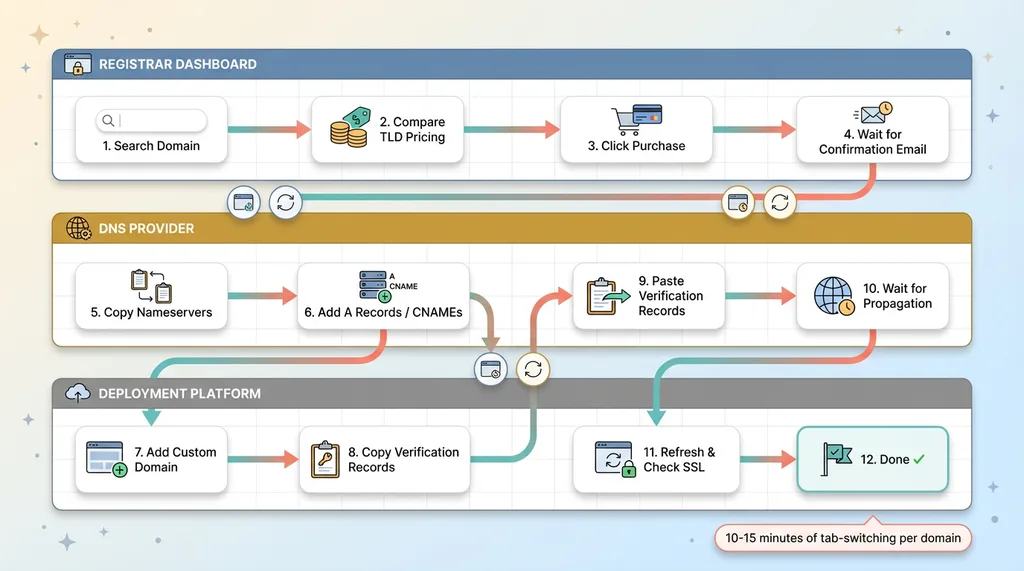 Manual Domain Setup: 12 Steps Across 3 Dashboards
The CDN provider gap
If you're a developer, you probably manage DNS through a CDN provider that also handles edge caching, SSL, and security rules. The tooling is excellent. The API for managing DNS records is mature and well-documented. But here's the gap: most of these providers don't offer domain registration through their API. You can create zones, add records, configure page rules — all programmatically. The actual purchase step? That requires their dashboard. A human clicking buttons.
This means you can't build a fully automated pipeline using a single provider. You'll always hit a wall at the registration step, which forces you back into a browser.
Finding a registrar with a real API
The fix is separating concerns. Use a registrar that exposes a proper REST API for the entire domain lifecycle — search, availability checks, registration, DNS record management, auto-renew configuration, WHOIS privacy. Then optionally migrate DNS management to your CDN provider after purchase for the full infrastructure stack.
The criteria I used when picking a registrar:
- API coverage: Can I search, check availability, purchase, and manage DNS records all through API endpoints? If any of those steps require a dashboard, it's a non-starter.
- Pricing transparency: Per-TLD pricing available via API, not hidden behind a checkout flow.
- TLD breadth: Support for at least 12+ common TLDs including the developer-oriented ones (.dev, .io, .app, .ai).
- No verification gates: Some registrars require manual identity verification before allowing programmatic purchases. That breaks the automation.
- Reasonable rate limits: Availability checks across multiple TLDs need to happen fast. If the API throttles you to one request per second, the UX falls apart.
I'm intentionally keeping vendor names out of this. The specific registrar I use isn't the point — the pattern is. Find a registrar with a real API, use it for the purchase step, and decide whether to keep DNS there or migrate it elsewhere based on your infrastructure needs.
The Architecture: Two Modes, One Command
The CLI has two modes because not every project needs the same infrastructure.
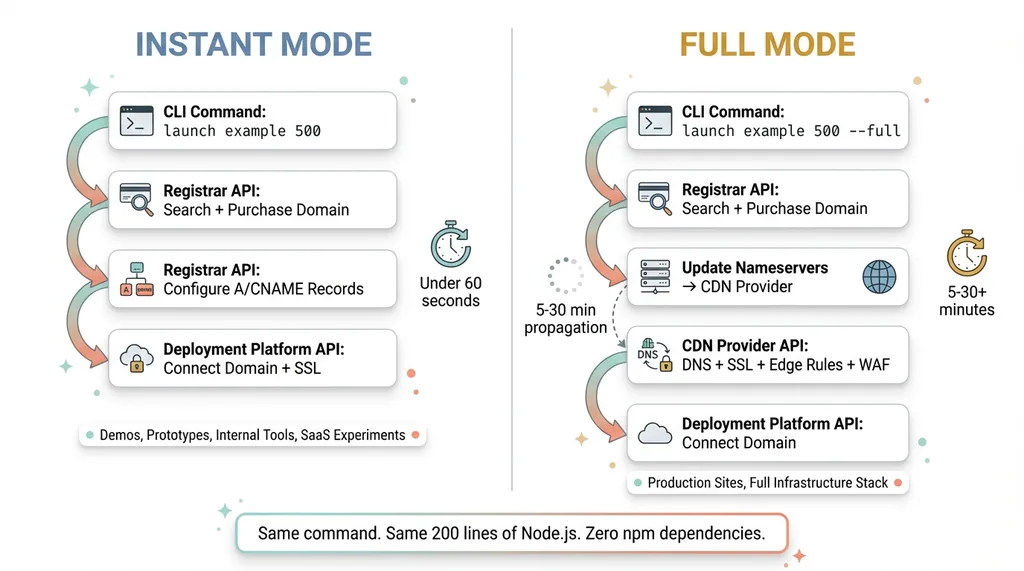 CLI Architecture: Instant Mode vs Full Mode
Instant mode: registrar-native DNS
In instant mode, the registrar handles everything. You register the domain and add A/CNAME records through the same API. There's no nameserver migration, no waiting for propagation across providers, no second API to authenticate against. The domain is registered, DNS records are configured, and you're pointed at your deployment in under 60 seconds.
This is for projects where you just need a domain resolving to a deployment. No CDN layer, no edge caching, no WAF rules. Quick demos, client prototypes, internal tools, SaaS experiments. The vast majority of my projects start here.
Full mode: CDN migration with nameserver swap
Full mode adds a step. After registration, the CLI updates the domain's nameservers to point at your CDN/DNS provider, then uses that provider's API to configure DNS records, SSL, and any edge rules you need. This gives you the complete infrastructure stack — caching, DDoS protection, analytics, the works.
The tradeoff is time. Nameserver propagation takes anywhere from 5 to 30 minutes, sometimes longer. The CLI handles this by polling, but the reality is you're waiting. For production sites that need the full stack, the wait is worth it. For a weekend project or a client demo, instant mode is the move.
The actual command shape is deliberately minimal:
launch example 500
First argument: the domain stem (no TLD — the CLI searches across all of them). Second argument: the maximum budget in cents. No config files. No YAML. No JSON manifests. The CLI reads API keys and contact info from environment variables and takes the mode as an optional flag: --instant or --full. Default is instant.
The whole thing is about 200 lines of Node.js with zero npm dependencies. Native fetch (available in Node 18+) and the registrar's REST API. That's it.
How the Search and Purchase Flow Works
The search logic is where most of the interesting engineering lives.
Checking 12+ TLDs sorted by price
When you run the command, the CLI takes your domain stem and fires availability checks across every TLD it's configured to search. For me, that's 12: .com, .io, .dev, .ai, .co, .xyz, .app, .net, .org, .tech, .so, and .me. Each check returns whether the domain is available and what it costs per year.
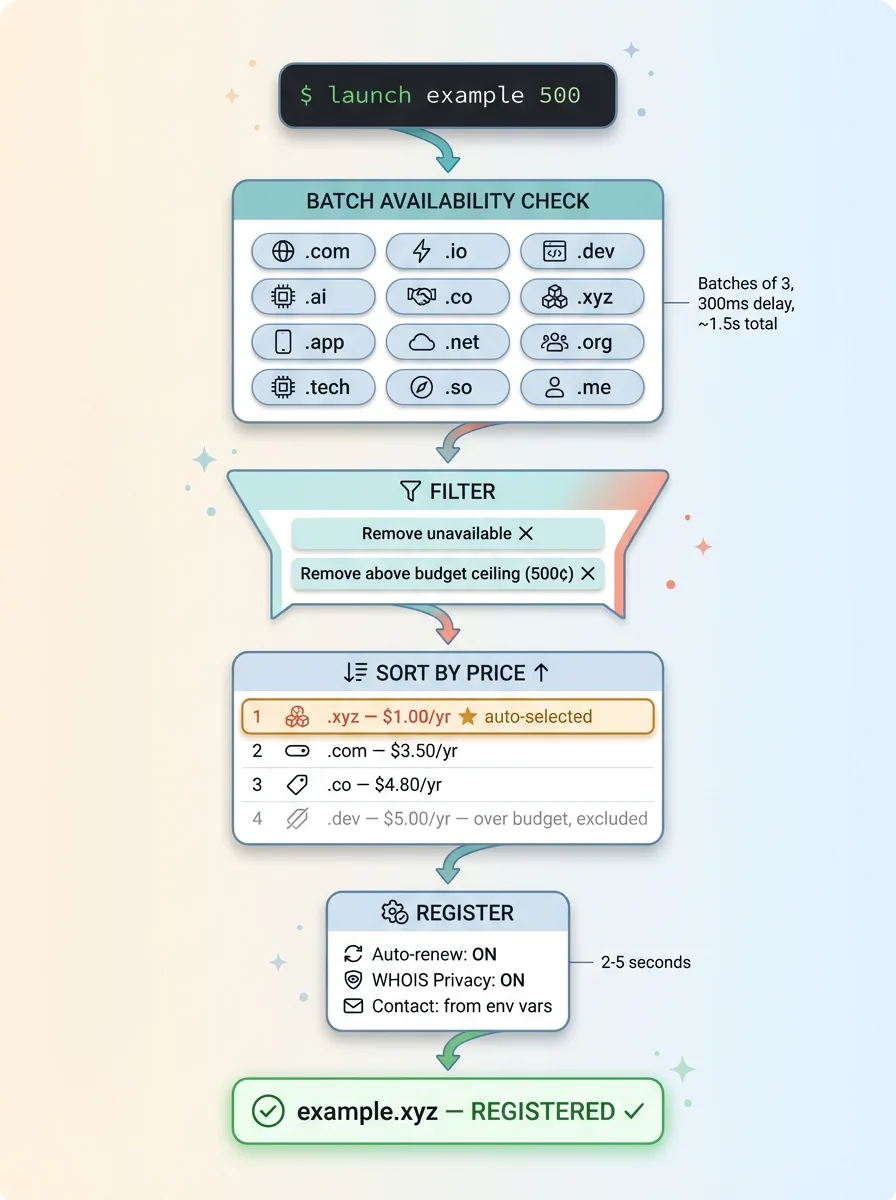 TLD Search, Filter, and Purchase Pipeline
The CLI collects all responses, filters out anything unavailable, filters out anything above your budget ceiling (the second argument), sorts by annual cost ascending, and displays a ranked table in the terminal. You see the domain, the TLD, and the annual price. The cheapest available option auto-selects unless you passed an --interactive flag, in which case you pick from the list.
Once selected, the CLI fires the registration API call with auto-renew enabled, WHOIS privacy on, and contact details pulled from your environment variables. Registration typically confirms in 2-5 seconds.
Handling rate limits and API quirks
Here's where it gets real. Most registrar APIs throttle availability checks. Fire 12 simultaneous requests and you'll hit a rate limit before half of them return. The workaround is batching.
The pattern looks roughly like this:
const tlds = ['.com', '.io', '.dev', '.ai', '.co', '.xyz', ...]
const batchSize = 3
const delayMs = 300

for each batch of tlds (3 at a time):
    fire availability checks in parallel
    collect results
    wait 300ms before next batch
Three parallel requests, 300ms pause, next three. The full 12-TLD search completes in about 1.5 seconds. Not instant, but fast enough that the terminal output feels responsive.
There's also a quirk with certain TLDs — .ai being the most annoying. Availability responses for .ai domains sometimes come back as "pending" rather than available or unavailable. The CLI handles this with a retry: if a response comes back ambiguous, it waits 2 seconds and checks again. If it's still unclear after two retries, it marks that TLD as unavailable and moves on. I'd rather skip a TLD than hang the CLI waiting for a flaky upstream response.
The budget ceiling is important. I set it because some TLDs are absurdly expensive for premium domains, and I don't want a script auto-purchasing a $4,000 .ai domain when I meant to spend $12 on a .xyz. The 500-cent default ($5) catches the cheap TLDs. Bump it to 2000 if you want .io and .dev options. Bump it to 8000 if you're serious about .ai.
Auto-Connecting to Vercel (or Any Deployment Platform)
After purchase and DNS configuration, the last step is connecting the domain to wherever the project is deployed.
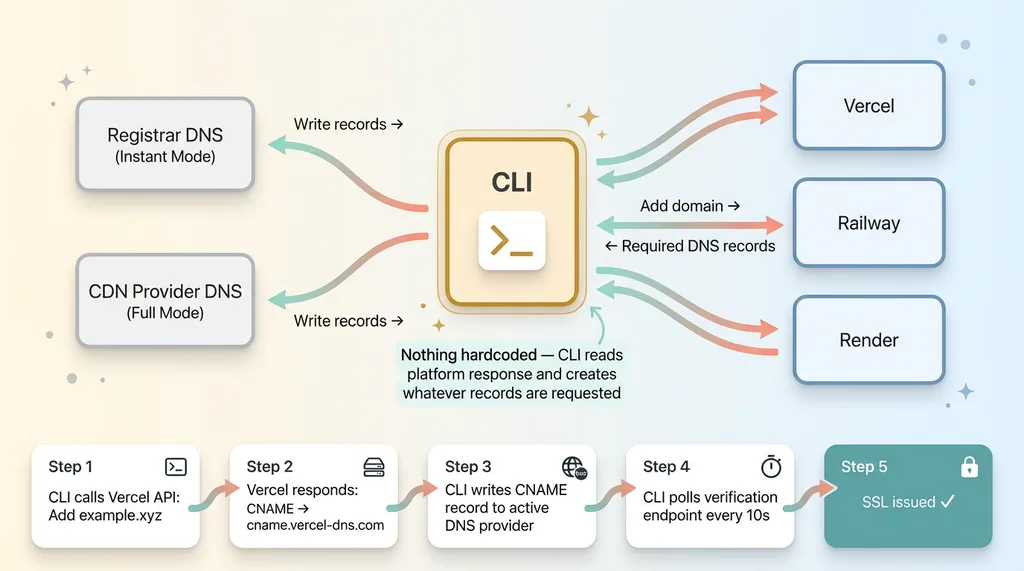 Platform-Agnostic DNS Record Flow
For Vercel, the flow is clean. The CLI calls Vercel's API to add the custom domain to a specific project. Vercel responds with the exact DNS records it needs — typically a CNAME pointing to cname.vercel-dns.com or an A record for apex domains. The CLI reads that response and writes those records back to whichever DNS provider is active. In instant mode, it writes to the registrar's DNS API. In full mode, it writes to the CDN provider's API.
The elegant part: nothing is hardcoded. The CLI doesn't assume what records Vercel needs. It reads the API response and creates whatever records the platform asks for. This means it could work with any deployment platform that follows the same pattern — add domain, get required records, write them. Railway works similarly. So does Render. The CLI is structured so adding a new platform target means writing one function that calls the platform API and parses its DNS requirements.
After records are written, Vercel verifies DNS propagation before issuing SSL. The CLI polls Vercel's domain verification endpoint every 10 seconds and reports status in the terminal. In instant mode with registrar-native DNS, verification usually clears in under a minute. The DNS records are live almost immediately because there's no nameserver migration.
Total time from running the command to a live site with SSL: under 90 seconds in instant mode. I've timed it. The longest part is the TLD search at the beginning.
What I'd Do Differently (And What's Next)
Honest assessment after using this on 8+ real projects.
What works well: Instant mode is genuinely zero-friction domain registration automation. Run the command, watch the output scroll, refresh the URL, site's live. I've used it for client demos, internal tools, and new project launches. It saves real time every single time and — maybe more importantly — eliminates the context-switching that kills momentum when you're in a build flow.
What's clunky: Full mode with nameserver migration is still semi-manual in practice. The CLI polls for propagation, but the timing is unpredictable. Sometimes it's 5 minutes. Sometimes it's 25. The CLI just sits there polling, which means you're either watching a terminal or context-switching to something else and coming back. Not a dealbreaker, but not the seamless experience instant mode provides.
What I'd add next: A dry-run mode that shows exactly what the CLI would do — which domain it would buy, what DNS records it would create, which platform it would connect to — without actually purchasing anything. A teardown command that removes the domain from the deployment platform and optionally cancels the registration. And the one I'm most interested in: wrapping the whole thing as an MCP tool so an AI agent could register and deploy domains as part of a larger automated build pipeline. Imagine telling an agent "build me a landing page for this concept and put it live" and having it handle everything including the domain.
One caveat: this is a power tool for people who launch things frequently. If you register one domain a year, the dashboard is perfectly fine. The ROI shows up when you're doing it weekly.
The Most Valuable Automation Is Often the Simplest
Here's the broader lesson, and it applies well beyond developer workflow automation and domain setup.
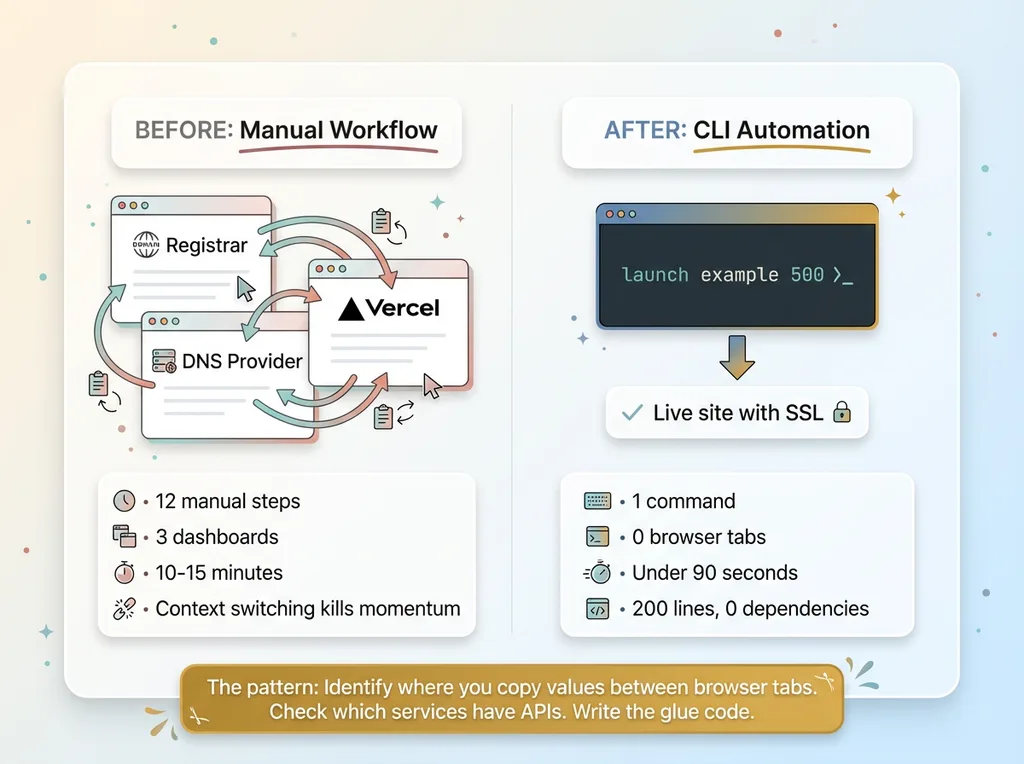 Before vs After: Manual Workflow vs CLI Automation
The most valuable automation I've built at my DTC fashion brand isn't always the sophisticated multi-model AI pipeline that generates product concepts or the dynamic pricing engine managing 564 products. Sometimes it's a 200-line script that eliminates a workflow everyone had been tolerating.
The pattern is always the same. Identify where you're copying values between browser tabs. Check which of those services have APIs. Write the glue code. This applies to domain registration, but it also applies to invoicing, inventory updates, reporting, content publishing, and dozens of other cross-platform workflows where humans act as the integration layer between two systems that could talk to each other directly.
This is the same principle behind the automation work I've written about before — finding manual workflows and scripting them away. Sometimes the script is sophisticated. Sometimes it's 200 lines and zero dependencies.
That's what a Chief AI Officer actually does. Not just deploy AI models, but look at the entire operation and find every point of friction that can be scripted, automated, or eliminated. Sometimes that means building a multi-LLM content pipeline. Sometimes it means a CLI that buys domains.
Get the next build note.
I write up each system I build, including what broke. Subscribe to my newsletter and I'll send you the next one.