The Pitch vs. The Reality of an AI Email Triage Assistant
Here's the dream. An AI email triage assistant reads your entire inbox overnight, sorts the noise from the signal, archives what doesn't matter, and hands you a clean list of things that actually need a decision. You open your laptop with coffee. Twelve items. All real. You're done with email in twenty minutes instead of two hours.
I built one. I run several businesses, and my inbox was eating my mornings. So I wired up a system to read it all, triage it, and produce that clean action list every day.
The interesting part was not getting the model to read email well. Models are genuinely good at that now. Claude can read a thread and tell you what it's about, who's waiting on you, and what the next step is. That problem is largely solved.
The interesting part was that my first version looked like it worked and quietly didn't.
It produced a clean list. The list looked great. But it was lying to me, and it took real failures to find out how. Whole batches of email never got read. The database said messages were handled when they were still sitting in my inbox. None of it showed up on the dashboard.
That's the thing nobody puts in the slide deck. The model is not the product. Coverage and state synchronization are the product. Whether the system touches every single message, and whether its picture of your inbox matches your actual inbox.
The buyer's real fear is simple and correct: can AI manage my inbox without missing things or making a mess I have to clean up? Let me walk you through what I learned answering that on my own email first.
What a Good Inbox Triage Actually Has to Do
Two properties separate a real AI executive assistant from a demo. Neither is about how smart the model is.
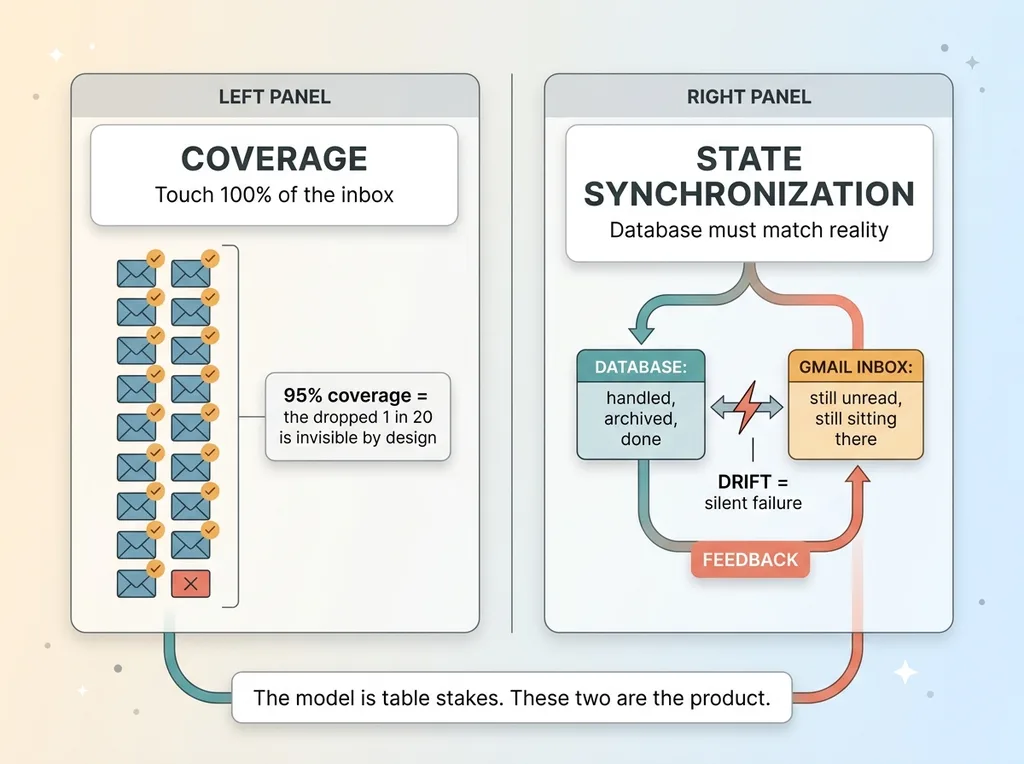 Coverage vs State-Sync: The Real Product
Read everything, not just what's easy
The first is coverage. The system has to touch 100% of the inbox. Every message, every batch, every day. Not the easy ones. Not the ones that fit neatly. All of them.
A triage that handles 95% sounds great until you think about what it means. The whole point is that you stop checking your inbox manually. You trust the action list. So the 5% it misses is invisible to you, by design. You're not going to catch it, because the entire value proposition is that you stopped looking.
A 95% triage is worse than useless. It's a trap. It teaches you to trust a system that drops one in twenty messages, and the dropped ones could be the deal, the contract, the angry customer.
Match reality, not just the database
The second property is state synchronization. If the system says an email is handled and archived, that had better be true in your actual inbox.
Most AI systems keep their own internal record of what they've done. A database row that says "processed, archived, done." The danger is when that record drifts from reality. The database says done. Gmail says still sitting in the inbox, unread.
When those two disagree, your dashboard looks perfect and your inbox is a disaster. The system reports success while the work is undone.
The model's reading quality is table stakes. Everyone has good reading now. These two properties, coverage and state-sync, are where systems silently break. This is the real spec. It's the part vendors skip because it's boring plumbing, not impressive AI.
The Coverage Gap That Dropped Whole Batches
The first failure was a coverage gap, and it was invisible.
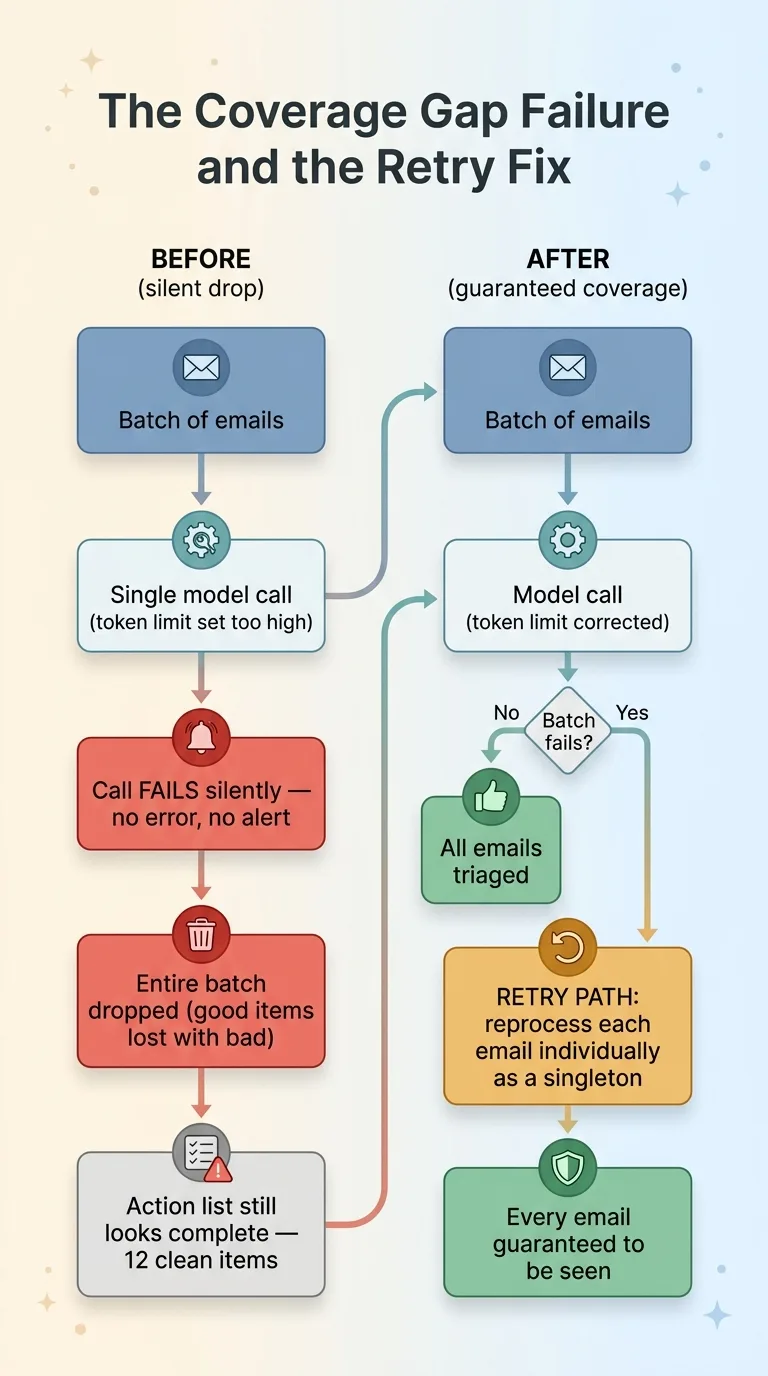 The Coverage Gap Failure and the Retry Fix
My triage processed email in batches. Group of messages, one model call, structured response back. Efficient. The problem was buried in the configuration.
At some point the token limit on the batch call got bumped way up. The logic was reasonable on its face: bigger context window means more email per call, fewer calls, lower cost. More is better, right?
Except the limit was set past what the call could actually handle. Every batch call broke. And it broke silently. No error in my face, no alert, no red dashboard. The call just failed and the system moved on.
On top of that, the batch logic had a second flaw. When one item in a batch misbehaved, the code dropped the entire batch. Not the bad item. The whole group. So whole sets of email never got triaged at all.
The action list still looked complete. Twelve clean items every morning. But behind it, entire batches of messages had never been read by the model. The model never even saw them. This is the critical distinction: it was not a model failure. The intelligence was fine. The plumbing dropped the work before the intelligence ever ran.
This is exactly why I'm obsessive about automations that email me when nothing is wrong. A silent failure is the most expensive kind, because you don't pay for it until it's too late.
The fix had two parts. First, I reverted the token limit to a value that actually works, so batch calls stopped breaking. Second, I added a retry path. When a batch fails, the system reprocesses every missed email individually, as a singleton. One message, one call, guaranteed to be seen.
That second part matters more than the first. Bugs come back. Configs drift. The retry path means coverage is guaranteed even when a batch fails again. The architecture itself refuses to drop email.
When the Cheap Model Broke the Schema
The second failure was more subtle, and it taught me something about tiering models for cost.
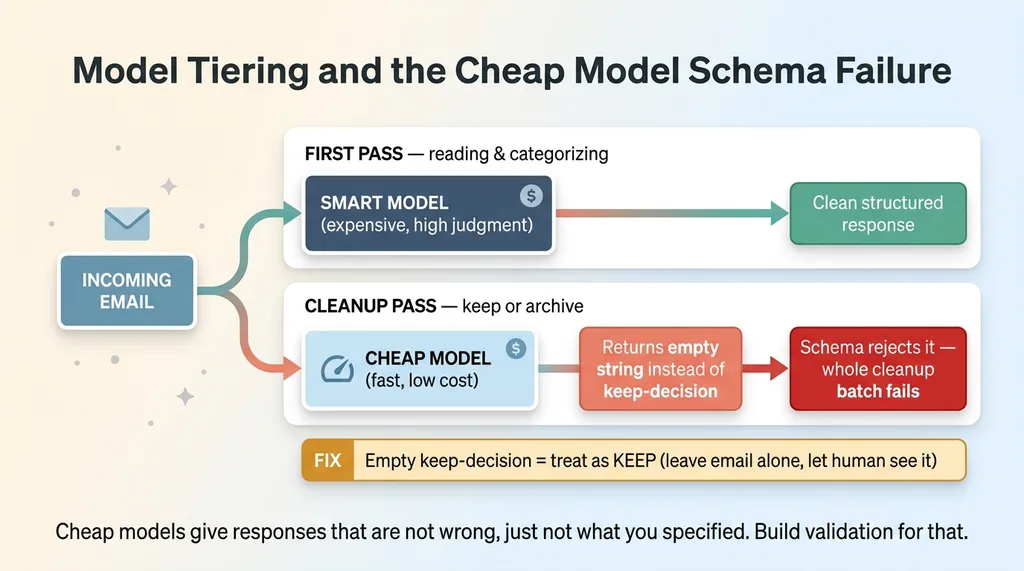 Model Tiering and the Cheap Model Schema Failure
Not every triage decision needs the smartest, most expensive model. The first pass reads and categorizes email, which takes some judgment. But a second cleanup pass just makes simple keep-or-archive decisions on the leftovers. Binary. Cheap.
So I tiered it. Smart model for the reading, cheap and fast model for the cleanup. This is standard practice when you're running real volume, and it's the right instinct. I do this kind of multi-model routing across most of my systems to keep costs sane.
The cleanup step expected a structured response. A defined schema with a keep-decision field. The cheap model, on the keep cases, returned an empty string instead of a proper value.
The schema rejected the empty string as invalid. And because the validation treated that as a parse failure, the cleanup rejected the entire batch. Nothing got cleaned. Every cleanup run failed because the cheap model returned technically-valid-but-empty garbage that my validation wasn't built to handle.
The lesson is sharp. When you tier your models for cost, the cheap one will give you responses that are not wrong, exactly, but not what you specified either. Empty strings. Missing fields. Slightly off formatting. Your validation has to be built for that reality, not for the clean output the expensive model gives you.
The fix was to tighten the schema handling so that an empty keep-decision is treated as a keep, not as a failure. If the model couldn't decide, the safe default is to leave the email alone. Keep it. Let the human see it.
This is the cost-versus-reliability tradeoff every real system hits eventually. You save money with the cheap model, then you pay it back in defensive validation. The savings are real, but only if you build the system expecting the cheap model to be sloppy.
143 Zombie Rows: When the Database Lies About the Inbox
The third failure was the worst, because it cut straight to state synchronization.
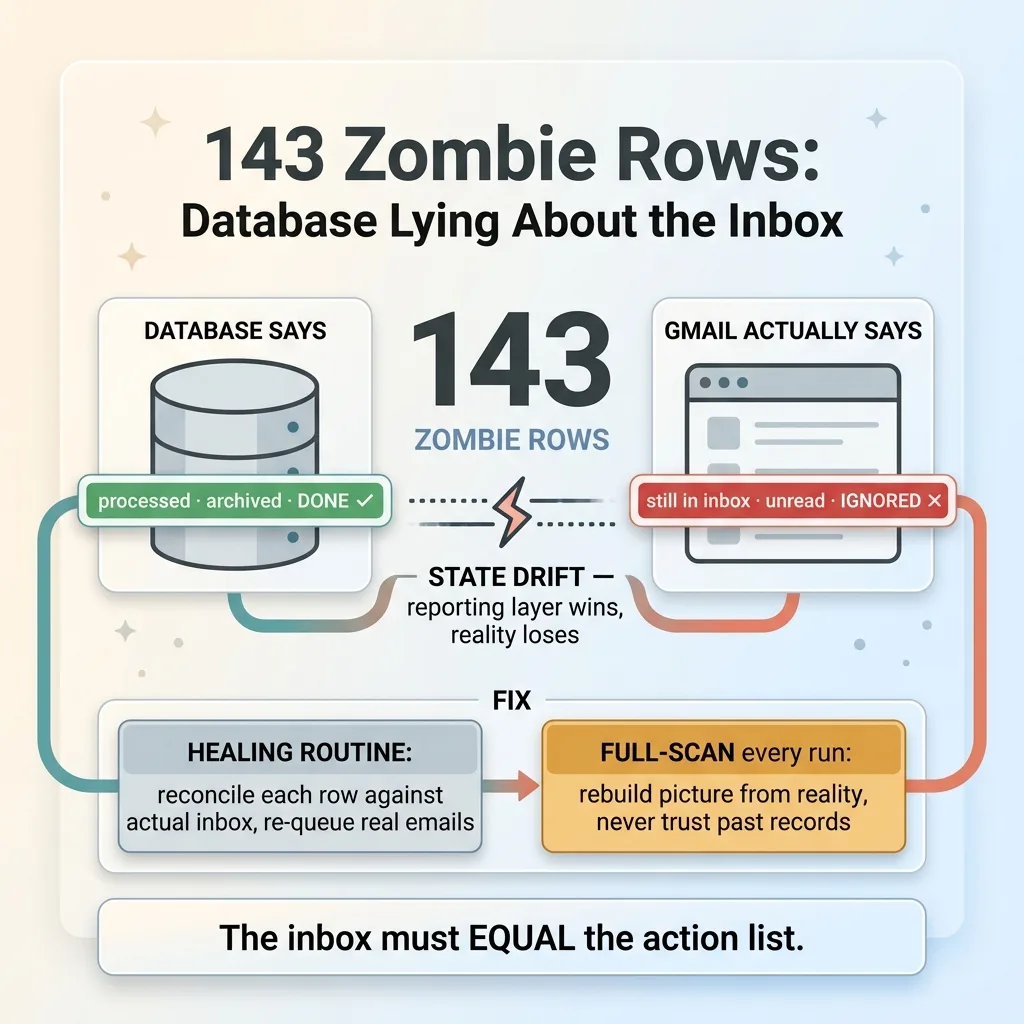 143 Zombie Rows: Database Lying About the Inbox
I found 143 rows in the database marked done. The system believed those 143 emails were handled and archived. Finished. Off the list.
They were still sitting in my actual inbox. Unarchived. Unread, some of them.
The database said one thing. Gmail said another. 143 zombie rows: records that claimed work was complete when the work had never touched reality.
This is the state-synchronization problem in its purest form, and it's the most dangerous failure of the three because everything looks fine on the dashboard. The action list was clean. The metrics were green. The system reported 143 successful completions. And 143 real emails sat in my inbox, ignored, because the system had convinced itself they were done.
I've written before about AI that reports success while doing nothing, and this is the textbook case. The reporting layer and the reality layer drifted apart, and the reporting layer won. The dashboard told a confident, detailed, completely false story.
I fixed it two ways.
First, a healing routine. It reconciled the zombie rows by checking each one against the actual inbox state and correcting the record so the database matched reality. The emails that were really still there got re-queued. The inbox state and the action list were forced back into agreement.
Second, and more important, I changed how the system sees the inbox. The original version processed only new mail. It assumed everything older had been handled correctly. That assumption is exactly how 143 rows go zombie without anyone noticing.
I switched it to full-scan the entire inbox on every run. The system rebuilds its picture of reality against the actual inbox, every time, instead of trusting its own past records. It costs more to scan everything. It's worth it.
The principle: the inbox must equal the action list. If those two can drift, even slightly, you don't have an assistant. You have a liability that looks like an assistant.
The Pattern: Coverage and State-Sync Are the Product
Step back and look at all three failures together. The token limit that broke batches. The cheap model that broke the schema. The 143 zombie rows.
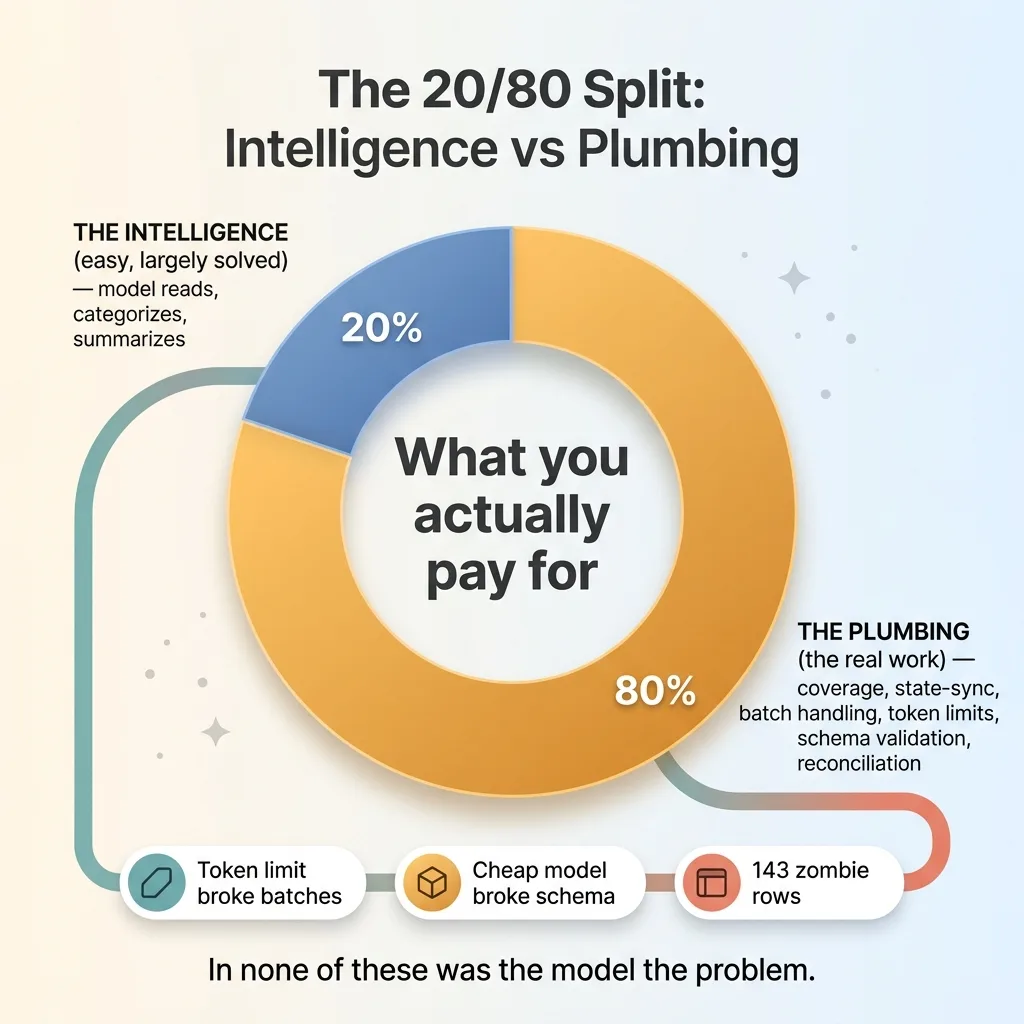 The 20/80 Split: Intelligence vs Plumbing
In not one of them was the model the problem.
The model read the email fine, every time. It categorized accurately. It wrote good summaries. The intelligence layer did its job. What failed was plumbing: batch handling, token limits, schema validation, state reconciliation. The unglamorous infrastructure that surrounds the smart part.
This is true of almost every AI system I build. The intelligence is the easy 20%. You call a good model with a clear prompt and you get good output. That part is largely a solved problem now.
The boring 80% is making sure the system covers everything and that its internal state matches the real world. Coverage and state-sync. That's where the work is, that's where systems silently break, and that's what you're actually paying for when you build something trustworthy.
So here's the honest answer to the buyer's doubt. Yes, AI can manage your inbox. But only if someone builds in guaranteed coverage and guaranteed state synchronization. And only if a human reviews the action list rather than the system auto-firing replies and archives.
That's not a limitation I'm embarrassed about. It's a design principle. Every system I ship stops for a human at the decision point. The triage does the reading and the sorting. You make the calls. The machine handles the volume, you keep the judgment.
What This Means If You Want AI Running Your Inbox
If you've been burned by a vendor, or you're just nervous about handing your inbox to a machine, here's the practical takeaway.
When someone demos an inbox AI and shows you a beautiful clean action list, ask two questions.
Does it touch every single message? Not most. Not the easy ones. Every one, with a guaranteed path for anything that fails the first time.
And how does it verify its own state against reality? When it says an email is handled, what proves that's true in the actual inbox, not just in its database?
If they can't answer those two questions clearly, the system will do exactly what mine did in version one. It will silently drop things and quietly lie about what it handled. The demo will look perfect because demos always do. The failures live in the 5% and the zombie rows, where you can't see them.
I learned this on my own inbox, across my own businesses, with my own money and time. I'd rather find the 143 zombie rows in my email than in a client's. That's the whole reason I build these things for myself first.
Get the next build note.
I write up each system I build, including what broke. Subscribe to my newsletter and I'll send you the next one.