AI Command Center for Small Business: One Screen
How I built an AI command center for a small business owner who'd never used AI. One login, a daily priority plan, and a CRM built from his inbox.
By Mike Hodgen
The Business That Ran Out of One Inbox
A guy who runs a small packaging distribution business called me last year. He sells boxes. Corrugated, custom-printed, the unglamorous stuff that every product in the world ships inside of.
He had never used an AI tool in his life. No CRM. No pipeline. No software that tracked who he talked to or what he promised them. His entire business lived in two places: his email inbox and his head.
That works until it doesn't.
Here is what was actually breaking. He sent a quote to a serious buyer and never followed up, because the email got buried under forty others. He lost the deal to someone who called back. A repeat customer who ordered every quarter went quiet, and he forgot to check in until the guy had already found another supplier. Nothing was written down. Every decision, every relationship, every open thread existed only as long as he could hold it in his memory.
When I described this to him, he nodded and said the thing I hear from almost every owner-operator: "I figured AI was for tech companies. Not for a guy who sells boxes."
That sentence is the whole problem. He thought AI required him to become technical. To learn prompts. To babysit a system. To change how he worked.
The opposite was true. For this to work at all, the AI had to disappear completely. He would never type a prompt. He would never see "AI" as a thing he operated. He would just open one screen and get a business that finally remembered things for him.
This is what an AI command center for small business actually looks like in practice. Not a chatbot. Not a dashboard with forty widgets. One screen that does three jobs.
What an AI Command Center for Small Business Actually Is
An AI command center for small business is a single internal app that turns raw, messy inputs (emails, customer questions, gut decisions) into structured, useful output: a working CRM, a visible pipeline, and a plan for the day.
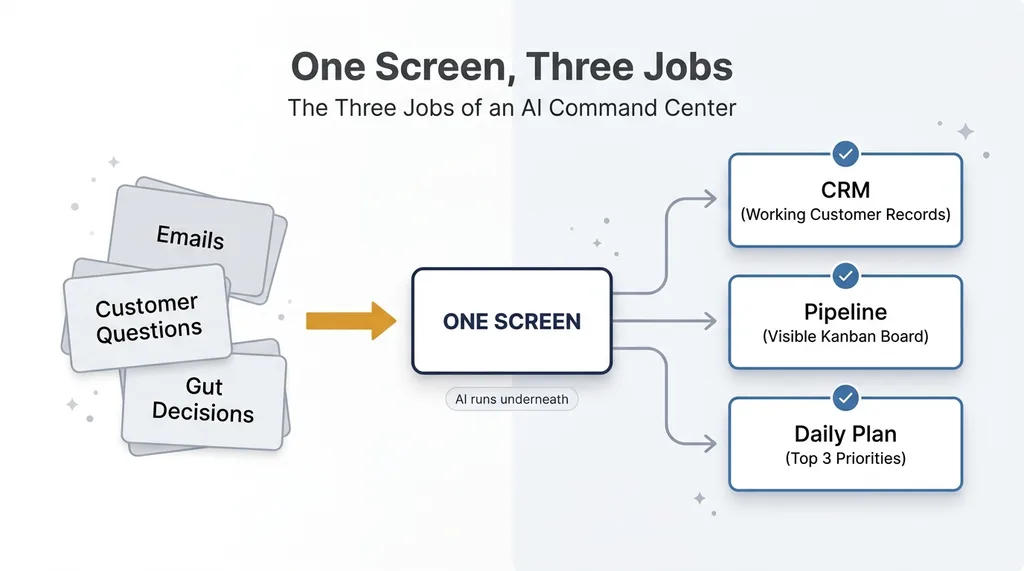 The Three Jobs of an AI Command Center
The defining feature is not the AI. It is that everything collapses into one screen.
Not a chatbot. Not a dashboard with 40 widgets.
Most SMB software dies the same way. You buy a CRM, you fill out fields for two weeks, then you stop. You sign up for a project tool nobody opens. You end up with a graveyard of subscriptions, each one demanding maintenance you never agreed to.
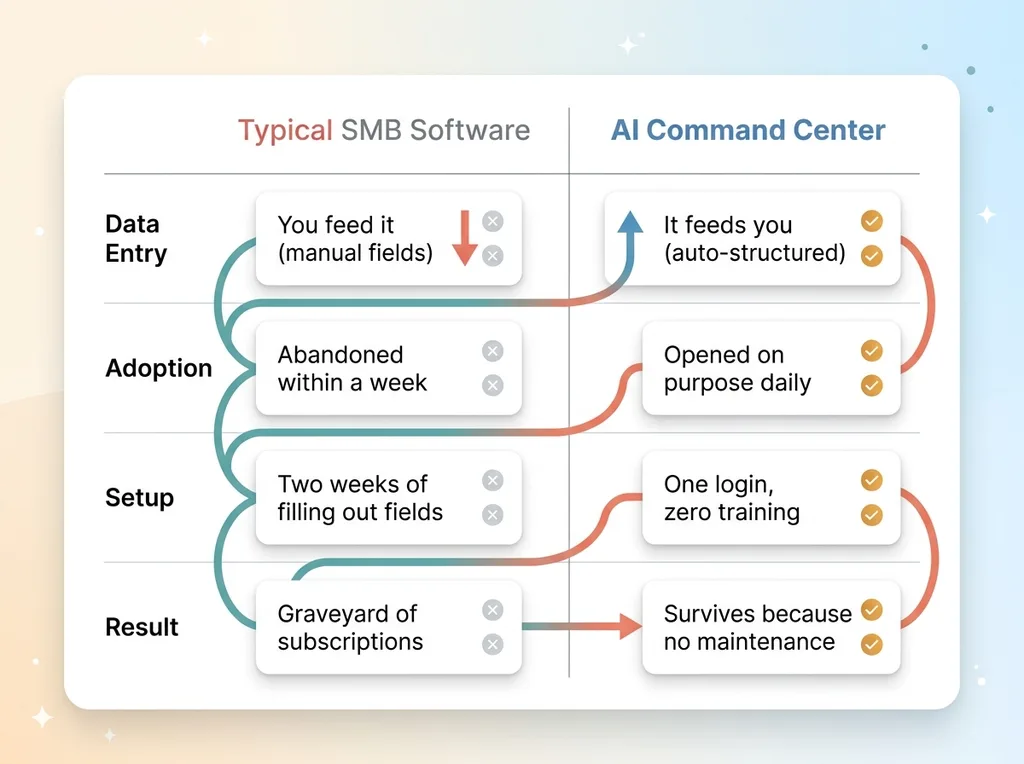 Traditional SMB Software vs AI Command Center
A command center is the opposite design. It does not ask the owner to feed it. It feeds the owner. The AI runs underneath the surface, doing the structuring work that the owner would never do by hand.
One login, mobile-first, zero training
Here is the rule I build by, and I will state it plainly: if it needs training, an owner-operator will abandon it within a week.
That is not a knock on them. They are busy running a real business. They do not have time to learn your interface. So the bar is one login, works on a phone, and explains itself in the first thirty seconds.
This applies whether you run packaging, a salon, or an electrical contracting outfit. I wrote more about that range of AI for a salon, an electrician, and a guy who sells boxes, because the pattern holds across every traditional business I have touched. The industry changes. The need for one simple screen does not.
Step One Was Listening, Not Building
I did not write a line of code for two weeks.
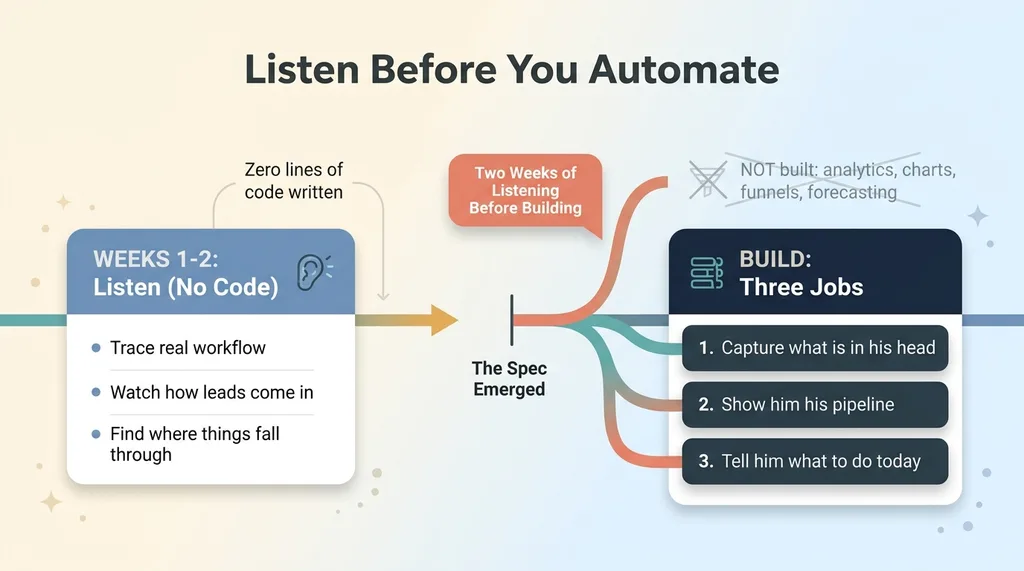 Two Weeks of Listening Before Building
Most AI projects start at the wrong end. Someone gets excited about a feature, builds it, then goes looking for a problem it might solve. I do the reverse. Before I build anything, I watch how the person actually runs their day.
So I sat with the box guy and traced his real workflow. Not the workflow he thought he had. The actual one. How a lead came in. Where it went. What he did with a quote. When things fell through the cracks and why.
What I learned changed everything. He did not need analytics. He did not need charts or conversion funnels or forecasting. He needed two simple things: to stop forgetting things, and to know what to do first when he sat down each morning.
That is it. The whole spec came out of watching him, not from a feature list. This is why I always tell owners to listen before you automate. The temptation is to start with the impressive stuff. The discipline is to start with the boring truth of how someone works.
By the end of those two weeks, the build came down to three jobs.
One, capture what is in his head so it stops living only there.
Two, show him his pipeline so he can see who is where.
Three, tell him what to do today so he opens the app on purpose.
Everything I built mapped to one of those three jobs. Nothing else got in.
Turning His Inbox Into a CRM He Never Has to Maintain
The core problem was simple and brutal: he would never manually fill out CRM fields. Not once. I knew that from the first conversation.
So I removed the maintenance entirely.
Paste the email, the AI structures it
Here is how it works for him. A customer emails him about a quote. He copies that email, pastes it into one box on the screen, and that is the entire interaction.
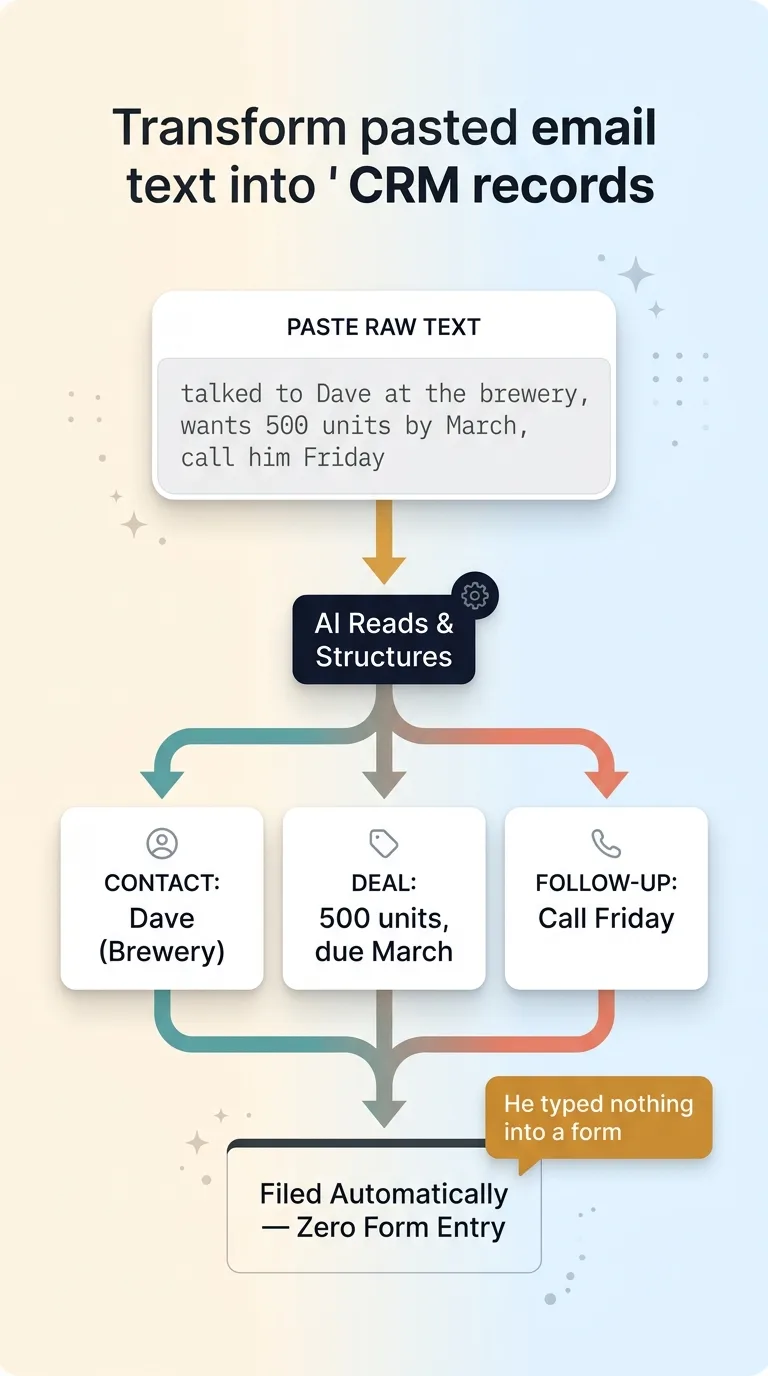 Paste Email to Structured CRM Record Flow
Behind the scenes, the AI reads it. It pulls out the contact, the company, the intent (are they asking for a quote, placing an order, following up, complaining), and the next step. Then it files all of that into the right place automatically.
He typed nothing into a form. He categorized nothing. He just pasted raw text and got back a structured record.
The same thing works for his own notes. He can paste a scrawled "talked to Dave at the brewery, wants 500 units by March, call him Friday" and the AI turns that into a contact, a deal, and a dated follow-up.
A Kanban pipeline derived from activity
The pipeline is a Kanban board, but he never drags cards around manually. The board is derived from activity. As emails and notes come in and get structured, deals move through stages based on what is actually happening, not based on him remembering to update a status.
It runs on Next.js and Supabase under the hood, but he does not know that and does not need to. What he knows is that he gets structure with zero data entry.
That is the real unlock for non-technical owners. The friction of keeping a system current is exactly what kills adoption. Remove the friction, and the system survives.
The Daily AI Digest That Writes His Top 3 Priorities
This is the feature that made him open the app every single day.
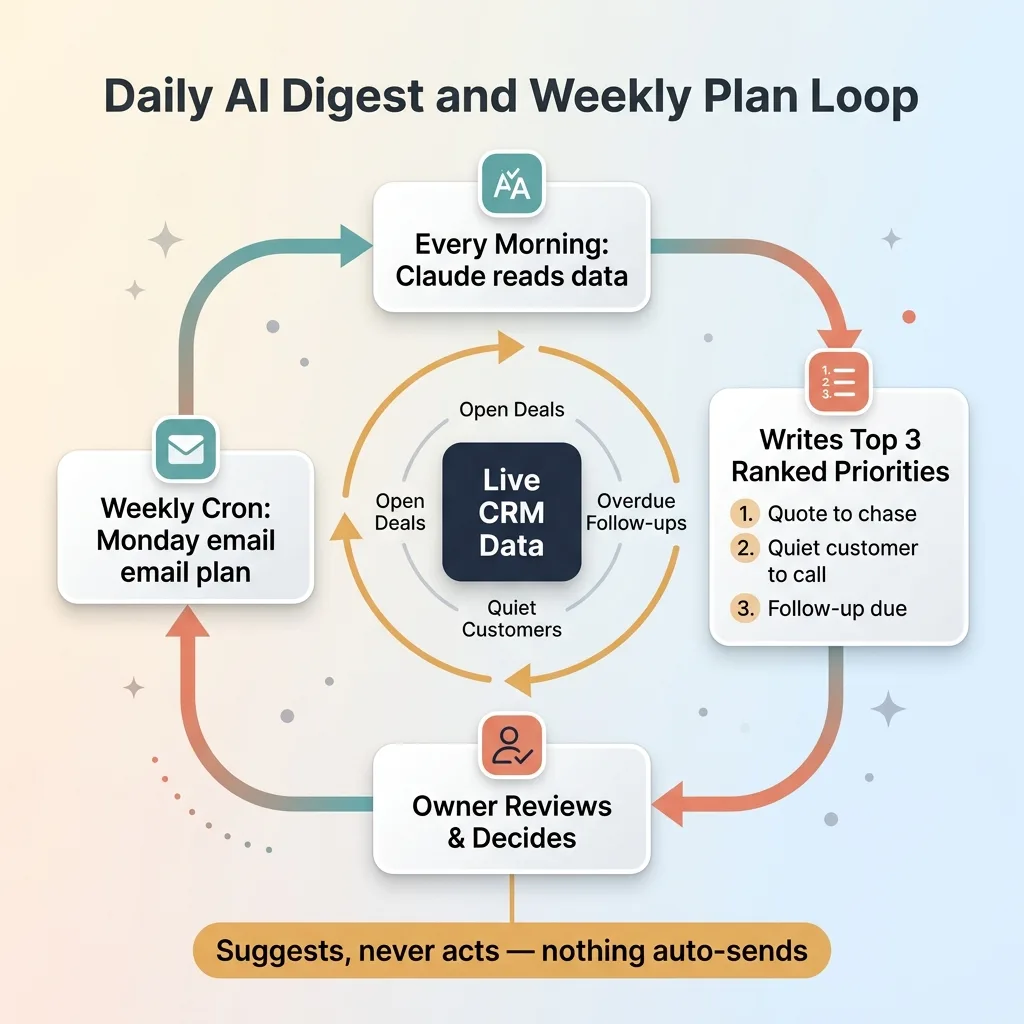 The Daily AI Digest and Weekly Plan Loop
Reads live CRM data every morning
Every morning, the system runs a brief generated by Claude. It reads his live CRM data (every open deal, every overdue follow-up, every quiet customer) and writes three ranked priorities for the day.
Not a list of twenty things. Three. Ranked. The most important thing he should do, then the next, then the next.
For a guy who runs on instinct, this matters more than a to-do list ever could. A to-do list flattens everything into equal items and overwhelms him. Ranked priorities respect his judgment while organizing it. The AI is not telling him what to think. It is making sure the thing he would want to act on is sitting right in front of him.
Suggests, never acts
This is the design choice I will not compromise on. The digest suggests. It never acts.
Nothing auto-sends. Nothing auto-commits. No email goes out without him. No deal closes itself. The AI surfaces what matters and he makes every call.
I build every system this way, and I wrote about why in every AI action stops for a human. For a small business owner especially, the trust comes from knowing the machine cannot do something dumb on its own. He stays in control of his relationships and his money. The AI just makes sure he sees what needs seeing.
I also added a weekly cron job. Every Monday morning, the system emails him a Claude-generated plan for the week, pulled from the same live data. That way the system reaches him even on the days he does not log in. The plan comes to him instead of waiting for him to come find it.
That email is what closed the loop. He started his week with a plan he did not have to make.
Why It Worked: The AI Had to Disappear
Here is the real lesson for any skeptical owner reading this.
Adoption did not come from the AI being impressive. It came from the AI being invisible.
He never types a prompt. He never opens a chat window. He never thinks of himself as someone who "uses AI." He logs into one screen, pastes the occasional email, and reads his three priorities. The intelligence is folded so far into the workflow that he does not perceive it as a separate thing he operates.
That invisibility is the whole point. The moment an owner-operator has to manage the AI, you have lost. They will not do it.
Let me be honest about what this is and is not. This is not transformation. I did not reinvent his business. I removed friction from things he was already doing badly in his head.
He always tracked his customers. He just did it in memory, and memory leaks. He always knew roughly what to do each day. He just had no way to see it laid out. The system did not give him new abilities. It gave a small business something it never had before: memory.
What did not change is just as important. He still makes every call. He still decides who to chase, what to quote, when to push. The AI did not replace his judgment. It made sure his judgment had something accurate to act on.
That is the version of AI that actually sticks in a small business. Not the flashy one. The one that quietly catches the things you used to drop.
If You Run Your Business Out of Your Head, Start Here
You do not need to be a tech company to get value from this. The box guy proved it. What you need is one screen that handles three things: capturing what is in your head, showing you your pipeline, and telling you what to do first.
That is the whole foundation. Everything else builds on it.
If you want to see where to begin, I laid out the AI systems every small business should build first. It is a practical sequence, not a wish list, and it starts with exactly the kind of capture-and-visibility setup I built for the packaging business.
Most owners I talk to are in the same spot he was. The business runs out of an inbox and a head, things slip, and they assume AI is for someone else. It is not. A simple internal AI app for operations is often the single highest-return thing a small business can build, because it fixes the leaks you have learned to live with.
If you are running a real business out of your inbox and you want to know what one screen would look like for you, let's talk about your one screen. I am not going to walk you through a demo deck. I want to understand how you actually run your day first.
Thinking about AI for your business?
If this resonated, let's have a conversation. I do free 30-minute discovery calls where we look at your operations and find where AI could actually move the needle. No slides, no pitch, just a straight look at how you work and where a system would help.
Get AI insights for business leaders
Practical AI strategy from someone who built the systems — not just studied them. No spam, no fluff.
Hodgen.AI
Ready to automate your growth?
Book a free 30-minute strategy call with Hodgen.AI.
Book a Strategy Call