AI HR Compliance Automation: Checklists That Get Done
How I built an AI HR compliance automation system with interactive checklists, e-signatures, and RAG-powered chat. Real build, real results.
By Mike Hodgen
When an HR compliance client first came to me, the problem wasn't what they expected. They thought they had a people problem. Employees weren't completing compliance checklists — onboarding acknowledgments, safety training sign-offs, policy updates. Completion rates were sitting under 40%. Leadership's diagnosis: employees are lazy, they don't care, we need to crack down. My diagnosis was different. I spent an hour trying to complete one of their checklists myself. It involved downloading a PDF from an email, printing it, reading a 12-page policy, signing the last page, scanning it back in, and emailing it to HR. In 2024. AI HR compliance automation wasn't a nice-to-have for this company. It was the difference between functioning and getting sued.
The stakes here aren't abstract. In California, PAGA (the Private Attorneys General Act) means a single missed meal-break acknowledgment can snowball into a class-action lawsuit. A missing I-9 filed one day late can trigger fines starting at $252 per form. An unsigned harassment training acknowledgment means the company can't prove the employee was trained — which matters enormously when a complaint lands on the EEOC's desk.
This wasn't a training problem. It wasn't a motivation problem. It was a systems problem. The compliance process was designed for an era of filing cabinets and fax machines, and nobody had updated it. HR was spending their time chasing people instead of managing risk.
Here's the thesis I kept coming back to: HR compliance is one of the most natural AI use cases in any organization because it's rule-based, document-heavy, and the cost of errors is enormous. Those three characteristics are exactly where AI shines.
Why HR Compliance Is a Perfect AI Use Case
Most companies start their AI journey in the wrong place. They pick something creative, ambiguous, or high-judgment — and then wonder why the project fails. Compliance work is the opposite. It's one of the clearest, most measurable applications you'll find.
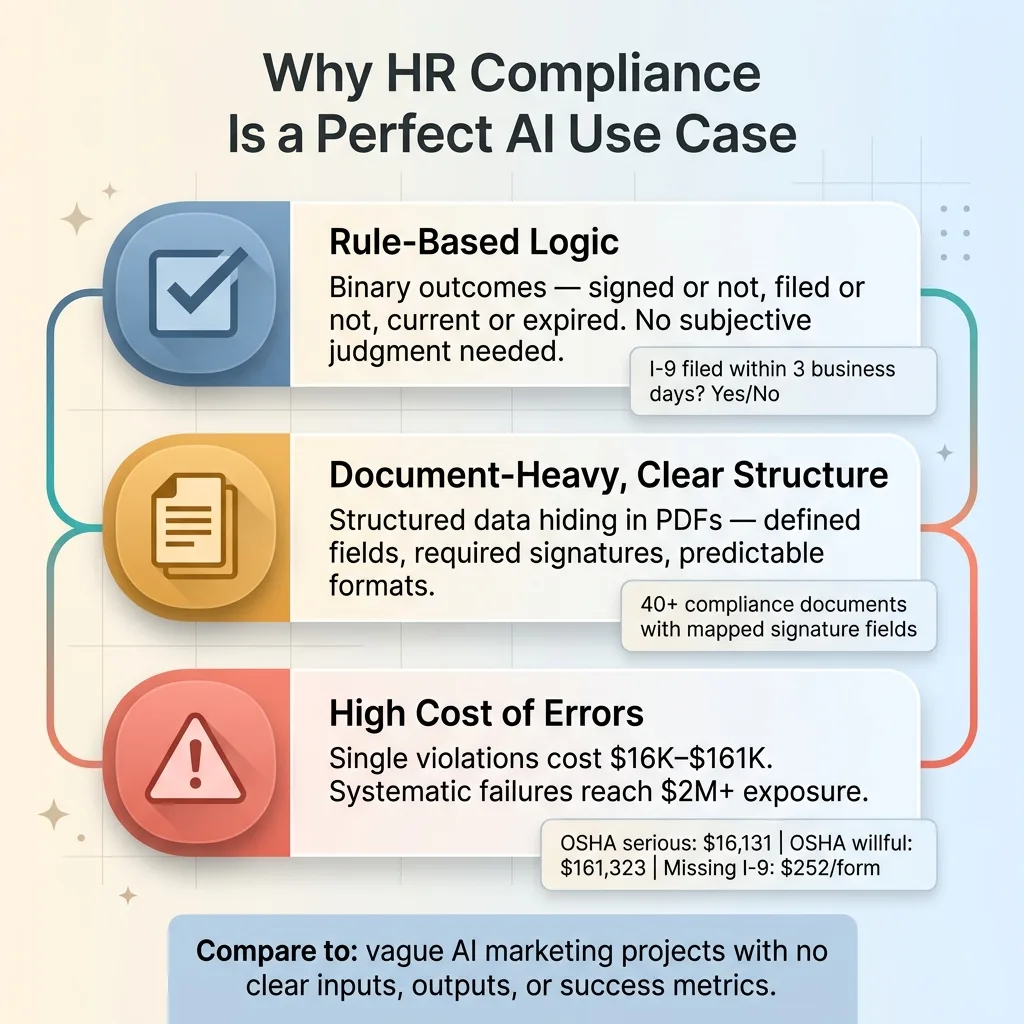 Why HR Compliance Is a Perfect AI Use Case
Rule-Based Logic, Not Judgment Calls
Compliance requirements are binary. Either the employee acknowledged the harassment policy or they didn't. Either the I-9 was filed within 3 business days of the start date or it wasn't. Either the safety training certification is current or it's expired.
There's no nuance, no subjective interpretation, no need for AI to be "creative." It needs to be relentless and accurate. Track the rule. Check the status. Flag the gap. Escalate if needed. This is exactly the kind of work that AI handles better than humans — not because it's smarter, but because it doesn't forget, doesn't get busy, and doesn't let things slip through the cracks on a Friday afternoon.
Document-Heavy With Clear Structure
HR departments drown in forms. Acknowledgments, policy updates, training certifications, benefits enrollments, tax forms, state-specific disclosures. Every single one of these is structured data pretending to be a PDF.
An employee handbook isn't unstructured creative writing. It's organized by section, has defined policies with clear applicability, and follows a predictable format. That structure means AI can parse it, index it, reference it, and use it to answer questions. The same goes for compliance forms — they have defined fields, required signatures, and specific routing rules.
High Consequence for Errors
This is what makes the ROI calculation concrete rather than theoretical. A single OSHA violation can run $16,131 for a serious citation. A willful violation jumps to $161,323. PAGA penalties in California stack per employee, per pay period. I've seen estimates where a mid-size company's exposure for systematic meal-break compliance failures exceeded $2M.
When the cost of a missed checkbox is measured in six or seven figures, spending $30K–$80K on an automated compliance system isn't an expense. It's insurance with a return.
Compare this to the vague AI projects companies waste budget on — "let's use AI to improve our marketing" with no clear inputs, outputs, or success metrics. HR compliance AI has all three, defined before you write a single line of code.
What I Built: The Interactive Compliance Portal
Let me walk through the actual system, because the architecture decisions matter.
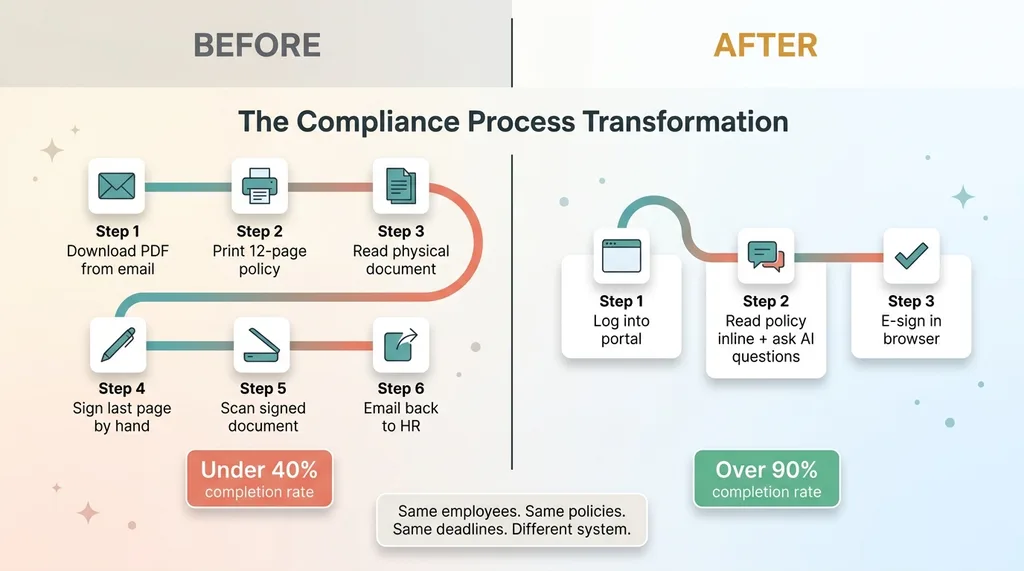 Before vs After: The Compliance Process Transformation
Smart Checklists That Track Themselves
Each compliance category — onboarding, annual renewals, safety, state-specific requirements — became an interactive checklist that tracks progress per employee. This sounds simple, but the devil is in the dependencies.
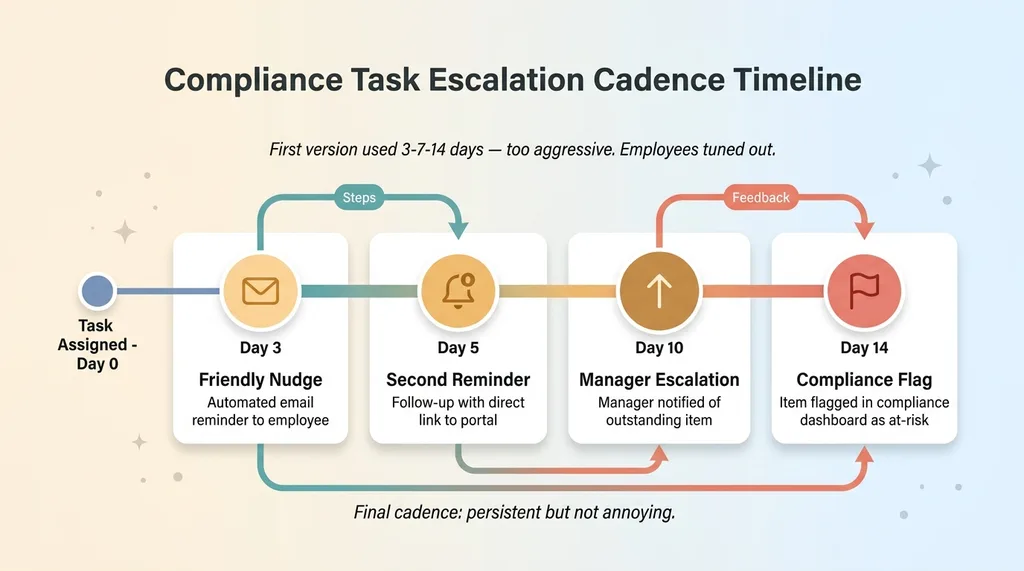 Escalation Reminder Cadence Timeline
You can't sign the harassment training acknowledgment before completing the training module. You can't submit benefits enrollment before completing the tax withholding form. These dependency chains are mapped in the system, so employees see a clear path and can't skip ahead in ways that would create compliance gaps.
Managers see real-time dashboards showing exactly who's completed what. No more emailing HR to ask "did the new hire finish their paperwork?" The system handles escalation automatically with a cadence I'll get to later: friendly nudge at day 3, manager notification at day 7, compliance flag at day 14.
PDF Field Positioning for E-Signatures
This was the gnarliest technical challenge in the entire project.
Compliance forms need actual signatures in specific locations on specific PDFs. Not a generic "I agree" button — a real signature placed in the exact field where the paper form would have been signed. Some forms have multiple signature lines. Some require dates next to the signature. Some need initials on every page.
I built a system that maps signature fields to exact pixel coordinates on each form template. When an employee signs, the signature gets placed precisely where it needs to be, generating a completed PDF that's indistinguishable from a hand-signed original — except it has a timestamp, IP address, and audit trail attached.
I went deep on this in the document signing system I built from scratch. That piece covers the full technical breakdown of how PDF field positioning works, the coordinate mapping approach, and the edge cases that nearly broke things.
The Employee Experience That Drives Completion
The portal feels like a modern app. Not a government website from 2004. Not a SharePoint page that takes 45 seconds to load.
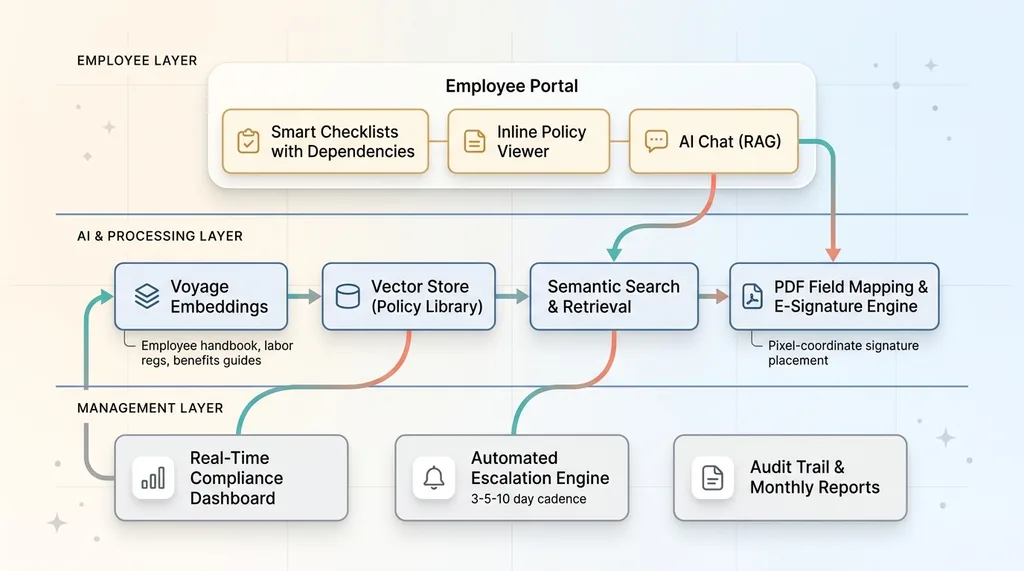 System Architecture: Interactive Compliance Portal
Each employee logs in, sees their outstanding items in priority order, can read the policy inline, ask questions via AI chat, and sign — all without leaving the browser. No printing. No scanning. No emailing attachments. No hunting through folders to find the right form.
This UX decision was the single biggest driver of results. The system went from under 40% completion rates to over 90% within the first compliance cycle. Nothing else changed — same employees, same policies, same deadlines. The only difference was removing the friction from the process.
Adding AI Chat With RAG for Policy Questions
Here's an insight that shaped the whole project: employees skip compliance tasks partly because they don't understand them. They read the form title, don't know if it applies to them, and close the tab.
"Do I need to fill out a new W-4 if I moved to a different state?" "Does the PTO accrual policy apply during my probationary period?" "Am I required to take the forklift safety training if I never go into the warehouse?"
These questions previously went to HR — if they got asked at all. Most of the time, the employee just ignored the form. That unanswered question became a compliance gap.
Voyage Embeddings on the Policy Library
I built a chat interface embedded directly in the compliance portal. The backend uses Voyage embeddings to vectorize the entire policy library — employee handbook, compliance documents, benefits guides, California-specific labor regulations, federal requirements.
When an employee asks a question, the system retrieves the most relevant policy sections using semantic search and generates a clear answer with citations. Every response includes the source document name and section number so the employee can verify it themselves.
The architecture is similar to what I describe in building a knowledge base with AI search, where I built a comparable RAG system for a professional services firm. The pattern is the same: take a corpus of authoritative documents, embed them, and build a retrieval layer that connects natural-language questions to specific, citable answers.
What Employees Actually Ask
The question distribution was revealing. About 35% of questions were eligibility-related ("does this apply to me?"). Another 30% were procedural ("what happens after I sign this?"). The rest split between benefits clarification and state-specific rules.
One critical design decision: the AI explicitly tells employees to confirm with HR for anything involving their specific situation, benefits calculations, or legal interpretations. It's a first-line resource — not a replacement for human judgment on edge cases. This matters for liability. The AI reduces HR's question volume; it doesn't eliminate the need for HR to exist.
The Compliance Dashboard: What Management Actually Sees
The management side of this system is where the operational value compounds.
Real-time completion percentages broken down by department, by compliance category, by individual employee. At a glance, the HR director can see that Engineering is at 94% completion on annual acknowledgments but the Sales team is lagging at 67% — and drill down to see exactly which individuals have outstanding items.
Every action is timestamped and logged. When the employee opened the document. When they asked a question about it in chat. When they signed. This isn't just good practice — it's evidence in the event of a dispute. If an employee claims they were never informed about a policy, the audit trail shows they opened it on March 3rd, asked two questions about it on March 4th, and signed it on March 5th.
Automated monthly reports generate themselves. They highlight at-risk items, overdue acknowledgments, and upcoming renewal dates for certifications that expire. Before this system, the HR manager was spending 15+ hours per month manually tracking compliance status across spreadsheets, email threads, and paper files. That dropped to under 2 hours of review time — mostly spot-checking the dashboard and handling the edge cases the AI flagged.
The dashboard also surfaced something unexpected: patterns in employee questions. When 60% of employees are asking the AI chat questions about the same policy section, that section probably needs to be rewritten. The AI became a feedback mechanism for policy clarity, which was a benefit I hadn't designed for but probably should have.
Results and What I'd Do Differently
The Numbers
- Checklist completion rates: under 40% → over 90%
- HR admin time on compliance tracking: 15+ hours/month → under 2 hours
- Time to full onboarding compliance: 14+ day average → under 5 days
- AI chat resolved 70%+ of policy questions without HR involvement
- Zero missed compliance deadlines in the first full quarter
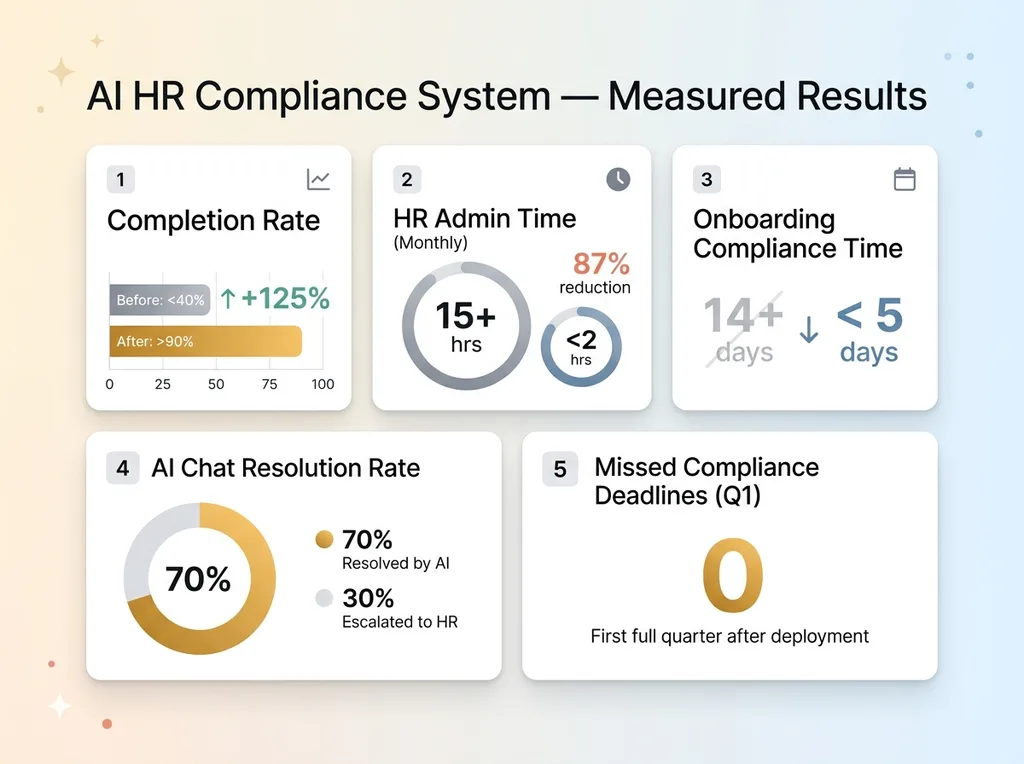 Results Dashboard: Key Metrics Before and After
These aren't projections. These are measured results from the first compliance cycle after deployment.
What Surprised Me
I underestimated how much time would go into PDF field mapping. It's tedious, manual work — measuring pixel coordinates for each signature field on each form template. For a company with 40+ compliance documents, this ate weeks. I'd now approach it with a more automated template detection system that I've since started building.
The RAG system needed more tuning than expected on California-specific labor law. General policy answers were solid out of the gate, but state-specific nuance — things like California's unique meal and rest break rules versus federal standards — required more careful prompt engineering and retrieval filtering to avoid blending federal and state guidance.
The escalation reminder system also needed calibration. My first version was too aggressive. Employees felt nagged and started ignoring notifications entirely, which was worse than no reminders at all. Too gentle, and they forgot. I landed on a 3-5-10 day cadence with escalation to the manager at day 10. That hit the sweet spot between persistent and annoying.
Compliance Systems Are a Foundation, Not a Ceiling
HR compliance is the perfect first AI project for most companies. Clear rules. Measurable outcomes. Immediate ROI. Low risk of AI hallucination causing problems, because every answer is cited and verifiable against source documents.
But it's also a foundation. Once you have the document infrastructure, the embedding pipeline, the chat interface, and the e-signature system — you can extend to vendor compliance, safety certifications, customer-facing documentation, internal training programs. The architecture transfers.
This is what a Chief AI Officer actually does: identifies the highest-value, lowest-risk entry point, builds the system, proves the ROI, then extends the architecture across the business. Not a slide deck about "AI strategy." A working system that saves time and eliminates risk in the first month.
If your HR team is drowning in compliance paperwork and your completion rates tell you the current system isn't working, this is a solvable problem. Not with more reminders or more training. With a better system.
Want to Talk Through What This Looks Like for Your Team?
I do a free 30-minute strategy call. No pitch deck. No sales team. Just a real conversation about your operations and where a system like this fits — or doesn't.
Get AI insights for business leaders
Practical AI strategy from someone who built the systems — not just studied them. No spam, no fluff.
Hodgen.AI
Ready to automate your growth?
Book a free 30-minute strategy call with Hodgen.AI.
Book a Strategy Call