AI Insurance Document Extraction: Flag Gaps in Seconds
How I built AI insurance document extraction that reads a Certificate of Insurance, pulls limits and dates, and flags coverage gaps in seconds.
By Mike Hodgen
The Drawer Full of Policies Nobody Reads
A while back I looked at how a small electrical and HVAC contractor managed their insurance. The answer was a drawer. A literal drawer with a stack of PDFs in it.
General liability. Workers comp. Commercial auto. An umbrella policy. A surety bond. All sitting there, printed and forgotten. The owner couldn't tell me the limits on any of them. He didn't know which one expired next. He had no idea whether the coverage matched the jobs he was bidding.
Here's where that bites. A general contractor wants you on their site, and before you set foot on it, they demand a Certificate of Insurance. They want to see your GL aggregate clears a number written into the contract. They want proof your workers comp is current. And the owner is standing there flipping through a drawer, unable to tell me if the cert is even still valid, let alone whether the limits clear the requirement.
That's not a tech problem. That's a "you don't get paid and you don't get on the job" problem.
This is the boring, expensive stuff nobody talks about when they talk about AI. Everyone wants a chatbot. Almost nobody wants to talk about the fact that small businesses are sitting on stacks of documents they literally cannot read at scale.
AI insurance document extraction is exactly the kind of unglamorous use case that earns its keep. Not because it's impressive at a dinner party. Because it catches a lapsed cert before it costs you a contract.
Document understanding, not chat, is the most underrated AI tool for small businesses. I'll show you what it actually looks like.
What an Upload Box Actually Does With an ACORD Certificate
The workflow is simpler than people expect. The owner drags a PDF into an upload box. Could be an ACORD 25 certificate. Could be a declarations page from the carrier. The system takes it from there.
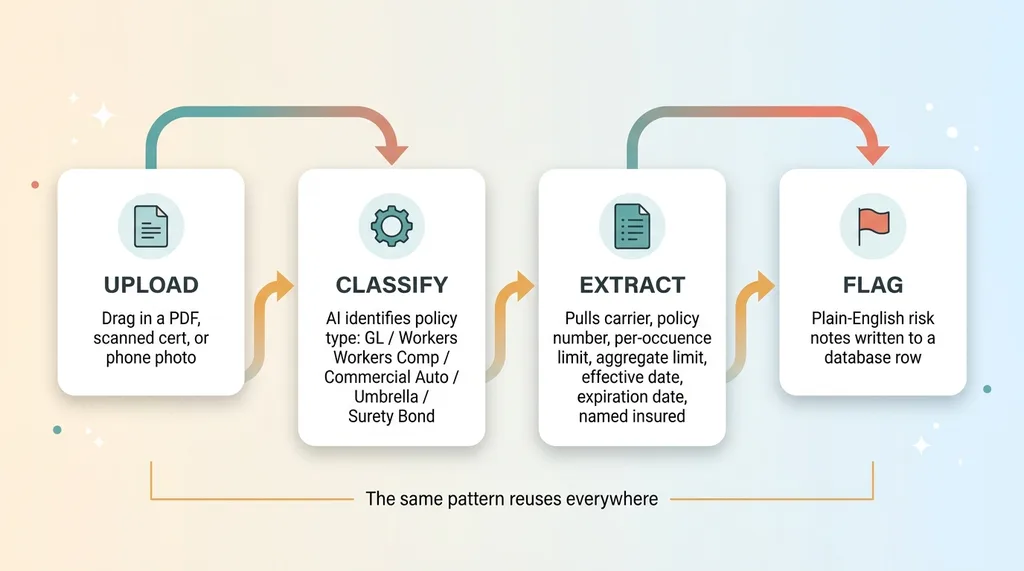 Upload-Classify-Extract-Flag pipeline
Classify the policy type first
The first thing the AI does is figure out what it's looking at. Is this a GL policy? Workers comp? Commercial auto? An umbrella? A surety bond? A tools-and-equipment floater?
This matters because the fields you care about change completely by type. On a GL cert you want per-occurrence and aggregate limits. On workers comp you care about the statutory limits and the employer's liability number. On a bond you care about the penal sum and the obligee. Classify first, then you know what to look for.
Extract the fields that matter
Once it knows the document type, it pulls the fields. Carrier name. Policy number. Per-occurrence limit. Aggregate limit. Effective date. Expiration date. Named insured. Additional insured language.
That output doesn't go into a chat reply. It gets written to a database row as structured data. Carrier in one column, expiration date in another, aggregate limit as an actual number you can compare against something.
This is ACORD certificate parsing AI as a category, and the reason you don't hand-build a parser for it is that these documents are a mess. Some are clean PDFs straight from the carrier. Some are scanned. Some are photographed on a phone in a truck. Layouts vary by carrier, by agency, by year. A rigid parser breaks the moment a new format shows up.
That's why I let the AI read any file you throw at it instead of writing brittle rules. The model reads the messy document and maps it to the fields I care about, regardless of how the page is laid out. A photographed ACORD 25 and a clean PDF dec page both come out the other end as the same structured row.
That structured row is the whole point. Once the data is clean, you can do something useful with it.
The Part That Earns Its Keep: Plain-English Gap Flags
Extraction by itself is just fancy data entry. Nice, but it doesn't change a decision. The flags are the actual product.
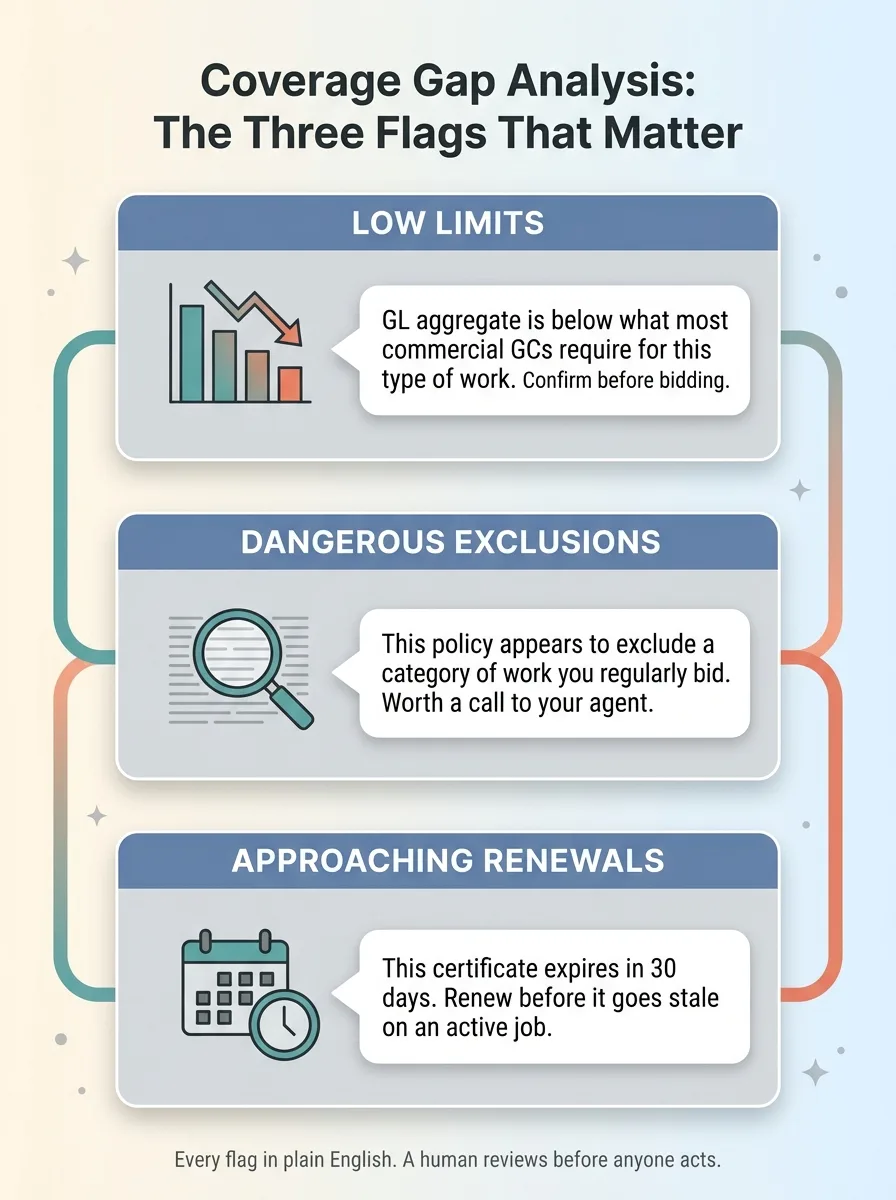 The three coverage gap flag categories
Here are the three categories that mattered for this contractor, and they're the core of any coverage gap analysis AI.
Low limits for the work being done
A commercial GC will write a GL requirement into the contract. Say they demand a two-million aggregate. If your policy carries a one-million aggregate, you don't clear it, and you find out when you're about to start the job.
The system compares the extracted aggregate and per-occurrence limits against the kind of thresholds typical for electrical and HVAC contract work. When a policy comes in under what the trade usually needs, it flags it. Plain note: "GL aggregate is below what most commercial GCs require for this type of work. Confirm before bidding."
Dangerous exclusions
Policies bury exclusions in the fine print. Some of those exclusions leave a contractor wide open on specific job types. The owner has no idea they're there because nobody reads page nine of a policy.
The AI surfaces exclusion language that matters for the trade and explains, in plain English, where it could leave the business exposed. Not "subject to endorsement CG 21 47," but "this policy appears to exclude a category of work you regularly bid. Worth a call to your agent."
Approaching renewals
This is the one that pays for itself fastest. Every policy has an expiration date. A cert that lapses mid-project can stop you from getting paid or get you removed from a site.
The system watches expiration dates and flags anything coming up inside a window, far enough out that you can renew before a cert goes stale.
The thing I care about most here is the language. Every flag comes back in plain English the owner can act on, not insurance jargon. He doesn't need to decode it. He needs to know what to do next.
And I'll be straight about the limit. This flags risk. It is not a coverage opinion and it does not replace an agent. A human reviews every flag before anyone acts on it. The system tells you where to look. Your agent tells you what it means.
Where I Let the AI Decide and Where I Don't
This is the part that separates a system you can trust from a demo that falls apart.
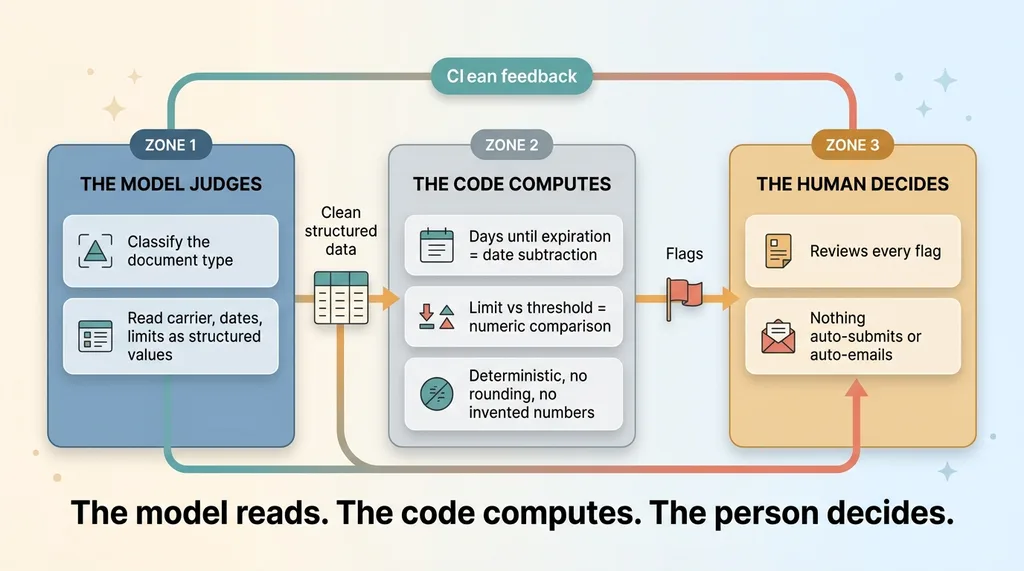 Model reads, code computes, human decides
The AI is excellent at reading a messy document and classifying and extracting what's on it. It is genuinely bad at being trusted with math and thresholds. Models drift, they round, they occasionally invent a number that looks plausible. You do not want that anywhere near a decision about whether your coverage clears a contract.
So I split the work. The model extracts dates and limits as structured values and nothing more. Then deterministic code does the arithmetic. Days until expiration is a date subtraction, done in code. Whether a limit clears a threshold is a numeric comparison against a configurable value, done in code.
The model never decides "this is a gap" on its own with arithmetic in its head. It hands over clean numbers, and the code makes the call. That's the principle I lean on everywhere: let the model judge and let the code compute. The model judges what kind of document this is and reads the fields. The code computes the days and the comparisons.
The other line I hold: nothing auto-submits and nothing auto-emails the agent. The system surfaces flags. The owner acts. No automated message goes out to a carrier or a GC without a human looking at it first.
This mirrors how I handle field intake on other projects. When a tech can snap a photo of a measure sheet and get a configured order, the extraction returns structured data for review, not a submitted order. Same discipline. The AI does the reading. The human keeps the wheel.
If you've been burned by an "AI solution" that turned out to be a chatbot guessing at your data, this is the answer to that doubt. The model reads. The code computes. The person decides.
Why This Beats the Spreadsheet (and the $0 Status Quo)
Let's be honest about the alternatives, because the cheapest option is always tempting.
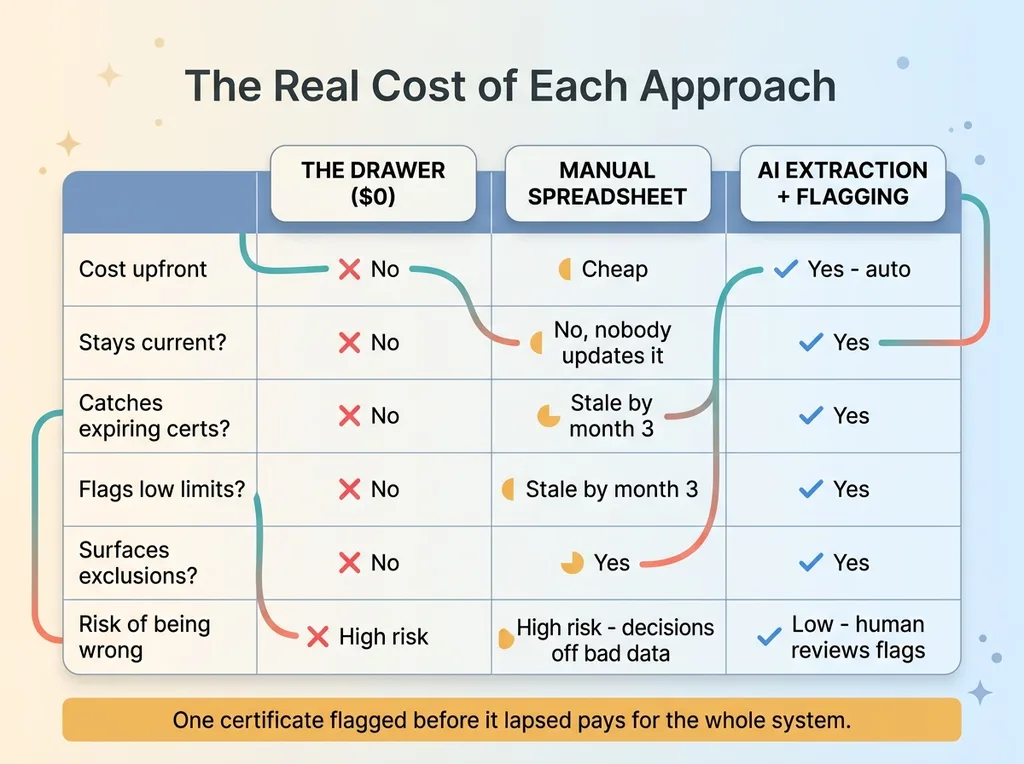 Drawer vs spreadsheet vs AI system comparison
The old system was a drawer and the owner's memory. That costs nothing until it costs you a contract.
The "cheap" upgrade is a spreadsheet someone updates by hand. I've seen plenty of those. Here's the problem: nobody updates it. The first week it's perfect. By month three it's three policies behind and nobody trusts it. A spreadsheet that's wrong is worse than no spreadsheet, because you make decisions off it.
The real cost here isn't the time spent typing policy numbers into cells. It's the cost of being wrong. A lapsed cert can stop you from getting paid or get you thrown off a site mid-job. An under-limit policy can leave the owner personally exposed when a claim lands. Those aren't hours-saved problems. Those are existential problems for a small contractor.
So I don't frame the ROI as "saved an hour of data entry." There's some of that, sure. The real return is risk caught before it becomes a lost contract or a claim that wipes out a year of profit. One certificate flagged before it lapsed pays for the whole system.
The honest limitation, again: this is a tracking and flagging tool. It is not insurance advice. The owner still needs an agent for coverage decisions. What the system does is make sure the owner walks into that conversation knowing exactly what he has, what's expiring, and where the gaps are. That's a different conversation than flipping through a drawer.
Document Understanding Is the SMB Use Case Hiding in Plain Sight
Here's the bigger point. Every small business is sitting on documents it can't track.
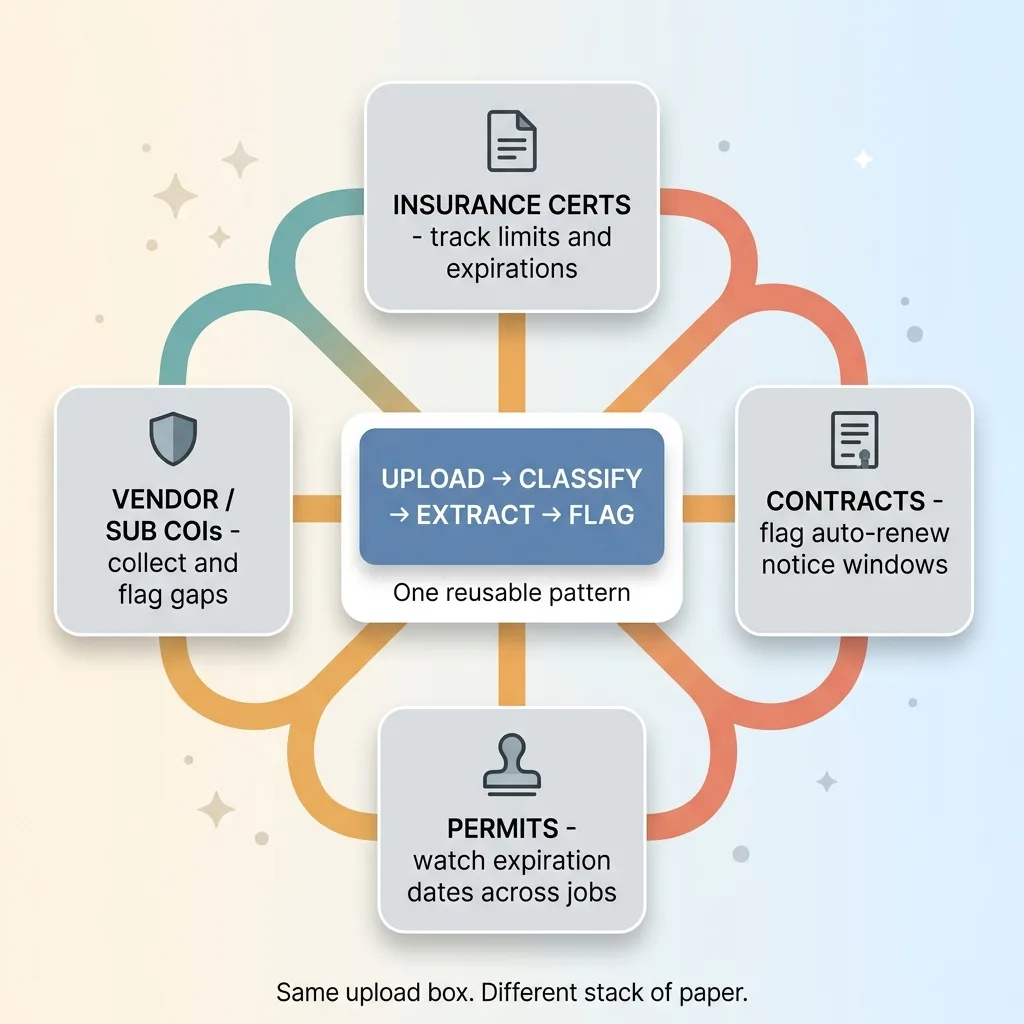 Document understanding reuses across SMB paperwork
Insurance certs. Contracts. Permits. Vendor invoices. Warranties. Licenses. Stacks of paper and PDFs that nobody reads until one of them becomes a problem.
Owners hear "AI" and think chatbot. The quiet win, the one that actually moves the needle, is extraction and flagging across those stacks of paper. That's document understanding for small business, and almost nobody is doing it.
The same pattern reuses everywhere. Upload, classify, extract, flag.
Take contracts with auto-renew clauses. A vendor agreement renews automatically unless you cancel 60 days out, and you miss the window because nobody was watching the date. Same upload-classify-extract-flag pattern. Pull the renewal terms, watch the notice window, flag it before it auto-renews.
Take permits with expiration dates. A contractor running multiple jobs has permits that expire on different timelines, and an expired permit on an active job is its own kind of disaster. Same pattern.
Take vendor certificates of insurance. The same contractor who needs to hand a COI to a GC also needs to collect COIs from his own subs, so he's not exposed when one of them causes a problem on his job. Same upload box. Same flags. Different stack of paper.
This is why I tell owners to start here. If you want a sense of the broader map, I wrote up the AI systems every small business should build first, and document understanding sits near the top of that list for a reason. It's unglamorous, it's high-stakes, and it's the kind of thing that breaks quietly until it breaks expensively.
If your business is sitting on documents nobody reads until they become a problem, that's exactly the kind of system I build. Not a chatbot. A system that reads your paper, flags what matters, and lets a human make the call.
Want to explore what AI could do for your business?
Book a free 30-minute strategy call. No pitch deck, no sales team, just a real conversation about your operations and where AI actually fits.
Get AI insights for business leaders
Practical AI strategy from someone who built the systems — not just studied them. No spam, no fluff.
Hodgen.AI
Ready to automate your growth?
Book a free 30-minute strategy call with Hodgen.AI.
Book a Strategy Call