The Trap: AI Makes Beautiful Imagery, Then Wrecks Your Site
AI image generation made one part of running my DTC fashion brand almost too easy. I can produce polished hero shots, product visuals, and collection imagery at a pace that would have required a photographer, a studio, and a week of scheduling two years ago. The temptation is obvious. Generate everything, ship it all, watch the store look like a brand three times its size.
That temptation is exactly where most stores blow up their performance. The easy move is taking your 2K master straight from the generator and dropping it onto a homepage that was already mostly images by weight. On my store, the homepage ran around 91% image weight by page bytes. Images weren't one of the problems. Images were the problem.
I had just finished real work on this. I cut 92% off my site's image weight, pulling mobile image download from 22.5MB down to 11.1MB. That's not a tweak. That's the difference between a phone on LTE giving up and a phone on LTE actually loading your store.
So here was the trap staring at me: I could generate a wave of beautiful new visuals and, by shipping them at full resolution, undo every hour I'd just spent. A better-looking homepage that loads slower is a worse homepage. Full stop.
Here's the honest answer to the buyer's doubt, because I know you're thinking it. Yes, you can generate store imagery at scale. But only if the delivery layer exists before the generation layer scales. Build it backwards and you're trading conversion for aesthetics.
This article is how I built the ai product image pipeline that let me ship new visuals constantly without re-tanking the performance I'd just fixed.
Why a 2K Master Is the Wrong Thing to Ship
The math nobody runs before launch
A 2K master is the right source of truth and the wrong shipped asset. People conflate the two constantly.
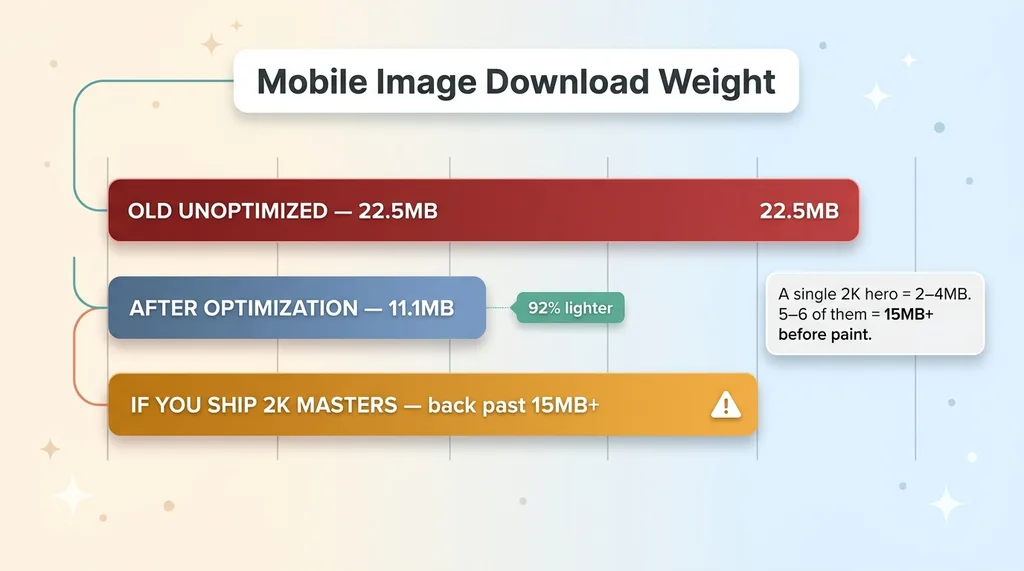 The Bloat Math: Shipping Masters vs Variants on a Homepage
Run the numbers. A single uncompressed 2K hero lands somewhere between 2MB and 4MB. Now build a real homepage: a seasonal hero, four or five collection cards, a couple of featured product shots. Ship those as masters and you're back past 15MB before the page even finishes painting.
I'd just gotten mobile download to 11.1MB. A handful of full-res AI heroes would have pushed me straight back toward the old 22.5MB. All that work, gone, in one deploy.
When your homepage is 91% image weight, images are the only lever that moves anything. Optimizing your JavaScript when 9 out of 10 bytes are pictures is rearranging deck chairs.
Generation quality vs. delivery weight are separate problems
The mistake is treating "how good the image looks" and "how heavy the browser download is" as one decision. They're two completely different problems with two completely different answers.
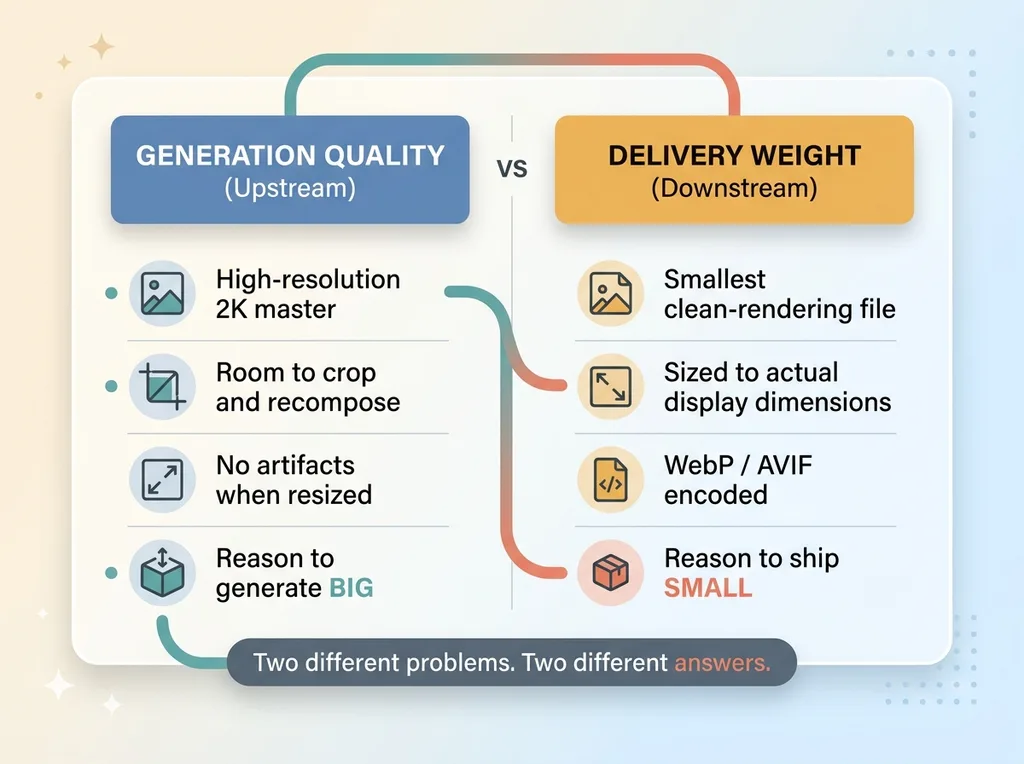 Generation Quality vs Delivery Weight as Two Separate Problems
Generation quality lives upstream. You want a high-resolution master so you have room to crop, recompose, and resize without artifacts. That's a reason to generate big.
Delivery weight lives downstream. The phone above the fold doesn't need 2K. It needs the smallest file that renders cleanly at the size it actually displays. That's a reason to ship small.
AI generation is now cheap and fast, which is exactly why delivery discipline matters more, not less. When producing 50 new images costs you an afternoon instead of a photo shoot budget, the bottleneck moves entirely to how you ship them. Volume without a delivery layer is just faster bloat.
The 3-Variant Image Pipeline I Built
Desktop, mobile, and collection-card variants
Every AI-generated image enters the pipeline as a 2K master. That master never gets shipped. It's the source, not the asset.
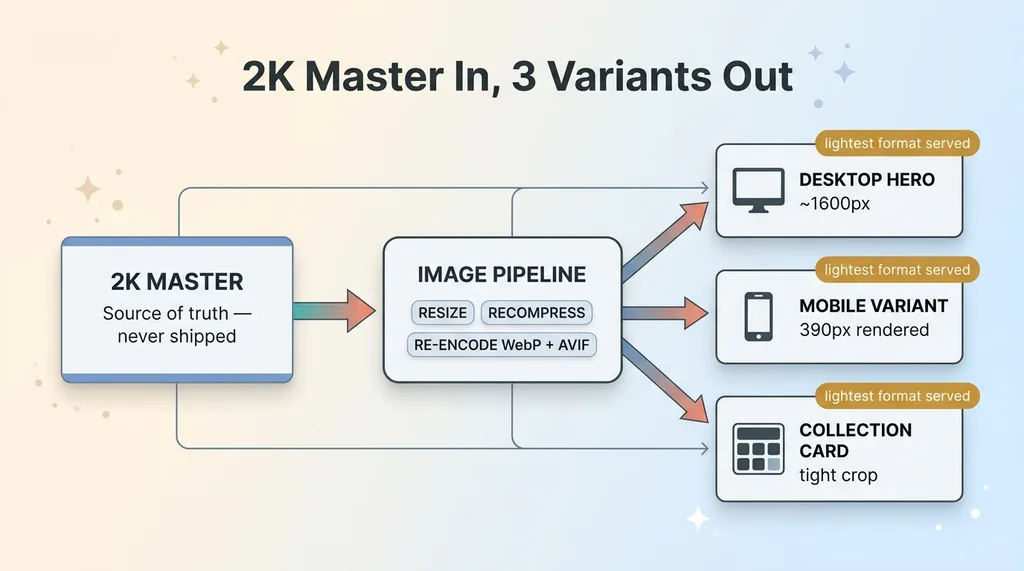 2K Master In, 3 Variants Out Pipeline Architecture
From that master, the pipeline emits three purpose-built variants:
- Desktop hero sized to what large screens actually render above the fold
- Mobile variant sized to what phones actually display, which is far smaller than people assume
- Collection-card variant, a tight crop for grid thumbnails where the image is rendering at a fraction of full size
Each variant is recompressed, not just resized. Resizing alone leaves you with bloated files at smaller dimensions. The pipeline re-encodes every variant to WebP and AVIF, so the browser pulls the lightest format it supports.
The result: a new visual ships as the correct set of responsive image variants automatically. I never make a per-image resizing decision. I drop the master in, three optimized variants come out, the right one serves to the right device.
2K master as the default source, never the shipped asset
Why three variants and not ten? Because ten is a trap of a different kind.
You could slice every breakpoint into its own variant and chase pixel-perfect delivery at every screen width. You'd also create combinatorial explosion: hundreds of files, a config nobody can reason about, and storage costs that creep. The marginal byte savings between a 750px and an 820px variant don't justify the complexity.
Three variants cover the breakpoints that matter. Desktop, mobile, and the grid thumbnail handle the vast majority of real rendering contexts. Phones and large screens are where the volume is, and the collection card is the most common repeated element on the site.
The sizing isn't arbitrary either. I tied each variant to the dimensions the image actually renders at in the live layout, not to round numbers that felt right. A mobile hero rendering at 390px wide doesn't need a 1200px file. Measuring the real rendered size and generating to it is the whole game. That's how you get ecommerce image performance that holds up when the catalog grows.
Alt Text, Compression, and Metadata Baked In
Generate the alt text in the same pass
The parts of an image that aren't pixels are the parts that always get skipped. Alt text, compression settings, metadata. They get deferred to "later," and later never comes.
So I baked them in. The pipeline generates descriptive alt text in the same pass that produces the variants. Accessibility and on-page context come for free instead of becoming a manual chore for someone to grind through 500 products.
Compression lives in the config, not in a per-image judgment call. The quality target is set once. Every image inherits it. No one is sitting in an editor deciding whether this hero should be quality 80 or 82.
The slug-as-alt bug I shipped (and what it actually cost)
Now the honest part. An early version of the pipeline used the URL slug as the alt text. So instead of "ivory linen wrap dress on neutral studio backdrop," a product got alt text that read like "ivory-linen-wrap-dress-fw24." Slug-as-alt.
That's a bug. But let me be precise about what kind of bug it was. It was polish debt, not a ranking catastrophe. Alt text matters for accessibility and for giving search engines context, and I'm not going to pretend it doesn't. But the slug-as-alt issue wasn't tanking my rankings and fixing it didn't send them soaring.
It's the kind of thing that ships when you move fast, gets caught in a later review pass, and gets fixed without drama. I'd rather ship a working pipeline with imperfect alt text and improve it than wait six months for the perfect version. The fix took one pass. The pipeline kept running the whole time.
Rolling It Out Collection by Collection
Per-collection rollout scripts
I didn't flip a switch on the entire catalog. That's how you turn a small regression into a site-wide outage you can't isolate.
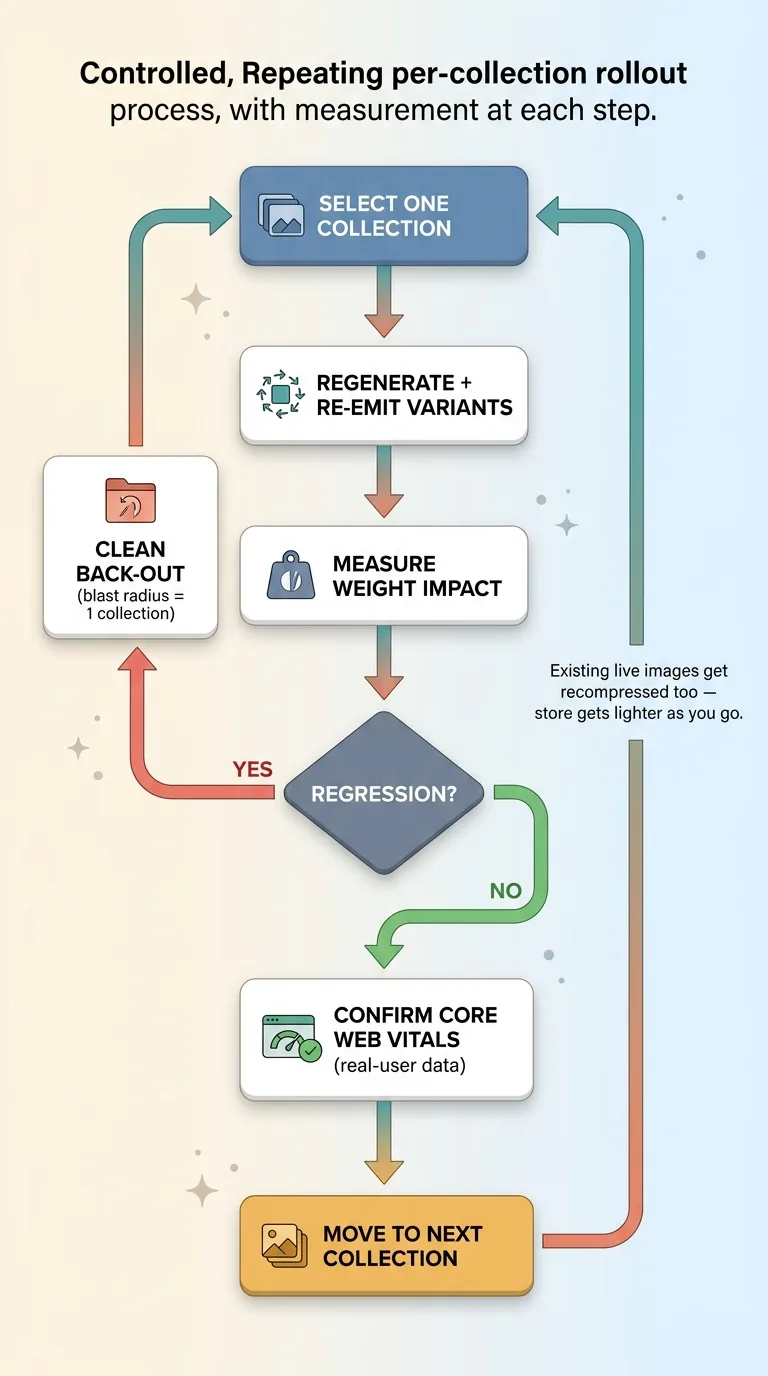 Per-Collection Rollout with Measurement at Each Step
Instead I built per-collection rollout scripts. Each one regenerates and re-emits variants for a single collection at a time. I'd run one collection, measure the weight impact, confirm nothing regressed, then move to the next. If something broke, the blast radius was one collection and the back-out was clean.
This sounds slower. It is. It's also the difference between a controlled rollout and a hope.
Recompressing the imagery that was already live
The scripts did something I didn't fully appreciate until I watched the numbers: they recompressed imagery that was already live, not just the new AI visuals.
So as I rolled out the pipeline, it wasn't only handling new generation. It was passing existing product photos through the same variant-and-recompress logic. The store got lighter as I went, collection by collection, even on imagery that predated the whole effort.
The discipline that made this work was measuring after every rollout instead of trusting the build. A pipeline that's supposed to reduce weight can quietly increase it if a config is wrong, and you won't know unless you check the real output.
I also didn't trust the lab score alone. I checked real-user data to confirm the new imagery wasn't quietly hurting Core Web Vitals for actual visitors. That distinction matters more than people think, and it's the whole point of what real-user Core Web Vitals data actually told me. A clean lab number on my machine means nothing if a phone in the field is choking.
Did the New Imagery Actually Hurt Performance?
Here's the result, because this is the question that actually matters.
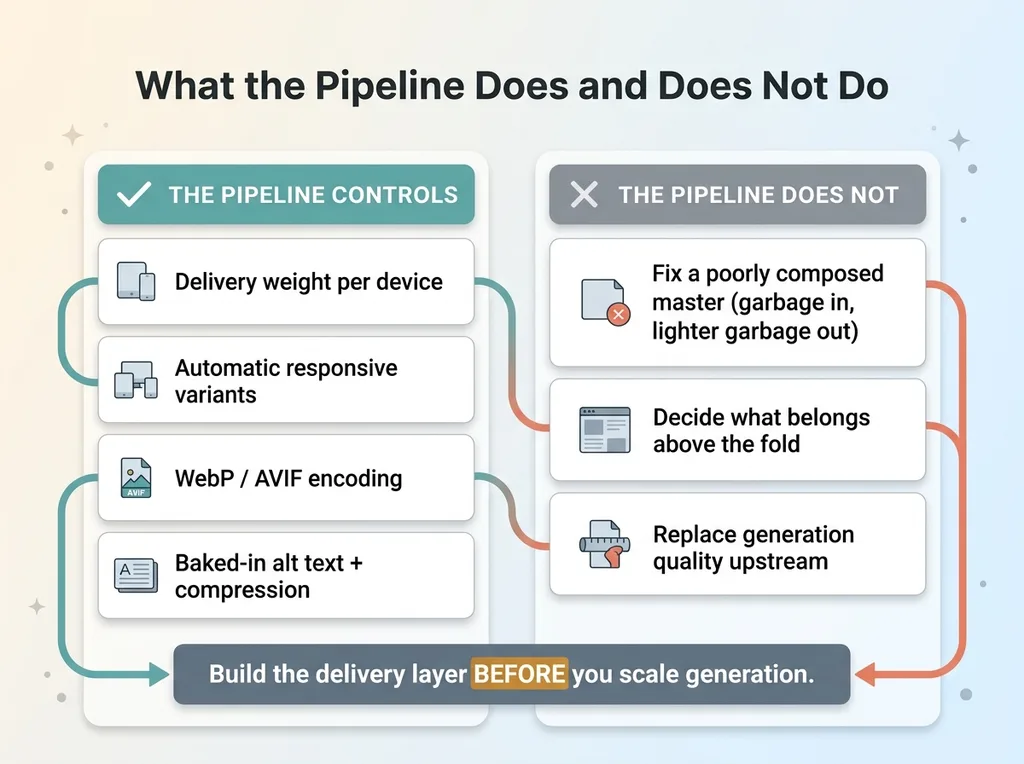 What the Pipeline Does and Does Not Do
The store got new AI-generated heroes, product shots, and collection visuals at scale. And mobile image download stayed at the improved level. It did not climb back toward the old 22.5MB. The new imagery shipped as variants, the variants stayed light, and the performance I'd fixed stayed fixed.
The net effect: the store looks better and loads the same. New visuals improved how the brand presents without re-tanking the Core Web Vitals I'd spent real effort recovering. That's the entire payoff of building the delivery layer first.
Now let me be precise about what the pipeline does and does not do, because overclaiming here would be dishonest.
The pipeline controls delivery weight. That's its job and it does it well. It does not make a bad source image good. If the master is poorly composed, the variants are just smaller versions of a poorly composed image. Garbage in, lighter garbage out.
It also doesn't replace judgment about which images belong above the fold. The pipeline will happily optimize a hero that shouldn't be there. Deciding what to feature is still a human call.
Generation quality lives entirely upstream of this. How the imagery gets made matters as much as how it ships, which is why I composite the real product instead of generating it wherever the product itself needs to be accurate. The full generation side runs through my AI product photography pipeline, and the delivery pipeline only works because the generation feeding it is solid.
The honest takeaway: yes, you can do this at scale. But the delivery layer has to exist before you scale the generation, not after.
Build the Delivery Layer Before You Scale the Generation
This lesson generalizes far beyond fashion. Any store sitting on heavy image weight that wants to adopt AI imagery needs the variant pipeline first. Skip it and you're trading a better-looking homepage for a slower one, which is a trade that costs you conversions every single day.
Most teams do it exactly backwards. They generate a hundred images because it's suddenly cheap and easy, ship the masters because that's the path of least resistance, then wonder why their load time got worse and their conversions slipped. The generation was never the hard part. The delivery always was.
That's why I built this as a generic asset, not a one-off for my brand. The architecture (2K master in, three recompressed variants out, alt text and compression baked into the config, per-collection rollout with measurement at each step) ports to any catalog. The numbers change. The logic doesn't.
If you're sitting on a folder of AI-generated imagery you're afraid to ship, or a site that's already too heavy to absorb new visuals, I can usually tell you in an afternoon whether the delivery layer is the actual problem. Most of the time it is, and most of the time it's fixable without rebuilding your whole store.
Get the next build note.
I write up each system I build, including what broke. Subscribe to my newsletter and I'll send you the next one.