Manufacturing Production Tracking Software for Cut-and-Sew
How I built manufacturing production tracking software for a cut-and-sew apparel floor: BOM recipes, QR safety scans, and auto-sealed sewing bundles.
By Mike Hodgen
How a Cut-and-Sew Floor Actually Runs (Before Software)
Before I built any manufacturing production tracking software for my own floor, here's how production actually ran: in people's heads and on PDF travelers stapled to bolts of fabric.
That's not an exaggeration. A traveler is a printed sheet that follows a garment through cutting and sewing. It tells the next person what to do. And it works fine right up until the moment it doesn't.
Tribal knowledge and paper travelers
The traveler covered the obvious stuff: style, size run, quantity. What it never captured was the knowledge that actually kept us from making expensive mistakes.
That knowledge lived in one or two people. When they were on the floor, things ran smooth. When they left for lunch, took a day off, or quit, the floor slowed to a crawl or started making errors nobody caught until sewing.
The three things nobody wrote down
Three pieces of critical knowledge lived nowhere durable.
First: which fabric pairs with which print. Some combinations worked, some didn't, and the rule existed only in someone's memory.
Second: whether a roll was directional. A directional fabric has to be cut with the pattern oriented one way. Cut it wrong and the garment is scrap.
Third: the exact moment a garment was fully cut and ready to sew. Not "mostly cut." Fully cut, every component, ready to bundle.
When that knowledge walked out the door, the cost was real. We got re-cuts from the wrong fabric. We had garments sewn from incomplete component sets. We had bundles started before all the pieces were even cut, which meant a sewer sat idle waiting on a piece that was still on the cutting table.
Most small manufacturers I talk to assume custom software can't coordinate a live floor like this. Too messy, too human, too many edge cases. I built it anyway, and it works. Here's how.
The BOM Recipe Is the Source of Truth
The foundation of the whole system isn't a station screen. It's a data model.
I built a bill of materials structure where every product is a recipe of components: a specific fabric, a specific print, the cut counts for each piece, and the orientation rules. This recipe replaces the paper traveler entirely.
Modeling a garment as a recipe, not a part
This is the part most people get wrong when they think about bill of materials manufacturing. A BOM is usually treated as a flat parts list. So many of fabric, so many of trim, done.
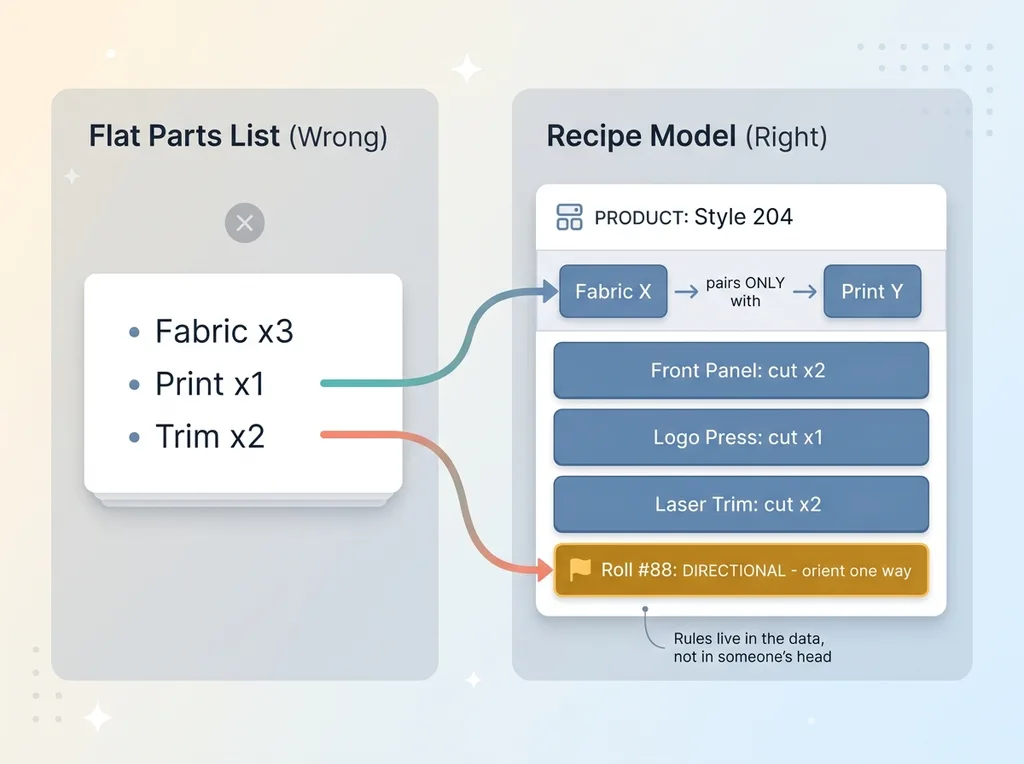 BOM Recipe as Source of Truth vs Flat Parts List
That's not enough for cut-and-sew. The recipe has to encode rules, not just quantities.
Fabric X only goes with print Y. That's a pairing rule, and it lives in the data now instead of in someone's head. I went deeper on the calculation logic in a parametric BOM calculator if you want the mechanics of how the component math works.
Why directional rolls live in the data
The directional roll problem is the cleanest example of why the recipe model matters.
A directional fabric carries a physical constraint: the cut has to orient one way. That constraint has nothing to do with quantity. It's a property of the material that the operator needs flagged before they make the cut, not after.
So directional behavior lives in the data, tied to the specific roll. The system knows, before anyone touches the fabric, that this one needs to be handled carefully.
Getting this data model right is 80% of the work. The station screens, the scans, the auto-sealing logic, all of it is downstream of the recipe being correct.
I'll be honest about what this required. I had to catalog every product's true recipe up front. That surfaced inconsistencies that had been hiding in tribal knowledge for years. Two people "knew" the same product differently. The data model forced us to pick one truth and write it down.
Station Views That Refuse Bad Work
Once the recipe is the source of truth, the shop floor control system layer gets built on top of it.
Each station on the floor (print, heat press, laser cut, to describe them generically) has a screen tied to the recipe. The operator doesn't read a paper traveler anymore. They scan a QR code, and the system tells them what this piece needs.
QR safety scans at print, heat press, and laser cut
The scan is the safety check. When an operator scans the fabric at a station, the system compares the scanned fabric against the recipe for that line item.
If the fabric matches the recipe, the operator proceeds. If it doesn't, the system refuses. Hard stop. They can't move forward with the wrong material.
I wrote up the full logic behind a barcode scan that refuses the wrong fabric, because it's the single biggest source of avoided re-cuts. The scan turns "did someone remember the pairing rule" into "the system enforces the pairing rule, every time."
Refuse on mismatch, warn on directional
There's a difference between an error and a caution, and the system treats them differently.
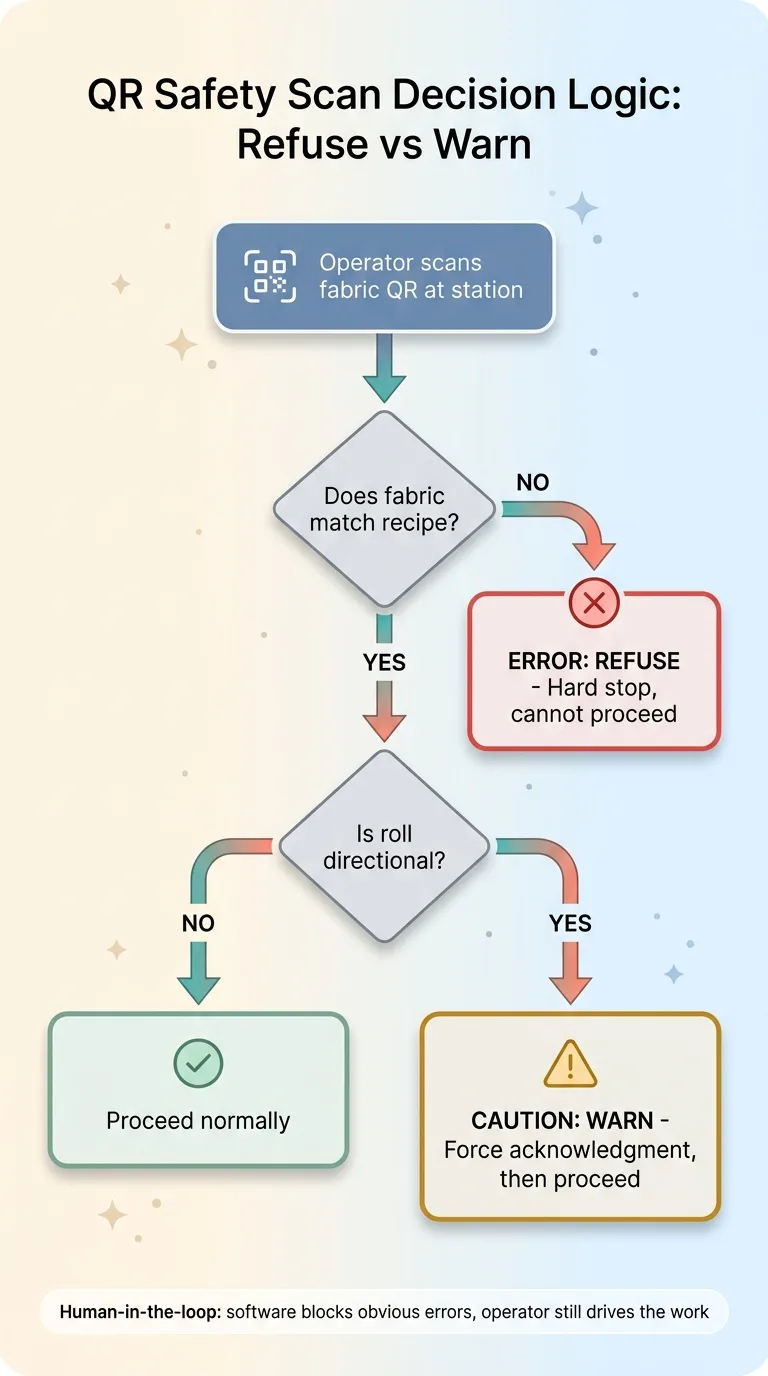 QR Safety Scan Decision Logic: Refuse vs Warn
A fabric mismatch is an error. Refuse, full stop.
A directional roll is a caution. The system warns the operator and forces an acknowledgment before they continue. The operator still makes the cut. They just can't do it on autopilot.
Operators interact with a lot of this through their phones, which is why I run parts of the floor from a Telegram bot. No expensive terminals at every station.
The human-in-the-loop point matters here. The system blocks the obvious errors. It does not take over. The skilled operator still drives the work. The software just refuses to let an obvious mistake through.
One honest note: I had to tune the refusal logic carefully. Early on it flagged too aggressively, and a system that cries wolf gets ignored. Operators learn to click through warnings if the warnings are usually wrong. The refusals only carry weight because they're almost always right.
The Bundle-Bridge: Sealing One Bundle Per Line Item
This is the technical heart of the whole thing, and it's the part that took the longest to get right.
After every cut, the system sums all the prior cuts for that line item against the recipe. It's constantly asking one question: is this line item fully cut yet?
Summing prior cuts after each station
A bundle seals only when every component of the recipe has been cut. Not when one station finishes. When all of them have produced their pieces.
The system tracks the running total across stations. Cut three of five components, the bundle stays open. Cut the fourth, still open. Cut the fifth and final component, and now the recipe is satisfied.
One bundle per line item, not per print job
Here's the distinction that breaks the naive approach. Print jobs and line items are not one-to-one.
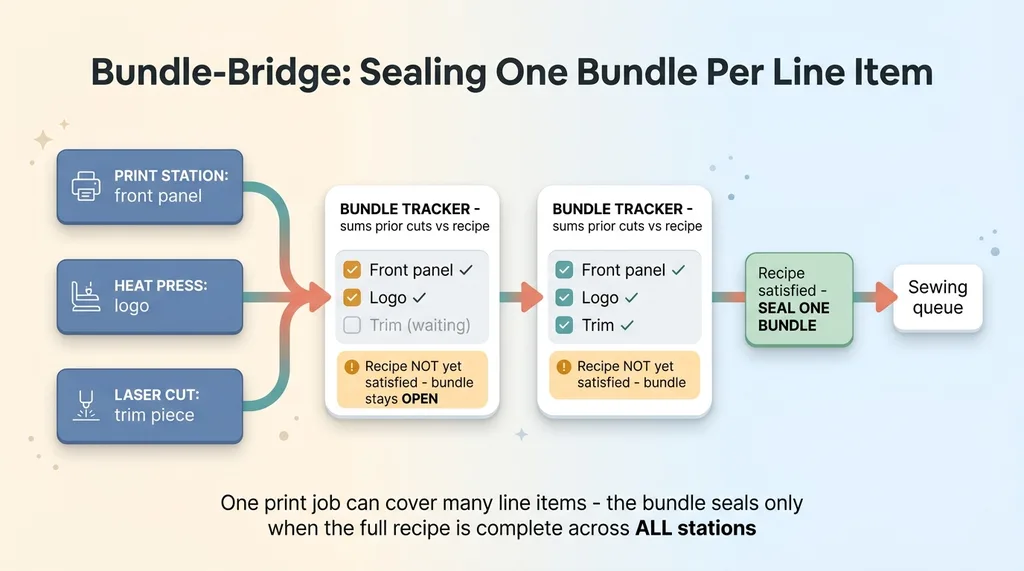 The Bundle-Bridge: Sealing One Bundle Per Line Item
A single print job might cover pieces for multiple line items. A single line item might need cuts from three different stations. If you seal a bundle when a print job finishes, you get incomplete bundles, because the print job finishing doesn't mean the line item is done.
That's exactly the failure we had with paper. A bundle would get started because one station's work looked done, and the garment would go to sewing missing a piece.
The bundle-bridge waits until the full recipe is satisfied across all stations. Then it auto-seals exactly one bundle per line item.
Walk through a real example. A line item needs a printed front panel from the print station, a heat-pressed logo from the press station, and a laser-cut trim piece from the cut station. The print station finishes first. The system logs it, bundle stays open. The press finishes next. Still open. The laser cut comes through last. Now the recipe is fully satisfied, the system seals the bundle, and that garment moves to sewing with every piece it needs.
This eliminated the most expensive paper-traveler failure we had. Garments no longer go to sewing with missing pieces, because the bundle physically cannot seal until the recipe is complete.
Auto-Creating the Work Order, Even From a Draft PO
When the bundle seals, the system doesn't wait for a human to do the next step. It auto-creates the work order and advances the bundle into the sewing queue.
Advancing into the sewing queue automatically
This closes the loop. Cutting finishes, the bundle seals, the work order generates, the sewing team sees it in their queue. No one walks a paper traveler across the floor to start the next phase.
The handoff that used to depend on someone noticing the cutting was done now happens automatically the instant the recipe is satisfied.
Handling the messy reality of draft purchase orders
Here's the edge case that mattered most, and it's the one off-the-shelf systems get wrong.
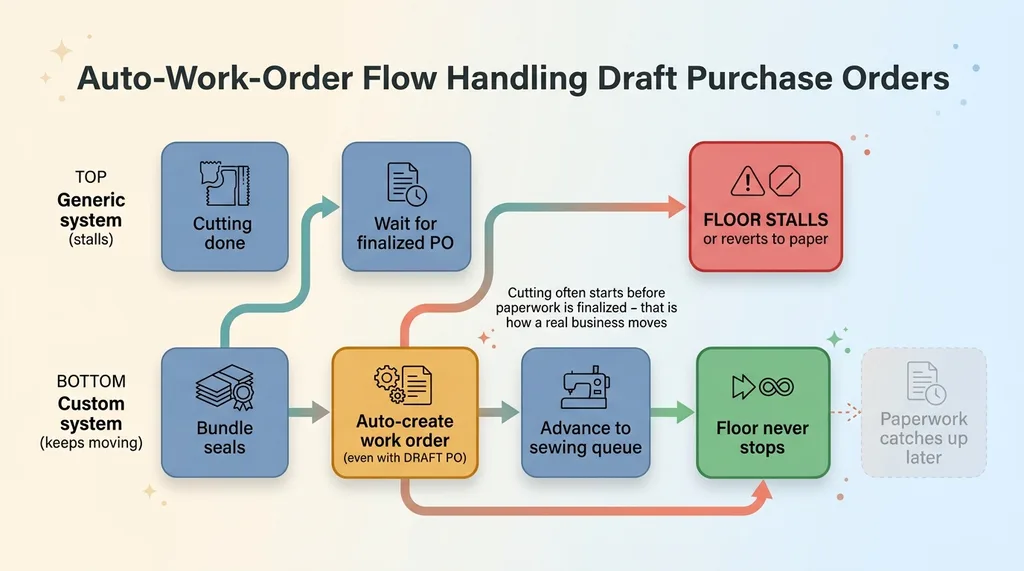 Auto-Work-Order Flow Handling Draft Purchase Orders
In real operations, cutting often starts before the paperwork is finalized. A purchase order might still be in draft when the floor needs to begin. That's not sloppiness, that's how a real business moves when a customer needs product.
A system that required a finalized PO before it would create a work order would stall the floor. Or worse, it would force operators back to paper to keep moving, which means the software gets bypassed and dies.
So I built it to handle the draft PO. The bundle seals and the work order auto-creates even if the triggering PO is still a draft. The system catches up the paperwork later, but the floor never stops.
This is the difference between software that gets used and software that gets abandoned. You build for the messy real workflow, not the clean one in the diagram. Anyone who tells you a custom system can't handle floor chaos has never built one for an actual floor.
What Changed on the Floor (and What It Didn't Fix)
Let me be straight about results, including the limits.
The errors that disappeared
Three things went away.
Wrong-fabric re-cuts dropped sharply, because the scan refuses the wrong material before the cut happens. We're not catching the error in sewing anymore. We're preventing it at the station.
Incomplete bundles stopped entirely. A bundle cannot seal until the recipe is satisfied, so garments don't reach sewing missing pieces. That failure mode is structurally impossible now.
And the dependency on one person's memory is gone. The pairing rules and directional flags live in the data. When someone takes a day off, the floor doesn't slow down, because the knowledge didn't leave with them.
We also stopped spending time reconciling paper travelers, which was its own quiet tax. Nobody's hunting for a stapled PDF that fell off a bolt.
Where humans still matter
Here's what it didn't fix.
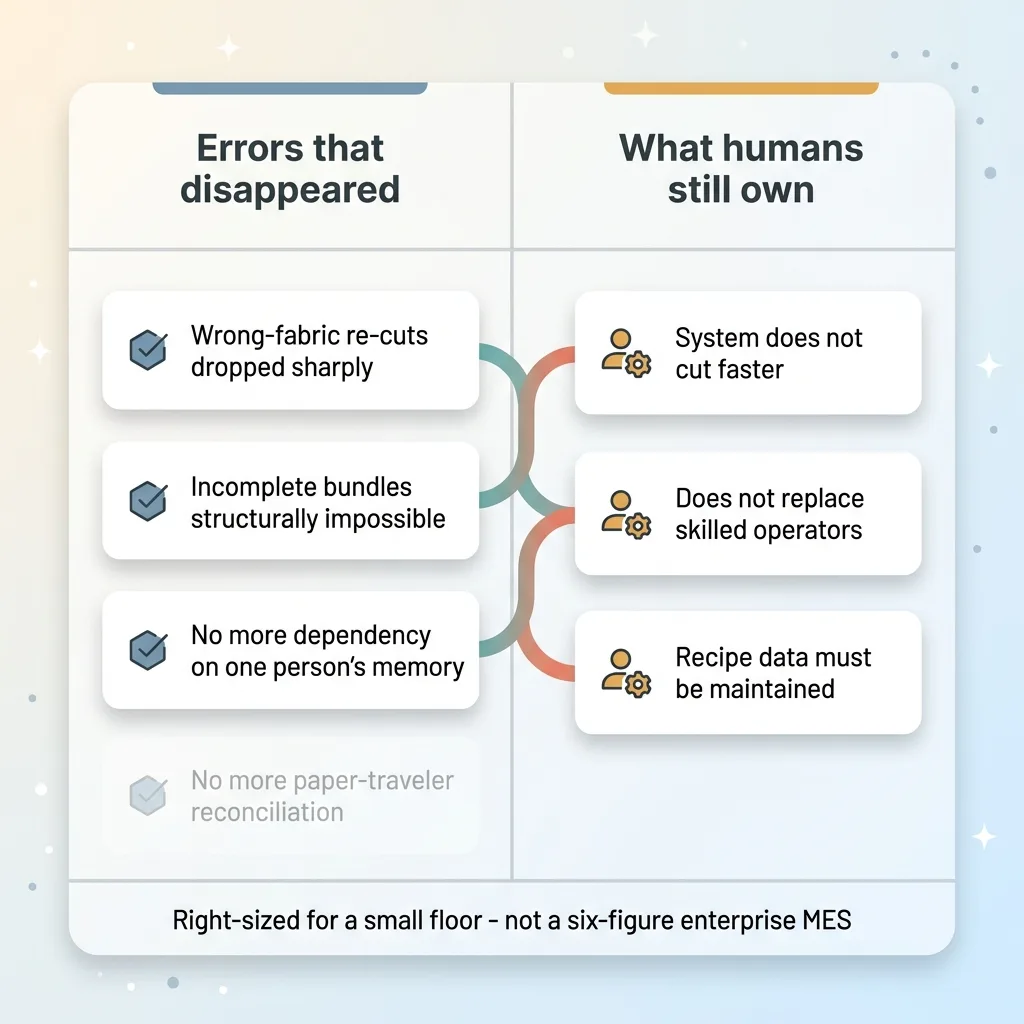 What the System Fixed vs What Humans Still Own
The system doesn't cut faster. Throughput at the cutting table is still about the operator and the equipment. The software prevents errors, it doesn't add speed.
It doesn't replace skilled operators. Cut-and-sew is a craft. The system tells the operator what's needed and blocks the obvious mistakes. It doesn't do the work.
And it needs the recipe data maintained. When a product changes, someone has to update the recipe. Let the data drift and the refusals start firing wrong, and you're back to operators clicking through warnings.
This is manufacturing production tracking software built for a small floor. It is not an enterprise MES with a six-figure license and a six-month implementation. It's right-sized for the operation it runs.
Why a Small Manufacturer Can Own This Instead of Renting It
Off-the-shelf MES is built for factories ten times your size. And even then, it can't encode your specific recipe rules and your floor's quirks.
The tribal knowledge that runs your floor IS the spec. The pairing rules, the directional handling, the draft PO workaround, all of it. A generic system makes you bend your process to fit its assumptions. A custom system models exactly how you actually work.
That's the whole argument. A custom cut and sew workflow software that knows your floor beats a generic one you have to fight. I run my brand on a stack of systems like this, and I documented the full systems stack I run my brand on if you want to see how the pieces fit together.
Here's what I bring that a software vendor doesn't. I run a real manufacturing floor on systems I built myself. I know the difference between a clean diagram and a Tuesday with a draft PO, a directional roll, and an operator who needs to keep moving. I've lived the failure modes, which means I build for them.
If you've got a floor that runs on someone's memory and a stack of paper travelers, that's not a problem you have to live with. It's a spec waiting to be written down.
Want to explore what AI could do for your business?
Book a free 30-minute strategy call. No pitch deck, no sales team, just a real conversation about your operations and where AI actually fits.
Get AI insights for business leaders
Practical AI strategy from someone who built the systems — not just studied them. No spam, no fluff.
Hodgen.AI
Ready to automate your growth?
Book a free 30-minute strategy call with Hodgen.AI.
Book a Strategy Call