The Mistake You Only Catch After the Material Is Gone
Here is a scene from my DTC apparel brand in San Diego that I never want to live through again.
An operator walks up to the heat press. There is a printed transfer ready to go and a roll of fabric next to it. They grab the wrong roll. Or they grab the right fabric but feed it through the wrong way, against the grain on a directional material. The press comes down. Heat. Pressure. Done.
You do not find out it was wrong until you are holding a ruined piece.
That single mistake costs more than it looks. You lose the printed transfer. You lose the fabric. You lose the labor that went into both. Call it $15 to $40 per incident on my floor. A few of those a week, every week, and you are looking at real money over a year. Money that vanished into a scrap bin.
What bothered me most was not the cost. It was that my software at the time was perfectly happy to record the mistake after the fact. It would log it. I could review it later in a report. But the fabric was already gone.
So I stopped thinking about reporting and started thinking about barcode scanning error prevention. Not a dashboard that tells me what went wrong yesterday. A system that physically refuses the wrong action before the press ever comes down.
This is the idea behind poka yoke, the Japanese term for mistake-proofing. The goal is not to catch errors. The goal is to make the wrong move impossible in the first place. You design the process so that the irreversible step simply cannot happen with the wrong inputs.
That shift in mindset changed how I built every checkpoint on my floor. Let me walk you through it.
Why Logging Errors Isn't Preventing Them
Most production software on the market is built to record. Something goes wrong, it gets logged, and the data shows up in a report that, let us be honest, nobody reads on a Friday afternoon.
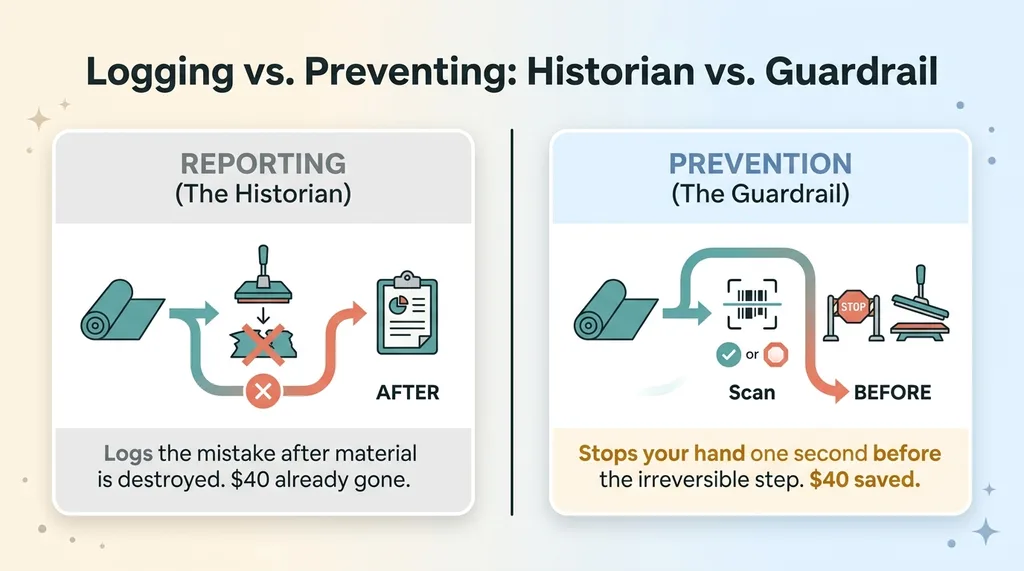 Logging vs. Preventing: Historian vs. Guardrail
That is fine for understanding trends. It is useless for saving the material that just got destroyed.
There is a real difference between a dashboard that tells you about a mistake and a checkpoint that stops your hand. One of them is a historian. The other one is a guardrail. If you have ever been burned by a vendor who sold you "visibility" and called it a solution, you already know the gap I am talking about.
Visibility does not prevent anything. It just describes the wreckage.
Prevention has to happen at the moment of action. Not in a weekly review. Not in a manager's spot check. At the station, with the operator standing there, hands on the material, one second before the irreversible step.
That timing is the whole game. The check has to fire after the operator has committed to an action but before that action becomes permanent. Too early and it is just a suggestion they will ignore. Too late and you are back to logging scrap.
This is the conceptual core of barcode scanning error prevention. The scan is not there to track inventory or feed an analytics pipeline. The scan is there to ask one question at the exact right moment: is this the right material for this job, yes or no? And if the answer is no, the process stops.
Reporting tells you that you wasted forty dollars. Prevention keeps the forty dollars. I would rather keep the forty dollars every single time.
The Two-Scan Checkpoint That Refuses a Mismatch
Here is the actual mechanism I built. No machine brand names, no magic, just a flow that works.
Scan the paper roll, then the fabric
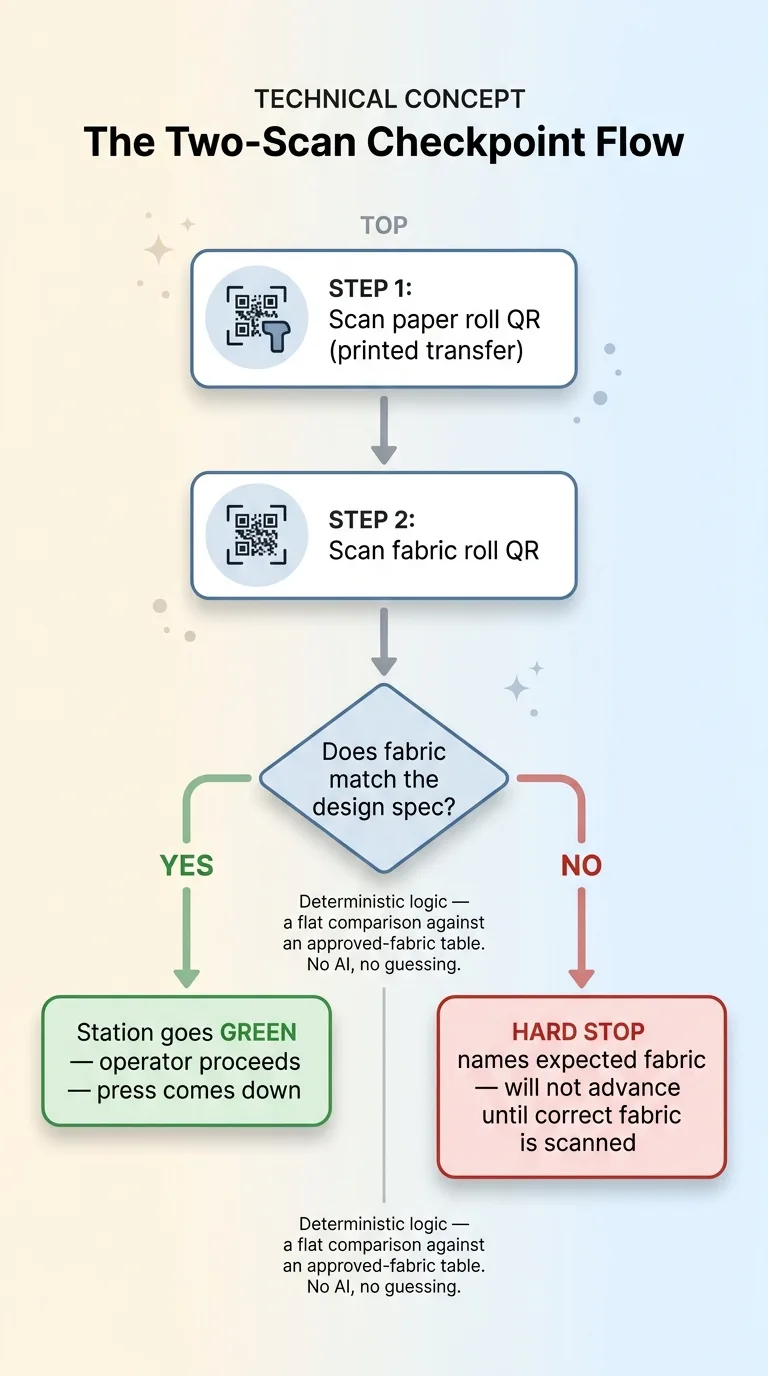
At the heat press station, the operator does two scans in order.
First, they scan the QR code on the printed paper roll, the one carrying the transfer for this job. Second, they scan the QR code on the fabric roll they are about to press it onto.
Both QR codes are printed on plain paper labels. Nothing fancy.
When the second scan lands, the station checks one thing: is this fabric the one this specific design was specced for? Every design in my system knows which fabrics it is allowed to run on. The scan compares the fabric in the operator's hands against that spec.
If they match, the station goes green and the operator proceeds. If they do not match, the station refuses.
This is the qr code production checkpoint pattern, and the order matters. Nothing irreversible happens until both scans agree. The press does not come down on a "maybe." You can read a deeper breakdown of a barcode scan that refuses the wrong fabric if you want the full companion walkthrough.
What 'refuse' actually means
"Refuse" is not a warning popup the operator can click through. It is a hard stop. The screen tells them this fabric does not belong with this design, names what was expected, and will not advance until the right fabric is scanned.
 The Two-Scan Checkpoint Flow
One detail I want to be clear about: this is deterministic logic. It is not an AI judgment call. The system is not "guessing" whether the fabric looks right. It is a flat comparison between a scanned ID and a spec in a table. Either it is on the approved list or it is not.
I keep AI out of this step on purpose. A mistake-proof checkpoint cannot hallucinate. This is exactly the kind of place where I draw a hard line, and I wrote about where I draw the line on automation for anyone who wants my full reasoning. When the cost of being wrong is destroyed material, you want boring, predictable rules, not probability.
The Amber Banner for Directional Fabric and Prints
Not every error is a clean yes-or-no. The second class of mistake on my floor is directionality, and it needs a different kind of guardrail.
 Matching Guardrail Strength to Error Type
Some fabrics have a grain or a nap that has to run a specific way. Some print designs are directional too. A stripe, a pattern, an image that has an obvious top and bottom. Press a directional design onto fabric running the wrong direction and the piece is ruined, even though the correct fabric and the correct transfer were used.
That kind of error is easy to miss because nothing is technically mismatched. Both items belong together. They are just oriented wrong.
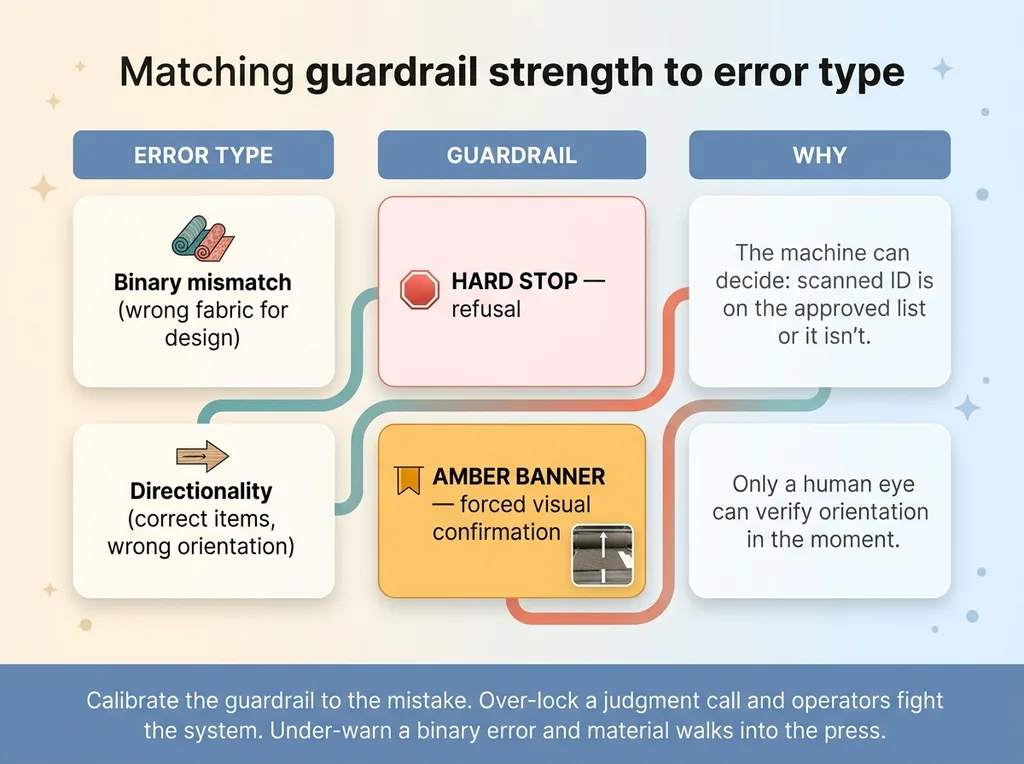
A hard refusal does not work here. The system cannot tell from a scan which way the operator is feeding the roll. So I matched the guardrail to the error.
When either the fabric or the design is flagged as directional, a giant amber banner fires on the screen. It carries a reference image showing the correct orientation. The operator cannot proceed without acknowledging it.
This is not a refusal. It is a forced visual confirmation. The system is saying: this one needs your eyes, here is exactly what right looks like, confirm before you press.
That is the design lesson worth stealing. Match the strength of the guardrail to the type of error. Binary mismatches get a hard stop, because the machine can decide. Orientation gets forced attention with a reference image, because only a human eye can verify it in the moment.
Over-engineering a hard lock onto a judgment call just trains operators to fight your system. Under-engineering a warning onto a binary error lets material walk into the press. The right guardrail is the one calibrated to the mistake.
No Drivers, No Special Hardware: USB Scanners as Keyboard Input
Here is the part that surprises people. This whole thing runs on hardware you can buy on Amazon today.
USB HID scanners just type
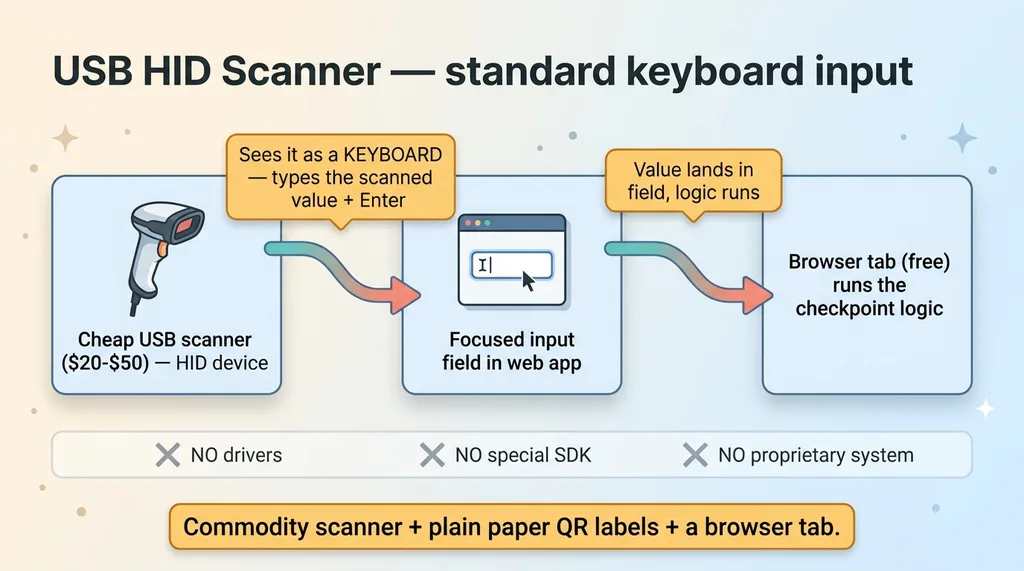
Cheap USB barcode scanners are HID devices, which means the computer sees them as a keyboard. When you scan a code, the scanner types the value into whatever field has focus, then hits enter. That is it.
 USB HID Scanner as Keyboard Input
No driver installs. No special SDK. No proprietary integration with some closed production system. The scanner types, and your web app receives the input exactly as if someone typed it by hand.
That is the entire reason this is a usb barcode scanner web app and not a six-figure factory IT project. You put a focused input field on the screen, the operator scans, the value lands in the field, your logic runs. The scanners cost $20 to $50 each. The browser is free.
If you have ever wanted to prevent manufacturing mistakes without ripping out your existing setup, this is the cheap path. Commodity scanner, plain paper QR labels, a browser tab. No RFID readers, no proprietary tags, no embedded controllers.
PIN auth that works with gloves
One more practical detail from the floor. Operators wear gloves. Typing a password on a touchscreen with gloves on is miserable and slow, and anything slow gets skipped.
So I use PIN auth instead. A short numeric code per operator, big tap targets, fast login even with gloves on. Identity matters because I want to know who ran which job, but it cannot cost ten seconds of fumbling every time.
That same low-friction thinking runs through everything I build for the floor. I wrote about how I let a team run a factory floor from a phone using the same principle: if the interface adds friction, operators route around it, and a guardrail nobody uses prevents nothing.
The hardware is the easy part. The discipline is keeping the interaction fast enough that nobody wants to bypass it.
What This Costs to Build vs. What It Saves
Let me be honest about the real cost, because the hardware number is misleading.
 Cost to Build vs. What It Saves
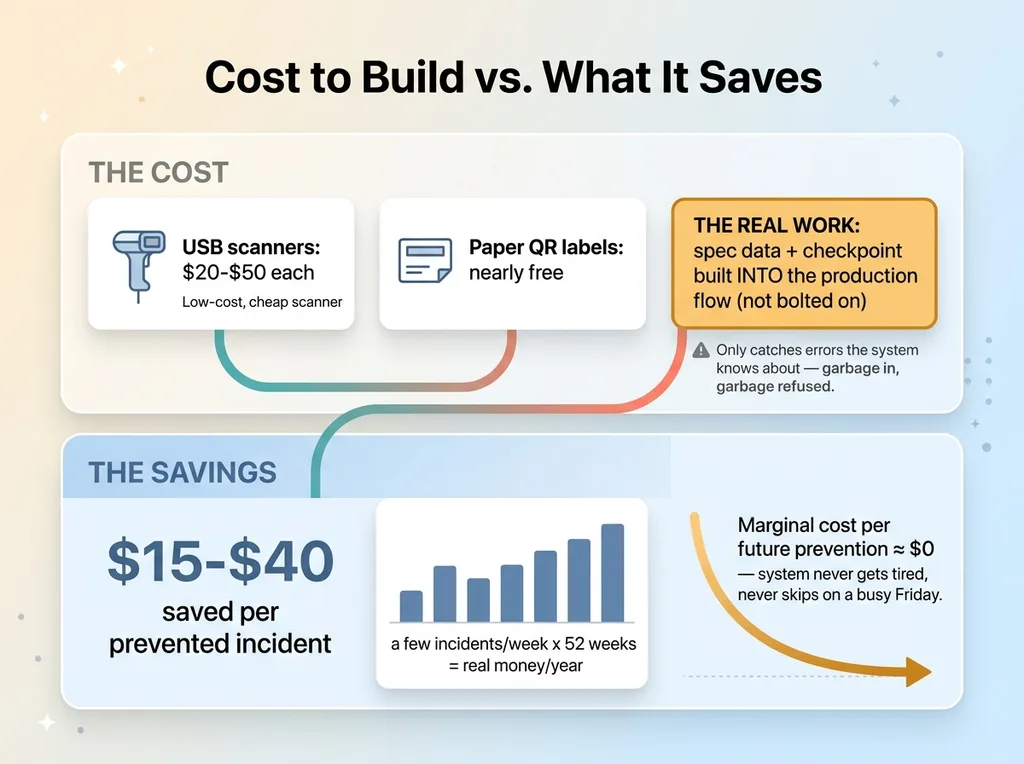
The scanners are $20 to $50. The paper QR labels are nearly free. If you stopped reading the price tag there, you would think this is a weekend project.
It is not. The real work is the logic and the data.
Every fabric and every design has to live in the system with its full spec: which fabrics a design is allowed to run on, whether it is directional, what the correct orientation looks like. And the checkpoint has to live inside your existing production flow, at the exact station where the irreversible step happens. Bolting it on as a separate app that operators have to remember to open defeats the entire purpose.
Now the honest limitation. This only catches errors the system knows about. If your catalog data says a design can run on Fabric A when it actually cannot, the check will happily approve the wrong combination. Garbage in, garbage refused.
The checkpoint is only as good as the spec behind it. So part of the build is cleaning up your product data, and that part is not glamorous.
But here is the payoff. Once the spec is right and the checkpoint is in the flow, the marginal cost of preventing each future mistake is basically zero. The system does not get tired. It does not skip the check on a busy Friday. Every job, every time, it asks the same question before the press comes down.
On my floor this lives inside a larger system. The checkpoints are one layer of the work I did automating a cut-and-sew floor, from print to press to bill of materials. The mistake-proofing is what makes the rest of the automation safe to run fast.
Where to Put the First Checkpoint on Your Floor
If you take one thing from this, take this: do not try to mistake-proof your whole floor at once.
That is how these projects die. You map every possible error, build a giant system, and never ship. Instead, find the single step where an error becomes irreversible and expensive. For me it was the heat press, because that is where material gets permanently committed and money gets destroyed.
Put one checkpoint there. Just one. Get it working, watch the scrap drop, then move to the next worst step.
And this pattern is not really about apparel. It generalizes to any floor where the wrong input gets committed to an irreversible process. Cutting, molding, printing, mixing, assembly. Anywhere "undo" does not exist, a two-scan checkpoint or a forced visual confirmation pays for itself fast.
I did not build this because it was an interesting engineering problem. I built it because I was tired of throwing away material I had already paid for, transfers I had already printed, and labor I had already spent. The scrap bin was teaching me an expensive lesson every week, and I wanted it to stop.
So here is my question for you. Where does your floor leak material? Where is the step where the wrong input becomes permanent before anyone notices?
Get the next build note.
I write up each system I build, including what broke. Subscribe to my newsletter and I'll send you the next one.