Tuning an AI Voice Intake Agent for Distressed Callers
How I tuned an AI voice intake agent so it won't cut off a crying caller mid-sentence. Semantic VAD, noise reduction, and turning calls into real leads.
By Mike Hodgen
The Call That Got Hung Up On
A woman called a personal-injury law firm's intake line about an hour after a car accident. She was shaken. She started to explain what happened, then paused, the kind of pause you take when you're trying not to cry while describing the worst day of your month.
The AI voice intake agent treated that pause as her turn ending. It started talking. It cut her off mid-sentence to ask a follow-up question she hadn't gotten to yet.
She hung up. That lead was gone.
I get called in for situations exactly like this. A firm stands up an AI phone receptionist, it demos beautifully on a calm test call, and then it falls apart the moment a real human in distress is on the other end. That's a very different problem than a pizza-ordering IVR mishearing a topping.
When your callers are upset, in pain, sometimes crying, a twitchy agent doesn't just annoy them. It makes the firm look cold at the exact moment a potential client is deciding whether they trust you with the worst thing that's happened to them this year. A barged-in caller doesn't leave a complaint. They leave, and they call the next firm on the list.
This particular engagement had two problems hiding inside one polished-looking system.
The first was the interruption problem: the agent talking over distressed callers because it couldn't tell a pause from a finished thought.
The second was quieter and worse. The voice calls built a live transcript during the conversation, then saved nothing when the call ended. The firm was paying for an agent that answered the phone like a pro and then threw every conversation in the trash.
Both problems came down to tuning, not technology. Here's how I fixed them.
Why Default Voice Activity Detection Hangs Up on Upset People
What server-side VAD actually does
Voice activity detection is the part of the system that decides when a caller has stopped talking, so the agent knows it's allowed to respond. Without it, the agent and the caller would talk over each other constantly, or the agent would never speak at all.
The default setup on most voice agents is server-side VAD with two dials: a volume threshold (this firm's was around 0.8) and a silence timer (around 1500 milliseconds). In plain terms: the system listens for audio above a certain loudness, and once the audio drops below that level for 1.5 seconds, it decides the caller is done and the agent jumps in.
Why threshold and silence timers fail vulnerable callers
That config works fine for a calm person reading a credit card number off a statement. They speak in steady chunks with clean gaps. The timer fires at the right moments.
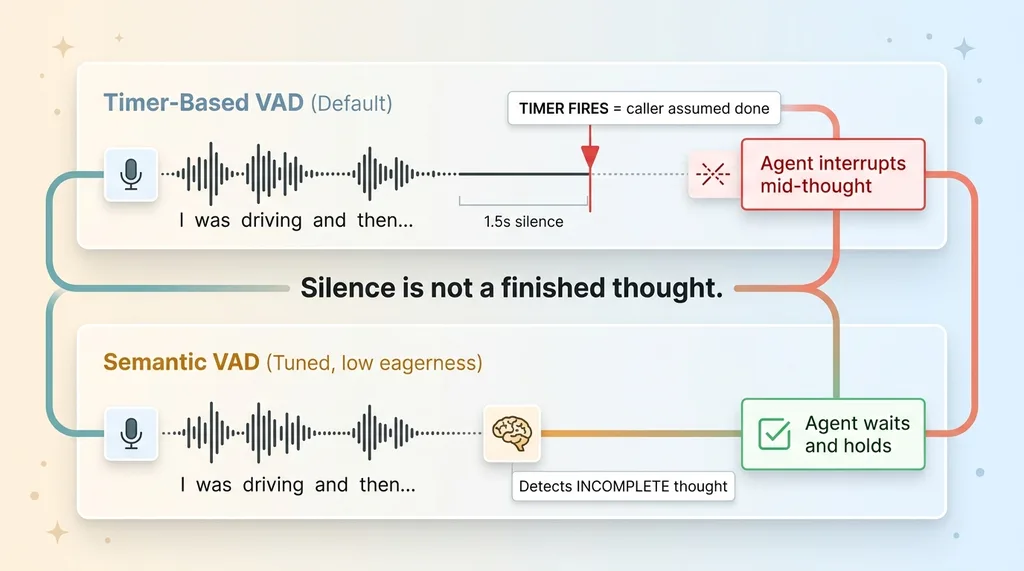 Timer-based VAD vs Semantic VAD on a distressed caller
It falls apart the instant someone pauses to breathe, to cry, or just to find the right words. A distressed caller does not speak in clean chunks. They say "I was driving and then..." and stop, because their brain is replaying the impact.
To a silence timer, that 1.5-second gap looks identical to a finished sentence. The agent counts it as "done" and barges in.
The core insight is simple and it's the whole article: silence is not the same as a finished thought. A timer-based detector physically cannot tell the difference, because all it measures is how long the audio went quiet.
And you can't fix it by cranking the silence timer up. Push it to 3 or 4 seconds and now the agent feels sluggish and dead for every normal caller, sitting there saying nothing while a clear-headed person waits for it to respond. You've traded one bad experience for another. It's a no-win dial, because the problem isn't the length of the timer. It's that you're using a timer at all.
The Fix: Semantic Turn Detection and Near-Field Noise Reduction
Semantic VAD with low eagerness
I switched the line from timer-based server VAD to semantic VAD. Instead of measuring how long the audio went quiet, semantic VAD decides whether a turn is over based on the meaning of what was actually said.
"I was driving and then..." is recognized as an incomplete thought. The model can tell the sentence is trailing off rather than landing. So the agent holds and waits, the same way a decent human receptionist would lean in instead of cutting you off.
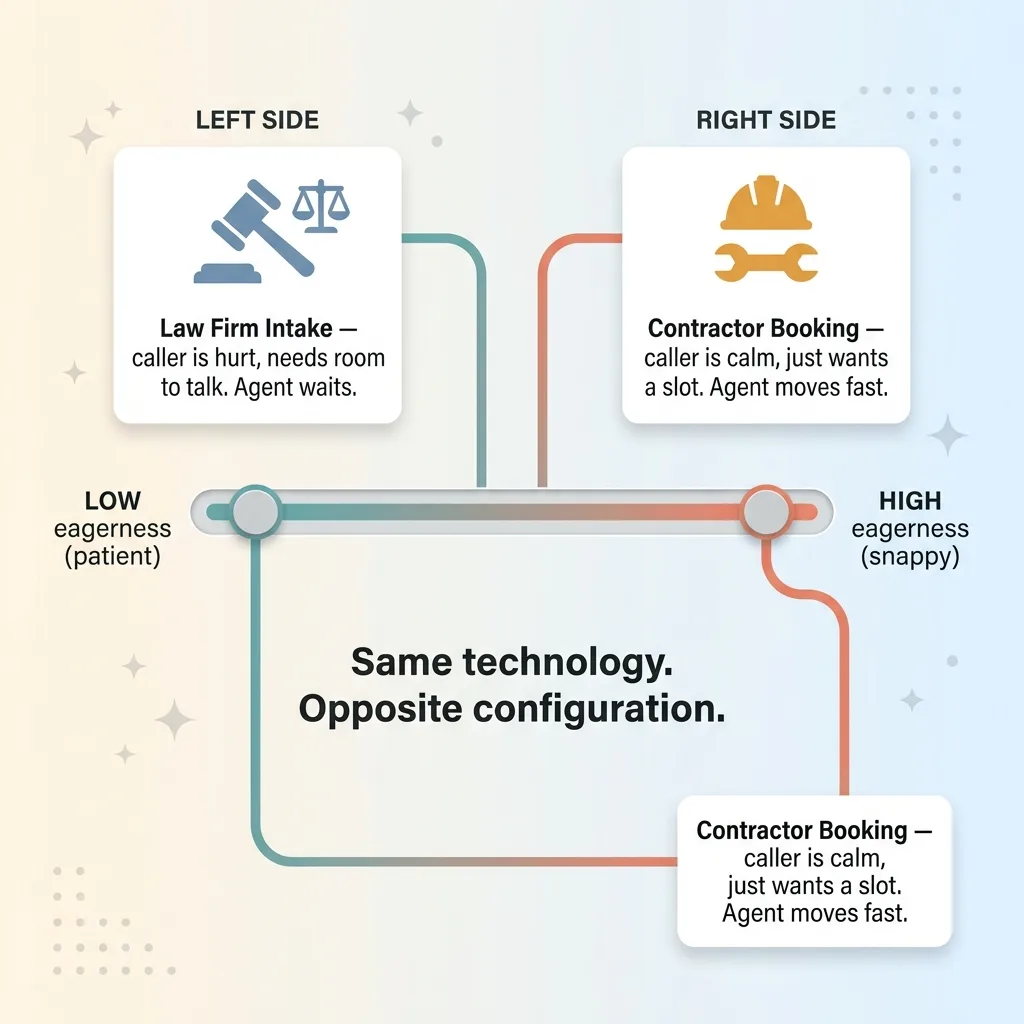
I set eagerness low. Eagerness is how quickly the agent wants to jump in once it thinks you might be done. Low eagerness means it errs on the side of waiting. For a calm sales line you might want it higher so the conversation feels snappy. For a line full of accident victims, you want the agent to be the patient one in the room.
This is the part people miss: empathy here is a configuration value, not a personality prompt. You don't make an agent kind by writing "be empathetic" in the system prompt. You make it kind by tuning when it's allowed to speak. The same logic applies to how it phrases things, which I get into in how to stop an AI receptionist from sounding like a bot.
Near-field noise reduction for phone and headset audio
The second piece was input audio. Phone and headset audio is close-mic and choppy. You get breath sounds, plosives, the caller's hand brushing the phone, background road noise from someone who just got in an accident and is sitting in their car.
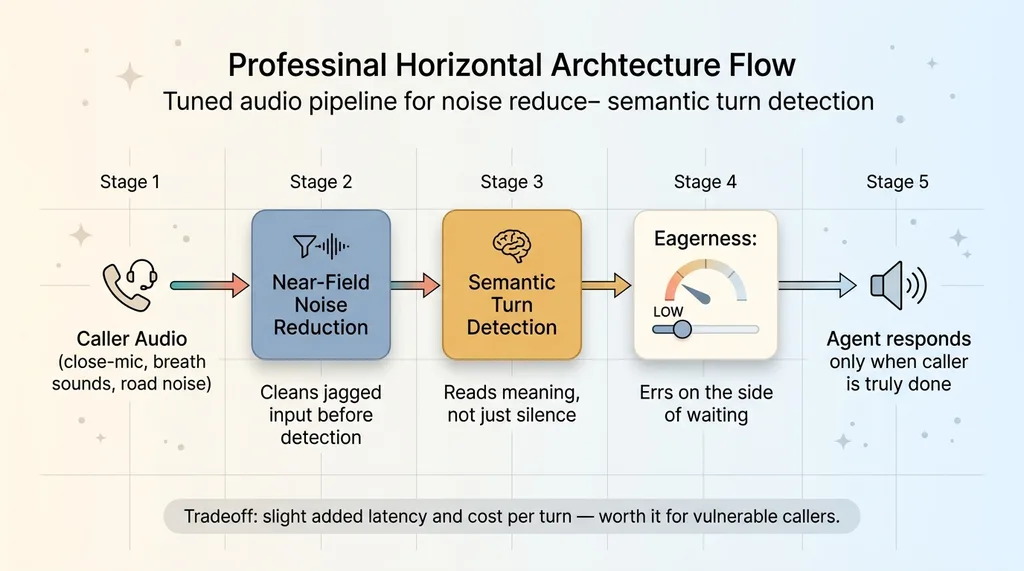 Tuned audio pipeline: noise reduction plus semantic turn detection
All of that confuses turn detection. The detector sees jagged audio and makes worse decisions about where speech starts and stops.
I enabled near-field noise reduction tuned for phone and headset input. It cleans up that close, messy signal before the detector ever sees it, so the semantic model is working from a clearer picture of what the caller actually said.
Honest tradeoff: semantic VAD adds a touch of latency and costs slightly more per turn than a dumb timer. For most lines that's a real consideration. For a vulnerable-caller intake line, it's not even a question. A half-second of added patience is worth far more than the fraction of a cent per turn.
The Second Failure: Voice Calls That Vanished
With the interruption problem solved, I went looking at why the firm's conversion numbers from voice still looked wrong. That's when I found the bug that actually mattered most.
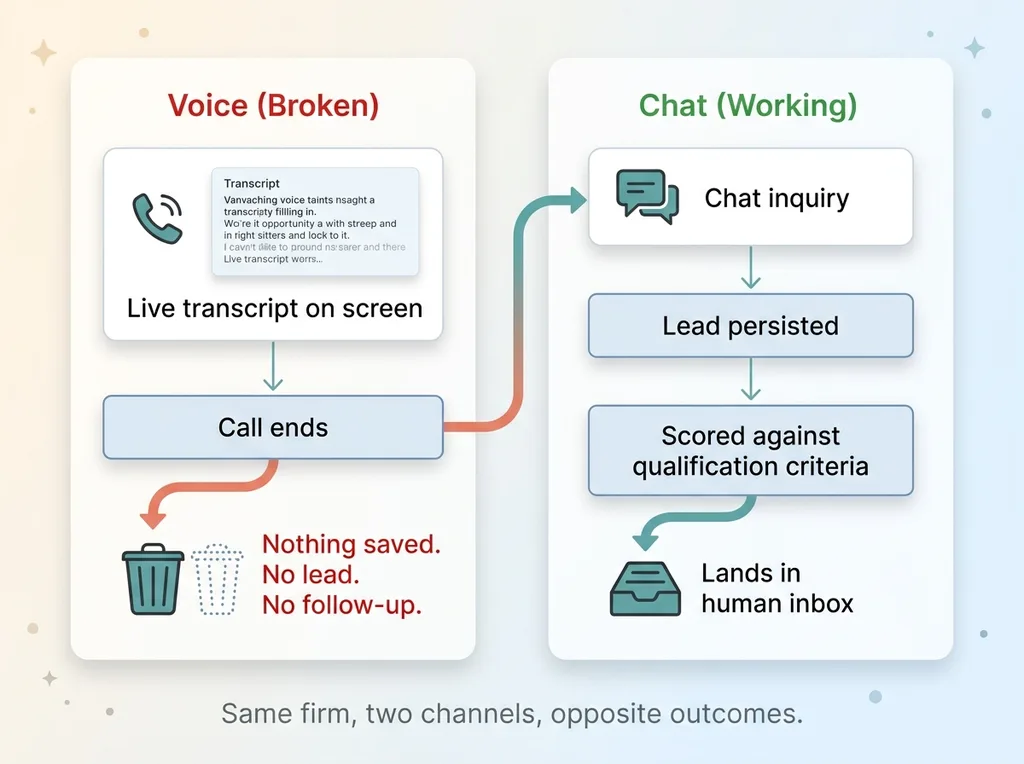 The vanishing voice transcript bug versus working chat persistence
The voice consultations built a live transcript on-screen as the call happened. You could watch it fill in, line by line, and it looked great. Then the call ended, and nothing got saved. No record, no lead, no follow-up. The transcript existed only as pixels during the call and then it was gone.
Meanwhile, chat inquiries on the same firm's site worked perfectly. A chat lead persisted, got scored against the firm's qualification criteria, and landed in the inbox where a human could pick it up. Voice did none of that.
So here was the actual situation: the firm was paying for a beautifully-spoken voice agent that answered every call like a professional and then discarded every single conversation the moment the caller hung up. The leads weren't going to a competitor. They were going nowhere.
This is the classic gap between a demo that "works" and a system that's wired into the business. The polished part, the conversation, was visible and impressive, so everyone assumed the rest was handled. The boring part, persistence, was missing entirely.
And the boring part is the entire point. A conversation that doesn't become a tracked lead isn't a business tool. It's a very expensive answering machine that forgets every message.
Making Voice Leads Reach the Same Inbox as Chat
A persist mode that saves the finished transcript
The fix was a persist mode. When a call ends, the system extracts the finished transcript, runs it through the exact same qualification logic the firm already uses for chat, and saves it as a lead.
Same scoring. Same fields. Same destination. The voice call now produces a record that's indistinguishable in structure from a chat inquiry, because there's no reason the firm should care which channel a hurt person happened to use to reach them.
I built this firm-scoped, which matters a lot in legal. The lead belongs to that firm and only that firm. The data is isolated so there's no chance a record from one practice surfaces anywhere it shouldn't. In a business where confidentiality is the product, scoping isn't a nice-to-have.
One scorecard for voice and chat
Once persistence was in place, voice and chat both flowed into the same inbox against the same scorecard. The firm stopped having two qualification standards. A lead is a lead, scored the same way, reviewed the same way.
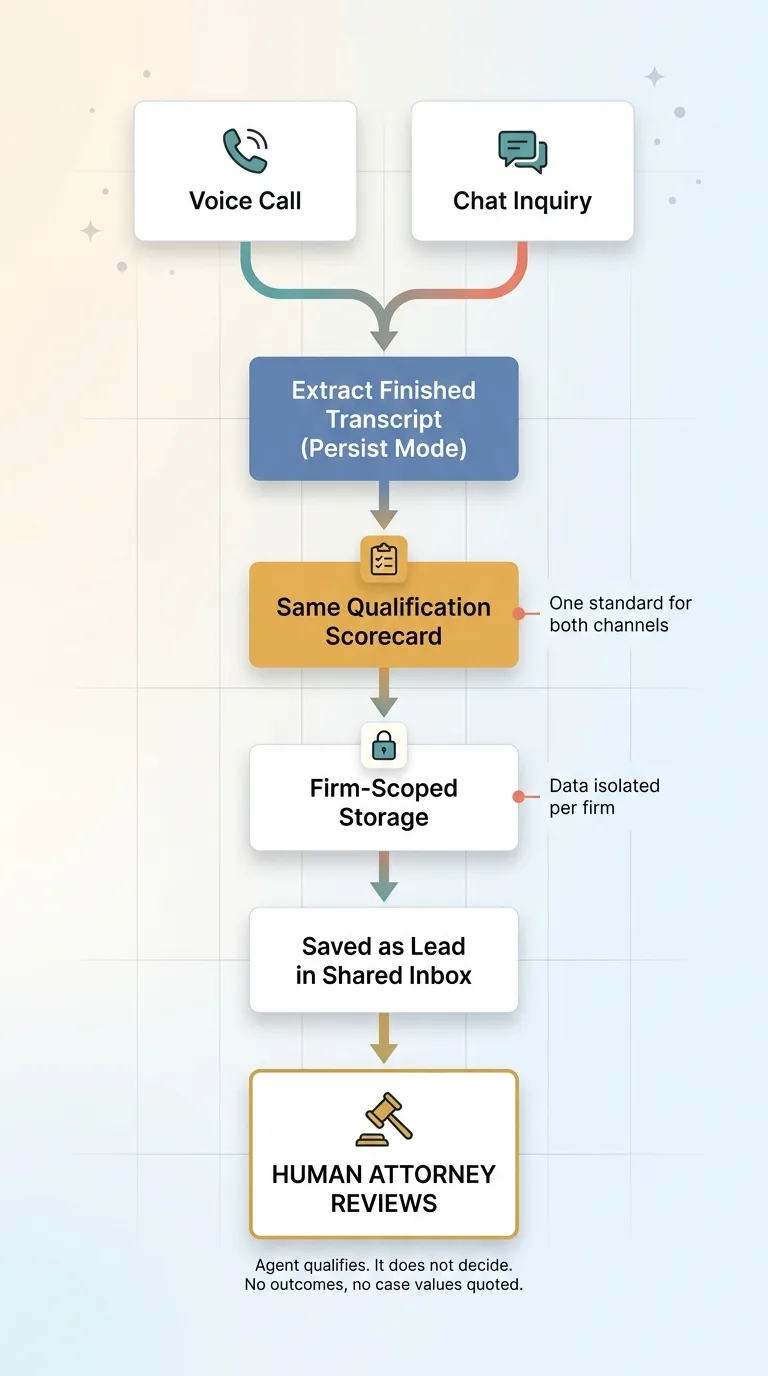 Unified persist mode: voice and chat into one scorecard with human review
Critically, the agent qualifies. It does not decide. It will not promise an outcome, it will not quote a case value, and it will not tell a caller what their claim is worth. That guardrail is non-negotiable for a law firm, and I wrote about why in detail in an intake agent forbidden from quoting a number.
After the agent qualifies the lead, a human attorney reviews it before anything moves forward. That's deliberate. Every system I ship stops for a human at the point where a real commitment or judgment call happens. The AI handles the intake; the lawyer handles the law.
The result: no lead silently lost, and intake quality that's consistent whether the victim picked up the phone or typed into a chat box at 2am.
What This Means If You're Skeptical AI Voice Sounds Robotic
I know the mental model you're carrying, because most people have it. AI on the phone means the maddening "I'm sorry, I didn't catch that, let's start over" loop. The robot that can't understand a zip code. The thing you mash zero to escape.
 Eagerness tuned per use case: contractor vs law firm
That reputation is earned. But it comes almost entirely from generic, untuned deployments where someone enabled the default settings and walked away.
The difference between robotic and genuinely usable lives in exactly the decisions I just described. Turn detection that respects a pause instead of pouncing on it. Noise reduction matched to the real audio your callers are actually producing. Persistence so the call becomes a tracked lead instead of a dead end. None of that is exotic. All of it is skipped by default.
I'll be honest about the limits. Voice still isn't the right answer for every business. Some workflows are better served by a form or a chat thread, where the caller can think and edit. And even on the lines where voice shines, I keep a human reviewing qualified leads rather than letting the agent make commitments it has no business making.
I also tune this per use case. A contractor's booking line and a law firm's intake line want completely different eagerness settings. The contractor wants speed, because the caller is calm and just wants to book a slot. The law firm wants patience, because the caller is hurt and needs room to talk. Same technology, opposite configuration.
The Tuning Is the Product
Here's the lesson I keep coming back to. An AI voice intake agent is only as good as the unglamorous tuning behind it.
Anyone can stand up a voice bot in an afternoon. The APIs are right there. The demo will sound fine on a calm test call, and everyone in the room will nod.
Making that same agent not cut off a crying accident victim, and making sure her call actually becomes a lead someone follows up on, is a different kind of work. It's the work that separates a demo from something a real business can run its intake on. It's not flashy. Nobody puts "we tuned the silence detector" on a sales slide. But that's the difference between winning the client and watching them hang up.
That's the kind of detail I build for. If you want to see the booking side of this same capability, I wrote up AI that answers your phone and books the job.
If you've got a phone line where the caller is stressed, where the call is high-stakes, and where every dropped one is a lost customer, that's exactly the situation where this tuning pays for itself fast. The lost leads are invisible until you go looking. Then they're the whole problem.
Want to explore what AI could do for your business?
Book a free 30-minute strategy call. No pitch deck, no sales team, just a real conversation about your operations and where AI actually fits.
Get AI insights for business leaders
Practical AI strategy from someone who built the systems — not just studied them. No spam, no fluff.
Hodgen.AI
Ready to automate your growth?
Book a free 30-minute strategy call with Hodgen.AI.
Book a Strategy Call