Demo videos convert. Everyone knows this. Wyzowl's latest data shows 89% of people say watching a video convinced them to buy a product or service, and in my own experience, product pages with embedded demo videos convert at roughly 2.4x the rate of pages with only static images and text. The math is not subtle.
And yet most businesses have maybe three demo videos, all slightly outdated, recorded by someone who no longer works there. The reason is simple: making a demo video is a pain in the ass. So I built an automated demo video generation pipeline that produces them without me touching a screen recorder. Every step — scripting, recording, narration, compositing, quality review — runs autonomously. This article breaks down exactly how it works.
Demo Videos Are the Highest-Leverage Sales Asset Nobody Makes Enough Of
The Math on Demo Videos vs. Other Content
A blog post takes me about 45 minutes with my AI-assisted content pipeline. A social media post takes 10. A demo video? Before I built this system, a single two-minute demo took 4-8 hours. That includes writing the script, setting up the environment, doing 3-5 takes because I clicked the wrong thing or stumbled over a line, editing out the mistakes, adding narration, exporting, and uploading.
The ROI per video is high. But the production cost per video is also high, which means most businesses treat demo videos like a quarterly project instead of what they should be — a standard artifact that ships with every feature, every release, every sales conversation.
I've seen the same pattern with clients. A payments startup I worked with had one demo video from 18 months ago. Their product had changed completely. A labor compliance SaaS client had zero video content — their entire sales motion was live Zoom demos, which meant every prospect required a salesperson's time.
Why the Bottleneck Is Production, Not Strategy
Nobody needs to be convinced that demo videos work. The bottleneck is purely production. Screen recording is manual, linear, and unforgiving. One mistake means you start over or spend time editing. Narration requires either a good mic setup and a quiet room, or paying a voiceover artist and waiting days.
This is a velocity problem. When the cost of producing something is high, you produce less of it. When you produce less of it, you underinvest in the highest-converting content format available. I got tired of that tradeoff and decided to engineer my way out of it.
The Full Pipeline: Five Tools, Zero Manual Recording
Architecture Overview
The pipeline runs as a single command. Here's the sequence:
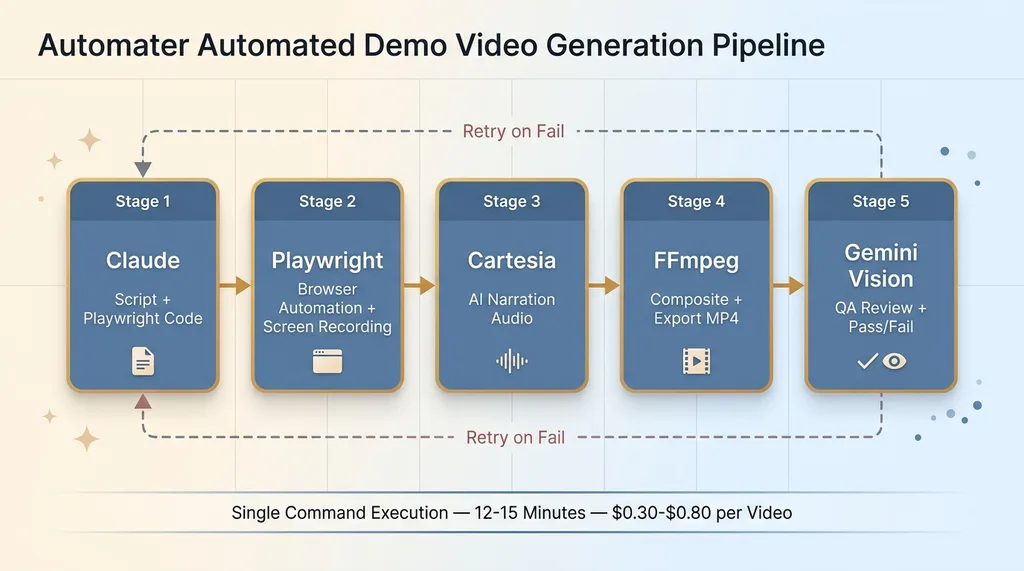 Five-Stage Pipeline Architecture
- Claude writes the narration script and generates Playwright automation code
- Playwright executes every browser interaction — clicks, scrolls, form fills — and records the screen
- Cartesia generates natural-sounding narration audio from the script
- FFmpeg composites the screen recording with the narration track, adds title cards and transitions
- Gemini Vision watches the final video, evaluates quality, and either approves it or triggers a retry
Five tools. Zero manual recording. The output is a polished MP4 ready to publish.
Why Each Tool Exists in the Chain
I could have tried to find one tool that does everything. That's the instinct most people have — look for an all-in-one solution. But I've written before about why I use multiple AI models in production, and the principle applies here too: each component should be best-in-class at its specific job.
Claude is the strongest scriptwriter available. Playwright is the most reliable browser automation framework — it handles modern SPAs, shadow DOMs, and dynamic content better than Selenium or Puppeteer. Cartesia produces narration that actually sounds human at a fraction of ElevenLabs' cost. FFmpeg is the industry standard for video manipulation. And Gemini 2.5 Pro's multimodal vision can literally watch a video frame by frame and tell you what's wrong with it.
A monolithic tool would be mediocre at all five jobs. This chain is excellent at each one.
Step 1: Claude Writes the Script and the Automation Code
Script Structure That Works for Demos
The input is a prompt describing what to demo, who the audience is, and the tone. Something like: "Demo the project creation flow for a technical PM audience. Professional tone, no fluff, under 90 seconds."
Claude outputs two artifacts simultaneously. The first is a narration script with timing markers. It looks roughly like this: an intro sentence, then a sequence of action-narration pairs where each action ("Click 'New Project'") has a corresponding narration line ("From the dashboard, we'll create a new project") with a pause duration between segments.
The second artifact is Playwright automation code that mirrors every action in the script. The key insight — and the thing that took the most iteration to get right — is that both artifacts are generated together in the same context window. Claude understands that when the narration says "enter a project name," the Playwright code needs to type into a specific input field at a specific moment.
Generating Playwright Selectors From the Script
The system prompt is structured so Claude knows it's writing for a visual medium. I provide it with a simplified DOM description of the target application — not the full HTML, but the key interactive elements with their selectors. Claude maps narration beats to specific selectors and generates the automation code with timing data baked in.
Does it always work perfectly? No. Claude sometimes generates selectors that don't exist or have changed since the DOM snapshot was taken. About 30% of first attempts have at least one selector issue. That's fine. The QA step catches it, and the pipeline retries with corrected context. Acknowledging failure modes and building around them is more honest — and more effective — than pretending everything works on the first try.
Step 2: Playwright Records While Cartesia Narrates
Browser Automation That Looks Human
Playwright runs in headed mode (you need a visible browser to record the screen) and executes every interaction from the generated script. But raw browser automation looks terrible in a demo — instant clicks, teleporting cursors, text appearing all at once. Nobody watches that and thinks "this is a real product experience."
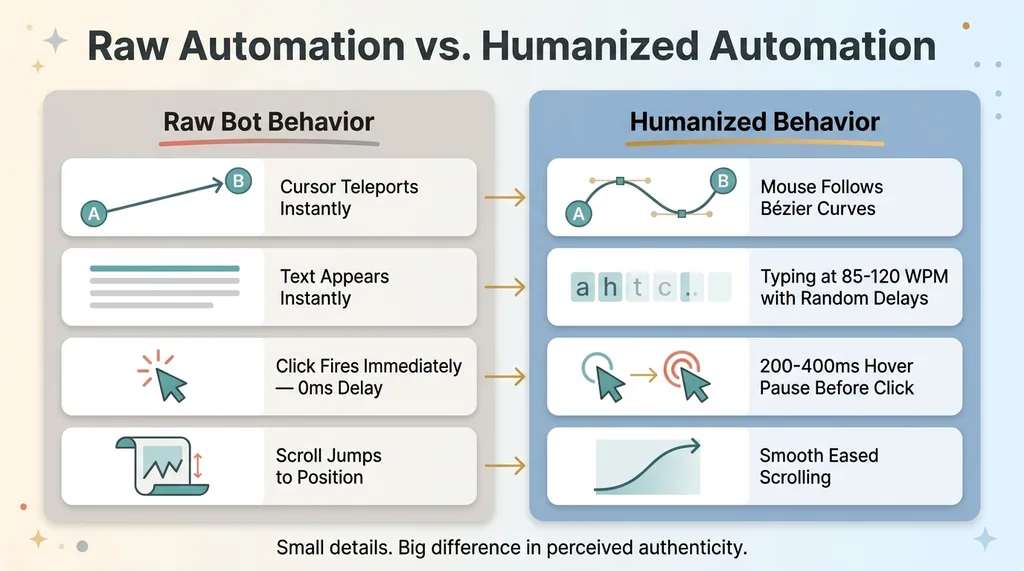 Humanization Layers in Browser Automation
So the automation includes humanization layers. Mouse movements follow Bézier curves instead of teleporting. Typing happens at 85-120 WPM with slight randomization between keystrokes. Clicks have a 200-400ms hover pause before they fire. Scrolling is smooth, not instant. These are small details, but they're the difference between a demo that feels like watching a real person and one that feels like watching a bot.
The viewport is locked at 1920x1080 for consistent output. Playwright's built-in video recording captures the screen at 30fps. The recording starts 2 seconds before the first action and ends 3 seconds after the last — giving the final video clean head and tail frames.
Narration That Doesn't Sound Like a Robot
Cartesia generates the narration as a separate audio track. I chose Cartesia over ElevenLabs for three reasons: the voice quality is comparable, the latency is lower for batch generation, and the cost is roughly 40% less per minute of audio. When you're generating dozens of videos, that cost difference matters.
The narration comes back with precise timing metadata — I know exactly how long each segment takes in milliseconds. This data feeds into the FFmpeg step.
FFmpeg then composites everything. The video track from Playwright, the audio track from Cartesia, any title cards or lower-third overlays I've defined in the template, and simple transitions between sections. The FFmpeg command chain handles resolution normalization, audio leveling, and export to H.264 MP4. The output is a complete, ready-to-publish video file.
Step 3: Gemini Vision Watches the Video and Grades It
What the QA Agent Checks
This is the step that makes the pipeline autonomous instead of merely automated. Most "automated" video systems still require a human to watch the output and verify it's good. I don't watch these videos before they publish. Gemini does.
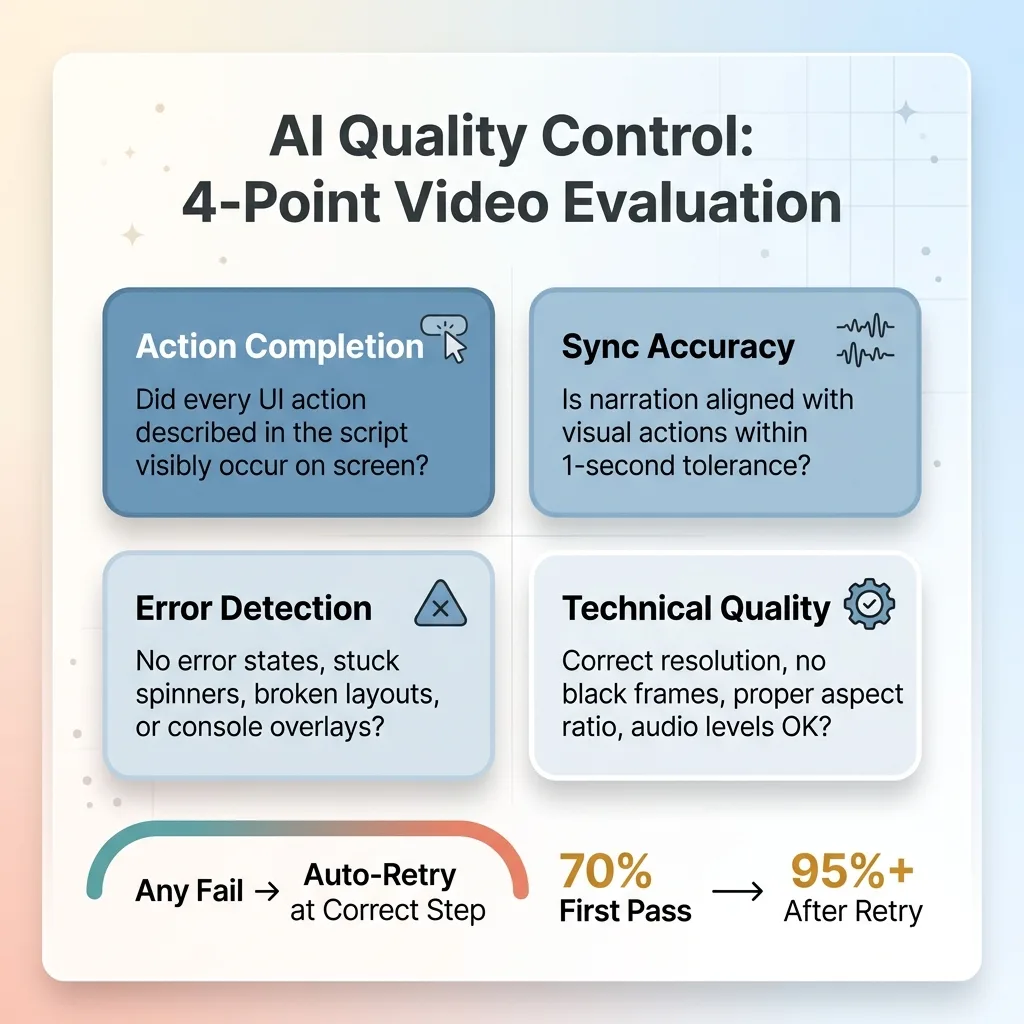 Gemini Vision QA Evaluation Criteria
Gemini 2.5 Pro's multimodal capabilities accept video input. The QA agent samples frames at key moments (aligned with the timing markers from the script) and evaluates four criteria:
- Action completion: Did every UI action described in the script visibly happen on screen? If the script says "click New Project," Gemini checks that the New Project modal or page actually appeared.
- Sync accuracy: Is the narration aligned with the visual actions within a 1-second tolerance? A narrator saying "watch as the dashboard loads" while the screen shows a completely different page is an instant fail.
- Error detection: Are there any visible error states, loading spinners that persisted too long, broken layouts, or console error overlays? Gemini flags these.
- Technical quality: Correct resolution, no black frames, proper aspect ratio, audio levels within acceptable range.
This follows the same pattern I use across every AI system I build — AI that rejects its own bad work is the difference between automation you can trust and automation you have to babysit.
Pass/Fail Criteria and Auto-Retry
Each criterion gets a pass or fail. Any single fail triggers a retry. The pipeline is smart enough to retry at the appropriate step. A timing sync issue? Rerun just the Playwright recording with adjusted delays. A selector failure where a button was never clicked? Go back to Claude with the error context and regenerate the automation code. A narration issue? Regenerate just the Cartesia audio.
First-pass success rate sits around 70%. Most failures are timing sync issues — the narration runs slightly ahead of or behind the visual action. These almost always resolve on the second attempt with adjusted pause durations. Full pipeline failures (where the script logic itself is wrong) happen maybe 5-8% of the time and require a complete regeneration.
After retry, the overall success rate is above 95%.
Results: What This Actually Saves
Time and Cost Per Video
Before: 4-8 hours per demo video. After: 12-15 minutes end-to-end, zero human involvement.
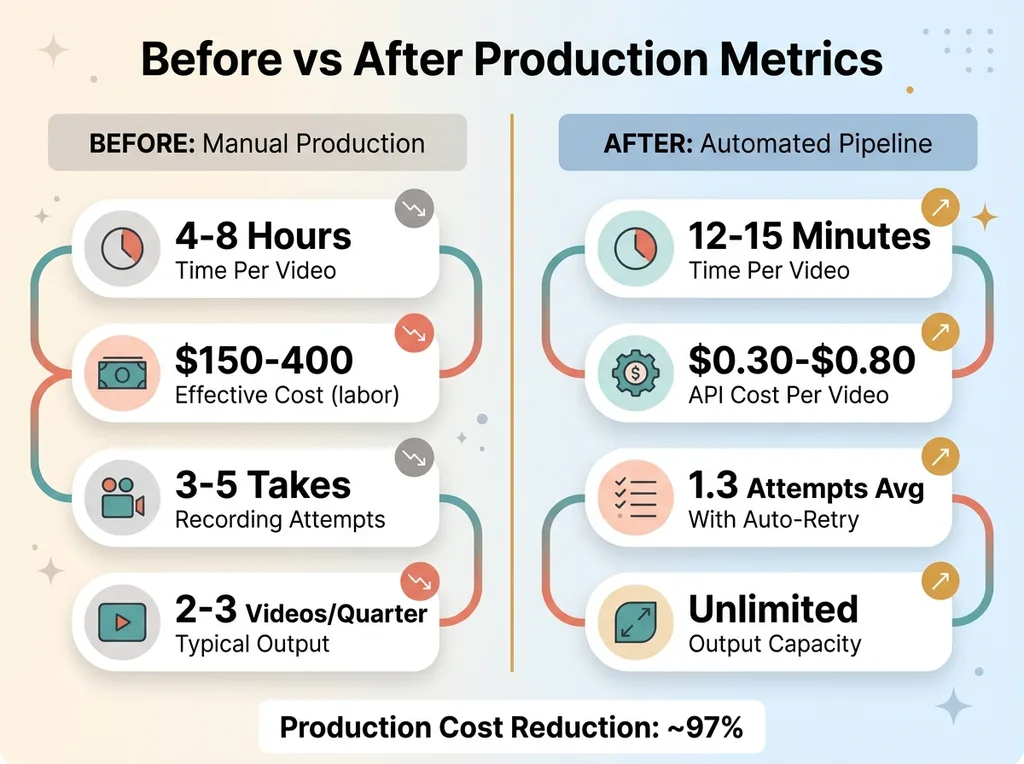 Before vs After Production Metrics
Cost per video breaks down to roughly $0.30-$0.80 in API calls. Claude for the script and automation code is the biggest chunk. Cartesia narration is a few cents per minute of audio. Gemini QA is minimal. FFmpeg is free.
What Changes When Demo Videos Cost Nothing
When demo videos are essentially free, you stop thinking about them as a project and start treating them as a standard build artifact. Every feature ships with a demo. Every product release gets a video changelog. Onboarding walkthroughs stay current because regenerating them after a UI change takes 15 minutes instead of a full afternoon.
The most interesting use case is personalized sales demos. Feed a prospect's company name and use case into the script prompt, and the pipeline generates a demo that references their specific workflow. I've used this for an AI SDR platform I built — each outbound sequence includes a personalized product walkthrough. Try doing that manually for 50 prospects a week.
Each video used to be a project. Now it's a CI/CD step.
When to Build a Pipeline vs. When to Just Hit Record
If you make two demo videos a year, use Loom. Seriously. This pipeline is overbuilt for low-volume use.
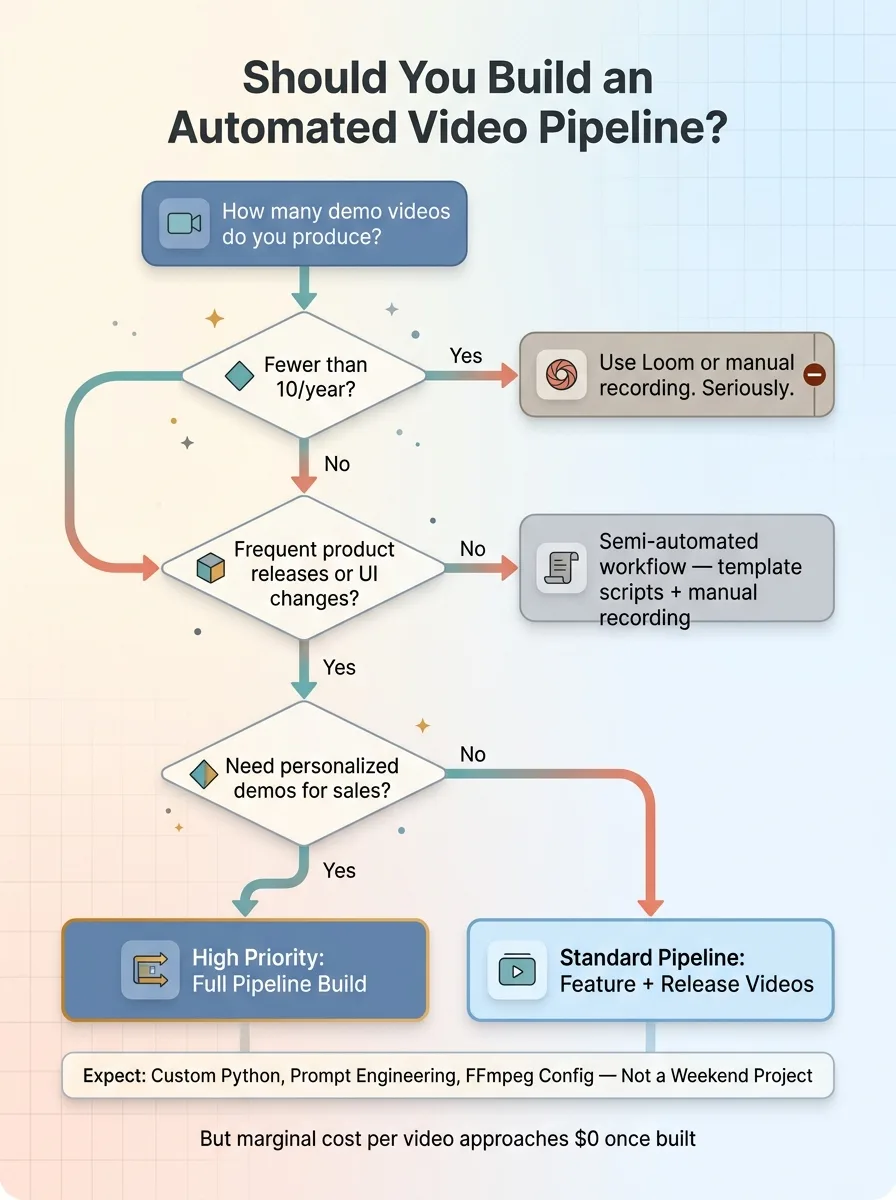 Decision Framework: Build Pipeline vs. Just Record
It makes sense when you ship frequently and need updated demos for every release. When you have multiple products or features that each need dedicated walkthroughs. When you want personalized demos in your sales motion. Or when you're building a platform where customers expect self-serve video documentation.
The upfront build cost was real. This is custom Python, prompt engineering, FFmpeg pipeline work, and QA agent configuration. It's not a weekend project. But once it exists, the marginal cost of each video approaches zero, and the system compounds — every improvement to one component improves every video the pipeline produces from that point forward.
This is the kind of system I build for businesses — not the obvious wins that everyone's already chasing, but the workflow infrastructure that eliminates entire categories of manual work permanently.
Get the next build note.
I write up each system I build, including what broke. Subscribe to my newsletter and I'll send you the next one.