808 Commits in 30 Days: AI Development Velocity at Scale
808 commits across 26 projects in 30 days. A real breakdown of AI development velocity — what compounded, what broke, and what I'd do differently.
By Mike Hodgen
February 15 to March 18, 2025. Thirty days. 808 commits across 26 distinct projects. One person.
That's the raw number. And I know how it sounds — like a vanity metric designed to impress on LinkedIn. So let me break down what it actually means, why AI development velocity compounds instead of plateaus, and what it taught me about building at a pace that didn't exist two years ago.
The Numbers: 808 Commits, 26 Projects, 1 Person
A few months before this sprint, I wrote about 72 commits across 10 projects in one week. The question that piece raised was obvious: does this pace sustain, or does it collapse under its own weight?
This is the answer. It doesn't just sustain. It compounds.
What Counts as a Commit
Let me be transparent about what "808 commits" actually means. These aren't auto-formatted whitespace changes or Dependabot version bumps. Some are 3-line bug fixes. Some are 400+ lines of new functionality. A few are documentation updates. The average was roughly 27 commits per day, including weekends where I worked shorter sessions.
Not every commit is equal. But every one represents a decision made and code shipped. That's the metric I care about — decisions executed, not lines written.
The Project Breakdown by Category
The 26 projects broke down roughly like this:
- 8 client-facing projects — ranging from a professional services firm's internal tooling to a fitness coaching client's platform rebuild to a labor compliance SaaS
- 10 internal products and tools — my DTC fashion brand systems, AI trading tools I built to solve my own problems, a document signing SaaS, content pipeline improvements
- 8 infrastructure and tooling projects — deployment automation, monitoring, shared libraries, security hardening
That mix matters. Client work funded the internal work. Internal work produced patterns that accelerated client work. Infrastructure kept everything from falling over. The flywheel effect was real and measurable.
The Compounding Effect: Why Project 26 Was Faster Than Project 1
This is the core insight, and it's the one most people miss when they think about AI-assisted development speed. The value isn't in any single project moving faster. It's in every project making the next one faster.
Reusable Patterns That Emerged
By the third project in this sprint, I had an authentication pattern I liked — Supabase Auth with Row Level Security, role-based access, and a clean session management approach. That pattern got reused in Projects 7, 12, and 19 with minimal modification. What took 4 hours to build right the first time took 20 minutes to implement the fourth time.
A pricing logic module I originally built for my DTC brand — the system that dynamically prices 564+ products using a 4-tier ABC classification — became the architectural skeleton for a client's pricing system. Different business rules, same bones.
When I built a document signing SaaS in a weekend, it wasn't because document signing is simple. It's because the authentication, database design, API patterns, and deployment pipeline were already solved problems sitting in my toolkit. I just had to write the domain-specific logic.
The Shared Toolkit Effect
My custom Python toolkit grew significantly during this period. It's now 22,000+ lines of utility functions, API wrappers, database helpers, and automation scripts. Each addition is small — maybe 50-200 lines. But each one eliminates a category of future work.
The multi-model architecture I use — Claude for content and complex reasoning, Gemini for image work, custom model chaining for cost efficiency — stabilized in the first week of this sprint and then became the default for everything after. I stopped making model selection decisions. The system just knew which model to route to.
Here's the compounding math: Project 1 in this sprint took roughly 12 hours to scaffold and get to a working prototype. By Project 20, equivalent complexity took about 3 hours because 60%+ of the scaffolding already existed as solved patterns.
This isn't about typing faster. It's about building a library of solved problems that AI can help you assemble and adapt.
What a Typical Day Looked Like
If you're a CEO wondering what AI-first development actually looks like in practice, here's the rhythm I settled into. It's less glamorous than you might think.
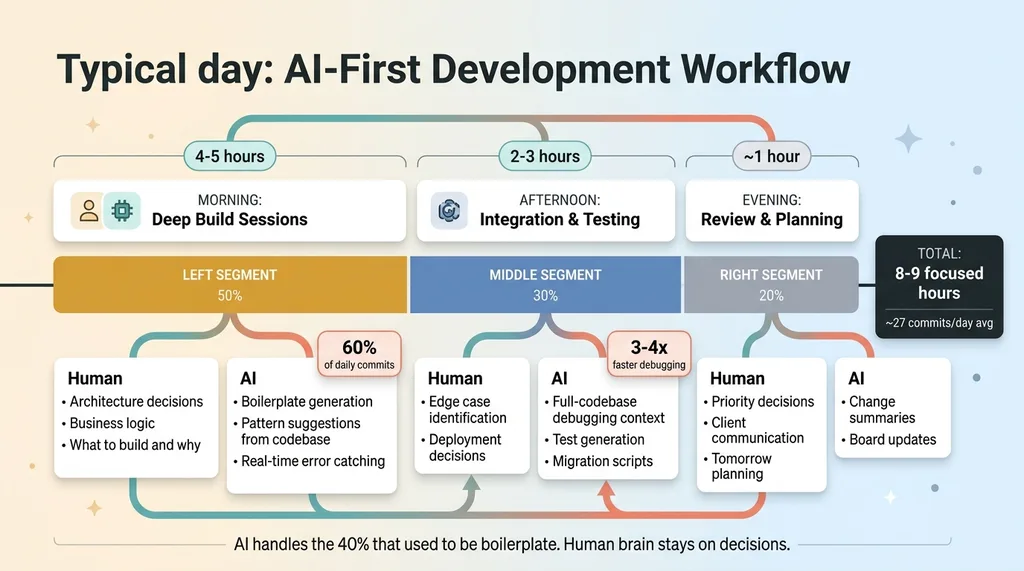 A Typical Day: AI-First Development Workflow
Morning: Deep Build Sessions
Four to five hours of focused building. This is where I'd pick the hardest problem — new architecture, complex business logic, a feature that required genuine thinking — and work through it with Claude Code. About 60% of the day's commits happened in this window. The AI handled boilerplate, suggested patterns from my existing codebase, and caught issues I'd miss when moving fast. I handled the decisions about what to build and why.
Afternoon: Integration and Testing
Two to three hours connecting systems, testing edge cases, deploying. This is honestly where AI saved the most time. Debugging with AI context — where it can see the full codebase, recent changes, and error logs — runs 3-4x faster than debugging solo. A production issue that used to mean an hour of console.log archaeology now takes 15 minutes of conversation with the AI about what changed and where.
Evening: Review and Planning
About an hour. Review what shipped, update project boards, plan tomorrow's priorities.
That's 8-9 focused hours. Not 16-hour hustle culture. The difference is that AI handles the parts that used to eat 40% of my day — boilerplate, documentation, test writing, refactoring. My brain stays on architecture, business logic, and the decisions AI genuinely can't make.
What Broke: 4 Projects That Failed or Stalled
Here's where I lose the people who want a clean success story. Of 26 projects, 4 had significant problems. That's a 15% failure rate, and I think being honest about it matters more than pretending everything worked.
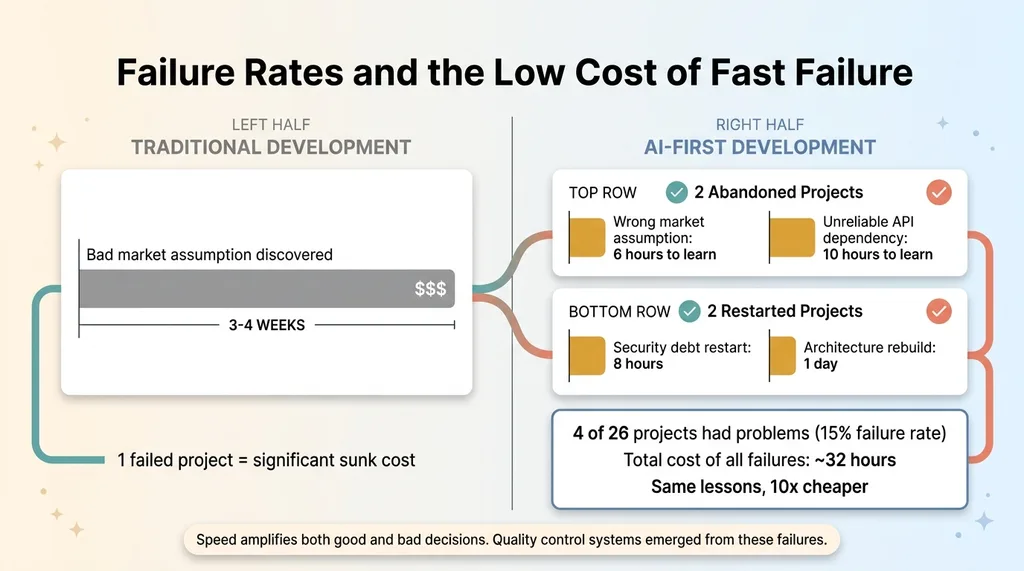 Failure Rates and the Low Cost of Fast Failure
The Abandoned Ones
Two projects got abandoned entirely.
One was a tool built on a market assumption that turned out to be wrong. I built the MVP in about 6 hours, showed it to potential users, and got a clear "this solves a problem we don't actually have." Six hours wasted? Maybe. But two years ago, that same bad assumption would have cost 3-4 weeks of development before I learned the same lesson. Low cost of failure is an underrated benefit of speed.
The second was a project that depended on a third-party API that proved too unreliable. Rate limits, inconsistent responses, two undocumented breaking changes in a single week. I cut my losses after investing about 10 hours.
The Ones That Needed a Restart
Two projects needed significant restarts.
One accumulated security debt that comes from moving too fast. I was shipping features without proper input validation, and by the time I noticed, the fixes touched almost every endpoint. That restart cost about 8 hours — time I could have saved by slowing down on day one.
The other had an architecture that worked great as a prototype but couldn't scale past it. The database schema was too normalized for the query patterns the application actually needed. Rebuilding the data layer took a full day.
Key insight: speed amplifies both good and bad decisions. When you can build an MVP in a day, you can also build a bad one in a day. The quality control systems I use now — including AI that rejects its own bad work — emerged directly from these failures.
And yes, the 808 number includes commits on projects that went nowhere. That's real. Not every swing connects.
AI-Assisted Development Speed: What's Real and What's Hype
I talk to a lot of CEOs who've been burned by AI promises. So let me give you the honest breakdown of where AI genuinely changed the math during this sprint, where it helped a little, and where it was completely useless.
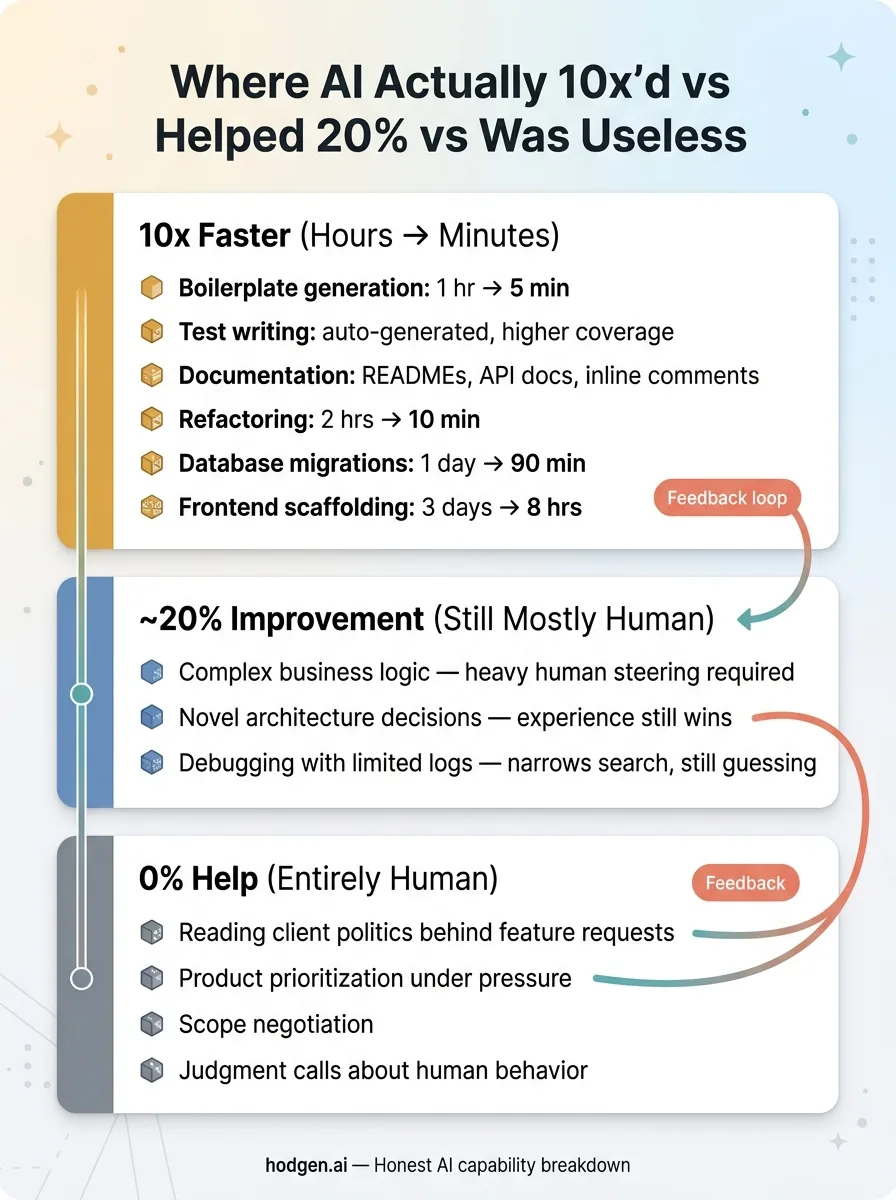 Where AI Actually 10x'd vs Helped 20% vs Was Useless
Where AI Genuinely 10x'd the Work
- Boilerplate generation — API endpoints, CRUD operations, form handling. What used to take an hour takes 5 minutes.
- Test writing — AI-generated tests caught bugs I wouldn't have written tests for. Coverage went up, time spent went down.
- Documentation — Every project got README files, API docs, and inline comments that I would have skipped if writing them manually.
- Refactoring — "Make this module handle both single and batch operations" used to be a 2-hour careful surgery. Now it's a 10-minute conversation.
- Database work — Translating business logic into SQL schemas and writing migrations. A Supabase migration that would have taken a full day took 90 minutes.
- Frontend scaffolding — A client-facing dashboard that normally needs 3 days of frontend work shipped in 8 hours.
These tasks went from hours to minutes. The 10x claim is real for this category.
Where AI Added Maybe 20%
- Complex business logic — AI can help implement it, but the thinking about what the logic should be is still entirely human. Heavy steering required.
- Novel architecture decisions — AI suggests patterns, but choosing the right one for your specific constraints requires experience it doesn't have.
- Debugging production issues with limited logs — AI helps narrow the search space, but it's guessing without sufficient context just like you are.
Where AI Was Useless
- Understanding client politics and why they actually want Feature X when they're asking for Feature Y
- Making product prioritization calls when everything feels urgent
- Negotiating scope when a project is growing beyond the original agreement
- Any decision requiring judgment about human behavior and motivation
The pricing strategy for a client's product line? That was 100% human thinking with AI just formatting the output into a clean document. The decision about which of my 26 projects to prioritize on any given morning? Entirely mine. AI can surface data to inform those calls. It can't make them.
What 808 Commits Taught Me About Building as a One-Person AI Team
The Infrastructure Tax Is Real
About 15% of those 808 commits were pure infrastructure. CI/CD pipelines, monitoring dashboards, deployment scripts, security patches, SSL certificates, DNS configurations. None of that shrinks with AI. If anything, more projects means more infrastructure surface area to maintain.
This is the part that doesn't make it into the "AI is amazing" narratives. Twenty-six projects means twenty-six things that can break at 2 AM. The automation modes I've built — 29 of them running in production now — help, but they don't eliminate operational overhead. They just make it manageable for one person instead of requiring a team.
Context Switching Has a New Cost Model
Working across 26 projects sounds chaotic. And it would be, without AI. But here's what changed: with good documentation (which AI helps maintain), picking up a project after 5 days away takes 15 minutes instead of 2 hours. I ask the AI to summarize recent changes, current state, and open issues. It reads the codebase and gives me a briefing. That's a fundamentally different cost model for context switching.
The real bottleneck at this velocity isn't code generation. It's decision-making. Which project gets attention today? Which feature matters most? Which client problem is most urgent? AI can inform these decisions with data. It cannot make them.
One more honest note: this pace isn't sustainable indefinitely in burst mode. But the systems it produced ARE sustainable. The 29 automation modes, the 3,000+ hours of annual time savings, the +38% revenue per employee in my DTC brand — those persist long after the sprint ends.
What This Means for Your Business
The point isn't that every CEO should make 808 commits. Most shouldn't write code at all.
The point is that the gap between companies using an AI-first development workflow and those that aren't is widening faster than most leaders realize. A one-person team with the right AI toolkit can now produce output that required a 5-8 person team two years ago. That's not futurism. That's what I just documented over 30 days.
For a $5M-$50M company, this means your competitors who figure this out first will move faster, ship more, and operate leaner. My own DTC brand saw +38% revenue per employee after deploying these systems. That's not a GitHub stat. That's a business outcome on a P&L.
The question isn't whether AI development velocity matters. It's whether you're building the systems to capture it before your market does.
Thinking About AI for Your Business?
If any of this resonated — the compounding, the honest failures, the real numbers — I'd like to hear what you're working on. I do free 30-minute discovery calls where we look at your operations and identify where AI could actually move the needle. No slides. No pitch deck. Just a conversation about your stack and what's possible.
Or if you want to understand how I'd approach your stack, start there.
Get AI insights for business leaders
Practical AI strategy from someone who built the systems — not just studied them. No spam, no fluff.
Hodgen.AI
Ready to automate your growth?
Book a free 30-minute strategy call with Hodgen.AI.
Book a Strategy Call