Conversion Tracking Broken in Shopify: A 10-Day Silent Failure
An app removal quietly stripped my gtag and broke conversion tracking in Shopify for 10 days. Here's the silent failure and the watchdog that catches it now.
By Mike Hodgen
What Actually Broke (And Why Nothing Alerted)
I run a DTC fashion brand out of San Diego. Everything we make is handmade, and the operation runs on a stack of AI systems I built myself: pricing, content, product creation, the works. So when I tell you I had conversion tracking broken in Shopify for ten straight days and didn't know it, understand that I am not a guy who ignores his dashboards. I live in them.
Here is how it happened.
The app I removed
One of my Shopify apps, the one connecting my catalog to Google and Shopping, was causing problems with my product feed. Listings were getting flagged. I'd been fighting it for a while, so I made the call: uninstall the app, fix the feed a different way, move on.
Clean decision. Or so I thought.
What it took with it
That app, it turned out, was injecting the storefront gtag into my live theme. Removing the app stripped the tag out with it. I had no idea. Nothing in the uninstall flow said "by the way, this also removes your entire analytics tracking layer."
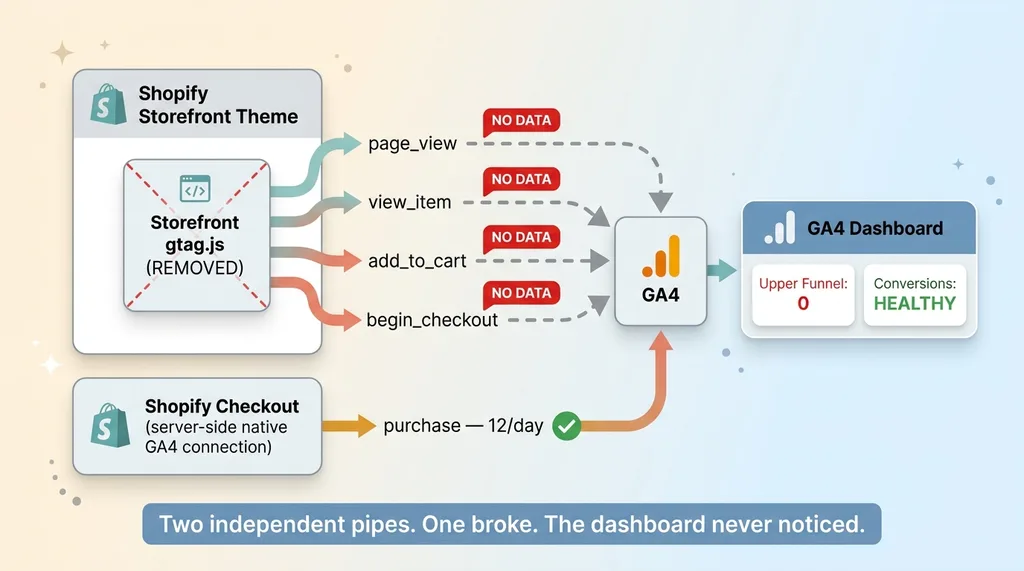
The damage was immediate and quiet. GA4 page_view collapsed by about 99%. add_to_cart dropped to a flat zero. The entire upper funnel went dark.
But here is the trap. Purchase events kept firing at roughly 12 per day, because those come through Shopify's native GA4 connection, not the storefront tag. The conversion definition survived. So at the dashboard level, where I and every CEO I know spend most of our time, nothing looked broken.
This is the exact same shape as the time the dashboard showed zeros for two weeks and nobody noticed. A system that half-works is a system that lies to you convincingly. The numbers that matter most kept ticking, so I had zero reason to look anywhere else.
That is the danger. The failure wasn't loud. It was polite.
How a Half-Working System Hides the Failure
Let me explain the architecture, because this is the part that should make every operator nervous.
 Two-pipe tracking architecture: storefront tag vs Shopify native connection
Why purchases kept firing
Shopify has its own native GA4 connection. When a checkout completes, Shopify fires the purchase event server-side, on its own, completely independent of the storefront gtag sitting in your theme.
So when the storefront tag vanished, purchases didn't care. They kept flowing through a separate pipe. My conversion count looked totally healthy. Twelve a day, right on trend.
Meanwhile the storefront tag, the one responsible for page_view, view_item, add_to_cart, and begin_checkout, was just gone. The entire top and middle of my funnel reported nothing. Not low numbers. Nothing.
Why the conversion definition is the worst place to monitor
Here is the lesson I want you to take from this, even if you forget everything else.
 Conversion count is the most downstream metric, funnel monitoring blind spot
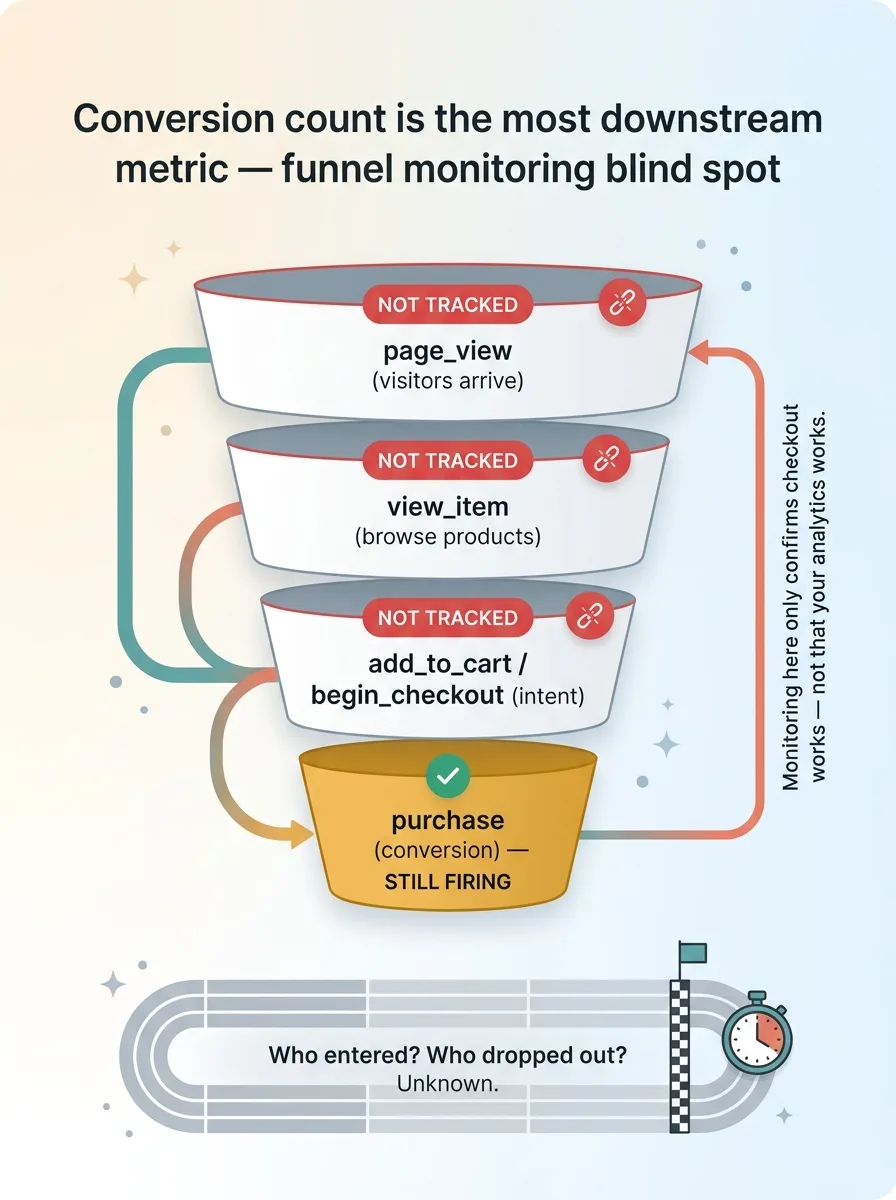
A system that fails halfway is more dangerous than one that fails completely. A full outage trips alarms. Purchases stop, revenue craters, somebody calls you at 7am. A partial failure trips nothing, because the one number everybody stares at keeps moving.
The conversion count is the worst possible place to monitor the health of your tracking. It is the most downstream metric you have. By the time a problem reaches your conversion number, it has had to survive every layer above it. And in my case, it didn't even depend on the layer that broke.
I was monitoring the finish line while the first three miles of the race went untracked. The runner still crossed, so the clock still showed a time. But I had no idea who entered the race, who dropped out, or where.
If your only health check is "are conversions still coming in," you are not monitoring your analytics. You are monitoring whether Shopify's checkout still works, which is a different and much more reliable thing.
The Real Cost: Ten Days of Ad Bidding on Garbage
This is where the silent failure stops being a technical curiosity and starts costing real money.
Click attribution went blind
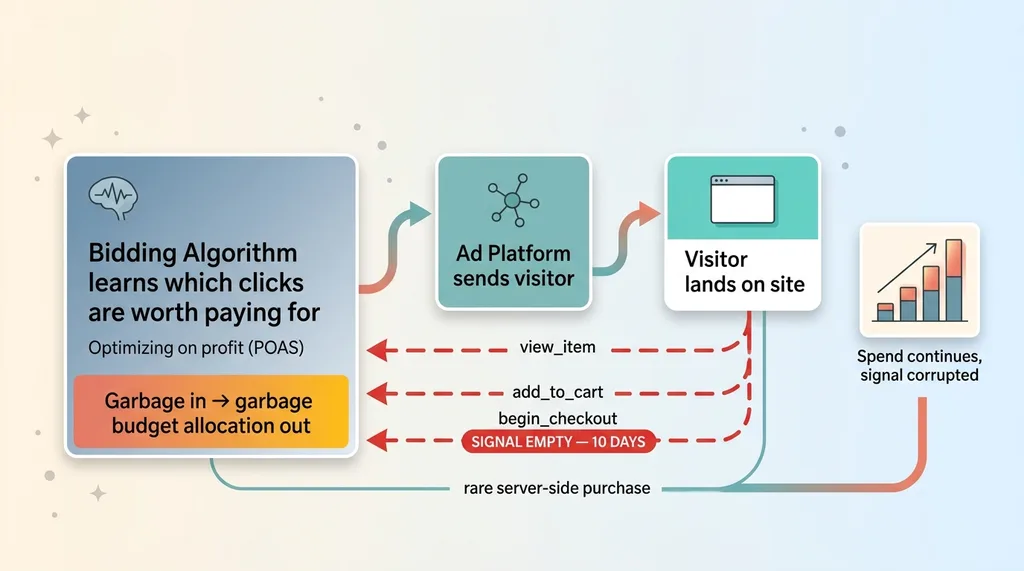
With the storefront tag gone, click attribution died. The ad platform sends a visitor to my site, and normally it gets a stream of signals back: did they view the product, did they add to cart, did they start checkout. That feedback is how the bidding algorithm learns which clicks are worth paying for.
For ten days, that feedback was empty. The ads kept running. The platform kept spending. But the signal coming back was corrupted, because everything between the click and the rare server-side purchase had gone silent.
What the algorithm optimized toward
Modern ad bidding is a machine that optimizes toward whatever you feed it. Feed it good engagement signals, it finds you more good customers. Feed it nothing, it optimizes toward noise.
 How blind ad bidding wastes spend on corrupted feedback
For ten days, every dollar of ad spend was being allocated by an algorithm working off incomplete data. It couldn't see which audiences engaged, which creative drove add-to-carts, which clicks actually moved down the funnel. It was bidding blind and didn't know it, same as me.
I run my ad bidding to optimize on profit, not just clicks, which makes the input signal even more important. Garbage in, garbage budget allocation out.
And here is the question every CEO reading this should sit with: how would I even know? If your conversion number looks fine and your ad spend looks normal, what exactly would tip you off that the algorithm has been driving with its eyes closed for a week and a half? For me, the honest answer was nothing. Nothing would have caught it. I found it by accident.
That is not a system. That is luck.
Fixing It Without the App (App-Free Re-Injection)
Once I understood what broke, the fix had two phases. First, get tracking back. Second, make sure it never silently disappears again. Here's phase one.
Re-injecting gtag.js into the theme head
I re-injected gtag.js directly into the theme head through a deploy script. Deliberately not another app. Apps are the thing that broke this in the first place, and I wasn't about to hand control of my tracking layer back to a third party that could yank it on the next uninstall.
The re-injected tag fires the four events that went dark: page_view, view_item, add_to_cart, and begin_checkout. Upper funnel restored, under my control, version-controlled in my own deploy pipeline.
What I intentionally did NOT send
Two deliberate decisions here, and both matter more than the re-injection itself.
I did not send purchase events from the storefront. Shopify's native connection still fires those. If I sent purchase from the storefront tag too, I'd double-count every sale and corrupt my conversion data in the other direction. The whole reason the failure stayed hidden was that purchases came through a separate pipe, so I left that pipe alone.
I did not touch Merchant Center. That's what started this entire mess. The original feed problem lived there, and reaching back into it would risk re-creating the listing issues I'd removed the app to escape. Fix the thing that broke, don't go poking the thing that was already fragile.
One more defensive detail worth calling out. The add_to_cart hook wraps the fetch call in a non-throwing wrapper. That means if the tracking code ever errors, it fails silently on the tracking side and never touches the cart. A broken analytics event should never be able to break a customer's ability to buy. Tracking is allowed to fail. Checkout is not.
That separation is the whole philosophy. Your measurement layer should never be load-bearing for your revenue layer.
The Daily Watchdog: Two Canaries That Never Sleep
Re-injecting the tag fixed the symptom. It did nothing to fix the actual problem, which was that I had no way to know the tag was gone. So I built the durable fix: a daily watchdog with two independent canaries.
Canary 1: live tag presence check
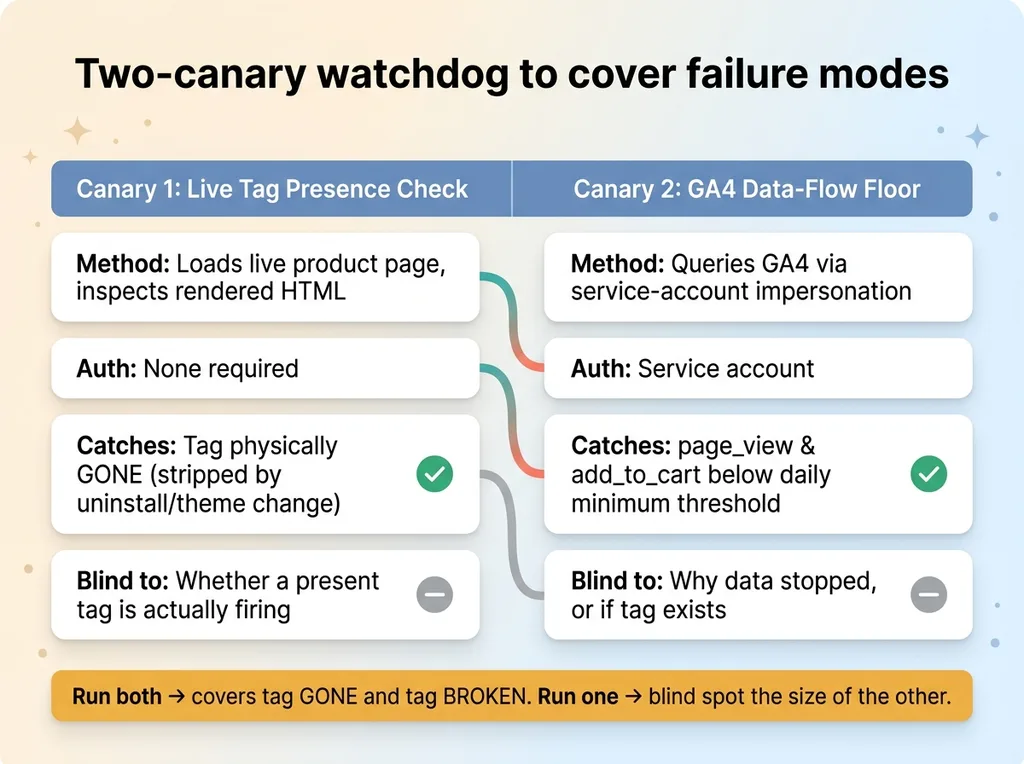
The first canary is auth-free. Every day it loads an actual live product page and checks the rendered HTML to confirm the tag is physically present.
This catches the exact failure that hit me. The tag wasn't misfiring. It wasn't throwing errors. It was simply gone, stripped out of the theme. No error-based monitor in the world would have caught that, because there was no error. There was just absence.
Canary 1 asks one blunt question: is the tag actually there, in the HTML, right now? If a future app uninstall or theme update strips it again, I know within 24 hours instead of ten days.
Canary 2: GA4 data-flow floor
The second canary checks GA4 directly through service-account impersonation. It confirms that page_view and add_to_cart counts are sitting above a minimum daily threshold.
This catches a different failure: the tag is present in the HTML but, for whatever reason, not actually firing. Maybe a script error, maybe a consent change, maybe a GA4 config problem. The tag exists but the data isn't flowing.
Why two canaries
Each one catches a failure mode the other completely misses.
 Two-canary watchdog system covering both failure modes
Canary 1 sees a missing tag but can't tell if a present tag is firing. Canary 2 sees missing data but can't tell you why, or whether the tag even exists. Run only one and you have a blind spot exactly the size of the other. Run both and you've covered the tag being gone and the tag being broken.
This is the same idea behind the automations that email me when nothing is wrong. The watchdog alerts on absence, not just on errors. Most monitoring only fires when something throws an exception. But my most expensive failure threw nothing. It just went quiet. A real watchdog has to treat silence itself as a signal.
How to Know If Your Analytics Is Already Blind
Let me give you something you can act on today, because the honest reality is this could be happening to you right now and your dashboard would look perfectly fine.
The checks any business can run today
Three checks, in order of how fast you can run them.
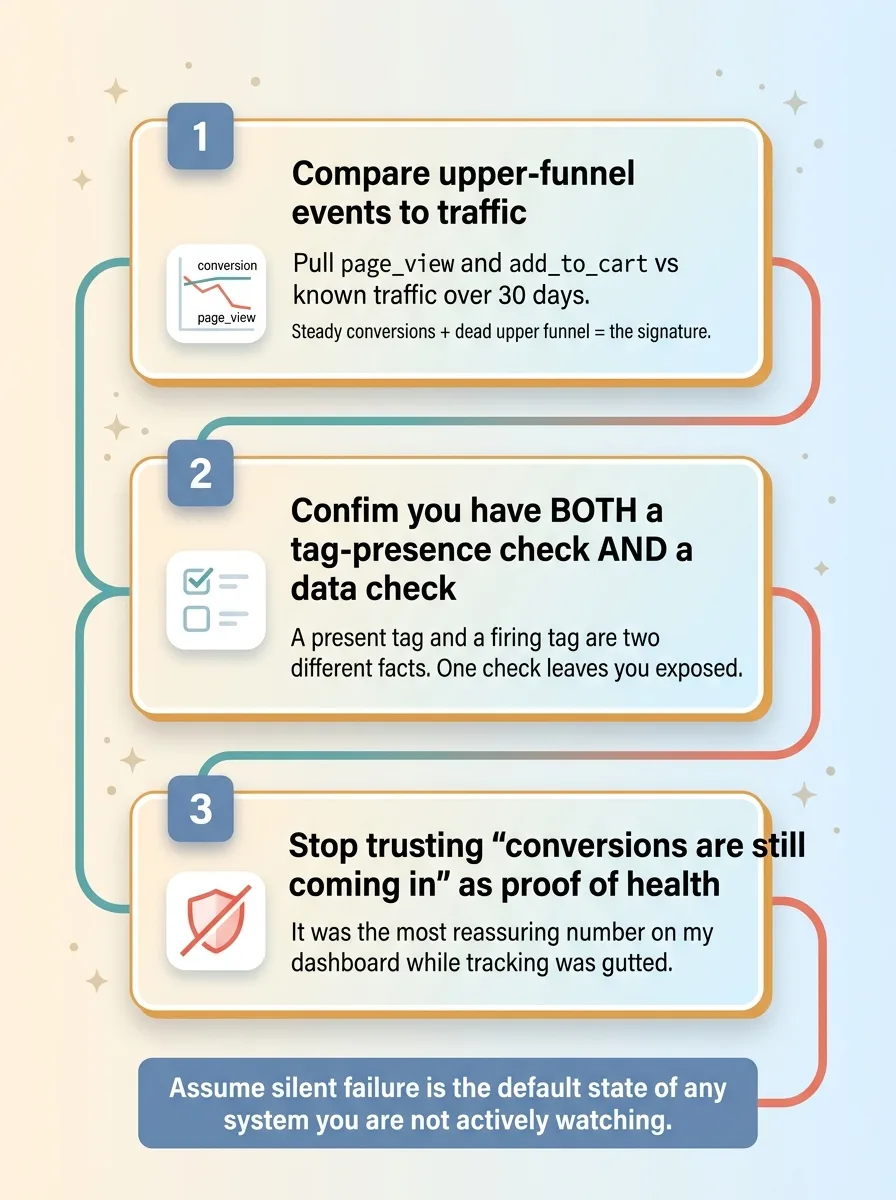 Three checks any business can run today to detect blind analytics
One: compare your upper-funnel events to your traffic. Pull page_view and add_to_cart against your known traffic over the last 30 days. If conversions are steady but page_view cratered at some point, you are in this exact failure. Steady conversions plus dead upper funnel is the signature. Look for it.
Two: confirm you have a tag-presence check that is separate from a data check. Most teams have neither. The ones who think they're covered usually have one or the other. You need both, for the reason I just laid out: a present tag and a firing tag are two different facts, and only checking one leaves you exposed to the other.
Three: stop trusting "conversions are still coming in" as proof of health. It isn't. It was the single most reassuring number on my dashboard while my tracking was gutted. The metric that made me feel safe was the metric actively hiding the problem.
The mindset shift
Here's the shift that actually matters. Assume silent failure is the default state of any system you are not actively watching. Not the exception. The default.
Things don't stay working because you built them well. They stay working because something is checking, every day, that they still work. I build watchdogs and kill-switches into every system I deploy now, because I've learned the hard way that "it was fine last time I looked" is not a status. It's a hope.
Silent Failures Are the Ones That Cost You Most
The failures that hurt you are almost never the ones that crash loudly. A loud crash gets fixed in an hour because everyone notices. The expensive ones are the failures that look completely fine on the dashboard while quietly burning your budget in the background.
Ten days. Blind ad bidding. Corrupted feedback flowing into an algorithm that kept confidently spending my money. And the only thing that would have caught it sooner was a watchdog that nobody, including me, had built yet.
That's the part worth sitting with. I run 15-plus AI systems and I still got caught by a silent failure, because the one place I needed monitoring was the one place I hadn't thought to put it. Nobody is immune. You just need the plumbing.
And that's exactly what it is: plumbing. This kind of monitoring is the boring, unglamorous work I install before the fancy AI projects, because the kill-switches I build into every system and the watchdogs that scream when something goes quiet are what make the rest of it trustworthy. AI that optimizes on corrupted data is worse than no AI at all.
If you're not completely sure what's silently failing in your own stack right now, that uncertainty is the answer. It's worth a conversation.
Want to explore what AI could do for your business?
Book a free 30-minute strategy call. No pitch deck, no sales team, just a real conversation about your operations and where AI actually fits.
Get AI insights for business leaders
Practical AI strategy from someone who built the systems — not just studied them. No spam, no fluff.
Hodgen.AI
Ready to automate your growth?
Book a free 30-minute strategy call with Hodgen.AI.
Book a Strategy Call