The Bug: An Empty Bucket Nobody Noticed
Here's a scene from my own backyard. I run a DTC fashion brand out of San Diego, handmade goods, and we built an internal app for the design team. One of the features let designers upload files straight into the app. Reference images, mockups, raw assets. Nothing exotic.
It looked done. We built it, demoed it, shipped it. In the demo a designer picked a file, clicked upload, the toast cleared, everyone nodded. Feature complete. Move on.
Months later I went looking for those uploaded files. I opened the storage bucket expecting a pile of assets.
It was empty.
Not half-full. Not missing a few. Empty since the day we launched. The feature had never once worked in production. Every single upload a designer had attempted over those months had failed, silently, and gone nowhere.
The only symptom anyone ever saw was a vague "upload failed" toast. Most of the team ignored it. A few assumed they'd picked a bad file and gave up. Nobody flagged it because nothing looked broken. The app didn't crash. No red error screen. No alert in my inbox.
This is the worst kind of bug. When something crashes, you find out immediately and you fix it. When something fails silently, it can sit there for months pretending to work while the actual data tells a completely different story.
A feature that demoed clean had never delivered a single byte to storage. And the reason why comes down to one thing almost every fast-built app gets wrong: how custom auth talks to storage row-level security.
Why Supabase Storage Upload RLS Fails With Custom Auth
Let me explain why supabase storage upload rls fails when you're running your own auth, because this trips up nearly every team that builds fast.
The mismatch between custom JWT sessions and native auth
Our app didn't use the storage provider's built-in authentication. We used our own cookie and JWT session system, which is a completely reasonable choice. Plenty of apps do this. You want control over sessions, roles, and how login works, so you roll your own.
The problem is what happens when the browser tries to write to storage.
The storage provider has no idea your custom session exists. When the browser client connects, it authenticates with the anonymous public key, the one that ships with the front end. From storage's perspective, that request is coming from an anonymous user. Your beautiful custom JWT might be sitting right there in a cookie, but the storage layer never reads it.
Storage RLS sees an anonymous user
So here's the actual request flow. The browser tries to upload a file. It hits storage using the anon key. Storage runs its row-level security policies to decide whether this request is allowed to insert. It checks: is there a policy that lets an anonymous user write to this bucket?
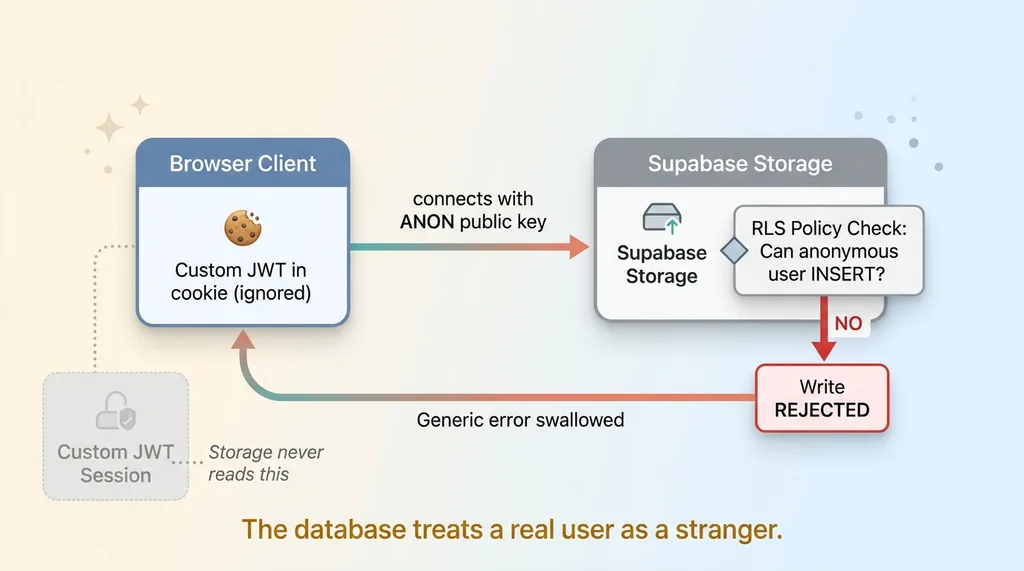 The broken request flow: browser to storage with anon key
There wasn't. There shouldn't be. You don't want anonymous writes to a private bucket.
So the policy check fails and storage rejects the write. Correctly. The database is doing exactly what it's supposed to do. It doesn't know who your user is, because your auth lives somewhere it can't see, so it treats them as a stranger and says no.
That rejection came back as a generic error. Our upload handler swallowed it and surfaced the only thing the user ever saw: the toast.
The core lesson is simple. Storage RLS only trusts the provider's own session token. If your auth lives in your own JWT system instead, the database has no idea who the user is. It will never match a policy that requires an authenticated identity, because as far as it's concerned, nobody is logged in. This is the same custom auth row level security mismatch I see in app after app, and it's one of the same five security holes that show up in every AI-built app.
Why It Stayed Hidden So Long
The rest of the app felt completely healthy, and that's the trap.
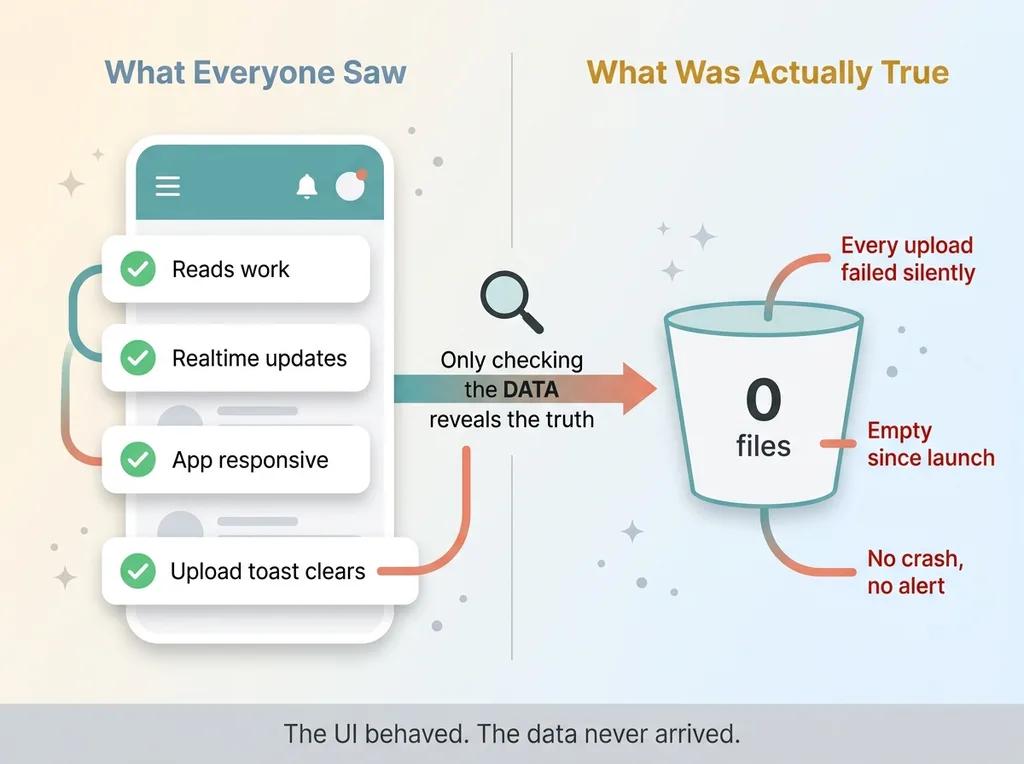 Happy path vs broken path looking identical from outside
Reads worked fine. Public reads and realtime subscriptions ran on the anonymous key and never needed an RLS-gated write to succeed. Designers opened the app, saw their data, navigated around, and everything responded. The only broken path was the one privileged write: uploading a file. Everything else hummed along.
This is the broader pattern with a silent upload failure, and silent failures in general. The happy path and the broken path look identical from the outside until you go check the actual data. The UI cleared the toast. The app stayed responsive. Nothing in the experience told anyone that the write at the end of the chain had quietly died.
I've watched the same thing happen elsewhere. I wrote about how a dashboard showed zeros for two weeks and nobody noticed, and it's the exact same disease. The system kept running, the screens kept rendering, and the real failure was invisible because nothing threw.
Here's the uncomfortable part for anyone who trusts a quick demo. A feature passing a demo tells you almost nothing about whether it works under real auth and real load. Our demo uploaded a file, watched the toast clear, and called it done. Nobody opened the bucket. Nobody confirmed the file landed. The demo proved the button was clickable. It proved nothing about whether the data arrived.
That gap, between "the UI behaved" and "the data is actually there," is where features go to die quietly.
The Fix: Route Privileged Writes Through a Server Endpoint
The fix is a clean server side file upload pattern. Stop calling storage from the browser entirely for any RLS-dependent write. The browser should never touch the storage bucket directly when your custom auth can't represent the user to the database.
Here's how I rebuilt it.
Build a server route that uses the service role
I created a server route whose only job is to receive a file and write it to storage. That route runs trusted server-side code, which means it can hold the service role key. The service role bypasses RLS entirely, because it's the trusted backend, not an anonymous browser. Service role storage writes always succeed because the database treats the service role as fully authorized.
The critical rule: the service role key never, ever touches the browser. It lives only on the server. If that key leaks to the front end, you've handed anyone the ability to bypass every policy you have.
Gate the route by role before it touches storage
The service role is powerful, so the server route has to do the authorization work that RLS would normally do. Before that route writes a single byte, it validates the custom JWT session itself. It reads the cookie, verifies the token, and confirms who the user is.
Then it checks the role. In our case, only designers can upload. If the request comes from someone without that role, the route rejects it immediately and never touches storage.
This is the discipline that matters. When you bypass RLS with the service role, the role gate on the endpoint becomes your authorization layer. You're not skipping security. You're moving it from the database to the server, where your custom auth can actually be read.
POST the file blob, never call storage from the client
The browser's job shrinks to one thing: POST the file blob to the server route. That's it. It sends the file, the server validates the session, checks the role, and performs the storage write with the service role.
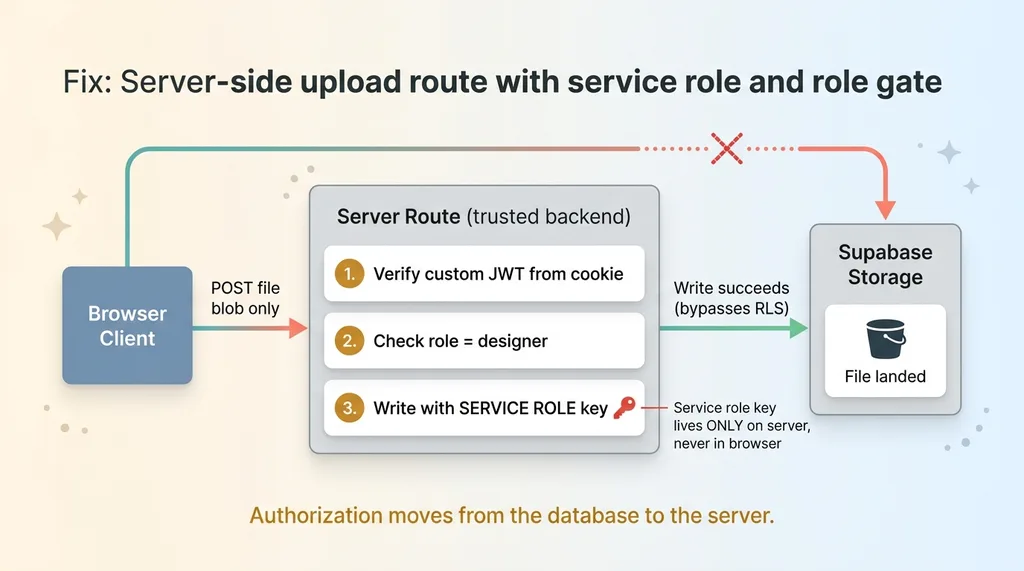 The fix: server-side upload route with service role and role gate
Once I made that change, the next upload landed in the bucket on the first try. After months of an empty bucket, files started arriving instantly. No code change on the storage policies. The policies were correct all along. The browser was simply the wrong place to make the call.
If you want the longer walkthrough, I broke down the server-side upload pattern in more detail.
What Still Belongs on the Anon Key
Now the nuance, because the wrong reaction is to panic and funnel every single call through your backend.
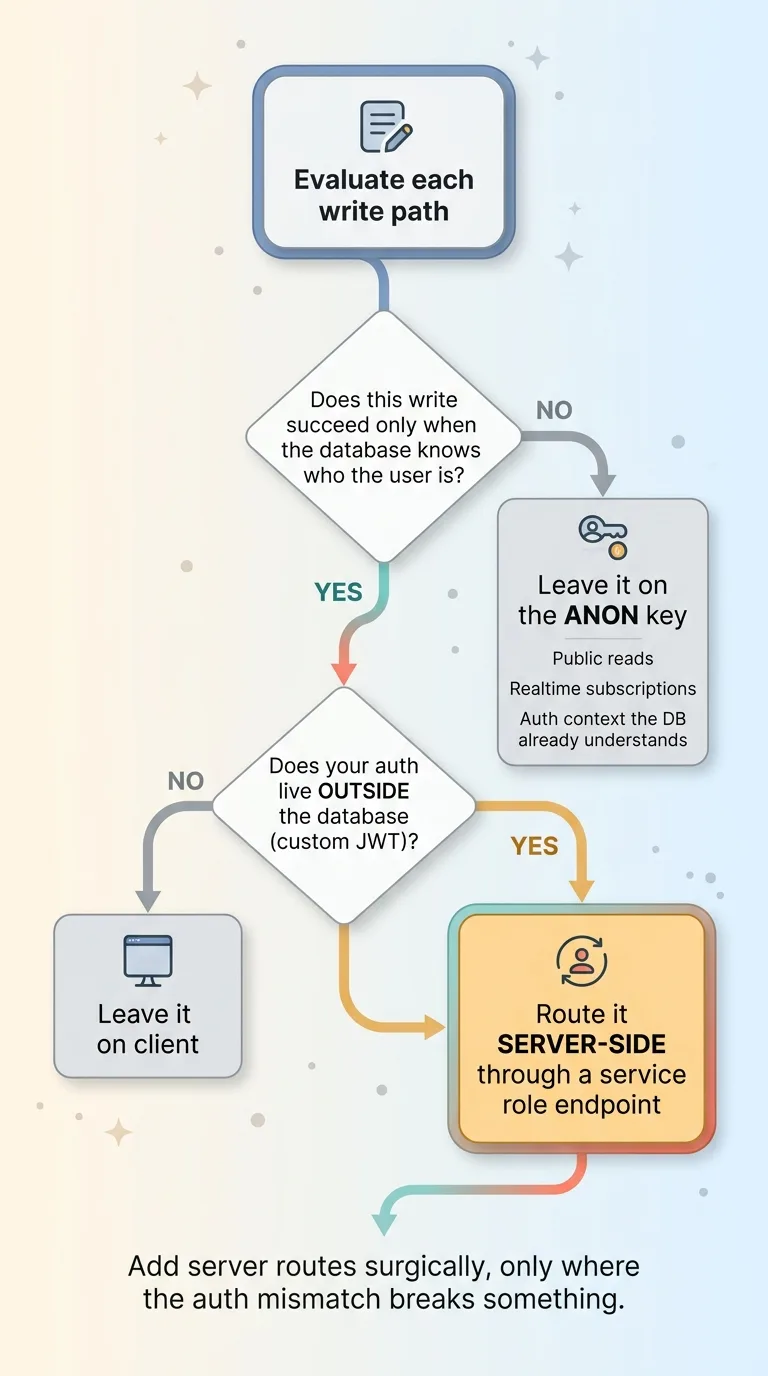 Decision rule for what needs a server route vs anon key
You don't need a server route for everything. That would bloat your architecture and slow down the whole app for no reason.
Public reads can stay on the anon key. Realtime subscriptions can stay on the anon key. Any operation where your RLS policies genuinely match the anonymous or authenticated context the database already understands can stay right where it is on the client. These work because the database can correctly evaluate them with the identity it has.
The only operations that need the server detour are RLS-dependent writes that your custom auth can't represent to the database. That's the specific failure case. Your user is real, but the database can't see them, so the policy can't pass.
Here's the decision rule I use:
- If a write succeeds only when the database knows who the user is, and your auth lives outside the database, route it server-side.
- Otherwise, leave it on the client.
That's the whole test. Apply it once per write path and you'll know exactly which calls need the backend and which don't. This keeps the architecture lean. You add server routes surgically, only where the auth mismatch actually breaks something, instead of building a backend bottleneck around a problem that only affects a handful of privileged writes.
The Real Lesson: Demos Lie, Data Tells the Truth
Step back from the storage specifics, because the real lesson is bigger than one bucket.
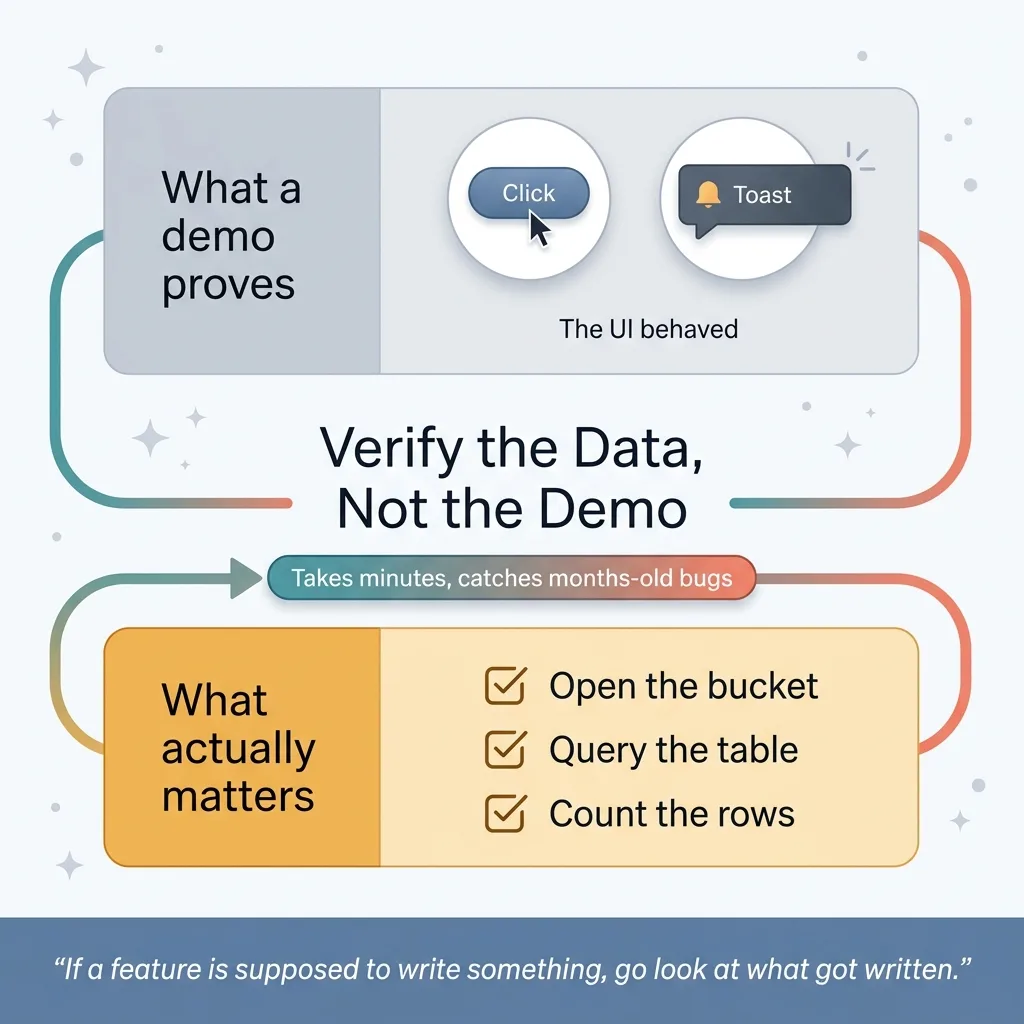 Verify the data layer, not the UI
Fast-built apps, vibe-coded apps, anything shipped under deadline pressure, are full of features that look finished and silently fail the moment real auth, real roles, and real RLS come into play. The demo runs on a happy path that never stresses the parts that break. Then production hits, and the gaps go unnoticed because nothing throws.
The only way to catch this is to go verify the actual stored data. Not the UI. Not the toast. The data layer. Open the bucket. Query the table. Count the rows. Confirm the bytes are where they're supposed to be.
I now check the data layer on every feature I ship, not just the front-end behavior. If a feature is supposed to write something, I go look at what got written. It takes minutes and it catches the bugs that would otherwise sit silent for months. This is one corner of the same five security holes that show up in every AI-built app, and it's the difference between building something that demos and building something that works.
Honest admission: I shipped this bug too. My team built it, I approved it, and it sat broken for months on my own brand's app. I'm not above this. The difference between me and the build that breaks is not that I never ship bugs. It's that I go and find them, because I know exactly where to look.
If Your App Looks Done, Have Someone Check the Bucket
The features that bite you are the ones that never throw an error. They demo clean, they ship, and they quietly do nothing for months while everyone assumes they work.
If your team built a custom-auth app fast, and you've never personally confirmed that the writes actually land where they should, that's worth an afternoon of someone's time. Open the bucket. Check the table. Find out whether the data the UI claims to be saving is actually there.
This is exactly the kind of thing I find when I audit a build. The silent gaps between what the demo showed and what's actually in the database. It's almost never the loud, obvious break. It's the upload that's been failing since launch, the dashboard reading zeros, the write that goes nowhere.
Get the next build note.
I write up each system I build, including what broke. Subscribe to my newsletter and I'll send you the next one.