The Happy Path Was Lying to Me
For most of the orders that move through my DTC fashion brand in San Diego, fulfillment is boring in the best way. A team member grabs a route, the system builds a batched pick cart, they walk the floor, pick the SKUs from their bins, pack the box, slap on a label, and ship. Clean. Predictable. The kind of workflow you can train someone on in an afternoon.
Then there's the order that breaks all of it.
We make hand-assembled custom combinations. A customer picks pieces, and a team member builds the thing by hand. The product doesn't exist when the order comes in. There's no bin to pick from because there's nothing in the bin yet. Somebody has to make it first.
For a while, I forced those orders through the same pick-and-pack line as everything else. It seemed easier than building something new. It was not easier. It was a quiet disaster.
The order would land in "awaiting pick" and sit there forever. The picker would get a route that included a custom item, walk to a bin that didn't exist, and stand there confused. The system thought the order was mid-pick. Reality said nobody could pick it. The data was lying.
That's the thing about every operations system I've ever built or audited. There's a happy path, and there's a set of exceptions that quietly break it. The custom order fulfillment workflow was my reminder that the mistake is never having exceptions. Every business has them. The mistake is pretending they don't exist and stuffing them through a process built for something else.
This whole thing lives inside the production system that runs my brand, so I had the room to fix it properly. Here's how I did it.
Why a Custom Order Can't Be Picked
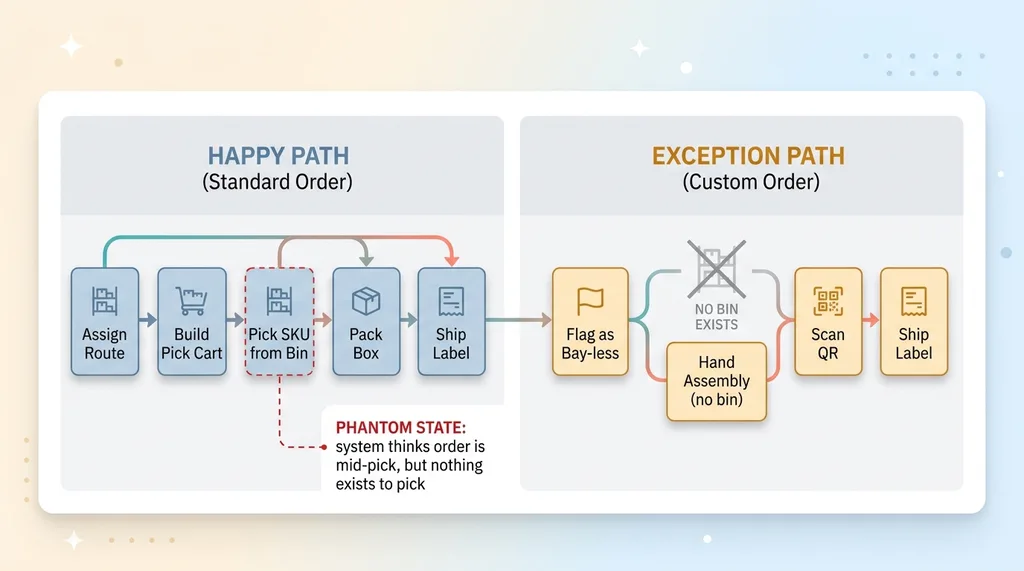 Happy path vs custom order exception path comparison
No bin, no pick
A pick-and-pack assembly line makes one core assumption: the thing you're shipping already exists and sits in a known location. You scan a bin, you grab the SKU, you move to the next one. The entire model is built around retrieval. Inventory is sitting somewhere, and your job is to go get it.
A custom order violates that assumption at the root. It's made to order. A team member assembles it by hand, sometimes over a couple of hours, often on their own schedule between other tasks. There is no shelf to pull from. There is no SKU sitting in a location waiting to be scanned. The item is a future event, not a present fact.
When I let these orders inherit the standard workflow, the system did exactly what I told it to. It assigned them to pick carts. It built batch routes that included them. It expected a physical thing to be retrieved from a location that had never held it.
The phantom state problem
That's how you get a phantom state. The system believed the order was mid-pick. The picker knew there was nothing to pick. Two versions of reality, and the database held the wrong one.
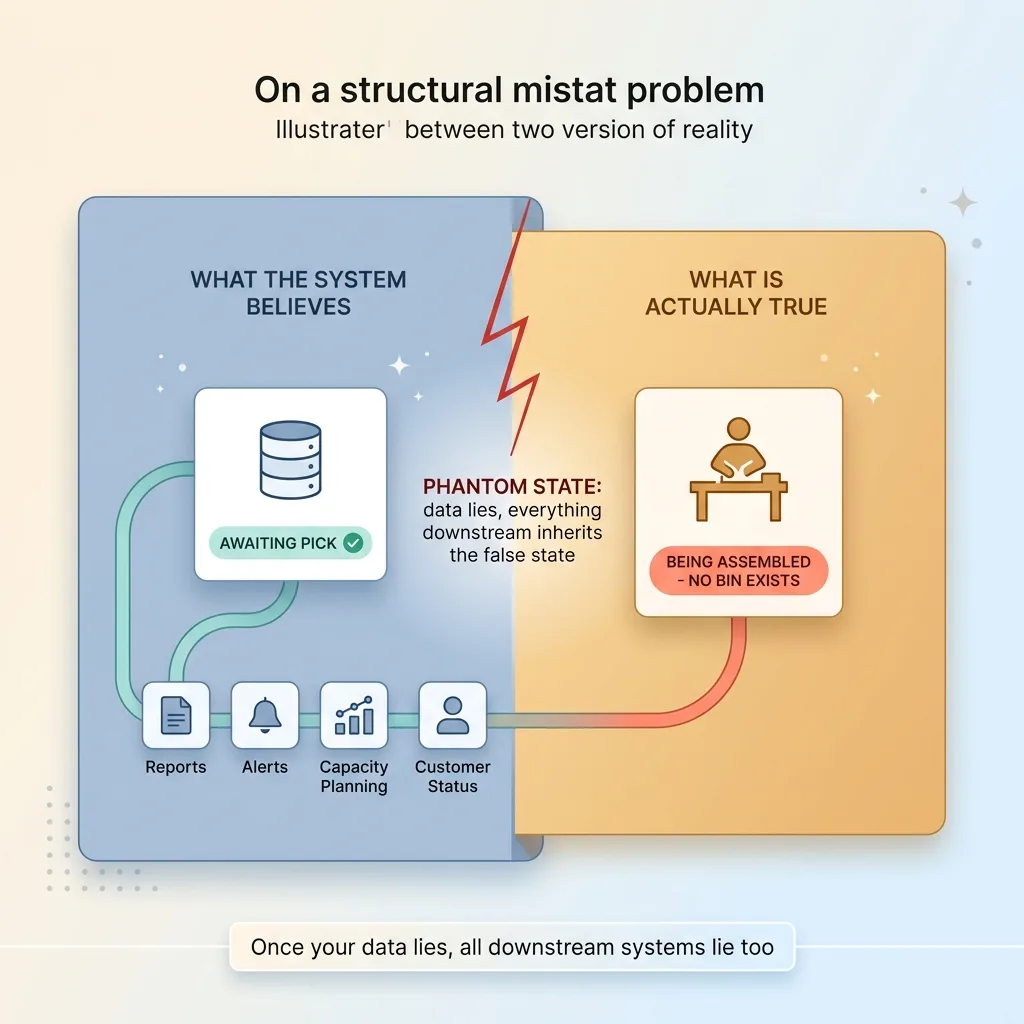 The phantom state problem - two versions of reality
This is the operations workflow design lesson that took me too long to learn. When you model an exception as if it were a happy-path order, the data lies about where the order actually is. And once your data lies, everything downstream lies too. Reports, alerts, capacity planning, customer-facing status updates. All of it inherits the false state.
A phantom state isn't a cosmetic bug. It's a structural mismatch between your model and your reality. You can't patch your way out of it. You have to stop pretending the custom order is a normal order that happens to be slow.
Designing the Exception Path Deliberately
A bay-less custom context
So I built the exception on purpose instead of patching the symptoms.
Custom orders now carry a flag that tells the system they live in what I call a bay-less custom context. No pick location. No batch route. The system knows, structurally, that this order has nothing to retrieve and nothing to walk to. It's not "awaiting pick" because there is no pick.
That flag changes how the order moves through the entire pipeline. Instead of entering the pick queue, a custom order skips it entirely and waits in its own honest state: being assembled. Nobody is fooled. The data matches reality.
Jump straight to shippable
Once the team member finishes hand-assembly, the order jumps straight to a shippable state. There's no fake pick step to clear, no phantom batch to reconcile. The maker finishes the work, and the order becomes ready to ship.
Here's the design philosophy that matters. I did not fork the entire fulfillment system. That would have been the lazy move dressed up as a thorough one. Instead, I added a deliberate branch at the exact points where the happy path made wrong assumptions, and nowhere else.
The order is real. It gets a label. It ships. It simply skips the part of the process that assumes a bin exists. That's the skip-pick-pack-custom mechanic in practice, and it's the difference between a system that tells the truth and one that's full of workarounds.
The branch is narrow on purpose. Exceptions should be surgical, not a second copy of your whole operation.
Reusing the Label Machinery (Don't Rebuild What Works)
The custom-aware packing slip
An exception path is not a parallel universe. This is where a lot of people overcorrect. They decide the exception is special, so they build it a whole new wing with its own everything, and now they maintain two systems that slowly drift apart.
Custom orders in my brand reuse the exact same label generation and shipping machinery as standard orders. Same carriers, same rates, same label printing, same tracking. None of that logic is different for a custom order, so none of it should be rewritten.
What changes is the packing slip. I print a custom-aware packing slip with a scannable QR code. That slip carries the context the maker needs and the QR carries the order identity so the system can track it cleanly.
Prep-print-then-scan-to-ship
The workflow runs like this. The team member preps and prints the slip when they start assembly. Then they finish the hand-assembly on their own schedule, which might be later that day or the next morning. When the piece is done, they scan the QR code and the order moves to shipped.
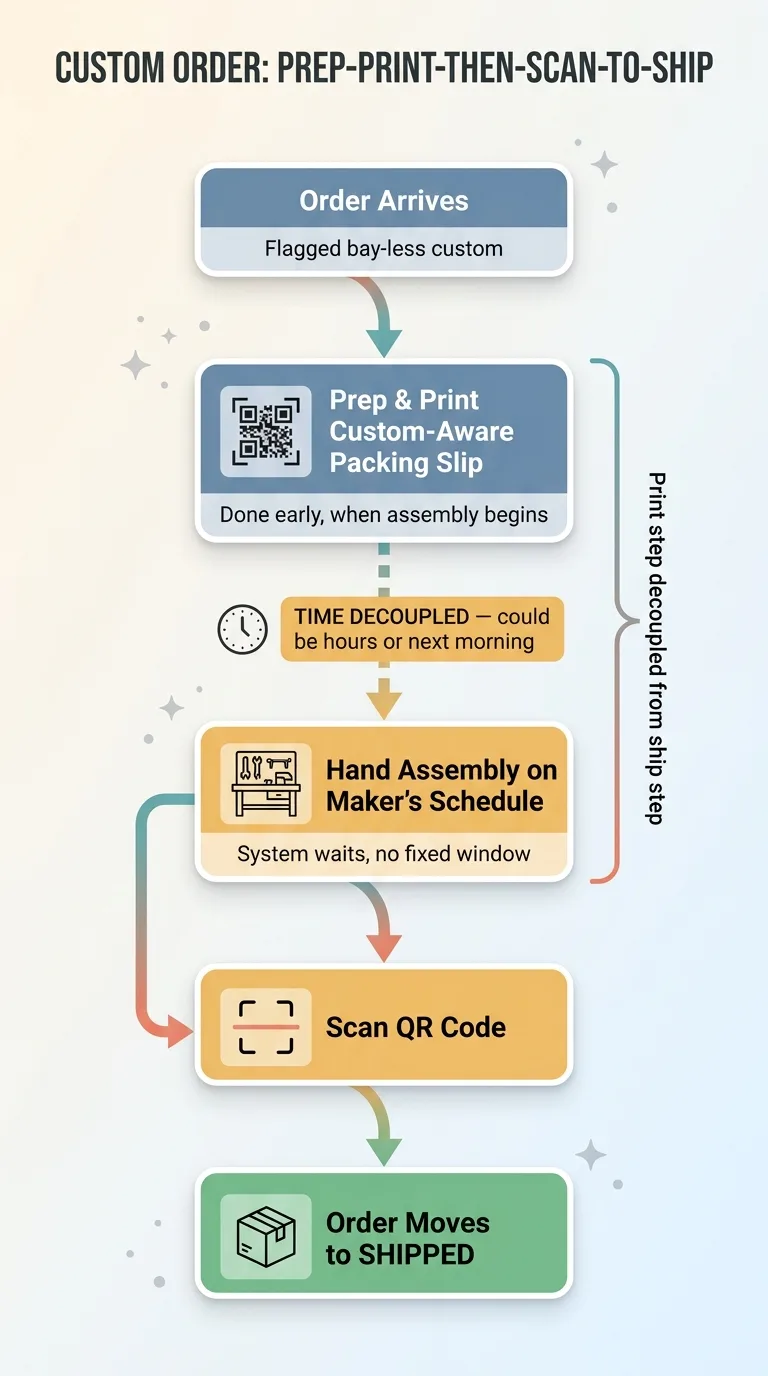 Prep-print-then-scan-to-ship decoupled workflow
That sequence decouples the print step (early, when they begin) from the ship step (whenever the maker actually finishes). The system isn't standing over anyone's shoulder demanding the order ship within a fixed window. It waits for the human to be done.
Good exception design reuses as much shared infrastructure as possible and forks only where the assumptions genuinely differ. Labels are identical, so I reuse them. Picking is not applicable, so I skip it. That's the whole discipline. Forking everything is how you end up with two systems and twice the maintenance and bugs that only show up in one of them.
Telling the Robots to Leave These Orders Alone
This is the part most people forget, and it's the part that actually bit me.
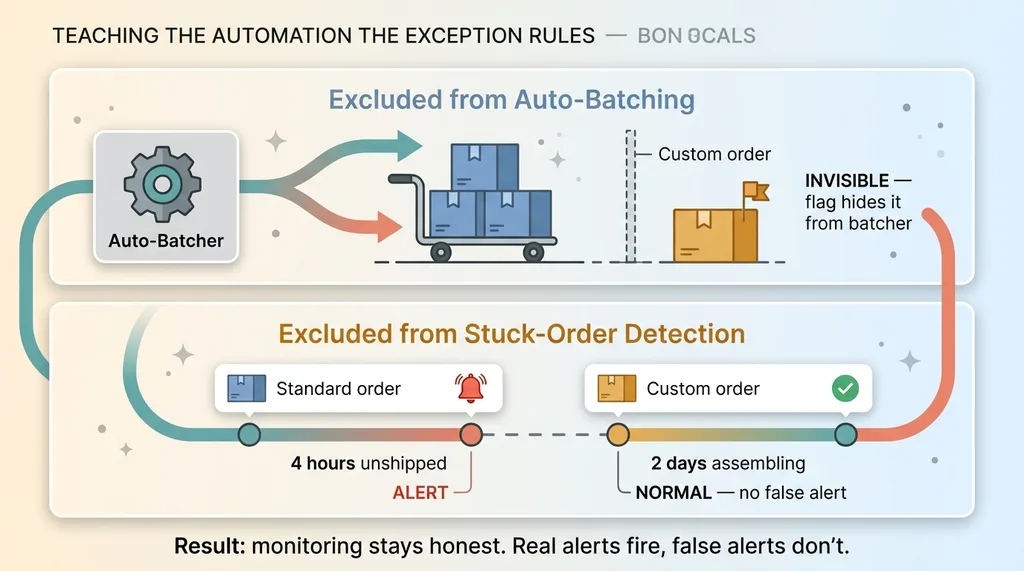 Telling the robots to ignore custom orders (two automation exclusions)
Once you have automated systems, you can't just teach the humans about the exception. You have to teach the robots too. The automation doesn't know your custom orders are special. It will happily do exactly what it was built to do, which is treat everything like a happy-path order.
Excluded from auto-batching
First exclusion: custom orders are excluded from automated batch selection. The auto-batcher that builds pick routes never sees them. It can't drag a custom order into a cart, because as far as the batcher is concerned, that order doesn't exist in its world.
Before I did this, the batcher kept scooping custom orders into routes that couldn't be picked. The flag is what makes them invisible to it. Out of sight, out of trouble.
Excluded from stuck-order detection
Second exclusion, and this is the one that hurt. Custom orders are excluded from stuck-order detection.
A standard order sitting unshipped for several hours is a real problem and should fire an alert. That's exactly what you want. But a custom order sitting for two days is completely normal, because the team member is still making it. That's the schedule. That's the product.
Before I added the exclusion, every single custom order tripped a false stuck-order alert. And here's the damage that does. It trains you to ignore your own alerts. When most of your alerts are noise, you stop trusting all of them, including the real ones. I've written before about how false alerts erode trust in your monitoring, and this is exactly that failure in the wild.
The exclusion means the monitoring stays honest. Real stuck orders alert. Custom orders making their way through assembly don't. The robots know the rules now, which is the whole point. Exceptions handled deliberately, not bolted on with a prayer.
What Good Exception Handling Looks Like
Zoom out, because this is the part a CEO actually cares about.
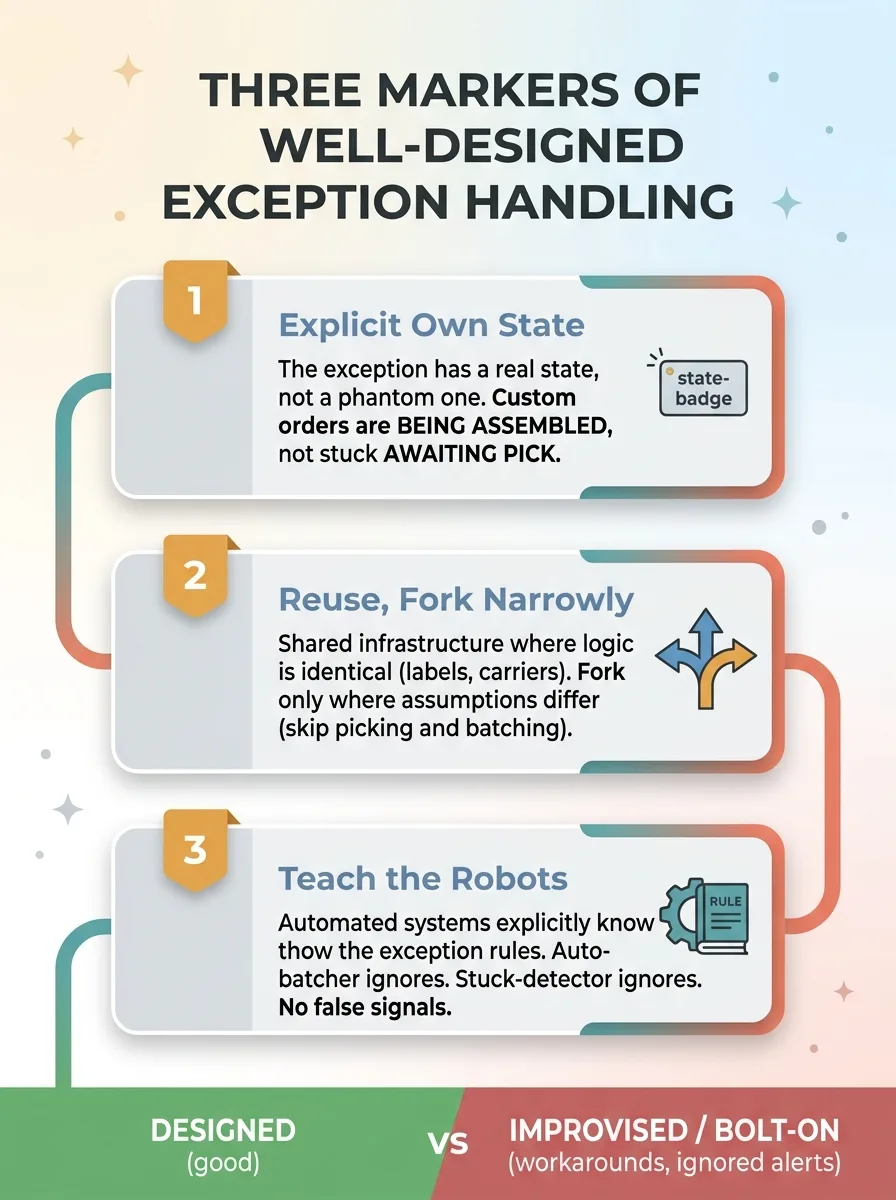 Three markers of well-designed exception handling
Every operations system has exceptions. The question is never whether you have them. You do. The question is whether they're designed or improvised.
Here are the three markers I look for when I want to know if an exception is handled well.
One: the exception has its own explicit state. Not a phantom version of a normal state. My custom orders aren't "awaiting pick" forever. They're "being assembled," which is a real thing that's actually happening. The data tells the truth about where the order is.
Two: it reuses shared infrastructure where the logic is identical and forks only where assumptions differ. Labels are the same, so they're shared. Picking and batching are not applicable, so they're skipped. The fork is as small as it can possibly be.
Three: automated systems are explicitly told the exception's rules. The auto-batcher ignores custom orders. The stuck-order detector ignores them. The automation doesn't generate false signals because it actually understands the rule.
Bolt-on exception handling is what creates the "our system kind of works but everyone has workarounds" problem. You know the one. The order type that Sarah handles differently because she just knows. The alert everyone learned to dismiss. The status that means something different for one category of order and nobody wrote that down.
Custom orders in my brand ship on the human's schedule, not the system's. That's deliberate. Every system I ship stops for a human at the points where human judgment and human pace matter, and hand-assembly is exactly that kind of point. The maker decides when the piece is done. The system waits.
Your Workflow Has an Exception Path Too. Is It Designed?
Almost every business I look at has at least one order type, customer type, or process that doesn't fit the main line.
Usually it's handled one of two ways. There's a person who "just knows" to do it differently, holding the real workflow in their head. Or there's a hack that throws false alerts everyone learned to ignore years ago. Both work fine right up until that person leaves or the volume grows past what a workaround can absorb.
When I dig into a company's operations, the exceptions tell me more than the happy path ever does. The happy path is the version everyone shows off. The exceptions show me where the system is honest and where it's quietly pretending. They're where the real money leaks out and where the next operational fire is already smoldering.
I build these systems for DTC and operations-heavy businesses, and honestly, the exception paths are where I earn my keep. Anybody can model the happy path. The custom order that can't be picked, the refund that needs three approvals, the rush job that breaks the schedule, that's the work that actually matters.
Get the next build note.
I write up each system I build, including what broke. Subscribe to my newsletter and I'll send you the next one.