Demo to Production SaaS: What the Demo Hides
Going from a slick demo to production SaaS means ingesting real client data and hardening auth. Here's the unglamorous work that makes an app real.
By Mike Hodgen
The Demo That Lied (In a Useful Way)
A demo is a sales tool. It is not a product. I say that as someone who builds both, and the gap between them is the whole reason most impressive demos die the moment real data shows up.
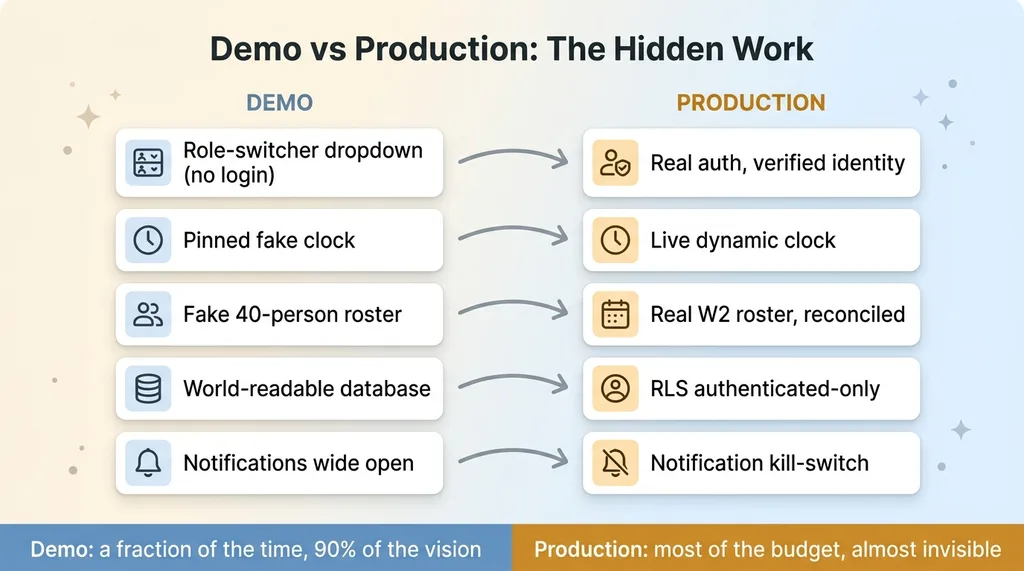 Demo vs Production: The Hidden Work
Going from demo to production saas is not a polish pass. It is a different job entirely. The demo's job is to remove friction so a buyer sees the vision in 90 seconds. Production's job is to add every piece of friction back, because that friction is what makes the thing real and safe.
What a role-switcher demo actually is
I built a scheduling app for a security-guard staffing client. The demo I shipped was deliberately wide open. It was public, no real authentication, and it had a role-switcher dropdown right in the corner. Click it and you became an owner. Click again and you became a guard. No login, no identity, no consequences.
That was the point. A buyer could land on the page and instantly see what an owner sees and what a guard sees, side by side, without me sitting next to them explaining it.
The pinned clock and the fake roster
The demo also ran on a pinned clock. I froze "now" at a fixed time so the scheduling screens always looked populated and correct. A live clock would have shown empty shifts at 2am and made the whole thing look broken during a sales call.
The roster was fake too. Made-up guard names, placeholder shifts, invented hours. Everything was tuned to look right in a screenshot.
None of that survives contact with a real W2 roster. The work that turns this into a system someone can actually run their payroll against is the work buyers never see. That is what the rest of this article is about.
Step One: Ingesting a Real Roster
The first real task had nothing to do with features. It was loading an actual W2 roster of dozens of employees.
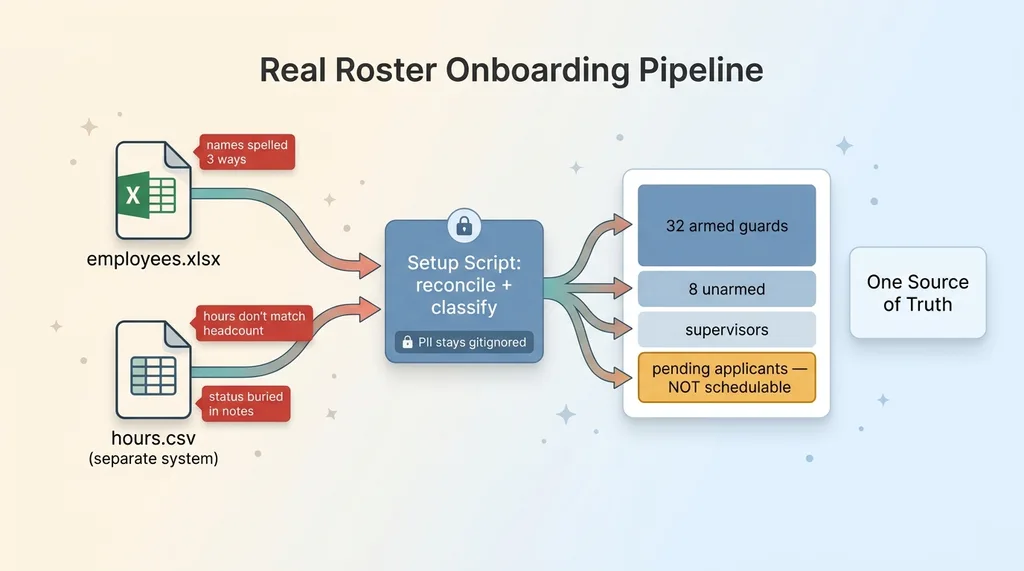 Real Roster Onboarding Pipeline
Two messy files, one source of truth
The client handed me two files. An employee spreadsheet in xlsx, and an hours CSV exported from a completely separate system. Neither lined up cleanly with the other.
Names were spelled three different ways across the two files. Hours didn't match headcount. Some people in the hours export weren't in the employee list at all. Statuses that mattered, like who was cleared to work, were implied in a notes column rather than stated in a field.
This is what real client data onboarding actually looks like. It is never a clean import. Anyone who tells you "just upload your spreadsheet" has never loaded a real one.
I wrote a setup script to do the merge. It reads the PII files (which stay gitignored, on purpose, so no employee name or pay figure ever lands in the repo), reconciles the two sources into one roster, and classifies every person.
Classifying who's actually on the books
The classification mattered more than I expected. The roster broke down into armed guards and unarmed guards, plus a layer of supervisors, plus pending-application employees who weren't cleared to work yet.
That last group is the trap. A pending applicant looks like an employee in the spreadsheet. If you load them as schedulable, you can assign someone to a site who legally isn't allowed to be there. The classification logic exists to keep those people out of the schedule until their status changes.
Here's the unglamorous truth: most of the productionization budget goes into this step, not into shiny features. Reconciling messy files and getting the source of truth right is where the hours go. It is also where the system earns the right to be trusted with real people's pay.
Deleting Every Fake Guard
Once the real roster was in, the fake one had to go. All of it.
Why demo data is dangerous in production
Leftover demo data is not harmless clutter. It is a live risk.
A fake guard sitting in the database can show up in a real schedule. A placeholder shift can route a real notification to a real phone. The pinned clock means "now" is wrong, so every time-sensitive screen lies. None of these are theoretical. They happen the first time someone uses the system for real and trips over a row that should not exist.
So I did a clean cutover and deleted every fake guard from the demo. Every seed row, every placeholder shift, gone.
The clean cutover
The cutover had three concrete parts. Delete all seed data so the only people in the system are the real employees. Swap the pinned demo clock for a dynamic real clock, so "now" is actually now and scheduling math works against the real calendar. Then confirm, row by row, that nothing fake survived.
This step is also where you discover which features secretly depended on the fake data being there. A dashboard that looked great in the demo suddenly renders empty, because it was quietly counting placeholder shifts. Better to find that now than after go-live.
RLS Hardening: From Public Reads to Authenticated-Only
The demo let anyone read everything. That was the feature. Production meant the exact opposite.
The demo was world-readable
In the demo, a public anonymous key could read the whole database. Fine when the data is fake. A disaster when the data is a real PII roster with names, statuses, and pay-adjacent information.
The jump to production meant wiring up real Supabase Auth, with middleware protecting every route. No session, no entry. But middleware alone is not enough, and this is where a lot of teams stop and call it secure.
Locking every table behind auth
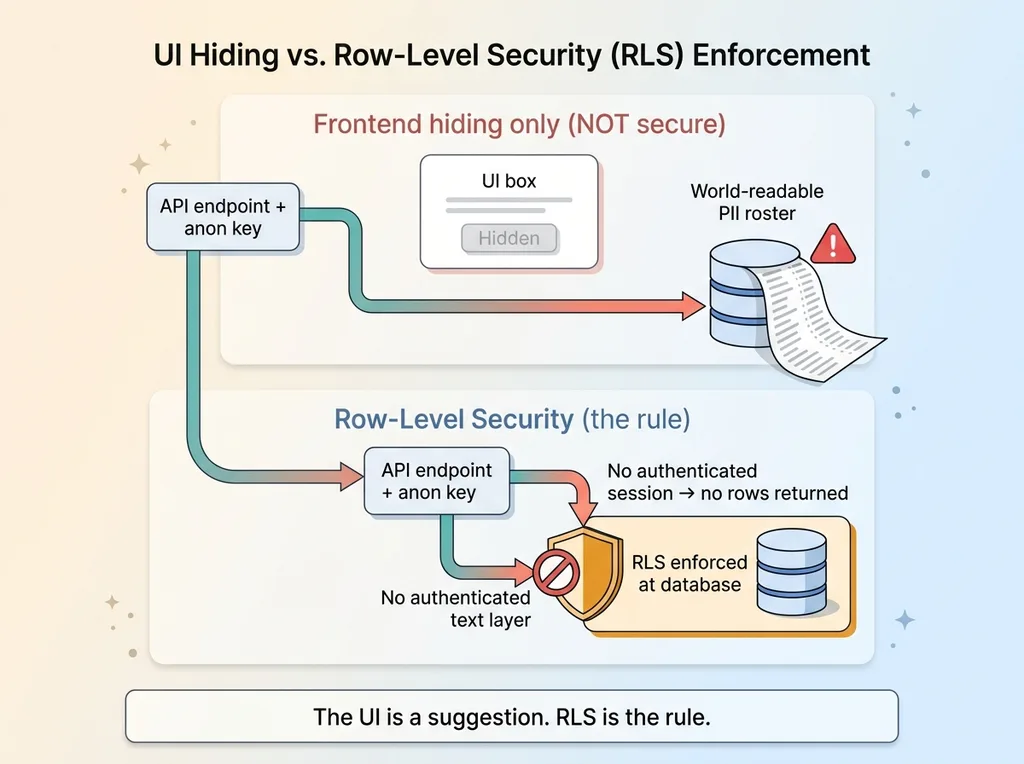
Here is rls hardening in plain terms. Row-level security is the database itself refusing to hand out rows to anyone who isn't allowed to see them. It is enforced at the data layer, not the UI.
 UI Hiding vs RLS Enforcement
This distinction matters more than almost anything else in the cutover. Hiding a button in the frontend is not security. If the table is world-readable underneath, anyone who finds the API endpoint and the anon key can pull the full roster, button or no button. The UI is a suggestion. RLS is the rule.
So I hardened RLS so every read requires an authenticated session, then tied access to who that session actually belongs to. The failure mode this prevents is the nightmare one: a public anon key quietly reading a full PII roster because the frontend looked locked but the database was open.
I treat this as a default now, not a step. Every client gets their data isolated at the database layer. I wrote about that pattern in every client gets their own database, and the mechanics of doing it across a lot of tables live in my row-level security playbook.
The demo answered "can you see this." Production answers "are you allowed to see this." Those are not the same question, and the database has to be the one enforcing the answer.
Role-Based Access Control So Guards Can't Approve Their Own Shifts
The role-switcher dropdown was the most demo-ish thing in the whole app. In production, it had to die and be replaced with real role based access control tied to the logged-in identity.
The system now knows who you are. Not who you clicked to pretend to be. Who you actually are. And it knows what that person is allowed to touch.
A per-org override matrix
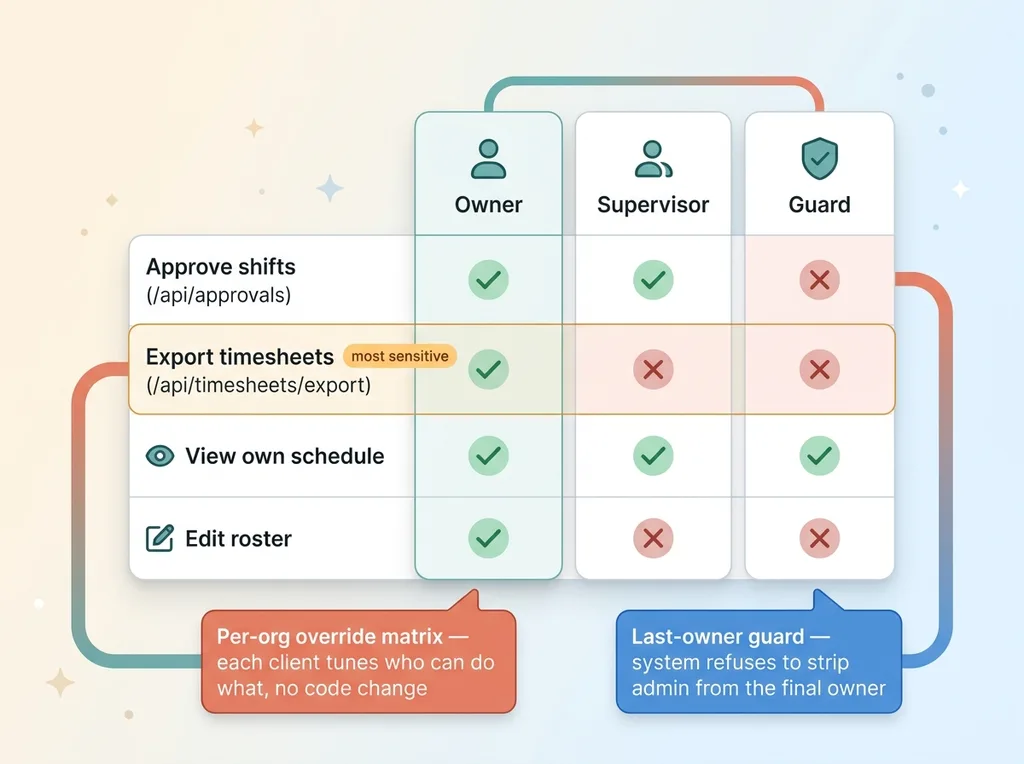
I built a per-org override matrix so each client organization can tune who can do what. The default permissions for an owner, a supervisor, and a guard are sensible out of the box, but a given org can adjust them without me touching code.
One staffing company might let supervisors approve shifts. Another might reserve that strictly for owners. The matrix handles both without a custom build for each.
The last-owner guard
There's a sharp edge in any permission system: you can accidentally lock everyone out. If an org has one owner and someone strips that owner's admin rights, nobody can administer the system anymore. It's bricked.
So I added a last-owner guard. The system refuses to remove admin rights from the final remaining owner. It is a small piece of logic that prevents a very expensive support call.
Gating the dangerous endpoints
Then the concrete part. Two endpoints carry real risk, and both are gated by role.
 Role-Based Access Control Matrix and Endpoint Gating
/api/approvals is locked so a guard cannot approve their own shifts, or anyone else's. Approval is an owner and supervisor action. A guard hitting that endpoint directly gets refused, not just hidden from a menu.
/api/timesheets/export is locked so a guard cannot download everyone's hours and pay data. That export is the single most sensitive thing in the system, and in the demo it was wide open to anyone.
This is the section that answers the buyer's real doubt. A demo where you click a dropdown to become an owner is fundamentally different from a system that knows your identity and refuses to let you touch what you shouldn't. The dropdown is theater. RBAC tied to a verified session is the actual control.
The Notification Kill-Switch: Test Mode Until Go-Live
The most dangerous moment in any cutover is the first time the system can send a real message to a real person.
Why real email is the scariest button
Up to this point, every mistake is contained. Bad data, wrong permissions, broken screens, all of it lives inside the system where only the team sees it.
Notifications break that containment. One bad query and dozens of guards get a 3am shift alert for a shift that doesn't exist. Now the mistake is on dozens of phones, in dozens of inboxes, and you're calling people at dawn to apologize. There is no undo on a sent email.
Redirect everything to the builder
So before go-live, every outbound notification runs through a global kill-switch. Until the client explicitly says go, every email the system tries to send gets redirected to my own inbox instead.
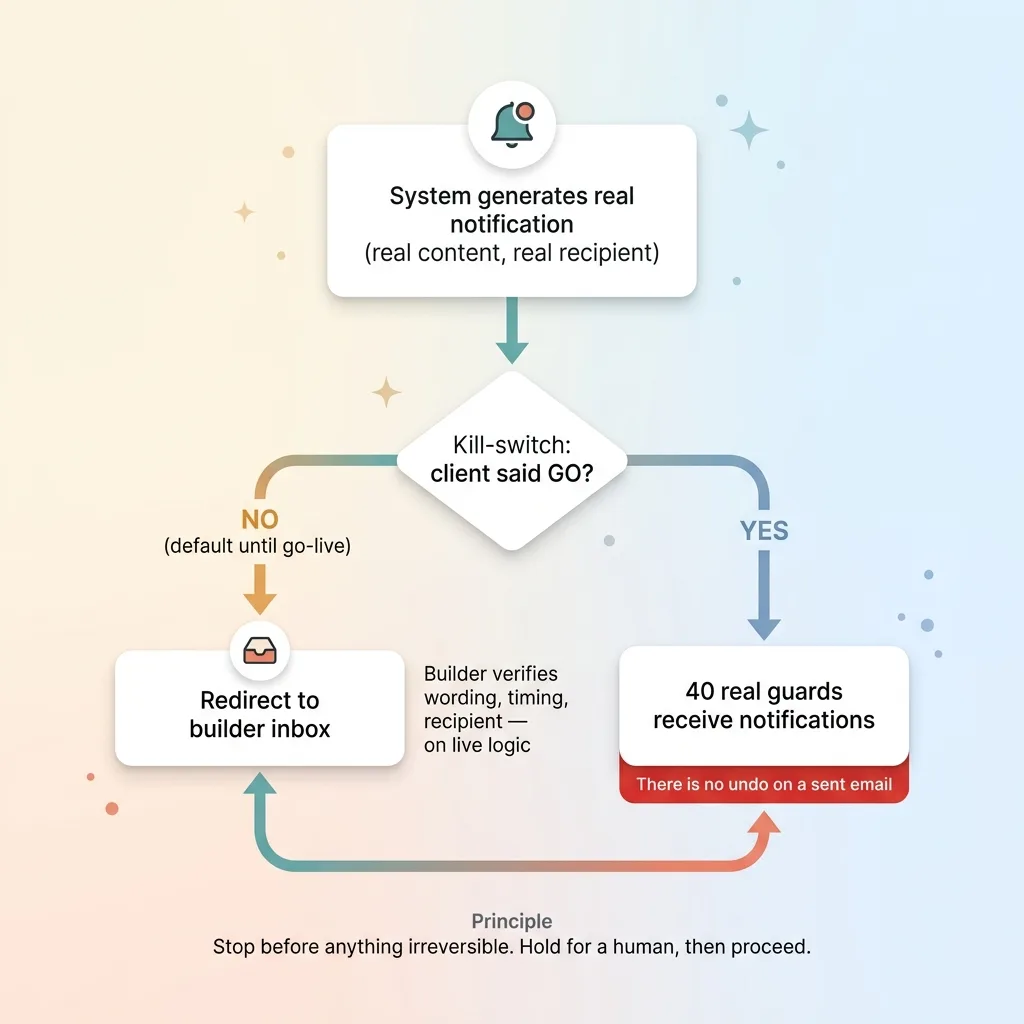 Notification Kill-Switch Flow
That lets me verify everything on real flows. I trigger a real shift change, the system generates the real notification with the real content and the real recipient, and it lands in my inbox instead of the guard's. I check the wording, the timing, who it would have gone to. All on live logic, without a single person outside the team ever receiving a message.
When the client confirms they're ready, I flip the switch and notifications start flowing to real recipients. Not a moment before.
This is one instance of a broader principle I build into every production system: it should stop before doing anything irreversible. Sending a message to a real person is irreversible. So the system holds, lets a human verify, and only then proceeds. I wrote more about that pattern in stops for a human before it sends.
What This Tells You Before You Buy a Demo
Look at what actually separated the demo from the production system. Ingesting two messy files into one clean roster. Deleting every fake row. Hardening RLS from public to authenticated-only. Gating approval and export endpoints by role. Holding notifications behind a kill-switch until go-live.
None of that is glamorous. All of it is the work. The demo took a fraction of the time and showed 90% of the vision. Production took most of the budget and was almost entirely invisible.
If you've been burned by a vendor whose slick demo never survived your real data, this is why. They built the sales tool and skipped the system. The demo removed friction. Nobody ever did the work of adding it back.
So the right question to ask any builder isn't "can you show me a demo." Anyone can build a demo. The question is "walk me through how you'd load my actual team and lock it down." If they can answer that with specifics about data onboarding, auth, role permissions, and how they'd hold notifications until you say go, they've done this before. If they get vague, they're going to learn on your dime.
I build both halves. The demo that sells the vision, and the production system underneath it, including all the unglamorous parts that decide whether it's actually real. If you're curious what that timeline looks like now, I broke it down in the new timeline for custom software.
Thinking about AI for your business?
If this resonated, let's have a conversation. I do free 30-minute discovery calls where we look at your operations and figure out where AI could actually move the needle, including what it would take to productionize your own messy data instead of just demoing around it.
Get AI insights for business leaders
Practical AI strategy from someone who built the systems — not just studied them. No spam, no fluff.
Hodgen.AI
Ready to automate your growth?
Book a free 30-minute strategy call with Hodgen.AI.
Book a Strategy Call