The Problem: Operators Wanted to Print Labels From Their Phones
I run a DTC fashion brand out of San Diego. Everything is handmade here, which means we have a warehouse floor with real people picking, packing, and shipping physical product. Thermal label printers hum all day, spitting out shipping labels and product tags.
The desktop workstations already printed labels instantly from our web app. An operator clicked a button, and a Zebra printer two feet away spat out a label in under a second. That part worked.
Then operators wanted to do the same thing from their phones while walking the floor. No more walking back to a workstation to print a single label. Scan a bin, print a tag, keep moving.
Sounds trivial. It is not.
Here is the wall I hit immediately, and it is the same wall every builder hits the moment a web app needs to talk to physical hardware: a secure web app served over HTTPS cannot talk to a local-network printer over plain HTTP. The browser flatly blocks it. No flag, no setting, no workaround in the page itself.
This was a real shipped feature, not a whiteboard exercise. Our production ops system runs the whole brand, and label printing is one of those small features that quietly decides whether the warehouse floor moves fast or slow. So when phones couldn't print, that was a problem I had to actually solve, not theorize about.
The frustrating part is that the desktop version proved the concept worked. The printer was right there. The web app could clearly generate the ZPL. The only thing standing in the way was a browser security policy that had no intention of bending. So I had to find a path around it. This is the story of how I got phones to print to a local printer from a web app without breaking the security model that protects everything else.
Why the Desktop Path Worked and the Phone Path Didn't
To fix it, I had to understand exactly why the desktop already worked. The mechanism is the whole story.
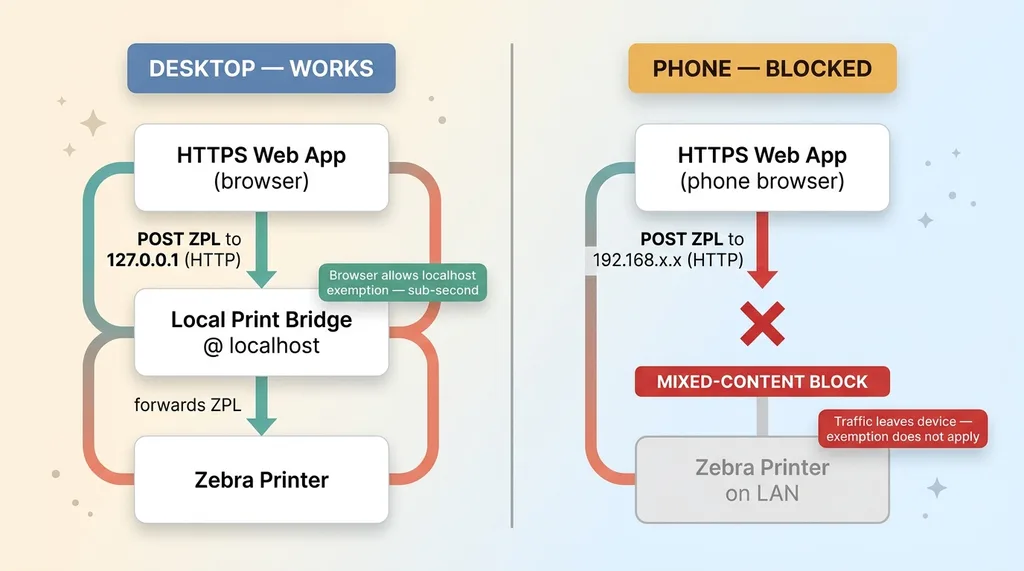 Desktop localhost path vs phone blocked path
The localhost exemption
On a desktop, the web app doesn't talk to the printer directly. It talks to a tiny local print bridge running on the same machine, listening at localhost (127.0.0.1) over HTTP. The bridge takes the ZPL and forwards it to the printer.
Now, an HTTPS page calling an HTTP address should trigger a mixed-content block. But browsers carve out a specific exemption for localhost. The reasoning is sound: traffic to 127.0.0.1 never leaves the machine, so there's no network for an attacker to intercept. Calling localhost over HTTP from an HTTPS page is allowed.
That exemption is the entire reason desktops print instantly. The HTTPS web app POSTs ZPL to the local bridge, the bridge prints, done. Sub-second.
Why a phone has no localhost to use
A phone has no local print bridge. There's nothing running on the phone listening at 127.0.0.1 that knows how to talk to a Zebra printer. The printer lives on the warehouse PC or somewhere on the LAN, reachable only at a private IP like 192.168.x.x over plain HTTP.
So the phone's only option is to POST ZPL across the network to that 192.168 address. And the instant an HTTPS page tries to talk to a private IP over HTTP, the browser throws a mixed-content block. That LAN address is not localhost. The traffic does leave the device. The exemption does not apply.
This is the clear answer to "why can't my HTTPS web app print to a local printer": it's not a bug you can patch. It's browser security policy doing exactly what it's designed to do. And browser local network restrictions have only gotten stricter over time, with newer specs adding explicit permission gates for private-network requests. Fighting the browser here is a losing game. You have to design around it.
The Options I Rejected (and Why)
Before I landed on the fix, I worked through the obvious workarounds. Every one of them falls apart for a specific reason, and knowing why is what makes the final design obvious.
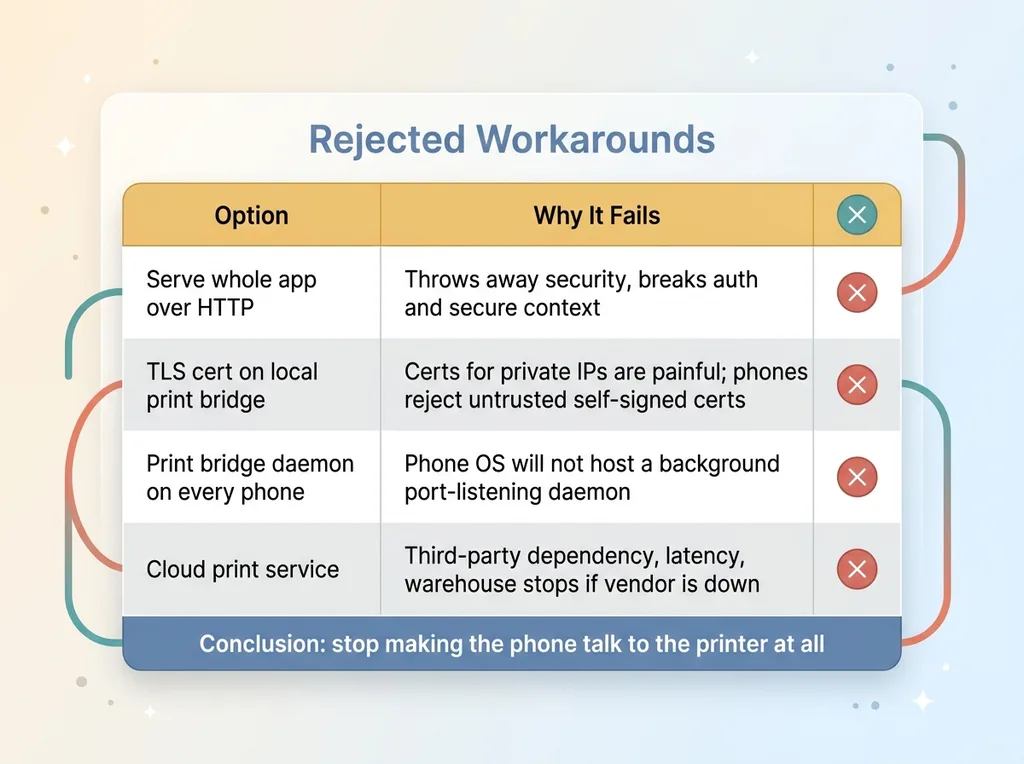 Rejected workarounds and why each fails
Serve the whole app over HTTP. This makes the mixed-content problem disappear by throwing away security entirely. It breaks authentication, breaks anything requiring a secure context, and exposes everything. Non-starter the second you say it out loud.
Put a TLS cert on the local print bridge. Now you're issuing certificates for private IP addresses, which is genuinely painful and not well supported. Self-signed certs trigger scary browser warnings, and a phone that has never trusted that cert will reject the connection anyway. Every new phone becomes a manual trust ceremony. No.
Run a print bridge daemon on every phone. Phones can't host a background daemon listening on a port the way a desktop can. The OS won't let you. Dead end before it starts.
Use a cloud print service. This works technically, but it adds a third-party vendor, network latency, and a dependency I don't control for what should be a sub-second label print on my own LAN. If their service is down, my warehouse stops printing. That's a bad trade for a label.
Each of these fails for an honest reason, not a hypothetical one. Once you rule them all out, the answer points itself: stop trying to make the phone talk to the printer at all.
The Fix: A Database-Backed Print Queue
The breakthrough is realizing what the phone and the warehouse PC have in common. The phone can't reach the printer. The printer can't reach the phone. But both of them can reach the database. The database becomes the meeting point.
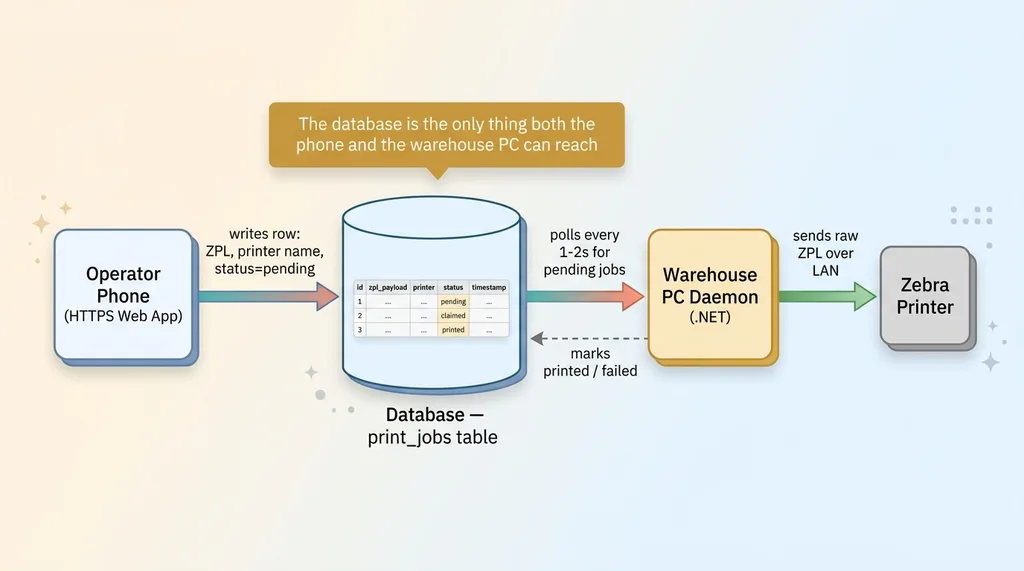 Database-backed print queue architecture
So I built a thermal label print queue backed by a single table.
How phones enqueue ZPL
There's a print_jobs table in the database. When an operator on a phone wants a label, the web app doesn't try to print anything. It writes a row: the raw ZPL payload, a target printer name, a status of pending, and a timestamp.
That's it. The phone's job is finished the moment that row is written. It only ever talked to the HTTPS API, which is a normal secure request to my own backend. It never touched the printer, never touched a 192.168 address, never tripped a mixed-content block. The browser is happy because nothing sketchy happened.
How the warehouse PC drains the queue
A small daemon runs on the warehouse PC, the same machine that already has a direct line to the printers. Every second or two, it polls the queue: "any pending jobs?" When it finds one, it claims the row, sends the raw ZPL straight to the local printer over the LAN (which is fine, because this is a backend process, not a browser), and marks the row printed or failed.
Desktops keep their fast localhost path, because there's no reason to slow them down. Only phones route through the queue.
The design principle is the whole point: the database is the only thing both the phone and the warehouse PC can reach, so make the database the handoff. This same pattern shows up all over my production ops system whenever two things that can't talk directly need to coordinate.
The cost is a second or two of latency between tapping print and the label coming out. On a warehouse floor where the operator is walking to the printer anyway, that delay is completely invisible. Nobody has ever noticed it.
The Daemon: Where the Real Work (and the Bugs) Live
The architecture is clean on a whiteboard. The daemon is where reality showed up. A process that touches physical hardware fails in boring, physical ways, and I hit a string of them shipping this.
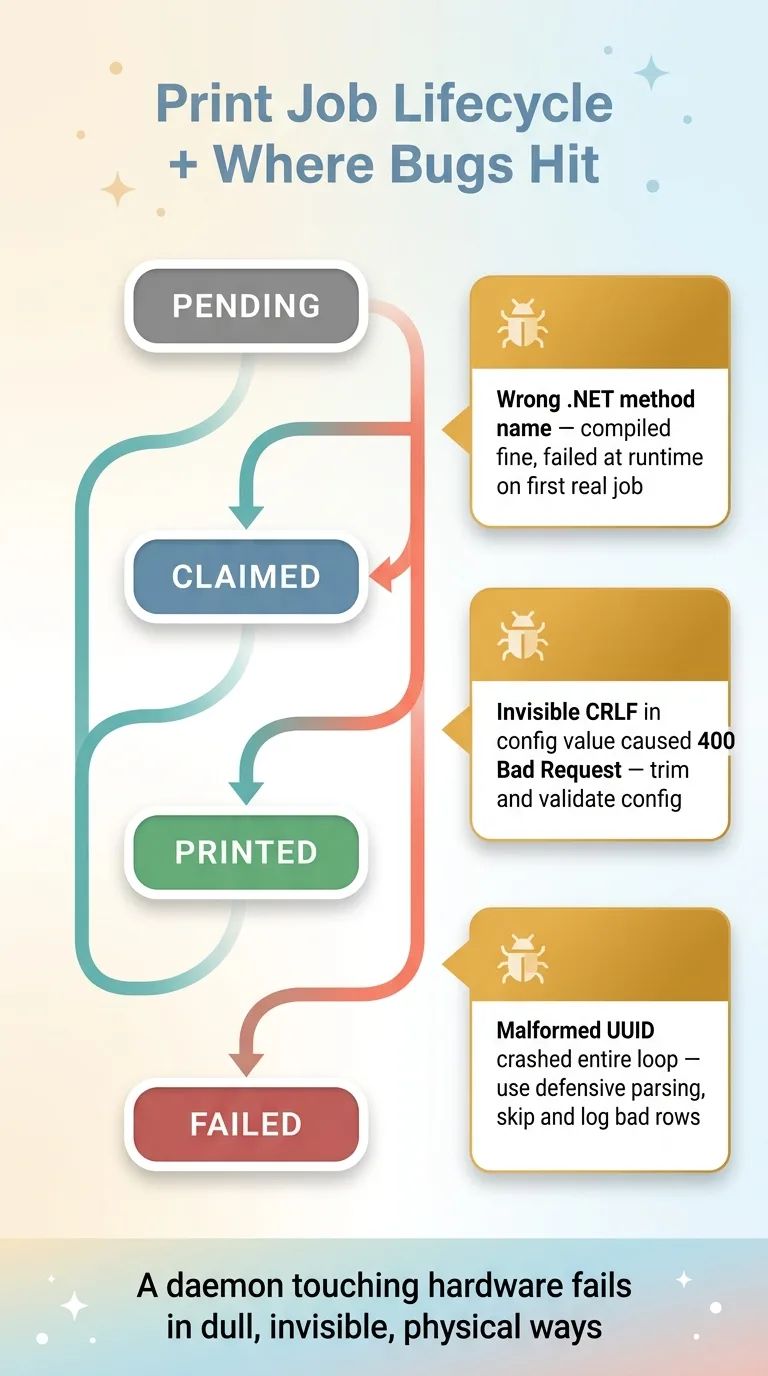 Print job status lifecycle and the three daemon bugs
A wrong method name that compiled fine until it didn't
The daemon is a .NET process. I called a method to send bytes to the printer, and it looked completely correct in the code. It compiled. It passed casual review. Then the first real job came through and the call failed at runtime, because the method name wasn't quite the right one for what I was actually doing.
This is the classic trap with code that talks to hardware. Everything looks right until the moment it has to do the physical thing, and only then does it tell you you were wrong. No amount of staring at the source caught it. A real job hitting a real printer caught it.
CRLF in a config value 400ing the drain
This one cost me an embarrassing amount of time. The drain loop suddenly started getting 400 Bad Request from the API when it tried to claim jobs. The config value it was using looked perfect in every UI I checked.
It had an invisible trailing carriage return on the end. A CRLF that got pasted in from Windows somewhere along the way. The value displayed identically to a clean one, but that hidden character made the request malformed.
The lesson stuck: trim and validate config aggressively. Copy-paste from Windows adds CRLF you cannot see, and it will silently break things that look fine to every human inspecting them.
Phantom-null UUID parse errors
Then the drain loop started dying entirely. A job row's identifier came through as a string that wasn't quite a valid UUID, and the parser choked on it. One bad row, and the whole loop crashed. Which meant every label behind it just stopped.
The fix wasn't to chase the one malformed UUID. The fix was to make the loop skip and log a bad row instead of crashing on it. Defensive parsing over optimistic parsing.
The through-line across all three: a daemon that touches hardware fails in dull, physical, invisible ways, and the answer is always defensive parsing plus visibility. You cannot fix what you cannot see, which is exactly why I lean hard on automations that tell me when nothing is happening. A silently dead drain loop is the worst failure mode there is, because the labels just stop and nobody knows why.
What Makes a Print Queue Like This Hold Up in Production
The fix was the easy part. Making it survive a real warehouse floor for months is the part worth writing down. Here's the checklist I'd hand to anyone building this.
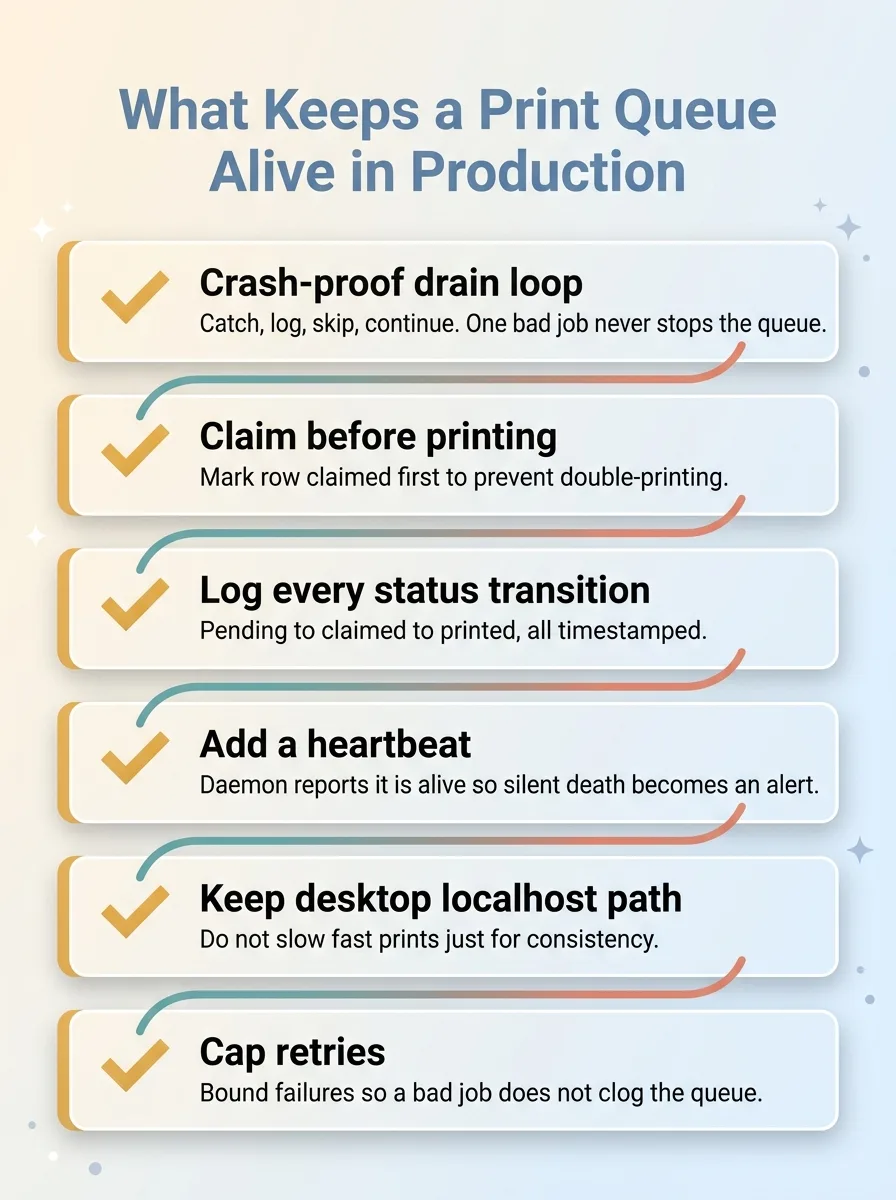 Production-hardening checklist for the print queue
-
Make the drain loop crash-proof. One bad job should never stop the queue. Catch, log, skip, continue. The UUID bug taught me this the hard way.
-
Mark jobs as claimed before printing. Update the row to
claimedfirst, then print. Otherwise two daemon instances can grab the same job and you double-print a label. Claim, then act. -
Log every status transition. Pending to claimed to printed or failed, all timestamped. Weeks later when someone asks "did that label actually print," you need a real answer, not a guess.
-
Add a heartbeat. The daemon should report that it's alive on a schedule. A silent dead daemon means labels stop and nobody notices until orders back up. The heartbeat is what turns a silent failure into an alert.
-
Keep the desktop localhost path. Don't route fast desktop prints through the queue just for consistency. Speed matters. Only phones need the queue.
-
Cap retries. A permanently failing job should fail for good after a few attempts, not reprint forever and clog the queue. Bound it.
None of these are clever. Together they're the difference between a demo that prints once and a queue that runs unattended for months. This is what turns a one-off fix into a reusable pattern.
The Wall Between Web Apps and Hardware Is Where Most Builds Stall
Label printing is a small problem. The pattern behind it is everywhere.
A clean web app on one side. A piece of physical or local hardware on the other. And a browser sitting in the middle that flatly refuses to let them talk. Scanners, scales, label printers, badge readers, POS terminals, all the same shape. The web has spent fifteen years getting more locked down, and physical hardware never got the memo.
The teams that actually ship are the ones who stop treating the queue-and-daemon plumbing as an afterthought and start treating it as the real product. Because it is. The AI feature or the slick UI is the part people demo. The plumbing is the part that decides whether it works on a Tuesday afternoon when the warehouse is slammed.
That's exactly the kind of unglamorous work I'm describing when I say the boring plumbing is the real work. It's where I spend a real chunk of my time across every system I build. Not the demo. The part that survives contact with a real floor.
Get the next build note.
I write up each system I build, including what broke. Subscribe to my newsletter and I'll send you the next one.