The Old Way: Four Tools to Make One Graphic
Last year I needed a single email header for my DTC fashion brand. One graphic. A product shot on a seasonal background with a short headline. Sounds like five minutes of work. It was closer to forty.
This is the part of AI image generation for marketing nobody talks about: the workflow it replaces is brutal, and most teams have just accepted it as the cost of doing business.
Here's what that one graphic actually took.
The background removal pass
First I uploaded the product photo to a background-removal service. Drag the file in, wait, download the cutout. The edges were never clean on the first pass. A handmade garment has loose threads and soft fabric edges, and those are exactly what these tools mangle. So I'd download, inspect, and decide whether to redo it.
The compositing pass
Then the cutout went into a compositing tool. I'd drop in a new background, scale the product, fix the edges by hand where the automatic removal chewed up a sleeve or a hem. This is the slowest part. Masking fabric by hand is tedious, and if you're picky about it, ten minutes evaporates fast.
Text and compression
Next, a third tool for the text. Branded typeface, legible at email size, positioned in the lower third. Export. Then a fourth tool to compress the file so the email would actually load without choking someone's inbox.
Four tools. Four exports. A file handoff at every step. Thirty to forty-five minutes for one header, more when the edges fought me.
Now multiply that across a campaign. Ten assets and you've burned half a day on production work for graphics nobody remembers a week later. That's the pain a CEO is paying for without ever seeing it on an invoice.
What a Frontier Image Model Does in One Call
The current generation of image models (the ones people nicknamed nano banana) collapse that entire stack into a single call.
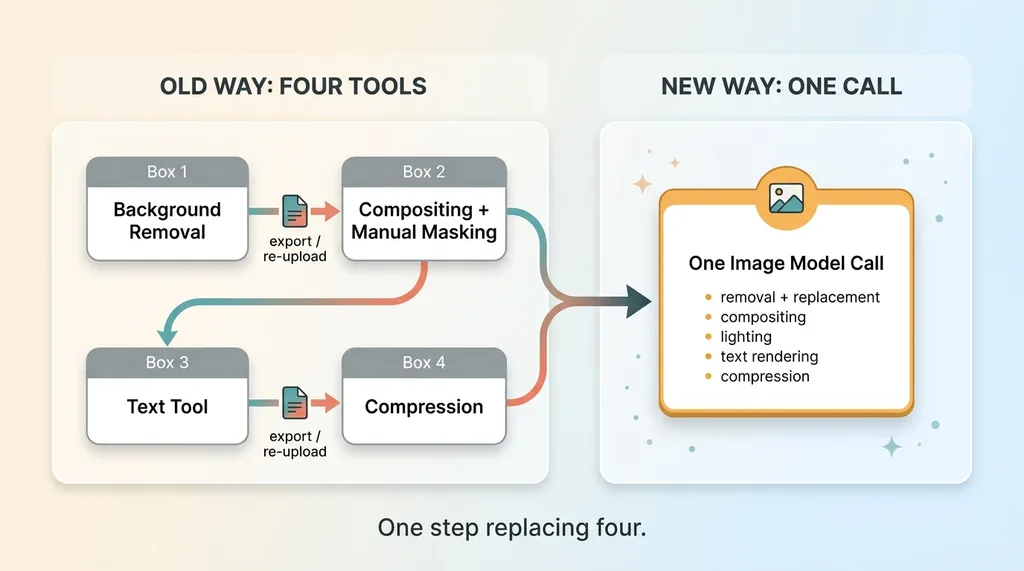 Four-tool workflow collapsing into one model call
One model now handles background removal and replacement, inpainting, outpainting, lighting changes, style transfer, and legible text rendering. All of it. Inside one natural-language prompt.
You hand it up to 14 reference images so it understands the product, the brand colors, the typeface feel. Then you describe what you want and it returns a finished output. No file handoff. No edge cleanup. No separate text layer. No compression service.
Let me map the old steps directly, because this is where it clicks for most people.
That background removal ai service I used to upload to? Now it's just part of the prompt: "put this on a warm studio background." The model removes and replaces in the same breath.
The compositing tool where I masked sleeves by hand? Gone. The model places the product on the new background and handles the lighting so it looks like it belongs there, not pasted on.
The vector text tool? Now it's "add the text SUMMER DROP in the lower third, legible, on brand." Modern models render short text cleanly, which was science fiction eighteen months ago.
The compression step? Handled at export.
Here's the part worth sitting with. This is not four tools getting faster. It's one step replacing four. The difference between optimizing a workflow and deleting most of it.
When I first ran my old email-header process through a single model call, I kept waiting for the catch. Where's the cleanup pass? Where's the file I download and fix? There wasn't one. The output was email-ready. That's the shift, and it's why I rebuilt how my whole brand produces marketing assets.
The Before-and-After, Measured
Vague claims about AI bore me. Here are the actual numbers.
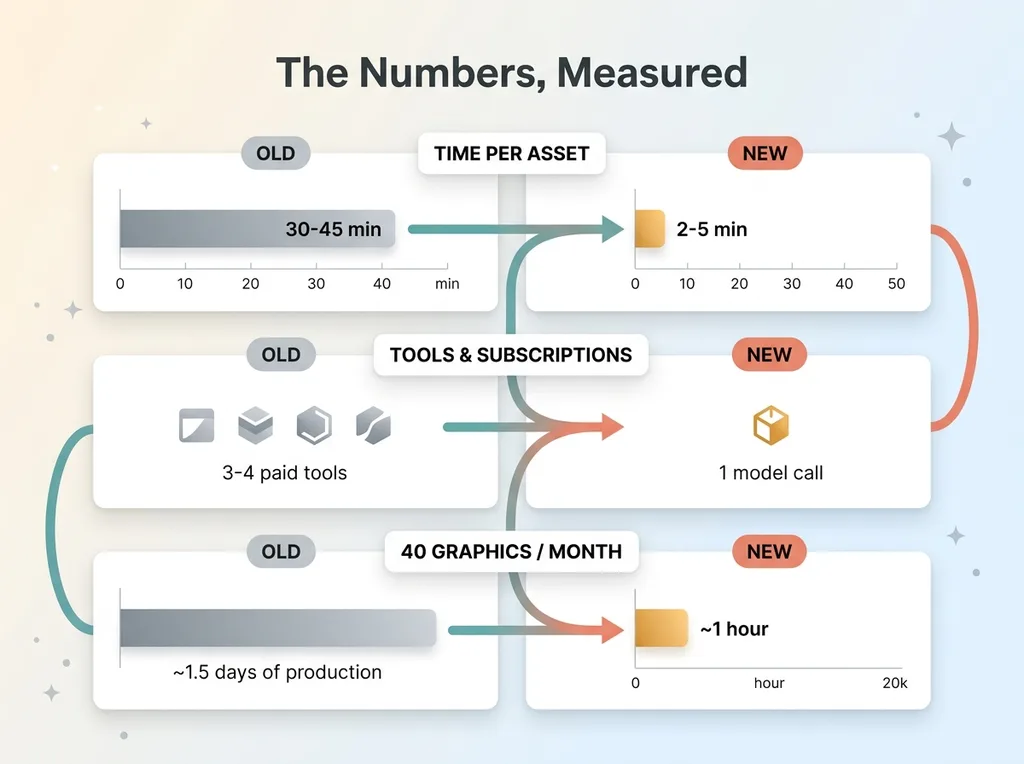 Before-and-after metrics: time, tools, throughput
Time per asset
Old way: 30 to 45 minutes per graphic. New way: 2 to 5 minutes. That's a single API call versus a four-tool relay race.
Tools and subscriptions
Old way: three to four paid tools in the stack, each with its own subscription and login. Background removal, compositing, text, compression. New way: one model call. The stack collapses to a line of code and an API key.
What a small team can now ship
This is where it matters for a CEO. Say your team makes 40 marketing graphics a month.
Old way: that's roughly a day and a half of pure production work. Masking, aligning, exporting, compressing. Hours your designer spent stitching tools instead of thinking.
New way: about an hour.
But the savings aren't even the headline. The real shift is throughput. A solo operator can now ship the volume of branded assets that used to require a designer plus a full tool stack. You're not just doing the same work faster. You're doing volumes that weren't possible before without hiring.
This single workflow fits inside a larger system I built: an AI product photography pipeline that scores its own work. The image generation is one piece. The pipeline judges its own output and reruns the misses, so quality holds at scale.
One honest caveat. This is for marketing graphics and social assets. Email headers, social posts, promo banners, seasonal campaigns. It is not for every kind of creative. A campaign hero shot that defines your brand for the year still deserves a real photographer and real art direction. Know the difference and you'll use this where it actually pays.
Where It Breaks: Product Fidelity
Now the part most AI articles skip, because it's the line between a useful tool and an embarrassing one.
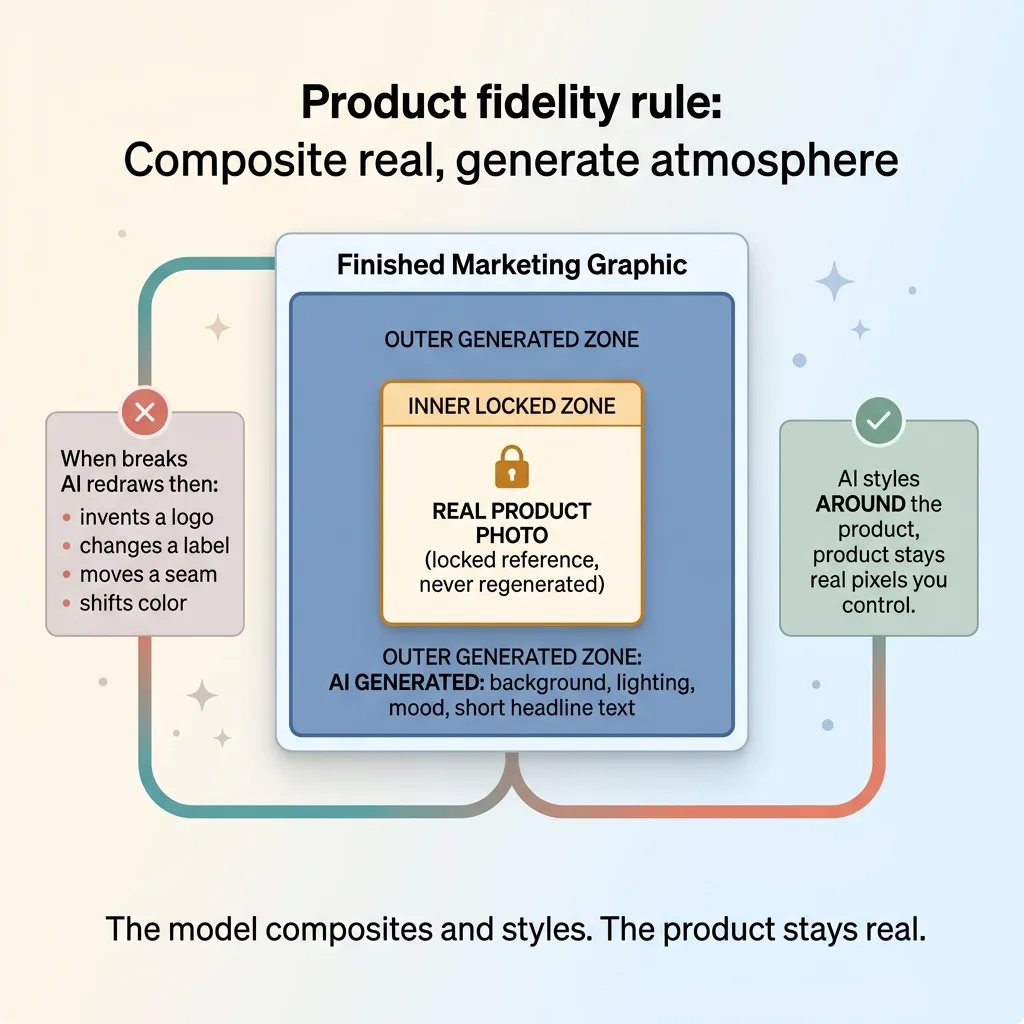 Product fidelity rule: composite real, generate atmosphere
The model is excellent at backgrounds, lighting, mood, and short text. It is dangerous when it redraws your product.
Ask a model to generate your product and it will improvise. It invents a logo. It changes a label. It moves a seam, adds a button, shifts a color half a shade. For my fashion brand, that's a misrepresented garment, a customer ordering something that doesn't exist. For a packaged-goods brand, it's a fake label on a real product. That's not a quirk. That's a problem you can't ship.
So here's the rule I use, and it's non-negotiable in every system I build: the model composites and styles, but the real product photo goes in as a reference and stays the real product.
The AI handles everything around the product. The product itself is pixels I control, not pixels the model invents. I wrote the full argument for this in composite the real product instead of generating it, because it's the single most important decision in this whole workflow.
One more limit worth flagging. Long paragraphs of text still come out garbled. Headlines and short callouts render clean. Body copy turns into AI gibberish that looks like text from a distance and falls apart up close. So use it for "SUMMER DROP" and "30% OFF," not for a paragraph of product description.
Respect these two lines and the tool is reliable. Ignore them and you'll ship something that costs you trust.
How I Use It Across Two Kinds of Work
I run this across two very different jobs, and the contrast teaches the whole decision.
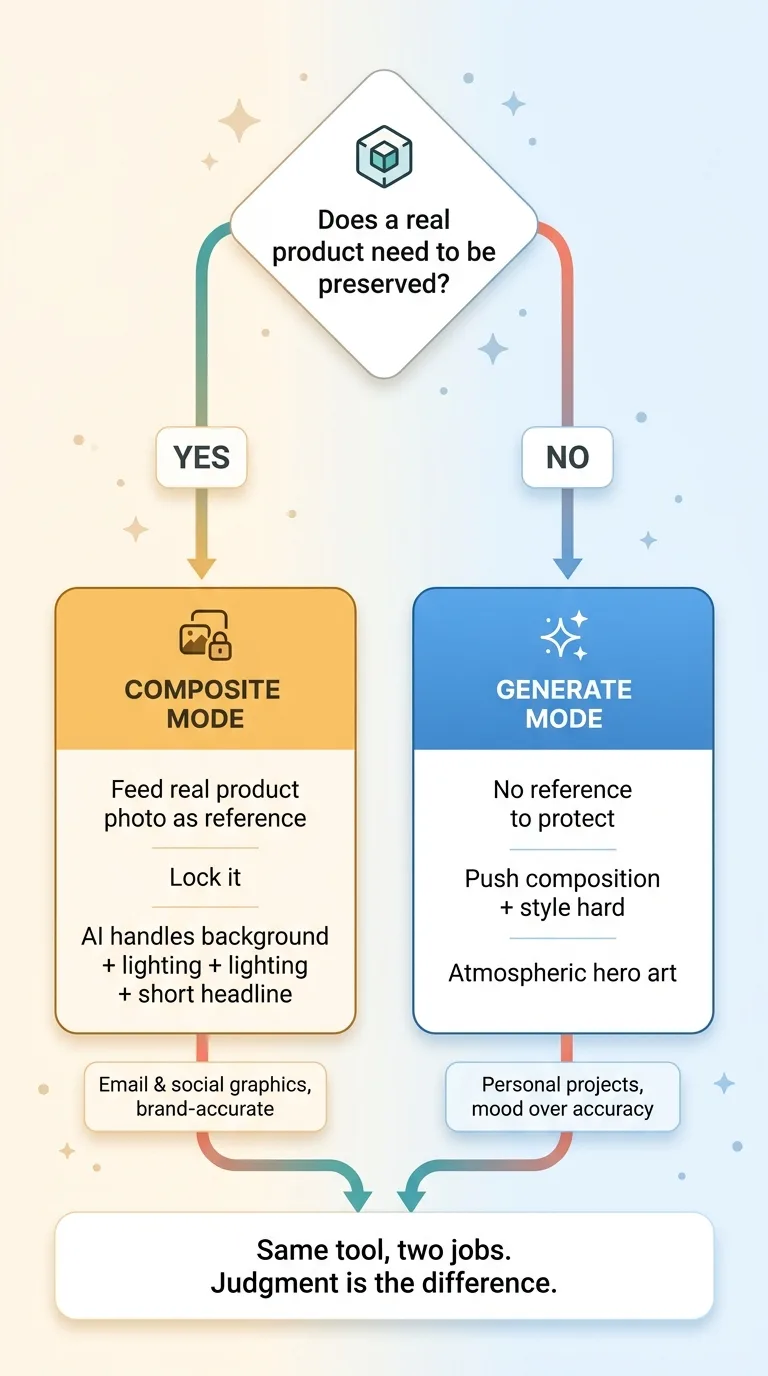 Two-mode decision: lock-and-reference vs let-it-generate
Email and social graphics for the brand
For my DTC fashion brand in San Diego, the real product is sacred. So I feed the actual product photo in as a reference, lock it, and let the model handle the seasonal background, the lighting, and a short headline.
A summer linen piece gets a warm, sun-washed backdrop. A fall drop gets muted tones and softer light. The garment stays exactly what it is, photographed in my studio. The atmosphere is generated. Output is email-ready in minutes, on brand, and accurate to what the customer actually receives.
Hero art for personal projects
For personal projects where there's no real product to preserve, I let the model run free. No reference to protect, so I push composition and style hard. Atmospheric hero art, bold visual concepts, the kind of imagery where the point is mood, not accuracy.
Here the model is generating, not compositing, and that's fine because nothing real has to survive the process.
That contrast is the entire judgment call. When the real thing must be preserved, reference it and lock it. When you're building atmosphere, let it generate. This is ai design automation applied with judgment, not blind generation. The teams that get burned are the ones who treat both jobs the same.
What This Actually Changes for a Business Paying for Design
If you're a CEO paying a designer plus a stack of creative subscriptions, here's the fair question: what does this actually change?
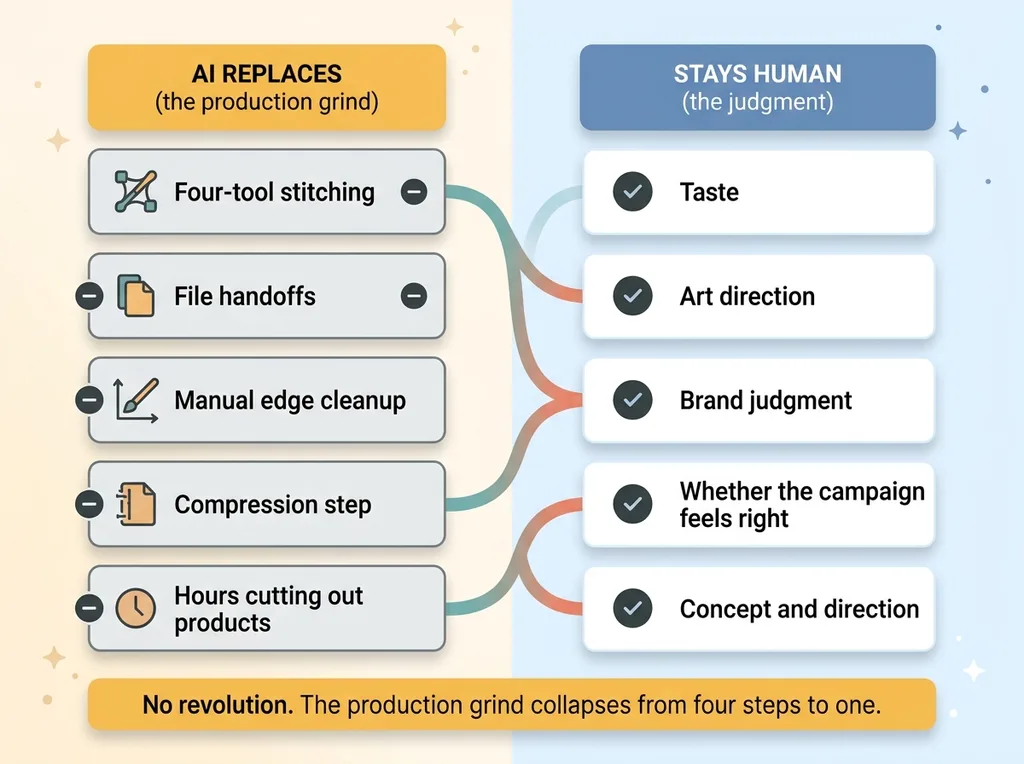 What gets replaced vs what stays human
Let me be precise, because the honest answer builds more trust than the hyped one.
It does not replace taste. It does not replace art direction or brand judgment. A model has no opinion about whether your campaign feels right. That's still a human job, and a valuable one.
What it replaces is the production grind. The four-tool stitching. The file handoffs. The manual edge cleanup. The compression step. The hour your designer spends cutting out a product and aligning text instead of thinking about the work.
So the designer who used to spend a day on production now spends that day on direction and concepts, and ships ten times the assets. Same person, dramatically different output. The subscriptions for background removal and compositing collapse into one model call.
That's it. No transformation. No revolution. Just the boring mechanics of a workflow collapsing from four steps to one.
And here's the strategic part. The model itself is cheap now. Nearly free. Everyone has access to the same image generators. I made this argument in full in the image model is free now and the moat moved. The advantage isn't having the model. It's how you wire it into your actual marketing, how you protect product fidelity, how you score and rerun the output, how it connects to the rest of your operations. Access is commodity. Implementation is the edge.
Where to Start If Your Team Is Still Stitching Tools
If your team is still running graphics through three or four tools, here's the practical first move.
Pick your highest-volume, lowest-stakes graphic. Recurring social posts or email headers. Something you make constantly where a misfire costs you nothing.
Keep your real product photos as references. Don't let the model invent the product. Then run one model call against your current four-step process and compare the two outputs side by side.
Measure two things. Time per asset, honestly. And where fidelity breaks, also honestly. Most teams find the win immediately on background and headline work, and they keep humans on anything where the actual product matters. That split is the right answer, not a compromise.
This single workflow is one of more than fifteen AI systems I've wired into a real brand. The product creation pipeline, the pricing engine across 564 products, the SEO automation behind 313 articles. The value was never any one tool. It's how they connect, where they hand off, and what they let a small team ship.
Get the next build note.
I write up each system I build, including what broke. Subscribe to my newsletter and I'll send you the next one.