The Objection That Kills Every Family Photo Product
I'm building a consumer photo app that turns a year of camera-roll chaos into a printed family photo book. The AI does the hard part: scanning thousands of photos, finding the people who matter, picking the best shots, and laying out something worth keeping.
Every time I described it to a parent, I got the same question before anything else. Not "how does the AI pick photos?" Not "how much does it cost?" The first thing out of their mouth was: who sees the faces of my kids?
That question is the whole ballgame. The single biggest objection to any AI product that touches family photos isn't accuracy or price. It's on-device AI privacy, specifically whether a child's face gets shipped off to some third-party model the parent has never heard of.
This is not a feature request. It's a deal-breaker. A parent who hesitates on that question doesn't buy. Ever.
And it's not just a gut reaction, though the gut reaction alone would be enough. It's a compliance landmine. COPPA in the US puts hard rules around collecting data on kids under 13. GDPR adds its own protections for EU minors. If your architecture routes children's faces through a cloud model, you've signed up for a legal exposure most founders don't fully understand until a regulator or a lawyer explains it to them.
Most AI products treat privacy as a settings toggle buried three screens deep. You find it under Account, then Advanced, then a checkbox nobody reads.
I decided to do the opposite. I made privacy the headline claim, and I built the architecture so I could actually back it up.
The thesis is simple: the sensitive part never leaves the device. The faces stay on the phone. What gets sent to the cloud is stripped of identity by design, not by promise.
Why "We Encrypt It" Isn't Good Enough
The difference between protected and never-sent
When I tell a regulated or privacy-conscious buyer that my app uses AI, their default assumption is that I'm shipping their sensitive data to a third party and hoping my encryption and my policies hold.
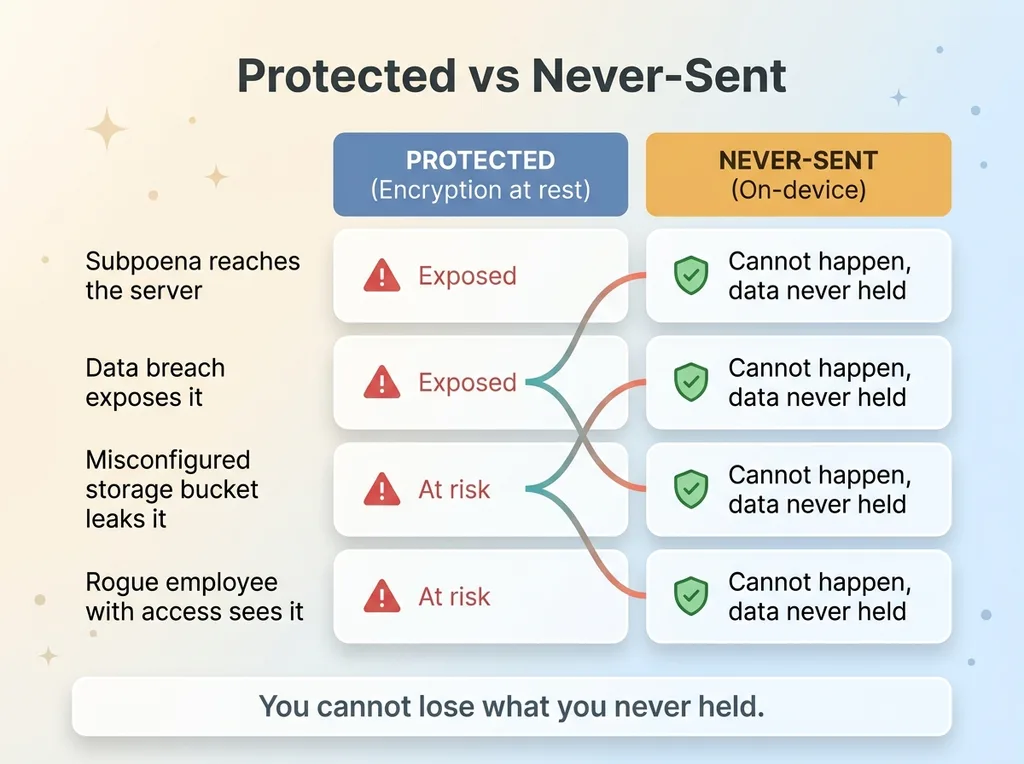 Protected vs Never-Sent comparison
That assumption is correct for most products. And it should make you nervous.
Here's the gap most teams gloss over. Encryption at rest is real and necessary. I've written about encrypting sensitive data at rest because it's the baseline every serious product should hit. But encryption at rest protects data once it's already sitting on someone else's server. The data is still on someone else's server.
What buyers actually assume about AI
A subpoena still reaches it. A breach still exposes it. A misconfigured storage bucket still leaks it. A rogue employee with the right access still sees it. Encryption narrows the attack surface. It doesn't close it.
The stronger position is structural: data that never leaves the device cannot be breached from the cloud, subpoenaed from the cloud, or leaked from the cloud. You can't lose what you never held.
That's the difference between protected and never-sent. Protected is a promise about how carefully you'll guard the thing you took. Never-sent means you never took it.
This generalizes well beyond family photos. If your business handles customer images, medical photos, scanned IDs, or financial documents, the same logic applies. The most defensible privacy claim isn't "we guard it well." It's "the sensitive piece never left your control in the first place." Buyers feel that difference, and so do auditors.
How On-Device Face Recognition Actually Works
Detection and embedding on the phone
People assume on-device face recognition means I built some scrappy, downgraded model to avoid the cloud. The opposite is true.
The phone in your pocket already ships a production-grade vision framework. It's the exact same one your native photo gallery uses when it groups all the pictures of your daughter into one "person" album. That framework does face detection and produces face embeddings entirely on-device.
When my app scans a camera roll, the phone's own vision model handles detection locally. No face image goes to a server for this step. No raw embedding tied to a real identity leaves the device.
So what's an embedding? In plain terms, it's a math fingerprint of a face. Imagine compressing everything distinctive about a face into a long list of numbers. That list is similar for two photos of the same person and different for two different people. It's not the face. You can't reconstruct a portrait from it. It's a pattern, not a picture.
Clustering people without a cloud round-trip
Once the phone has embeddings for every face it detected, it clusters them locally. Clustering just means grouping the similar fingerprints together so that all the photos of one kid land in one bucket, all the photos of another kid land in another, and so on.
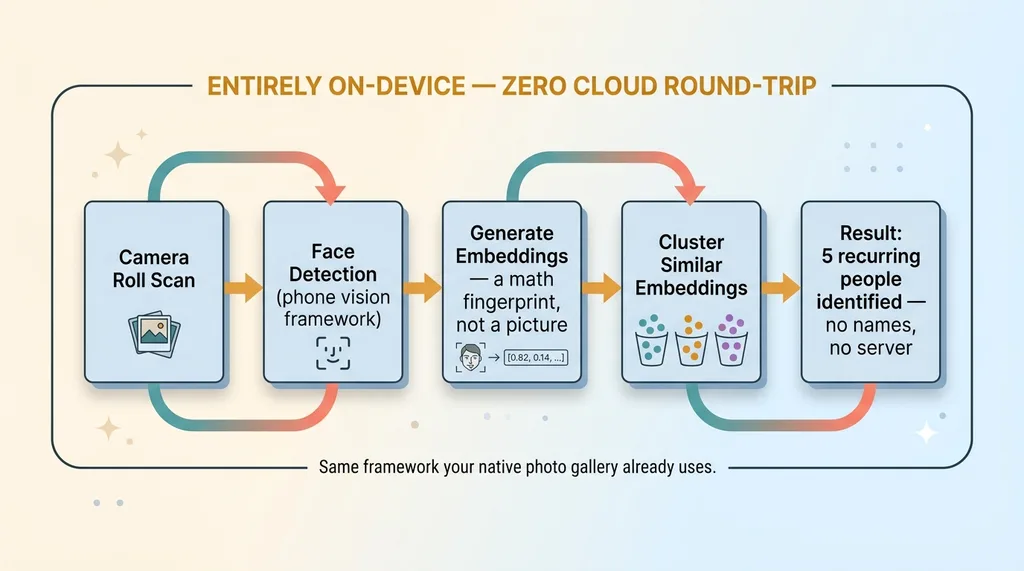 On-device face recognition pipeline
This entire step, detection through clustering, happens on the device with zero cloud round-trip. The app learns "there are five recurring people in this camera roll" without ever telling a server whose faces those are.
Here's the part founders miss: the recognition itself isn't the hard part. The platform already solved that and put a strong vision model in everyone's pocket for free. The hard part is wiring my app's selection logic around it, working within the framework's quirks, handling edge cases, and keeping the identity-sensitive work pinned to the device. That's engineering discipline, not a new model.
I'm not fighting the hardware. I'm using the most private tool available, which happens to also be one of the best.
What Actually Touches the Cloud (And Why That's Safe)
Trust comes from precision, so let me be exact about what does leave the device. Privacy theater is when you wave your hands and say "it's all secure." Real privacy is being able to draw the data flow on a whiteboard.
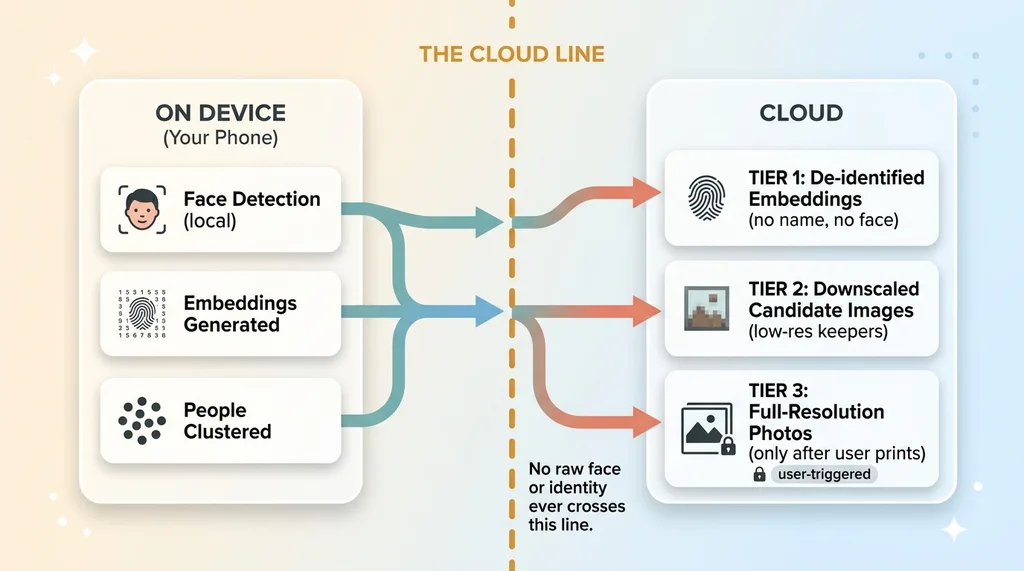 Three-tier data flow: what crosses the cloud line
There are three tiers of what touches the cloud, and they're carefully separated.
De-identified embeddings, not faces
Tier one is de-identified embeddings, used for ranking and selection logic. These are the math fingerprints, stripped of any link to a real identity. The cloud might use them to understand "this is the same recurring person across these shots" so the final book features the right people consistently. But it never knows who that person is. There's no name, no face image, no account-level identity attached. It's a pattern doing its job blind.
Downscaled keepers, full-res only at the end
Tier two is downscaled candidate images, the "keepers." To evaluate composition, lighting, and whether someone's eyes are closed, the selection AI looks at small, downscaled versions of the strongest candidate photos. Lower resolution is plenty for judging whether a shot is good. The AI doesn't need a 12-megapixel original to know a photo is blurry.
Tier three is full-resolution images, and these upload only for the final book the user explicitly chose to print. Not during scanning. Not during selection. Only after a human says "yes, make this book," and only for the exact photos in it.
This is where I draw the line on what AI gets to do. The selection AI never needs the full-res original to do its job, and it never needs to know whose face it's looking at. So I don't give it either.
This layering is the discipline most teams skip. Sending everything to the cloud is easier. You dump the whole camera roll up to a server, run one big model over all of it, and bolt on a privacy policy afterward. It works, it ships faster, and it puts every customer's most sensitive data on your infrastructure as a permanent liability. I'd rather do the harder version that I never have to apologize for.
Privacy as the Headline, Not a Buried Setting
Most products treat privacy as a defensive checkbox, something you mention in a footer to avoid getting sued. I flipped it into the lead claim: faces never leave your phone.
That sentence isn't a toggle a user can flip on. It's the architecture. The faces literally cannot leave because the identity-sensitive processing happens on-device and the cloud never receives a face tied to a person. Which means I can say it without an asterisk, without a "subject to our terms" qualifier.
That distinction is the entire reason it works as marketing. I've written before about how I market AI to wary parents, and the core lesson is this: a privacy claim you can actually back up with architecture converts skeptical buyers far better than a feature list ever will.
A wary parent doesn't want to read about my eleven AI capabilities. They want one promise they can trust. "Your kids' faces never leave your phone" is that promise, and because it's true at the architecture level, they can feel that it's not marketing spin.
For B2B buyers, this maps straight into compliance conversations. When privacy is architecture instead of policy, you can show an auditor the data flow diagram. You point at the device, you point at what crosses the line, and you show them the sensitive part never crosses it. That's a completely different conversation than handing over a privacy policy and asking them to trust it.
COPPA-compliant by design beats COPPA-compliant by policy every time. One is a property of your system. The other is a hope.
The Tradeoffs I Accepted (And the Ones I Didn't)
I'd be lying if I said this was free. Every architecture choice has a cost, and honesty about the costs is part of why people trust the upside.
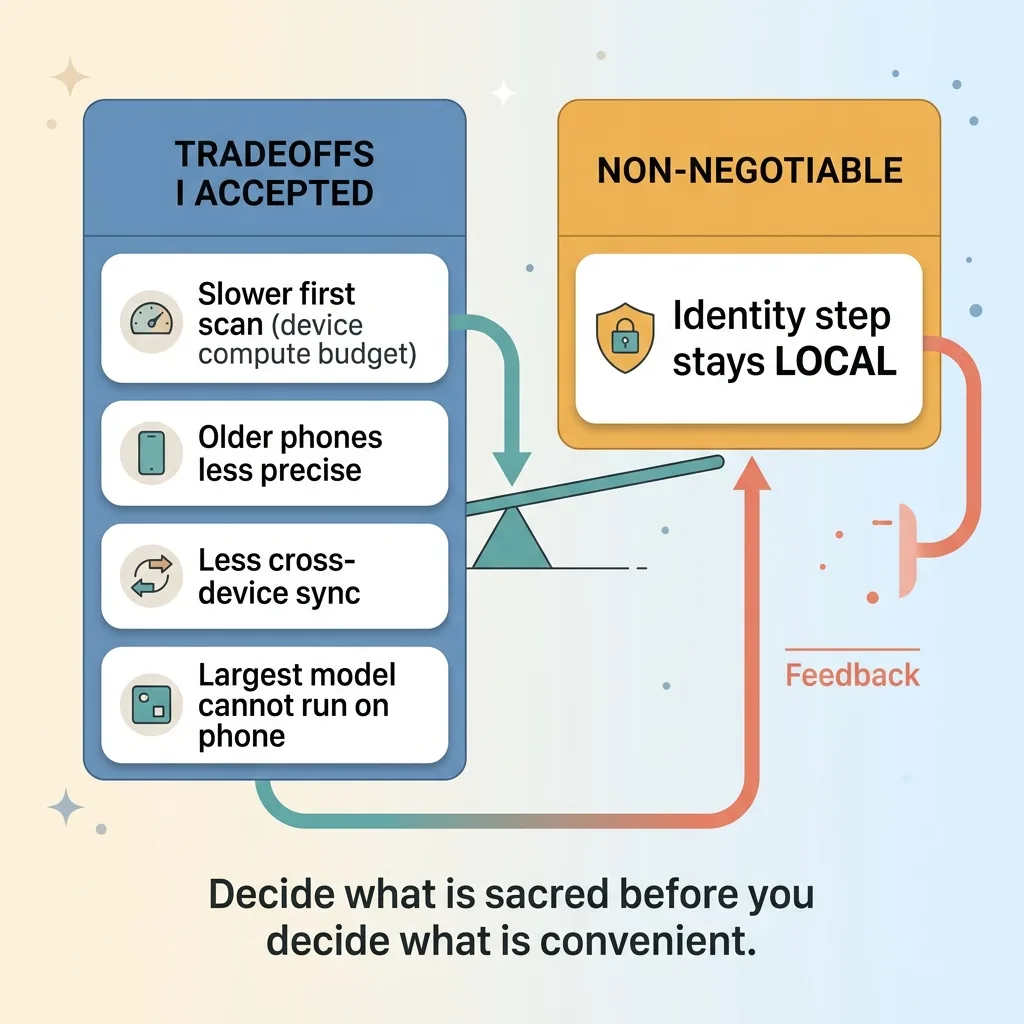 Tradeoffs accepted vs non-negotiable
On-device processing is slower than a cloud GPU for that first big scan. A data center can chew through ten thousand photos faster than a phone can. The initial scan takes longer because I'm working within the device's compute budget.
Older phones do less well. Newer hardware runs the vision framework comfortably. Older models are slower and occasionally less precise at clustering. I accept a narrower hardware sweet spot.
I also give up some cross-device sync convenience. Because the face cluster lives on the device, it doesn't automatically follow you to a new phone the way cloud-stored data would. And I simply can't run my largest model on a phone. Some heavy lifting has to happen elsewhere, which is exactly why I built the three-tier system above.
Here's what I refused to trade: the sensitive identity step staying local. That was non-negotiable from the first line of code. Everything else flexed around it.
The honest framing is that I chose a slightly slower, slightly more constrained product in exchange for a privacy claim I never have to walk back. For a family photo app touching kids' faces, that's clearly the right trade.
For another business, the line moves. A medical imaging tool might accept more cloud processing under HIPAA controls. A document scanner might split differently. But the principle holds regardless: decide what's sacred before you decide what's convenient. Most teams do it backwards and pay for it later.
How to Decide What Stays Local in Your Own Product
If you're building or buying an AI product that touches sensitive customer data, here's the framework I'd actually use. Three questions, answered before you write architecture, not after.
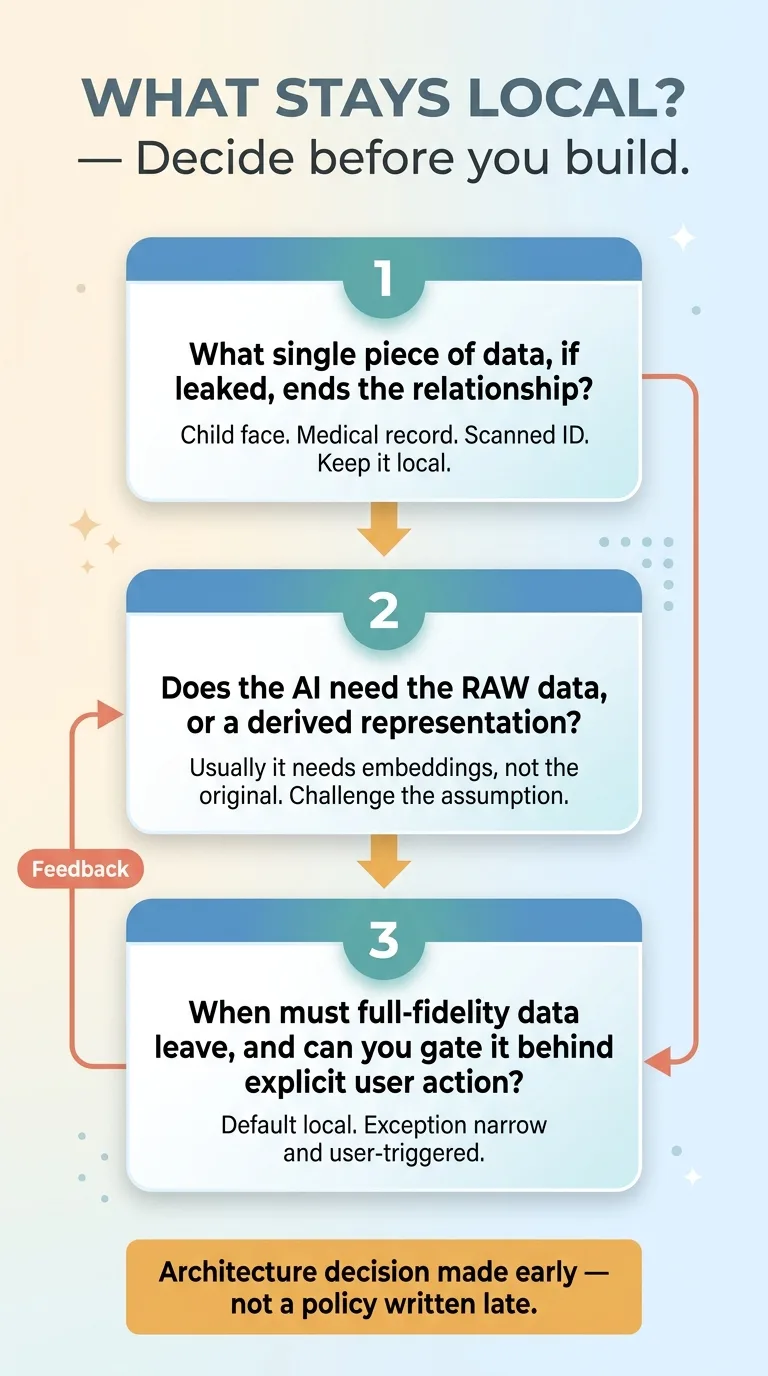 Three-question framework for what stays local
One: what's the single piece of data that, if leaked, ends the relationship? For me it was a child's face. For you it might be a medical record, a scanned ID, a financial statement. Find that one thing. Keep it local. Everything else is negotiable, but that one piece is sacred.
Two: does the AI actually need the raw sensitive data, or just a derived representation? This is the question almost everyone skips. My selection AI didn't need faces, it needed embeddings, math fingerprints stripped of identity. Nine times out of ten the model needs a derived, de-identified representation, not the raw sensitive original. If you assume the AI needs everything, you'll ship everything. Challenge that assumption hard.
Three: when does full-fidelity sensitive data truly need to leave the device, and can you gate it behind explicit user action? In my case, full-resolution photos only upload after a user explicitly chooses to print a book. The default is local. The exception is deliberate, narrow, and user-triggered.
The thing to understand is that this is an architecture decision made early, not a privacy policy written late. You can't retrofit "the data never leaves the device" onto a system that already ships everything to the cloud. The teams that get this right decide the data flow first and build outward from it.
Get the next build note.
I write up each system I build, including what broke. Subscribe to my newsletter and I'll send you the next one.