How to Rotate an API Key Safely (Without Leaking It)
Rotating a secret can burn it. Here's the safe procedure I use to rotate an API key safely: clipboard capture, format validation, and never screenshotting a live key.
By Mike Hodgen
The rotation itself is the leak nobody plans for
Here's something nobody tells you: the safest-sounding security move you make all month can be the one that burns you.
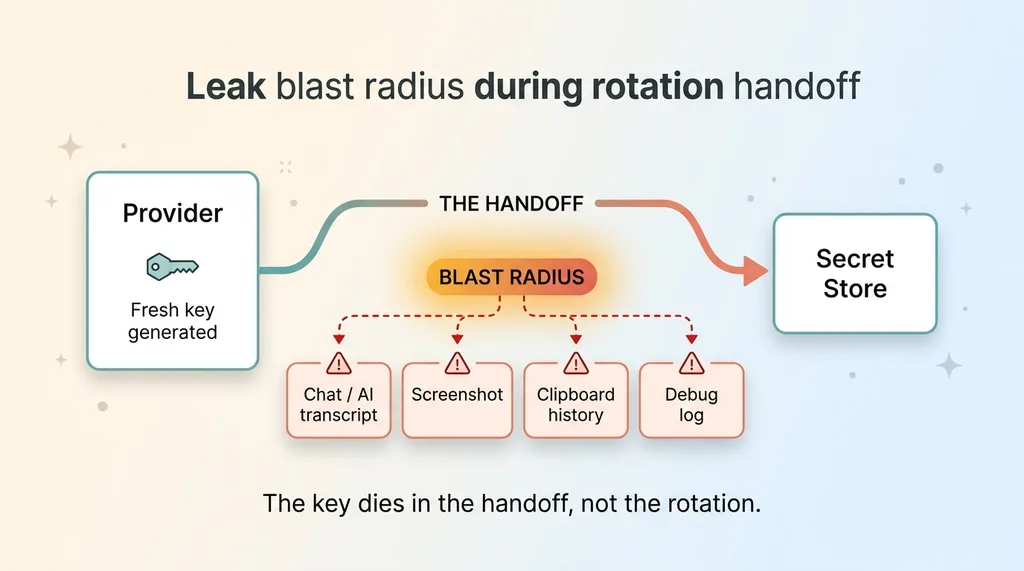 The leak blast radius during rotation handoff
Most teams treat key rotation as the cleanup step. A key leaked, or somebody left, or it's just been a while, so you rotate it. New key, problem solved, back to work. The mental model is that rotation moves you from less safe to more safe. It's the responsible thing to do.
But the act of rotating a key has a blast radius of its own. The moment you generate a fresh credential, you have to get it from the provider into your secret store, and that handoff is where keys die. I've learned to rotate an API key safely the hard way, by leaking two of my own fresh keys during the exact procedure meant to protect them.
I'm going to walk you through both incidents, because they're embarrassing and instructive in equal measure. One was a key I pasted into a chat to feed a script. The other was a screenshot of a dashboard showing the key in plaintext. Neither was a hack. Both were me, trying to be careful.
The core rule, stated up front: any key that touches a transcript, a chat log, a screenshot, or a clipboard buffer that gets logged is compromised the moment it lands there. Not "probably." Compromised. There is no undo.
Most teams rotate casually because they've never thought about the procedure as a thing that can leak. They focus on the leak that triggered the rotation and ignore the leak the rotation itself can cause. I made that mistake across dozens of projects before I built a procedure that doesn't.
Two ways I burned a fresh key during rotation
These are mine. Not hypotheticals, not war stories I borrowed. I did both of these.
The interactive prompt with no terminal
I had a rotation script that needed the new key. The script read it from an interactive stdin prompt, the standard "paste your key here:" pattern you've seen a hundred times. Clean enough when you run it in a real terminal.
Except this time it was running in an environment with no attached terminal. So the prompt didn't appear. It just hung, waiting for input that could never arrive.
I was mid-rollout, the old key already revoked, services starting to fail. So I did the fast thing. I pasted the key directly into a chat so an agent could grab it and feed it to the script. It worked. The rollout completed. Crisis over.
Then it hit me. That key was now sitting in a transcript. The kind that gets retained, indexed, possibly used for model training, readable by support staff. I had generated a brand-new key to improve security and immediately dropped it into one of the least private places imaginable. Dead on arrival. I rotated again, properly, an hour later.
The screenshot of a key-details dialog
Different project, same instinct to "just confirm it looks right." I'd generated a key in a provider dashboard and wanted to double-check the prefix matched what my config expected before deploying. The provider's key-details dialog showed the full value in plaintext.
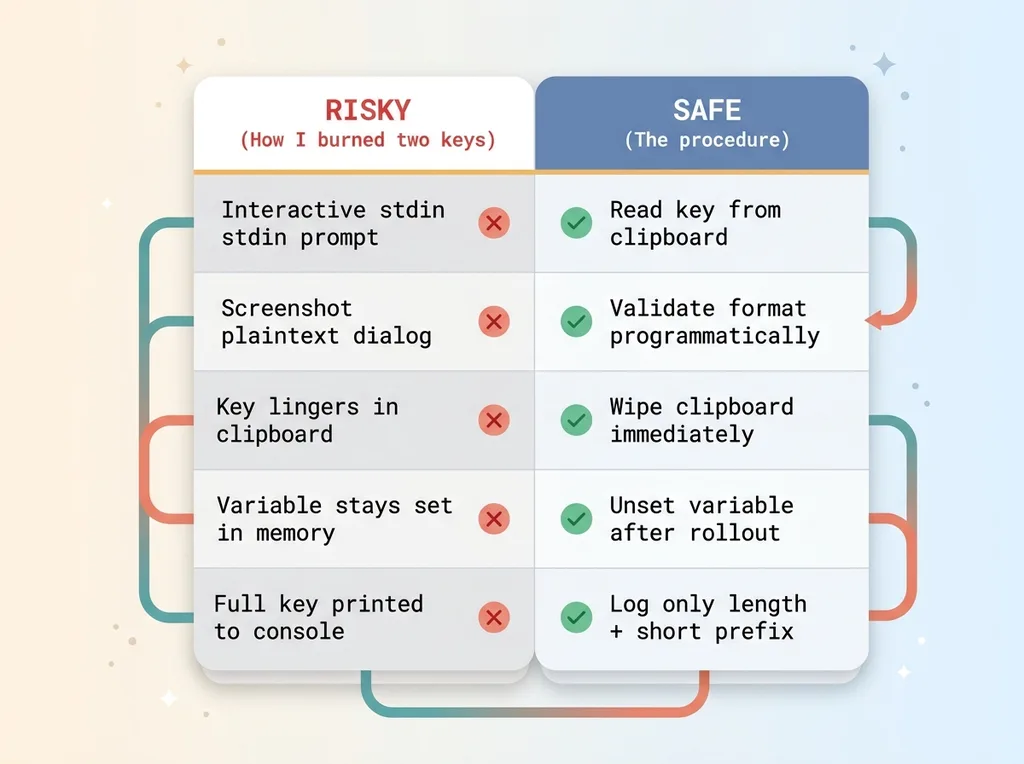 Risky rotation vs safe rotation comparison
So I screenshotted it. Quick visual confirmation, move on.
The problem is what happens to screenshots. Mine auto-upload to a cloud photo library. They sync across devices. They land in folders that get shared. That plaintext key was now replicated across three places I didn't control and couldn't fully audit.
Also dead. Rotated again.
The lesson from both: the leak happened during a process designed to make things more secure. Good intentions, careful person, fresh credential, instantly burned. That's why a real key rotation procedure has to account for the handoff, not just the rotation.
Why a key in a chat log is compromised, period
Let me put this in plain terms, because the threat model matters more than the mechanics.
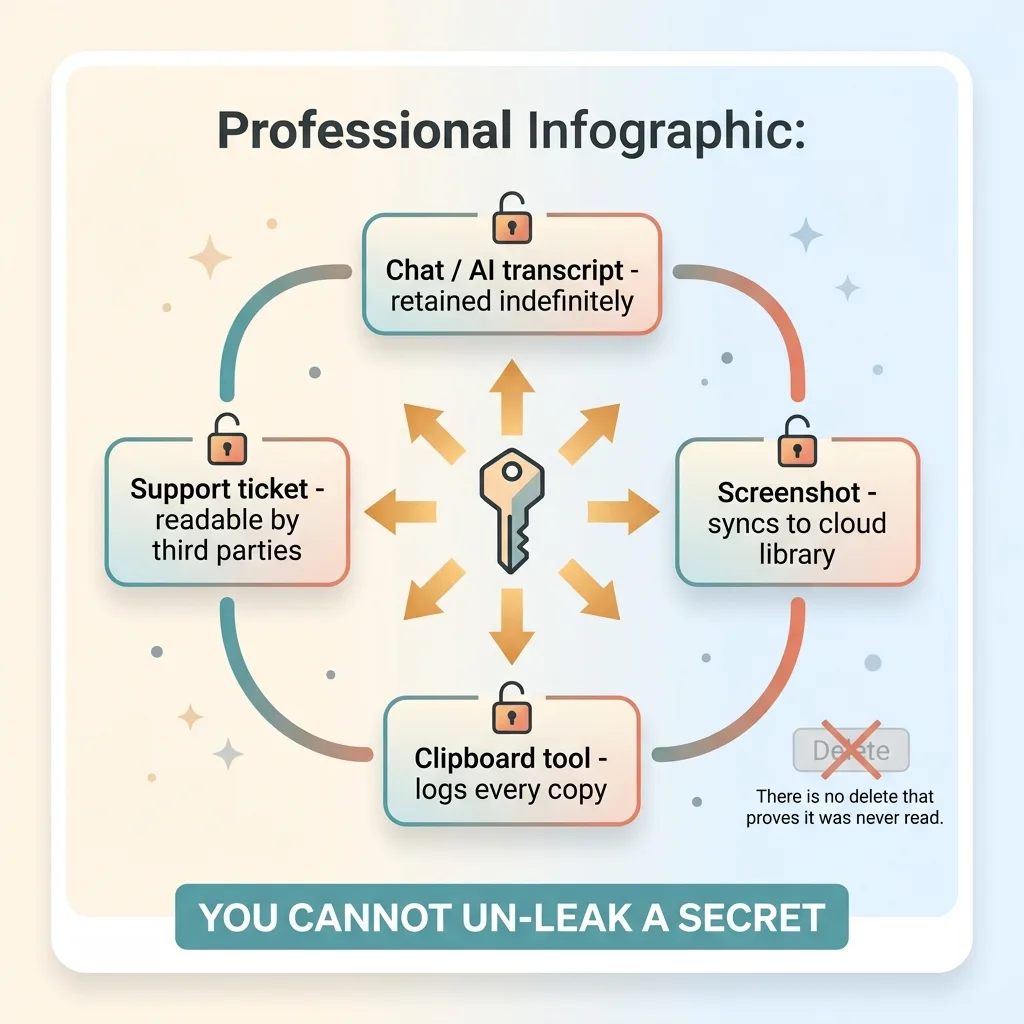 Why a leaked key cannot be un-leaked
When a key lands in a chat log or an AI transcript, you've lost control of it. Those logs are retained, often indefinitely. They're sometimes used to train models. They're frequently readable by support staff, by anyone with account access, by whatever system indexes them for search. You don't know who reads them, when, or whether a copy already exists somewhere you'll never see.
Screenshots are worse, because they feel innocent. They sync to cloud photo libraries, get pasted into Slack threads, attach to support tickets, end up in ticketing systems that third parties can access. Clipboard-history tools, the kind that quietly log every copy you make, keep their own record. You copied the key once; the tool kept it forever.
Here's the part people resist: you cannot un-leak a secret. There is no delete that proves it was never read. Deleting the message, the screenshot, the clipboard entry, none of it changes the fact that the value sat somewhere it shouldn't have. The only honest assumption is that it was seen.
So the only safe move is to treat any exposed key as already breached and rotate it again. No investigation, no "let me check if anyone actually saw it." Rotate.
This is also where blast radius matters. If that leaked key is a single key powering six different apps, one careless paste compromises all six at once. The narrower the scope of each key, the smaller the cleanup. But narrow scope doesn't save you if your rotation procedure leaks the replacement too.
This is the stakes part. Accept them, and the procedure below stops feeling like overkill.
The safe key rotation procedure I actually use
This is the part you came for. It works whether a human runs it or you're directing an AI agent to run it. The agent rule is the same as the human rule: it must never receive the full key in plaintext context.
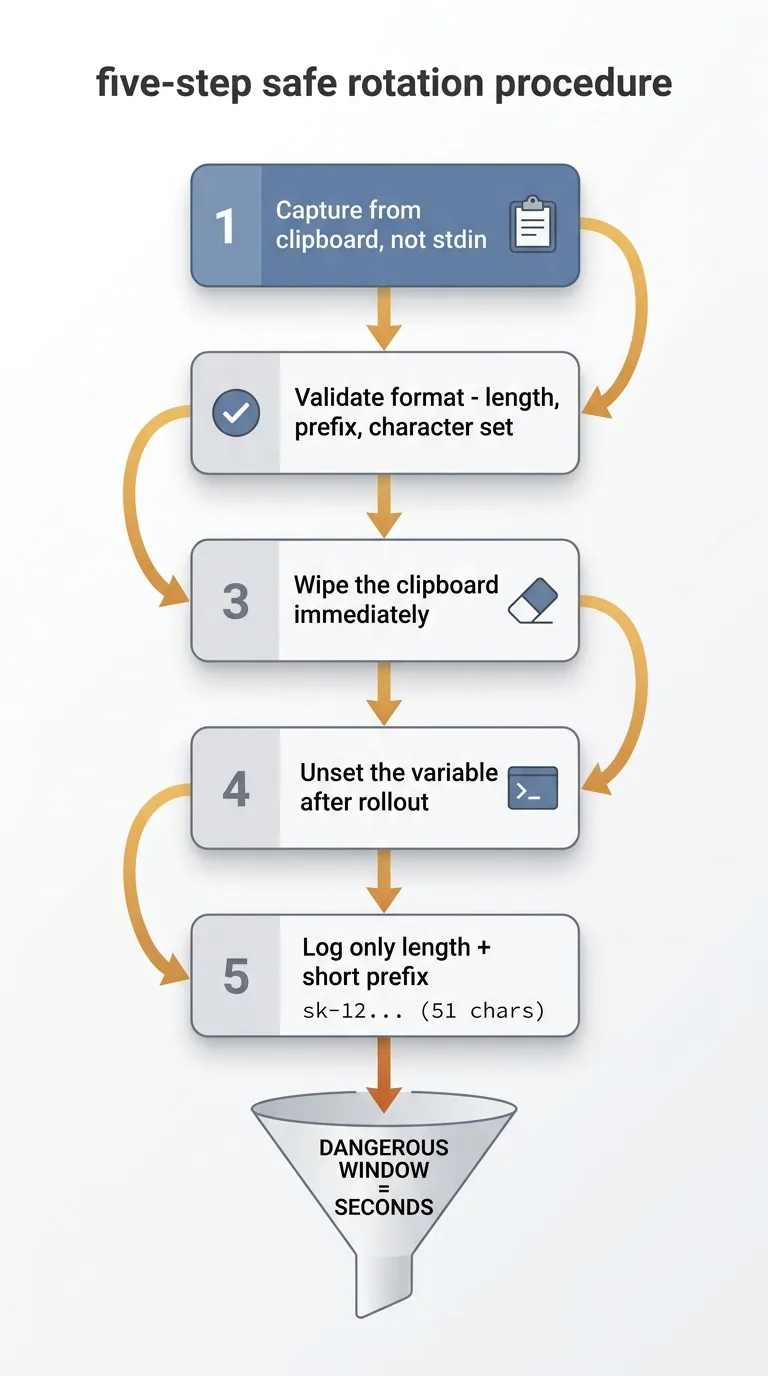 The five-step safe rotation procedure
Capture from the clipboard, not stdin
Don't use an interactive prompt. Copy the key from the provider, then have your script read it from the clipboard programmatically. This kills two problems at once. It never hangs when there's no terminal, which is what tempted me into the chat paste. And it removes the prompt that invites someone to type or paste a secret into a logged session.
Validate the format before you trust it
The instant you capture the key, validate it. Check the length, the prefix, the character set against what the provider uses. A wrong paste, a truncated copy, a key from the wrong account, you catch all of it here, before you deploy. This is the step that replaces the screenshot. You confirm the key is right without ever displaying the full value.
Wipe the clipboard immediately
The moment you've captured the key into the script, clear the clipboard. Clipboard-history tools and sync services grab whatever sits there. The shorter the key lives in that buffer, the less chance some background tool keeps a copy. This is the key handling clipboard discipline that almost nobody does, and it's a two-line addition to the script.
Unset the variable after rollout
Once the key is written to your secret store, unset the environment variable that held it. If you leave it set, it lingers in process memory and risks getting echoed by a later command, dumped into a log, or printed by a debug routine you forgot about. Set it, use it, unset it.
Never print more than a length and short prefix
When you need to confirm which key you're working with, log a length and a short prefix only. Something like sk-12... (51 chars). That's enough to confirm identity and catch a wrong key. It is never enough to leak the secret. The full value should never hit a log line, a console, or a transcript.
Run those five steps in order and the dangerous window, the time the raw key exists in a place a human or a tool can copy it, shrinks to seconds. That's the whole point. These are the secret rotation best practices I wish I'd had before I burned two keys learning them.
The operating rules that catch what scripts miss
A script handles the mechanics. It does not handle judgment. These three rules cover what the script can't.
Treat any transcripted key as already burned
If a key ever appears in a chat, an AI prompt, a ticket, a shared doc, or a screenshot, rotate it again. Immediately. No debate, no investigation into whether it was "really" exposed. The exposure is the breach. I learned this by arguing with myself for ten minutes about whether my chat-pasted key was actually compromised, then realizing the argument itself was the tell. If you're debating it, rotate.
Only ever screenshot masked confirmations
When you genuinely need a visual, screenshot a masked view, the prefix and last few characters only. Never the plaintext dialog. If the provider only offers a plaintext view, don't screenshot it at all. Screenshot the masked confirmation from your own validation output instead. You built that output in step two of the procedure for exactly this reason.
Prevention beats rotation
The cheapest leak to fix is the one that never happens. A clean rotation procedure is the floor, not the ceiling. The better goal is a system where keys live in one managed store and humans rarely touch the raw value at all.
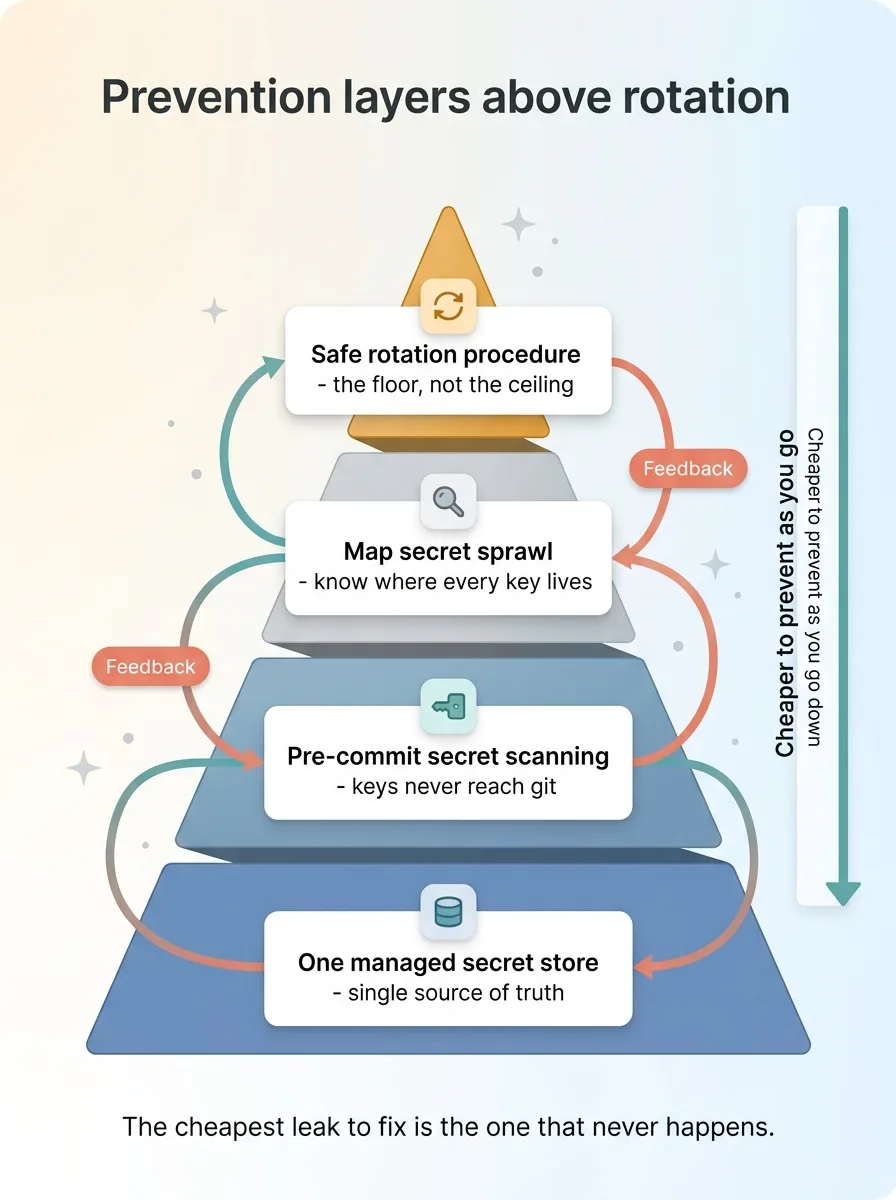 Prevention layers above rotation
Part of that is stopping leaks at the source. Make it physically impossible to commit a key with pre-commit scanning, so a key never reaches your git history in the first place. And before you fix anything, map your own secret sprawl first, because most teams have no idea how many copies of how many keys are scattered across env files, laptops, and old branches. You can't rotate safely what you can't find.
A rotation checklist your team can run today
Here's the whole thing in one scannable list. Print it, paste it into your runbook, hand it to whoever does rotations next.
- Never paste a key into a chat, AI prompt, ticket, or shared doc
- Capture the key via clipboard, not an interactive stdin prompt
- Validate the format (length, prefix, character set) the instant you capture it
- Wipe the clipboard immediately after capture
- Unset any environment variable holding the key after rollout
- Log only a length and a short prefix, never the full value
- Screenshot only masked views, never the plaintext dialog
- If a key ever touches a transcript, rotate it again, no debate
That's it. Run that and you've closed the hole I fell into twice.
Now the bigger picture. Almost every team I look at handles secrets ad hoc. No procedure, keys living in env files on a dozen machines, the same key pasted into Slack and Notion and three different scripts because that was faster than looking it up properly. This checklist closes the immediate gap. It does not fix the sprawl underneath.
The durable fix is moving every secret into one source of truth, so there's one place to rotate, one place to audit, and the raw value almost never gets handled by a person. That's a bigger project, and I've written up how I move every secret to one source of truth so you can see what it actually involves.
If your team rotates keys casually and you want to know where you're actually exposed, that's exactly the kind of thing I dig into when I audit how your team handles secrets. Not a slide deck. A real look at where the keys live and how they move.
Ready to bring AI leadership into your company?
I work with a small number of companies at a time. If you're serious about AI, apply to work together and I'll review your application personally.
Get AI insights for business leaders
Practical AI strategy from someone who built the systems — not just studied them. No spam, no fluff.
Hodgen.AI
Ready to automate your growth?
Book a free 30-minute strategy call with Hodgen.AI.
Book a Strategy Call