Automated Website Compliance Monitoring on Every Deploy
How I built automated website compliance monitoring that scans only changed pages on every deploy and emails the principal the moment a violation appears.
By Mike Hodgen
A One-Time Audit Goes Stale the Day After You Run It
A while back I ran a regulated firm's whole website through an AI compliance audit. We found 174 findings across their public site, the legal team worked through them, and everything got cleared. Clean bill of health. Everyone felt good.
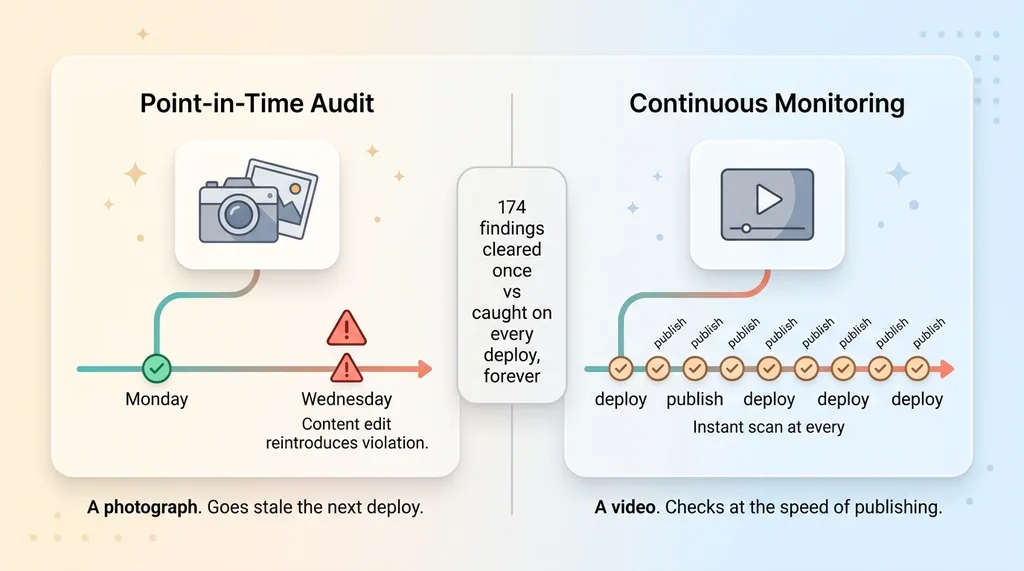 Point-in-time audit vs continuous compliance monitoring
Then the marketing team kept doing their job.
That is the problem with automated website compliance monitoring done as a single event. A compliance audit is a photograph. Your website is a video. The moment someone tweaks a headline, ships a new product page, or "updates" a disclosure to make it read better, you risk re-introducing exactly the kind of violation you just paid to remove.
Why point-in-time compliance fails
This firm had over 150 canonical pages. Disclosures, performance claims, risk language, the works. In a regulated business, a single sloppy edit on one page can be a real problem, not a typo.
A clean audit on Monday tells you nothing about Wednesday's content edit. The certificate of cleanliness expired the second the next deploy went out. And nobody on the marketing side is thinking about Reg language when they swap a hero image and rewrite the copy above it.
The cost of re-auditing on every edit
The obvious fix is to just re-run the audit. Often.
But running a full frontier-model scan across 150-plus pages is slow and expensive. Doing it weekly is painful. Doing it on every content change is absurd. You would be paying to re-examine 149 pages that nobody touched just to catch the one that changed.
So the buyer's real question is this: how do you stay continuously compliant without paying for a full audit every single week? You need the coverage of an audit with the cost of barely doing anything at all. That tension is the entire design problem.
The Core Idea: Only Scan What Actually Changed
The trick is embarrassingly simple once you see it. Do not scan the whole site. Scan what changed.
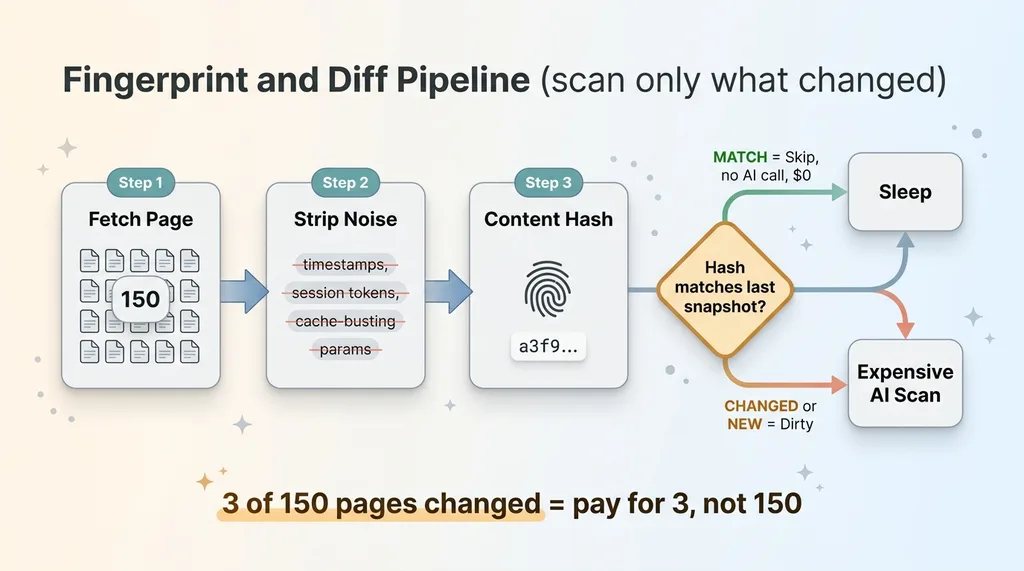 Fingerprint and Diff Pipeline (scan only what changed)
Fingerprint every page
The monitor fetches every canonical page and strips out the noise first. Timestamps, session tokens, cache-busting query strings, the little dynamic bits that change on every page load and mean absolutely nothing for compliance.
Then it content-hashes the meaningful body of the page. That hash is a fingerprint. It stores the fingerprint as a snapshot, one per page, and moves on.
This first pass is cheap. Fetching and hashing 150 pages costs almost nothing. No AI involved yet. You are just taking attendance.
Diff against the last snapshot
On the next run, the monitor does the same thing again. Fetch, strip, hash. Then it compares the new fingerprint against the stored snapshot for each page.
If the hash matches, the page is byte-for-byte identical in everything that matters. Skip it entirely. No AI call, no cost, no time.
If the hash is different, or the page is brand new, that page is dirty. Only dirty pages go to the expensive AI scan.
This is ai content change detection doing the heavy lifting. The diff is the cheap part. The AI judgment is the expensive part. So you spend the expensive part only where something actually changed.
The math gets fun. Say 3 pages changed out of 150 since the last run. You pay to scan 3 pages, not 150. On a typical day where nobody touched anything, you pay to scan zero. The monitor wakes up, confirms nothing moved, and goes back to sleep.
That is how you get audit-grade coverage at near-zero ongoing cost. You stop paying to re-read pages that did not change.
Capping the Scan So a Big Backlog Never Drops a Page
Here is where naive change detection falls over, and where the honest engineering matters.
What happens when a big deploy changes 80 pages at once? A site redesign, a footer template update, a global disclosure change. Suddenly you have 80 dirty pages all demanding an AI scan in a single run.
The per-run cap
You do not want one run to blow the budget by scanning all 80 in a panic. And you definitely do not want it to scan what it can and quietly forget the rest.
So the monitor caps the number of AI scans per run. A fixed batch size. It processes up to that limit and stops.
Draining the queue over multiple runs
The pages it did not get to stay marked dirty. They are not cleared, not skipped, not forgotten. They are explicitly still queued for the next run.
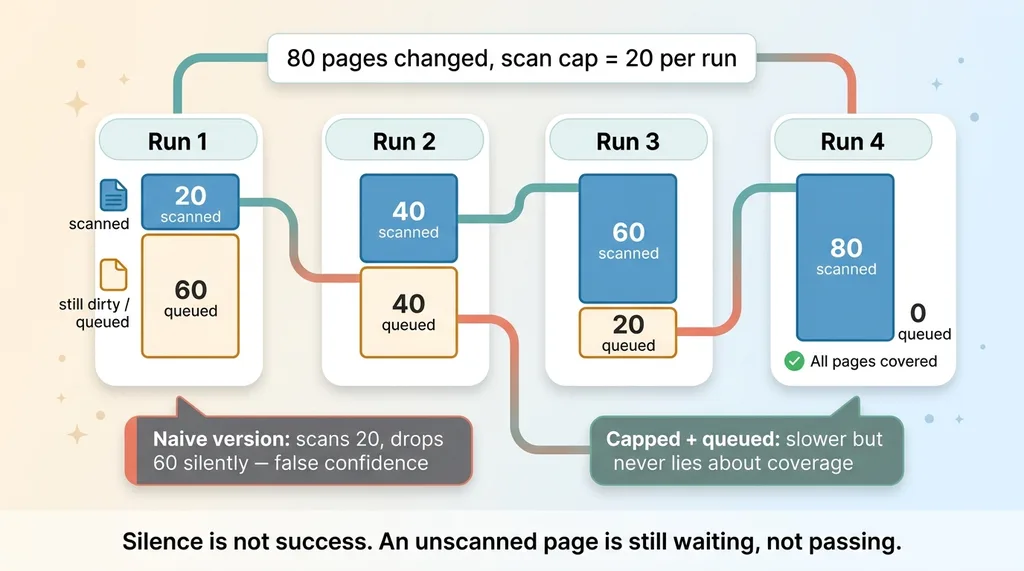 Per-run cap with queue draining over multiple runs
So if 80 pages change and the cap is 20, the first run scans 20 and leaves 60 dirty. The next run takes another 20. Four runs later, the backlog has drained and every single page got its scan. No page is ever silently dropped.
This matters more than it sounds. I have a whole philosophy about automations that email me when nothing is wrong, and the core of it is this: silence is not success. A page that did not get scanned this run is not a page that passed. It is a page that is still waiting.
The naive version processes what it can and loses the overflow. You think you are covered, you are not, and you find out during a regulator's visit. The capped-and-queued version is slower to clear a big backlog, but it never lies to you about coverage. That trade is worth it every time.
Two Triggers: A Daily Cron and a Deploy Webhook
The monitor fires two ways, and they cover different failure modes.
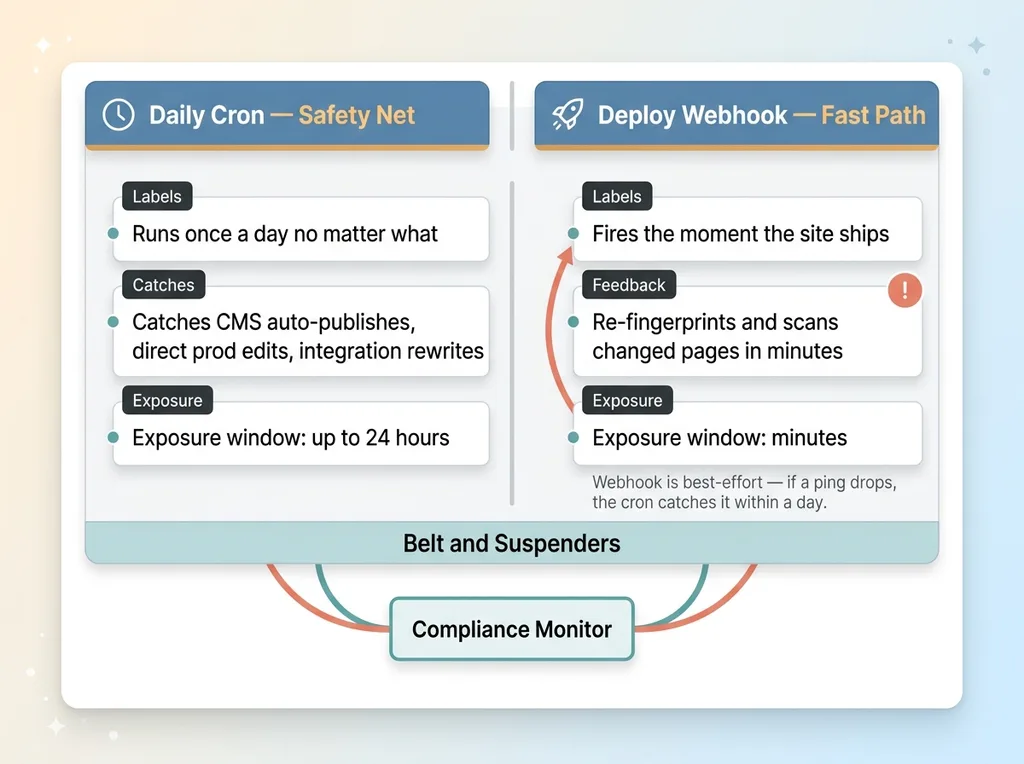 Two triggers: daily cron safety net vs deploy webhook fast path
The scheduled safety net
The daily cron is the baseline. Once a day, no matter what, the monitor re-fingerprints the entire site and catches anything that drifted.
This is the safety net for everything you did not see coming. Maybe a CMS auto-published a scheduled post. Maybe someone edited a page directly in production without going through the normal deploy. Maybe an integration rewrote some content. The daily cron does not care how the change got there. It just notices that a fingerprint moved.
Catching violations at deploy time
The cron alone means you could be exposed for up to 24 hours after a bad edit ships. For most content that is fine. For a regulated financial site, 24 hours of a non-compliant performance claim sitting live is not fine.
So the fast path is a deploy webhook content scan. The moment a new version of the site ships, the deploy pipeline pings the monitor. The monitor wakes up, re-fingerprints, finds the changed pages, and scans them within minutes instead of waiting for tomorrow's cron.
That webhook turns compliance from a periodic review into something that happens at the speed of publishing. You ship, the monitor checks, and if you just introduced a violation you hear about it before lunch, not next week.
Honest limitation: the webhook is best-effort. Deploy pipelines fail. Pings get dropped. Networks hiccup. That is exactly why the daily cron exists as backup. If the webhook misses, the cron catches it within a day. Belt and suspenders. Neither one is trusted to be the only line of defense.
Keeping the AI Scan Cheap Enough to Run Forever
If you are a MOFU buyer, you are doing the ongoing-cost math in your head right now. Good. So did the firm. Here is how the scan stays cheap enough to run forever.
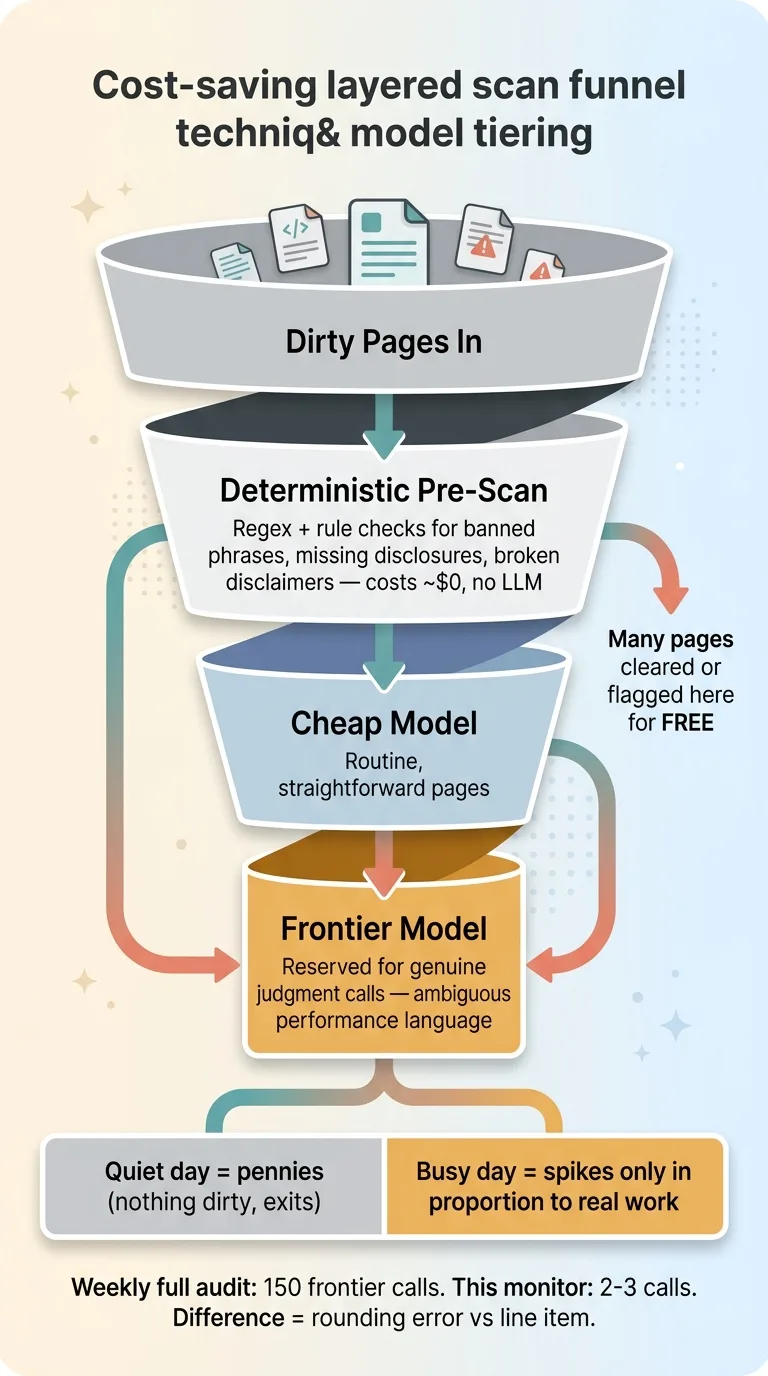 Cost-saving layered scan funnel (deterministic pre-scan then model tiering)
Deterministic pre-scan before the model
The expensive part is the AI judgment call. So cut it down before the model ever sees the page.
A deterministic pre-scan runs first. Regex and rule checks for known banned phrases, missing required disclosures, broken disclaimer language, and obvious red flags. This costs effectively nothing. No LLM call, just pattern matching.
A surprising number of pages get fully handled here. A page with a required disclosure block intact and no banned phrases can clear without bothering the model. A page that is obviously missing a mandatory disclaimer gets flagged without the model. I wrote about this approach in detail in regex first, model second. The deterministic layer is your free first pass.
Why you don't need a frontier model on every page
The second cost lever is model selection. You do not run the most expensive frontier model on every page that survives the pre-scan.
Routine pages, the ones where the question is straightforward, get a cheaper model. You reserve the expensive frontier model for genuine judgment calls. The ambiguous performance language. The claim that might be fine in context and might not. The stuff where you actually need the smartest reasoning available.
Stack those two layers and the economics get sane. On a quiet day with no changes, the monitor costs pennies. It fingerprints, finds nothing dirty, and exits. On a busy day it spikes, but only in proportion to the actual work.
Compare that to a weekly full audit running a frontier model across 150 pages whether they changed or not. You are paying for 150 expensive judgment calls every week to catch the 2 or 3 things that moved. The monitor pays for 2 or 3. Over a year that is the difference between a real line item and a rounding error.
Writing Findings Where Humans Already Look (And Emailing Only When It Matters)
A monitor that nobody checks is worse than no monitor, because it gives you false confidence. Two operational decisions keep this one actually useful.
The shared review store
The monitor writes its findings into the same review store the compliance team already used for the original audit. Same place, same format, same workflow.
It does not create a second system. There is no separate dashboard nobody logs into, no parallel queue that drifts out of sync with the real one. When the compliance person opens their review queue, the monitor's findings are sitting right there next to the audit findings they already know how to handle.
Continuity is underrated. The fastest way to kill a good tool is to make people learn a new place to look.
Email only on new critical and high findings
The noise problem is real. If the monitor emailed on every finding, it would become wallpaper inside a week. People filter it, ignore it, and then miss the one email that mattered.
So it only emails the principal when a deploy introduces a new critical or high-severity finding. Something that genuinely needs eyes today.
Existing known issues do not re-alert. If a page already has a flagged finding sitting in the review queue, the monitor does not nag about it again. Lows and informationals never trigger an email at all. They sit quietly in the review queue for the next time someone does a pass.
This is human-in-the-loop done right. The AI proposes, the human disposes, and the human only gets pulled out of their day when the stakes actually justify the interruption. An email from this system means something. That is the whole point.
Continuous Compliance Is an Architecture Decision, Not a Service You Buy Weekly
The firm went from a point-in-time audit that aged out the day after we ran it to continuous compliance scanning that costs almost nothing on a quiet day and catches a regression the moment it ships. Same coverage. A fraction of the cost. And it runs whether anyone remembers to think about it or not.
The broader lesson for you, if you run a regulated business: compliance cannot be an event you schedule. It has to be a standing system wired into how your site actually changes. Your content does not change on a quarterly calendar. It changes whenever someone hits publish. Your compliance checking has to live at that same speed.
I will be honest about the limit. This monitors what it knows to check. It catches regressions against rules and patterns that have been encoded. A brand-new regulation still needs a human to translate it into checks the system can run. The monitor is not a substitute for someone who understands the law. It is a tireless way to enforce what you already know, on every deploy, forever.
If your public-facing content carries regulatory risk and changes constantly, this pattern is buildable for your stack. It is the kind of thing you build once and own, not a retainer you pay every week. If you want to go deeper on the architecture, I broke down a standing compliance monitor separately.
Want to explore what AI could do for your business?
Book a free 30-minute strategy call. No pitch deck, no sales team, just a real conversation about your operations and where AI actually fits.
Get AI insights for business leaders
Practical AI strategy from someone who built the systems — not just studied them. No spam, no fluff.
Hodgen.AI
Ready to automate your growth?
Book a free 30-minute strategy call with Hodgen.AI.
Book a Strategy Call