Veo 3.1 in Production: What AI Video Actually Delivers
Real production data from Veo 3.1 AI video generation: costs, quality scores, prompt engineering, and where it falls short. No hype, just results.
By Mike Hodgen
A financial advisory firm I work with was spending $2,000 to $5,000 per video with a production company. Explainer content for clients, short-form social clips, internal training materials. Each piece took 2-3 weeks from brief to delivery. The ask was straightforward: can we use Veo 3.1 AI video generation to do this faster and cheaper without the output looking like it was made by an intern with a free trial?
The honest answer is: mostly yes, sometimes no, and the details matter a lot.
I've spent the last several months building and testing an AI video production pipeline using Veo 3.1 through Vertex AI. I've run hundreds of generations, tracked the costs down to the penny, and delivered real content to a real client who had real opinions about quality.
This article covers what Veo 3.1 actually is, how I integrated it into a production pipeline, what worked, what fell apart, and the exact cost and quality numbers. No hype. No "AI will replace all video production" nonsense. Just what I found after putting this through its paces.
What Veo 3.1 Actually Is (And What It Isn't)
Technical capabilities in mid-2026
Veo 3.1 is Google's video generation model, accessible through Vertex AI. It handles text-to-video and image-to-video generation. You give it a prompt describing what you want, and it generates a video clip.
The real specs: you can generate clips up to 8 seconds at 1080p resolution, with options for various aspect ratios including 16:9, 9:16, and 1:1. Audio generation — introduced in Veo 3.0 — is refined here, meaning the model can produce synchronized sound effects and ambient audio that match the visual content. Lip sync for generated characters has improved significantly, though "improved" and "good enough" are different conversations.
What changed from Veo 3.0
Three things actually matter in the 3.0 to 3.1 jump. First, motion coherence is substantially better. Objects that move across the frame no longer randomly distort or phase through each other as often. Second, style adherence across clips improved — when you specify a visual style, the model holds it more consistently throughout the generation. Third, the safety filter calibration got more sensible. In earlier versions, perfectly benign business content would get flagged and blocked. That was a real production problem, and it's mostly resolved.
What Veo 3.1 is NOT: a video editor, a long-form content creator, or a reliable character consistency engine. You cannot generate a 60-second continuous video. You generate short clips and assemble them. And if you need the same AI-generated person to appear across multiple separate generations looking identical — that's still unreliable. Plan around this limitation, don't fight it.
The Vertex AI Integration: How the Pipeline Works
Architecture decisions
The pipeline uses three models doing different jobs. Claude writes the video prompts based on a creative brief. Veo 3.1 generates the clips via Vertex AI. Gemini reviews the output against a scoring rubric.
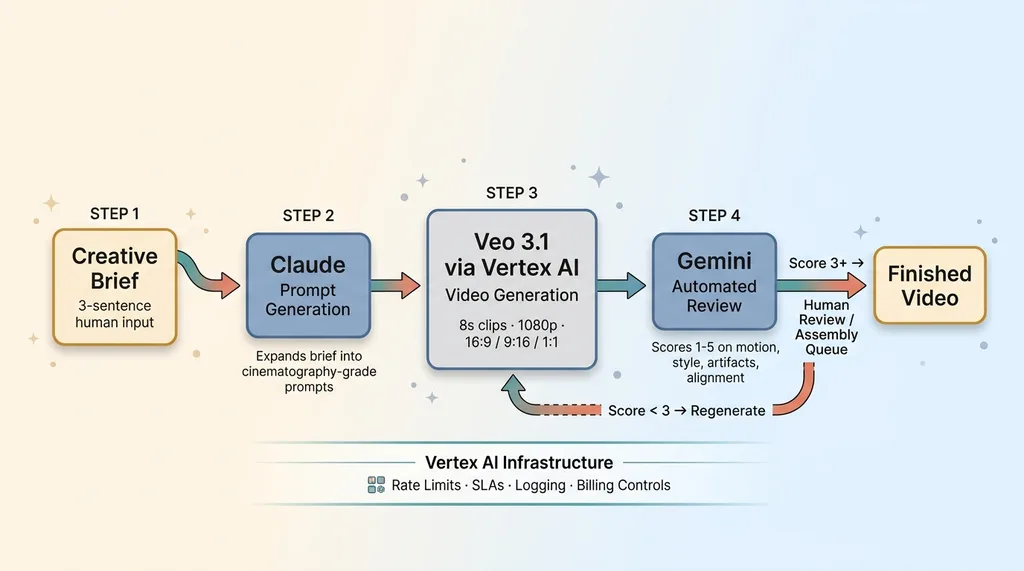 Three-Model AI Video Pipeline Architecture
I use Vertex AI instead of AI Studio for the same reasons I moved my other production workloads there: rate limits that don't choke at scale, proper SLAs, logging that actually tells you what happened when something fails, and billing controls that prevent a runaway generation loop from burning through your budget at 3 AM.
Prompt chaining for consistent output
This is where the multi-model architecture pays off. A human writes a creative brief — maybe three sentences about what the video needs to accomplish. Claude expands that into a structured set of video prompts, one per clip, with specific camera directions, lighting notes, and style anchors. These prompts aren't generic. They read like cinematography notes.
Here's a real example. A prompt that produces unusable output: "Professional business meeting in a modern office." You'll get something that looks like a stock photo slideshow with weird motion artifacts.
A prompt that works: "Medium wide shot, static camera with subtle drift right, two figures at a glass conference table, warm overhead lighting with cool window backlight, shallow depth of field on background, corporate minimalist style, muted blue-gray color palette, calm and focused mood."
The specificity is everything.
The generation-review-regenerate loop
Every generated clip runs through an AI video review system using Gemini. Gemini scores each clip on motion quality, style adherence, visual artifacts, and brief alignment on a 1-5 scale. Clips scoring below 3 get automatically regenerated with adjusted prompts — the system tweaks camera specifications or style descriptors based on what Gemini flagged. Clips scoring 3-4 get queued for human review. Clips scoring 5 go straight to the assembly queue.
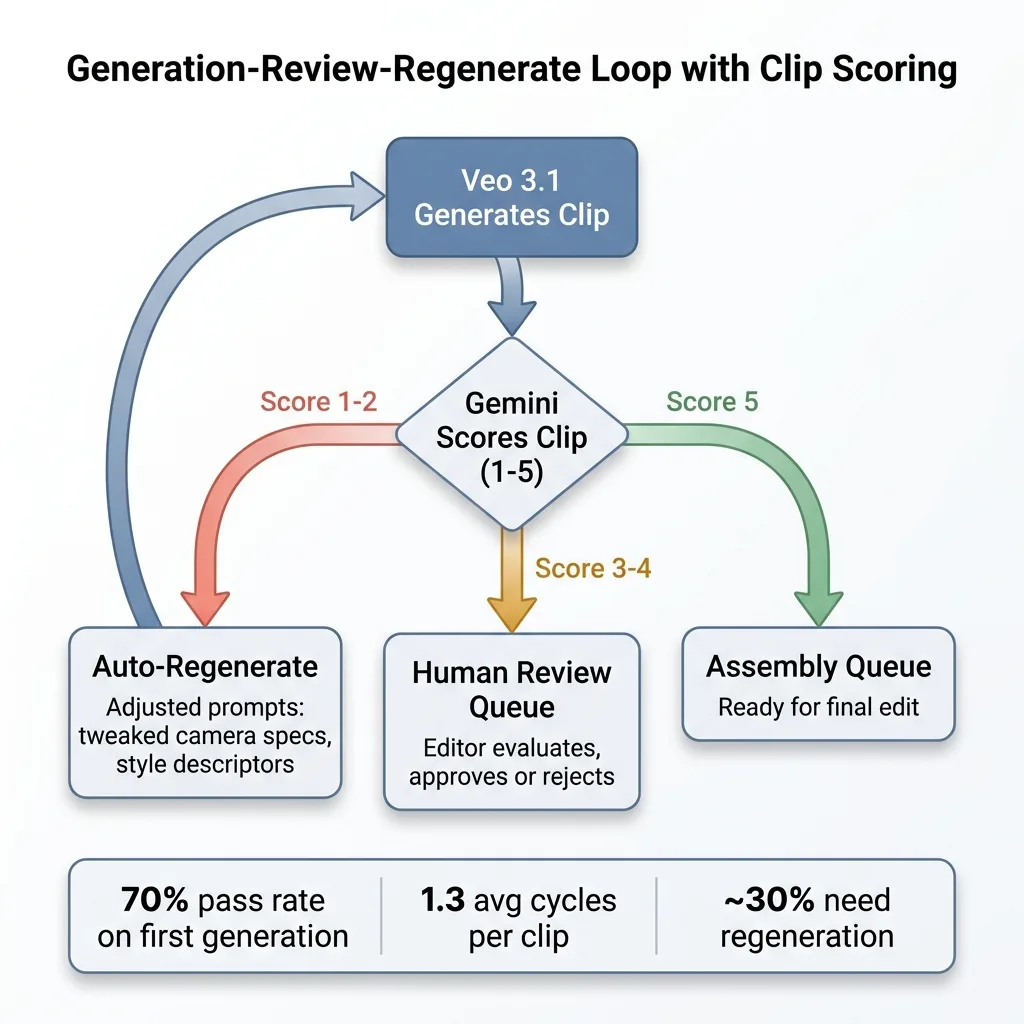 Generation-Review-Regenerate Loop with Clip Scoring
This loop typically runs 1.3 cycles per clip on average. Meaning about 30% of clips need at least one regeneration. That cost matters, and I'll get to it.
Quality: Where AI Video Works and Where It Falls Apart
The 70% that's production-ready
Out of a real production batch of 50 clips generated for the financial advisory client, here's what happened:
- 35 clips (70%) were usable as-is after passing automated review
- 10 clips (20%) needed minor human editing — trimming, color correction, speed adjustments
- 5 clips (10%) were unusable and had to be scrapped entirely
That 70% first-pass success rate is solid. It's comparable to the hit rate I see in my AI product photography pipeline that scores its own output, where the automated scoring approach follows the same logic: generate, score, route.
What works well: abstract motion graphics and kinetic typography. Product showcase b-roll where you need panning shots of objects or environments. Mood footage — cityscapes, nature scenes, abstract textures. Text-overlay social content where the video is backdrop, not the star. Internal training materials where "good enough" is the actual standard.
The 30% that needs human intervention
The minor editing bucket is predictable. Color consistency between clips sometimes drifts despite style anchoring. Pacing doesn't always match what you need for the final edit. Some clips are slightly too long or have dead frames at the end. A competent editor handles these in minutes per clip.
The uncanny valley problem
Human faces in close-up are still the problem. Medium and wide shots of people? Passable, often good. Close-ups? You'll notice something wrong. The eyes don't quite track naturally. Skin texture has a subtle plasticity. Lip sync has improved, but it's not where it needs to be for a talking-head explainer video that's going to live on a firm's website.
The client's reaction was exactly what I expected. They were genuinely impressed by the b-roll and motion graphics — said it was indistinguishable from what their production company delivered. They were skeptical of the human-featuring content, and they were right to be. We pivoted that portion of the content plan to use real footage for any close-up human elements and AI for everything else.
That's the honest play. Knowing where the line is matters more than pretending the line doesn't exist.
The Real Numbers: Cost and Speed vs Traditional Production
Per-video cost breakdown
Traditional production for this client: $2,000-$5,000 per finished video, 2-3 week turnaround.
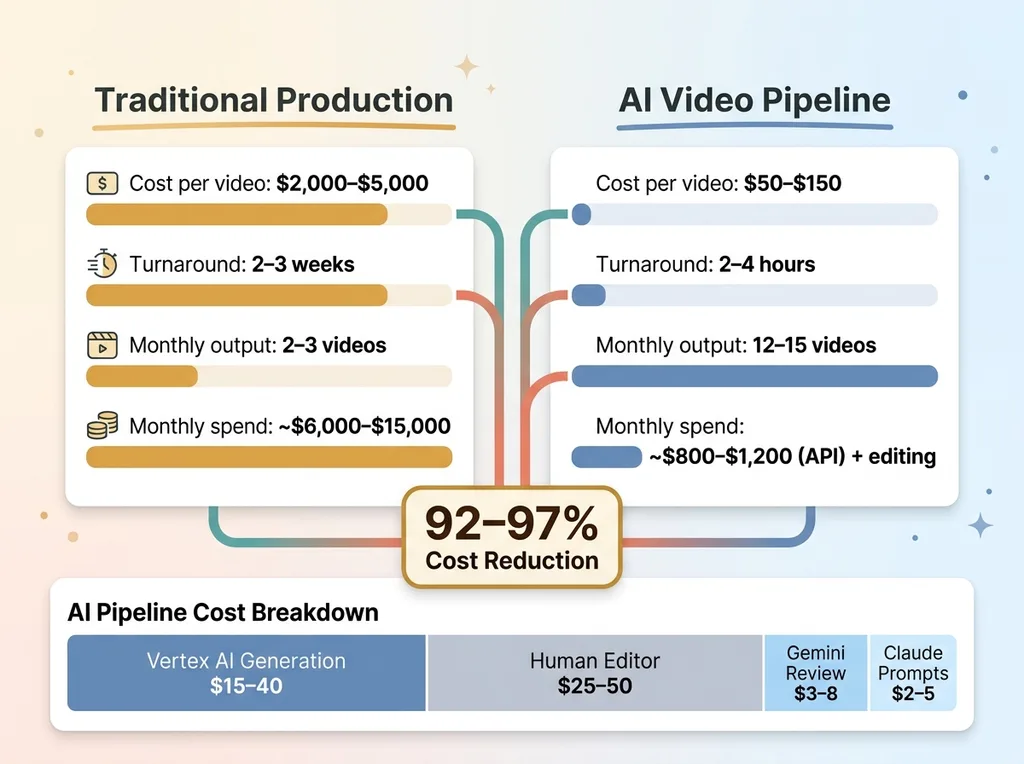 Cost and Speed Comparison: AI Pipeline vs Traditional Production
The AI pipeline cost per finished 30-60 second video:
- Vertex AI generation costs: $15-$40 per video (varies by number of clips and regeneration cycles)
- Claude API for prompt generation: $2-$5 per video
- Gemini API for review loop: $3-$8 per video
- Human editor for assembly and final polish: $25-$50 per video (roughly 30-60 minutes of work)
- Total: $50-$150 per finished piece, depending on complexity
That's a 92-97% cost reduction compared to traditional production. The numbers are real.
Time savings
Concept to finished clip: 2-4 hours vs 2-3 weeks. Most of that time is human review, assembly, and approval — not waiting on AI generation. The actual generation and review loop for a 6-clip video takes about 25 minutes.
For the financial advisory client, we went from producing 2-3 videos per month to 12-15 per month at a fraction of the previous budget. That volume shift changes what's possible with their content strategy.
The hidden costs nobody mentions
This pipeline didn't build itself. There are real costs that the per-video math doesn't capture:
Pipeline development time. I spent meaningful weeks building, testing, and refining this system. The prompt library alone — 40+ tested templates for different content types — represents significant R&D time. If you're paying someone to build this, factor in that development cost.
Iteration cycles. The first time you run a new content type through the pipeline, expect lower hit rates. Your first batch of "executive thought leadership" clips won't be as clean as your twentieth batch. The system learns, but the human operating it learns faster.
Audio licensing. Veo 3.1's generated audio works for ambient sound. It doesn't work for music beds. You still need licensed music or AI-generated music from a separate service, and that's an additional cost and workflow.
Vertex AI at scale. If you're producing 100+ videos per month, the API costs are not trivial. For this client, we're running roughly $800-$1,200 per month in API costs across all three models. Still vastly cheaper than a production company, but not the "practically free" story some people sell.
Prompt Engineering for Veo 3.1: What I Learned the Hard Way
The anatomy of a high-performing video prompt
After hundreds of generations, here's the prompt structure that consistently works:
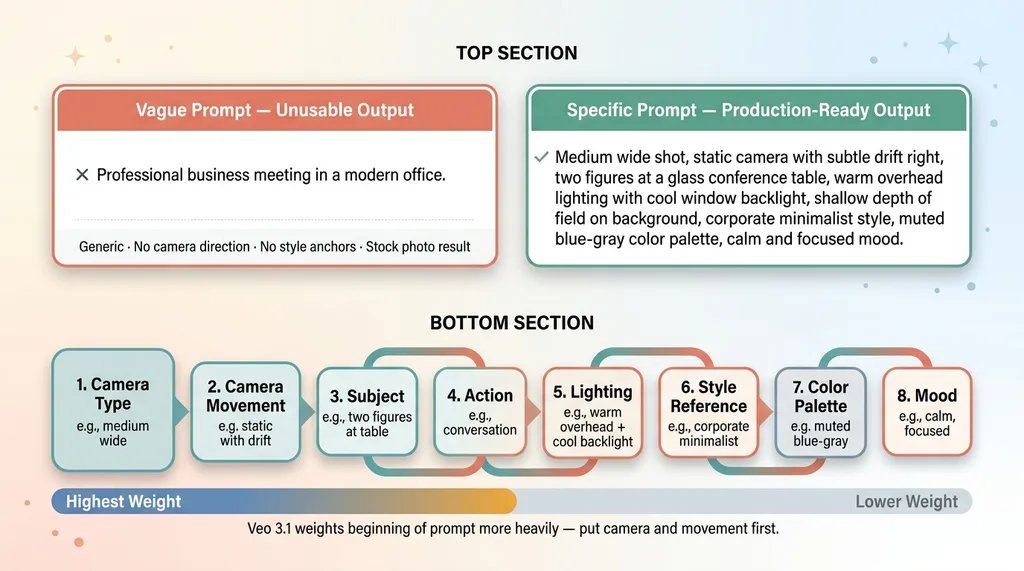 Effective vs Ineffective Veo 3.1 Prompt Structure
[Camera type] + [Camera movement] + [Subject description] + [Action] + [Lighting] + [Style reference] + [Color palette] + [Mood]
Order matters. Veo 3.1 weights the beginning of the prompt more heavily than the end. Put your camera and movement first, because those are the hardest elements for the model to get right on revision.
Style anchoring across multiple clips
Getting five separate generations to feel like they belong in the same video is the real challenge. The solution: be extremely specific about three things — color palette (specific hex ranges, not just "warm tones"), lighting direction (not just "bright" but "soft diffused overhead with rim light from camera right"), and camera behavior (lens focal length, movement speed, stabilization style).
Leave composition more open. Let the AI decide where to place elements in the frame. Overconstraining composition leads to awkward, forced-looking output.
What to specify and what to leave open
My early attempts with vague prompts produced generic, usable-by-nobody content. But I also found that over-specifying every element produces stiff, lifeless clips. The sweet spot is locking down the cinematographic choices and letting the AI handle the art direction within those constraints.
The prompt library I built has 40+ tested templates across content types: talking-head setups, product showcases, environmental b-roll, kinetic typography backgrounds, abstract transitions. Each template is a starting point that Claude customizes for the specific brief. This library is reusable IP that compounds over time. Every project makes the next one faster.
When to Use AI Video (And When to Hire a Human)
AI video generation in 2026 makes sense when:
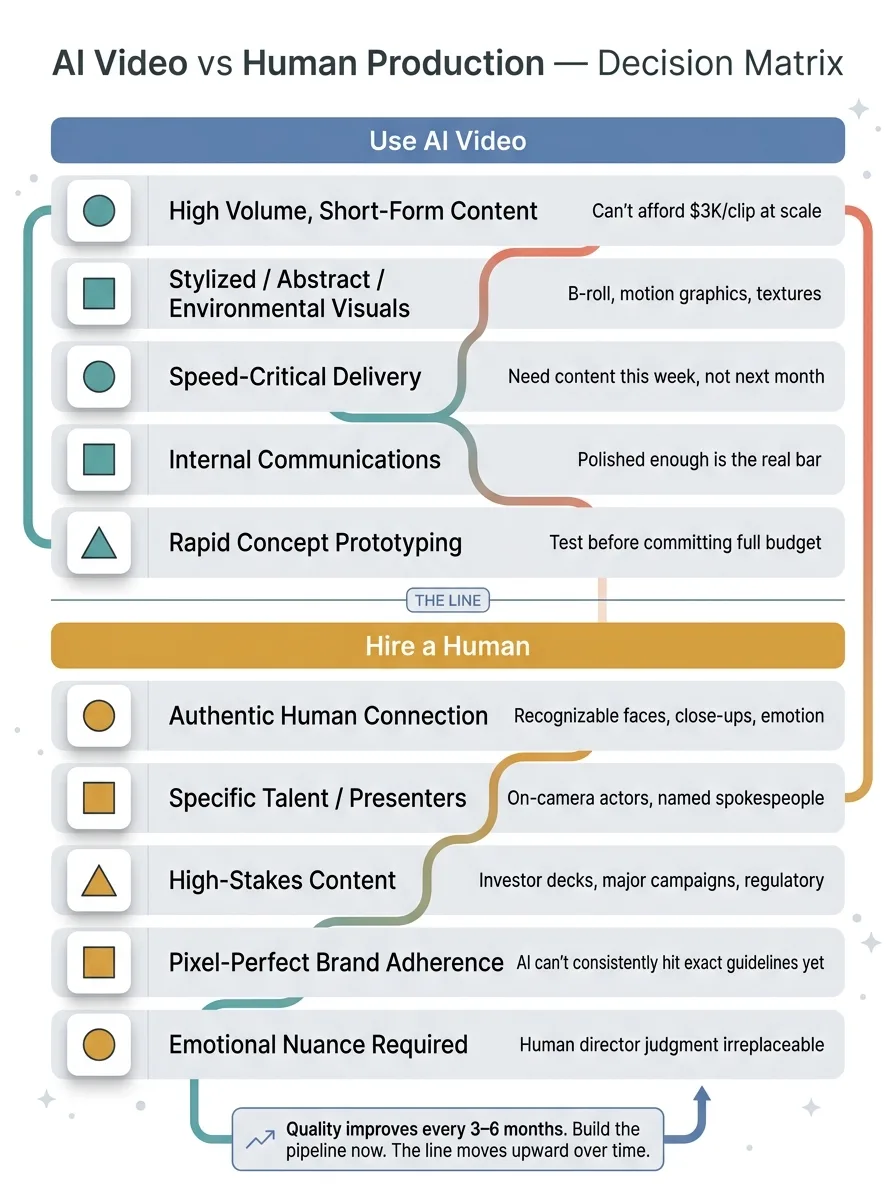 AI Video Use Case Decision Matrix
- You need high volume of short-form content and can't afford $3,000 per clip at scale
- Your brand can work with stylized, abstract, or environmental visuals
- Speed matters more than cinematic perfection — you need content this week, not next month
- You're producing internal communications where "polished enough" is the real bar
- You want to rapidly prototype concepts before committing budget to full production
Hire a human when:
- Your brand depends on authentic human connection and recognizable faces
- You need specific talent, actors, or on-camera presenters
- The content is high-stakes — investor presentations, major campaign launches, regulatory-sensitive materials
- You need pixel-perfect brand guideline adherence that AI can't consistently deliver yet
- The emotional nuance of the content requires a human director's judgment
This is the kind of honest assessment I give as a Chief AI Officer. Not everything should be AI. The goal is knowing exactly where the line is and making decisions that save money on one side while maintaining quality on the other.
Here's the forward-looking reality: AI video generation quality improves every 3-6 months. The close-up face problem that limits Veo 3.1 today will likely be solved in Veo 4. The 8-second clip limit will extend. Style consistency across generations will tighten. The companies that are building these video pipelines now will have the infrastructure, the prompt libraries, and the operational workflows ready when the quality fully catches up. The companies that wait will be starting from scratch while their competitors are already producing at scale.
Thinking About AI Video for Your Business?
If any of this resonated — whether it's the cost numbers, the quality reality check, or the pipeline architecture — I'd like to talk. I do free 30-minute discovery calls where we look at your specific operations and figure out where AI video (or any other AI system) could actually move the needle for your business. No pitch deck. Just an honest conversation about what's realistic.
Get AI insights for business leaders
Practical AI strategy from someone who built the systems — not just studied them. No spam, no fluff.
Ready to automate your growth?
Book a free 30-minute strategy call with Hodgen.AI.
Book a Strategy Call