Why Generative AI Fails in Ways a Human Would Catch in a Second
I built a generative AI product that assembled visual layouts automatically. Photos in, finished pages out, no human touching the design. It worked beautifully in the demo. Then it shipped something that made my stomach drop.
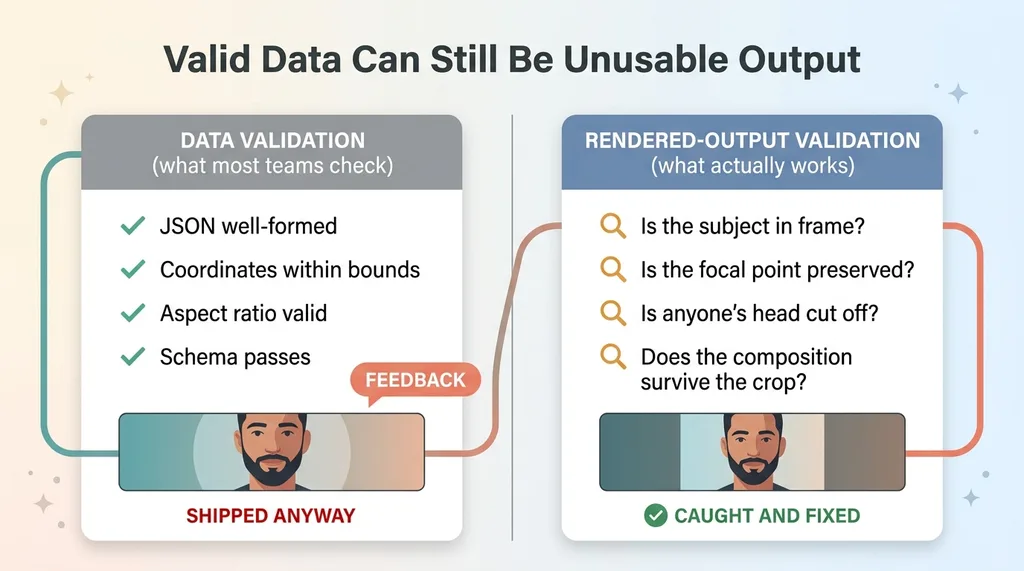 Data Validation vs Rendered-Output Validation
A portrait photo got jammed into a 2-to-1 hero banner. The layout engine cropped it to fit the slot, and in doing so it sliced the subject's head clean off. The data was perfect. The dimensions matched. The aspect ratio was valid. And the output was garbage that any human would have caught in half a second.
That wasn't a one-off. The same engine produced faces sliced out of frame, focal points buried at the edge of a crop, and filler pages with nothing meaningful on them. Confidently. Then it shipped them downstream like everything was fine.
This is the exact failure mode that makes CEOs distrust AI in production, and they're right to. The model isn't lying to you on purpose. It just has no idea what its output actually looks like. It optimizes the numbers it can measure and stays blind to the thing a person sees instantly.
For a long time the industry's answer was "wait for a smarter model." I don't buy it. A bigger model still produces no signal about whether the rendered result is acceptable, because it never looks at the rendered result. It looks at tokens and tensors, not the finished artifact.
The answer that actually worked for me was an ai quality control loop. A separate layer that takes the real output, looks at it the way a human would, and catches the obvious failures before anyone sees them. Not a better generator. A reviewer that sits between the generator and the customer.
That distinction is the whole article. Let me show you how it works.
The Core Idea: Render the Output, Then Look at It
Most AI validation checks the wrong thing. It inspects the model's text response or its structured data, confirms the JSON is well-formed, and calls it valid. That's where teams get burned, because the data can be perfectly valid while the rendered result is unusable.
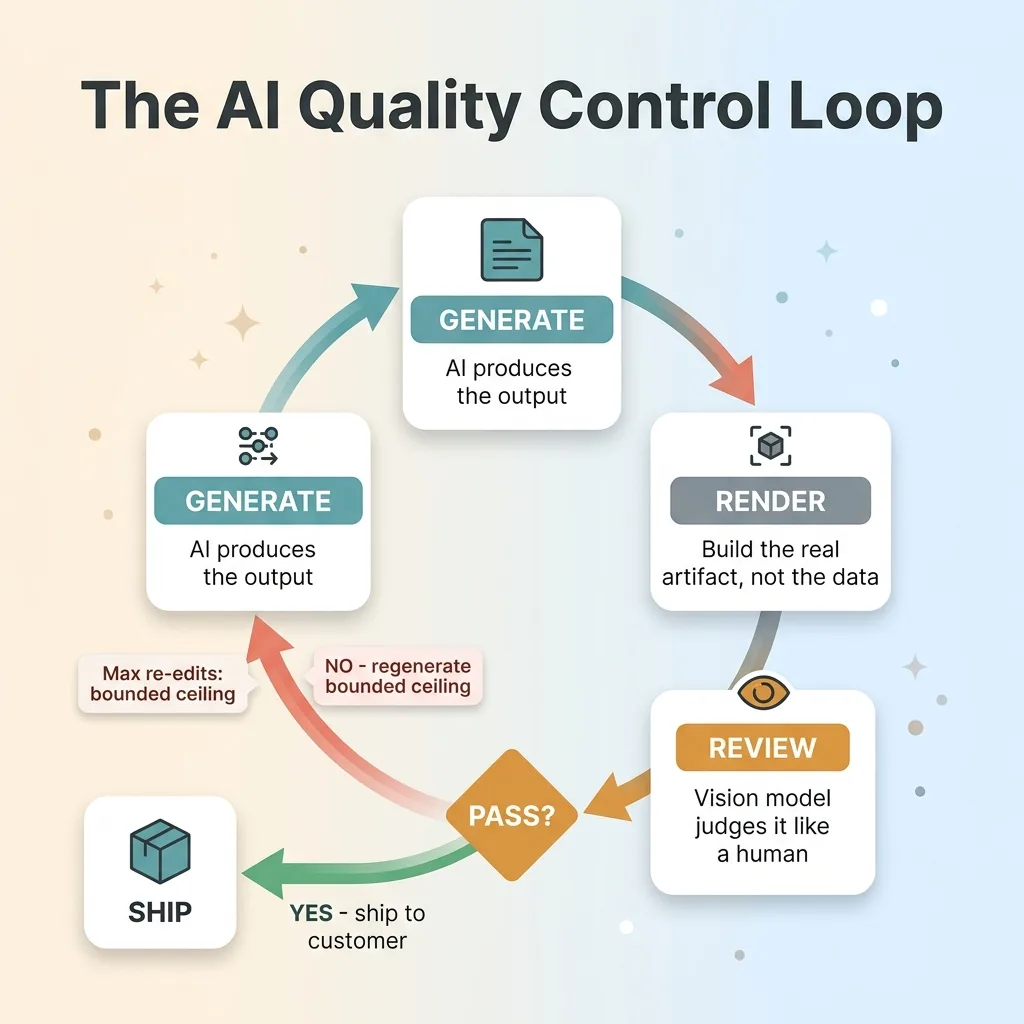 The Render-Review-Regenerate QA Loop
My cropped-head disaster passed every data check it had. The coordinates were inside bounds. The schema validated. Nothing in the structured output said "the subject's face is gone." You only see that when you render the thing and look at it.
So that's the pattern. Here's the snippet-friendly definition:
An AI quality control loop renders the real output, evaluates it with a separate model, and regenerates the failures automatically before a human sees them.
Three moves. Render the actual artifact, the placed crop, the assembled page, the final image. Feed it to a vision model that judges it the way a person would. When it fails, regenerate and re-check until it passes or hits a ceiling.
This generalizes well beyond my layout product. Any production AI output that gets rendered or assembled can be checked this way. Generated images. Document layouts. Marketing pages built from templates. Slide decks. Anything where the model produces components and something else stitches them into a final form a customer experiences.
The key shift is treating your own AI like an unreliable contractor. You don't ship a contractor's work because they say it's done. You look at it. The loop is how you look at it at scale, on every output, without a human bottleneck.
I wrote more about the broader principle of an AI that rejects its own bad work, because the mindset matters more than any single agent. Once you accept the generator will fail, you stop trying to make it perfect and start building the layer that catches it.
The Crop-QA Agent: Catching the Sliced-Off Faces
The first agent I built did one job: review every placed photo crop.
For each photo the layout engine placed, the agent rendered the exact crop the layout produced. Not the source image. The actual cropped result that would ship. Then it loaded the original source image alongside it and handed both to a vision model.
The questions it asked were practical, the same ones a human reviewer would ask. Is the subject still in frame. Did the crop ratio destroy the composition. Is the focal point preserved or did we lose it to the edge. Is anyone's head cut off.
That's the check that would have caught my 2-to-1 hero disaster on day one. A portrait forced into a wide banner triggers an immediate fail, because the vision model can see the head is gone the same way you and I can.
When a crop failed, the agent self-corrected. It adjusted the crop to recenter the subject, or re-placed the photo in a slot where the aspect ratio actually fit. Then it rendered again and re-checked. A genuine self correcting ai loop, where the output improves silently without me in the chain.
That last part matters more than it sounds. This runs without me in the loop. I'm not approving crops. I'm not reviewing a queue. The output gets better on its own, and the only time I hear about it is when something can't be fixed within the ceiling.
If you want the deeper mechanics, I broke down a vision model that grades the output in its own piece. The short version: rendering the real artifact and judging it visually is what separates this from validation that only reads data and misses the thing the customer sees.
One agent, one job, done at scale. That alone killed the most embarrassing class of failure.
The Critic Agent: Scoring the Whole Thing and Cutting Filler
The crop agent works at the micro level, one element at a time. But some failures only show up when you step back and look at the whole assembled artifact.
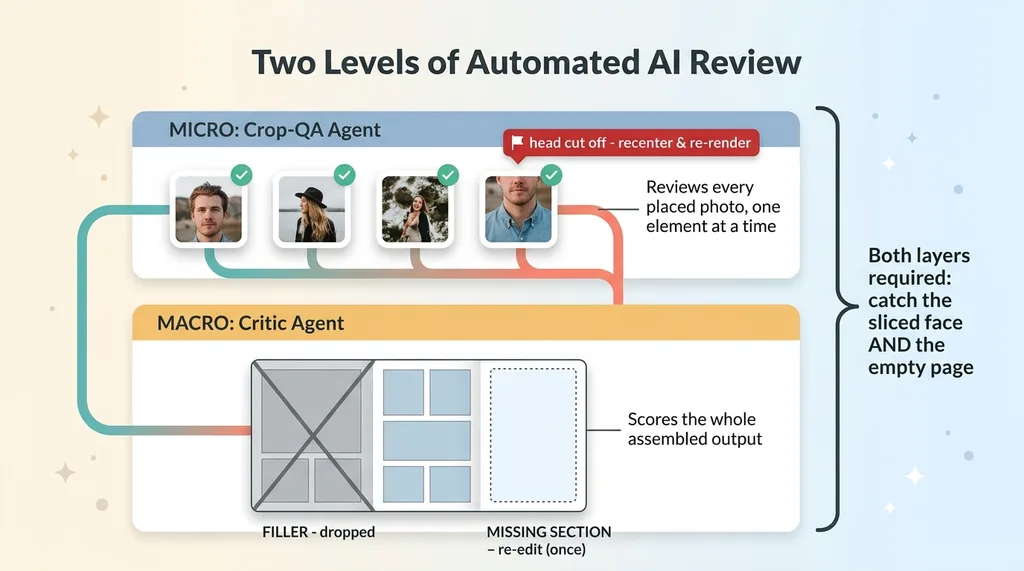 Two-Layer QA: Crop Agent vs Critic Agent
A page can be made of perfectly cropped photos and still be filler. Nothing meaningful on it. Technically valid, completely pointless. The crop agent can't catch that, because every individual piece passed.
So I built a critic agent that operates one level up. It scores the entire assembled output. It identifies filler pages, content with no real substance, and drops them. It also detects the opposite problem: when meaningful beats or sections are left uncovered, when the output skipped something that should have been there.
When the critic finds a gap, it triggers a re-edit. And here's the part that makes it production-grade instead of a demo: it triggers exactly one bounded re-edit, not an infinite loop.
This is the lesson teams learn the expensive way. A self correcting ai that re-edits forever is a cost disaster and a reliability disaster at the same time. It burns tokens, it stalls the pipeline, and worse, it can oscillate, fixing one thing and breaking another on repeat. So the loop has a hard ceiling. Re-edit once. If it's still wrong, flag it and move on rather than spiral.
The bounded ceiling is the difference between a toy and a system you can put in front of customers. Demos assume the loop converges. Production assumes it sometimes won't, and caps the damage.
Real automated ai review needs both layers. Micro judgment on every element, and macro judgment on the whole output. Catch the sliced face and the empty page. One without the other leaves a hole, and the hole is exactly where your customer's bad experience comes from.
The Golden-Test Harness That Caught a Real Bug
The QA agents catch failures at runtime. But there's a second category of failure they can't catch: the ones you introduce while fixing other failures.
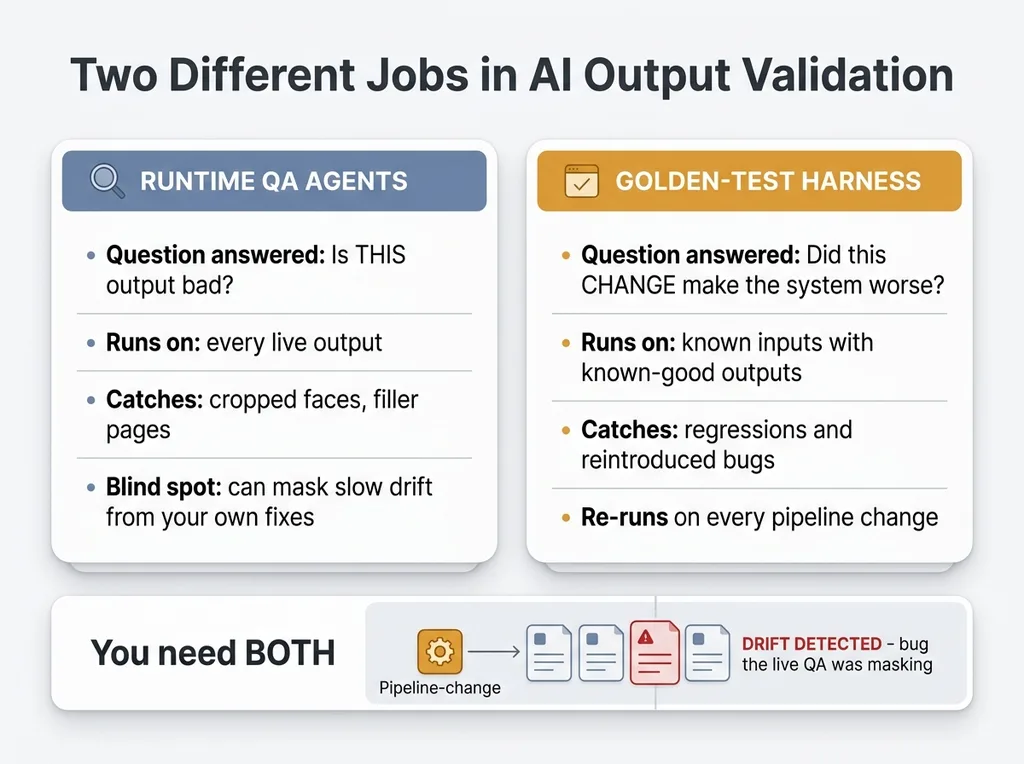 Runtime QA vs Golden-Test Harness
You tune the layout engine to fix one problem. The change quietly breaks something three steps away. The runtime QA agents don't flag it because, ironically, they're now masking it, smoothing over the symptom so you never see the underlying drift.
That's why I built a golden-test harness. A set of known inputs with known-good expected outputs. Every time I changed the pipeline, the harness re-ran all of them and flagged any drift from the expected result.
It earned its keep. It caught a real residual bug that the live QA agents had been masking. Something that would have slipped through every runtime check and degraded output slowly without anyone noticing, until a customer did.
This is the part most teams skip, and it's the part that separates ai output validation as an engineering discipline from validation as vibes. Runtime QA tells you "this specific output is bad." Golden tests tell you "this change made the whole system worse." Different jobs. You need both.
The trap is speed. When you can ship pipeline changes fast, and AI lets you ship them very fast, you accumulate debt invisibly. Every change risks reintroducing a failure you already fixed. Without a golden-test harness, you don't find out until it's in front of someone who matters.
The harness is boring infrastructure. It's also the thing that let me keep moving fast without the pipeline rotting underneath me. Speed plus regression protection compounds. Speed alone just compounds the mess.
What the Loop Removes the Human From, and What It Doesn't
Let me be straight about what this actually buys you, because the honest version builds more trust than the hype version.
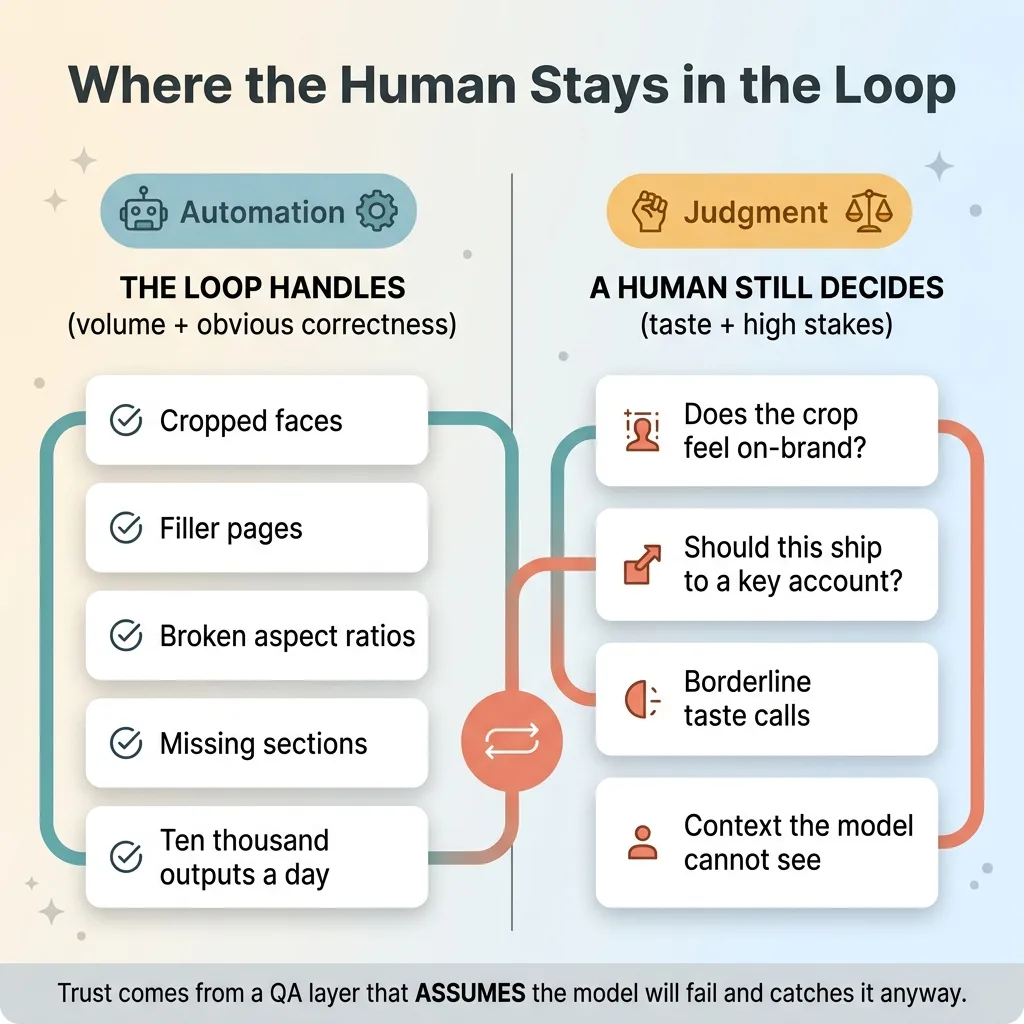 What the Loop Automates vs What Stays Human
The QA loop removes the human from catching obvious, mechanical failures at scale. Cropped faces. Filler pages. Broken ratios. Missing sections. The stuff a person would catch instantly but can't catch on ten thousand outputs a day without burning out. That's the win, and it's a big one.
It does not remove human judgment on taste, brand, or high-stakes calls. The vision model can tell you a face is in frame. It can't tell you whether the crop feels right for your brand, or whether a borderline output should ship to your most important account. That judgment stays with a person, by design.
I build it that way on purpose. Every system I ship stops for a human at the points where judgment beats automation. The loop handles volume and obvious correctness. People handle the calls that actually require taste and context.
And the loop isn't perfect. The vision model occasionally flags a good crop as bad, or misses a weird edge case. I'm not going to pretend otherwise. That imperfection is exactly why the bounded re-edit ceiling and the golden tests exist. They're the backstops that keep an imperfect reviewer from doing damage.
Here's the thing for the skeptical buyer. AI producing confidently wrong garbage is real. You've probably seen it, and it's probably why you're cautious. But it's a solvable engineering problem, not a reason to keep AI out of production entirely.
The trust doesn't come from hoping the model gets it right. It comes from the QA layer that assumes it won't and catches it anyway. That's a system you can actually rely on.
Where a QA Loop Fits in Your Production AI
Generalize this one more time. If you're putting any generative AI in front of customers, images, layouts, copy, documents, the question was never whether the model will fail. It will. The question is whether you've built the layer that catches the failure before the customer does.
Most teams ship the model and skip the loop. They get a great demo, push it live, and then spend the next six months explaining away the embarrassing outputs that slip through. That's why so many AI projects feel unreliable. It's not the model. It's the missing QA layer.
What I do is build that layer. The render-review-regenerate loop that looks at the real output the way a human would. The bounded re-edit ceiling so the system fixes what it can and flags what it can't, without spiraling into a cost sink. And the golden-test harness so that the next change you make doesn't quietly reintroduce a failure you already solved.
It's not glamorous work. It's the difference between AI you can trust in front of customers and AI that makes you look bad at the worst possible moment.
Get the next build note.
I write up each system I build, including what broke. Subscribe to my newsletter and I'll send you the next one.